
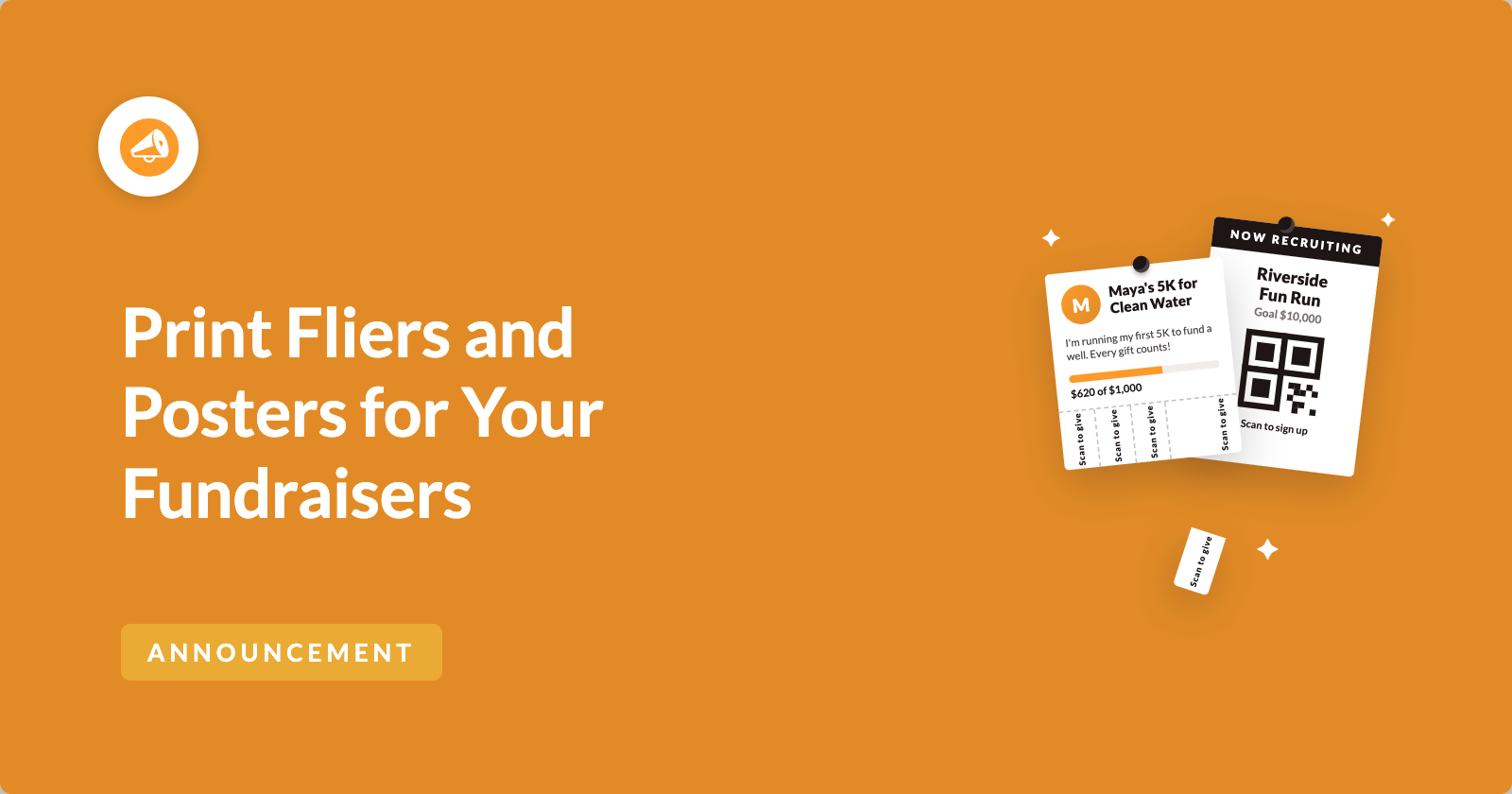
A lot of peer-to-peer fundraising happens away from a screen.
It happens at the finish line of a 5K, on a school noticeboard, in an office kitchen and at a table in a church hall. Someone hears about a fundraiser and wants to give, and the fundraiser says “I’ll send you the link.” Often the link never gets sent.
So we’ve added 2 printables to Charitable Ambassadors. A fundraiser flier gives each fundraiser a one-page flier with their own story and a QR code for their own page. A recruitment poster invites new people to sign up and start fundraising for your campaign.
Both open as a normal web page and print from the browser. You don’t need a design tool, a PDF plugin or a designer. 🖨️
Fliers and posters are available now in Charitable Ambassadors 3.4.7.
Here’s What a Fundraiser Flier Looks Like
Here’s a flier from our test site, printed for a fundraiser running a charity 5K.

Everything on it comes from the fundraiser’s own page, so they don’t have to fill anything in. The campaign name sits above their headline, with their name and photo beside it.
Their story runs down the page, and their goal sits in the side column. The QR code under the goal says “Scan to donate” and opens their own page, not your main campaign. So a supporter who scans it gives to the person they were just talking to.
Your logo goes in the footer. If you haven’t set one, your site name appears there as text instead.
Here’s What a Recruitment Poster Looks Like
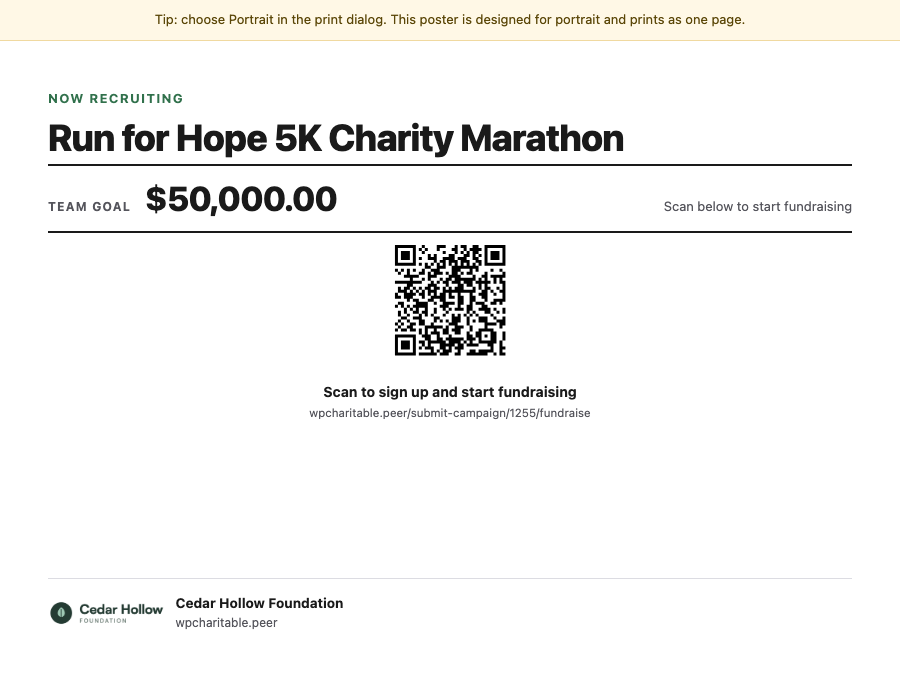
The poster has a different job. It asks people to become fundraisers, not donors.
It shows “Now Recruiting” above your campaign name, then the goal and a large QR code. Under the code, it says “Scan to sign up and start fundraising”.
Someone walks past, scans it with their phone, and lands on the form that creates their own fundraising page. They don’t need a link from you first.
See Fliers and Posters in Action
If you’d rather watch than read, this short video shows both printables, from setup to print.
Fliers Raise Money, Posters Bring In New Fundraisers
The 2 printables send people to different places, so it helps to know which one you need before you print.
A flier belongs to one fundraiser. Its QR code opens that person’s page, where a supporter can donate.
A poster belongs to a parent campaign, which is the main campaign your fundraisers raise money under. Its QR code opens your sign-up form, where someone can start a fundraiser of their own.
So hand out fliers when you want donations, and pin up posters when you want more people fundraising for you.
When You’ll Feel the Difference
Fliers and posters help anywhere your supporters meet people in person. Here are a few examples.
- 🏁 Race days and event tables. Put a pile of fliers on the table. A supporter who only brought cash still leaves with a way to give online later.
- 🏫 Schools and clubs. Pin a poster to the noticeboard, and parents can sign up as fundraisers without you sending each one an invite.
- 🏢 Workplaces. Put a poster in the kitchen and fliers at reception, so you ask for donations and new fundraisers in the same building.
- 🚪 Door-to-door drops. The Hand out layout is made for giving to people, and the QR code means nobody has to type a web address off a piece of paper.
- ⛪ Places without a screen. A church hall, a village shop, a gym and a conference table all work.
How to Switch On Printable Fliers
Fliers are switched off when you update. That way, a new Print Flier link only appears in front of your fundraisers once you decide to offer it.
To get started, head over to Charitable » Ambassadors » Other » Fliers and switch on Enable Printable Fliers.
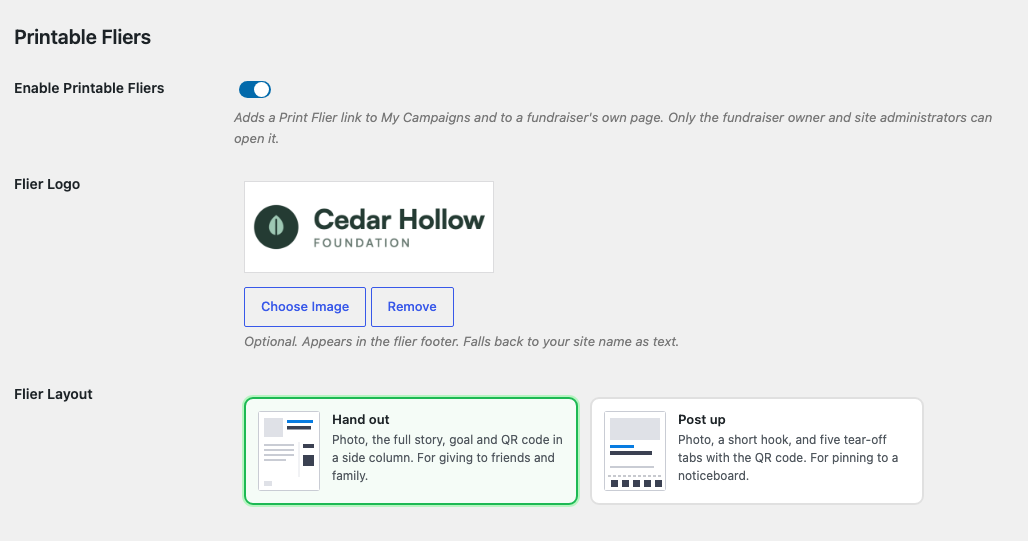
Once fliers are on, 2 more settings appear. Flier Logo is optional and adds your logo to the footer. Flier Layout lets you choose the shape of the flier.
If you switch fliers off later, your logo and layout are saved for next time.
Choose Between 2 Flier Layouts
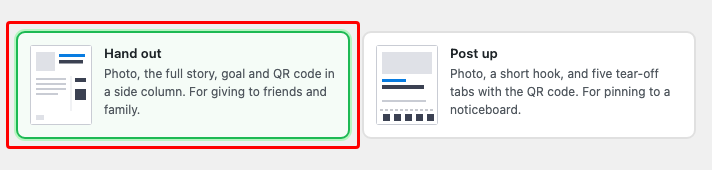
Hand out is the default. It’s made for giving to friends and family, with a photo, the full story, the goal and the QR code in a side column.
Post up is made for a noticeboard. It shows a photo and a short hook, with 5 tear-off tabs that carry the QR code, so people walking past can take one away with them.
Both layouts print portrait on one page. A tip at the top of the flier reminds you to choose Portrait in the print dialog, because landscape splits it across 2 pages.
Your Fundraisers Print Their Own Fliers
Once fliers are on, every fundraiser gets a Print Flier link in 3 places. All 3 open the same flier.
- On My Campaigns, on each of their fundraisers.
- In the launch panel a new fundraiser sees when their page is approved and goes live.
- On the creator toolbar on their own fundraiser page, while they’re signed in.
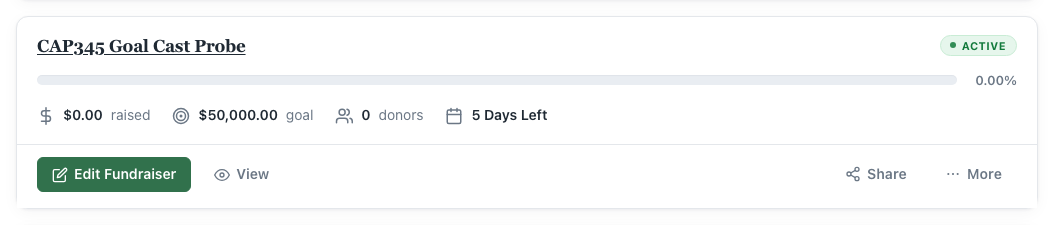
They click it, the flier opens as its own page, and they print it. They don’t need to ask you for anything, so you can get on with running the campaign.
The launch panel is a good place for it. A new fundraiser is often most excited the day their page goes live, and that’s when they’ll see the link.
Only the Owner and Your Admins Can Print a Flier
A flier can be opened by the fundraiser who owns it and by site administrators. Nobody else can open it, whether they’re signed in or not.
If someone who isn’t signed in visits a flier’s web address, they’ll see a plain not-found page.
Most fundraisers have the Subscriber role in WordPress. If you use a roles plugin that removes editing permissions, your fundraisers can still print their fliers, because Charitable checks who owns the fundraiser first.
Clear Messages When There’s No Flier to Print
If a flier can’t be printed, the page explains why instead of printing a broken page.
A fundraiser who is still waiting for approval sees “You can print a flier once this fundraiser has been approved and published.” Someone who tries to open another person’s flier is told they can’t print it.
A standalone campaign, meaning one without peer-to-peer fundraising, has no flier, and the page says so. If fliers are switched off, only someone who could switch them back on sees that message. Everyone else sees a plain not-found page.
How to Print a Recruitment Poster
Posters are printed by whoever runs the campaign. To print one, head over to Charitable » Campaigns and click the Print Poster icon at the end of the campaign’s row.
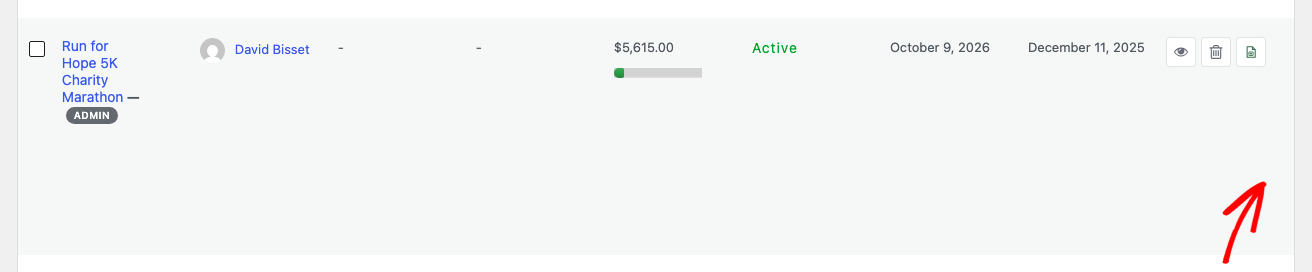
The icon only appears on a parent campaign that accepts fundraisers, and only for someone who can manage that campaign. A fundraiser’s own row doesn’t show it, because nobody signs up to a single fundraiser.
The poster opens in a new tab and brings up your browser’s print dialog.
Posters have their own rule for who can print them. The campaign’s author can print one, and so can anyone with permission to edit that campaign.
Point a Poster at One Type of Fundraiser
If your campaign accepts both individual fundraisers and teams, you can print a poster that sends people straight to one type. Add type to the end of the poster’s web address.
/poster/123/?type=individual
/poster/123/?type=team
/poster/123/?type=team-member
For example, you could pin a team poster in the coaches’ office and an individual poster in the lobby. Without type, people choose for themselves when they sign up.
Posters Work Even With Fliers Switched Off
The Enable Printable Fliers setting only controls fliers. Recruitment posters work whether it’s on or off.
Posters do use your Flier Logo, so you only upload your logo once. The Flier Layout setting doesn’t change posters, because a poster has a single layout for now.
If you want posters but not fliers, switch fliers on, choose your logo, and then switch fliers off again. Your logo stays saved and keeps appearing on your posters.
See Which Printouts Bring People In
Every QR code Ambassadors prints is tagged with where it came from. A scan from a flier and a scan from a poster are counted separately.
So after an event, you can see which printouts brought people to your pages and decide what to print next time.
Fliers and Posters Print the Same on Every Site
Neither printable loads your theme’s styles. Each one is its own page, so it looks the same on every site, and a theme update won’t change how it prints.
Both are hidden from search engines and never cached. A flier won’t show up in Google, and if a fundraiser edits their story, the next flier they print shows the new version.
For Agencies and Developers
Fliers and posters come with filters, template overrides and access checks you can call from your own code.
Hooks and Filters
The flier has 5 filters. charitable_ambassadors_flier_view_args covers everything the template renders, and charitable_ambassadors_flier_layout receives the fundraiser ID, so you can choose a different layout per campaign.
charitable_ambassadors_flier_story_words sets how much of the story is printed, charitable_ambassadors_flier_qr_url changes what the QR code opens, and charitable_ambassadors_flier_slug changes the flier part of the web address.
The poster has charitable_ambassadors_poster_view_args, charitable_ambassadors_poster_url and charitable_ambassadors_poster_qr_url.
Template Overrides
You can override every flier and poster template from your theme, from the 2 flier layouts to the footer and the poster itself. The documentation lists every file path.
Access Checks You Can Call
Charitable_Ambassadors_Flier_Controller::can_print() and Charitable_Ambassadors_Poster_Controller::can_view() both take a user ID. So you can check access for a logged-out visitor or a specific user without a real request.
Their get_block_reason() methods return the reason a printable is blocked. Use them when your own interface shouldn’t show a link that won’t open.
FAQs on Fliers and Posters
Which Plan Do I Need for Fliers and Posters?
Fliers and posters are part of Charitable Ambassadors, which needs the Charitable Pro plugin 1.8.16 or higher, on the Pro plan and higher. Fliers arrived in Ambassadors 3.4.4, posters in 3.4.6 and the Print Poster icon in 3.4.7, so update to 3.4.7 to get everything.
Do I Need a PDF Plugin?
No. Both open as a normal page and print from your browser. Your browser can also save the page as a PDF if you want a file.
Can Fundraisers Print Their Own Fliers Without Asking Me?
Yes. Once you switch fliers on, every fundraiser finds a Print Flier link on My Campaigns and on their own page.
Does the Poster’s QR Code Open a Donation Form?
No. A poster’s QR code opens your sign-up form, so the person can start their own fundraiser. A flier’s QR code opens a fundraiser’s page, where people donate.
Why Does My Flier Print Across 2 Pages?
Choose Portrait in the print dialog. Both layouts are made to fit on one portrait page.
Will Fliers Show Up in Google?
No. Fliers and posters are both hidden from search engines.
Get Started With Fliers and Posters
Fliers and posters are available now in Charitable Ambassadors 3.4.7. Update Ambassadors, open Charitable » Ambassadors » Other » Fliers, and switch on Enable Printable Fliers.
Your fundraisers will see Print Flier the next time they open My Campaigns. For a poster, open Charitable » Campaigns and click Print Poster on a parent campaign’s row!
Read the Fliers and Posters Documentation →
Not Yet on a Charitable Paid Plan?
Charitable Has 1.2+ Million Downloads!
Trusted by millions to power successful fundraising campaigns. Try Charitable risk-free today.
✅ 14-day money-back guarantee
✅ Transparent pricing
✅ Code-free setup
What’s New in Charitable
We also launched several powerful features and improvements recently.
📊
Compare any 2 periods and export your numbers straight from the rebuilt dashboard.
🤖
Ask your AI assistant to build, edit and manage your fundraising campaigns for you.
🔁
Donors set up a monthly gift once, and Charitable bills every renewal on schedule.
⚡
See every automation as a flow of connected cards on a full-screen canvas.
We’ve been adding to Charitable constantly, features and improvements designed to help you raise more and serve your donors better. See everything we’ve shipped at the Charitable Changelog.
Not yet a Charitable Pro user? Sign up today and get up to 50% off on your plan. We’re confident you’ll love raising funds with Charitable. If, for any reason, Charitable is not the right fit for you, we’ll refund your purchase with our 14-day money-back guarantee. Get Charitable Pro Now »
If you have any questions or want help setting up fliers and posters for your program, our support team is ready to help.
Stay Connected for More Nonprofit Resources
For more tutorials and videos tailored to nonprofits, subscribe to our YouTube channel. We regularly publish expert tips, step-by-step guides on online donations, fundraising strategies, and practical resources to help your organization succeed.
🗞️ Get weekly tips and exclusive guides in your inbox
Join our newsletter →
🎥 Watch step-by-step tutorials and success stories
Subscribe to our YouTube channel →
👩🏽💻 Connect with our community and get daily nonprofit insights
Follow us on LinkedIn →
🥳 Fun reels and non-profit insights
Follow us on Instagram →
👀 Insightful & fun videos to help you grow your cause
Follow us on TikTok→
🌎 Subscribe and follow for general fundraiser tips
Get Fundraiser Tips on TikTok →
Powerful Fundraising Resources
🤖 Use Charitable with Your AI Assistant
⬇️ Download proven strategies, campaign ideas, and expert tools
Get the Fundraising Kit →
💸 Get Free Fundraising Resources
Head to the Charitable Fundraising Hub →
🤔 Got questions about Charitable?
Charitable FAQs →
🏎️ Take Charitable for a spin
Create your Charitable Demo →
Understand non-profit terms and jargon
Non-Profit Glossary →
% Looking for non-profit deals and discounts?
Best Non-Profit Deals and Discounts →









Leave a Reply