Charitable Blog

Everything you need to know about Charitable and our team.

Introducing Brevo for Charitable: Turn Donors Into Subscribers, Automatically

Introducing Brevo for Charitable: Turn Donors Into Subscribers, Automatically

Last updated on

  • By

Plenty of the nonprofits we work with already run their email marketing through Brevo (formerly Sendinblue), and a good number of you have asked us for the same thing: a way for new donors to land on that list without anyone touching a spreadsheet.

Today we’re shipping that. Charitable now connects directly to Brevo, one of the most widely used email marketing and CRM platforms for nonprofits, so a new donor joins your Brevo list the moment their donation is completed.

No exports. No manual imports. Just donors ending up on the list they already told you they wanted to join. 📬

What Is Brevo?
Brevo

If you haven’t run into it yet, Brevo is an email marketing and CRM platform built around a generous free tier, which is a big part of why so many nonprofits end up there.

Beyond sending newsletters, Brevo also handles marketing automation, like welcome series and event-based triggers, transactional email, and basic contact segmentation. A donor’s confirmation email and next month’s appeal can come from the same place.

If you’re not on Brevo yet and want to see what the free plan covers, you can look at their plans directly at brevo.com.

Now you can use Brevo with Charitable and it’s so easy to set up!

Here’s What The Brevo Integration with Charitable Looks Like

Before we get into how the connection works, here’s what your donor actually sees. A simple opt-in checkbox sits right on your donation form.
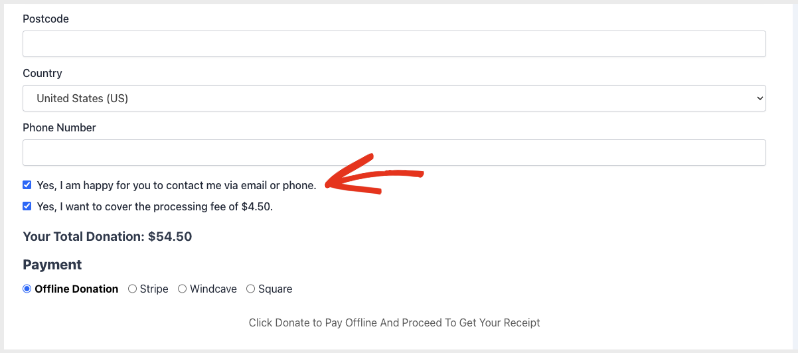
Donor opt-in checkbox displayed on a Charitable donation form

A donor checks that box while giving, and that’s the entire donor-facing part of this feature. Nothing else about your form or your checkout flow changes.

Why Automatic List Building Changes Everything

When a supporter opts in on your donation form, they’re telling you they want to hear from you. The window to welcome them, thank them, and invite them back is widest right after they give.

Connecting Brevo means that welcome sequence can start immediately. No manual exports, no spreadsheets, and no donors slipping through the cracks between your donation form and your mailing list.

Brevo joins Charitable’s Newsletter Connect lineup alongside Mailchimp, Campaign Monitor, ActiveCampaign, MailerLite, MailPoet, and Mailster. It’s available starting on the Plus plan and up.

Respect Every Donor’s Choice

Growing your list should never mean adding people who didn’t ask to be there. Charitable puts the donor in control and keeps you compliant.

You can show the opt-in checkbox unchecked, show it pre-checked, or skip the checkbox entirely and subscribe every donor automatically. The label is yours to edit, so it can match the way you’d actually ask.

Turn on Brevo’s confirmation email and a donor has to confirm before they’re added to your list. That’s the standard for consent and email deliverability, and it’s a toggle, not something you have to build.

Donor data export and permanent erasure are wired straight into WordPress’s own privacy tools, so a data request gets handled in a click instead of a support ticket.

When You’ll Feel the Difference

A few situations where this pays off right away:

⚡ Recurring campaigns: a welcome sequence fires the moment someone gives, instead of whenever you next get around to an export.
🎯 Multiple appeals running at once: point each campaign at a different Brevo list, so a giving-day appeal doesn’t land in the same list as your year-round donors.
🛡️ GDPR-conscious organizations: turn on double opt-in and get documented consent without writing a line of code.
🧑‍💻 Small teams without a developer on staff: no Zapier, no custom webhook, no CSV to babysit.
📊 Anyone already using Brevo’s segmentation and automation tools: donor data lands there in real time, ready to work with.

Connect Brevo in Under 5 Minutes

Connecting Brevo takes 1 key and a couple of clicks.

Step 1: Open Your Newsletter Settings

Go to Charitable » Settings » Marketing » Newsletters and click Configure next to Brevo.
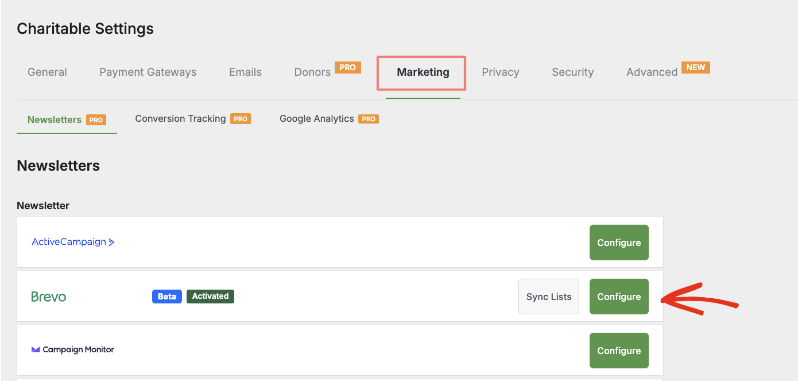
Brevo configure

Step 2: Paste Your Brevo API Key

Paste your Brevo API v3 key and save. Charitable pulls in your lists and contact attributes automatically.
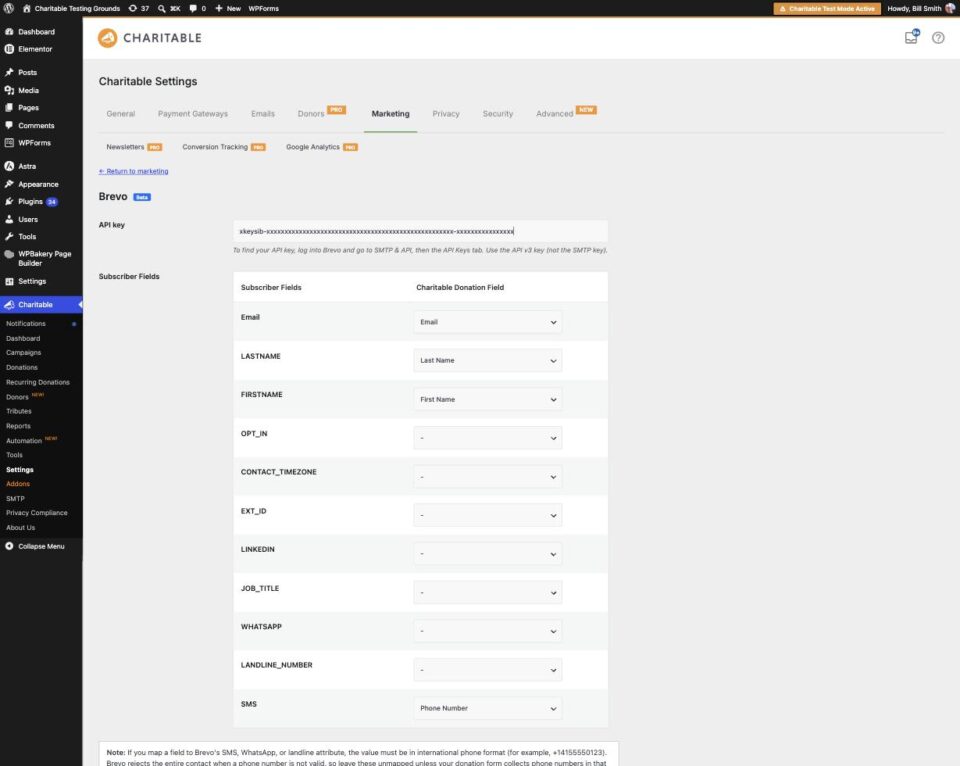
Brevo settings screen inside Charitable's Newsletter Connect settings

Step 3: Map Your Fields

Match donor details, like first name, last name, and any custom attributes you’ve created, to the matching Brevo attributes.

Step 4: Pick Your List

Choose a default Brevo list for every campaign, or set a different list per campaign.

That’s the whole setup. From here, every opted-in donor lands on your list on their own.

Read the Full Brevo Setup Tutorial →

Get Started with Brevo

If you already run Brevo, you can connect it to Charitable in the next 5 minutes. Head to Charitable » Settings » Marketing » Newsletters, click Configure next to Brevo, and paste your API key.

Read the Brevo Documentation →

For Agencies and Developers

Hooks and Filters

Brevo ships with 2 filters: one for the subscribe payload (charitable_newsletter_connect_brevo_subscriber_data) and one for the GDPR export (charitable_newsletter_connect_brevo_export_custom_field). Use either one to adapt what gets sent to Brevo for a specific client’s setup.

Developer’s Note on Beta: Brevo is shipping as a beta release, so we built in the visibility you’d want before trusting it with live donor data.

Every subscribe attempt, success, and error gets logged at Charitable » Tools » Logs, and you can filter that log down to just the Brevo source.

When something goes wrong, the log shows the exact message Brevo sent back. That’s the difference between guessing and knowing right away whether it’s a bad key, an IP allowlist, or a phone number format issue.

Logging degrades gracefully, and the integration never blocks a donation, even if Brevo itself is unreachable.

Read the Brevo Documentation →

Not Yet a Charitable Pro User?

What’s New in Charitable

We also launched several powerful features and improvements recently:

🧾

Custom Receipts

Show a different thank-you page to every donor, based on their campaign, gift size, or country.

Learn More →

🖼️

Beacon Campaign Templates

Launch a full-width fundraising page with a hero image, logo, and donation widget locked above the fold.

Learn More →

📝

Donation Form Block

Drop a fully working donation form directly into any page or post in the block editor.

Learn More →

👤

Creator Profiles

Give every peer-to-peer fundraiser a permanent, shareable page with their bio, avatar, and campaigns.

Learn More →

📱

Apple Pay and Google Pay in Mollie

Let mobile donors check out with a face scan or fingerprint instead of typing out a card number.

Learn More →

📋

Ambassadors 3.0

Moderate and manage your whole peer-to-peer network from new directory and reporting screens.

Learn More →

We’ve been adding to Charitable constantly, features and improvements designed to help you raise more and serve your donors better. See everything we’ve shipped at the Charitable Changelog.

Stay Connected for More Nonprofit Resources

For more tutorials and videos tailored to nonprofits, subscribe to our YouTube channel. We regularly publish expert tips, step-by-step guides on online donations, fundraising strategies, and practical resources to help your organization succeed.

🗞️ Get weekly tips and exclusive guides in your inbox
Join our newsletter →  

🎥 Watch step-by-step tutorials and success stories
Subscribe to our YouTube channel →  

👩🏽‍💻 Connect with our community and get daily nonprofit insights
Follow us on LinkedIn →

🥳 Fun reels and non-profit insights
Follow us on Instagram → 

👀 Insightful & fun videos to help you grow your cause
Follow us on TikTok→  

🌎 Subscribe and follow for general fundraiser tips
Get Fundraiser Tips on TikTok → 

Powerful Fundraising Resources

🤖 Use Charitable with Your AI Assistant

See Charitable + AI →

⬇️ Download proven strategies, campaign ideas, and expert tools
Get the Fundraising Kit →  

💸 Get Free Fundraising Resources
Head to the Charitable Fundraising Hub →

🤔 Got questions about Charitable?
Charitable FAQs →

🏎️ Take Charitable for a spin
Create your Charitable Demo →

Understand non-profit terms and jargon
Non-Profit Glossary →

% Looking for non-profit deals and discounts?
Best Non-Profit Deals and Discounts →

author avatar
David Bisset Project Manager
David is the project manager of Charitable since 2022. David works with several non-profits (one operated by his wife) along with managing and developing features, support, and marketing for Charitable. Has been with WordPress since 2006 and has been lead organizer of multiple conferences, events, and meetups.

Disclosure: Our content is reader-supported. This means if you click on some of our links, then we may earn a commission. We only recommend products that we believe will add value to our readers.

Leave a Reply

Your email address will not be published. Required fields are marked *

Get free tips and resources right in your inbox, along with 60,000+ others

Join our Newsletter

We won’t spam you. We only send an email when we think it will genuinely help you. Unsubscribe at any time!

Featured Video:

Watch more videos on our YouTube channel.

What's New In Charitable

View The Latest Updates
🔔 Subscribe to get our latest updates
📧 Subscribe to Emails

Email Subscription

Join our Newsletter

We won’t spam you. We only send an email when we think it will genuinely help you. Unsubscribe at any time!

Donations New

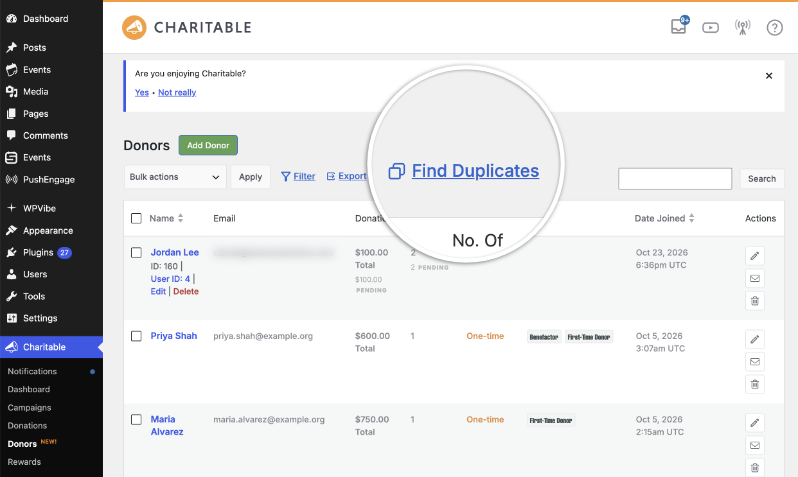
👥 Introducing Donor Merging: Two Records, One Supporter!

Somewhere in your donor list is a supporter who appears twice, because they gave from a work address one year and a personal one the next. Every donation is still recorded and every receipt still went out, but a loyal supporter who has given for years can look like two people who gave half as much. From the Charitable Pro plugin 1.8.19.1 you can find those records and merge them from the Donors screen. Why this is important:

  • 🔍 A Find Duplicates link where you already work: Head to Charitable » Donors and it sits next to Filter and Export, then tells you how many groups of possible duplicates it found.
  • 🧩 Grouped by name, not by email: Charitable compares the first and last name together and ignores capital letters, spacing and punctuation, which is what catches the same person under two different addresses.
  • 📊 A preview before anything changes: Each group shows every record with its email address, its donation count and its lifetime total, and the preview shows you the combined totals and the email that will be added.
  • ↩️ Every merge can be undone: Nothing is merged until you choose to merge it, and you can reverse any merge afterwards, so a wrong guess costs you nothing.
  • 📥 Built for the week after an import: Moving donors over from another plugin is where most duplicates come from, and it is also when they are hardest to spot, because every record is new to you.

Check out our announcement here.

author avatar
David Bisset Project Manager
David is the project manager of Charitable since 2022. David works with several non-profits (one operated by his wife) along with managing and developing features, support, and marketing for Charitable. Has been with WordPress since 2006 and has been lead organizer of multiple conferences, events, and meetups.
ambassadors New

🔑 Introducing Passwordless Fundraisers: Sign Up With Just an Email!

Supporters arrive wanting to help, and then the form asks them to invent a password for a website they may only visit twice. A lot of them stop right there. Passwordless Fundraiser Accounts, new in Charitable Ambassadors 3.5.0, let a supporter start a peer to peer fundraiser with nothing but an email address. Why this is important:

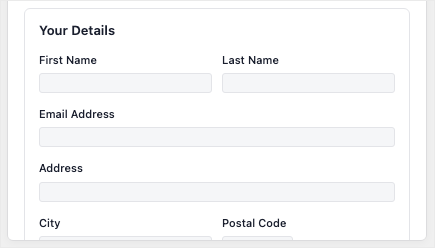
  • 🔑 No password step to lose them at: Switch it on in Charitable » Ambassadors » Templates » Submit Form and the create-fundraiser form asks only for a name, an email address and a page title.
  • 👤 Still a real WordPress account: One click in one email confirms the address, signs them in and creates the account, so they can come back later to edit their story, change their photo and see who has donated.
  • 🎚️ Your call on every campaign: Each peer to peer campaign can follow the site default or override it, which matters when a campaign pays fundraisers through Stripe Connect and those people do need a password.
  • 📋 See who has not clicked yet: The Charitable » Ambassadors » Directory » Awaiting Sign-In tab lists everyone still waiting, with the campaign they joined and a Resend button, so a typo or a spam folder is something you can spot and fix.
  • 🛡️ Links a scanner cannot use up: Opening the link only shows a page, and your fundraiser is signed in when they press the button on it, so corporate email scanners never burn the link. Each one works once, expires on its own and is stored only as a hash.

Check out our announcement here.

author avatar
David Bisset Project Manager
David is the project manager of Charitable since 2022. David works with several non-profits (one operated by his wife) along with managing and developing features, support, and marketing for Charitable. Has been with WordPress since 2006 and has been lead organizer of multiple conferences, events, and meetups.
ambassadors New

🏃 Introducing Activity: Show Progress on More Than Money!

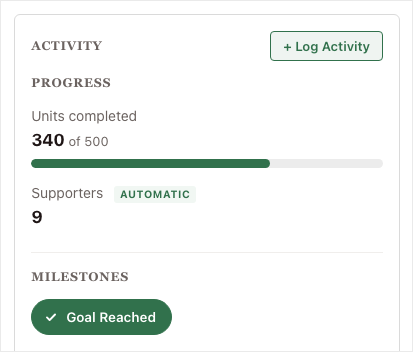
Most peer-to-peer fundraisers are about more than the money. A read-a-thon is about minutes read, a walkathon is about miles walked, and a food drive is about meals packed. Activity for Charitable Ambassadors lets your fundraisers show that effort right beside the dollars they raise. Why this is important:

  • 🎯 Progress on what you actually count: A progress bar shows each thing you count against its own target, sitting right beside the money raised.
  • 🏅 Milestones for the yes or no things: A milestone badge marks the efforts that are simply done or not done, with no number to chase.
  • ✍️ Fundraisers log their own numbers: Your supporters enter their totals from their own pages, so the effort stops living in a spreadsheet, a comment, or nowhere at all.
  • 🤖 Some numbers count themselves: An AUTOMATIC tag appears wherever the site worked the figure out from completed donations, so you can see at a glance what nobody typed in.
  • 🧩 Set it up once, use it anywhere: You decide what gets counted one time, then choose which campaigns count it. Available now in Charitable Ambassadors 3.4.7, with no new plugin and no developer.

Check out our announcement here.

author avatar
David Bisset Project Manager
David is the project manager of Charitable since 2022. David works with several non-profits (one operated by his wife) along with managing and developing features, support, and marketing for Charitable. Has been with WordPress since 2006 and has been lead organizer of multiple conferences, events, and meetups.
ambassadors New

🖨️ Introducing Fliers and Posters: Raise Money Away From the Screen!

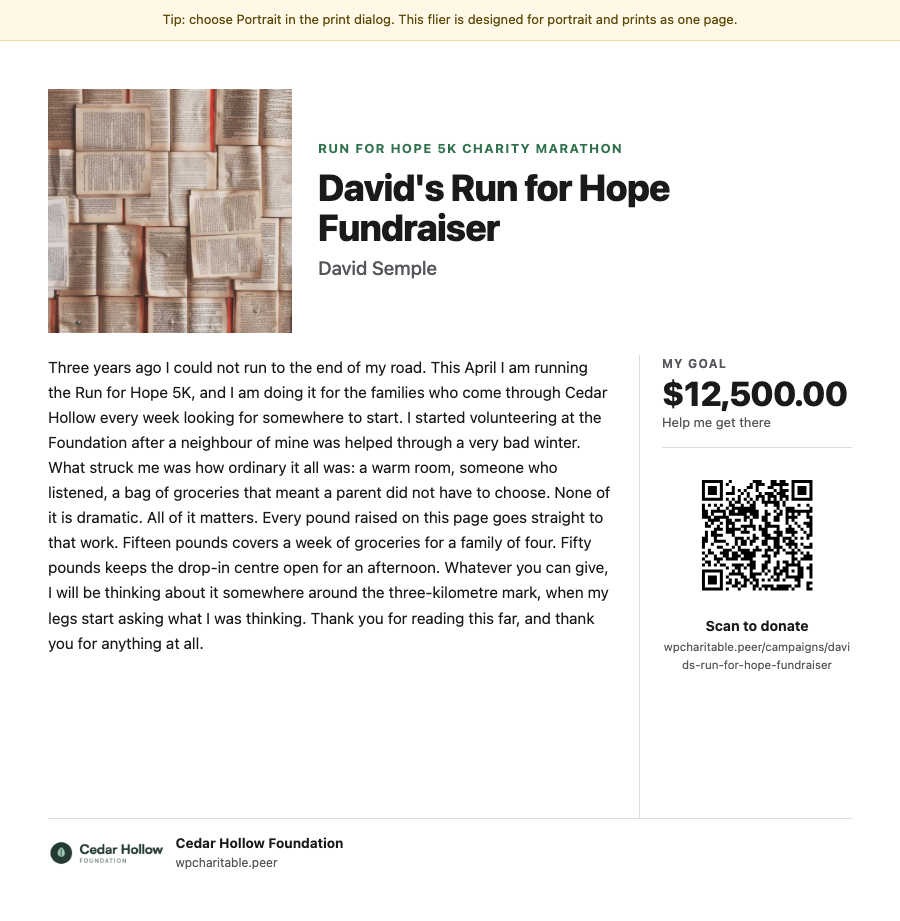
A lot of peer-to-peer fundraising happens away from a screen: at the finish line of a 5K, on a school noticeboard, in an office kitchen. Charitable Ambassadors 3.4.7 adds 2 printables, a fundraiser flier carrying each fundraiser’s own story and QR code, and a recruitment poster that signs new fundraisers up. Both open as a normal web page and print straight from the browser. Why this is important:

  • 🏁 A flier for every fundraiser: Each one carries that fundraiser’s own photo, story and goal, with a QR code that opens their page rather than your main campaign.
  • 📌 A poster that recruits: It shows “Now Recruiting” above your campaign name with a large QR code that opens your sign-up form, so someone can start fundraising without waiting on a link from you.
  • 🪄 No design tool needed: Both printables render as a normal web page and print from the browser, with no PDF plugin and no designer.
  • 📄 2 flier layouts: Hand out carries the full story for giving to friends and family, and Post up carries a short hook with 5 tear-off tabs for a noticeboard.
  • 🛡️ Off until you switch it on: Fliers stay off after the update until you enable them under Charitable » Ambassadors » Other » Fliers, and only the owner or an administrator can open one.

Check out our announcement here.

author avatar
David Bisset Project Manager
David is the project manager of Charitable since 2022. David works with several non-profits (one operated by his wife) along with managing and developing features, support, and marketing for Charitable. Has been with WordPress since 2006 and has been lead organizer of multiple conferences, events, and meetups.
Improvement Payments

💸 Introducing Tiered Rates for Fee Relief: Match the Ask to the Gift!

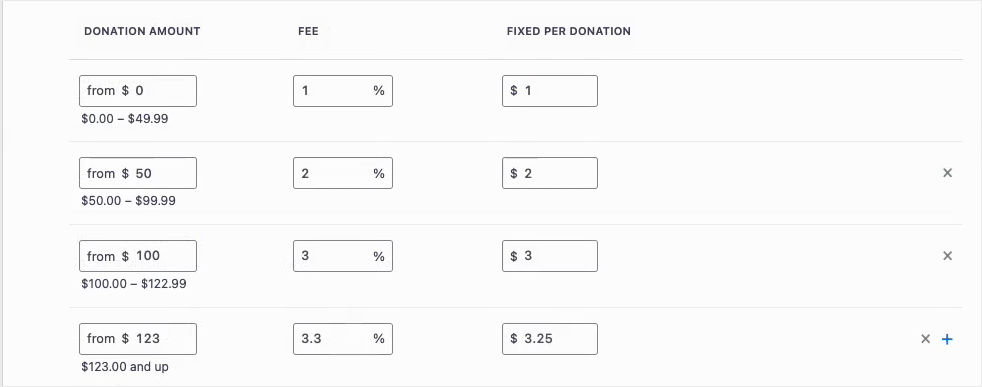
Fee Relief asks your donors one short question at checkout: would you like to cover the processing fee on this gift? Until now that question used a single rate for every donation on a gateway, so a $10 gift and a $500 gift were asked for the same percentage. Fee Relief 1.3.0 lets you set as many donation bands as you like, each carrying its own rate. Why this is important:

  • 🪙 Gentler on small gifts: A fixed transaction cost is a far bigger share of a $10 donation than a $500 one, so bands let you ask for less at the bottom.
  • 🎚️ As many bands as you need: Each band carries its own percentage and its own fixed amount, and the top band runs on with no upper limit.
  • 🛑 An optional ceiling: A Maximum fee field stops any donor being asked for more than a number you choose, however large the gift.
  • 🔌 Set per payment gateway: Stripe can run on four bands while Windcave and Payfast stay on a single rate, because bands belong to a gateway and not to your whole site.
  • 🛡️ Nothing changes until you say so: Your current rates stay exactly as they are until you switch Use Tiered Rates on under Charitable » Settings » Advanced » Fee Relief.

Check out our announcement here.

author avatar
David Bisset Project Manager
David is the project manager of Charitable since 2022. David works with several non-profits (one operated by his wife) along with managing and developing features, support, and marketing for Charitable. Has been with WordPress since 2006 and has been lead organizer of multiple conferences, events, and meetups.