
Your AI assistant just got a lot more useful in Charitable! 🎉
In version 1.8.19 of the Charitable Pro plugin, you can ask your assistant for a spreadsheet of your donations, and it hands you a CSV download link right there in the chat.
Ask how much came from repeat donors, and it splits your income between people who gave before and people giving for the first time. You also get a new setting to choose exactly which roles can let an assistant see donor contact details.
Our team has been working really hard to make this possible.
Since we brought AI to Charitable in 1.8.18, your assistant could already build campaigns, edit donation forms and log offline gifts. Now it can handle your reporting too, so you can stop clicking and just ask! ⚡
See It in Action
If you’d rather watch than read, here’s the one-minute version.
What You Can Use This For
Here are a few things you can ask for in a single sentence, the same way you’d ask a colleague.
- 📊 Getting ready for a board meeting: “Export this year’s donations as a spreadsheet.” You get a link to a CSV file with only the dates you asked for.
- 🔁 Checking whether you’re growing: “How much of last quarter came from repeat donors, and how much from first-time donors?” You get a count and a total for each group.
- 🙏 Planning thank-you calls: “Export the donations to the Winter Appeal so I can call everyone who gave.” The file includes each donor’s contact details, as long as your role is allowed to see them.
- 📬 Recording a check that came in the post: “Log a $250 check from the Henderson Foundation, dated October 14, against the Winter Appeal.” The donation is recorded on the right campaign.
- 📝 Making the form change you’ve been putting off: “Add a question to the donation form asking how they heard about us.” The new field appears on the form.
- 🚀 Getting a campaign ready before a deadline: “Create a fundraiser for the animal shelter with a $5,000 goal, ending November 30.” It arrives as a draft for you to review.
We introduced write support with the WordPress abilities API in version 1.8.18. What’s new is that your assistant can now finish the reporting jobs too, so the answer and the attachment arrive together.
Ask for a Spreadsheet, Get a Download Link
Before this release, your assistant could list your donations in the chat. A spreadsheet still meant a trip to the export screen. Now it makes the file for you.
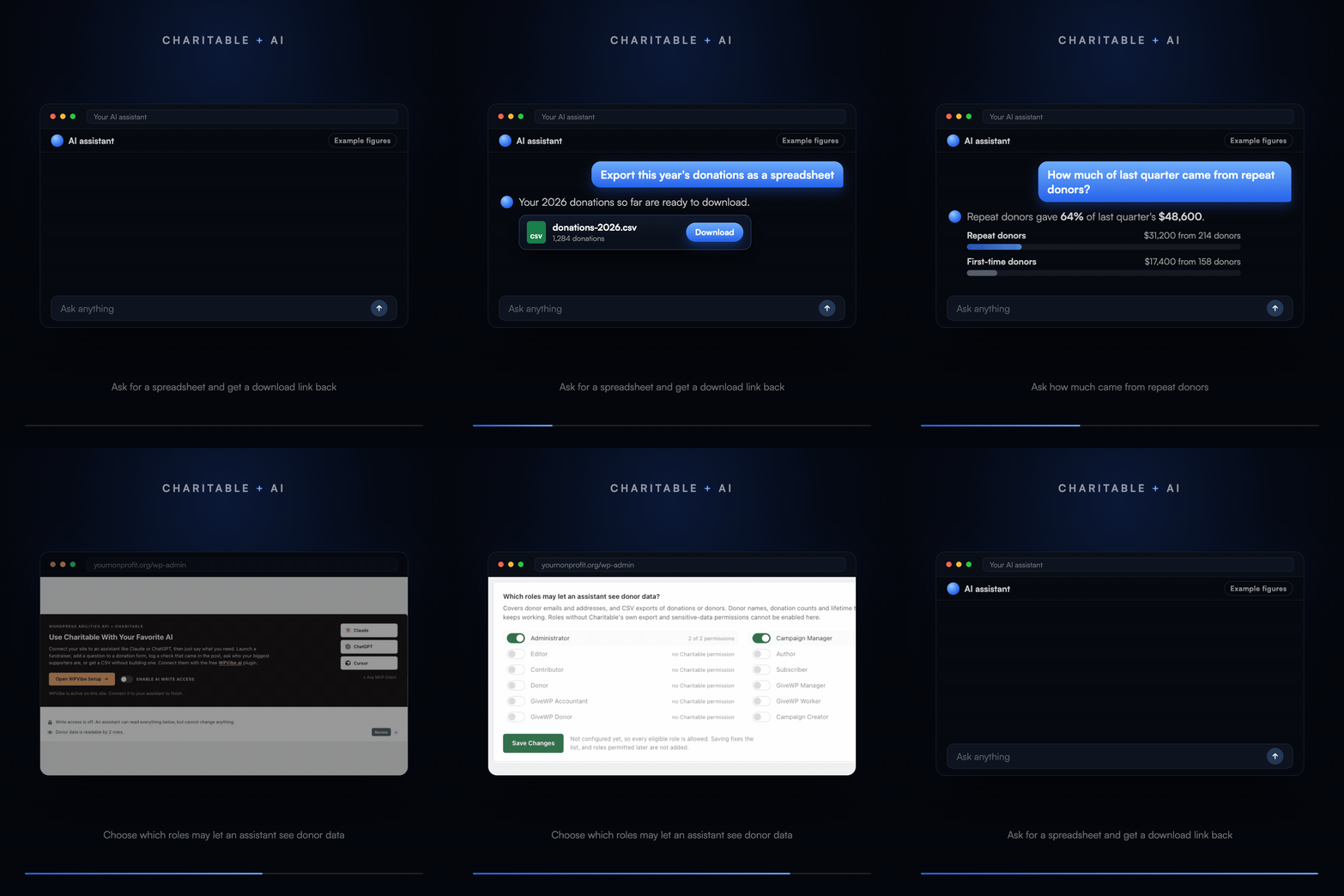
Ask for your donations as a spreadsheet and you’ll get a CSV download link, along with how many rows the file has. You can narrow it the same way you would in the chat, to one campaign, one donor, one status or a date range.
You can export donors too, and there’s one detail to know here. The date range on a donor export is about when each donor was first added to your site, not when they gave.
So if you want everyone who gave last month, ask for last month’s donations instead. Charitable explains this difference to your assistant, so it will usually pick the right export for you.
Both files include donor names, email addresses, phone numbers and postal addresses. That’s why they follow the donor data setting further down this post, and why the download link only opens for someone who is signed in and allowed to export.
See How Much Came From Repeat Donors
Knowing whether your money comes from people who gave before or from new donors tells you a lot about your fundraising. It’s also slow to work out by hand.
Now you can just ask. Your assistant splits the money given in any date range between donors who had given before and donors giving for the first time. You’ll get a count and a total for each group.
There are 2 ways to count a repeat donor, and your assistant picks the one that fits your question. Usually it means someone who gave before the period you asked about began.
If you’d like the answer to match the First Time filter on your Donors report, ask it to count over the donor’s whole history instead. Then a repeat donor is anyone with more than 1 donation ever.
You Choose Who Can Let an Assistant See Donor Data
This is the question we’re asked most, so here’s a straight answer. When you ask an assistant about your donors, the answer has to be sent to the assistant. If you ask Claude who gave the most last year, Claude has to receive those names to tell you.
So the real protection is a clear line around what can be reached, and by whom. In 1.8.19 you draw that line yourself, with the new AI Access to Donor Data setting under Charitable » Tools » AI MCP.
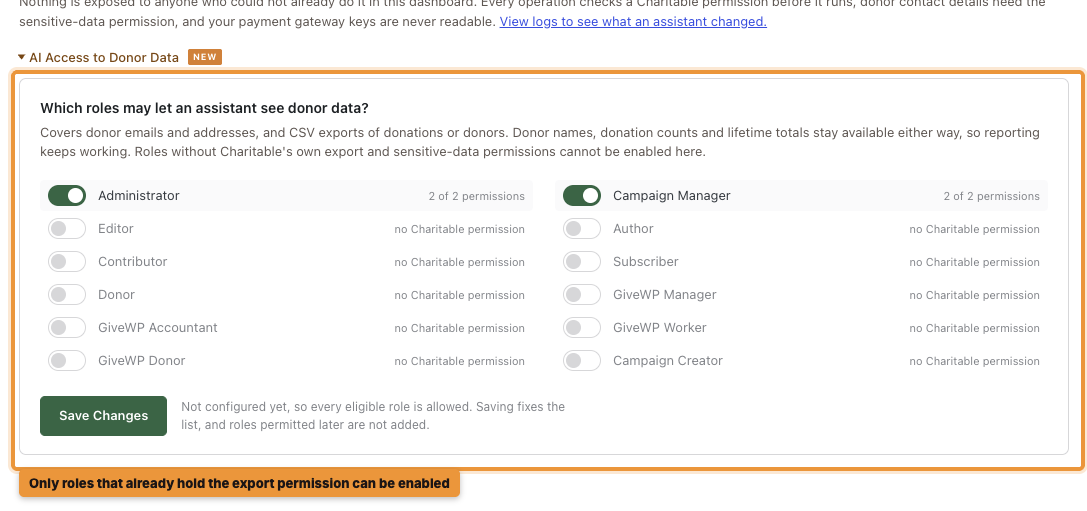
The setting covers donor emails and addresses, and CSV exports of donations or donors. Donor names, donation counts and lifetime totals stay available either way, so your reporting questions keep working.
You choose which roles may let an assistant see that data. A role can only be switched on if it already has Charitable’s own export and sensitive-data permissions. On a typical site, that means only Administrator and Campaign Manager can be selected.
Until you save the list, every eligible role is allowed, because that’s how Charitable has always behaved. We recommend saving it once. Roles you add to your site later are not added to a saved list, so you’ll switch those on yourself.
The protections from 1.8.18 all still apply. Your payment gateway keys are never readable, and donor lists never include email or postal addresses for anyone. Your assistant also acts as you, so it can’t see or change anything your own login couldn’t.
Choosing an assistant also means trusting that company with whatever you ask it. If you plan to ask it about donor records, it’s a good idea to read your AI provider’s data policy first.
Write Access Is Still Yours to Switch On
Write access works the same way it did in 1.8.18. It stays off until an administrator turns on Enable AI Write Access under Charitable » Tools » AI MCP.
The new exports and repeat donor totals only read your data, so they work with write access off. That makes them a good place to start if you’d like to try an assistant before you let it change anything.
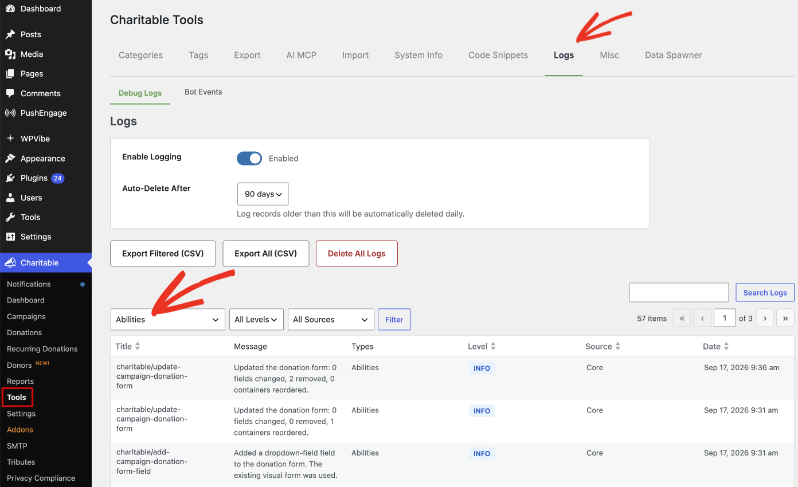
Every change an assistant makes is recorded under Charitable » Tools » Logs. Choose Abilities from the filter and you’ll see what it did and when.
New to WPVibe?
Your AI assistant can’t reach your website on its own. Something has to connect the 2, and that’s WPVibe.
WPVibe is a free WordPress plugin built by the team behind SeedProd. It connects your site to the assistant you already use, such as Claude, ChatGPT or Cursor. There’s no API key to copy and no code to paste.
You’ll sometimes see the term MCP, which is short for Model Context Protocol. It’s a shared standard for how AI assistants talk to other software. Because WPVibe uses it, one connection works with every assistant that supports MCP.
Getting Started: Ask for Your First Export
If you connected an assistant for 1.8.18, you only need steps 1 and 3. If you’re starting fresh, here’s the whole setup.
Step 1: Update to Version 1.8.19
To get started, update the Charitable Pro plugin to version 1.8.19 or later. You’ll also need WordPress 6.9 or later, which is the version where WordPress added the standard way for plugins to offer their features to an assistant.
Step 2: Connect WPVibe
Next, head over to Charitable » Tools » AI MCP and click Install & Activate WPVibe. Then follow WPVibe’s setup to connect it to your assistant.
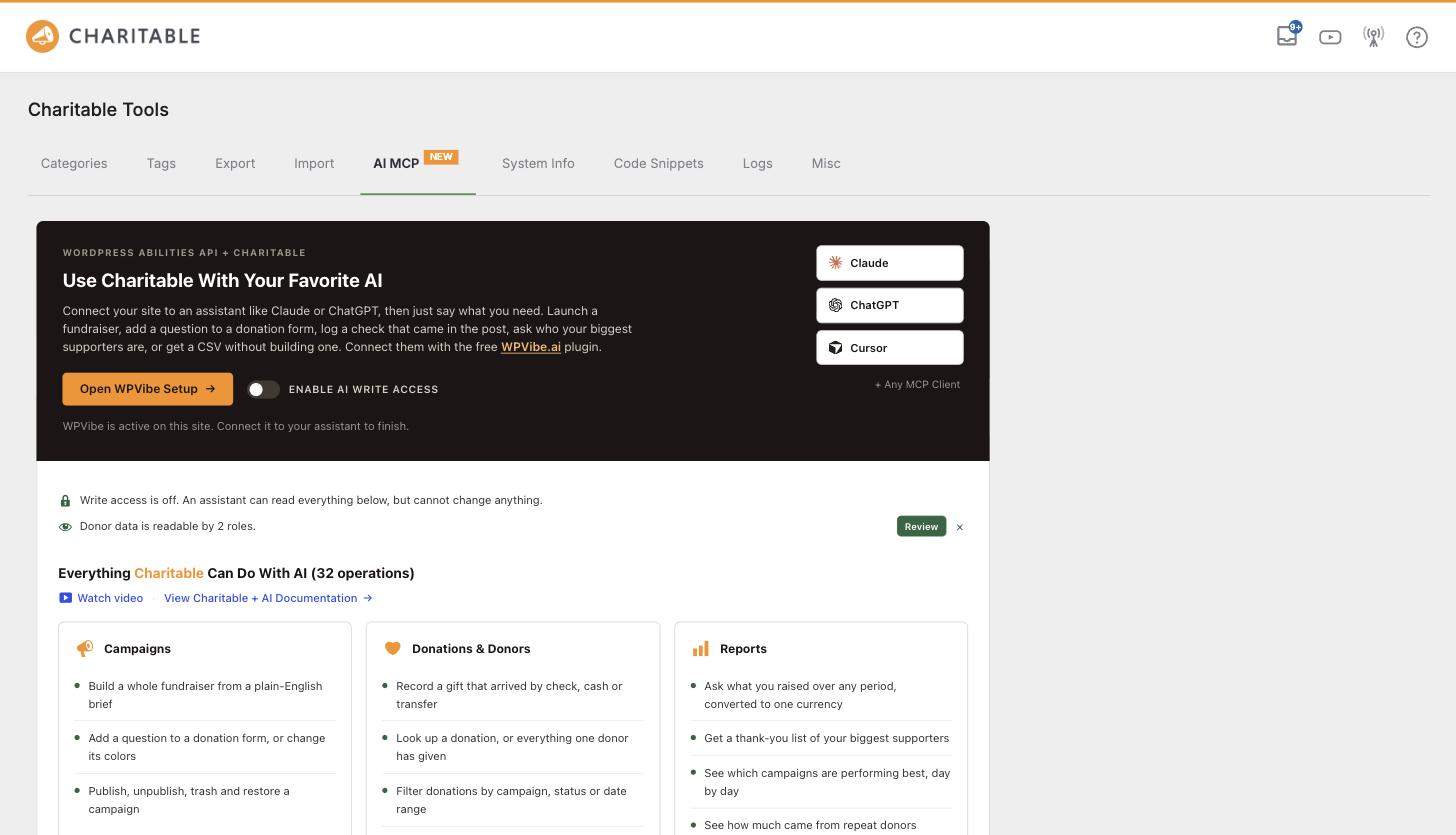
Step 3: Choose Your Donor Data Roles
On the same screen, open AI Access to Donor Data. Switch on the roles you trust, then click Save Changes.
Step 4: Decide About Write Access
If you only want answers and exports, you can leave Enable AI Write Access off. Turn it on when you’re ready for your assistant to log donations, edit forms and build campaigns.
Now open your assistant and ask for this year’s donations as a spreadsheet. You’ll have a download link in the chat a few seconds later!
Read the Full AI Assistants Setup Guide →
For Agencies and Developers
New Abilities in 1.8.19
This release registers 4 new read-only abilities with the core WordPress Abilities API. Anything that discovers core abilities discovers these too.
charitable/export-donationsbuilds a CSV of donations and returns a download link and row count. It takes the same filters ascharitable/list-donations.charitable/export-donorsbuilds a CSV of donors. Its date range filters on when the donor was created, not on donation dates.charitable/get-donor-retention-summarysplits a date range into repeat and first-time donors, with arangeorlifetimebasis.charitable/describe-editing-schemareturns the form field types and Design style values the site accepts, so a client can avoid a refused write.
Controlling Access on Sites You Manage
The donor data role list is enforced on the server, so it holds whichever client connects. Both export abilities also require the sensitive-data permission, and the download link checks the export permission of whoever opens it.
The charitable_abilities_allow_write filter overrides the write switch in code, which is a clean way to keep production read-only while staging stays open. The charitable_ability_meta filter adjusts what each ability advertises to a client, so you can narrow what an assistant sees on a site you manage for someone else.
FAQs on AI Assistants in Charitable
What do I need to use the new exports and donor data controls?
You’ll need version 1.8.19 or later of the Charitable Pro plugin, WordPress 6.9 or later, and an assistant connected through WPVibe or another MCP client. There’s no add-on to buy, and it works on free AI plans.
Do I need write access turned on to export?
No. Exports and repeat donor totals only read your data, so they work with write access off. You do need a role that’s allowed to see donor data.
If I limit donor data, will my reporting questions still work?
Yes. Donor names, donation counts and lifetime totals stay available whatever you choose. The setting only covers contact details and CSV exports.
Can someone else open the export link my assistant gives me?
Only if they’re signed in to your site with permission to export. Anyone else who gets the link won’t be able to download the file.
How do I see what an assistant changed?
Head over to Charitable » Tools » Logs and choose Abilities from the filter. Every change an assistant makes is listed there with the date and time.
The Whole Picture, on One Page
If this is your first look at Charitable and AI, we keep a single page up to date instead of spreading it across release posts.
It starts with a section for anyone new to AI and walks through the setup step by step. You’ll also find prompts to try, how the safety design works, answers to common questions and notes for developers.
More in Version 1.8.19
This release also brings a redesigned dashboard and Reports Overview. You can compare any 2 periods, export the whole summary as a PDF or CSV, and get a free score for your fundraising setup.
Get Started With Your AI Assistant
Update to version 1.8.19 of the Charitable Pro plugin, then head over to Charitable » Tools » AI MCP to choose your donor data roles. After that, ask your assistant for this year’s donations as a spreadsheet and see what comes back!
Read the AI Donor Data and Exports Documentation →
Not Yet on a Charitable Paid Plan?
Charitable Has 1.2+ Million Downloads!
Trusted by millions to power successful fundraising campaigns. Try Charitable risk-free today.
✅ 14-day money-back
✅ Transparent pricing
✅ Code-free setup
What’s New in Charitable
We’ve also launched several other features and improvements recently.
🎟️
Sell event tickets through the same donation forms and payment gateways you already use.
🔁
Donors set up a monthly gift once on Windcave, and Charitable bills each renewal on schedule.
🧩
Build each automation on a drag and drop canvas, from the trigger to every action that follows.
📬
Turn donors into email subscribers automatically, with consent collected right on your donation form.
💳
Donors can replace an expired card and keep their recurring gift, schedule and giving history.
We’ve been adding to Charitable constantly, with features and improvements designed to help you raise more and serve your donors better. See everything we’ve shipped at the Charitable Changelog.
Not yet a Charitable Pro user? Sign up today and get up to 50% off on your plan. We’re confident you’ll love raising funds with Charitable. If, for any reason, Charitable is not the right fit for you, we’ll refund your purchase with our 14-day money-back guarantee. Get Charitable Pro Now »
Stay Connected for More Nonprofit Resources
For more tutorials and videos tailored to nonprofits, subscribe to our YouTube channel. We regularly publish expert tips, step-by-step guides on online donations, fundraising strategies, and practical resources to help your organization succeed.
🗞️ Get weekly tips and exclusive guides in your inbox
Join our newsletter →
🎥 Watch step-by-step tutorials and success stories
Subscribe to our YouTube channel →
👩🏽💻 Connect with our community and get daily nonprofit insights
Follow us on LinkedIn →
🥳 Fun reels and non-profit insights
Follow us on Instagram →
👀 Insightful & fun videos to help you grow your cause
Follow us on TikTok→
🌎 Subscribe and follow for general fundraiser tips
Get Fundraiser Tips on TikTok →
Powerful Fundraising Resources
🤖 Use Charitable with Your AI Assistant
⬇️ Download proven strategies, campaign ideas, and expert tools
Get the Fundraising Kit →
💸 Get Free Fundraising Resources
Head to the Charitable Fundraising Hub →
🤔 Got questions about Charitable?
Charitable FAQs →
🏎️ Take Charitable for a spin
Create your Charitable Demo →
Understand non-profit terms and jargon
Non-Profit Glossary →
% Looking for non-profit deals and discounts?
Best Non-Profit Deals and Discounts →









Leave a Reply