
Charitable Blog

Everything you need to know about Charitable and our team.

Introducing Card Updates: Let Donors Fix an Expired Card Without Losing Their Subscription

Introducing Card Updates: Let Donors Fix an Expired Card Without Losing Their Subscription

Last updated on

  • By

A card expires. A bank reissues a number after a fraud alert. It happens to every recurring donor eventually, and until now the fix was painful for everyone: either your team collected new card details by hand, which is a compliance headache, or you asked the donor to cancel and start over, which quietly kills a lot of recurring gifts.

🎉 With Charitable Recurring 2.3, donors can update their own saved card in seconds through Stripe’s secure Customer Portal, and the subscription never skips a beat.

Why Self-Service Card Updates Change Everything

Failed renewals from stale cards are one of the biggest silent leaks in recurring fundraising. The old workarounds made it worse.

Cancel-and-resubscribe loses the donor’s history and momentum, and hand-entering a card puts sensitive data where it should never be.

Letting the donor refresh their own card inside Stripe keeps the original subscription intact, keeps card numbers off your site entirely, and turns a support ticket into a 30-second self-service moment.
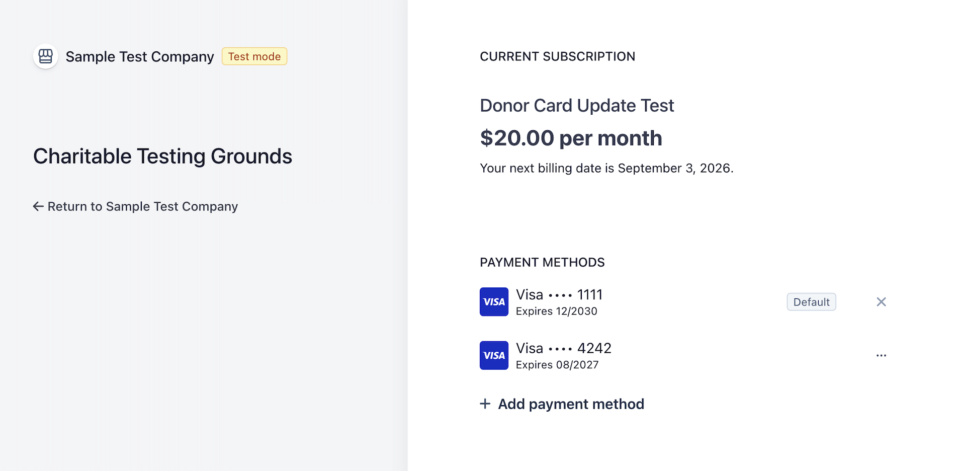
Current subscription page showing Donor Card Update Test at  per month with billing date September 3, 2026; payment methods list includes Visa ending 1111 and 4242 with expiration dates, and an option to add a new payment method.

Like to see how it works? I’ve created a video walkthrough for you.

See It In Action

Donors Fix Their Own Card, Securely

All you have to do is turn on one setting and an Update Card control appears next to each recurring donation on the donor dashboard.

The donor clicks it, lands in Stripe’s own PCI-compliant Customer Portal, enters a new card, and comes back to a friendly confirmation.

Their amount, schedule, and giving history stay exactly as they were.
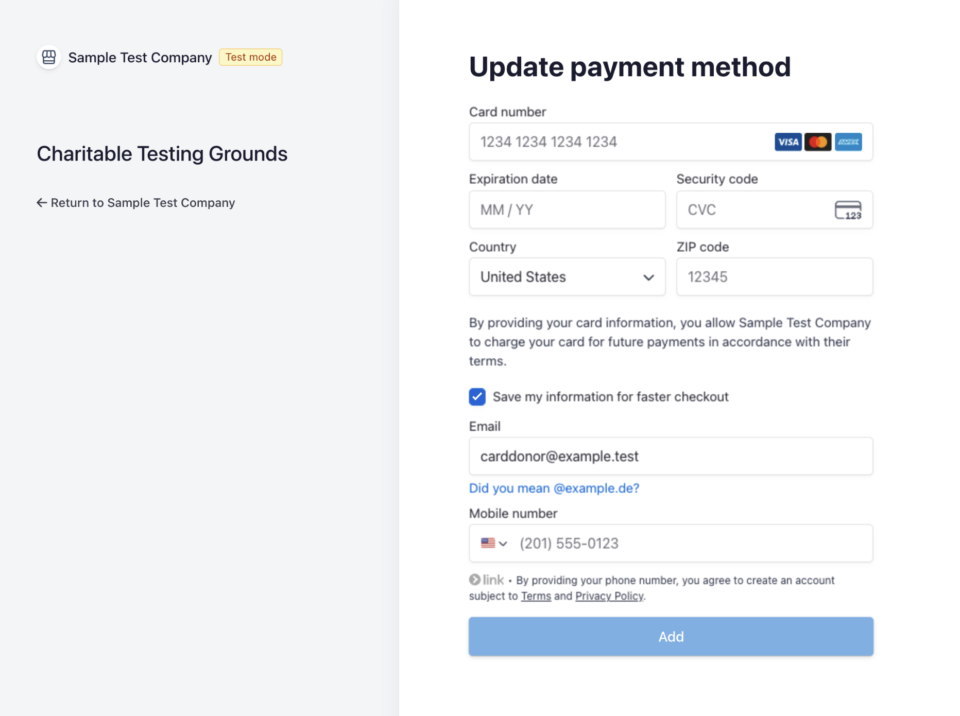
Split-screen UI: left pane shows 'Charitable Testing Grounds' with a 'Return to Sample Test Company' link; right pane displays a form titled 'Update payment method' with card number, expiration date, security code, country, ZIP, and a large 'Add' button.

What you’ll love about this feature:

⚡ 30-second fix: Donors refresh an expired card themselves, no ticket required.
🔒 Card data never touches your site: Everything happens inside Stripe’s secure portal.
✅ Subscription stays intact: Same subscription, same history, just a fresh card for the next renewal.

Your Team Can Help Without Touching a Card Number
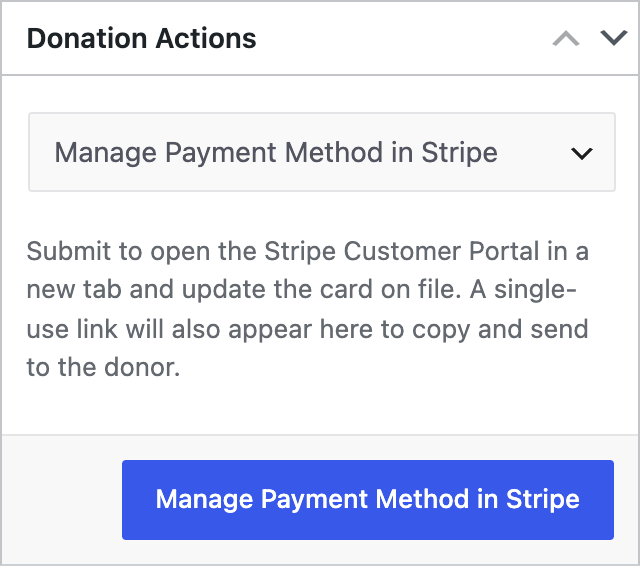
Donation Actions panel with a dropdown labeled 'Manage Payment Method in Stripe' and a blue 'Manage Payment Method in Stripe' button.

When a donor calls in, staff do not need to read card digits aloud or type them anywhere.

From the recurring donation edit screen, choose Manage Payment Method in Stripe.

The portal opens in a new tab so you can help live, and a single-use link appears that you can copy and email to the donor to finish on their own.

🤝 Help on the phone: Open the donor’s secure portal in one click.
🔗 Send a single-use link: Copy it with one tap and paste it into an email.
🛡️ Zero card handling: Your team never sees or stores a card number.

Locked Down to Card Updates by Default

The Stripe portal can do a lot, so Charitable scopes it to card update only out of the box. Donors cannot accidentally cancel or change their plan from inside the portal, which keeps donation status and your webhooks in sync.

Developers who want to expose more can do so with a single filter.

🎯 Card update only: No surprise cancellations or plan changes.
🧩 One filter to extend: charitable_recurring_stripe_portal_features opens it up when you need it.
🔁 Status stays correct: Cancellations still run through Charitable so nothing drifts.

Every Change Is Logged

Both card updates and cancellations are written to the donor log, visible right on the donor’s profile and in Charitable Tools. You get a clear, timestamped record of who did what, without any extra setup.

📋 Audit trail: Card updates and cancellations are recorded automatically.
👁️ On the donor profile: See the history without leaving the donor screen.
🕐 Timestamped: Know exactly when a donor refreshed their card.

For Agencies and Developers

Hooks, Filters, and Full Customization

The whole flow is extensible. Use charitable_recurring_stripe_portal_features to control exactly what the Stripe portal exposes, and charitable_recurring_donor_dashboard_card_update_enabled to gate the donor control with your own logic. The charitable_recurring_user_actions filter is the same seam that will power future donor self-service.

Built for Connect and Direct Keys

Card updates work whether you use Stripe Connect or direct API keys, and each donation is handled in its own test or live mode automatically, so mixed environments just work.

FAQs on Card Updates

Does this require Charitable Pro? 

Yes. This card update feature is available in Charitable Pro with the Recurring Donations addon.

Will updating a card cancel or restart the donor’s subscription? 

No. The subscription keeps its original ID, amount, schedule, and giving history. Only the payment method changes.

Does my team ever see or store the new card number? 

No. Card entry happens entirely inside Stripe’s own PCI-compliant Customer Portal, so a raw card number never touches your site or your staff.

Can a donor cancel their subscription from inside the portal? 

Not by default. Charitable scopes the portal to card updates only, so cancellations and plan changes still have to go through Charitable, which keeps donation status and webhooks in sync.

Does this work with Stripe Connect? 

Yes. Card updates work whether you use Stripe Connect or direct API keys, and each donation is handled in its own test or live mode automatically.

Get Started with Card Updates

Update Charitable Recurring to 2.3.0+, then enable Update Payment Method under Charitable » Settings » Donors.

The admin controls are ready the moment the addon updates. That is all it takes to stop losing recurring donations to expired cards.

What’s New in Charitable

We also launched several powerful features and improvements recently:

🧾

Custom Receipts

Design a personalized, on-brand thank-you page for every campaign, no code required.

Learn More →

🖼️

Beacon Campaign Templates

Launch a full-width fundraising page with a bold hero image and a locked-in donation widget.

Learn More →

📝

Donation Form Block

Drop a fully working donation form directly onto any page or post, no redirects.

Learn More →

📣

Ambassadors 3.0

Moderate your peer-to-peer network with new directory screens and one-click approvals.

Learn More →

Razorpay Integration

Accept UPI, cards, and global currencies for India-based donations, right inside your form.

Learn More →

🔔

PushEngage Integration

Send instant push notifications for thank-yous, campaign launches, and goal milestones.

Learn More →

We’ve been adding to Charitable constantly, features and improvements designed to help you raise more and serve your donors better. See everything we’ve shipped at the Charitable Changelog.

If you have any questions or run into anything setting up card updates, our support team is ready to help.

Stay Connected for More Nonprofit Resources

For more tutorials and videos tailored to nonprofits, subscribe to our YouTube channel. We regularly publish expert tips, step-by-step guides on online donations, fundraising strategies, and practical resources to help your organization succeed.

🗞️ Get weekly tips and exclusive guides in your inbox
Join our newsletter →  

🎥 Watch step-by-step tutorials and success stories
Subscribe to our YouTube channel →  

👩🏽‍💻 Connect with our community and get daily nonprofit insights
Follow us on LinkedIn →

🥳 Fun reels and non-profit insights
Follow us on Instagram → 

👀 Insightful & fun videos to help you grow your cause
Follow us on TikTok→  

🌎 Subscribe and follow for general fundraiser tips
Get Fundraiser Tips on TikTok → 

Powerful Fundraising Resources

⬇️ Download proven strategies, campaign ideas, and expert tools
Get the Fundraising Kit →  

💸 Get Free Fundraising Resources
Head to the Charitable Fundraising Hub

🤔 Got questions about Charitable?
Charitable FAQs

🏎️ Take Charitable for a spin
Create your Charitable Demo

Understand non-profit terms and jargon
Non-Profit Glossary

% Looking for non-profit deals and discounts?
Best Non-Profit Deals and Discounts →

author avatar
David Bisset Project Manager
David is the project manager of Charitable since 2022. David works with several non-profits (one operated by his wife) along with managing and developing features, support, and marketing for Charitable. Has been with WordPress since 2006 and has been lead organizer of multiple conferences, events, and meetups.

Disclosure: Our content is reader-supported. This means if you click on some of our links, then we may earn a commission. We only recommend products that we believe will add value to our readers.

Leave a Reply

Your email address will not be published. Required fields are marked *

Get free tips and resources right in your inbox, along with 60,000+ others

Join our Newsletter

We won’t spam you. We only send an email when we think it will genuinely help you. Unsubscribe at any time!

Featured Video:

Watch more videos on our YouTube channel.

What's New In Charitable

View The Latest Updates
🔔 Subscribe to get our latest updates
📧 Subscribe to Emails

Email Subscription

Join our Newsletter

We won’t spam you. We only send an email when we think it will genuinely help you. Unsubscribe at any time!

Integration page builder

👉🏻 New in Charitable: Native Elementor Widgets for Seamless Campaign Building

With native Elementor widgets, you design donation campaigns right alongside the rest of your page without touching code. Here’s how it works, and why it’s worth turning on today.

Create fundraising pages that are VISUAL, NATIVE, AND SHORTCODE-FREE. You can also:

⚡ Mini Donation: Add a compact, high-converting donation widget with preset amounts and full color control.

⏳ Campaign Countdown: Build urgency for a deadline-driven appeal, complete with optional confetti when the goal is hit.

📣 Donation Feed: Prove momentum by showing visitors the social proof of real people giving right now.

🏆 Donor Leaderboard: Celebrate top supporters with gold, silver, and bronze styling to spark friendly giving.

🖼️ Campaign Showcase: Feature multiple campaigns in a landing page grid or carousel, with search, filters, and badges.

Learn more here.

author avatar
David Bisset Project Manager
David is the project manager of Charitable since 2022. David works with several non-profits (one operated by his wife) along with managing and developing features, support, and marketing for Charitable. Has been with WordPress since 2006 and has been lead organizer of multiple conferences, events, and meetups.
Addon New

🗒️ Custom Receipts… New Addon!

With Custom Receipts, you decide which page your donors see, on every campaign. Here’s how it works, and why it’s worth turning on today.

Left side shows a donation receipt with donation number, date, total, and payment method for a  gift to Anywhere, titled 'One Family Gets Clean Water For A Week.'

Create receipts that are CUSTOM TO THE DONOR OR CAMPAIGN. You can also:

📅 Year-end appeal: Reinforce the goal and invite donors to share while momentum is high.

🎗️ Memorial or tribute campaign: Give a gentle, respectful thank-you that fits the moment.

💎 Major gifts: Show a special message only to donors who give above a threshold.

🔁 Recurring growth: Invite one-time donors to become monthly supporters right on the receipt.

🌍 Global campaigns: Surface a country-specific note, like a Gift Aid reminder, only where it applies.

Learn more here.

author avatar
David Bisset Project Manager
David is the project manager of Charitable since 2022. David works with several non-profits (one operated by his wife) along with managing and developing features, support, and marketing for Charitable. Has been with WordPress since 2006 and has been lead organizer of multiple conferences, events, and meetups.
New templates

🤩 New Beacon Campaign Templates w/ “Hero” Block!

With the new Beacon Campaign Templates for Charitable Pro, you can launch a stunning, full-width fundraising page that instantly captures visitor attention above the fold.

Fundraising page header for Save Maple Grove Park with a donation widget and a small square photo of a sunlit tree thumbnail on the left.

🔦 Above-the-Fold Impact: Lead with a full-width hero image, your logo, and your goal with a donation widget locked right on top of the banner so your ask and momentum register instantly without scrolling.

📐 Two Flexible Layouts: Choose between a structured two-column layout for side-by-side storytelling and supporting details, or a clean one-column view designed for uninterrupted long-form narratives.

⚡ All-in-One Hero Field: Powered by the new Campaign Hero field, bringing background media, live progress bars, custom donation amounts, and recurring giving tabs together into a single cohesive block that can be dropped into any layout.

🎨 Automatic Theme Matching: The hero banner and donation widget automatically inherit your campaign theme’s button and accent colors, ensuring your entire presentation stays beautifully on-brand without touching a line of CSS.

Learn more here.

author avatar
David Bisset Project Manager
David is the project manager of Charitable since 2022. David works with several non-profits (one operated by his wife) along with managing and developing features, support, and marketing for Charitable. Has been with WordPress since 2006 and has been lead organizer of multiple conferences, events, and meetups.
donation form Feature New

📝 Donation Form Block: Embed a Working Donation Form Anywhere

With the new Donation Form Block for Charitable Pro, you can drop a fully working donation form directly onto any page or post in the WordPress block editor. No redirects, no page reloads, and zero friction between reading your story and making a contribution.

📝 Drop Forms Anywhere: Place a working form directly onto your homepage, inside a story-driven blog post, on a dedicated landing page, or within a campaign announcement.

🎯 Dynamic Campaign Binding: Easily choose a specific campaign from the block sidebar or set it to automatically bind to whichever campaign is currently being viewed.

📐 Full vs. Minimal Form Views: Switch between a full layout or a compact minimal view to perfectly fit sidebars, narrow columns, or wide landing pages.

🎨 Scoped No-Code Styling: Customize typography, container spacing, border radius, amount buttons, and accent colors independently for every form instance without touching a line of CSS.

Learn more here.

author avatar
David Bisset Project Manager
David is the project manager of Charitable since 2022. David works with several non-profits (one operated by his wife) along with managing and developing features, support, and marketing for Charitable. Has been with WordPress since 2006 and has been lead organizer of multiple conferences, events, and meetups.
ambassadors New

👤 Creator Profiles: Put a Face to Every Peer-to-Peer Campaign

Ambassadors 3.3.0 now provies Creator Profiles — giving your supporters a permanent, shareable public home that turns one-time fundraisers into ongoing relationships.

👤 Public Creator Pages: Give every fundraiser an instant, clean landing page at /creator/their-name/ to showcase their custom avatar, bio, and a browsable grid of their campaigns.

📊 Proof of Impact: Boost donor trust by displaying site-wide milestones on the profile—like total funds raised and total donor counts.

💳 Interactive Hover Cards: When donors hover over a creator’s name on a campaign page, a compact card expands with their bio and social handles right at the moment of decision.

📍 Responsible Location Sharing: Allow creators to safely show local supporters where they are based using only city, state, and country details.

🛠️ Self-Serve Customization: Fundraisers can update their own profiles and link up to six social networks directly from the My Campaigns hub, saving you admin time.

Ready to empower your advocates? Update to Ambassadors 3.3.0 and turn on “Enable Public Creator Page” today!

author avatar
David Bisset Project Manager
David is the project manager of Charitable since 2022. David works with several non-profits (one operated by his wife) along with managing and developing features, support, and marketing for Charitable. Has been with WordPress since 2006 and has been lead organizer of multiple conferences, events, and meetups.




