
Requires: Charitable Pro plugin 1.8.17+
Basic plan and higher
Does your donation form look broken when someone opens it on a phone?
Charitable’s forms are already responsive. The trouble usually comes from your theme or page builder, whose styles can push a field off the edge, shrink a button, or break the payment area on a small screen.
DonationExpress fixes that. On a phone, it opens your campaign’s real donation form in a full-screen sheet that your theme cannot style. The fields, suggested amounts and payment gateways are all the same, and the form looks the same on every phone.
This guide covers when to use DonationExpress, how to turn it on, how to style the sheet, which receipt to show, and how to preview it without a phone. Developers will find the hooks, filters and code examples at the end.
Many people who reach your form from social media, email or ads are on a phone, so a clean mobile form helps more of them finish their gift. DonationExpress is a Beta feature and is off by default, so nothing changes on your site until you turn it on.
What’s in This Guide?
- Watch the DonationExpress Setup Video
- When to Use DonationExpress
- How DonationExpress Changes the Form on a Phone
- Where to Find the DonationExpress Settings
- How to Set Up DonationExpress in 6 Steps
- What Donors See With DonationExpress Turned On
- Tips Worth Keeping in Mind
- Troubleshooting DonationExpress
- DonationExpress Developer Reference
- Code Examples for Customizing DonationExpress
- Wrapping Up
- You May Also Want to Read
Watch the DonationExpress Setup Video
This short walkthrough shows DonationExpress being turned on and a donation going through the sheet on a phone.
When to Use DonationExpress
DonationExpress helps most in these situations.
- Your theme or page builder styles the donation form or popup in a way that looks broken on phones.
- You want donors to see the same donation form on every device, whatever phone they use and whatever theme you run.
- You want the mobile form to load fast, without your theme’s scripts and styles loading alongside it.
- You get donations from social media, email or ads, where many visitors are on a phone and the first look at your form matters.
Even a well-built nonprofit theme can add styles that clash with a form on a small screen. A form that looks broken is one of the reasons people leave before they give, and we cover the others in how to stop donors from abandoning the donation form.
How DonationExpress Changes the Form on a Phone
On the left is a donation form on a phone when theme styles clash with it. On the right is the same campaign with DonationExpress turned on.
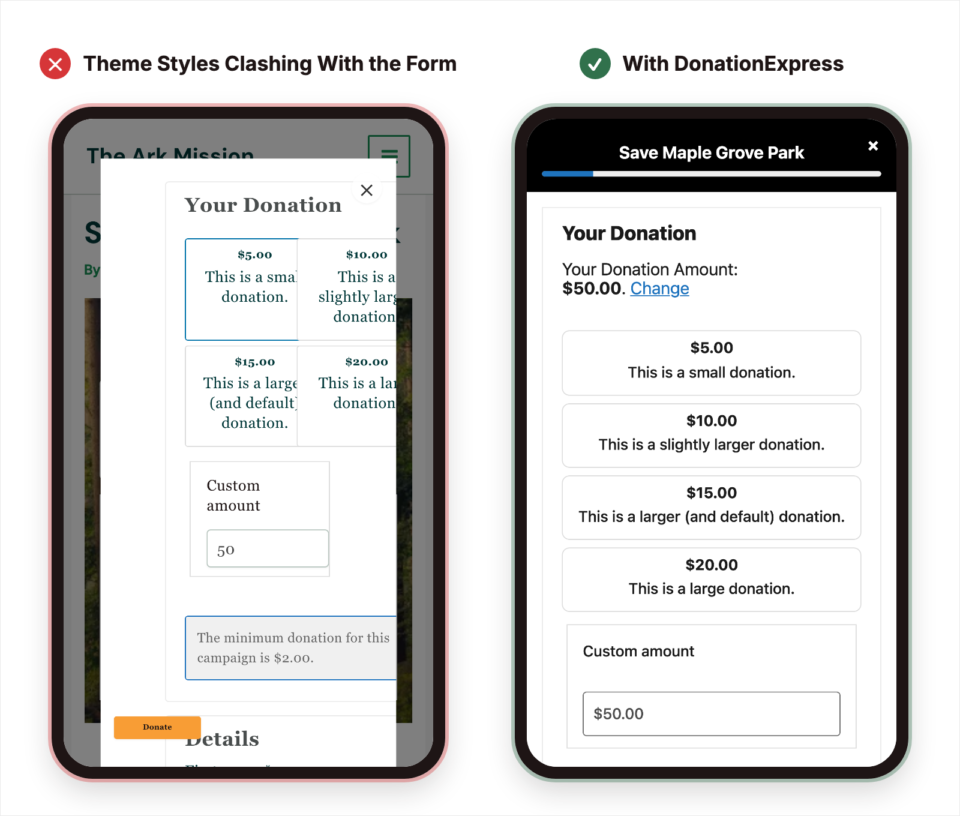
The sheet shows your campaign’s real donation form, with the same fields, suggested amounts and payment gateways. Only the theme styling is gone.
Where to Find the DonationExpress Settings
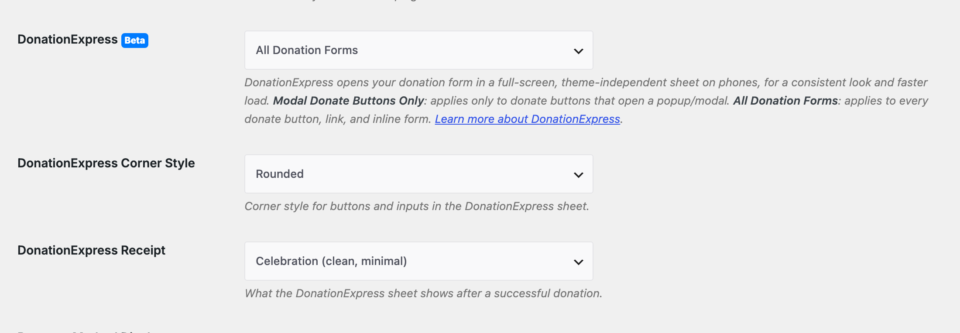
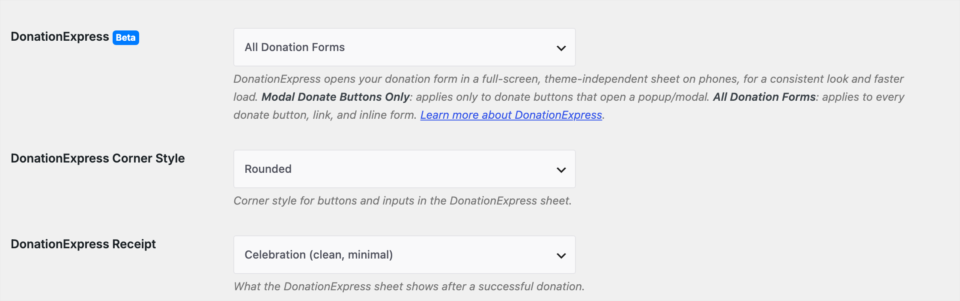
To find the settings, head over to Charitable » Settings » General » Donation Form. You’ll see 3 DonationExpress settings under Display Options.
- DonationExpress turns the feature on and picks which donate buttons and forms use it.
- DonationExpress Corner Style sets the corner shape for buttons and fields in the sheet.
- DonationExpress Receipt sets what the sheet shows after a successful donation.
The Corner Style and Receipt settings stay hidden until DonationExpress is set to something other than Off, because only the sheet uses them.
How to Set Up DonationExpress in 6 Steps
Setting up DonationExpress takes a few minutes. Every setting is on the same screen, and you can test the result without picking up a phone.
1. Choose Which Donation Forms Use DonationExpress
To get started, open the DonationExpress setting. It has 3 options, so pick the one that matches the forms you want to change.

| Option | What it does |
|---|---|
| Off | DonationExpress is turned off, and donation forms show the normal way on phones. This is the default. |
| Modal Donate Buttons Only | Only donate buttons that open a popup or modal use the sheet. Forms placed directly on a page are left alone. |
| All Donation Forms | Every donate button, link and on-page form uses the sheet on a phone. |
Choose Modal Donate Buttons Only if you already like how your on-page forms look on phones and only want to fix the popup.
Choose All Donation Forms if you want every mobile donation to go through the sheet, however the donor reached the form. If you’re not sure, start with this one.
DonationExpress only runs on screens 768 pixels wide or narrower. On tablets and desktops, your forms look exactly as they do today, and a developer can change that width with a filter covered in the developer reference below.
2. Pick a DonationExpress Corner Style
Once DonationExpress is on, the DonationExpress Corner Style setting appears below it. It controls how rounded the buttons and fields in the sheet are.
| Corner style | Look |
|---|---|
| Sharp | Buttons and fields have square corners. |
| Rounded | Buttons and fields have lightly rounded corners. This is the default. |
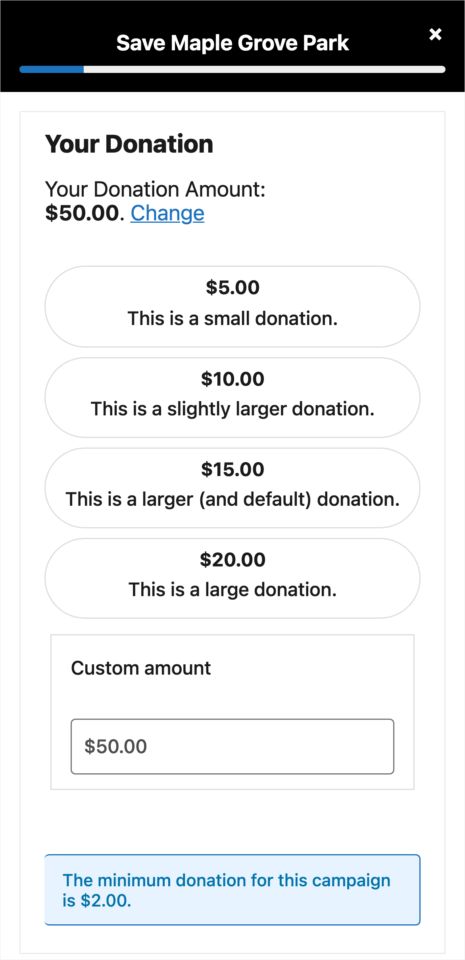
| Pill | Buttons and fields are fully rounded, like a pill. |
Here’s the same sheet with the Pill style. Pick the style closest to the buttons on the rest of your site.
The rest of the sheet’s look comes from settings you already have in Charitable, because DonationExpress doesn’t read anything from your theme.
- The accent color comes from your donation form Default Highlight Color setting, on the same Charitable » Settings » General » Donation Form screen. The Donate button and the progress bar in the sheet use it.
- The logo comes from your email logo in Charitable » Settings » Emails. If you’ve set one, it shows at the top of the sheet.
3. Choose the DonationExpress Receipt
Next, use the DonationExpress Receipt setting to choose what donors see after they give. This setting needs the Charitable Pro plugin 1.8.17.1 or higher, so update first if you don’t see it.
| Receipt style | What the donor sees |
|---|---|
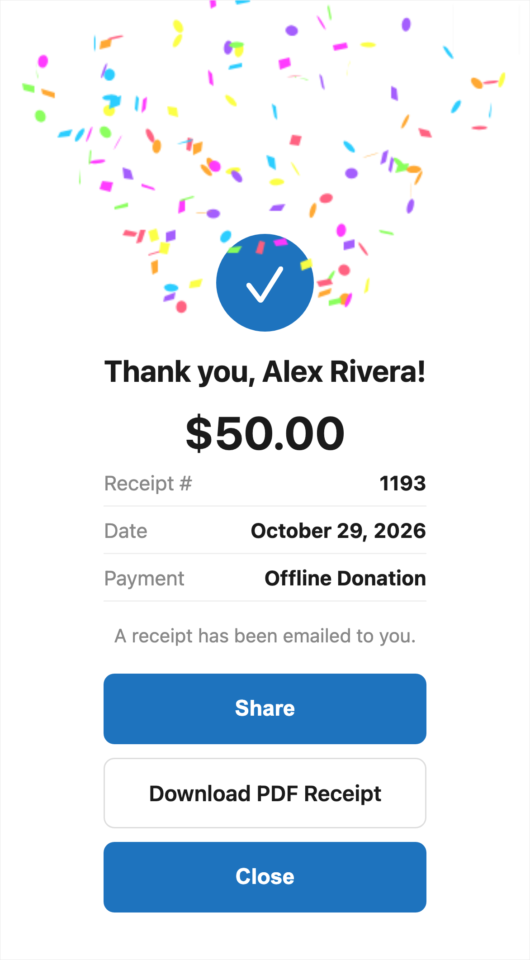
| Celebration (clean, minimal) | The donor sees a thank-you screen with a checkmark and confetti. It has a Share button, an optional Make it monthly button, an optional Download PDF Receipt button, and a Close button. This is the default. |
| Detailed (clean, itemized breakdown) | The donor sees the same celebration screen plus a table listing each campaign they gave to and the total. |
| Standard Receipt Page | The sheet closes and the donor lands on your normal receipt page, styled by your theme, exactly as they would without DonationExpress. |
The Celebration and Detailed receipts stay inside the sheet, so the donor never leaves the clean layout.
Which Buttons Show on the DonationExpress Receipt
Some buttons on the Celebration and Detailed receipts only show when the matching feature is turned on.
- Share opens the phone’s own share menu, so donors can post to social media or send a message with one tap.
- Make it monthly shows only when Charitable’s Recurring Donations feature is active and the gift was a one-time donation. It reopens the sheet with a monthly gift selected.
- Download PDF Receipt shows only when Charitable’s PDF Receipts feature is active.
4. Save Your DonationExpress Settings
When all 3 settings look right, scroll to the bottom of the page and click Save Changes. Your settings should now look something like this.
5. Preview DonationExpress Without a Phone
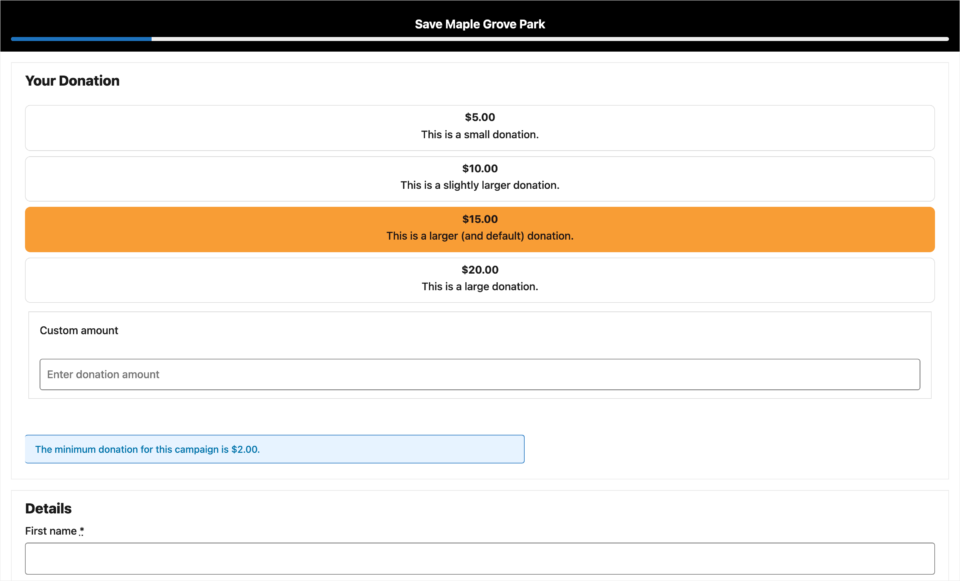
You don’t need a phone to see the sheet. While logged in as an administrator, open this URL in your browser and replace NN with a campaign ID.
https://yoursite.com/wp-admin/?charitable_action=preview-mobile-form&campaign_id=NNIt shows the same theme-free donation form DonationExpress shows on a phone. That way you can check your colors, logo and corner style on a full-size screen.
6. Test DonationExpress on Your Phone
Finally, open one of your campaigns on your phone and tap the Donate button. The DonationExpress sheet should slide up over the page, as shown in the next section.
If you use a test-mode payment gateway, you can also make a test donation to see the receipt you picked in step 3.
What Donors See With DonationExpress Turned On
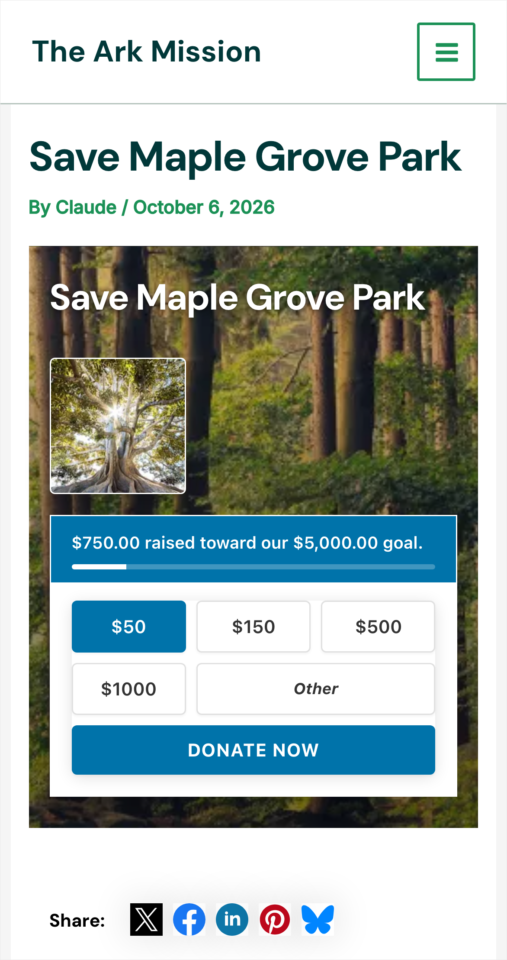
Here’s a campaign on a phone with All Donation Forms selected. The campaign page looks the same as before until the donor taps Donate Now.
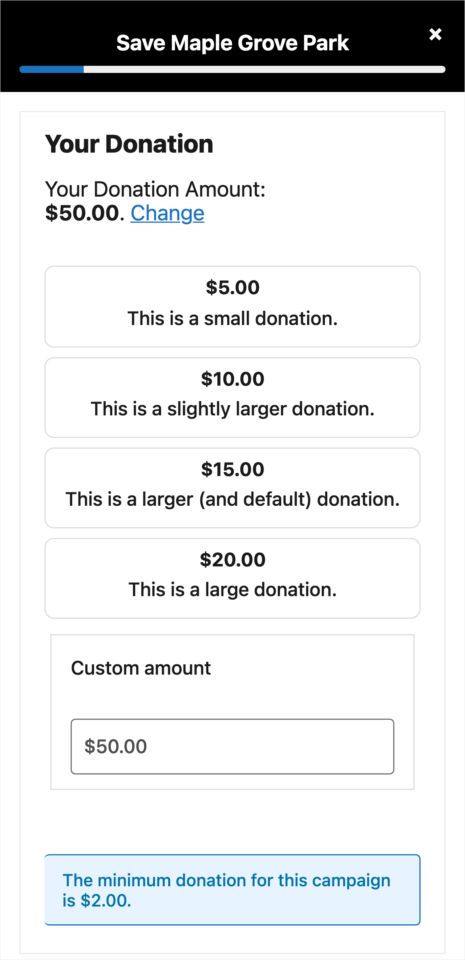
That tap opens the sheet. The campaign name and progress bar sit at the top, with the suggested amounts below them.
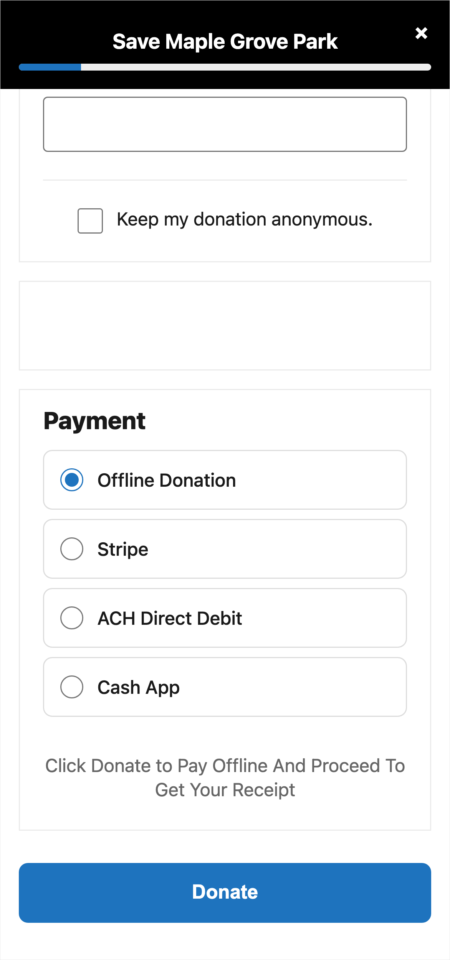
Further down, the donor fills in their details and picks a payment method. The Donate button uses your highlight color.
After the gift goes through, the receipt appears in the same sheet. This one is the Detailed receipt, with an itemized line for the campaign and the total.
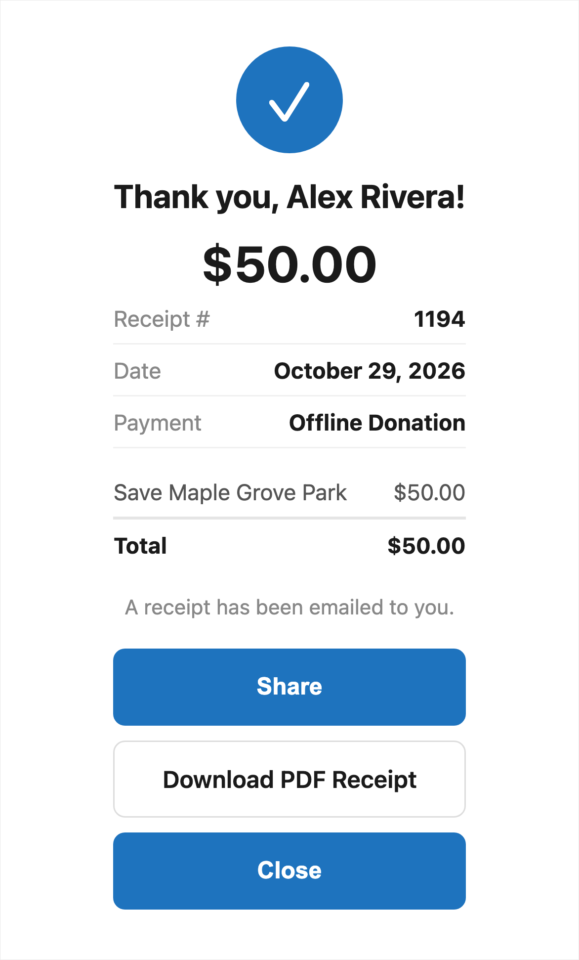
The donor never leaves your site. If you’d like more ideas for the page around the form, read our guide on how to build a donation page that converts.
Tips Worth Keeping in Mind
These points will help DonationExpress run smoothly on your site.
- DonationExpress shows the campaign’s real form, so your fields, suggested amounts and gateways appear in the sheet automatically. There is nothing to rebuild.
- If you use a caching or optimization plugin, exclude the
/charitable-give/path from caching. The sheet needs fresh security tokens every time it loads, the same as your normal donation and receipt pages. - Apple Pay and Google Pay work inside the sheet. Apple Pay still needs your domain verified with your payment gateway, the same as on the normal form.
- Turn it on before a big appeal, such as one of your Giving Tuesday ideas or an Instagram campaign, so every donor who arrives on a phone gets the clean form.
- DonationExpress is in Beta and off by default, so existing sites don’t change until you turn it on.
Troubleshooting DonationExpress
If something doesn’t look right, these are the usual causes.
The DonationExpress Sheet Doesn’t Open on My Phone
First, check that the DonationExpress setting isn’t set to Off. If it’s set to Modal Donate Buttons Only, forms placed directly on a page won’t use the sheet, so switch to All Donation Forms.
The sheet also only opens on screens 768 pixels wide or narrower. A large phone turned sideways can be wider than that, so test with the phone upright.
The DonationExpress Sheet Shows an Error or Won’t Submit
This is usually a caching plugin serving an old copy of the sheet. Exclude the /charitable-give/ path from caching, clear the cache, and try again.
Apple Pay Doesn’t Show in the DonationExpress Sheet
Apple Pay needs your domain verified with your payment gateway. If Apple Pay doesn’t show on your normal donation form either, finish the domain verification first.
The Make It Monthly or PDF Button Is Missing
These buttons only show when the matching feature is active. Make it monthly also only shows after a one-time gift, and it never shows on the Standard Receipt Page option.
DonationExpress Developer Reference
DonationExpress renders the campaign’s real donation form inside a bare, theme-free document served from a dedicated endpoint. A full-screen overlay on the parent page loads that document in an iframe. A small postMessage bridge keeps the parent and the frame in sync through the donation and receipt flow.
Where the DonationExpress Code Lives
| Piece | Location |
|---|---|
| Bootstrap | Charitable_Mobile (includes/mobile/class-charitable-mobile.php), started on init priority 9 |
| Helper functions | includes/mobile/charitable-mobile-functions.php |
| Settings and asset isolation | includes/mobile/charitable-mobile-hooks.php |
| Theme-free endpoint | Charitable_Mobile_Form_Endpoint (includes/endpoints/class-charitable-mobile-form-endpoint.php) |
| Templates | templates/mobile/form-mobile.php, templates/mobile/receipt-mobile.php |
| Assets | assets/css/charitable-mobile.css, assets/js/charitable-mobile-{sheet,bridge,receipt}.js |
DonationExpress Endpoints and URLs
The endpoint registers 2 rewrite rules and 2 query vars, and renders on template_redirect (priority 0).
| Purpose | Pretty permalinks | Plain permalinks |
|---|---|---|
| Donation form | /charitable-give/{campaign_id}/ | ?charitable_mobile_form={campaign_id} |
| In-sheet receipt | /charitable-give/receipt/{donation_id}/ | ?charitable_mobile_receipt={donation_id} |
The receipt document is access-controlled with charitable_user_can_access_donation(). A request for a donation the current visitor cannot access returns a 403.
DonationExpress Helper Functions
| Function | Returns |
|---|---|
charitable_mobile_get_mode() | The resolved mode, which is off, modal, or always. |
charitable_mobile_is_enabled() | Whether the sheet is enabled at all (false when mode is off). |
charitable_mobile_get_breakpoint() | The mobile breakpoint in pixels (768 by default). |
charitable_mobile_get_form_url( $campaign_id, $args ) | The theme-free form URL. $args accepts amount and period. |
charitable_mobile_get_receipt_url( $donation_id ) | The theme-free in-sheet receipt URL. |
charitable_mobile_get_brand_tokens( $campaign_id ) | array{ accent, logo, radius } resolved from Charitable settings. |
charitable_mobile_get_receipt_style( $campaign_id ) | The resolved receipt style, which is confetti, detailed, or redirect. |
DonationExpress Filters
| Filter | Default | Purpose |
|---|---|---|
charitable_mobile_mode | Saved setting | Force the mode in code, for example per page or per campaign. Return off, modal, or always. |
charitable_mobile_is_enabled | Derived from mode | Final on/off gate. Return false to disable the sheet regardless of the mode. |
charitable_mobile_form_breakpoint | 768 | The max-width breakpoint, in pixels, that counts as mobile. |
charitable_mobile_brand_tokens | Resolved tokens | Override the accent, logo, and radius used to style the sheet. |
charitable_mobile_asset_is_allowed | true for Charitable and gateway assets | Allow or exclude a specific style or script handle in the bare document. |
charitable_mobile_receipt_style | Saved setting | Vary the receipt style per campaign. Return confetti, detailed, or redirect. |
charitable_mobile_receipt_pdf_url | PDF Receipts URL or '' | Override the PDF button URL, or return '' to hide it. |
charitable_mobile_receipt_monthly_url | Monthly form URL or '' | Override the Make it monthly URL, or return '' to hide it. |
charitable_mobile_receipt_check_icon | Default checkmark markup | Swap the success icon shown on the receipt. |
DonationExpress Actions
| Action | Runs |
|---|---|
charitable_mobile_form_head | In the bare document’s <head>, where Charitable and gateway head assets are printed. |
charitable_mobile_form_footer | Before the bare document’s closing </body>, where footer scripts are printed. |
DonationExpress Admin Preview URL
?charitable_action=preview-mobile-form&campaign_id=NN redirects an administrator (manage_options) to the theme-free form URL for a campaign, so the sheet can be reviewed on any screen size.
Code Examples for Customizing DonationExpress
Add any of these snippets with a code snippets plugin or your child theme’s functions.php file.
Force DonationExpress On for a Single Landing Page
add_filter(
    'charitable_mobile_mode',
    function ( $mode ) {
        if ( is_page( 'give-now' ) ) {
            return 'always';
        }
        return $mode;
    }
);
Raise the DonationExpress Breakpoint for Small Tablets
add_filter( 'charitable_mobile_form_breakpoint', fn() => 900 );Override the DonationExpress Accent Color and Corner Radius
add_filter(
    'charitable_mobile_brand_tokens',
    function ( $tokens, $campaign_id ) {
        $tokens['accent'] = '#1e88e5';
        $tokens['radius'] = '4px';
        return $tokens;
    },
    10,
    2
);
Show the Detailed DonationExpress Receipt for One Campaign
This snippet shows the Detailed receipt for campaign 1234 and keeps the Celebration receipt everywhere else.
add_filter(
    'charitable_mobile_receipt_style',
    function ( $style, $campaign_id ) {
        return 1234 === (int) $campaign_id ? 'detailed' : $style;
    },
    10,
    2
);
Allow an Extra Script Into the DonationExpress Document
This snippet lets one extra script handle, such as a custom font loader, load inside the theme-free document.
add_filter(
    'charitable_mobile_asset_is_allowed',
    function ( $allowed, $handle ) {
        if ( 'my-font-loader' === $handle ) {
            return true;
        }
        return $allowed;
    },
    10,
    2
);
Wrapping Up
You now know how to turn on DonationExpress, choose which forms use it, style the sheet, pick the receipt donors see, and preview it all without a phone. Your mobile donors will get the same clean form on every phone, whatever theme you use.
If you get stuck on any step, our support team is happy to help.
You May Also Want to Read
These guides and blog posts cover the features that work alongside DonationExpress, and the campaigns where it helps most.
- Donation Form Templates. Learn how to change the look of the standard donation form that shows on tablets and desktops.
- PDF Receipts. Set up the PDF receipts behind the Download PDF Receipt button in the sheet.
- Recurring Donations. Turn on the monthly giving behind the Make it monthly button in the sheet.
- How to Enable Apple Pay and Google Pay With Stripe. Verify your domain so Apple Pay shows inside the sheet.
- How to Create a Donation Form. Build the campaign form that DonationExpress shows on phones, step by step.
- Facebook Ads for Nonprofits. Plan ads that send people to your campaign, where most clicks arrive on a phone.





