
Peer-to-peer fundraising runs on people. Yet in most tools, the person behind a campaign is invisible: a fundraiser is a single page that goes quiet the moment the campaign ends, with no lasting home for the human who ran it.
Creator Profiles, new in Charitable Ambassadors 3.3.0, changes that.
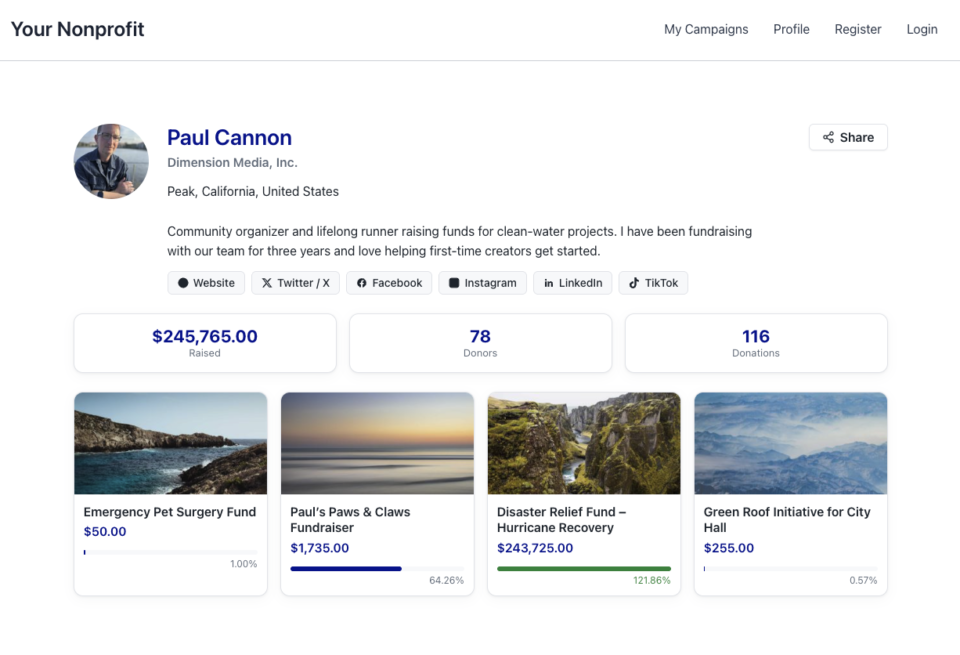
Every creator now gets a shareable public page that shows who they are, what they’ve raised, and every campaign they’ve run.
Here’s what that page looks like:
Why a Public Identity Changes Everything
Donors give to people they trust, which is exactly why social proof matters so much for nonprofits. When a supporter can click a name and land on a real profile with a photo, a bio, an organization, and a track record, that trust arrives instantly. A profile turns a one-time fundraiser into an ongoing relationship, and it gives your most active supporters a reason to come back and run their next campaign with you.
See It in Action
If you’d rather watch than read, here’s a quick look at everything below.
A Public Page at /creator/your-name/
Turn on one setting and every creator running a peer-to-peer fundraising campaign gets a clean public page at /creator/their-name/, served automatically with nothing to build.
The page opens with instant identity: an avatar, bio, organization, and social links, all in one place. Below that sits proof of impact, showing total raised, donor count, donations, and more, though you can hide any of those numbers if you’d rather keep them private. A campaigns grid follows, gathering every published campaign the creator has run into one browsable gallery. And a built-in Share button, with Copy Link, Share Via, and Email options plus an optional QR code, makes the page easy to share from anywhere a creator wants to post it.
Creators Control Their Own Story
A new Profile tab in the My Campaigns hub gives creators their own personalized space to shape how they show up, with no admin involvement and no code required.
Creators set their own name, bio, organization, website, and photo, and connect up to 6 social networks: Twitter/X, Facebook, Instagram, LinkedIn, YouTube, and TikTok. You control which sections and stats appear site-wide, so every profile stays on-brand no matter who is editing it. And if a creator ever needs a hand, an admin can still edit any profile directly from the Directory.
Recognizable on Every Fundraiser Page
Your creators don’t just live on their profile page. Their identity now travels with them.
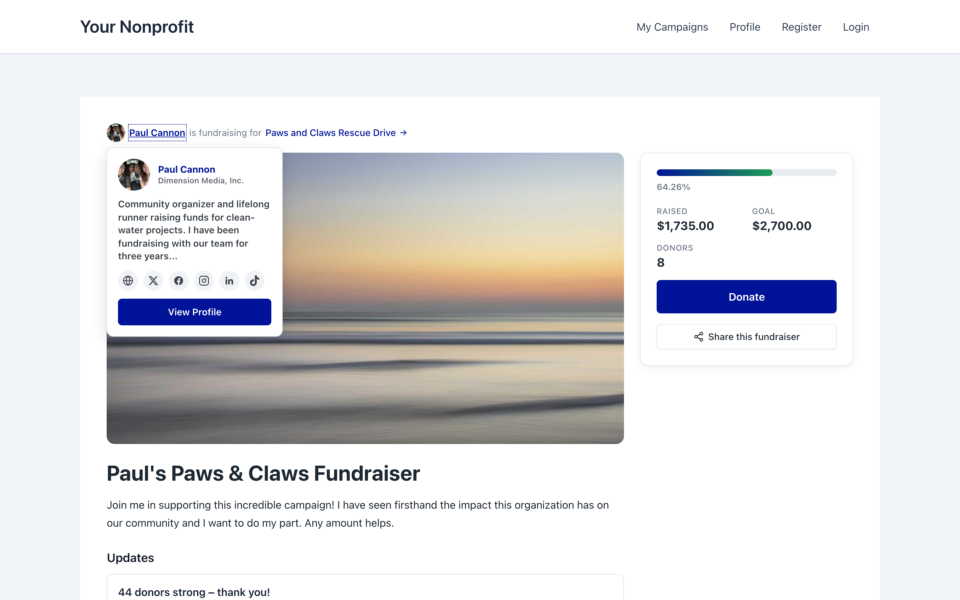
Trust is built in the seconds before someone decides to give, and that’s exactly where the new creator hover card does its work. On every fundraiser page, your creator’s name now carries a small avatar, so there’s a face to the name from the very first glance. Hover over that name, or focus it with the keyboard, and a compact card opens with their photo, organization, a short bio, their social links, and a one-click button to view their full public profile.
Because the card responds to keyboard focus and not just a mouse hover, it stays accessible to every visitor. Donors no longer have to wonder who’s behind a campaign. They see a real person with a real story, right at the moment of decision, which makes giving feel personal and safe instead of anonymous.
Location Sharing, Done Responsibly
Local supporters rally around local causes, so Creator Profiles can show where a creator is based, carefully. Only city, state, and country are ever collected or shown; a street address never enters the picture.
You choose the mode site-wide: keep location off entirely, hand control to each creator, or set it for everyone. In creator-controlled mode, each person decides exactly which parts of that information to reveal.
For Agencies and Developers
Hooks, Filters, and Full Customization
Creator Profiles is built to be extended. Dedicated filters let you change the /creator/ URL base, the name format, every display toggle, and the fundraiser-page avatar and hover card. For full control over layout, copy creator/profile-page.php into your theme at your-theme/charitable-pro/charitable-ambassadors/creator/profile-page.php.
Clean Integration Points
A charitable_ambassadors_creator_profile_saved action fires after every save, and the [charitable_creator_profile] shortcode embeds any creator’s profile anywhere you like.
FAQs on Creator Profiles
Does this require a specific Charitable plan?
Yes. Charitable Ambassadors requires the Pro plan or Elite, plus Charitable Pro 1.8.16 or later. Creator Profiles specifically needs Charitable Ambassadors 3.3.0.
Is a creator’s exact address ever shown?
No. Only city, state, and country are ever collected or displayed, and even those are optional.
Can I turn this off?
Yes. Leave “Enable Public Creator Page” off and no public pages or hover cards are created.
Get Started With Creator Profiles
Update to Charitable Ambassadors 3.3.0, then go to Charitable » Ambassadors » Templates » My Campaigns and turn on Enable Public Creator Page. Your creators get their profiles right away, and they can start personalizing from the My Campaigns hub.
Read the Creator Profiles Documentation →
Charitable Has 1.2+ Million Downloads!
Trusted by millions to power successful fundraising campaigns. Try Charitable risk-free today.
✅ 14-day money-back
✅ Transparent pricing
✅ Code-free setup
What’s New in Charitable
We also launched several features and improvements recently:
📝
Drop a fully working donation form directly onto any page or post in the block editor, no redirect required.
📱
Donors on mobile can check out instantly with Apple Pay or Google Pay through Mollie.
🤝
New moderation and directory screens let you manage every campaign creator and ambassador in one place.
⚡
Accept donations in India via UPI, QR codes, and major international currencies.
🔔
Built-in push notifications for donation thank-yous, campaign launches, and goal milestones.
🛡️
Real-time bot detection that flags attacks and blocks bad actors before they hit your donation forms.
We’ve been adding to Charitable constantly, features and improvements designed to help you raise more and serve your donors better. See everything we’ve shipped at the Charitable Changelog.
Not yet a Charitable Pro user? Sign up today and get up to 50% off on your plan. We’re confident you’ll love raising funds with Charitable. If, for any reason, Charitable is not the right fit for you, we’ll refund your purchase with our 14-day money-back guarantee. Get Charitable Pro Now »
If you have any questions or need a hand getting set up, our support team is ready to help you make the most of Creator Profiles.
Stay Connected for More Nonprofit Resources
For more tutorials and videos tailored to nonprofits, subscribe to our YouTube channel. We regularly publish expert tips, step-by-step guides on online donations, fundraising strategies, and practical resources to help your organization succeed.
🗞️ Get weekly tips and exclusive guides in your inbox
Join our newsletter →
🎥 Watch step-by-step tutorials and success stories
Subscribe to our YouTube channel →
👩🏽💻 Connect with our community and get daily nonprofit insights
Follow us on LinkedIn →
🥳 Fun reels and non-profit insights
Follow us on Instagram →
👀 Insightful & fun videos to help you grow your cause
Follow us on TikTok→
🌎 Subscribe and follow for general fundraiser tips
Get Fundraiser Tips on TikTok →
Powerful Fundraising Resources
🤖 Use Charitable with Your AI Assistant
⬇️ Download proven strategies, campaign ideas, and expert tools
Get the Fundraising Kit →
💸 Get Free Fundraising Resources
Head to the Charitable Fundraising Hub →
🤔 Got questions about Charitable?
Charitable FAQs →
🏎️ Take Charitable for a spin
Create your Charitable Demo →
Understand non-profit terms and jargon
Non-Profit Glossary →
% Looking for non-profit deals and discounts?
Best Non-Profit Deals and Discounts →







Leave a Reply