
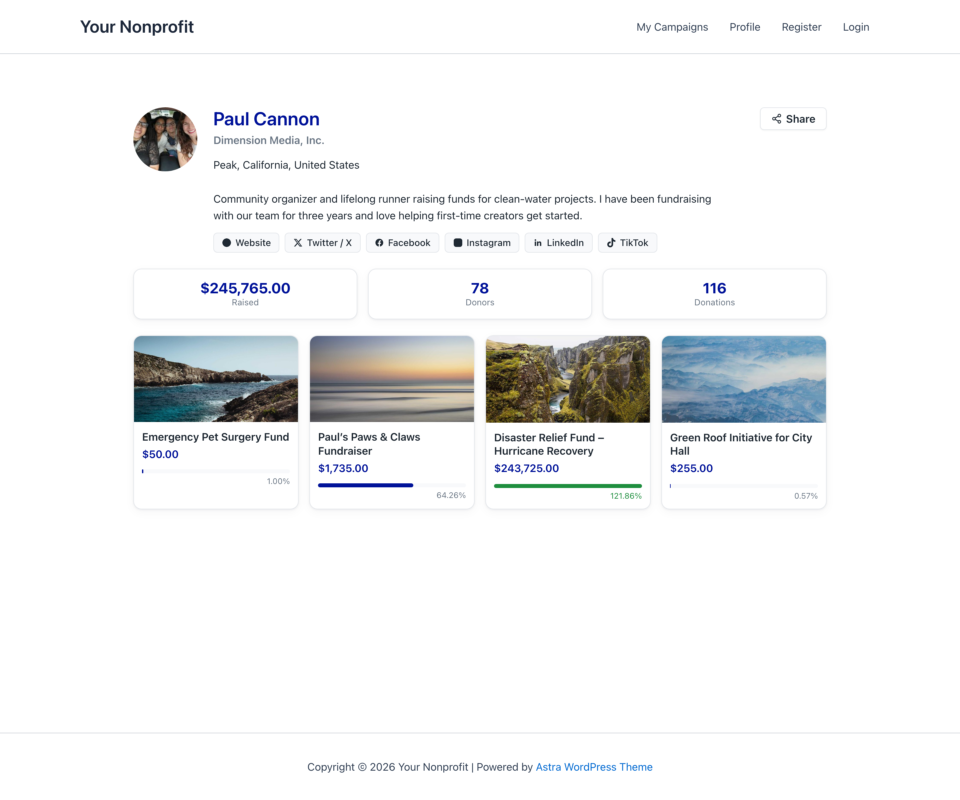
Creator Profiles give every campaign creator and fundraiser a shareable public page at /creator/your-name/, showing their avatar, bio, organization, social links, campaigns, and headline totals. Creators manage their own profile from the My Campaigns hub, and their identity now travels with them onto every fundraiser page.
Available in Charitable Ambassadors 3.3.0+ (requires Charitable Pro 1.8.16 or later).
Key Features
- Publish a public profile page for each creator at
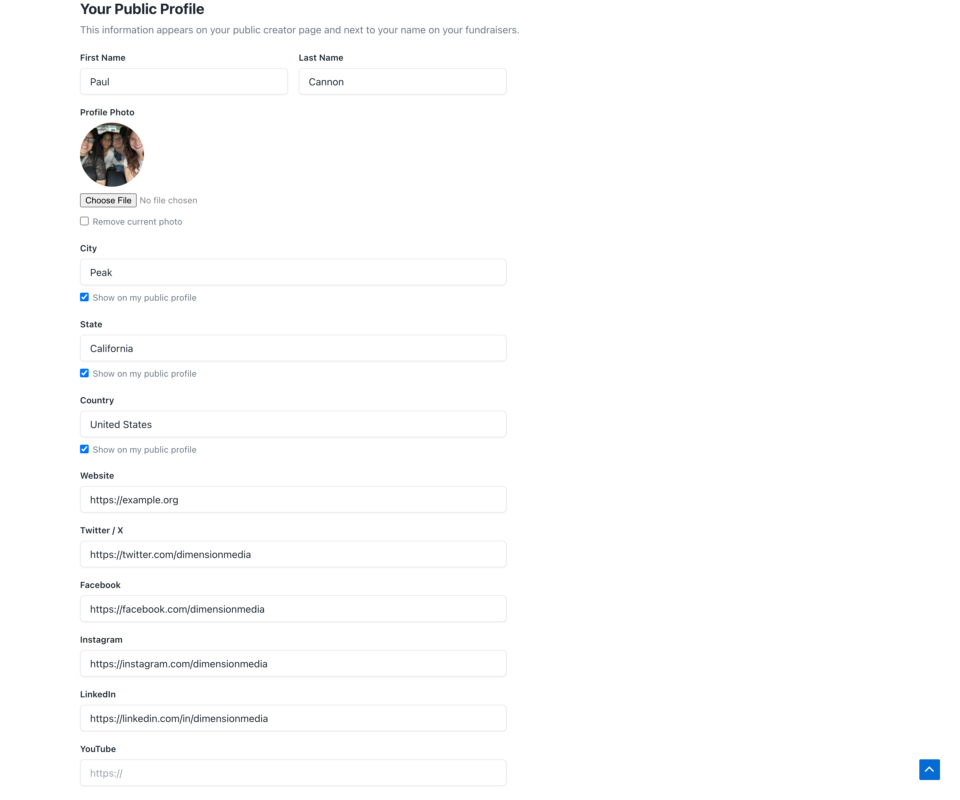
/creator/<name>/, served automatically with no page to build. - Let creators edit their own profile from a new Profile tab in the My Campaigns hub: name, bio, organization, website, six social networks, photo, and location.
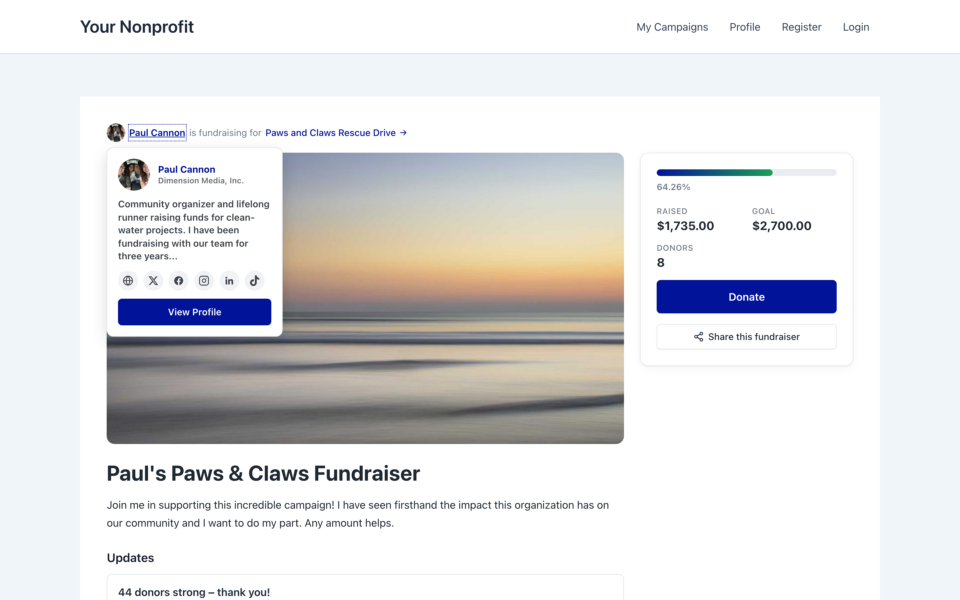
- Show a creator’s avatar and an accessible hover card (bio, organization, social links, and a link to their public profile) next to their name on every fundraiser page.
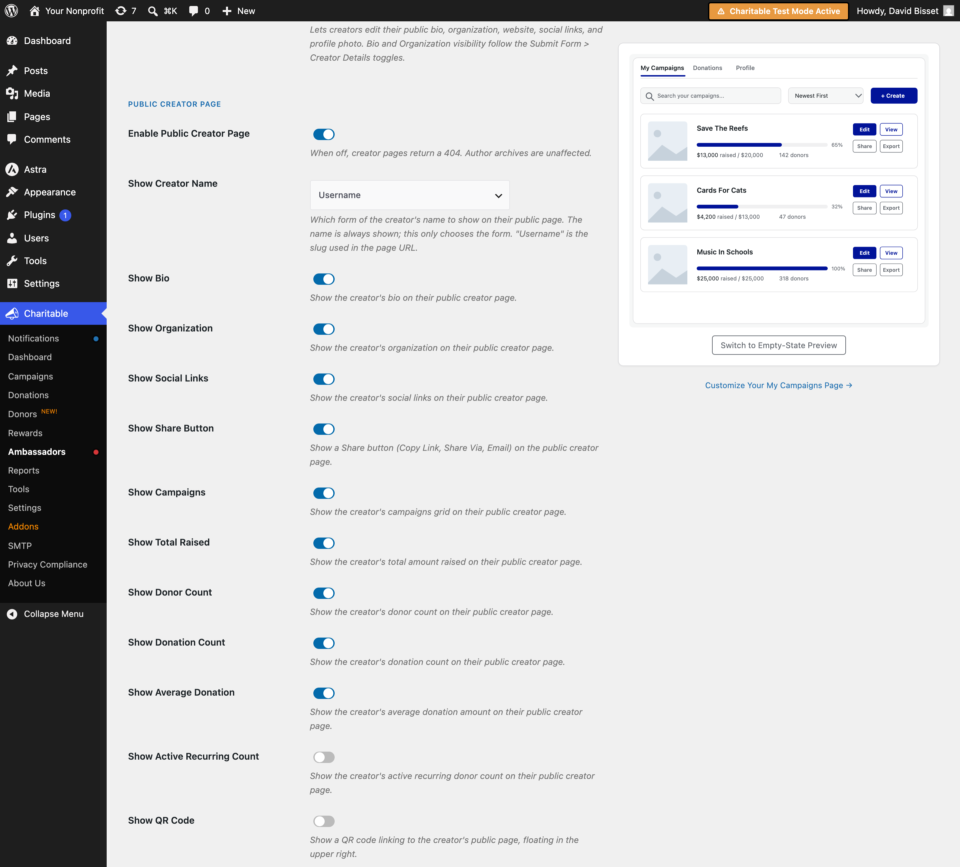
- Choose exactly which stats and sections appear on the public page, from bio and social links down to total raised, donor count, and an optional QR code.
- Control location sharing responsibly: city, state, and country only, never a street address, with Disabled, creator-controlled, and forced modes.
- Add a Share button (Copy Link, Share Via, Email) so creators can promote their profile in one click.
- Embed any creator’s profile anywhere with the
[charitable_creator_profile]shortcode.
Why Use Creator Profiles?
A fundraiser is often a one-time page with no lasting home for the person behind it. Creator Profiles give your most active supporters a recognizable identity across your site, so donors can see who they are supporting, browse their campaigns, and trust the person asking. That recognition builds credibility, encourages repeat fundraising, and turns individual campaigns into an ongoing relationship.
See It In Action
Requirements
- Charitable Ambassadors 3.3.0 or later
- Charitable Pro 1.8.16 or later
- WordPress 5.0 or later, PHP 7.4 or later
- Pretty permalinks enabled (Settings > Permalinks set to anything other than Plain), since the public page uses a rewrite rule
Getting Started
Activation
- In WordPress admin, go to Charitable > Ambassadors > Templates > My Campaigns.
- Find the Public Creator Page section and turn on Enable Public Creator Page.
- Save your settings. Each creator’s page is now live at
/creator/<their-username>/.
When the setting is off, creator pages return a 404 and no profile content is exposed. Author archives are unaffected either way.
If pages return a 404 after enabling the feature, visit Settings > Permalinks once and save to flush the rewrite rules.
How Creators Edit Their Profile
Creators manage their own profile from the Profile tab inside the My Campaigns hub (the page that hosts the [charitable_my_campaigns] shortcode). From there a logged-in creator can set:
- First and last name (used to build the display name)
- Bio
- Organization
- Website plus Twitter / X, Facebook, Instagram, LinkedIn, YouTube, and TikTok
- Profile photo
- City, state, and country, and which of those to share (when location sharing is creator-controlled)
Administrators can edit the same profile fields for any creator from the Directory.
The Public Creator Page
The page is served automatically at /creator/<name>/, where <name> is the creator’s WordPress user slug. The default creator base can be changed with a filter (see Developer Resources). The page can include the creator’s avatar, chosen name format, bio, organization, social links, a Share button, an optional QR code, a grid of their published campaigns, and headline totals.
Only published campaigns are counted and shown. Private, draft, pending, and rejected campaigns never appear.
Fundraiser Page Enrichment
On every fundraiser page, the creator’s name is enriched with a small avatar and an accessible hover and focus card. The card shows the creator’s bio, organization, and social links, plus a link to their full public profile. This is on by default and can be tuned or disabled with filters.
Location Sharing
Location sharing is limited to city, state, and country. A street address is never collected or shown. You control it site-wide with two settings:
- Location Sharing Mode decides whether location is off, creator-controlled, or forced on.
- Allow decides which parts (city, state, country) are eligible at all. An unchecked part is never shown, even in forced mode.
In creator-controlled mode, each creator opts in to the parts they want to show from their Profile tab.
Usage
Shortcode
Use the shortcode to embed a creator profile on any page or post:
[charitable_creator_profile user_id="12"]
or
[charitable_creator_profile nicename="jane-doe"]
With no attributes, the shortcode resolves the creator for the current /creator/<name>/ request, which is how the automatic page renders.
Shortcode Parameters
| Parameter | Type | Default | Description |
|---|---|---|---|
| user_id | integer | 0 | The WordPress user ID of the creator to display. Takes priority over nicename. |
| nicename | string | “” | The creator’s user slug (nicename). Used when user_id is not supplied. |
Configuration Options
All settings below live under Charitable > Ambassadors > Templates > My Campaigns.
Public Creator Page Display
| Setting | Type | Default | Description |
|---|---|---|---|
| Enable Public Creator Page | checkbox | Off | Master switch. When off, creator pages return a 404. |
| Show Creator Name | select | First & Last Name | Which form of the name to show: First Name Only, Last Name Only, First & Last Name, or Username. The name is always shown; this only chooses the form. |
| Show Bio | checkbox | On | Show the creator’s bio. |
| Show Organization | checkbox | On | Show the creator’s organization. |
| Show Social Links | checkbox | On | Show the creator’s social links. |
| Show Share Button | checkbox | On | Show a Share button (Copy Link, Share Via, Email). |
| Show Campaigns | checkbox | On | Show the creator’s campaigns grid. |
| Show Total Raised | checkbox | On | Show the creator’s total amount raised. |
| Show Donor Count | checkbox | On | Show the creator’s donor count. |
| Show Donation Count | checkbox | On | Show the creator’s donation count. |
| Show Average Donation | checkbox | Off | Show the creator’s average donation amount. |
| Show Active Recurring Count | checkbox | Off | Show the creator’s active recurring donor count. |
| Show QR Code | checkbox | Off | Show a QR code linking to the creator’s public page, floating in the upper right. |
Location Sharing
| Setting | Type | Default | Description |
|---|---|---|---|
| Location Sharing Mode | select | Disabled | Disabled (never show location), Allow Creator To Control, or Force (creator cannot change). |
| Allow | multi-checkbox | none | Which parts creators can share: City, State, Country. Unchecked items are never shown, even in force mode. |
Customization
Template Override
Copy the profile template into your theme to customize the public page layout:
yourtheme/charitable/charitable-ambassadors/creator/profile-page.php
Filters and Functions
Every display toggle, the URL base, the name format, and the fundraiser-page treatment can be adjusted in code. See Developer Resources below.
Troubleshooting
Creator pages return a 404
Confirm Enable Public Creator Page is on. Then visit Settings > Permalinks and save once to flush the rewrite rules. Also confirm the creator has at least one published campaign, since a profile with nothing published does not resolve.
A creator’s location is not showing
Location Sharing Mode must be set to Allow Creator To Control or Force, and the relevant part (city, state, or country) must be checked under Allow. In creator-controlled mode, the creator also has to opt in to that part from their Profile tab.
Social links are not appearing
Confirm Show Social Links is on and that the creator has entered at least one link in the Profile tab.
The profile photo is not updating
The public page uses the creator’s uploaded profile photo (the avatar user meta). The uploaded image must belong to that creator’s own media. If no photo is set, the site falls back to the standard avatar.
Developer Resources
Hooks and Filters
charitable_ambassadors_creator_slug— Filters the URL base for creator pages. Defaultcreator.charitable_ambassadors_creator_url— Filters the full public profile URL for a creator.charitable_ambassadors_creator_name_format— Filters the resolved name format (first,last,full,username).charitable_ambassadors_creator_page_enabled— Filters whether the public page is enabled.charitable_ambassadors_creator_page_show_{key}— Per-section visibility, where{key}isbio,org,social,share,campaigns,raised,donors,donations,avg,recurring, orqr.charitable_ambassadors_creator_location_mode— Filters the location sharing mode.charitable_ambassadors_creator_location_allow_{part}— Per-part location allowance, where{part}iscity,state, orcountry.charitable_ambassadors_creator_social_fields— Adds or removes editable social fields.charitable_ambassadors_creator_avatar_meta_key— Filters the user meta key used for the profile photo. Defaultavatar.charitable_ambassadors_creator_treatment— Enables or disables the creator avatar and hover card on fundraiser pages.charitable_ambassadors_creator_inline_avatar— Toggles the inline avatar next to the creator’s name on fundraiser pages.charitable_ambassadors_creator_tooltip— Toggles the hover and focus card on fundraiser pages.charitable_ambassadors_creator_tooltip_show_{key}— Per-item visibility inside the hover card.charitable_ambassadors_directory_creator_profile_tabs— Filters the tabs shown on the admin Directory creator profile.charitable_ambassadors_creator_profile_saved— Action that fires after a creator profile is saved. Receives the user ID and the saved data array.
Useful Functions
charitable_ambassadors_get_creator_slug()— Returns the sanitized URL base for creator pages.charitable_ambassadors_get_creator_url( $user_id )— Returns the public profile URL for a creator.charitable_ambassadors_creator_public_name( $creator )— Returns the creator’s display name in the configured format.charitable_ambassadors_creator_page_enabled()— Returns whether the public page is enabled.charitable_ambassadors_creator_location_mode()— Returns the current location sharing mode.charitable_ambassadors_creator_location_allows( $part )— Returns whether a location part is allowed.charitable_ambassadors_creator_social_fields()— Returns the editable social field definitions.
Helpful Links
🤝 Get help when you need it
Connect with Customer Support →
📑 Find the guide you need
Browse the Documentation Hub →
⬇️ Download proven strategies, campaign ideas, and expert tools
🔗 Let your AI Assistant do the fundraising work for you.
Connect Charitable to your AI assistant →
💸 Get Free Fundraising Resources
Head to the Charitable Fundraising Hub →
🤔 Got questions about Charitable?
Charitable FAQs →
Need help understanding non-profit terms and jargon?
See our Non-Profit Glossary →





