
Requires:
- Charitable Pro 1.8.16+
- Charitable Tributes 1.0.0+
A tribute gift means more when the family knows about it, and when the donor’s receipt reflects who their gift honored. Tributes handles both: it can notify a loved one automatically, send a periodic summary to family contacts, and add a tribute section to receipts.
All of the wording is yours to control, set once in Charitable > Tributes > Settings.
The tribute notification e-card
When a donor chooses to notify a loved one and confirms consent, Tributes sends a notification when the gift completes. It shares that a gift was made, who it was from, and the personal message.
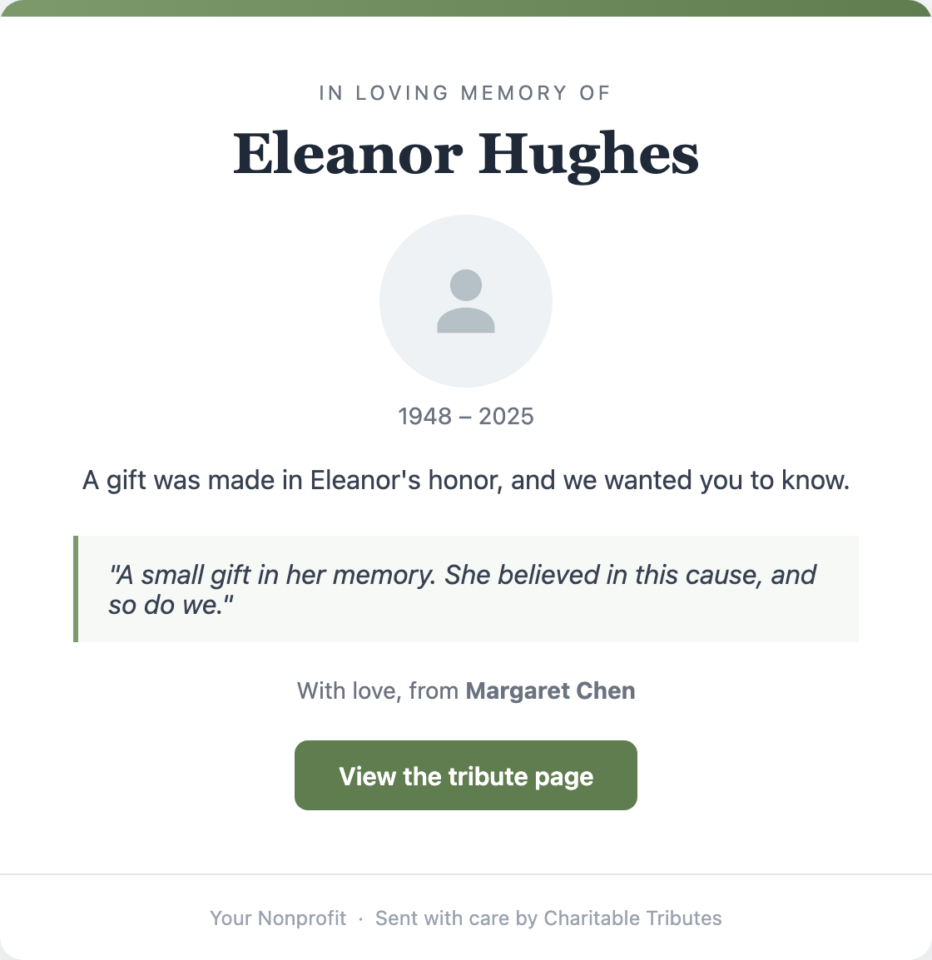
There are two formats:
- The standard notification, a clean text-and-branding email.
- The e-card, a richer format with the honoree photo, a styled border, an accent color, and your attribution line. The donor opts into the e-card on the form; otherwise the standard notification is sent. Only one of the two is ever sent per gift.
Wording you control, per tribute type
Memorial gifts should read with care, and celebration gifts should feel joyful. So the subject, headline, eyebrow, and closing can all be set per tribute type, in Settings > E-card.
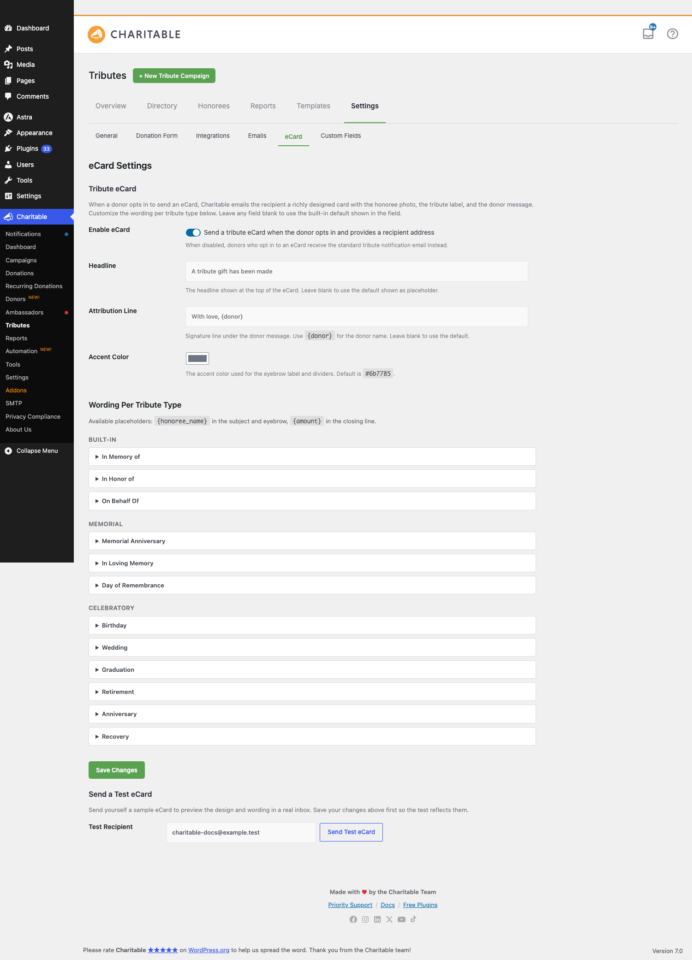
- Set a different subject line for “In Memory Of,” “In Honor Of,” and “On Behalf Of.”
- Choose an accent color to match the tone.
- Use the Send Test E-card button to preview exactly what a recipient receives before any donor triggers one.
The standard notification’s from-name, from-email, subject, and body live in Settings > Emails, also with per-tribute-type wording.
Resending and consent
The notification is always gated on consent. If the donor did not confirm they have permission to contact the recipient, nothing is sent, even if an email was entered. You can resend a notification at any time from the Tribute Donations report, and use the test-send to check your wording.
The family digest
For honorees with family contacts who have opted in, Tributes can send a periodic family digest, a summary of the gifts made in their loved one’s name over a period.
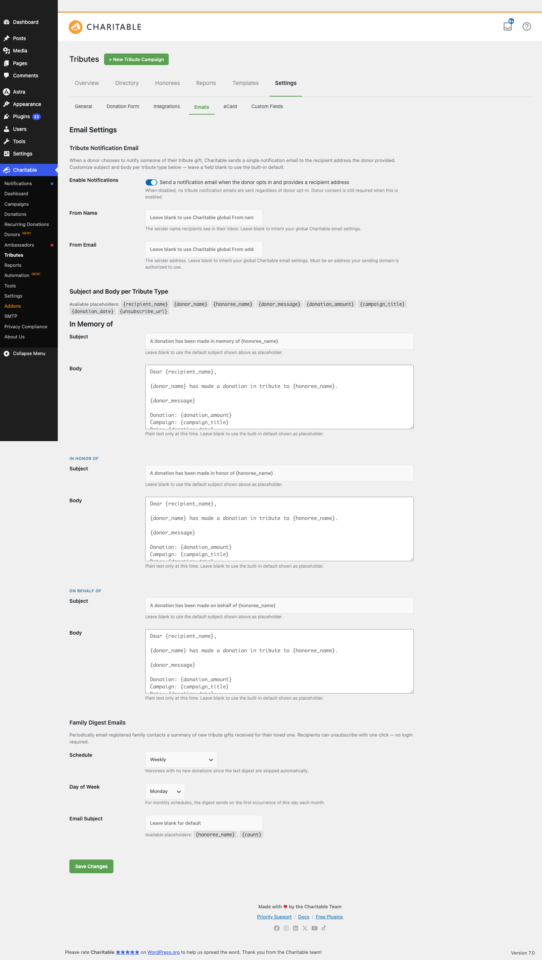
In Settings > Emails, choose the schedule:
- Off (the default), Weekly, Biweekly, or Monthly.
- The day of the week the digest goes out.
- The subject line.
The digest contents respect privacy choices, so anonymous and family-only gifts are summarized appropriately. Each digest includes a one-click unsubscribe link, and a contact only receives it if you opted them in on the honoree record.
Tribute sections on receipts
Tribute details flow straight into the donor’s receipt, so their record reflects exactly who their gift honored.
- The donation receipt email includes a tribute section with the honoree’s name, the tribute type, and the personal message.
- If you use the PDF Receipts addon, the generated PDF includes a matching, formatted tribute section.
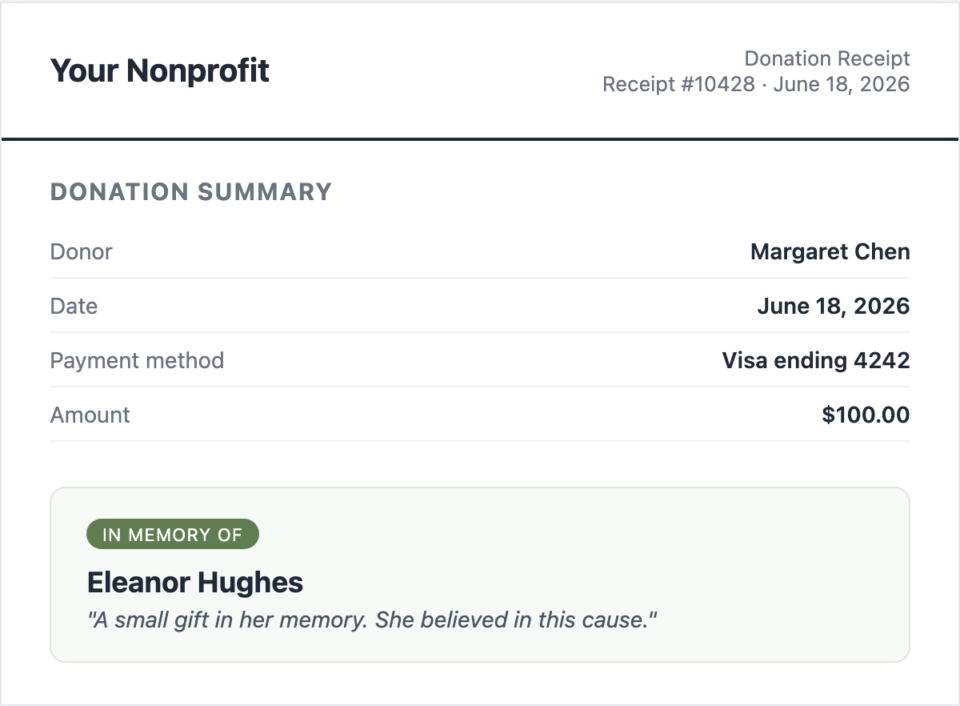
Privacy is respected throughout. Anonymous and family-only choices are honored on the receipt just as they are everywhere else.
Email tags
Your tribute emails and receipt sections can use merge tags alongside Charitable’s standard tags:
{honoree_name}– the person being honored.{tribute_type}and{tribute_label}– the dedication, as a slug and as a readable label.- Standard Charitable tags such as
{donor_name},{donation_amount}, and{campaign_name}. - Custom field tags for any honoree or tribute custom fields you defined.
Tips
- Use Send Test E-card after editing your wording. It is the fastest way to catch a typo before a real family sees it.
- If notifications are not sending, check three things: the recipient email is valid, the donor confirmed consent, and your site can send email. Tributes uses Charitable’s email system, so an SMTP plugin is strongly recommended for reliable delivery.
- The family digest is off by default. Turn it on only when you have family contacts who have opted in.
Developer reference
Email classes and IDs
Tributes registers its emails into Charitable’s email system, so they inherit the send-with-donation-id pipeline and the admin settings UI.
| ID | Trigger | |
|---|---|---|
| Tribute notification | tribute_notification | Donation completion, when a recipient and consent are present and the e-card is not chosen. |
| Tribute e-card | tribute_ecard | Donation completion, when the donor opted into the e-card. Replaces the notification. |
| Family digest | (scheduled) | An Action Scheduler sweep on the configured schedule. |
Send gating filters
Both sends pass through filters and the global unsubscribe list, so you can suppress a send programmatically:
// Block the standard tribute notification for a specific donation.
add_filter( 'charitable_send_tribute_notification', function ( $send, $donation_id ) {
    return $send;
}, 10, 2 );

// Block the e-card.
add_filter( 'charitable_send_tribute_ecard', function ( $send, $donation_id ) {
    return $send;
}, 10, 2 );
Receipt band filters
The tribute section on the receipt email is controlled by these filters:
| Filter | Default | Purpose |
|---|---|---|
charitable_tributes_receipt_email_enabled | true | Show the tribute section on the receipt email. |
charitable_tributes_receipt_email_show_photo | true | Include the honoree photo. |
charitable_tributes_receipt_email_show_message | true | Include the donor’s message. |
charitable_tributes_receipt_email_show_ecard | true | Reflect the e-card styling. |
charitable_tributes_receipt_email_show_tribute_link | true | Link to the tribute page. |
Templates
Override these in your theme using Charitable’s template loader:
templates/emails/tribute-notification.php(and-plain.php)templates/emails/tribute-ecard.phptemplates/emails/family-digest.php(and-plain.php)
The unsubscribe token lifetime is filterable via charitable_tributes_unsubscribe_token_max_age (default 30 days). See the Developer Reference for the PDF Receipts integration hook.
Related
- The Tribute Donation Experience: What Donors See
- How to Create a Tribute Campaign in Charitable
- Tributes Pages and Blocks
- Honoree Records and the CRM
- Settings, Integrations, and Developer Reference
- Charitable Tributes Guide
Helpful Links
🤝 Get help when you need it
Connect with Customer Support →
📑 Find the guide you need
Browse the Documentation Hub →
⬇️ Download proven strategies, campaign ideas, and expert tools
🔗 Let your AI Assistant do the fundraising work for you.
Connect Charitable to your AI assistant →
💸 Get Free Fundraising Resources
Head to the Charitable Fundraising Hub →
🤔 Got questions about Charitable?
Charitable FAQs →
Need help understanding non-profit terms and jargon?
See our Non-Profit Glossary →




