
Requires:
- Charitable Pro 1.8.16+
- Charitable Tributes 1.0.0+
There are two ways to collect tribute gifts, and they suit different moments.
- Run the setup wizard to create a dedicated tribute campaign with its own shareable page. This is the right choice when a family asks for gifts “in lieu of flowers,” or when you want a single page focused on one honoree.
- Turn on the tribute option for a campaign you already have. This is the right choice when you want any donor to be able to dedicate their gift on a general donation form, without creating a separate page.
This guide covers both.
Here’s a sample of a Tribute page:
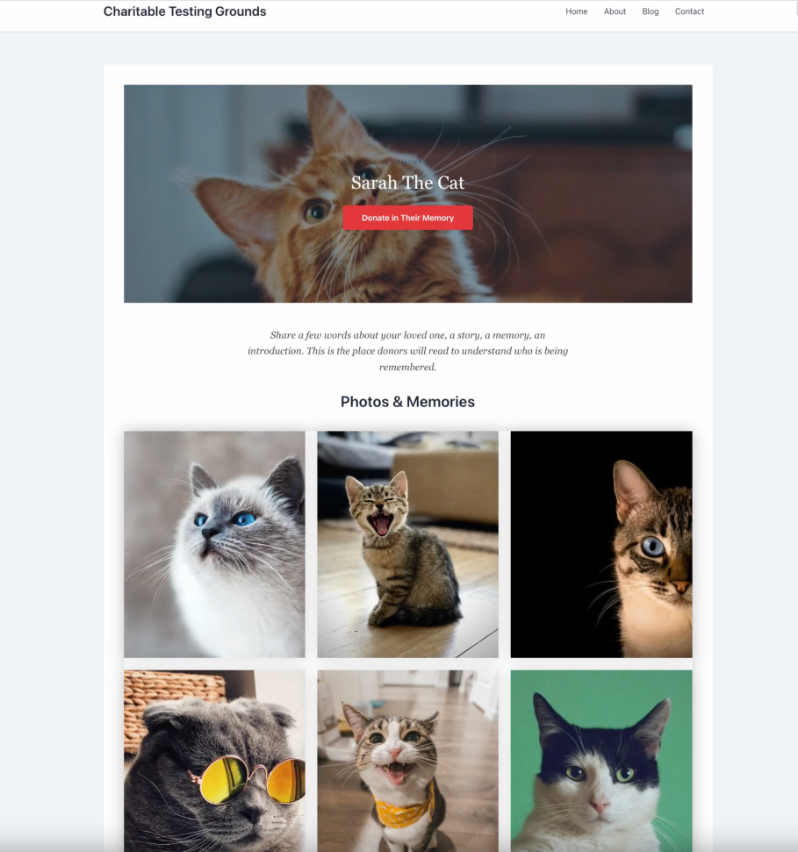
For more on Tributes, see our Charitable Tributes Guide.
Launching a tribute campaign with the wizard
When a family asks for memorial gifts, speed matters. The setup wizard walks you from a starting template to a live, shareable tribute page in well under 2 minutes. From anywhere in the Tributes area, click New Tribute Campaign at the top of the page to open it.
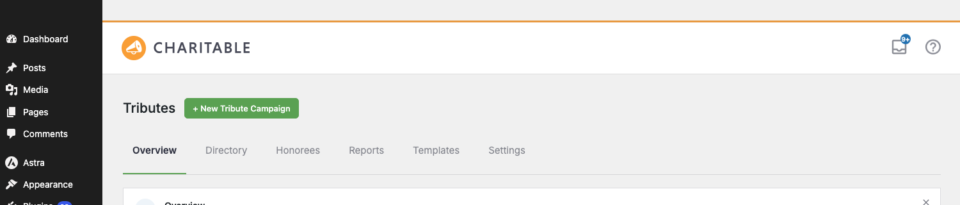
The wizard has five steps, shown as “Step 1 of 5” along the top so you always know how far you are.
Step 1: Pick a template
Templates are pre-built starting points, grouped into categories so you can find the right tone quickly.
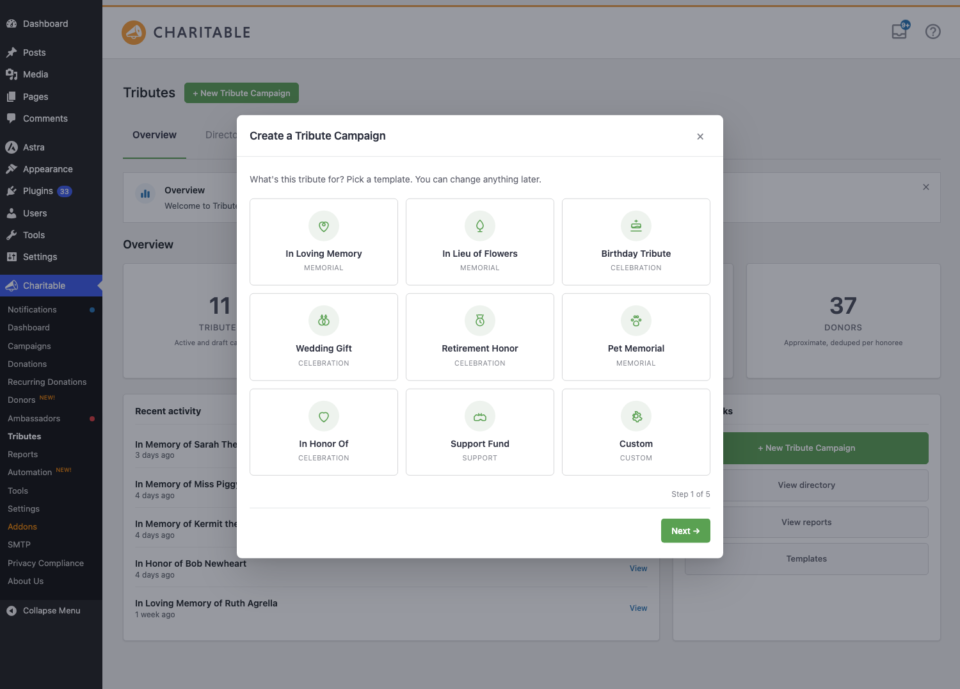
- Memorial – In Loving Memory, In Lieu of Flowers, and a Memorial Anniversary.
- Celebration – Birthday Tribute, Anniversary Tribute, Wedding Gift, and New Baby.
- Support – a Recovery or Support Fund.
- Custom – start from a blank tribute and build it your own way.
The template you pick sets the default tribute type, the wording, and which honoree details the next step asks for. You can change everything later in the block editor.
Step 2: Who is this for?
This step is where you name the honoree and add a few details about them.
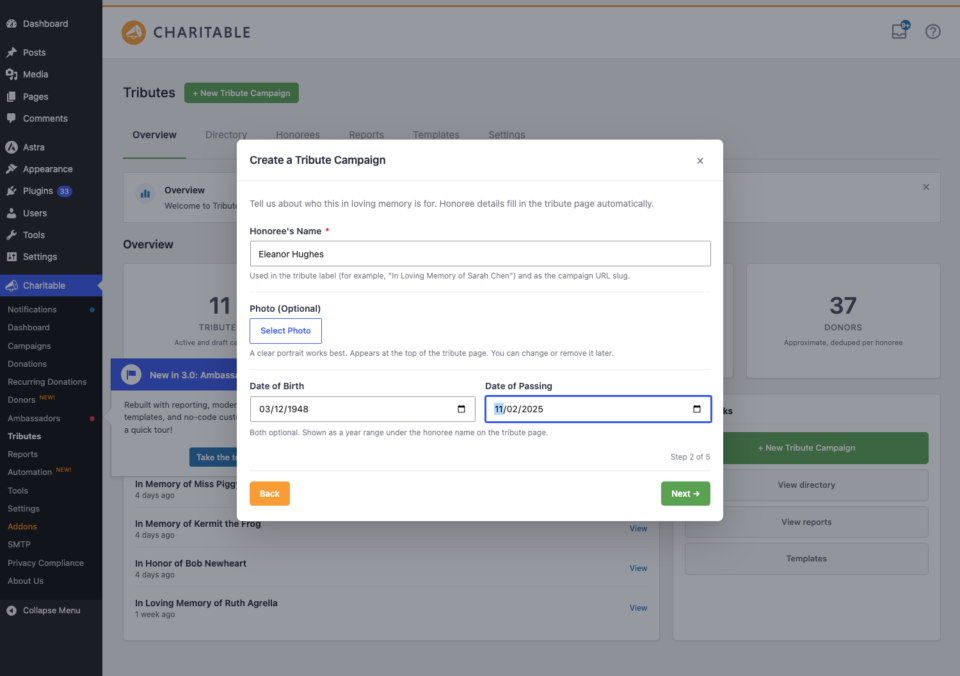
- Honoree name (required) – the person, pet, or cause being honored.
- Dates – depending on the template, you may be asked for a date of birth and a date of passing. These power the date range on the Honoree Card block and can anchor annual giving.
- Photo – click to choose an image from your media library.
If the template you picked is a support fund created with the honoree’s knowledge, you will also see a consent checkbox to confirm they agreed to be featured.
Step 3: How should donors share?
Here you decide how donors interact with the page.
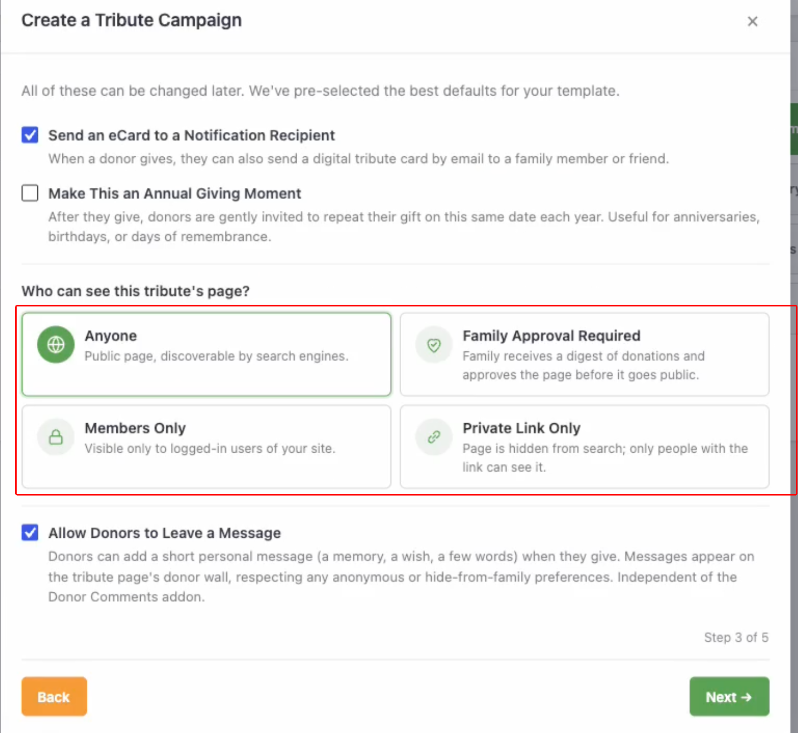
- Enable e-card to the notification recipient – let donors notify a loved one that a gift was made.
- Enable annual recurring opt-in – let donors turn a one-time gift into an annual tribute. Requires the Recurring Donations addon to actually charge renewals.
- Privacy level – choose how visible the tribute is: public, family approval required, members only, or private link only.
- Enable donor messages – let donors leave a personal message on the gift.
Step 4: Where does the money go?
Every tribute campaign needs a destination for the funds.
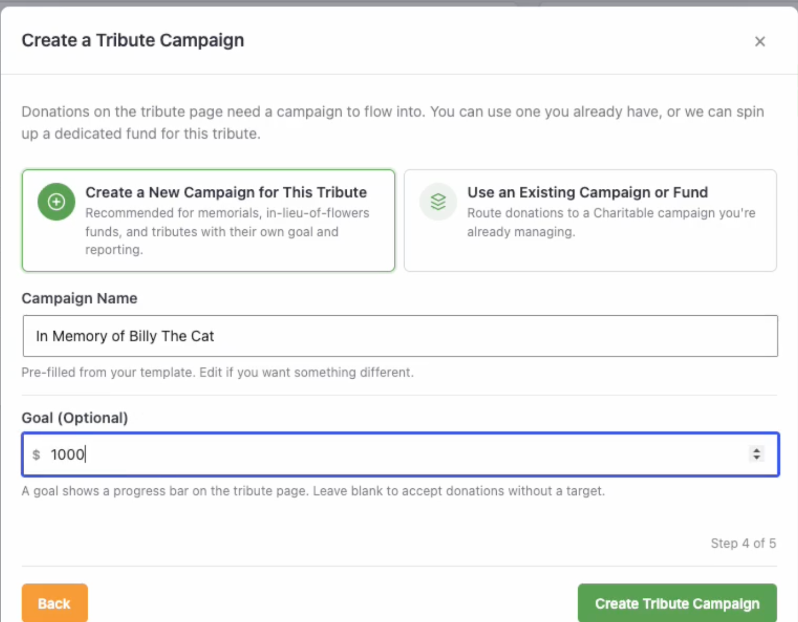
- Create a new campaign (fund) – Tributes creates a Charitable campaign behind the scenes and points the tribute page at it. You can give it a name and an optional goal amount.
- Use an existing campaign – point the tribute at one of your current campaigns from the dropdown, so the gifts roll into a fund you already run.
Step 5: Done
The final step gives you everything you need to go live.
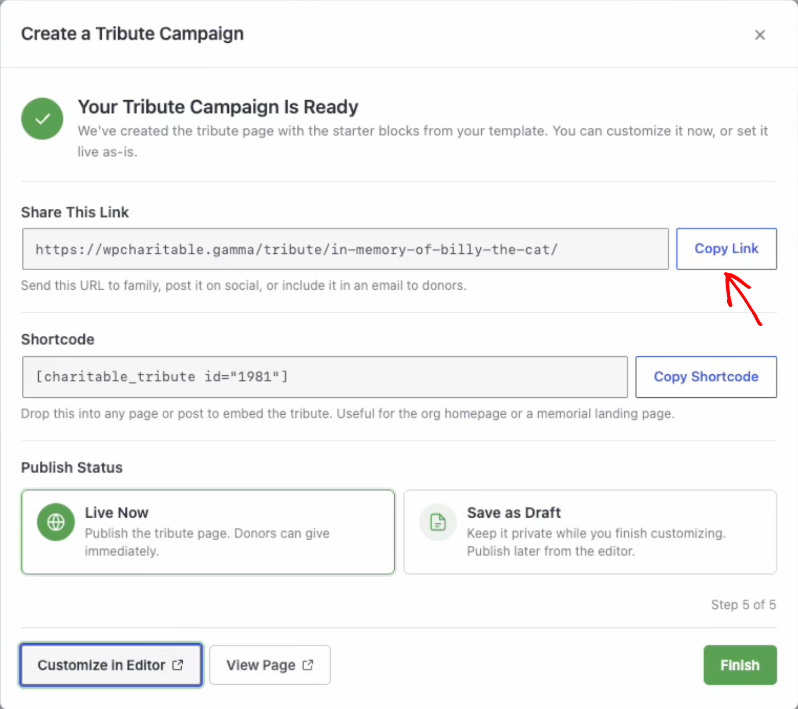
- Choose to Publish the page now or Save as Draft to finish it later.
- Click Customize in editor to open the tribute page in the block editor, where the 6 tribute blocks are ready to use.
- Copy the share link to send to the family, or the shortcode to embed the tribute somewhere else on your site.
That is it. Your honoree record and tribute page now exist, and any gift made to the page links to the honoree automatically.
Adding the tribute option to an existing campaign
You do not need a dedicated page to accept tributes. You can turn the tribute option on for any campaign, and donors will see it on that form. Gifts that include a tribute still create and link honoree records, exactly like the wizard-built pages.
- Edit the campaign in the Campaign Builder.
- Open the Settings area and find the Tributes panel.
- Turn on Enable tributes for this campaign and save.
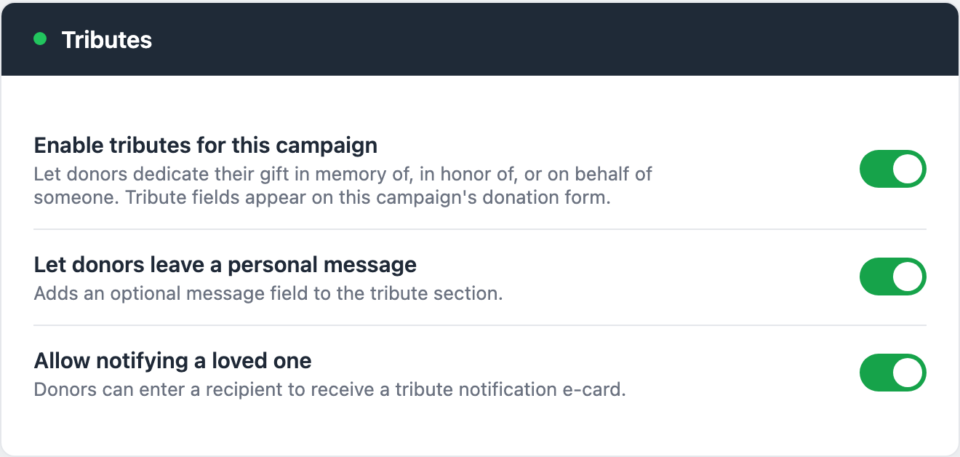
Now, when a donor gives to that campaign, they can choose to dedicate their gift. Nothing changes for donors who just want to give normally; the tribute fields only appear when a donor opts in. For exactly what the donor sees, read The Tribute Donation Experience.
Choosing how the tribute fields appear
In Tributes » Settings » Donation Form you can choose the form pattern that controls where the tribute fields sit on the form:
- Blocks inline – the tribute option appears in the same section of the form as the donation amount.
- Blocks step – the tribute option appears on its own step in a multi-step form.
You can also customize the donor context line, the short bit of helper text shown above the tribute fields, so it speaks in your organization’s voice.
Tips
- Use the wizard for one-honoree pages and the campaign option for “any gift can be a tribute” forms. Many organizations use both.
- A wizard-built tribute campaign always links its gifts to its honoree, even if the donor does not re-enter the honoree name. The honoree and tribute type are properties of the page, so every gift counts.
- You can run the wizard as many times as you like. Each run creates one tribute page and one honoree record.
Developer reference
Wizard AJAX endpoints
The wizard is a modal driven by wp_ajax_ endpoints. All require a nonce and the manage_charitable_settings capability.
| Action | Purpose |
|---|---|
charitable_tributes_wizard_open | Initialize a wizard session. |
charitable_tributes_wizard_step | Render and handle a single step. |
charitable_tributes_wizard_set_campaign_status | Toggle the new campaign between publish and draft. |
charitable_tributes_wizard_discard | Discard an in-progress wizard session. |
Registering a custom template
Templates are filterable, so you can add your own starting points to the picker.
add_filter( 'charitable_tributes_templates', function ( $templates ) {
    $templates['scholarship-fund'] = array(
        'label'        => __( 'Memorial Scholarship', 'your-textdomain' ),
        'category'     => 'memorial',
        'tribute_type' => 'in-memory-of',
    );
    return $templates;
} );
See the Developer Reference for the full template array shape.
Campaign meta
When the tribute option is enabled on a campaign, Tributes stores _campaign_tribute_enabled on the campaign post. Wizard-built fund campaigns also carry _charitable_tributes_managed_fund, which is how a gift to that fund is automatically associated with the campaign’s honoree at completion.
Related
- Tributes Pages and Blocks
- Charitable Tributes Emails, E-cards, and Receipts
- Honoree Records and the CRM
- Settings, Integrations, and Developer Reference
- Charitable Tributes Guide
Helpful Links
🤝 Get help when you need it
Connect with Customer Support →
📑 Find the guide you need
Browse the Documentation Hub →
⬇️ Download proven strategies, campaign ideas, and expert tools
🔗 Let your AI Assistant do the fundraising work for you.
Connect Charitable to your AI assistant →
💸 Get Free Fundraising Resources
Head to the Charitable Fundraising Hub →
🤔 Got questions about Charitable?
Charitable FAQs →
Need help understanding non-profit terms and jargon?
See our Non-Profit Glossary →




