
Requires:
Charitable Pro 1.8.16+
Charitable Tributes 1.0.0+
This is the feature that sets Charitable Tributes apart from a simple tribute checkbox. When a donor honors someone, Tributes creates a lasting honoree record in your dashboard. Each honoree has running totals, the list of donors who gave in their name, the messages left for them, and the family contacts you choose to keep.
So when 10 people give in memory of the same person, you see one honoree with the full picture, not 10 disconnected donations.
The honoree directory
Open Charitable » Tributes » Honorees to see every honoree on your site. The directory is a searchable, filterable list with the numbers you care about in each row.
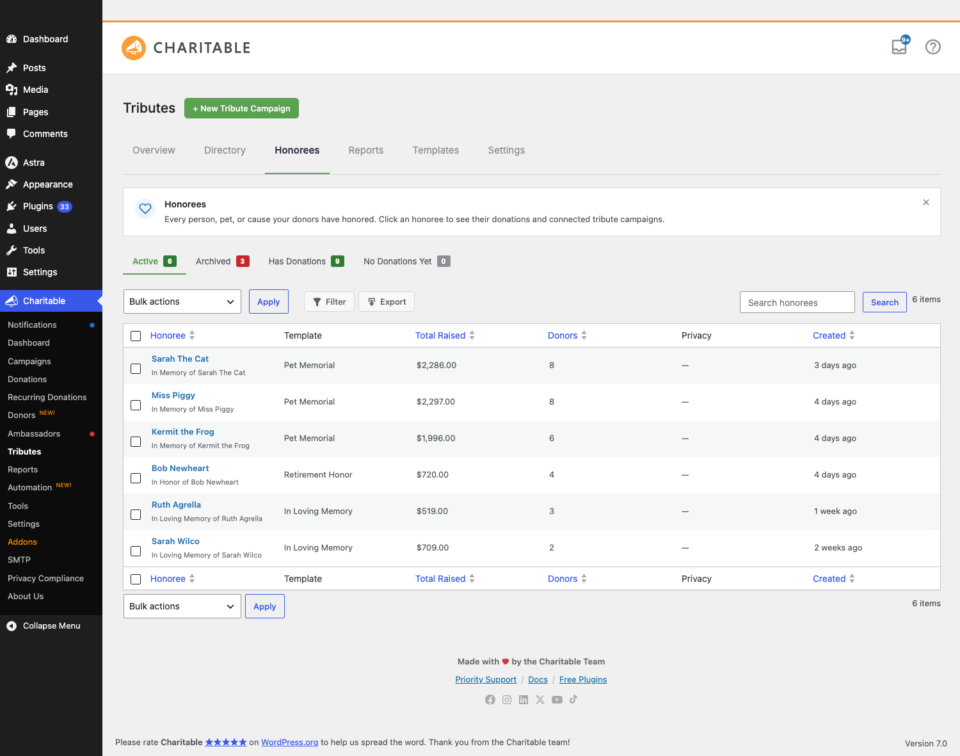
Each row shows:
- The honoree’s name and photo.
- Donations – the number of gifts made in their name.
- Total raised – the running total.
- Linked tributes – the tribute campaigns connected to this honoree.
- Status – whether the record is published, a draft, or in the trash.
You can search by name, filter by the template used to create the honoree, and click any name to open the full record.
Inside an honoree record
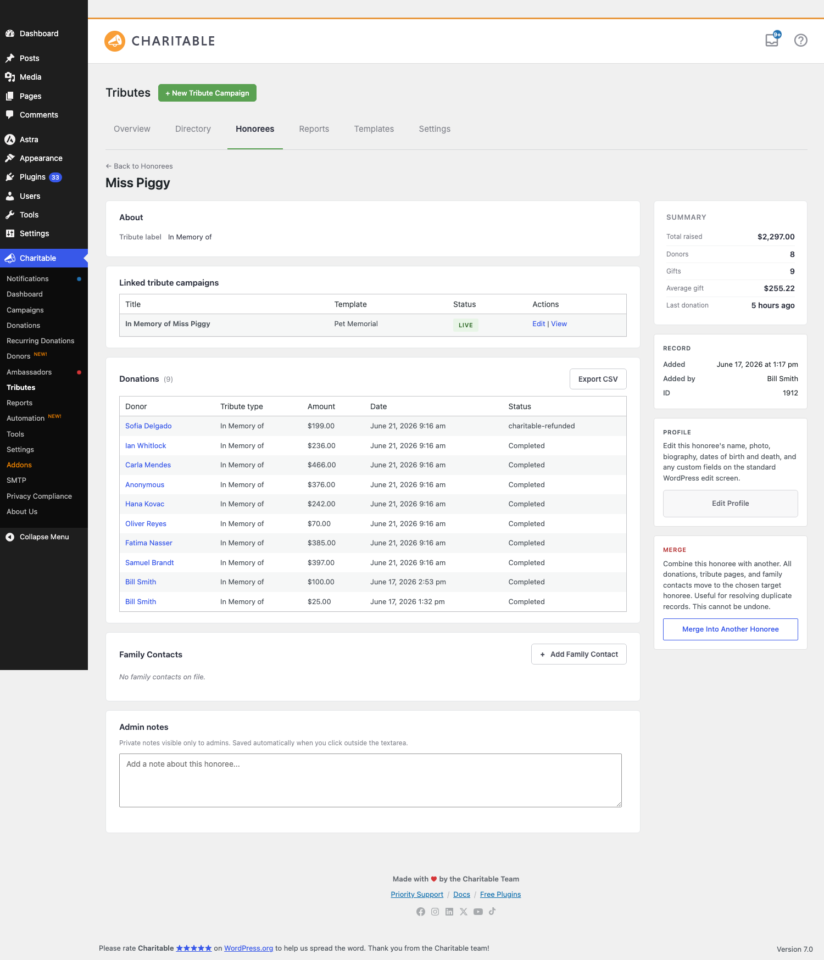
Click an honoree to open their detail page. It brings together everything about the person and the giving made in their name.
Totals at a glance
The top of the record shows headline numbers: total raised, number of gifts, number of unique donors, and the most recent gift. These come from a cached totals table, so the page stays fast even for an honoree with hundreds of gifts.
The donations made in their name
A table lists every gift linked to this honoree, with the donor display name (respecting anonymous and family-only choices), the amount, the date, and the personal message. This is the giving history for that person in one place.
Family contacts
Family contacts are kept separately from donors, so you can reach a loved one directly without confusing them with the people who gave.
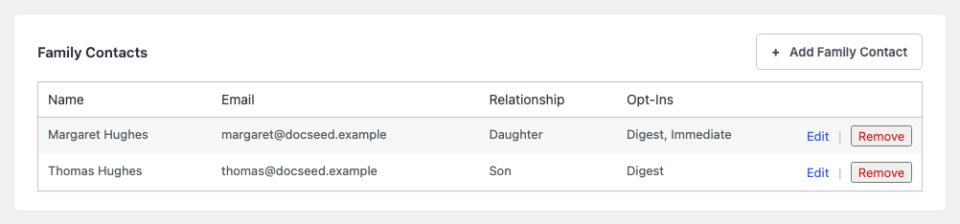
Add a contact with their name, email, postal address, and relationship to the honoree. You choose whether each contact is opted in to the family digest, the periodic summary of giving in their loved one’s name. Contacts can be edited or removed at any time.
Admin notes
Each record has a private notes area for your team, saved as you type. Use it for context that should not be public, such as how the family prefers to be contacted.
Privacy levels
Every honoree has a privacy level that controls who can see the tribute and its donor messages.
| Level | Who can see it |
|---|---|
| Public | Everyone. The tribute page and donor messages are visible to all. |
| Family approval | Messages are held until a family contact approves them. |
| Members | Only logged-in users on your site. |
| Private link | Only people with the private link. The tribute is not listed publicly. |
You set the default privacy level in Settings, and you can override it per honoree.
Merging duplicate honorees
Sometimes the same person ends up with two records, usually because donors spelled the name differently. The merge tool combines them into one.
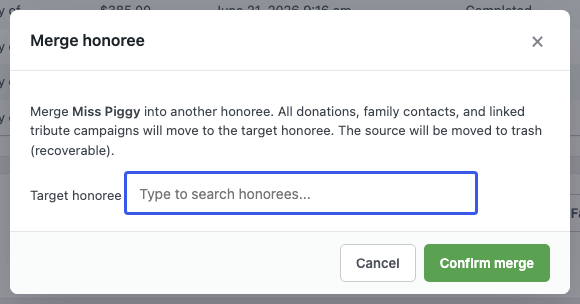
Merging moves all of the source honoree’s donations, linked campaigns, and family contacts into the target record, then recalculates the totals. Pick the record you want to keep as the target, and the other is folded into it.
Custom fields
If the built-in honoree details are not enough, you can define your own. In Settings > Custom Fields, add fields for honorees and for tribute campaigns, such as “Section of the cemetery” or “Preferred charity.” Your custom fields appear on the records and are available as email tags.
Reports and the Honoree Leaderboard
The Reports tab turns your tribute giving into insight.
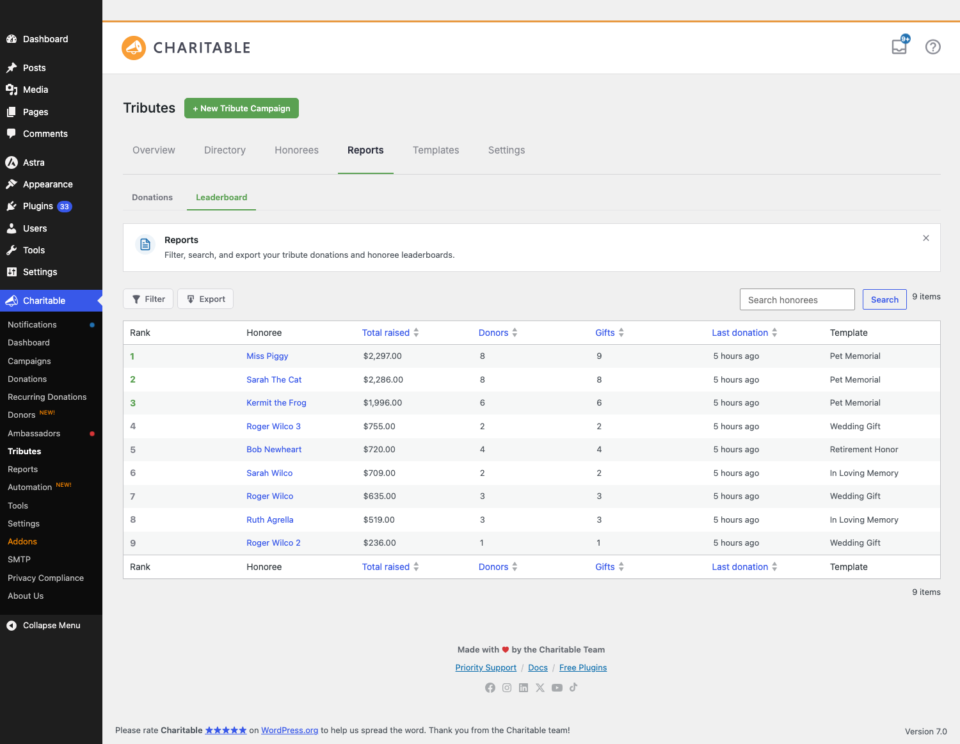
- The Tribute Donations report lists tribute gifts, filterable by tribute type, template, status, and date range.
- The Honoree Leaderboard ranks honorees by amount raised or by number of gifts, so you can see which tributes are resonating.
- CSV export lets you download the donors and details behind any honoree or report for your records or a spreadsheet.
Tips
- An honoree is created automatically the first time a gift is made in that name. You do not have to set them up in advance.
- If two honorees look like duplicates, check the spelling of the name on the linked donations before merging, so you keep the cleaner record as the target.
- Family contacts are never emailed unless you opt them into the family digest, so adding a contact for your records alone is safe.
Developer reference
The honoree model
Honorees are the charitable_honoree post type, enriched with these properties (see src/Models/Honoree.php):
| Property | Meaning |
|---|---|
name, nickname | Display name and optional nickname. |
dob, dod | Date of birth and date of passing (ISO). |
photo_attachment_id | Honoree photo. |
relationship_to_org | How the honoree relates to your cause. |
privacy_level | public, family-approval, members, or tokenized. |
display_preference | full or first-name-only. |
entity_type | person, pet, or cause (extensible). |
family_approval_status | not-required, pending, or approved. |
tokenized_slug | The private-link token for tokenized privacy. |
custom_fields | Admin-defined custom field values. |
Custom tables
| Table | Purpose |
|---|---|
wp_charitable_honoree_donations | One row per gift, linked to an honoree (donor display, amount, message, status). |
wp_charitable_honoree_family_contacts | Family contact records (name, email, postal, relationship, opt-in flags). |
wp_charitable_honoree_totals_cache | Cached totals per honoree (total raised, donor count, gift count). |
Access them through the repositories rather than raw SQL:
use Charitable\Pro\Tributes\Repositories\Repositories;

$donations = Repositories::honoree_donations();
$contacts  = Repositories::honoree_family_contacts();
$totals    = Repositories::honoree_totals_cache();
AJAX endpoints
All require a nonce and the manage_charitable_settings capability.
| Action | Purpose |
|---|---|
charitable_tributes_save_honoree_notes | Save the private admin notes. |
charitable_tributes_save_custom_fields | Save custom field definitions. |
charitable_tributes_add_family_contact | Add a family contact. |
charitable_tributes_update_family_contact | Update a family contact. |
charitable_tributes_delete_family_contact | Remove a family contact. |
charitable_tributes_honoree_merge | Merge two honoree records. |
charitable_tributes_honoree_search | Search honorees by name (used by autocomplete). |
Events
The CRM emits actions you can hook into, including charitable_tributes_honoree_created, charitable_tributes_donation_linked, charitable_tributes_honoree_merged, and charitable_tributes_donation_refunded. See the full payloads in the Developer Reference.
Related
- The Tribute Donation Experience: What Donors See
- How to Create a Tribute Campaign in Charitable
- Tributes Pages and Blocks
- Charitable Tributes Emails, E-cards, and Receipts
- Settings, Integrations, and Developer Reference
- Charitable Tributes Guide
Helpful Links
🤝 Get help when you need it
Connect with Customer Support →
📑 Find the guide you need
Browse the Documentation Hub →
⬇️ Download proven strategies, campaign ideas, and expert tools
🔗 Let your AI Assistant do the fundraising work for you.
Connect Charitable to your AI assistant →
💸 Get Free Fundraising Resources
Head to the Charitable Fundraising Hub →
🤔 Got questions about Charitable?
Charitable FAQs →
Need help understanding non-profit terms and jargon?
See our Non-Profit Glossary →




