
Requires:
- Charitable Pro 1.8.16+
- Charitable Tributes 1.0.0+
This page walks through exactly what a donor sees and chooses when they make a tribute gift. Understanding the donor side helps you set up your forms well and answer supporter questions with confidence.
Tribute giving starts where the donor already is, on your donation form. Nothing changes for donors who just want to give normally. The tribute fields only appear when a donor opts in, or when the gift is made to a dedicated tribute campaign where the dedication is already set.
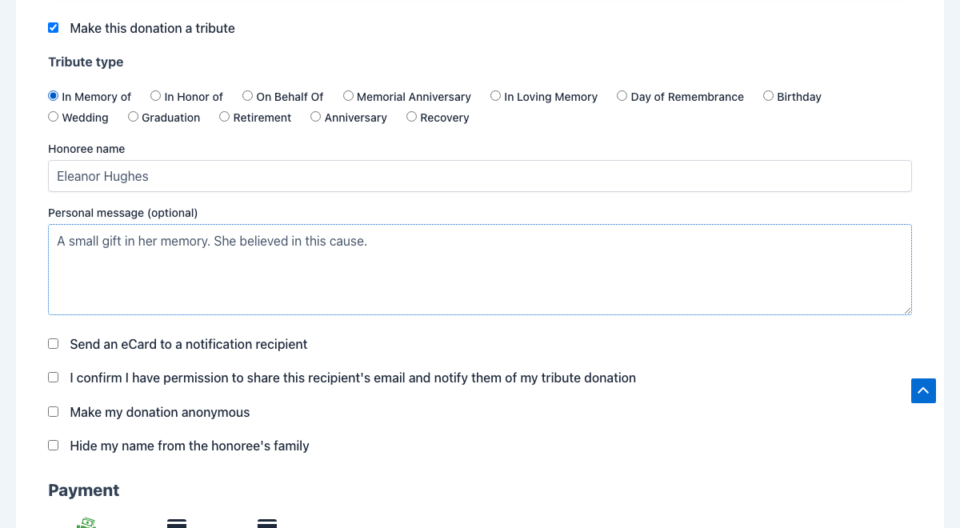
Choosing to dedicate the gift
On a campaign where tributes are enabled, the donor sees an option to dedicate their donation. When they turn it on, the tribute fields expand. On a dedicated tribute page, the honoree and tribute type are already chosen, so the donor sees a shorter set of fields focused on their message and notification.
The fields a donor can fill in
Here is the full set of tribute fields, and what each one does.
| Field | What the donor does | Notes |
|---|---|---|
| Tribute type | Picks “In Memory Of,” “In Honor Of,” “On Behalf Of,” or one of your custom types. | The available types can be tailored per campaign. |
| Honoree name | Names the person, pet, or cause being honored. | If a matching honoree already exists, the gift links to that record. If not, a new honoree record is created. |
| Personal message | Writes a short message about the gift. | Limited to 500 characters by default. |
| Notify a loved one | Turns on a notification and enters a recipient name and email. | This is how the family hears about the gift. |
| Send as an e-card | Chooses the richer e-card format for that notification. | See Tribute Emails and E-cards. |
| Consent | Confirms they have permission to contact the recipient. | The notification is only sent when this is checked. |
| Give anonymously | Hides the donor’s name from public display. | The gift still counts toward totals. |
| Hide from honoree | Keeps the gift out of the honoree’s public donor list entirely. | Useful for sensitive gifts. |
| Make it annual | Turns the one-time gift into an annual tribute. | Requires the Recurring Donations addon. See below. |
Notifying a loved one
One of the most meaningful parts of tribute giving is letting the family know a gift was made. If the donor chooses to notify a loved one, they enter the recipient’s name and email and confirm they have consent to reach out.
When the gift completes, Tributes sends a notification to that recipient sharing that a gift was made, who it was from, and the personal message. The donor can choose the richer e-card format, which includes the honoree photo and your branding. You control all the wording.
The notification is always gated on consent. If the donor does not confirm consent, no notification is sent, even if they entered an email address. This keeps your sending compliant by design.
Privacy on the donor’s terms
Donors control how visible their gift is.
- Give anonymously hides the donor’s name wherever the gift appears, including the Donor Wall block and the family notification. The gift still counts toward the honoree’s totals.
- Hide from honoree removes the gift from the honoree’s public display entirely, for donors who want to give quietly.
These choices are respected everywhere the gift could appear, automatically.
Turning a one-time gift into an annual tribute
Some gifts are meant to repeat. After a one-time tribute donation, the donor can choose to make it an annual tribute on a date that matters, such as a birthday, an anniversary, or a day of remembrance.
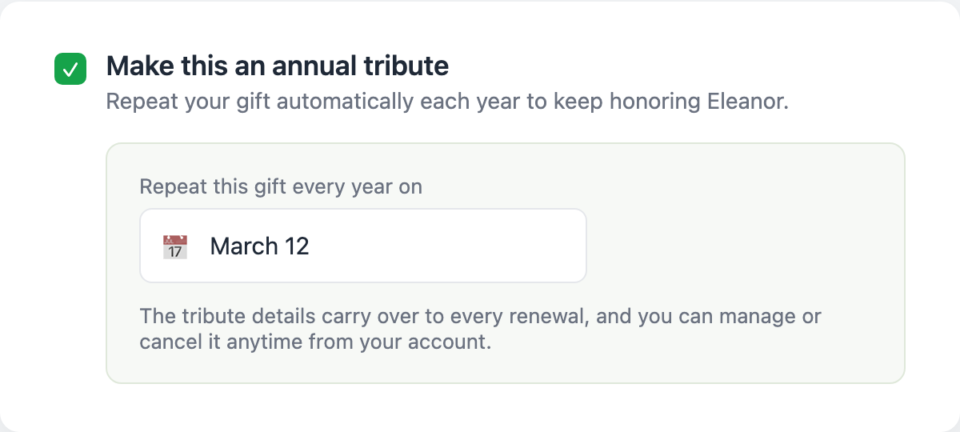
With the Recurring Donations addon active, that one choice creates a recurring gift that keeps the tribute details intact year after year, so the honoree keeps getting credit on every renewal. The donor manages it from their own Charitable account. Without the Recurring addon, the option is hidden, because there is nothing to schedule the renewal.
After the donation
As soon as the gift completes:
- Tributes creates or updates the honoree record and links the gift to it.
- If the donor named a recipient and gave consent, the notification or e-card is sent.
- The gift appears in your Tribute Donations report and on the honoree’s record.
- The donor’s receipt includes a tribute section, on screen and in the PDF receipt if that addon is active.
Developer reference
Tribute donation fields
All donor-facing fields are registered under the tribute_ prefix and stored as donation post meta:
| Meta key | Type | Meaning |
|---|---|---|
tribute_enabled | '1' / empty | The donor opted into a tribute. |
tribute_type | slug | in-memory-of, in-honor-of, on-behalf-of, or custom. |
tribute_honoree_name | string | The honoree name the donor entered. |
tribute_message | string | The donor’s personal message. |
tribute_ecard_enabled | '1' / empty | Send as the richer e-card. |
tribute_notification_name | string | Recipient name. |
tribute_notification_email | Recipient email. | |
tribute_notification_consent | '1' / empty | Consent gate for the notification. |
tribute_donor_anonymous | '1' / empty | Hide donor name from public display. |
tribute_hide_from_honoree | '1' / empty | Hide the gift from the honoree entirely. |
tribute_annual_optin | '1' / empty | Create an annual recurring tribute. |
Useful filters
// Change the personal-message character limit (default 500).
add_filter( 'charitable_tributes_message_max_length', function () {
    return 1000;
} );

// Tailor the tribute types offered, optionally per campaign.
add_filter( 'charitable_tributes_type_options', function ( $types, $campaign_id ) {
    // $types is an array of slug => label.
    return $types;
}, 10, 2 );

// Hide the donor message field entirely.
add_filter( 'charitable_tributes_hide_donor_comment', '__return_true' );
Tribute fields are available in both the legacy donation form and the Visual Form Builder, are included in CSV exports, and are exposed as email tags. See the Developer Reference for the full list.
Related
- How to Create a Tribute Campaign in Charitable
- Tributes Pages and Blocks
- Charitable Tributes Emails, E-cards, and Receipts
- Honoree Records and the CRM
- Charitable Tributes Guide
Helpful Links
🤝 Get help when you need it
Connect with Customer Support →
📑 Find the guide you need
Browse the Documentation Hub →
⬇️ Download proven strategies, campaign ideas, and expert tools
🔗 Let your AI Assistant do the fundraising work for you.
Connect Charitable to your AI assistant →
💸 Get Free Fundraising Resources
Head to the Charitable Fundraising Hub →
🤔 Got questions about Charitable?
Charitable FAQs →
Need help understanding non-profit terms and jargon?
See our Non-Profit Glossary →




