
As a non-profit or online fundraiser, you’ve probably heard some version of this warning: AI is changing SEO, and if you’re not adapting, you’re falling behind.
What you’ve probably heard less of is a clear, practical explanation of what that actually means for a nonprofit with a three-person communications team, a WordPress site, and exactly zero budget for a $1,500/month SEO agency retainer.
That’s what this is.
Here’s the thing worth saying at the outset: for nearly 20 years, the fundamentals of SEO barely moved.
Build good content. Earn links. Keep your site technically clean.
That was essentially the whole playbook. Tactics moved, tools improved, and best practices sharpened around the edges. But the underlying logic? Remarkably stable for two decades.
That era is over.
What we’re watching right now isn’t another small update. It’s the first real structural shift in how search works since mobile-first indexing changed the game in 2015.
AI Overviews are here to stay. They are going to be the predominant result that viewers see.
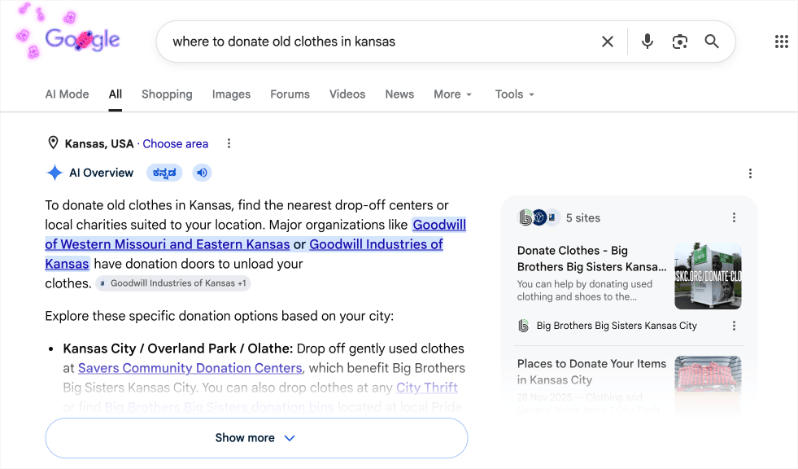
This means more searches end without a click.
Google is now in the business of answering questions directly, not just pointing to sources. And the organizations it chooses to cite and recommend aren’t necessarily the ones with the best keyword optimization. They’re the ones Google has built the clearest, most confident picture of.
That last point is what this guide is built around. Because understanding it changes everything about how you should think about your web presence.
I want to be honest with you about the moment we’re in.
Search has genuinely changed in ways that matter, and some of those changes require nonprofits to rethink things they thought were settled.
At the same time, the AI-in-SEO conversation is drowning in hype, tool vendor panic, and predictions from consultants whose incentive is for you to feel lost without them.
A lot of what’s being sold as revolutionary is, when you look closely, just an extension of what good SEO has always required: helpful content, genuine expertise, technical credibility, and a consistent presence across the web.
This guide covers what we know, what we’re seeing, what we can predict, and what to do. Not the noise, but the substance, specifically for nonprofits navigating this shift without an agency budget.
What’s in This Guide
- The End of Twenty Years of Stable SEO
- Why Your Website Matters More Than Ever
- Let’s Clear Up the Jargon
- Nonprofits Are Actually Better Positioned Than They Think
- How to Optimize Your Nonprofit’s Content for AI-Powered Search
- Using AI Tools to Strengthen Your SEO
- Best Free and Low-Cost AI Tools for Nonprofits
- E-E-A-T: The Standard AI Search Is Built Around
- How Charitable Supports Your Nonprofit’s AI-Era SEO Strategy
- Frequently Asked Questions
The End of Twenty Years of Stable SEO
For about 20 years, SEO basically worked the same way.
Google’s algorithm got updated constantly – you might remember names like Panda or Penguin – but the core question never really changed: does this page deserve to show up for this search?
Google answered that question by looking at three things:
- Is your content relevant to what the person searched for?
- Is your website trusted – do other sites link to you?
- Is your site technically solid – does it load fast, work on mobile, etc.?
Nonprofits that invested in those three things over time built up real, lasting visibility in search. And unlike paid ads, that visibility kept working without you having to keep paying for it. That’s why SEO has always been such a smart investment for organizations with tight budgets.
That hasn’t changed. But something new has been added to the mix.
Google is no longer just asking “is this a good page?” It’s also asking “is this a real, trustworthy organization that we can confidently recommend?”
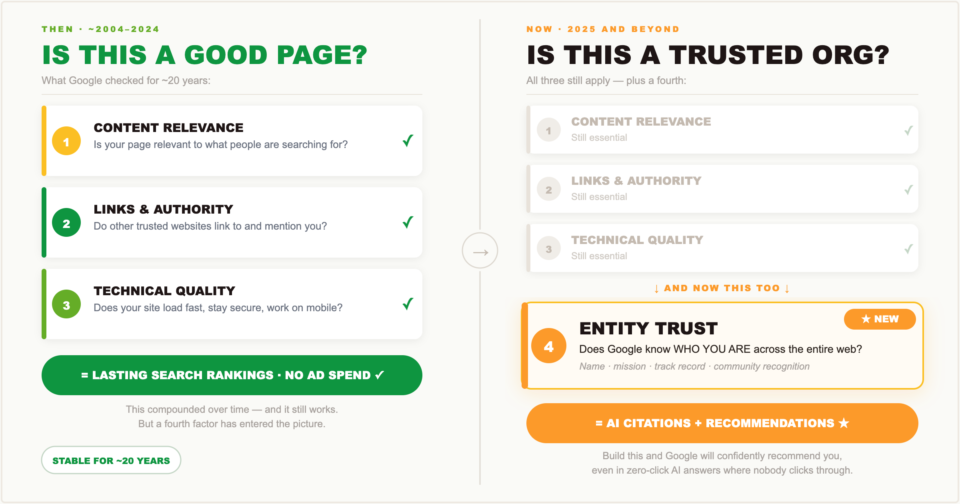
That’s a different question. And it means there’s now a fourth thing you need to focus on – making sure Google actually knows who you are, what you do, and why you can be trusted. Not just on one page, but across the whole web.
What We Know
AI Overviews aren’t going away. Google has made that clear – they’re expanding them, not testing them.
And yes, fewer people are clicking through to websites than before. That’s not speculation, it’s showing up in the data.
But here’s the thing worth paying attention to: the organizations that get cited inside those AI Overviews aren’t getting there by publishing more content. They’re getting there because Google recognizes them as genuinely trustworthy and knowledgeable on their topic.
The same system that decides what ranks in search also decides what gets featured in AI answers. And that system is getting better at telling the difference between an organization that actually knows its stuff and one that’s just really good at writing for search engines.
What We’re Observing
The nonprofits showing up in AI answers aren’t always the biggest or most well-known ones. They’re the ones with a clear, consistent online presence that makes it easy for Google to understand who they are and what they do. Organizations with strong community ties, detailed program pages, and honest content about their work are getting cited in AI responses. That’s a really good sign.
What’s Coming
The goal is shifting. It used to be “rank number one for this keyword.” It’s becoming “be the organization Google thinks of when someone asks about this cause.” That’s a bigger, more valuable position to hold – and Google is clearly moving in that direction. Nonprofits that build a rich, well-organized online presence around their mission are the ones that will benefit most.
What You Should Do Right Now
This is not the time to pull back. It’s the time to build.
The nonprofits that keep showing up, keep publishing real content, and keep strengthening their online presence during this period of change are the ones that will come out ahead when things settle down.
Everything in this guide is built around that idea.
Why Your Website Matters More Than Ever
You’ve probably heard it. AI can answer any question. Social media reaches your donors directly. Search traffic is going down anyway. So do you even need a website anymore?
I’ve heard this too. And I think it’s completely wrong. Nonprofits that believe it are making a mistake they’ll be paying for years from now.
Google Is Moving From Rankings to Recommendations
Here’s where we see search is actually heading.
When someone asks Google “Who should I donate to for hurricane relief in Florida?” – the answer isn’t going to be whoever used that phrase the most on their website. It’s going to be the organizations Google already knows, trusts, and understands well enough to recommend with confidence.
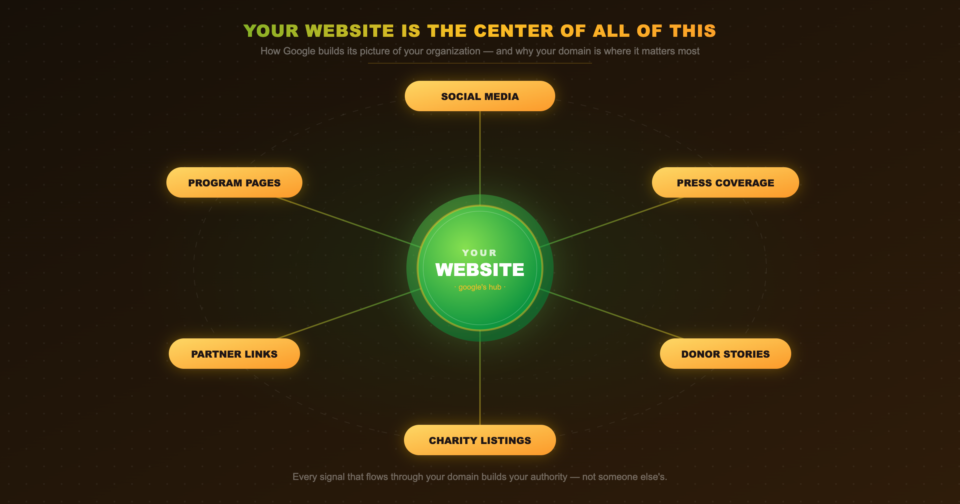
How does Google build that understanding? By looking at everything it can find about you across the web:
- Your website
- Your social media
- Press coverage and news mentions
- Donor testimonials
- Your program details and history
- Community partnerships
Google puts all of that together to form a picture of your organization. The clearer and more complete that picture is, the more likely Google is to recommend you.
Your Website Is the Center of All of This
Social media helps. Press coverage helps. Links from other trusted sites help. But your website is the main source Google uses to understand who you are and what you do.
If your website is thin, outdated, or missing key information – Google’s picture of your organization is incomplete. And incomplete means you don’t get recommended.
On your website, you get full control of how you depict your non-profit, what content you publish, what questions you answer, and how you strategize for AI SEO.
AI-powered search doesn’t make your website less important. It makes it more important. AI needs more information to make good recommendations, not less. The “you don’t need a website” argument has it completely backwards.
Building on Someone Else’s Platform Means Building Their Brand, Not Yours
Every campaign you run on GoFundMe makes GoFundMe more visible on Google. Every fundraiser you host on Classy builds Classy’s reputation – not yours.
This has always been a problem. In the age of AI search, it’s a serious one.
When Google’s AI decides which organization to recommend for food security donations in your city, it looks at everything it knows about that organization. How much content their website has. How consistent their information is across the web. How trusted their domain is. If your campaigns have been living on a third-party fundraising platform, you’ve been building their authority every single time.
There’s no way around this. You either own your web presence, or you’re renting it from a platform that does. And that difference matters more with every campaign you run.
Your Website Is How Google Gets to Know You
Think about everything Google needs to know before it feels confident recommending your organization:
- Who you are and what your mission is
- Who you serve and how
- What you’ve actually accomplished
- What donors can expect when they give
- That other trusted sources recognize you as legitimate
Almost all of that comes from your website. Social media adds supporting signals. Press coverage and links from partner organizations help reinforce the picture. But your website is the hub – the place where Google forms its core understanding of who you are.
That means your website probably needs more content than it has right now. Not marketing fluff – real, substantive information. Your programs described in actual detail. Your outcomes backed up with real numbers. Your history and mission explained clearly. Your leadership’s backgrounds. Honest answers to the questions donors ask before they give.
The more Google knows about you from your own site, the more confidently it can recommend you.
Social Media and Your Website Work Together
Social media matters – more now than before, actually. Google uses it to build a fuller picture of your organization. But social media without a strong website behind it is like a great storefront with no actual store inside.
The organizations that will show up most in AI-powered search are the ones doing both: a deep, well-organized website that documents their work, and active social media that shows they’re engaged with their community. Together, those two things give Google a complete, confident picture of who you are.
Owning Your Platform Means You Can Adapt
AI search is changing fast. What works today will look different 12 months from now. The organizations that can keep up are the ones who own their own infrastructure – their website, their donation pages, their content, their SEO settings.
If your donation pages live on a third-party platform, you’re stuck working within whatever that platform allows. You can’t update your page titles, improve load speed, add structured data, or make technical SEO changes unless they’ve built that into their product. Your ability to adapt is limited by their roadmap.
When you run your fundraising through your own WordPress site using a tool like Charitable, every improvement you make applies to your donation pages too. When best practices shift – and they are shifting right now – you can respond immediately.
That flexibility isn’t a nice-to-have. It’s a necessity right now.
Don’t have your own website? Follow our tutorial to set it up now:
💡 Worth reading: A lot of nonprofits don’t realize how much those “free” fundraising platforms are actually costing them. We broke it down here: Why Free Fundraising Platforms Aren’t Actually Free
Let’s Clear Up the Jargon
There are a lot of buzzwords flying around right now. Here’s what they actually mean:
SGE (Search Generative Experience) – Google’s original name for AI-powered search results, now called AI Overviews. When someone says “optimizing for SGE” they mean structuring your content so Google’s AI picks it as a source.
GEO (Generative Engine Optimization) – Optimizing your content so AI search tools cite you as a source – not just ranking on page one, but being the organization AI recommends when someone asks a related question. Think of it as SEO with an extra step.
AEO (Answer Engine Optimization) – This one’s been around longer. It means writing content that directly answers questions, so Google pulls it into those answer boxes at the top of results. FAQ sections, step-by-step lists, simple definitions – that’s AEO. In the AI era, this approach is more important than ever.
Zero-Click Searches – A search where the person gets their answer without clicking anything. This sounds bad, but it’s not always. If Google’s AI mentions your organization when someone searches “food assistance in [your city],” that’s brand visibility – even with no click. Being invisible in that result is the real loss.
Nonprofits Are Actually Better Positioned Than They Think
There’s a narrative going around that AI search is bad news for organizations without big tech budgets. I want to push back on that.
Google’s AI systems are specifically designed to surface content from people with real expertise and lived experience. They’re equally designed to filter out generic, mass-produced content from people who don’t actually know what they’re talking about.
Now think about what your nonprofit actually knows.
A domestic violence shelter writing about safety planning isn’t guessing. They’ve worked with survivors for years. A youth workforce nonprofit writing about resume skills for teenagers has run those workshops dozens of times. A rural food bank writing about food access in their county has data, relationships, and context that no content farm can fake.
That’s exactly what AI search is trying to find.
The problem for most nonprofits isn’t a lack of real expertise. It’s that the expertise is stuck inside the organization and not clearly expressed on the website. Getting it out there – in a format search systems can understand – that’s the work.
Your Built-In Advantages
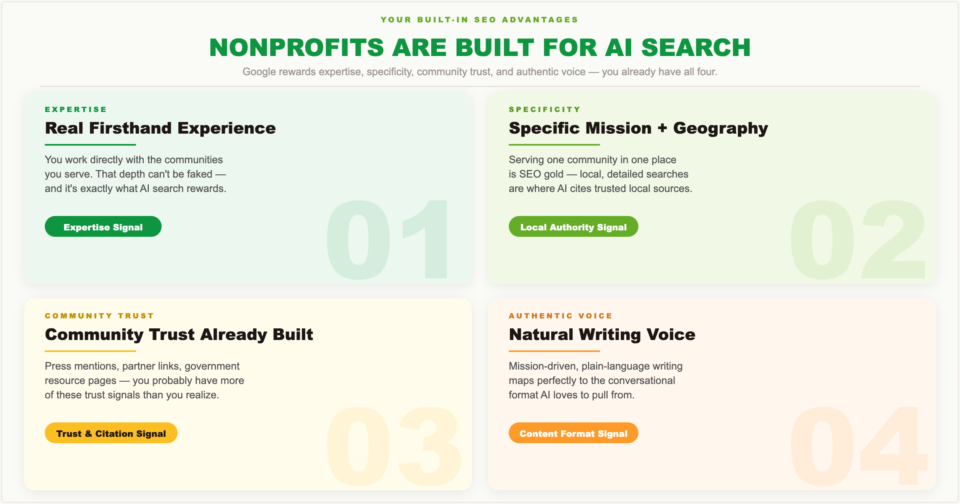
Real firsthand experience – You work directly with the communities and causes you write about. That depth is exactly what Google’s quality systems look for.
Specific mission and geography – Most nonprofits serve a specific group of people in a specific place. That specificity is perfect for the kinds of local, detailed searches where AI is most likely to cite a trusted local source.
Community trust – Press mentions, links from partner organizations, listings on government resource pages – nonprofits embedded in their communities often have more of this than they realize. And it’s exactly what search rewards.
Natural writing voice – The honest, mission-driven way nonprofit communicators naturally write lines up well with the question-answering, conversational content formats that AI systems love to pull from.
How to Optimize Your Nonprofit’s Content for AI-Powered Search
Optimizing for AI search isn’t a whole new skill. It’s the same SEO fundamentals you may already know, just applied with a bit more intention. Here’s what that looks like in practice.
Structure Your Content So AI Can Actually Read It
AI systems need to be able to pull clear answers from your pages. When content is just big walls of text with no headings or structure, AI has a harder time figuring out what’s important.
You don’t need to make your writing feel robotic. You just need clear organization:
- One H1 heading per page that clearly states what the page is about
- H2 headings for your main sections
- H3 headings for sub-topics within those sections
- Answer questions directly – when a heading asks something, answer it in the first sentence or two
- Use bullet points and lists – AI reads these well and understands they belong together
- Bold your key terms so AI knows what matters on the page
FAQ sections are especially powerful. When you write out real questions as H3 headings and answer each one completely underneath, you’re creating content that works for AI Overviews, traditional featured snippets, and voice search all at once. A simple FAQ page answering “how are donations used?” or “how do I access your services?” is one of the best content investments you can make right now.
Tell Google Exactly Who You Are
In AI-powered search, Google thinks of your organization as an “entity” – a distinct, identifiable thing with a name, location, mission, and reputation. The clearer and more consistent that picture is across the web, the more confidently Google can recommend you.
Start with your own website:
- Your full legal name, address, phone number, and description should appear on your About page, Contact page, and footer
- Your schema markup should clearly state your organization type, location, and mission
- Your Google Business Profile should match your website exactly
- Your Charity Navigator and GuideStar profiles should use the same name and description as your site
Every place your organization appears online – press mentions, partner pages, directories – should show the same consistent information. This consistency builds what Google calls “entity authority.” The higher your entity authority, the more likely Google is to cite you as a trusted source.
Go Deep on Your Topics – Not Just Your Keywords
Stuffing keywords into your content stopped working a long time ago. What AI systems actually look for is genuine depth – does this page really understand the topic, or is it just hitting a checklist?
Going deep doesn’t mean writing longer for the sake of it. A 3,000-word page that repeats the same three points isn’t deep. A 1,500-word page that covers a topic from multiple angles – the background, who’s affected, what works, how to get help, what to expect – that’s deep.
For nonprofits, this means writing thorough, honest content about the specific areas where your organization has real expertise. Not just what you do, but why it matters, how it works, and what you’ve learned from doing it.
Answer Every Question Your Audience Has
Google builds its picture of your organization partly from the questions you answer on your website. The more completely you answer the questions donors, volunteers, and community members actually have, the richer that picture becomes.
Go through your website like a first-time visitor who’s never heard of you. Ask yourself:
- What would they want to know?
- What questions are currently going unanswered?
- Where would they get confused or lose trust?
Every gap is a missed opportunity – both to connect with that visitor and to give Google more to work with. Filling those gaps with honest, specific, well-organized content is one of the smartest things you can do right now.
Using AI Tools to Strengthen Your SEO
AI tools have made a lot of SEO tasks faster and easier – especially for small teams with limited time and budget. But they also come with real risks, especially for nonprofits where trust is everything. Let’s be honest about both.
Where AI Actually Helps
Keyword research – Ask an AI tool to generate keyword ideas based on your mission, identify what people are searching for, and group related terms together. Use the results as a starting point, then apply your own judgment about what fits your audience.
Content outlines – Before writing anything, ask AI to draft an outline covering the main angles, common questions, and sub-topics for your subject. Fill it in with your real expertise. This kills blank-page paralysis and makes sure you don’t miss anything important.
Meta descriptions and page titles – Writing these for dozens of pages is tedious. AI does it quickly. Give it the page’s keyword, a summary of the content, and the character limit. Review the results, tweak for your voice, and move on.
First drafts of informational content – For general educational content – explaining a concept, summarizing an issue, describing how something works – AI can give you a solid starting draft. The key word is starting. Always revise, fact-check, and add your organization’s real expertise before publishing.
Repurposing existing content – Got an impact report, grant application, or program summary sitting in a folder? AI can help you turn it into blog posts, FAQ sections, or resource pages. This is one of the best uses of AI for nonprofits because you’re working from content that already exists and has already been reviewed by your team.
Where AI Can Hurt You
Avoid AI to write impact stories. Your stories get their power from being real and specific. An AI-generated story about “a single mother named Maria whose life changed thanks to your organization” is fiction. If anyone figures that out – and people do – the trust damage is serious and hard to undo. Your real stories, even told imperfectly, are worth so much more.
AI makes up facts. AI tools generate text that sounds plausible – but they don’t actually know things. Statistics, dates, program names, legal requirements – anything factual in an AI draft needs to be independently verified before you publish it. Every single time.
Pure AI content can get you penalized. Google is very clear that it penalizes low-quality content published in bulk to game search rankings – whether it’s written by humans or AI. Thin, generic AI content published without real human expertise added is exactly what Google’s spam systems are built to catch. It’s not a sustainable strategy.
AI can’t replicate your voice. The people who trust your nonprofit are partly responding to the genuine human voice behind your communications. If your content starts to feel polished but hollow, that connection erodes. Protect it.
Best Free and Low-Cost AI Tools for Nonprofits
You don’t need expensive enterprise software to get value from AI in your SEO work. Here are the tools worth your time:
ChatGPT (free / paid) – The most versatile option. Great for keyword brainstorming, outlines, meta descriptions, and first drafts. The free tier handles most nonprofit SEO tasks just fine.
Claude (free / paid) – Especially good at longer content and following detailed instructions about tone and audience. Great for drafting resource pages and FAQ sections.
Perplexity AI (free) – An AI search tool that gives answers with citations. Ask it questions your audience might search for and see what sources it pulls. If your organization isn’t showing up, that’s a gap worth fixing.
Google Search Console + Workspace (free) – Google’s own tools. Search Console shows you what searches are bringing people to your site. Workspace’s AI features can help draft and refine content.
Semrush (freemium) – The free tier gives you enough keyword research and site audit capability for a small nonprofit to do meaningful work. The paid tier ($117/month) is worth it if SEO is a regular priority.
Surfer SEO (paid) – Analyzes top-ranking pages for any keyword and tells you what topics and structure your content needs to be competitive. Worth it if you’re publishing content consistently and want data-driven guidance.
All in One SEO (free / paid) for WordPress – For any nonprofit running on WordPress, All in One SEO (AIOSEO) is the clearest recommendation in this guide. At $49.60/year for the Basic plan, it’s the most accessible full-featured SEO plugin available, and it’s the one used by over 3 million websites for a reason.
Google Search Console + Google Analytics 4: Free and Non-Negotiable (free) – Google Search Console shows you exactly which queries bring people to your site, which pages are indexed, which keywords you rank for and at what position, and any technical issues Google has flagged. Google Analytics 4 tracks how visitors behave once they arrive.
Semrush (paid) – Gives you powerful tools and data you can use to optimize your site for AI results.
Before purchasing at full price, check the Charitable nonprofit deals and discounts page for current offers on AIOSEO and other tools your organization may need.
E-E-A-T: The Standard AI Search Is Built Around
Google has a framework called E-E-A-T. It stands for Experience, Expertise, Authoritativeness, and Trustworthiness. It was originally created for human reviewers who evaluated search results. Now it’s become the core standard that AI systems – including AI Overviews – use to decide what content is worth surfacing.
If you want to rank and get cited in AI-generated search results, understanding E-E-A-T isn’t optional. It’s the lens through which everything you publish gets evaluated.
Experience: Show the Real Work
Experience means you’ve actually done the thing you’re writing about – not just researched it.
This is where nonprofits have a real advantage. When you write about serving homeless youth, fighting food insecurity, or running workforce programs, you’re writing from direct, hands-on experience. Google’s systems specifically look for evidence of that – first-person details, specific numbers, real outcomes, the kind of nuance that only comes from actually doing the work.
In practice, this means being specific. Don’t write:
“We help families access food resources.”
Write:
“Each week, our pantry serves approximately 380 families across three zip codes, with the highest concentration in [neighborhood] – an area the USDA has designated as a food desert.”
The specific version signals real experience. The vague version sounds like someone who spent 15 minutes on Google.
Expertise: Put Your Credentials on the Page
Expertise means having formal or demonstrated knowledge in your field – and making that visible.
For nonprofits, this means:
- Author bylines on blog posts and program pages should include more than just a name – add a line about the person’s background and why they’re a credible voice on this topic
- Your About page should clearly describe the professional backgrounds of your leadership and program staff
- If your programs are evidence-based, name the evidence and link to it
- If you partner with universities or public health agencies, say so explicitly
Don’t assume people will take your expertise on faith. Show it on the page.
Authoritativeness: What Others Say About You
Authoritativeness isn’t something you can build entirely from your own website. It comes from what the rest of the web says about you.
That includes:
- Press mentions and news coverage
- Links from other credible organizations
- Your GuideStar Platinum Seal or Charity Navigator rating
- Accreditations and certifications in your sector
Every time a credible source links to you, cites you, or mentions you, it adds to your authority in Google’s eyes. This is why press relations and link building aren’t optional extras – they’re how you build the signals that AI systems use to decide whether your content is worth recommending.
The nonprofits most likely to appear in AI Overviews are the ones with strong external recognition. And that recognition gets built through the same community relationships and program quality that already define your work.
Trustworthiness: The Foundation Everything Else Rests On
Trustworthiness is assessed through signals like:
- HTTPS security on your website
- Real, transparent contact information – a real address, real phone number, real people with real names
- Clear explanation of how donations are used
- Up-to-date content that doesn’t present old information as current
- Listings in reputable charity databases like Charity Navigator, GuideStar, and BBB Wise Giving Alliance
For nonprofits specifically, being listed and compliant with these databases is a strong trust signal that directly correlates with how AI systems evaluate your credibility as a source.
Voice Search: What Nonprofits Need to Know
Voice search – through Siri, Google Assistant, Alexa, and similar tools – works very differently from typed search. When someone types a query, they get a list of results to choose from. When someone asks a voice question, they get one answer. You either win that result or you’re not in it at all.
Voice queries are also structured differently. People type “food bank Austin” but they ask “Hey Google, where can I find a food bank near me?” Voice searches are longer, more conversational, and almost always phrased as questions.
The good news: the same content that works for AI Overviews works well for voice search too. FAQ sections, direct question-and-answer formatting, and conversational writing are exactly what voice search pulls from.
A few specific things to focus on:
- Answer questions directly in the first sentence after a question-format heading
- Target question-based keywords like “how do I,” “where can I,” “what is,” and “who helps with”
- Keep your Google Business Profile complete and accurate – voice searches with local intent (“near me”) pull heavily from Business Profile data
- Make your site fast – voice search results almost always come from fast-loading pages
Winning When Nobody’s Clicking
If more than half of searches end without a click, does SEO still matter?
Yes – but the goal has to expand.
Showing up in an AI-generated summary, a featured snippet, or a knowledge panel still means something, even without a click. If your nonprofit appears as a cited source in Google’s AI Overview for “food assistance resources in [your city]” – you’ve essentially been endorsed by the world’s most trusted information system. That builds awareness and trust, even if no one clicks through that day.
Here’s how to build that kind of visibility:
Get into featured snippets: Answer common questions directly and concisely in the first 40-60 words after a question-format heading. These paragraph-style answers are the most common type of featured snippet – and the most likely to get pulled into AI Overviews.
Build out your Knowledge Panel
- Claim your Google Business Profile
- Complete your Wikipedia article if applicable
- Keep your GuideStar and Charity Navigator profiles current
- Add Organization schema markup to your website
Knowledge panels show up in search results and build brand recognition every time someone sees your name – with or without a click.
Show up in local map results: Maintain a complete, active Google Business Profile with recent posts, photos, and reviews. Local map results appear above traditional search results and are one of the best sources of zero-click visibility for local organizations.
Track mentions, not just traffic: Set up Google Alerts for your organization’s name and key program names. When you show up in AI-generated content – whether in a Google Overview, a Gemini response, or a Perplexity answer – that’s visibility worth tracking alongside your regular traffic numbers.
How Charitable Supports Your Nonprofit’s AI-Era SEO Strategy
Everything we’ve talked about in this guide – owning your content, building your brand authority, controlling your domain – comes back to one practical question: where do your donation pages actually live?
Because that choice matters more than most nonprofits realize.
When your donation pages live on GoFundMe, Zeffy, Donorbox, Classy, or any other third-party platform, every campaign you run is building their brand authority with Google. The links you earn. The content that gets indexed. The search rankings your campaigns achieve. All of it goes to their domain, not yours.
As Google’s AI increasingly recommends organizations with strong, consistent web presences, having a fragmented online presence costs you more with each campaign.
See these helpful guides:
Your Campaigns Build Your Domain – Not Someone Else’s
Charitable runs on WordPress – your website, your domain, your brand.
When your Giving Tuesday campaign page ranks for “donate to help families in [your city],” that ranking belongs to you. When a journalist covers your campaign and links to it, that link goes to your domain. When Google indexes your campaign pages, they become part of your organization’s overall web presence.
Here’s a sample campaign from Charitable that runs on your own site.
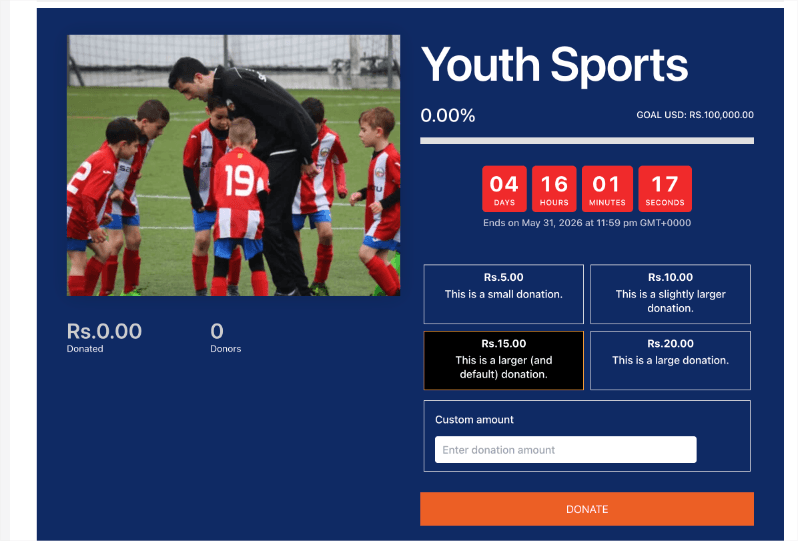
Keep in mind there are multiple templates like these to choose from. You can create unlimited campaigns on your site and raise as much funds as you need. No limits.
All your donations are neatly recorded and organized for you. You can filter and export anytime you need.
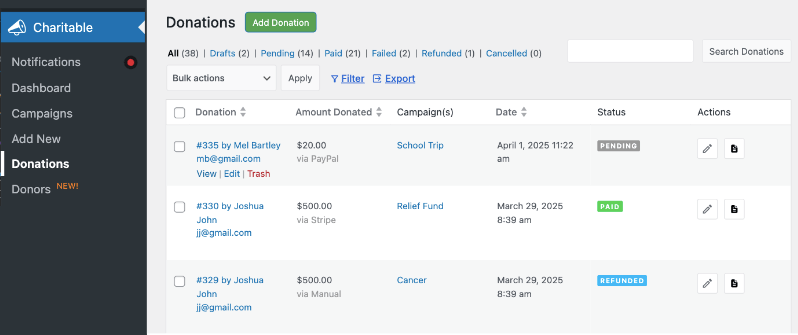
Running numerous campaigns over several years on your own platform builds a much stronger SEO position compared to having your fundraising dispersed across various hosted platforms.
Fast, Mobile-Friendly Donation Pages
Google uses page speed and mobile performance as ranking signals. Slow pages don’t just lose donors – they actively drag down your search rankings, no matter how good your content is.
Charitable’s donation forms are built for mobile-first performance. Clean, fast-loading pages that score well on Google’s technical performance metrics – which means they help your SEO rather than hurting it.
Full Integration With Your WordPress SEO Setup
Because Charitable is a WordPress plugin, your donation pages and campaign pages are treated exactly the same as the rest of your website by your SEO tools.
That means:
- AIOSEO or Rank Math applies to your campaign pages just like your blog posts
- Custom title tags and meta descriptions with donor-intent keywords on every donation page
- Your XML sitemap automatically includes your campaign pages
- Your schema markup covers your full fundraising setup
Everything is unified. Everything is under your control. Everything builds your entity authority – not someone else’s.
More than 10,000 nonprofits trust Charitable, with over 1 million downloads on WordPress.org.
Charitable Lite is completely free – unlimited campaigns, full donor data ownership, and support for Stripe, PayPal, and Square, all on your own domain.
Paid plans start at $69/year, and every paid plan comes with a 14-day money-back guarantee.
Charitable Has 1+ Million Downloads!
Trusted by millions to power successful fundraising campaigns. Try Charitable risk-free today.
✅ 14-day money-back guarantee
✅ Transparent pricing
✅ Code-free setup
Stay Connected for More Nonprofit Resources
For more tutorials and videos tailored to nonprofits, subscribe to our YouTube channel. We regularly publish expert tips, step-by-step guides on online donations, fundraising strategies, and practical resources to help your organization succeed.
🗞️ Get weekly tips and exclusive guides in your inbox
Join our newsletter →
🎥 Watch step-by-step tutorials and success stories
Subscribe to our YouTube channel →
👩🏽💻 Connect with our community and get daily nonprofit insights
Follow us on LinkedIn →
🥳 Fun reels and non-profit insights
Follow us on Instagram →
👀 Insightful & fun videos to help you grow your cause
Follow us on TikTok→
🌎 Subscribe and follow for general fundraiser tips
Get Fundraiser Tips on TikTok →
Powerful Fundraising Resources
⬇️ Download proven strategies, campaign ideas, and expert tools
Get the Fundraising Kit →
💸 Get Free Fundraising Resources
Head to the Charitable Fundraising Hub →
🤔 Got questions about Charitable?
Charitable FAQs →
🏎️ Take Charitable for a spin
Create your Charitable Demo →
Understand non-profit terms and jargon
Non-Profit Glossary →
% Looking for non-profit deals and discounts?
Best Non-Profit Deals and Discounts →





Leave a Reply