
Charitable Blog

Everything you need to know about Charitable and our team.

Introducing PayPal commerce

Introducing PayPal Commerce in Charitable: One Connection, Six Ways to Donate

Last updated on

  • By

Donors are evolving! They want easy payment options like Venmo, Pay Later, or Apple Pay. When they don’t see it on your donation form, most of these donors disappear, and they don’t tell you why.

With Charitable Pro 1.8.15 and Charitable 1.8.11 we’re shipping PayPal Commerce!

This is a single integration that gives your donors the modern PayPal experience: PayPal balance, Venmo, Pay Later financing, credit and debit cards, Apple Pay, and Google Pay.

The best part, you can set this up through one one-click connection.

It’s PayPal – modernized! Ready for donors who want fast payment options, so you can capture every donation!

Why One Modern PayPal Connection Changes Everything

If you’ve been on the older Legacy PayPal integration, you’re missing out on Venmo, Pay Later, Apple Pay, Google Pay, and the modern card fields that PayPal now ships by default.

Donors who don’t see their preferred payment option don’t switch; they leave.

PayPal Commerce closes that gap.

All you have to do is click on a “Connect with PayPal” button. We’ll handle the rest.

This gives your donation form everything PayPal supports today, and your donors check out faster because PayPal already knows them.

More Ways to Pay, Without More Setup Work

What I love about this new PayPal connection is that it gives you everything in one connection. Earlier, adding payment methods used to mean adding plugins, copying API keys, and reading vendor docs. That’s done!
Paypal sample

Here’s how easy it is now:

🚀 One-Click “Connect with PayPal”: Sign in to your PayPal business account, approve the connection, and your donation form is live. No API keys, no developer needed.

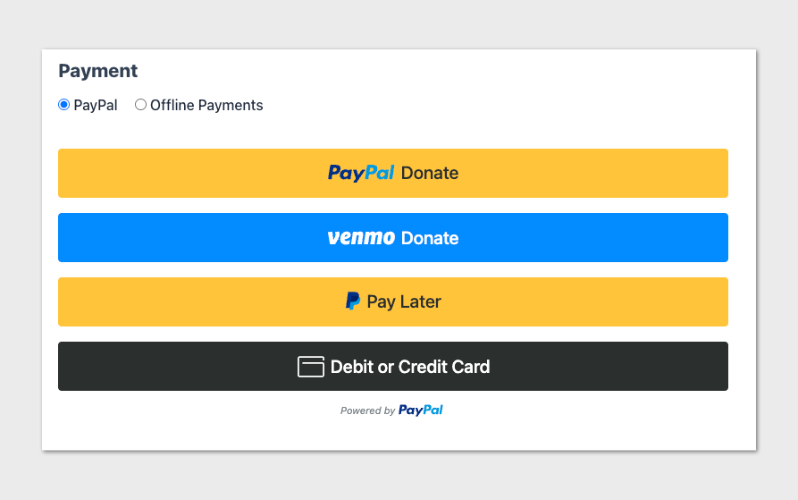
💳 Six Ways to Donate: PayPal balance, Venmo (US), Pay Later financing, credit and debit cards through PayPal’s PCI-compliant card fields, Apple Pay on Safari, and Google Pay on Chrome. All available on the same form, with each donor seeing the options that work for them.

⚡ Save and Reuse Payment Methods: Returning donors can save their PayPal account or card during checkout and reuse it on future donations with a single tap. Faster checkout means more completed donations.

✅ Real-Time Capability Status: The connection panel shows you exactly which payment methods PayPal has approved on your account, with a Refresh Status button to recheck after PayPal updates your eligibility. No guesswork about why a button isn’t showing.

Recurring Donations That Just Work

Whether you want PayPal to manage the recurring schedule or you want full control, PayPal Commerce supports both.

Two Recurring Modes, Same Donor Experience: Choose PayPal Subscriptions API (PayPal manages the renewal cycle automatically and shows the subscription in the donor’s PayPal account), or Vault + Cron (your site stores the saved payment method and triggers each renewal). Donors see the same “Make it monthly” checkbox either way.

Donor Trust, From Start to Finish

The hardest moment in any donation flow is when something goes wrong. PayPal Commerce is built so that even the unhappy paths feel professional.

💬 Friendly Inline Error Messages: When PayPal can’t process a donation (a restricted merchant, a declined card, a country mismatch), donors see a plain-language inline message with a recovery hint, like “Your payment method was declined. Please try a different card or use PayPal balance.” No hostile browser alert dialogs.

👁️ Admin-Only Diagnostic Detail: If you’re signed in as an admin and a donor hits an error on your form, you see the underlying PayPal reason and debug ID inline. Triage takes seconds, not a log dive.

📣 Refunds and Cancellations From WordPress: Issue a refund or cancel a recurring donation directly from the donation admin. No need to log in to PayPal. The plugin updates the donation log with the refund ID and confirms with PayPal automatically.

For Agencies and Developers

Hooks, Filters, and Full Customization

Per-renewal platform fee logging is exposed via the charitable_paypal_log_platform_fee_on_donation filter (off by default), and the fee percentage itself is filterable via charitable_paypal_platform_fee_percentage. The donor cancellation redirect can be customized via charitable_donation_cancellation_page and charitable_donation_cancellation_args.

One PayPal Per Site

To prevent confusion on the donation form, only one PayPal integration shows at a time. Sites running Legacy PayPal continue using Legacy PayPal exclusively; new and unused sites see PayPal Commerce exclusively. The donation form stays predictable for your donors no matter which side you’re on.

Get Started With PayPal Commerce

PayPal Commerce is available right now in Charitable Pro 1.8.15 and Charitable Lite 1.8.11.

Update Charitable Pro, head to Charitable » Settings » Payment Gateways » PayPal Commerce, and click Connect with PayPal. You’ll be accepting modern PayPal donations in under five minutes.

Note if you are already using Legacy PayPal – PayPal Commerce won’t be available currently to maintain your current PayPal workflow. An “upgrade” option will be available soon if you do wish to update to the new PayPal Commerce.

Also note that Charitable Pro at this time is the only plugin that will have recurring donations support w/ PayPal Commerce.

Read the PayPal Commerce Documentation »

Not Yet a Charitable Pro User?

Charitable powers fundraising on more than a million WordPress sites and has been the trusted nonprofit donation plugin since 2014.

Charitable Pro adds the gateways, recurring donations, donor management, and advanced campaign features your nonprofit needs to grow without the per-transaction overhead of hosted donation platforms.

Stay Connected for More Nonprofit Resources

For more tutorials and videos tailored to nonprofits, subscribe to our YouTube channel. We regularly publish expert tips, step-by-step guides on migrations like this GiveWP to Charitable switch, fundraising strategies, and practical resources to help your organization succeed.

🗞️ Get weekly tips and exclusive guides in your inbox
Join our newsletter →  

🎥 Watch step-by-step tutorials and success stories
Subscribe to our YouTube channel →  

👩🏽‍💻 Connect with our community and get daily nonprofit insights
Follow us on LinkedIn →

🥳 Fun reels and non-profit insights
Follow us on Instagram → 

👀 Insightful & fun videos to help you grow your cause
Follow us on TikTok→  

🌎 Subscribe and follow for general fundraiser tips
Get Fundraiser Tips on TikTok → 

author avatar
David Bisset Project Manager
David is the project manager of Charitable since 2022. David works with several non-profits (one operated by his wife) along with managing and developing features, support, and marketing for Charitable. Has been with WordPress since 2006 and has been lead organizer of multiple conferences, events, and meetups.

Disclosure: Our content is reader-supported. This means if you click on some of our links, then we may earn a commission. We only recommend products that we believe will add value to our readers.

Leave a Reply

Your email address will not be published. Required fields are marked *

Get free tips and resources right in your inbox, along with 60,000+ others

Join our Newsletter

We won’t spam you. We only send an email when we think it will genuinely help you. Unsubscribe at any time!

Featured Video:

Watch more videos on our YouTube channel.

What's New In Charitable

View The Latest Updates
🔔 Subscribe to get our latest updates
📧 Subscribe to Emails

Email Subscription

Join our Newsletter

We won’t spam you. We only send an email when we think it will genuinely help you. Unsubscribe at any time!

Campaigns New

⏳ Campaign Countdown: Drive Urgency and Lift Donations

Urgency is one of the most powerful tools in fundraising! Meet Campaign Countdown—a live, real-time timer built to turn procrastination into immediate generosity.

What’s New:

⏱️ Live, Real-Time Urgency: Beautifully track days, hours, minutes, and seconds down to your campaign’s deadline with live-updating visual countdowns.

🎨 Tailored to Your Look: Choose between Boxed bordered tiles or a clean, single-line Inline display. Match your theme instantly using the custom digital display font and deep color controls.

🎉 Celebrate the Win: Trigger automatic, full-screen confetti or fireworks animations the exact millisecond your timer hits zero to celebrate an ended fundraiser.

🛠️ Place it Anywhere: Drop the countdown anywhere you like using the Campaign Builder field, a dedicated Gutenberg block, or a simple shortcode.

🚨 Smart Expiry Actions: Total control over the end state—choose to automatically replace the timer with a custom message, freeze it at zero, or hide the element entirely when time runs out.

author avatar
David Bisset Project Manager
David is the project manager of Charitable since 2022. David works with several non-profits (one operated by his wife) along with managing and developing features, support, and marketing for Charitable. Has been with WordPress since 2006 and has been lead organizer of multiple conferences, events, and meetups.
Improvement Migrations

↔️ Importing From GiveWP, Donorbox, GiveButter… even CSV!

Whether you’re migrating from another platform or consolidating your records, moving your data to Charitable is now faster and more flexible than ever. We’ve streamlined the process so you can bring over your entire fundraising history in just a few clicks.

🔄 Native GiveWP, Donorbox, & GiveButter Support: Switching from a major platform? Our dedicated migration tools handle the heavy lifting, automatically mapping your donors and donations directly into Charitable—no technical skills required.

📂 Universal CSV Import: Moving from a custom system or a specialized CRM? If you can export it to a CSV, you can import it here. Our smart mapping tool lets you align your columns to Charitable fields like names, emails, phone numbers, and addresses in seconds.

Instant Donor Profiles & Custom Tags: Automatically create rich donor profiles and bring in custom tags to keep your data organized. Segment and engage your supporters from day one with a clean, professional database structure.


Ready to make the switch?

Check out our GiveWP Migration Guide

Learn more about our Import Tools

author avatar
David Bisset Project Manager
David is the project manager of Charitable since 2022. David works with several non-profits (one operated by his wife) along with managing and developing features, support, and marketing for Charitable. Has been with WordPress since 2006 and has been lead organizer of multiple conferences, events, and meetups.
Improvement Payments

💳 New Braintree Features For Your European Donors

With the release of Braintree addon version 1.3.0, you can now empower your European donors with the payment methods they trust and prefer, making giving seamless for international supporters.

🌍 Six New European Payment Methods: Support popular local options like iDEAL (Netherlands), Bancontact (Belgium), BLIK (Poland), and more to meet donors where they are.

⚡ Frictionless Donor Experience: These bank-based methods allow donors to authenticate directly with their own bank in a secure popup… no credit card numbers required.

⚙️ Automatic Currency Sync: No complex setup needed. The builder automatically displays the correct payment buttons based on your site’s currency (EUR or PLN), ensuring a relevant experience for every visitor.

author avatar
David Bisset Project Manager
David is the project manager of Charitable since 2022. David works with several non-profits (one operated by his wife) along with managing and developing features, support, and marketing for Charitable. Has been with WordPress since 2006 and has been lead organizer of multiple conferences, events, and meetups.
Campaigns New

🖼️ Campaign Featured Images: Pro-Level Visuals Made Simple

With the new Campaign Featured Image setting in our visual builder, you now have a single, dedicated place to manage how your fundraisers look across your entire site and beyond.

🖼️ One Image, Everywhere: Set a primary thumbnail that automatically syncs to campaign grids, lists, and shortcodes—no more relying on layout order.

📱 Social Sharing Optimized: Easily upload images at the perfect size to ensure your campaigns look stunning and professional when shared on social media.

🔍 SEO & Accessibility Ready: Add custom alt text directly within the builder to improve search rankings and ensure your mission is accessible to every supporter.

author avatar
David Bisset Project Manager
David is the project manager of Charitable since 2022. David works with several non-profits (one operated by his wife) along with managing and developing features, support, and marketing for Charitable. Has been with WordPress since 2006 and has been lead organizer of multiple conferences, events, and meetups.
Improvement receipts

🗓️ Annual Receipts 2.0: Send Year-End Receipts to Every Donor in Minutes

You can now send annual receipts in minutes with a few clicks to all your donors.

📧 One-Click Bulk Send Wizard that guides you to sending to hundreds of donors simultaneously directly from your WordPress dashboard.

🔍 Smart “Dry Run” Mode: See exactly who will receive a receipt and who will be skipped (and why) before a single email leaves your server.

🛡️ SMTP-Aware & Limit Protection: Charitable now detects your email setup and automatically adjusts batch sizes and pauses for daily limits to ensure your emails land in inboxes.

✅ Complete Audit Trail: Dedicated system log and on the individual donor’s profile, giving you a clear history for every fiscal year.

Stop dreading tax season and start spending that time on your mission. Update to Annual Receipts 2.0 and automate your year-end reporting today.

author avatar
David Bisset Project Manager
David is the project manager of Charitable since 2022. David works with several non-profits (one operated by his wife) along with managing and developing features, support, and marketing for Charitable. Has been with WordPress since 2006 and has been lead organizer of multiple conferences, events, and meetups.





