

Creating a seasonal fundraiser is a great idea! You probably already know that ’cause you’re here.
It personalizes things for the donor. It makes them feel like their donating to a specific cause. Not to mention, the giving spirit is high during seasons like Christmas and the holidays.
So creating themed fundraisers can signnificantly boost your fundraising during this season.
I’ve tested tons of fundraising tools and I know a lot of them will have you going down a long winding road – some requiring coding and developers.
Nonprofits have enough on their plates without that. So my goal is to make it as easy as it can be to launch your seasonal fundraiser – with goals and dates – without coding and within minutes!
We’ll be using the Charitable plugin in this guide because it’s the easiest tool out there. You’ll pick a template, click your way through a few settings in the builder, and fill in your goal and deadline. No developer, no custom code, and most people have it done in about 10 minutes.
Follow along here and you’ll have a seasonal campaign published in minutes, not weeks.
Table of Contents
- Why Seasonal Fundraising Works
- What You Need Before You Start
- How to Set Up a Seasonal Fundraising Campaign (Step by Step)
- Step 1: Pick a Template That Fits the Occasion
- Step 2: Customize It in the Campaign Builder
- Step 3: Set Your Goal and Deadline
- Step 4: Set Suggested Donation Amounts
- Step 5: Save, Preview, and Publish
- Seasonal Fundraiser Ideas to Try All Year
- Tips for Getting the Most Out of a Seasonal Campaign
- FAQs on Seasonal Fundraising Campaigns
Why Seasonal Fundraising Works
People give differently depending on the calendar, and the data backs that up. Roughly 30% of all annual charitable giving in the US happens in December alone, with about 10% of that landing in the final 3 days of the year. Year-end giving research from NPTrust shows this pattern holds across nearly every cause type, not just a handful of large charities.
GivingTuesday follows the same logic on a smaller time scale. In 2025, donors in the US gave $4 billion in a single day, a 13% increase over the year before, according to GivingTuesday’s own results report.
That’s not a fluke. It’s what happens when a specific date, a specific deadline, and a specific occasion all line up at once.
Seasonal campaigns work because they borrow urgency and meaning that’s already built into the calendar. You’re not manufacturing a reason to ask.
Christmas, Giving Tuesday, Mother’s Day, and the close of your fiscal year all come with their own emotional weight and their own natural deadline. A campaign that names the occasion, sets a visible goal, and closes on a real date gives supporters a reason to give today instead of “sometime.”
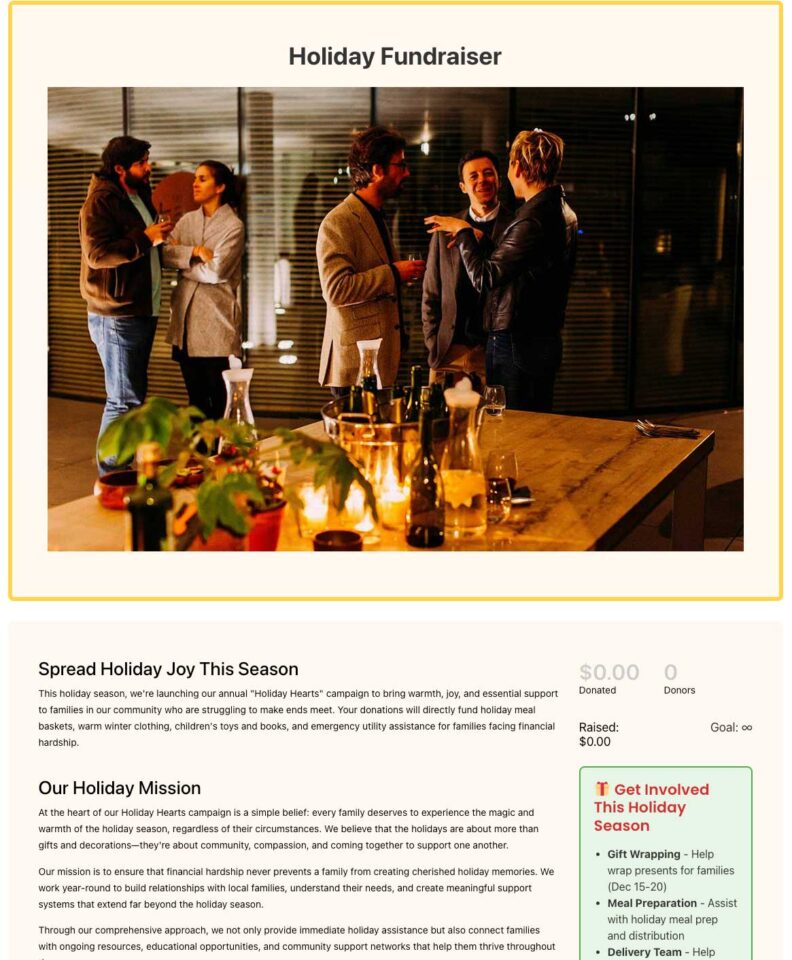
The catch is that most of that seasonal energy gets wasted on a generic, always-on donation page. If your page looks the same in December as it does in July, you’re leaving the single biggest giving window of the year on the table.
What You Need Before You Start
Everything in this tutorial works with the free version of Charitable. You can start with Charitable Lite if you haven’t installed it yet, and every step below, choosing a template, customizing it, setting a goal, and setting a deadline, is included at no cost.
Need help installing the plugin? See how to install Charitable on your site »
A few sections further down cover paid-plan features like recurring holiday gifts and fee relief. Those are optional. You can run a complete seasonal campaign without them, and I’ll flag exactly where they come into play.
How to Set Up a Seasonal Fundraising Campaign (Step by Step)
Step 1: Pick a Template That Fits the Occasion
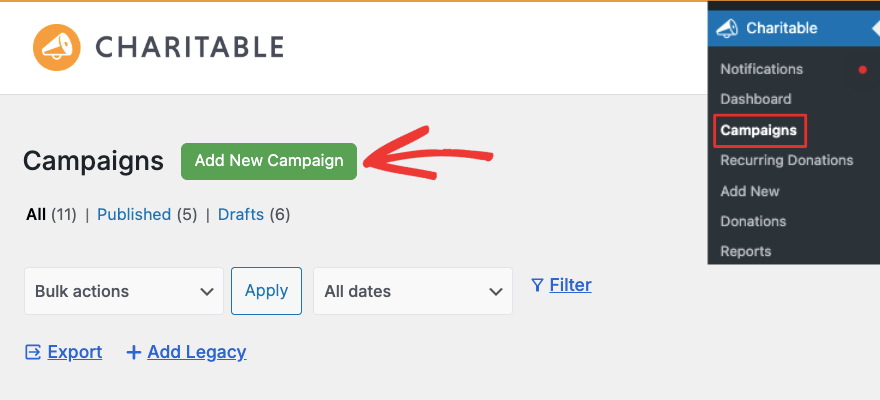
In your WordPress dashboard, go to Charitable » Campaigns » Add New.
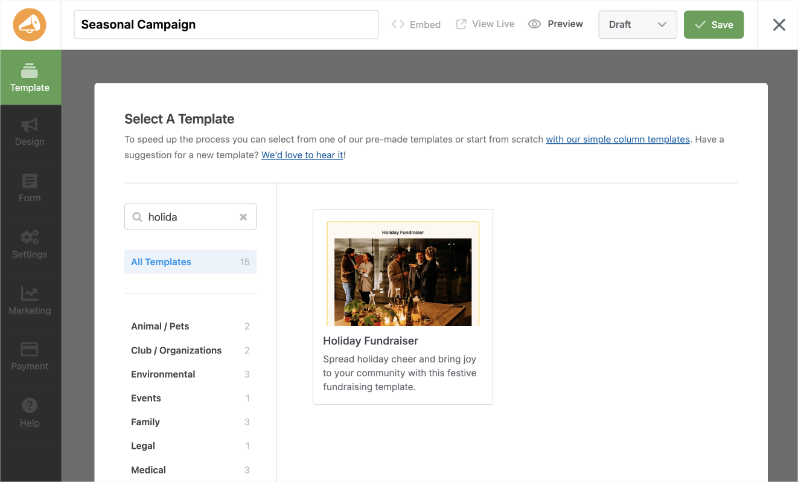
This opens the template picker, where you can search or browse by category before you build anything from scratch.
Type “holiday” into the search box and you’ll find the Holiday Fundraiser template, built specifically for festive, feel-good campaigns. If your occasion doesn’t have a dedicated template yet, browse the full template library, where the Special Occasions category and the simple 1-column and 2-column blank layouts both work well as a starting point you can theme yourself in the next step.
Name your campaign something specific to the occasion, like “Winter Giving Drive” or “Giving Tuesday 2026.”
Hover over any template to preview it, then click Create Campaign to open it in the builder.
Step 2: Customize It in the Campaign Builder
Once you’ve selected a template, the visual campaign builder opens with your layout in the center and a panel of drag-and-drop blocks on the left. This is where the template turns into your actual campaign.
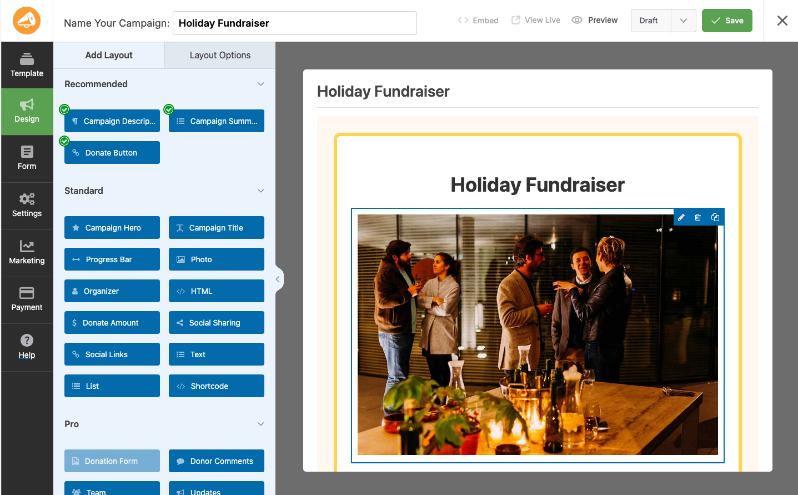
Click any block on the canvas to edit it directly. A few places worth your attention first:
- Campaign Hero or Photo block: Swap in a photo or video that fits the season. A warm, specific image of the people or animals your campaign supports works better than generic holiday clip art.
- Campaign Title and Description: Name the occasion directly. “Help Us Deliver Winter Coats Before Christmas” tells a supporter exactly what their gift does and why it’s time-sensitive.
- Progress Bar: This is optional but you can drag this block where you want it to appear. I personally like it near the top of the layout, close to the goal amount, so donors see momentum the moment they land on the page.
- Donor Comments: Let supporters leave a holiday greeting or a short note with their gift. It’s a small touch that fits the season and adds a personal layer to the page.
Every change previews instantly in the canvas, so you can try a few layouts before committing to one. There’s no need to get it perfect on the first pass. You can come back and adjust colors, images, or copy at any point before or during the campaign.
Step 3: Set Your Goal and Deadline
Click Settings in the left panel, then open General Settings. This is where the urgency actually gets built in.
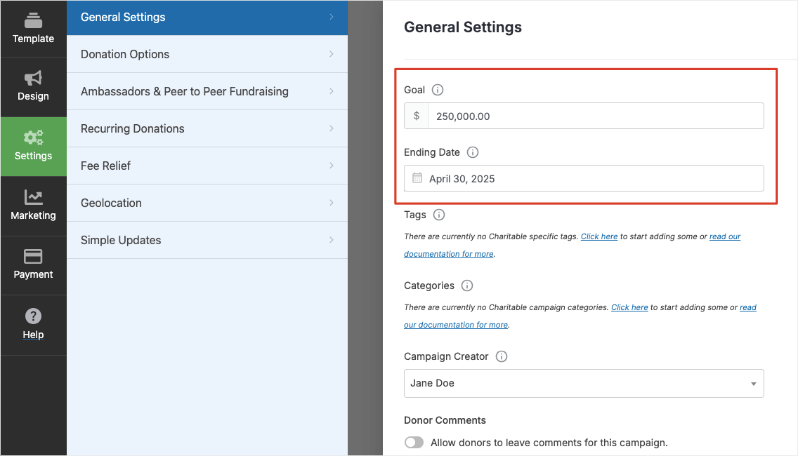
Enter a dollar amount in the Goal field. This number drives the progress bar on your campaign page, and a visible goal is one of the simplest ways to turn a vague ask into a concrete target donors can help you hit.
Leave it blank only if you genuinely want an open-ended campaign with no set target.
Then fill in the Ending Date field with the last day of your campaign,
- December 24th for a Christmas drive
- The Tuesday after Thanksgiving for Giving Tuesday
- December 31st for a year-end appeal.
This date is what creates a real deadline instead of an implied one, and it’s also the field that powers Charitable’s campaign countdown timer if you want to add a live, ticking clock to the page.
While you’re on this screen, add a category and a few tags that match the occasion. It’s a small step, but it helps supporters find this campaign later if you keep it visible on your site’s campaign list.
Step 4: Set Suggested Donation Amounts
Still inside Settings, click Donation Options. This is where you set the preset amounts donors see as buttons on the donation form, along with a minimum and maximum if you want either.

Rewrite the description under each amount so it ties back to the season.
Instead of “This is a slightly larger donation,” try something like “Covers a holiday meal for one family” or “Sponsors one gift for Giving Tuesday.”
Set one amount as the default selection, usually your mid-range option, since most donors give whatever is already selected unless they have a specific number in mind.
If you’re on a paid plan, this is also where you’d turn on recurring donations so a supporter can convert their one-time holiday gift into a monthly commitment.
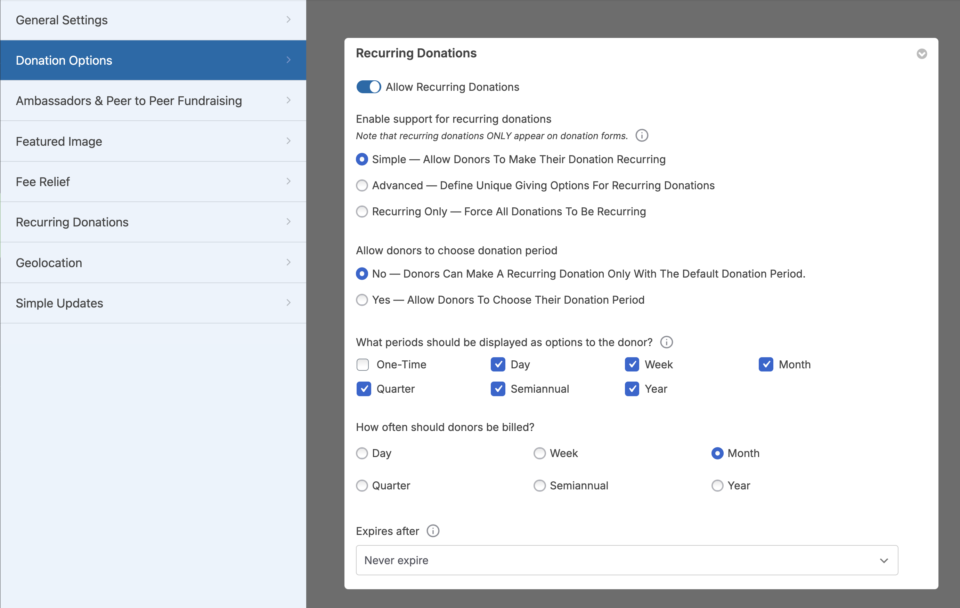
You can also use fee relief so donors can cover the processing fee and send their entire gift to your cause. Neither is required to launch the campaign, but both tend to perform well during high-emotion giving windows.
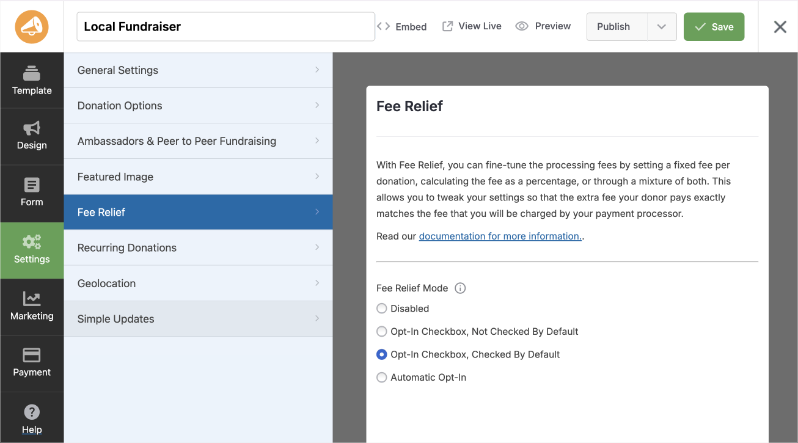
See how to set up Fee Relief here »
Step 5: Save, Preview, and Publish
Click Save in the top right of the builder, then click Preview to see the campaign exactly as a donor will. Check the goal amount, the deadline, and the donation form on both desktop and mobile before you consider it done.
When everything looks right, switch the status from Draft to Publish. From there, use the Embed option to drop the campaign onto an existing page or a brand-new one, or grab the shortcode directly if you’d rather place it yourself.
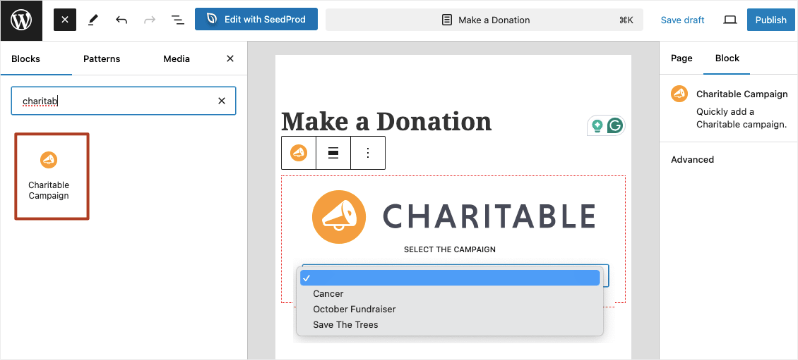
There are also readymade blocks inside the block editor in WordPress. Simply search for “Charitable”. Drop in the Charitable Campaign block. Then choose your fundraiser from the drop down menu.
That’s the whole setup. Most people go from template to a published, goal-driven seasonal campaign in well under an hour.
Need more guidance? See our guides on:
- How to Set Up Your First Campaign »
- Creating Time-Sensitive or Goal-Based Fundraising Campaigns in Minutes
- The Ultimate Nonprofit Task Automation Guide: Tools, Workflows & Time-Saving Strategies
Not yet on Charitable Pro? You can get up to 50% off when you sign up for or upgrade to Charitable Pro. We want to ensure that you can try the advanced fundraising features like Recurring Donations, Donation Recovery, and more at a significantly reduced cost.
Join over a million satisfied Charitable Pro users today. Every purchase comes with a 14-day money-back guarantee, ensuring you’re supported every step of the way.
If you have any questions or need assistance, our support team is ready to help you make the most of these new features.
Seasonal Fundraiser Ideas to Try All Year
Seasonal fundraising isn’t limited to the holidays in December. Any date with cultural or emotional weight can anchor a campaign, and running the same template-customize-goal-deadline process from above works for every occasion below.
- Giving Tuesday (late November): The single biggest 1-day giving event on the calendar. Pair it with a matching gift if you can line one up, and browse Charitable’s Giving Tuesday fundraising ideas for more inspiration.
- Christmas and winter holidays (December): The Holiday Fundraiser template is built for this exact moment. Frame the ask around warmth, gifts, and meals.
- Year-end giving (December 26 to 31): A separate push from your Christmas campaign, focused on tax-deductible giving before the calendar turns over. Charitable’s year-end fundraising playbook has a full plan for this window.
- New Year, new goals (January): A fresh-start campaign works well for organizations tied to health, education, or personal growth.
- Valentine’s Day (February): A natural fit for causes tied to relationships, family, or community, “spread the love” campaigns included.
- Easter and spring renewal (March or April): Themes of growth and second chances resonate here, especially for animal rescue and youth-focused causes.
- Mother’s Day and Father’s Day (May and June): Tribute-style giving in honor of a parent performs well when you let donors add a short dedication.
- Back-to-school (August): Strong timing for education, literacy, and youth organizations asking for supplies or scholarship funds.
- Fall and Thanksgiving (November): A gratitude-themed campaign ahead of Giving Tuesday can warm up your list before the bigger push.
- Your own anniversary or founding date: Not every meaningful date is a national holiday. Your organization’s own milestones make for a genuinely personal seasonal campaign.
You don’t need all 10 running in a single year. Pick 2 or 3 that genuinely fit your mission and your supporters’ calendar, and give each one the same care you’d give a single big December push.
Tips for Getting the Most Out of a Seasonal Campaign
Launch with enough runway
A 3-day campaign rarely has time to build momentum. Give a major seasonal push at least 2 to 4 weeks, so you have room to send multiple reminders and let word spread before the deadline arrives.
Show the goal early and often
Reference the progress bar and dollar amount in your emails and social posts, not just on the campaign page itself. “We’re at 62% of our Giving Tuesday goal” gives a supporter a reason to check the page even if they’ve already decided to give.
Turn one-time holiday gifts into recurring support
The emotional high of a seasonal ask is a good moment to invite a supporter to keep giving after the season ends. If you’re on a paid plan, recurring donations let a donor start a monthly gift right from the same form they’d use for a one-time holiday contribution.
Let your best campaigns become peer-to-peer
Seasonal energy spreads faster when supporters fundraise on your behalf. Peer-to-peer fundraising, available on paid plans, lets individual supporters launch their own personal version of your seasonal campaign inside their own network, while all the funds still come back to you.
Keep the relationship going after the deadline passes
When a seasonal campaign ends, the donor relationship doesn’t have to. Send a donation thank-you email that shares what their gift accomplished, and consider inviting them to your next seasonal push well before it launches. Every donor who gave once during the holidays is a warm lead for the next occasion on your calendar.
Need more step by step tutorials? Browse through our Charitable guides »
FAQs on Seasonal Fundraising Campaigns
Do I need one of Charitable’s paid plans to run a seasonal campaign?
No. Picking a template, customizing it in the builder, and setting a goal and deadline are all included in the free version of Charitable. Paid plans add extras like recurring donations, fee relief, and peer-to-peer fundraising, but none of those are required to launch a complete seasonal campaign.
How many seasonal campaigns can I run in a year?
There’s no limit. You can create unlimited campaigns in Charitable, so you’re free to run a campaign for every occasion that fits your organization, from Giving Tuesday through year-end and beyond, without paying extra per campaign.
What happens to my seasonal campaign page after the deadline passes?
That’s up to you. You can leave the page live to show your final results, hide the donation form while keeping the story visible, or unpublish it entirely and reuse the same template next year. Nothing happens automatically when the end date passes unless you’ve added a block like the countdown timer that changes behavior at zero.
Can I reuse the same seasonal campaign every year?
Yes. Many organizations duplicate last year’s Christmas or Giving Tuesday campaign, update the goal, the deadline, and a few photos, and publish it again rather than starting from scratch. It saves time while still giving supporters a page that feels current.
Is there a dedicated holiday template, or do I have to build one from scratch?
Charitable includes a Holiday Fundraiser template you can find by searching “holiday” in the template picker. For other occasions without a dedicated template, the Special Occasions category and the simple 1-column or 2-column blank templates both work well as a starting point you theme yourself.
Do supporters need an account to donate to a seasonal campaign?
No. Donors can give as a guest without creating an account. The donation form collects only what’s needed to process the gift and send a receipt, which keeps the checkout process fast during high-traffic giving days like Giving Tuesday.
Can I run more than one seasonal campaign at the same time?
Yes. There’s nothing stopping you from running a general fund campaign alongside a seasonal one, or running 2 seasonal campaigns for different causes at once. Each campaign has its own goal, deadline, and donation form, so they don’t interfere with each other.
Seasonal giving isn’t a one-time trick. It’s a rhythm you can build into your fundraising calendar, and Charitable gives you the templates, the builder, and the goal-and-deadline tools to run it well every time the season comes back around.
Charitable Has 1.2+ Million Downloads!
Trusted by millions to power successful fundraising campaigns. Try Charitable risk-free today.
✅ 14-day money-back
✅ Transparent pricing
✅ Code-free setup
Stay Connected for More Nonprofit Resources
For more tutorials and videos tailored to nonprofits, subscribe to our YouTube channel. We regularly publish expert tips, step-by-step guides on online donations, fundraising strategies, and practical resources to help your organization succeed.
🗞️ Get weekly tips and exclusive guides in your inbox
Join our newsletter →
🎥 Watch step-by-step tutorials and success stories
Subscribe to our YouTube channel →
👩🏽💻 Connect with our community and get daily nonprofit insights
Follow us on LinkedIn →
🥳 Fun reels and non-profit insights
Follow us on Instagram →
👀 Insightful & fun videos to help you grow your cause
Follow us on TikTok→
🌎 Subscribe and follow for general fundraiser tips
Get Fundraiser Tips on TikTok →
Powerful Fundraising Resources
🤖 Use Charitable with Your AI Assistant
⬇️ Download proven strategies, campaign ideas, and expert tools
Get the Fundraising Kit →
💸 Get Free Fundraising Resources
Head to the Charitable Fundraising Hub →
🤔 Got questions about Charitable?
Charitable FAQs →
🏎️ Take Charitable for a spin
Create your Charitable Demo →
Understand non-profit terms and jargon
Non-Profit Glossary →
% Looking for non-profit deals and discounts?
Best Non-Profit Deals and Discounts →






Leave a Reply