
Most nonprofits know their donation page could do better. Far fewer know which thing to fix first. You can spend a weekend redesigning a campaign page and still miss the one setting that is quietly costing you recurring donors.
Charitable Lite 1.8.12 answers that question for you.
Site Analysis is a new, completely free report that scores your fundraising setup and hands you a prioritized list of what to fix, in order.
It only looks at your Charitable configuration. No campaign content or donor data, including names, emails, or donation amounts, is ever sent or stored.
No upgrade required, and no developer needed. 🥳
Why a Score Changes The Way You Fundraise
Just being told, “Hey, you need to improve your fundraiser” is not helpful.
Instead, getting a list of tasks like:
- Add a goal to your active campaign
- Offer another way to give
- Shorten your donation form
Now those are actionable items that are actually helpful!
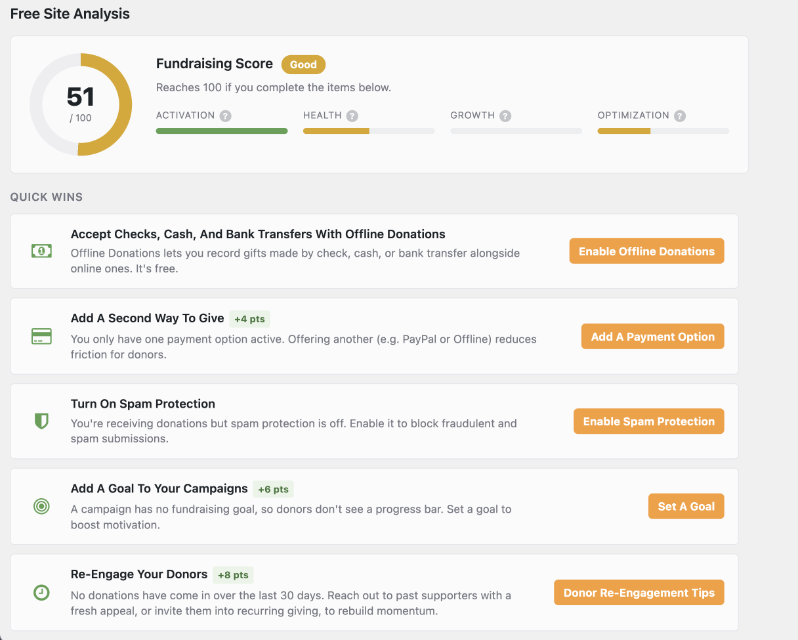
Site Analysis looks at how your site is actually configured, scores it across 4 areas, and turns the gaps into specific recommendations. Instead of guessing, you get a ranked to-do list, and a number that moves when you act on it.
See It in Action
The 4 Areas Site Analysis Scores
Head to Reports » Site Analysis and run your first report. It takes about a minute.
A single overall score would tell you something is wrong without telling you what kind of wrong.
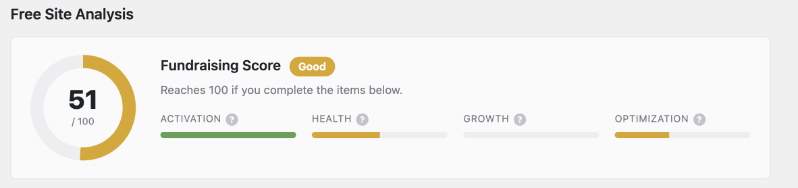
So instead of handing you one blended number, Charitable breaks your score into 4 separate areas, on purpose.
Here’s what each of the 4 actually means for you, in plain terms.
![Activation tile: Getting live and bringing in your first donations (megaphone icon shown). Changes on a nonprofit dashboard screen. [informative]](https://www.wpcharitable.com/wp-content/uploads/2026/08/4-types-of-site-analysis-reports.png "4 types of site analysis reports | Charitable")
Activation
Activation is the most basic layer and it’s the first checkpoint covering everything from your donation form to your payment gateway. It’s easy to assume that because your form loads and your gateway is connected, everything downstream is fine. That’s not always true. Maybe you connected a payment gateway a while back and never finished the setup.
Maybe a campaign went live without a goal amount, so donors never see any sense of momentum.
Maybe a required field on your form isn’t actually mapped to anything, so information you thought you were collecting has been going nowhere the whole time.
None of this shows up unless someone goes looking, which is exactly what Activation does for you. If this score comes back low, fix it first.
Health
Health shows you whether your existing setup is configured cleanly, without the misconfigurations that quietly turn donors away.
For instance, it could show you:
A currency mismatch between your gateway and a campaign that only shows up for donors in certain countries.
A “thank you” redirect that silently points to the wrong page after someone gives.
An old setting left behind from an earlier version of your form that nobody remembers turning on.
Any one of these might be costing you a small percentage of donors here and there, not enough to trigger a complaint, just enough to quietly add up over a year.
Health exists to go find that kind of thing before a donor has to be the one who sees it.
Growth
Activation and Health are both about problems. Growth is a little different, it’s about opportunity.
This score looks at whether your site is actually built to grow your donor base over time, not just process whatever gifts happen to come in today.
Is recurring giving turned on and visible, so a one-time donor has an easy path to becoming a monthly supporter?
Do donors have a way to opt into hearing from you again, or does the relationship end the moment the gift clears?
Is there anything in place that encourages a first-time donor to come back for a second gift?
If your Growth score is low, it doesn’t necessarily mean something’s broken.
It usually just means there’s an easy improvement available that you haven’t made yet.
Optimization
Optimization is the score for once everything else is already solid, the kind of fine-tuning that experienced fundraisers tend to obsess over, like form length, how many suggested donation amounts you’re showing, and which one is selected by default.
Small choices like these change how many donors finish giving, in ways that are well documented but genuinely hard to catch on your own site. You’ve looked at your own donation form so many times that you’ve stopped really seeing it.
Optimization looks at your form the way a first-time visitor sees it, not the way you see it after months of looking at it every day.
All 4 scores get checked every single time you run a report, and they’re deliberately independent of each other. You can have a beautifully optimized donation form sitting on top of a broken payment gateway, and you’d still be losing donations, just for a completely different reason than you’d expect.
Site Analysis is built to catch both kinds of problem, the obvious one and the quiet one, in the same pass.
Recommendations You Can Actually Act On
A score is useful, but a score by itself doesn’t fix anything, and if all you got was a number, you’d probably close the tab and forget about it by lunch. The list of recommendations underneath the score is really the point of the whole feature.
That list is ranked, not just dumped on you in whatever order Charitable happened to check things. Whatever matters most sits at the top. Each recommendation also shows the points it would add to your score, so you can see exactly which fix is worth doing first.
If you genuinely only have 10 minutes today, you don’t have to read the whole thing and figure out priority for yourself. You just work down from the top and stop whenever you run out of time, knowing you already handled the part that mattered most.
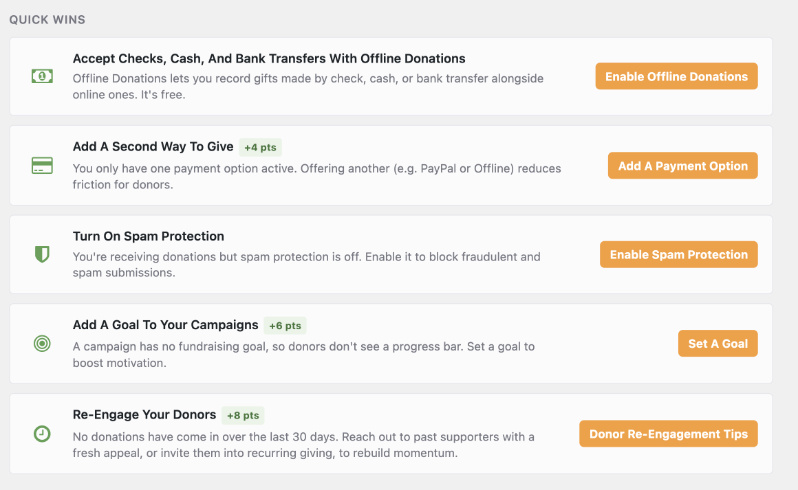
Every recommendation is written against your actual setup: your campaigns, your forms, your gateways, as they exist right now, not a generic best-practices checklist that half applies to you and half doesn’t. If a recommendation shows up on your report, it’s because Site Analysis found that specific thing on your specific site.
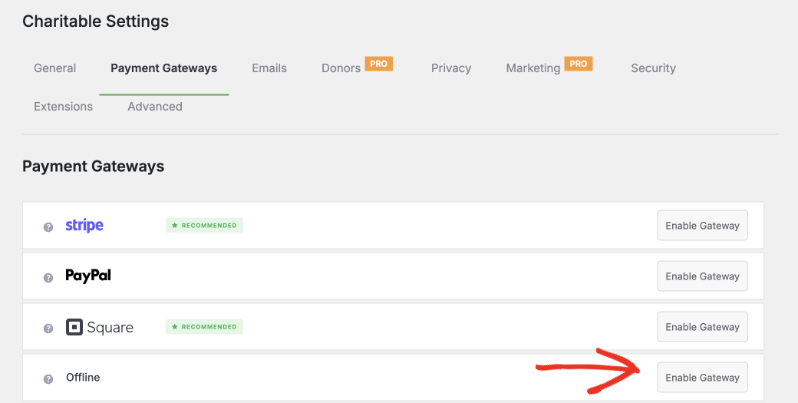
When you click a recommendation like “Enable Offline Donations,” it takes you straight to the Payment Settings page, where you can turn it on in a couple of clicks. No hunting through menus to find the right setting.
The best part? It ships in Charitable Lite, the free version of the plugin, so there’s nothing to unlock and nothing to buy first.
Get Started With Site Analysis
Site Analysis is available only in our Charitable Lite plugin (that’s the free version). It’s coming soon to the Pro plugin!
You can be looking at your own score in about a minute. Update to Charitable 1.8.12 from Plugins » Installed Plugins, then head to Reports » Site Analysis and run your first report.
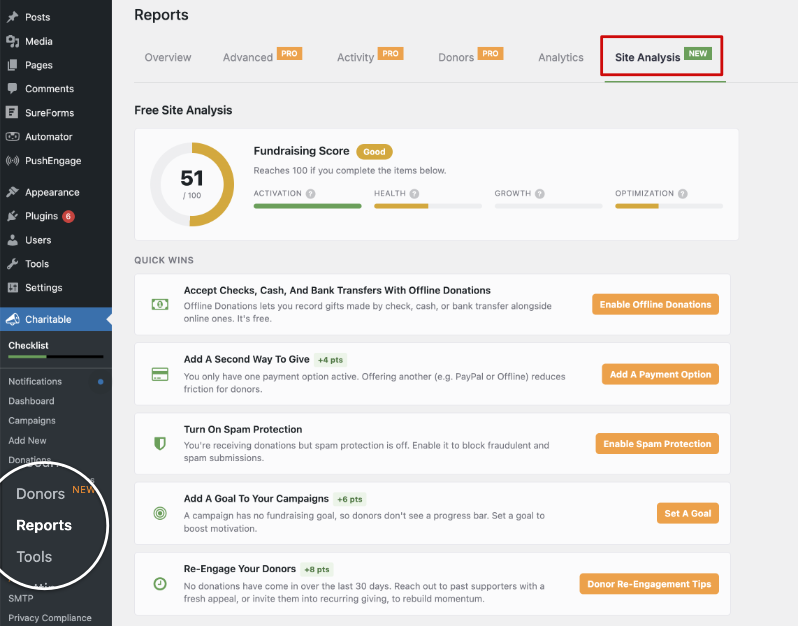
Don’t be surprised if your first score isn’t perfect. Most sites’ aren’t, and that’s really the point of running it. Work down the recommendations list starting at the top, and rerun the report any time you want to see the number move.
Read the Site Analysis Documentation →
Also Released: New Beacon Templates
With the release of Charitable Lite 1.8.12, we’ve also brought in 2 Beacon campaign templates that were previously only available in the Pro plugin.
Beacon leads with a full-width hero banner, your logo, your goal, and a donation widget locked right on top of the image, so visitors see the donation request the moment they arrive on your campaign page.
Charitable Has 1.2+ Million Downloads!
Trusted by millions to power successful fundraising campaigns. Try Charitable risk-free today.
✅ 14-day money-back guarantee
✅ Transparent pricing
✅ Code-free setup
What’s New in Charitable
We also launched several powerful features and improvements recently:
🧾
Show a different thank-you page to every donor, based on their campaign, gift size, or country.
📝
Drop a fully working donation form directly into any page or post in the block editor.
👤
Give every peer-to-peer fundraiser a permanent, shareable page with their bio, avatar, and campaigns.
📱
Apple Pay and Google Pay in Mollie
Let mobile donors check out with a face scan or fingerprint instead of typing out a card number.
📋
Moderate and manage your whole peer-to-peer network from new directory and reporting screens.
⚡
Accept UPI, cards, and more from India-based donors with a native, no-code connection.
We’ve been adding to Charitable constantly, features and improvements designed to help you raise more and serve your donors better. See everything we’ve shipped at the Charitable Changelog.
Not yet a Charitable Pro user? Sign up today and get up to 50% off on your plan. We’re confident you’ll love raising funds with Charitable. If, for any reason, Charitable is not the right fit for you, we’ll refund your purchase with our 14-day money-back guarantee. Get Charitable Pro Now »
Stay Connected for More Nonprofit Resources
For more tutorials and videos tailored to nonprofits, subscribe to our YouTube channel. We regularly publish expert tips, step-by-step guides on online donations, fundraising strategies, and practical resources to help your organization succeed.
🗞️ Get weekly tips and exclusive guides in your inbox
Join our newsletter →
🎥 Watch step-by-step tutorials and success stories
Subscribe to our YouTube channel →
👩🏽💻 Connect with our community and get daily nonprofit insights
Follow us on LinkedIn →
🥳 Fun reels and non-profit insights
Follow us on Instagram →
👀 Insightful & fun videos to help you grow your cause
Follow us on TikTok→
🌎 Subscribe and follow for general fundraiser tips
Get Fundraiser Tips on TikTok →
Powerful Fundraising Resources
🤖 Use Charitable with Your AI Assistant
⬇️ Download proven strategies, campaign ideas, and expert tools
Get the Fundraising Kit →
💸 Get Free Fundraising Resources
Head to the Charitable Fundraising Hub →
🤔 Got questions about Charitable?
Charitable FAQs →
🏎️ Take Charitable for a spin
Create your Charitable Demo →
Understand non-profit terms and jargon
Non-Profit Glossary →
% Looking for non-profit deals and discounts?
Best Non-Profit Deals and Discounts →







Leave a Reply