
If your nonprofit serves donors in Europe, you know that credit cards are not always the preferred way to give.
In the Netherlands, most online payments go through iDEAL. In Belgium, it is Bancontact. In Poland, BLIK and Przelewy24 dominate.
We’re thrilled to announce that with the release of Braintree addon version 1.3.0, Charitable Pro now supports six local payment methods. Now you can empower your European donors with the payment methods they trust and prefer! This update is PERFECT for nonprofits looking to make giving as seamless as possible for their international supporters.
What Are Local Payment Methods?
Local payment methods are bank-based payment options popular in specific countries. Instead of entering a card number, donors click a button, authenticate with their bank in a popup, and the donation is processed directly. The experience is fast, familiar, and secure.
What’s New in Braintree 1.3.0?
Braintree 1.3.0 introduces six local payment methods popular across various European countries, making it easier than ever for your donors to contribute using familiar options:
| Method | Currency | Countries |
|---|---|---|
| iDEAL | EUR | Netherlands |
| Bancontact | EUR | Belgium |
| EPS | EUR | Austria |
| BLIK | PLN | Poland |
| Przelewy24 | PLN, EUR | Poland |
| MyBank | EUR | Italy, Portugal |
These methods appear automatically on your donation forms when your site currency matches. A site set to EUR will display iDEAL, Bancontact, EPS, Przelewy24, and MyBank. A site set to PLN will show BLIK and Przelewy24. No extra configuration beyond flipping a toggle.
How It Looks on the Donation Form
Local payment buttons appear below the standard Braintree card form, separated by an “or pay with” divider. Each button displays the payment method’s logo and name.
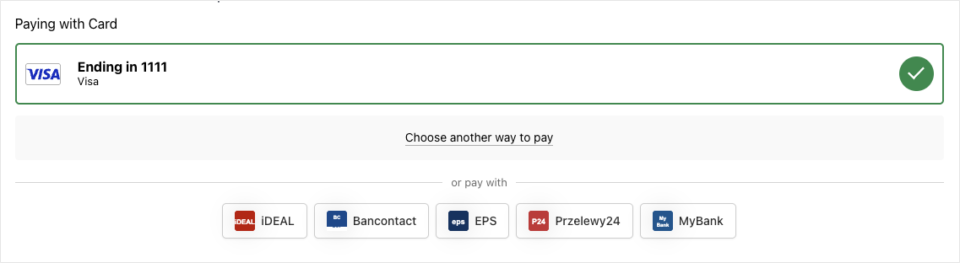
When a donor clicks a button, a popup opens where they authenticate with their bank. After approval, the popup closes and the donation submits automatically. If popups are blocked, the flow falls back to a same-window redirect.
Why You’ll Love These New Payment Options
- 🌟 Increased Donations: Enable donors in various European countries to give using their preferred local methods.
- 💼 Broader Reach: Access new donor pools by supporting popular payment methods in targeted regions.
- 🔒 Secure & Speedy Transactions: Donors authenticate through their bank, ensuring a fast, secure, and seamless donation process.
How to Set Up Braintree 1.3.0 🛠️
Getting started takes just a few minutes:
- Update the Braintree addon to version 1.3.0 or later.
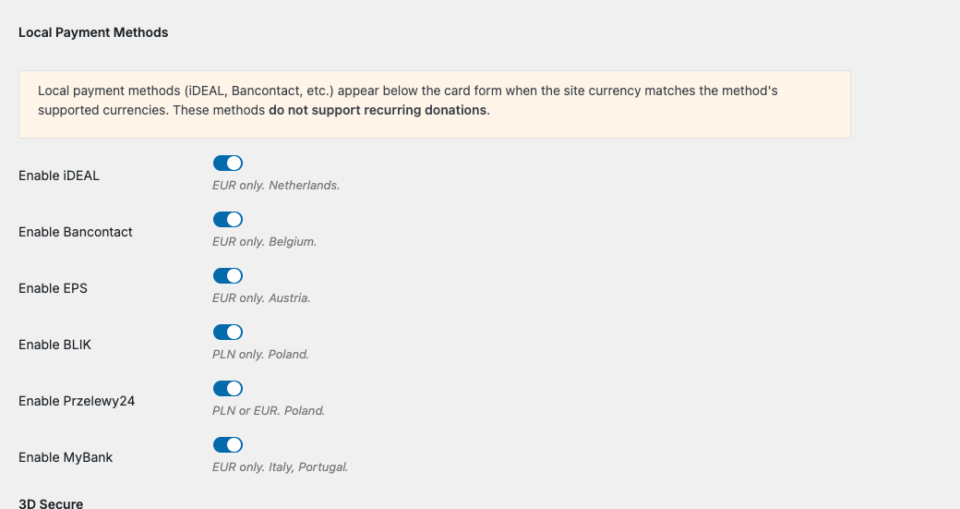
- Enable methods at Charitable » Settings » Payment Gateways » Braintree. Scroll to the Local Payment Methods section and toggle on the methods you want.
- Add webhook events. In your Braintree dashboard, add the four local payment webhook types (Completed, Reversed, Expired, Funded) to your existing webhook subscription.
- Set your currency. Make sure your site currency is EUR or PLN at Charitable » Settings » General.
That is it. Your donors will see the new payment buttons the next time they visit a campaign page.
Good to Know About Braintree 1.3.0
- Currency filtering is automatic. Only methods that match your site currency appear. No buttons show for USD or other unsupported currencies.
- Recurring donations are not supported. Local payment methods work for one-time donations only. When a donor switches to a recurring period, the buttons hide automatically.
- Webhooks are required. Local payments are processed asynchronously. Without webhooks, donations will stay in Pending status.
- Braintree account activation may be needed. If you see errors, contact Braintree support to confirm local payments are enabled on your merchant account.
Ready to Get Started?
Braintree 1.3.0 is available now for all Charitable Pro users. Update the addon from your WordPress dashboard, enable the methods your donors need, and start accepting local payments today.
For the full setup walkthrough, see our documentation: Setting Up Braintree Local Payment Methods.
Not Yet a Charitable Pro User?
Charitable powers fundraising for over 1 million WordPress sites! With Charitable Pro, here are just some of the features you get access to:
- Recurring Donations
- Full Donation Management
- Campaign Showcase
- Donations Feed
- Mini Donation Widget
- Advanced Reporting
- Peer-to-Peer Fundraising
- Donation Goal Thermometers
- Email Notifications
- Customizable Donation Forms
Every dollar your donors give goes directly to your cause – not to a platform taking a cut.
You own your data, your donor relationships, and your fundraising experience, all from within WordPress.
No third-party dashboards, no surprise fees, and no lock-in. And if it’s not the right fit, we offer a 14-day money-back guarantee – no questions asked.
Stay Connected for More Nonprofit Resources
For more tutorials and videos tailored to nonprofits, subscribe to our YouTube channel. We regularly publish expert tips, step-by-step guides on online donations, fundraising strategies, and practical resources to help your organization succeed.
🗞️ Get weekly tips and exclusive guides in your inbox
Join our newsletter →
🎥 Watch step-by-step tutorials and success stories
Subscribe to our YouTube channel →
👩🏽💻 Connect with our community and get daily nonprofit insights
Follow us on LinkedIn →
🥳 Fun reels and non-profit insights
Follow us on Instagram →
👀 Insightful & fun videos to help you grow your cause
Follow us on TikTok→
🌎 Subscribe and follow for general fundraiser tips
Get Fundraiser Tips on TikTok →
Powerful Fundraising Resources
🤖 Use Charitable with Your AI Assistant
⬇️ Download proven strategies, campaign ideas, and expert tools
Get the Fundraising Kit →
💸 Get Free Fundraising Resources
Head to the Charitable Fundraising Hub →
🤔 Got questions about Charitable?
Charitable FAQs →
🏎️ Take Charitable for a spin
Create your Charitable Demo →
Understand non-profit terms and jargon
Non-Profit Glossary →
% Looking for non-profit deals and discounts?
Best Non-Profit Deals and Discounts →









Leave a Reply