
How much does GoFundMe take from each donation? Most people ask this question right before they launch a fundraiser, and it’s a smart one to ask.
The fee itself is smaller than many people expect. But the fee line is only one part of what a fundraiser costs you, and it’s often the smallest part.
I’ve spent 15+ years helping nonprofits raise money online, and I co-founded a nonprofit myself. The costs that hurt us most were never the ones printed on a pricing page. They were the slow payouts and the donors we couldn’t reach again.
Think about the moment a donor gives $50 to your cause. They trust you, and they want to hear what happens next. Whether you can write back to them depends on where they gave.
In this guide, I’ll give you GoFundMe’s exact fees for 2026, taken from GoFundMe’s own pricing page and help center. I’ll show you what they add up to on a real $1,000 campaign.
Then I’ll walk through the costs the fee page doesn’t show, give you a worksheet to work out your real cost, and show you how to raise money on your own website instead.
- How Much Does GoFundMe Take?
- GoFundMe Fees by Country
- What GoFundMe Fees Look Like on a $1,000 Campaign
- Does GoFundMe Take a Percentage of Donations?
- The Costs That Don't Show Up on the Fee Page
- When GoFundMe Is the Right Choice
- A Worksheet to Work Out Your Real Cost of Fundraising
- How to Raise Money on Your Own Website With Charitable
- FAQs on GoFundMe Fees
How Much Does GoFundMe Take?
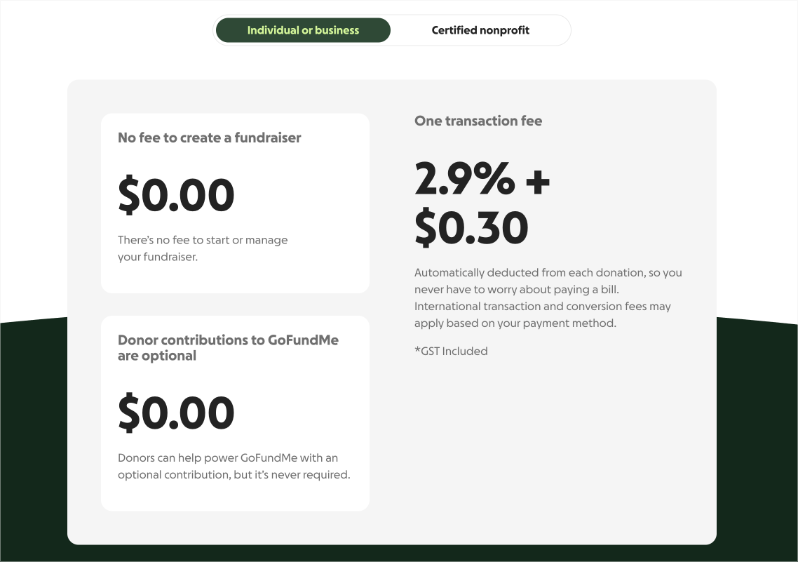
GoFundMe takes one transaction fee of 2.9% + $0.30 from every donation to an individual or business fundraiser in the United States. For a certified nonprofit fundraiser in the US, the fee is 2.2% + $0.30. There is no fee to start or manage a fundraiser, and donors don’t have to give GoFundMe anything extra.
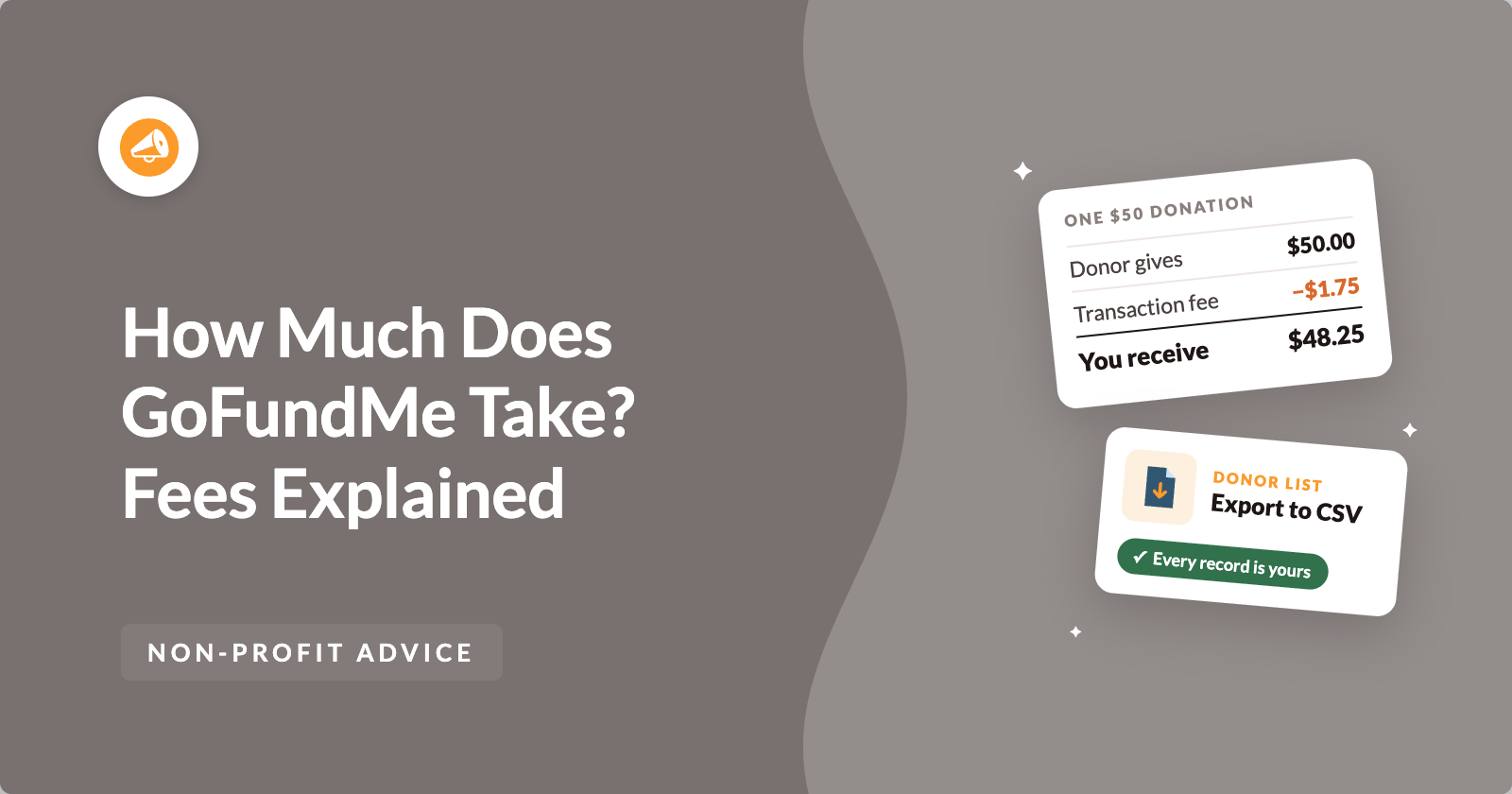
GoFundMe gives its own example in its help article on fees. A $50 donation to a US fundraiser reaches the person receiving the funds as $48.25, after the 2.9% + $0.30 fee is taken out.
Here are the main charges at a glance, as GoFundMe listed them on 8 October 2026.
- No fee to create a fundraiser. GoFundMe charges $0.00 to start or manage your fundraiser.
- Donor contributions to GoFundMe are optional. Donors can add a contribution to help power GoFundMe, but it’s never required, so GoFundMe lists it at $0.00.
- One transaction fee, individual or business fundraiser. GoFundMe takes 2.9% + $0.30 from each donation in the US.
- One transaction fee, certified nonprofit. GoFundMe takes 2.2% + $0.30 from each donation in the US.
- Recurring donations. Donors who give monthly pay an extra 5% fee on each donation, on top of the transaction fee.
GoFundMe takes the transaction fee out of each donation automatically, so you never have to pay a bill. International transaction and conversion fees may also apply, depending on the donor’s payment method. You can see what was taken in the Breakdown part of the Transfers page in your GoFundMe account.
Those rates are for the US. If you fundraise from another country, the numbers change a little.
GoFundMe Fees by Country
GoFundMe’s pricing page lists a different rate for each country. Most personal fundraisers pay 2.9% plus a small fixed amount in the local currency. Certified nonprofit fundraisers pay a lower rate in the 5 countries that offer them.
Here’s what the pricing page showed when I checked it on 8 October 2026.
| Country | Personal or business fundraiser | Certified nonprofit fundraiser |
|---|---|---|
| United States | 2.9% + $0.30 | 2.2% + $0.30 |
| Canada | 2.9% + $0.30 | 2.2% + $0.30 |
| United Kingdom | 2.9% + £0.25 | 1.9% + £0.20 |
| Ireland | 2.9% + €0.25 | 1.9% + €0.35 |
| Australia | 2.2% + $0.30 | 1.9% + $0.30 |
GoFundMe also says that international transaction and conversion fees may apply, based on the donor’s payment method. GoFundMe doesn’t charge a conversion fee itself, but a donor’s bank may.
Percentages are hard to feel, though. So let’s put real money through them.
What GoFundMe Fees Look Like on a $1,000 Campaign
Say your campaign raises $1,000 from 20 donors who each give $50. On each gift, GoFundMe takes 2.9% of $50, which is $1.45, plus $0.30. That’s $1.75 per gift.
Across 20 gifts, the fees come to $35, and you receive $965. If the same campaign runs as a certified nonprofit fundraiser, the fee drops to $1.40 per gift, so you pay $28 and receive $972.
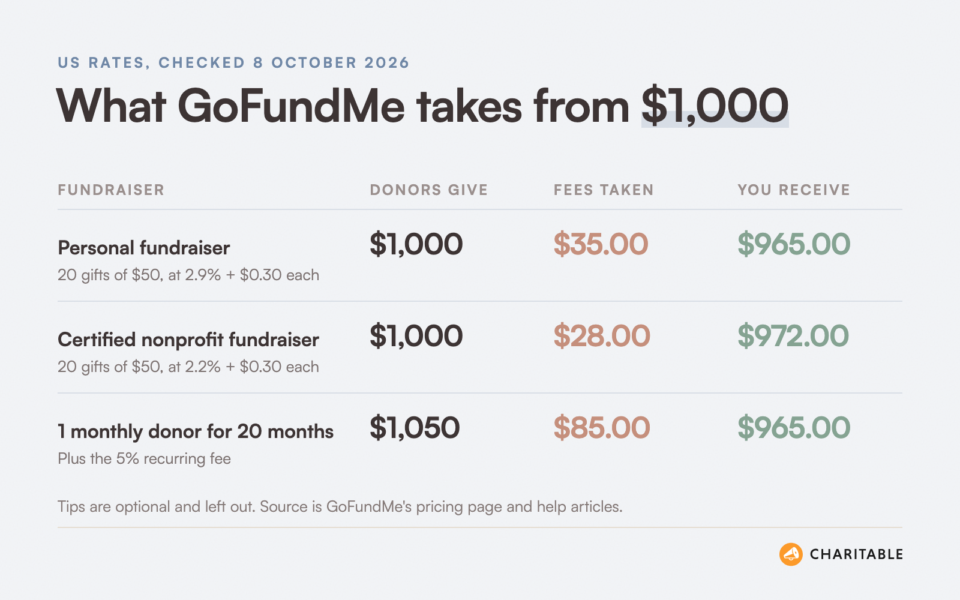
Monthly donors change the picture. If 1 donor gave $50 a month for 20 months, they would also pay GoFundMe’s 5% recurring fee of $2.50 every month.
That donor would spend $1,050 in total. You would still receive $965, and GoFundMe would keep $85. The recurring fee is paid by the donor, so it doesn’t lower your payout, but it is still money your supporter spent that didn’t reach your cause.
For comparison, any website that takes card payments pays a processing fee to its payment company. I’ve explained how those fees work in my guide to nonprofit payment processing fees. GoFundMe’s transaction fee sits in a similar range for one-time gifts.
So the fee on a one-time gift is fair. The hidden costs of fundraising platforms show up in the tip and in the recurring fee, which leads to the question most people are really asking.
Does GoFundMe Take a Percentage of Donations?
Yes. GoFundMe takes a percentage plus a fixed amount from every donation, as the transaction fee. It doesn’t take a separate platform percentage on top of that for one-time gifts.
GoFundMe says the transaction fee covers card, debit and ACH charges, plus the cost of offering ways to pay such as PayPal, Venmo, Apple Pay and Google Pay. It calls this the only fee deducted from a single donation.
How the GoFundMe Tip Works
When a donor checks out, GoFundMe asks them to leave a tip for GoFundMe. Its pricing page calls this an optional donor contribution. The donor can slide it down to $0 or type in a custom amount.
The tip doesn’t come out of your donation. It gets added to what the donor pays. But a donor usually has a set amount in mind, so money that goes to a tip may be money that doesn’t go to you.
GoFundMe also says the organizer won’t see whether donors left a tip. So you can’t tell how much of your supporters’ money went to GoFundMe instead of your cause.
The 5% Fee on Monthly Donations
Monthly giving is where a lot of nonprofits grow. GoFundMe offers it, but each monthly donation carries a 5% fee paid by the donor, in addition to the normal transaction fee.
GoFundMe’s help article says that organizers pay nothing extra for this. That’s true. Your most loyal supporters pay it instead, every single month.
Monthly donations on GoFundMe also aren’t offered in every country. GoFundMe says fundraisers in Italy and Canada don’t have the option.
So far, everything we’ve covered appears on GoFundMe’s pricing page or in its help center. The next set of costs doesn’t show up as a fee at all.
The Costs That Don’t Show Up on the Fee Page
When I help a nonprofit choose where to fundraise, I ask 3 questions that have nothing to do with percentages.
Where does the money go? How fast does it arrive? Who keeps the donor list?
Here’s how GoFundMe answers each one, using its own help articles.
Waiting for Your Money
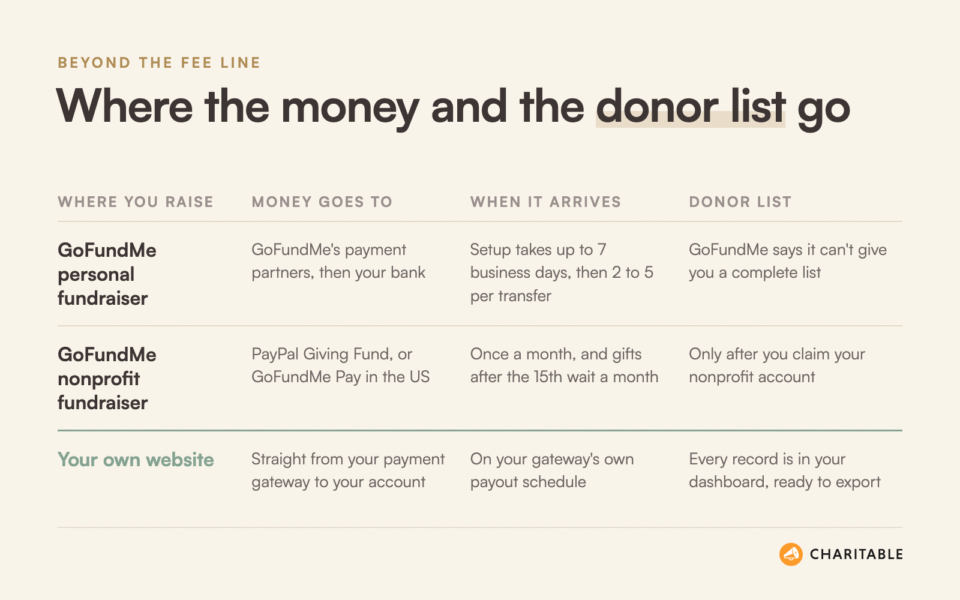
On a personal fundraiser, you set up bank transfers before you can withdraw. GoFundMe says that setting up and verifying transfers can take up to 7 business days or longer.
After that, each transfer takes 2 to 5 business days to reach your bank account. If you miss the deadline to verify your bank details, GoFundMe says your donations could be refunded automatically.
Certified nonprofit fundraisers work differently. The organizer never handles the money. It goes through PayPal Giving Fund, or straight to the nonprofit if it’s based in the US and has turned on GoFundMe Pay.
PayPal Giving Fund pays nonprofits once a month. Money donated up to the 15th is sent that month, and anything after the 15th waits until the following month. A nonprofit that hasn’t enrolled with PayPal Giving Fund gets a paper check, sent to the address in public records.
That wait matters when the money is for something urgent, like rent for a family or repairs after a storm. A gift made on the 16th could take more than 6 weeks to arrive.
Your Donor List
This is the cost I think about most. In its article on thanking and managing donors, GoFundMe says that “it’s not possible for us to provide a complete list of your donors’ information,” to comply with data protection rules.
You can thank donors through GoFundMe’s own messaging tool. But on a personal fundraiser, you can’t download a full list of names and email addresses to add to your newsletter.
Nonprofits can get more donor data, but only after they claim their nonprofit account. In the US, that claim goes through GoFundMe Pro. In Canada, the UK, Ireland and Australia, you send in a photo ID and proof that you can act for the nonprofit, and GoFundMe reviews it.
Why does this matter so much? A first-time donor is the easiest person to ask for a second gift. If you can’t write to them, you have to find them all over again for your next campaign.
I’ve written more about why keeping in touch with donors costs far less than finding new ones.
Whose Name Your Donors Remember
A GoFundMe page lives on GoFundMe’s website, with GoFundMe’s logo around your story. The donor makes an account with GoFundMe and gets emails from GoFundMe.
Months later, many donors will remember that they gave “on GoFundMe.” Fewer will remember your nonprofit’s name or website. That makes your next ask harder, even when the first campaign went well.
GoFundMe Pro Is Priced Separately
GoFundMe also sells a product for larger nonprofits, called GoFundMe Pro. Its pricing page says that “GoFundMe Pro pricing and fees differ,” and it doesn’t list those prices there.
If your nonprofit is looking at GoFundMe Pro, ask the sales team for a full written quote. Make sure it covers software costs, transaction fees and any fees donors pay at checkout.
None of this makes GoFundMe a bad choice. It makes it a choice with trade-offs, and for some fundraisers those trade-offs are fine.
When GoFundMe Is the Right Choice
I want to be fair here. GoFundMe solves real problems, and I’d suggest it to a friend in some situations.
- A personal emergency. If you’re raising money once, for one person, you may never need to contact those donors again.
- No website yet. If you have no website and need to start today, a GoFundMe page can be live in minutes.
- A supporter fundraising for you. A friend who wants to raise money for your nonprofit on their birthday may find GoFundMe familiar and easy.
Things change once you plan to fundraise again next month and next year. Then the donor list, the payout timing and your own brand start to cost more than the transaction fee ever will.
If you’d like to see the other options side by side, I’ve compared them in my roundup of the best GoFundMe alternatives for nonprofits.
Before you choose anything, though, it helps to see your own numbers on one page. Here’s the worksheet I use.
A Worksheet to Work Out Your Real Cost of Fundraising
This worksheet works for GoFundMe, for any other platform and for your own website. Copy it into a document, fill in a line for each option you’re comparing, and look at the totals together.
Use your last campaign’s numbers if you have them. If this is your first campaign, use your goal and a typical gift of $50.
Part 1. The Money
- Goal. Write down how much you plan to raise, for example $1,000.
- Number of gifts. Divide your goal by your typical gift, for example 20 gifts of $50.
- Fee per gift. Multiply your typical gift by the percentage, then add the fixed amount, for example $1.75.
- Total transaction fees. Multiply the fee per gift by the number of gifts, for example $35.
- Software cost. Add any monthly or yearly price for the tool, for example $0 on GoFundMe.
- Money that reaches you. Subtract lines 4 and 5 from your goal.
Part 2. What Your Donors Pay on Top
- Tips. Note whether donors are asked to tip the tool, and whether you can see the amount.
- Recurring fees. Note any extra percentage monthly donors pay, for example 5% on GoFundMe.
- Option to cover fees. Note whether donors can choose to cover your processing fee for you.
Part 3. Time and Control
- Days until the first payout. Count the business days from the first gift to money in your bank.
- Donor list. Write yes or no. Can you download every donor’s name and email address today?
- Your brand. Write yes or no. Does the donor see only your name, colors and website while they give?
- Your rules. Write yes or no. Can you change the goal, the end date and the page whenever you like?
Most people only fill in Part 1. In my experience, the “no” answers in Part 3 cost a nonprofit more over a year than any line in Part 1.
If you want those answers to be “yes,” the simplest path is to take donations on your own website. Here’s how that works.
How to Raise Money on Your Own Website With Charitable
Charitable is a WordPress donation plugin. It turns your WordPress site into a place where you can run campaigns and take donations, with no coding. More than 10,000 nonprofits use it, and the free version has 1+ million downloads.
If you don’t have a website yet, my guide on how to create a nonprofit website walks you through it.
Here’s how it answers the 3 questions from earlier.
- You control your data. Every donor’s name, email and gift history is saved on your own website. You can export it, take it with you and use it anywhere.
- You control your fundraisers. You decide how much to raise, set the goal and the deadline, and extend it whenever you like.
- Payouts go directly from your payment gateway. Donations go straight from Stripe, PayPal or Square to your account. Charitable never holds the money.
- Donors stay on your site. They see your name, your colors and your story from the first click to the thank-you page.
- Point and click, no coding required. You build campaign pages with a visual builder and ready-made templates.
Your payment gateway still charges its standard processing fee, the same as on any website. On Charitable’s paid plans, Charitable takes no percentage of your donations. You pay for your license, and the processing fee goes to your gateway.
Here’s how to set up your first campaign. It takes about 10 minutes.
Step 1. Install Charitable
The easiest way to begin is to start with Charitable Lite, the free version. It includes unlimited campaigns, goals, end dates, progress bars and the Stripe, PayPal, Square and offline payment options.
To install it, head over to Plugins » Add New in your WordPress dashboard, search for Charitable, then click Install Now and Activate.
Step 2. Create a Campaign From a Template
Once Charitable is active, head over to Charitable » Campaigns and click Add New. The campaign builder opens with a set of ready-made templates.
Type your campaign’s name in the Name Your Campaign box. Then hover over a template that suits your cause and click Create Campaign. You can change everything about it later.
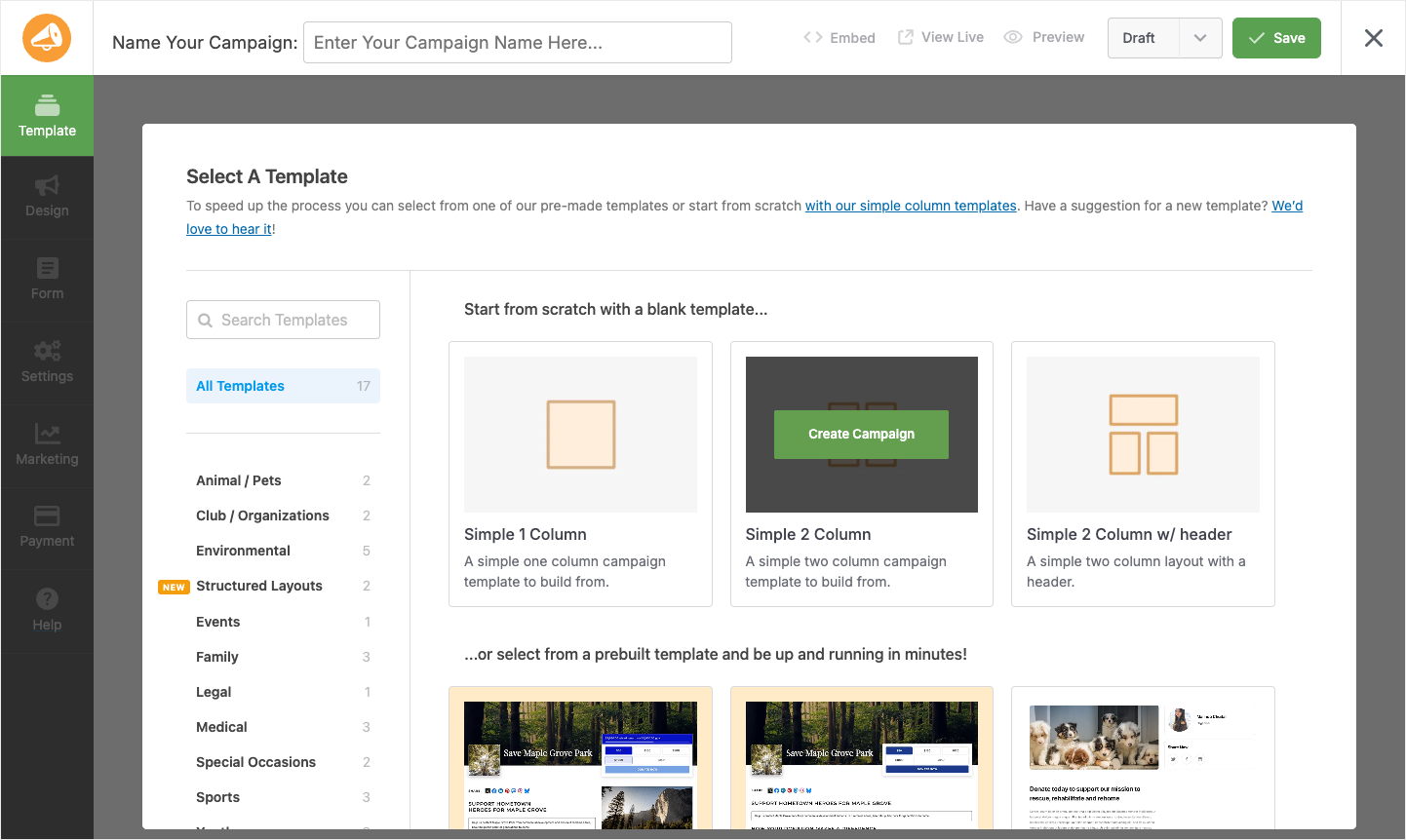
Next, open the Settings tab and go to General Settings. Enter your target in the Goal field and pick a date under Ending Date. Your page will show a live fundraising progress bar and a countdown, just like a GoFundMe page.
Step 3. Connect Your Payment Gateway
To accept gifts, head over to Charitable » Settings » Payment Gateways. Turn on the gateway you want, such as Stripe, PayPal or Square, then click Settings and follow the prompts to connect your account.
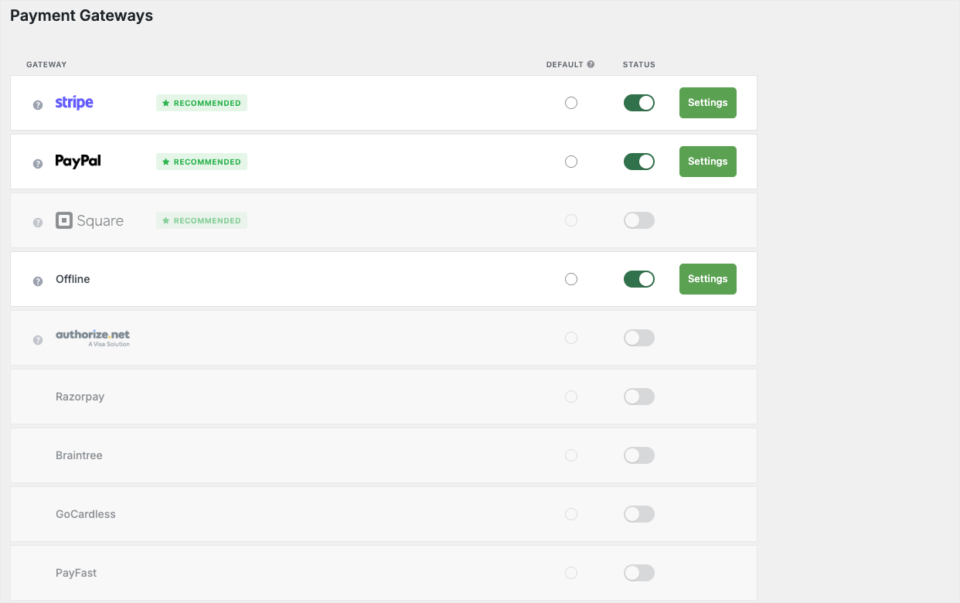
From here on, every gift goes straight into that gateway account and out to your bank on the gateway’s own schedule. Nobody holds your money in between. If you’re not sure which gateway to pick, my guide to the best payment gateways for nonprofits compares them.
Step 4. Let Donors Cover the Processing Fee
This is the honest version of a tip. Instead of asking donors to pay the tool, Charitable’s Fee Relief feature asks if they’d like to cover your processing fee, so the full gift reaches your cause.
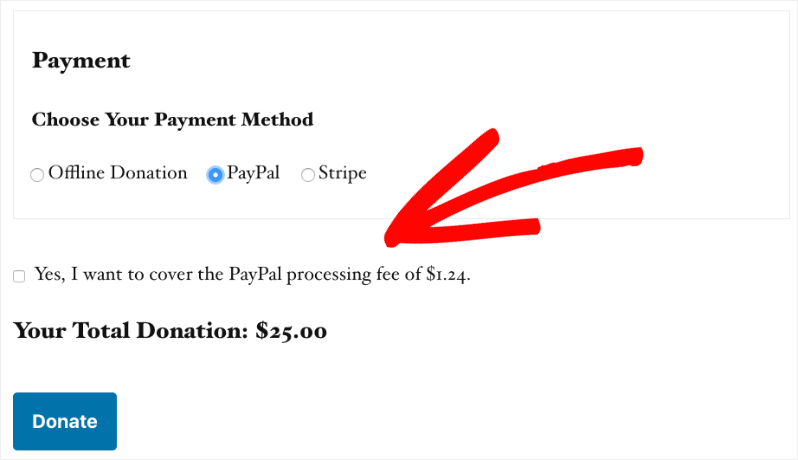
The donor sees a checkbox with the exact fee for their gift, and they choose. Fee Relief is in the Charitable Pro plugin, Plus plan and higher. You can see how it works in my guide to boosting donations with Fee Relief.
Step 5. Publish and Share Your Campaign
When you’re happy with the page, click Publish in the builder. Your campaign is now live on your own website, with the amount raised, your goal, the time left and a donate button.
Then send the link to your email list and post it on social media. Ask your board and your closest supporters to share it in the first 48 hours, because early gifts make new visitors more likely to give.
Step 6. Export Your Donor List Whenever You Like
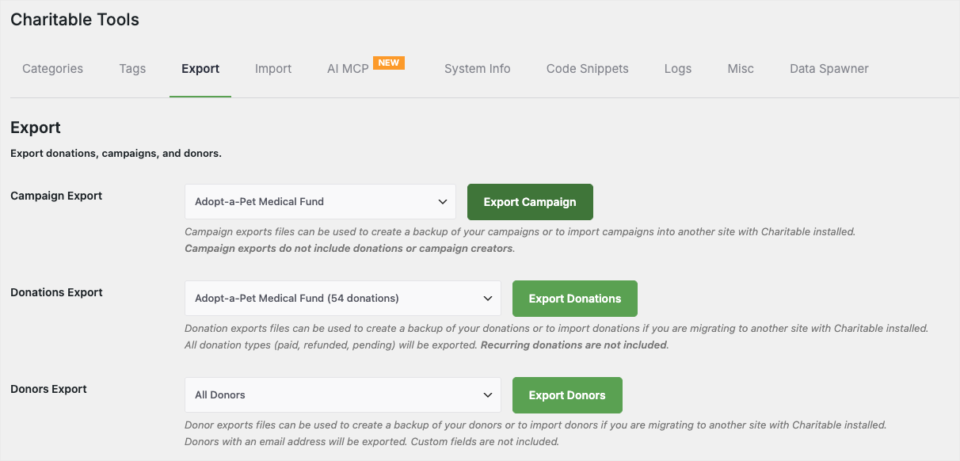
This is the step GoFundMe can’t give you. Every donor who gives through your campaign gets a record in your WordPress dashboard, with their name, email and giving history.
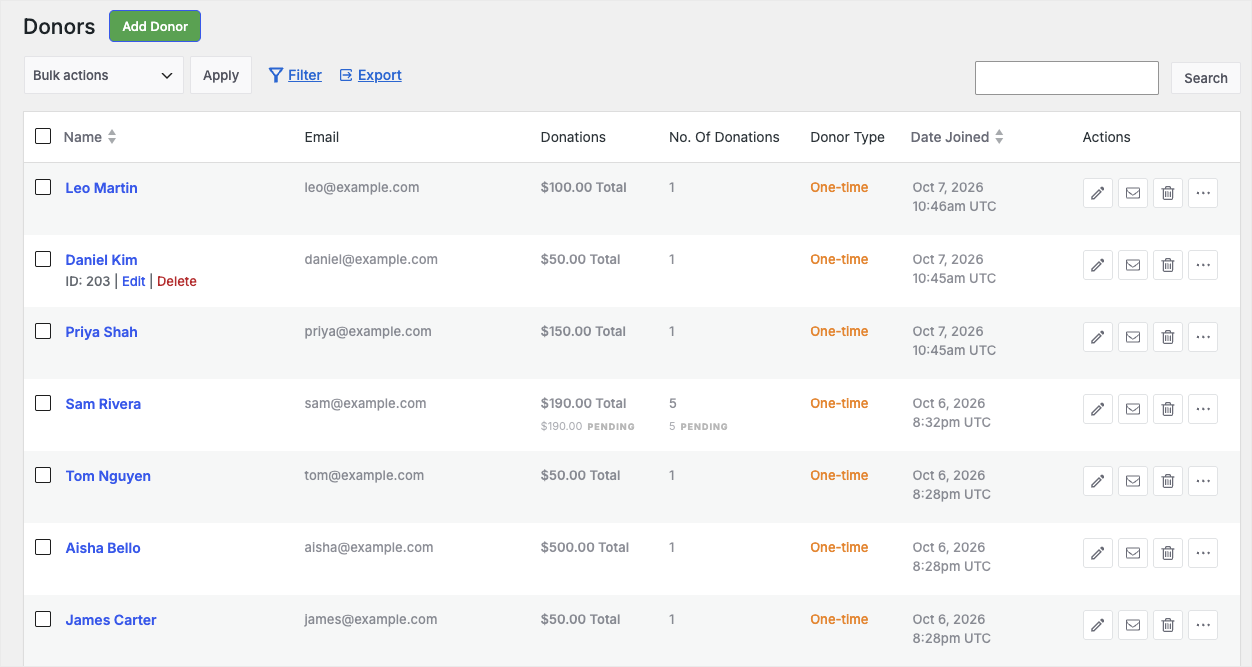
To download your list, head over to Charitable » Tools » Export. Choose All Donors under Donors Export and click Export Donors. You’ll get a CSV file you can open in a spreadsheet or bring into your email tool.
Moving over from another tool? Charitable can bring your existing donors in too, with its CSV donor import tool.
When to Move to a Paid Plan
The free version is enough to run your first campaign. When you’re ready to grow, the paid version of Charitable adds the tools that help donors give again.
- Recurring donations. Donors can give every month with no extra 5% fee from Charitable, in the Charitable Pro plugin, Plus plan and higher.
- Fee Relief. Donors can choose to cover your processing fee, in the Plus plan and higher.
- Email marketing. New donors can be added to Mailchimp, ActiveCampaign, MailerLite and other tools automatically, in the Plus plan and higher.
- Peer-to-peer fundraising. Supporters can raise money for you on their own pages under your campaign, in the Pro plan and higher.
Paid plans start at $69 a year, and Charitable takes no percentage of your donations on any paid plan. You can compare every plan on the Lite vs Pro page.
Every paid plan comes with a 14-day money-back guarantee, no questions asked. Get Charitable risk-free today »
FAQs on GoFundMe Fees
How much does GoFundMe take from $1,000?
If $1,000 comes in as 20 gifts of $50 to a US personal fundraiser, GoFundMe takes $35 and you receive $965. On a US certified nonprofit fundraiser, it takes $28 and you receive $972.
Does GoFundMe take a percentage of donations?
Yes. In the US, GoFundMe takes 2.9% + $0.30 from each donation to a personal fundraiser and 2.2% + $0.30 from each donation to a certified nonprofit fundraiser.
Do I have to leave a tip on GoFundMe?
No. The tip is optional, and donors can change it to $0 at checkout. GoFundMe says it will refund a tip that was left by mistake.
Does GoFundMe charge a fee for monthly donations?
Yes. Donors who give monthly pay a 5% fee on each donation, on top of the normal transaction fee. The organizer doesn’t pay it.
How long does it take to get money from GoFundMe?
On a personal fundraiser, setting up transfers can take up to 7 business days, then each transfer takes 2 to 5 business days. Nonprofit fundraisers are paid once a month through PayPal Giving Fund, unless the nonprofit uses GoFundMe Pay in the US.
Can I get my donors’ email addresses from GoFundMe?
GoFundMe says it can’t give you a complete list of your donors’ information. A nonprofit can get more donor data after it claims its nonprofit account.
Is it cheaper to take donations on my own website?
It depends on how much you raise. On your own site, you pay your gateway’s processing fee plus any plugin license, so a very small one-time fundraiser may cost about the same either way. The bigger gain is that you keep your donor list and get paid directly by your gateway.
Charitable Has 1.2+ Million Downloads!
Trusted by millions to power successful fundraising campaigns. Try Charitable risk-free today.
✅ 14-day money-back guarantee
✅ Transparent pricing
✅ Code-free setup
Stay Connected for More Nonprofit Resources
For more tutorials and videos tailored to nonprofits, subscribe to our YouTube channel. We regularly publish expert tips, step-by-step guides on online donations, fundraising strategies, and practical resources to help your organization succeed.
🗞️ Get weekly tips and exclusive guides in your inbox
Join our newsletter →
🎥 Watch step-by-step tutorials and success stories
Subscribe to our YouTube channel →
👩🏽💻 Connect with our community and get daily nonprofit insights
Follow us on LinkedIn →
🥳 Fun reels and non-profit insights
Follow us on Instagram →
👀 Insightful & fun videos to help you grow your cause
Follow us on TikTok→
🌎 Subscribe and follow for general fundraiser tips
Get Fundraiser Tips on TikTok →
Powerful Fundraising Resources
🤖 Use Charitable with Your AI Assistant
⬇️ Download proven strategies, campaign ideas, and expert tools
Get the Fundraising Kit →
💸 Get Free Fundraising Resources
Head to the Charitable Fundraising Hub →
🤔 Got questions about Charitable?
Charitable FAQs →
🏎️ Take Charitable for a spin
Create your Charitable Demo →
Understand non-profit terms and jargon
Non-Profit Glossary →
% Looking for non-profit deals and discounts?
Best Non-Profit Deals and Discounts →








Leave a Reply