
Charitable Documentation

Learn how to make the most of Charitable with clear, step-by-step instructions.

How to install and activate Charitable extensions

Charitable extensions are normal WordPress plugins which add extra features to Charitable.

1. Make sure you have activated your license

When you purchase a plugin license through wpcharitable.com, you will receive a single code to register Charitable as a paid (or a “pro” version, not a lite or free version).

After you make your purchase, check your email for the Purchase Receipt email.
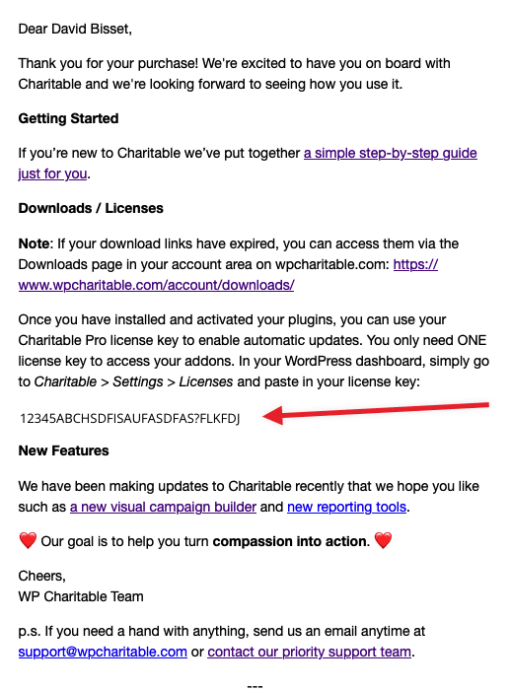
Important: Can’t find email? Don’t worry. This code can also be found in your account dashboard on wpcharitable.com.

Once you activate your license in Charitable with this code you will be able to install Charitable extensions two ways.

2. Install the addon manually via wpcharitable.com.

You can download your plugin(s) through the wpcharitable.com account area. Simply log in using the account created when you made your purchase and then download the plugin from the Downloads tab.
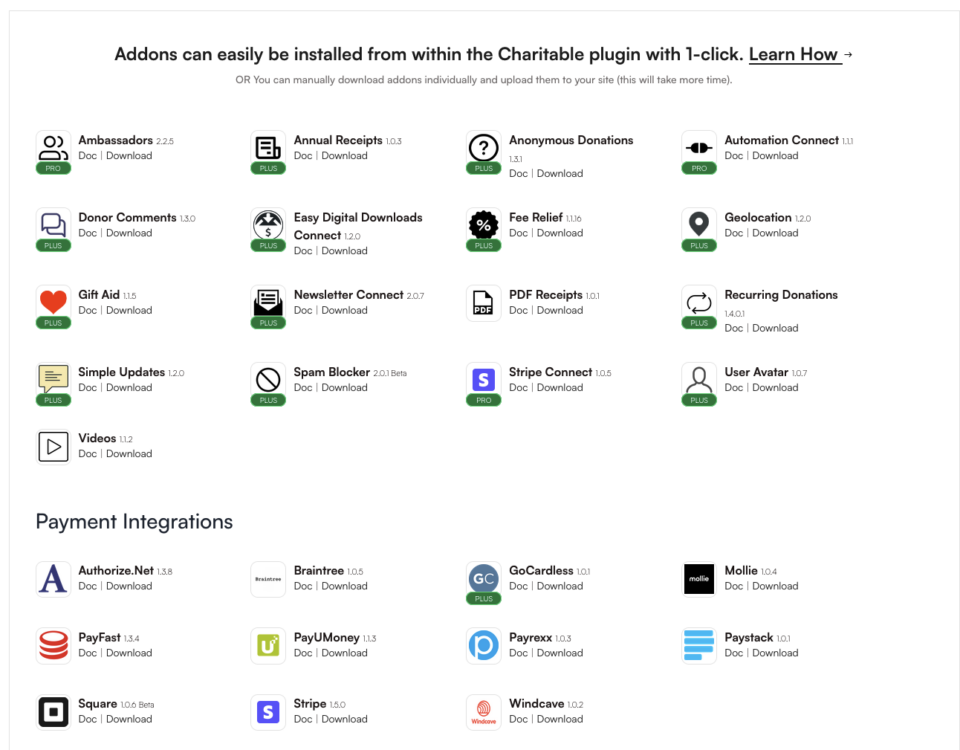
Once you download a zip file of an extension you can install it on your site in one of two ways:

  1. Install it in the WordPress dashboard — the recommended approach.
  2. Install it through FTP.

How to install a plugin in your WordPress dashboard

You can install a Charitable extension in your WordPress dashboard. This is the way we recommend installing Charitable extensions, since it’s the easiest.

In your WordPress dashboard, go to Plugins > Add New:

Next, click on the Upload Plugin in the top left corner, attach the zip file you downloaded earlier, and finally click Install Now.

WordPress-plugin-install-with-a-zip-file

Skip ahead to find out how to activate your plugin.

How to install a plugin via FTP

If you have FTP access to your website server and you are comfortable with using an FTP program like Cyberducks or Filezilla, you can follow the steps below to install with FTP.

First of all, you will need to unzip the zip file you downloaded earlier. You will be uploading the plugin folder, not the zip file itself.

Next, log in to your website server using FTP. Navigate to the /wp-content/plugins directory in your WordPress installation files.

Upload the plugin folder to the plugins directory to install it.

Activate the plugin

Now that you have installed the plugin, the final step is to activate it.

If you installed the plugin via the WordPress dashboard, simply click on the Activate Plugin button:
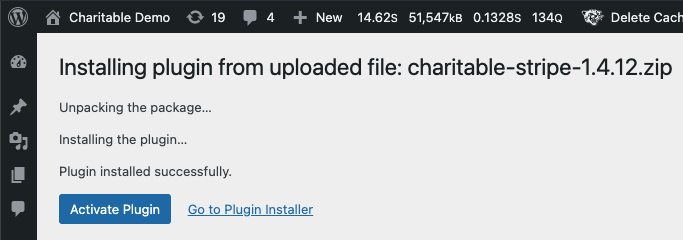
You can also activate plugins by going to Plugins > Installed Plugins.

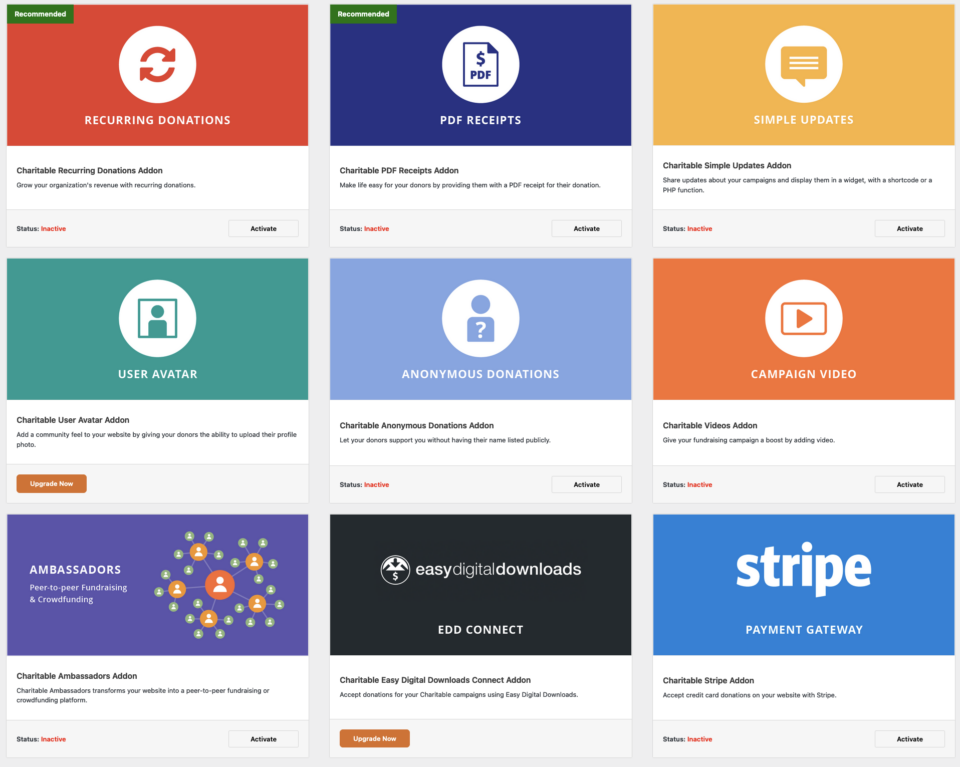
3. Installing via the addons screen in Charitable

You can also do a one-click install of an extension or addon you have available in your plan by going to the addons screen in the Charitable menu.

Still have questions? We’re here to help!

Last Modified:

What's New In Charitable

View The Latest Updates
🔔 Subscribe to get our latest updates
📧 Subscribe to Emails

Email Subscription

Join our Newsletter

We won’t spam you. We only send an email when we think it will genuinely help you. Unsubscribe at any time!

Integration New

🎉 New Built-in PushEngage Integration

Struggling with falling email open rates and rising ad costs just to keep your supporters engaged? Charitable’s built-in PushEngage integration features:

🔔 Zero-Fee Direct Messaging: Deliver crisp, instant pop-up notifications straight to your donors’ desktops and mobile devices.

⏱️ Four Smart Automated Triggers: Automatically send updates for immediate donation thank yous, full-list campaign launches, urgent “ending soon” alerts, and goal milestone celebrations.

📈 Group Momentum Broadcasts: Turn private milestones into public wins by automatically broadcasting alerts to your entire subscriber list the moment a campaign hits 50%, 75%, or 100% of its goal.

📊 Automatic Analytics Tracking: Monitor exactly where your incoming notification traffic is coming from with built-in attribution that requires zero complex configuration.

Visit this page to learn more.

New Security

💂‍♂️ New DonationGuard 🛡️ Automatically Protects Your Donations!

Worried about card testing attacks or spam bots flooding your donation forms, but don’t want to ruin the giving experience for your real supporters? Charitable’s DonationGuard features:

🛡️ Real-Time Bot Detection: Actively monitors every donation submission for five distinct attack signals without slowing down your human donors.

📊 Smart Traffic Scoring: Instantly evaluates activity against a learned baseline of your site’s normal donation rhythms to catch sneaky, slow-drip card testing.

🚨 Severity-Tiered Alerts: Immediately opens structured “Attack Records” and notifies you via email and admin alerts the moment a campaign starts taking fire.

🎯 Single-Click Defense: Deploy instant security using the “Recommended Settings” preset to turn on Honeypot, Time Trap, and Rate Limit modules all at once.

🚫 Automated Blocklists: Permanently stop repeat offenders by automatically blocking suspicious email addresses based on your customized rules.

Visit this page to learn more.

GiveWP Migrations New

🧤 White Glove Migration Service for GiveWP

Thinking about switching your fundraising platform from GiveWP to Charitable, but don’t want to risk losing your data or handle a complex technical setup yourself? Charitable’s White Glove Migration Service features:

👥 Flawless Donor Mapping: Safely transfer your entire supporter database with zero data loss.

📊 Complete Financial History: Meticulously preserve every historical transaction for continuous, accurate reporting.

🔄 Seamless Recurring Giving: Safely transfer active sustaining subscriptions without disrupting your incoming revenue or requiring your donors to update their information.

💳 Zero Gateway Disruptions: Keep using Stripe, PayPal, or any other GiveWP-compatible processor you already love.

🚀 Expert Technical Setup: Relax while our team handles the heavy lifting to install and configure your forms—plus, qualifying users get a full year of Charitable Pro completely free.

Visit this page to learn more.

automation Improvement

📢 New Feature Alert: Automation Connect 2.0 Is Here! 🚀

Thinking about connecting your fundraising data to tools like Mailchimp, Slack, or Google Sheets, but don’t want to hire a developer or write custom code? Charitalbe’s new automation addon has:

⚡ 17 Event Triggers: Instantly fire webhooks for a donor’s first gift, renewal payments, or reached campaign milestones.

🎯 Smart Conditional Logic: Use powerful AND/OR logic across 11 fields to only send data when it meets your exact criteria, like newsletter opt-ins.

📊 Custom Payload Control: Select from 80+ clean data fields across donor, donation, and campaign metadata so your apps get exactly what they need.

🚀 Pre-Built Platform Templates: Skip the setup from scratch with ready-to-go templates for Zapier, Make.com, n8n, HubSpot, and Slack.

🛡️ Reliable Developer Tools: Power your workflows with signed HMAC-SHA256 payloads, complete WordPress filters, and automatic retry logs.

automation Improvement

🔌 Charitable Meets Zapier: Connect to 7,000+ Apps and Automate Your Fundraising

Tired of manually copying donation data into accounting sheets or tracking down new donor signups? Put your administrative tasks on autopilot. Charitable is now officially on Zapier, giving you a powerful, no-code way to plug your fundraising directly into the rest of your favorite tools.

Every donation, donor signup, and campaign milestone can now trigger an automated workflow seamlessly.

What’s New:

♾️ Connect to 7,000+ Apps: Bridge your Charitable campaigns with everyday software like Google Sheets, QuickBooks, Slack, Mailchimp, HubSpot, Notion, Airtable, and thousands more.

⚡ 12 Powerful Triggers: Build deep workflows using smart automation triggers covering the entire donation lifecycle—including New Donation, New Donor, Subscription Cancelled, and Campaign Goal Reached.

📋 Pre-Built Action Templates: Get started in three minutes or less with our pre-made template combinations, like automatically logging new donations straight into a Google Sheet or firing custom donor welcome emails through Gmail.

🚫 Zero Code Needed: No complex webhooks or custom PHP scripts required. Just pick your trigger, choose your app, map your fields, and let Zapier handle the heavy lifting.

Ready to save hours of admin time? Grab Charitable Pro with the Automation Connect addon today and launch your first Zap!

