
Requires: Charitable Pro 1.8.16+
Charitable Ambassadors 3.0.0+
Every meaningful action in your Ambassadors program should trigger a response. When a fundraiser is approved, the ambassador needs to know right away. When someone’s application is rejected, they deserve a clear explanation. When a recruit signs up through an invite link, the person who recruited them should hear about it.
Ambassadors fires 5 transactional emails that handle all of this automatically. They go out in response to a specific event, not from a marketing campaign you compose manually. This page documents each one: when it fires, who it goes to, what the default body looks like, which smart tags it accepts, and how to customize or disable it.
All five emails are enabled by default.
Where to Find These Ambassador Emails?
To edit the body or subject of any of them, go to Charitable » Settings » Emails.
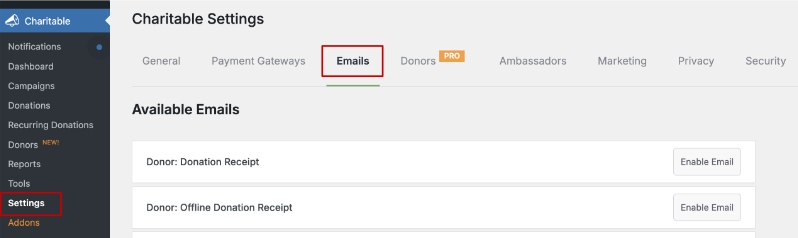
Scroll to find the emails you need. You can enable/disable these emails here.
How to Edit Ambassador Emails?
Once enabled, click on the Email Settings button to access the email inside.
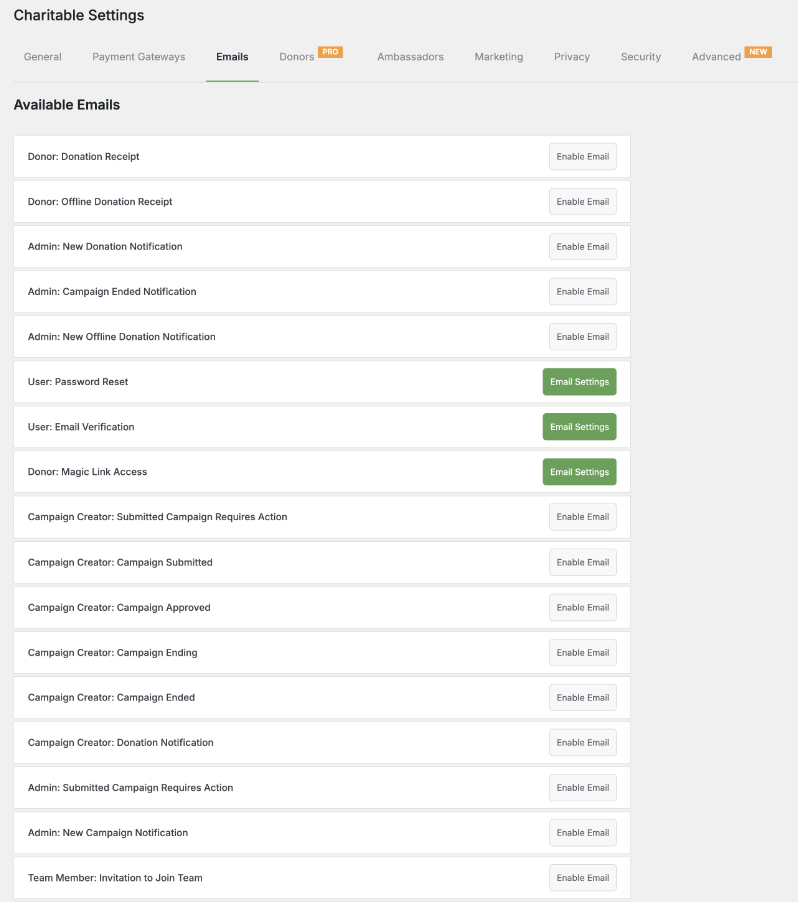
A default email is setup for you.
You can change the subject line, headline, and body to fit your requirements.
There are also shortcodes you can use to auto fetch information such as yoru website URL, team name, creator’s name, and so on.
If any email is accidentally disabled, you will see it appear in your Email Health banner.
Quick Reference
| ID | Fires when | Recipient | |
|---|---|---|---|
| Campaign Approved | creator_campaign_approved | A fundraiser is approved by a moderator or auto-approved on submit. | The ambassador. |
| Campaign Rejected | creator_campaign_rejected | A fundraiser is rejected by a moderator. | The ambassador. |
| Campaign Needs Revision | creator_campaign_needs_revision | A moderator requests changes. | The ambassador. |
| Inviter Recruit Approved | inviter_recruit_approved | A recruited ambassador’s first fundraiser is approved. | The inviter (recruiter). |
| New Campaign Requires Action | new_campaign_requires_action | A new fundraiser submission lands in Moderation Pending. | Site administrators (any user with manage_charitable_settings). |
The Technical Side
Campaign Approved
ID: creator_campaign_approved
To: The ambassador (post_author of the fundraiser)
Fires: Whenever a fundraiser transitions to published from any other status. The Moderation Approve action fires this, auto-approval on submit fires this, and manually publishing via the WP editor fires this.
Default Subject
Your campaign is liveDefault Body
Dear [charitable_email show=campaign_creator],

Your campaign, "[charitable_email show=campaign_title]", has been approved and is now live!

You can view your campaign online at [charitable_email show=campaign_url].

If you would like to edit it, go to [charitable_email show=campaign_edit_url].
Available Smart Tags
| Tag | Substitutes |
|---|---|
[charitable_email show=campaign_creator] | The ambassador’s display name. |
[charitable_email show=campaign_title] | The fundraiser’s title. |
[charitable_email show=campaign_url] | The fundraiser’s public URL. |
[charitable_email show=campaign_edit_url] | The fundraiser’s editor URL. |
[charitable_email show=campaign_goal] | The goal amount. |
[charitable_email show=campaign_end_date] | The fundraiser’s end date. |
Customization Filters
add_filter( 'charitable_email_creator_campaign_approved_default_subject', function ( $subject, $email ) {
return "🎉 Your fundraiser is live: " . $email->get_field_value( 'campaign_title' );
}, 10, 2 );
add_filter( 'charitable_email_creator_campaign_approved_default_body', function ( $body, $email ) {
return "Welcome aboard!
" . $body . "Reply to this email if you have any questions.
";
}, 10, 2 );Suppress Per-Call
When approving with the Notify checkbox unticked, the email is suppressed via:
add_filter( 'charitable_ambassadors_skip_creator_campaign_approved', '__return_true' );
// ...the approval runs...
remove_filter( 'charitable_ambassadors_skip_creator_campaign_approved', '__return_true' );
Don’t use this filter for site-wide suppression. For that, use the Notify checkbox default via moderation_default_notify_on_approve.
Campaign Rejected
ID: creator_campaign_rejected
To: The ambassador
Fires: When a moderator rejects a fundraiser via the Moderation queue.
Default Subject
Your campaign was not approvedDefault Body
Dear [charitable_email show=campaign_creator],

We've reviewed your campaign, "[charitable_email show=campaign_title]", and unfortunately it does not meet our guidelines.

Reason: [charitable_email show=rejection_reason]

If you'd like to discuss this further or submit a revised campaign, please reach out at [admin_email].
Available Smart Tags
The same set as Campaign Approved, plus:
| Tag | Substitutes |
|---|---|
[charitable_email show=rejection_reason] | The reason text from the Reject modal. |
Customization Filters
add_filter( 'charitable_email_creator_campaign_rejected_default_subject', function ( $subject ) {
return 'About your recent fundraiser submission';
} );
add_filter( 'charitable_email_creator_campaign_rejected_default_body', function ( $body ) {
return $body . 'You can read our submission guidelines at our guidelines page.
';
} );Campaign Needs Revision
ID: creator_campaign_needs_revision
To: The ambassador
Fires: When a moderator uses the Request Changes action.
Default Subject
Updates needed to your campaignDefault Body
Dear [charitable_email show=campaign_creator],

We've reviewed your campaign, "[charitable_email show=campaign_title]", and we'd like a few small updates before publishing.

Notes from our team: [charitable_email show=revision_notes]

You can edit your campaign at [charitable_email show=campaign_edit_url] and resubmit when you're ready.
Available Smart Tags
The same set as Campaign Approved, plus:
| Tag | Substitutes |
|---|---|
[charitable_email show=revision_notes] | The notes from the Request Changes modal. |
[charitable_email show=campaign_edit_url] | The fundraiser’s editor URL with a magic-link auto-login token. |
Customization Filters
add_filter( 'charitable_email_creator_campaign_needs_revision_default_body', function ( $body ) {
return $body . 'Tip: reply to this email if you have questions about the requested changes.
';
} );Inviter Recruit Approved
ID: inviter_recruit_approved
To: The inviter (recruiter)
Fires: When a recruited ambassador’s first fundraiser is approved, after attribution has linked the recruit back to the inviter. Only sends if Email Inviter On Approval is enabled under Invitations settings, and only after attribution has linked the recruit back to the inviter.
Default Subject
[charitable_email show=recruit_name] just joined as a fundraiser thanks to you!Default Body
Hi [charitable_email show=inviter_first_name],

Great news! [charitable_email show=recruit_name] just had their fundraiser approved - and they signed up through your invite link.

Their fundraiser: [charitable_email show=recruit_campaign_url]

Thanks for spreading the word.
Available Smart Tags
| Tag | Substitutes |
|---|---|
[charitable_email show=inviter_name] | The inviter’s display name. |
[charitable_email show=inviter_first_name] | The inviter’s first name. |
[charitable_email show=recruit_name] | The recruit’s display name. |
[charitable_email show=recruit_campaign_title] | The recruit’s first fundraiser title. |
[charitable_email show=recruit_campaign_url] | The recruit’s first fundraiser URL. |
[charitable_email show=site_url] | Your site’s URL. |
Customization Filters
add_filter( 'charitable_email_inviter_recruit_approved_default_subject', function ( $subject, $email ) {
    $recruit = $email->get_field_value( 'recruit_name' );
    return "🎉 Your friend {$recruit} is fundraising too!";
}, 10, 2 );
Site-Wide Disable
Toggle the Email Inviter On Approval setting under Charitable » Ambassadors » Invitations.
New Campaign Requires Action
ID: new_campaign_requires_action
To: Site administrators (any user with manage_charitable_settings)
Fires: When a new fundraiser is submitted and auto-approval is off, meaning it lands in Moderation Pending.
Default Subject
A new fundraiser needs your reviewDefault Body
A new fundraiser was submitted and is awaiting review.

Title: [charitable_email show=campaign_title]
Ambassador: [charitable_email show=campaign_creator]
Submitted: [charitable_email show=submission_date]

Review it in the Moderation queue: [charitable_email show=moderation_url]
Available Smart Tags
| Tag | Substitutes |
|---|---|
[charitable_email show=campaign_title] | The fundraiser title. |
[charitable_email show=campaign_creator] | The ambassador’s display name. |
[charitable_email show=campaign_url] | The fundraiser’s URL (preview if not yet public). |
[charitable_email show=submission_date] | Submission timestamp. |
[charitable_email show=moderation_url] | Deep link to the Pending view in Moderation. |
Customization Filters
add_filter( 'charitable_email_new_campaign_requires_action_default_subject', function () {
    return '🔔 [Charitable] Fundraiser awaiting review';
} );
Throttling
The admin email fires once per submission. If your moderation team is small and the volume gets noisy, consider using Notifications (the bell-icon panel) instead. It’s rate-limited and dismissable, which makes it a better fit for high-volume programs.
What All Five Emails Have in Common
A few conventions apply across every email, which makes customizing them consistent once you know the pattern.
Email IDs
The ID strings (such as creator_campaign_approved) are stable. They’re used as the filter prefix (charitable_email_<id>_default_subject, etc.) and as the option key for the Charitable email on/off setting.
Filters
Every email exposes the same set of filters. All of them receive the $email object as the second argument so you can call get_field_value() to compose your customization:
charitable_email__default_subject
charitable_email__default_body
charitable_email__recipient_email
charitable_email__recipient_name
charitable_email__should_send
Smart-Tag Filter
Add new smart tags by hooking into the content field value filter, then use your tag in any email body:
add_filter( 'charitable_email_content_field_value_', function ( $value, $email ) {
    return 'Computed value';
}, 10, 2 );

// Then use [charitable_email show=your_tag] in any email body.
From Address
All five emails use the WordPress admin_email by default. Override globally via charitable_email_from_address or per-email via charitable_email_<id>_from_address.
HTML vs Plain Text
All five emails are HTML by default. Recipients’ mail clients will fall back to a plain-text representation automatically. To force plain text, return a stripped body from the _default_body filter.
Tips Worth Keeping in Mind
A few things that make a real difference in how these emails land with your ambassadors.
- Customize subject lines more than bodies. Subject lines drive open rates. Bodies that are clear and direct almost always outperform clever ones.
- Always send a test before deploying. Charitable Pro has a “Send Test” button on each email’s settings page. Use it every time you change a subject or body, not just on the first setup.
- Use smart tags liberally. Hard-coding the ambassador’s name would mean every fundraiser gets the same impersonal email. Smart tags make every message feel like it was written for that person specifically.
- Keep the New Campaign Requires Action email short. Your moderation team reads this many times a week. A one-liner with the campaign title and a direct link to the queue is more useful than a long paragraph they’ll skim past.
Developer Reference
Email Class Hierarchy
Charitable_Email                                                    # Pro base class
    └─ Charitable_Ambassadors_Email_Creator_Campaign_Submitted     # Base for creator-targeted emails
            ├─ Charitable_Ambassadors_Email_Creator_Campaign_Approved
            ├─ Charitable_Ambassadors_Email_Creator_Campaign_Rejected
            └─ Charitable_Ambassadors_Email_Creator_Campaign_Needs_Revision
    └─ Charitable_Ambassadors_Email_Inviter_Recruit_Approved        # For inviter-targeted
    └─ Charitable_Ambassadors_Email_New_Campaign_Requires_Action    # Admin-targeted
Each leaf class lives in includes/emails/.
Static Helpers
For programmatic triggering:
Charitable_Ambassadors_Email_Creator_Campaign_Approved::send_with_campaign_id( $campaign_id );
Charitable_Ambassadors_Email_Creator_Campaign_Rejected::send_with_campaign_id( $campaign_id, $reason );
Charitable_Ambassadors_Email_Creator_Campaign_Needs_Revision::send_with_campaign_id( $campaign_id, $notes );
Charitable_Ambassadors_Email_Inviter_Recruit_Approved::send_with_recruit_id( $recruit_user_id, $recruit_campaign_id, $inviter_user_id );
Charitable_Ambassadors_Email_New_Campaign_Requires_Action::send_with_campaign_id( $campaign_id );
Capabilities
The New Campaign Requires Action email is sent to all users with manage_charitable_settings. To target specific admins instead, filter the recipient list via charitable_email_new_campaign_requires_action_admin_recipients.
Wrapping Up
That covers all five transactional emails in Ambassadors. Between the approval, rejection, and revision emails your ambassadors receive, and the admin notification that keeps your moderation queue moving, these are the messages that keep your program running smoothly behind the scenes. Customize the subject lines, add your brand’s voice to the bodies, and use smart tags to make every email feel personal.
If you run into anything that isn’t covered here or need help with a specific email, our support team is happy to help.
You May Also Want to Read
These are the docs most closely connected to the transactional emails in Ambassadors.
- Moderation – the actions (approve, reject, request changes) that fire most of these emails.
- Email Health – the banner on the Overview that flags any of these emails when they’ve been accidentally disabled.
- Notifications – the in-admin bell-icon panel that complements these emails for your moderation team.
- Invitations – the feature that triggers the Inviter Recruit Approved email.
- Hooks & filters in Ambassadors – the full filter reference.
Helpful Links
🤝 Get help when you need it
Connect with Customer Support →
📑 Find the guide you need
Browse the Documentation Hub →
⬇️ Download proven strategies, campaign ideas, and expert tools
🔗 Let your AI Assistant do the fundraising work for you.
Connect Charitable to your AI assistant →
💸 Get Free Fundraising Resources
Head to the Charitable Fundraising Hub →
🤔 Got questions about Charitable?
Charitable FAQs →
Need help understanding non-profit terms and jargon?
See our Non-Profit Glossary →





