Documentation Category: FAQs

  • How to Connect your Square Test Account in Charitable

    Testing your Square payment gateway before going live is crucial for ensuring a smooth donation experience. This guide will walk you through connecting your Square test account (sandbox) to Charitable. Prerequisites Before you begin, make sure you have: In this Guide Step 1: Set Up Your Square Sandbox Environment First, sign up for Square if you…

  • Getting started with Annual Receipts

    Charitable Annual Receipts allows you to give your donors an attractive end of financial year receipt, helping them with their tax reporting. Annual receipts can be accessed online, downloaded or printed. How to install and activate the Annual Receipts plugin Annual Receipts is a WordPress plugin. You can install it just like any other plugin.…

  • Which currencies are supported by Charitable?

    With Charitable, you can accept donations in a wide range of currencies. Note: Currency support varies by payment gateway. Out of the box, the following currencies are supported: Argentine Peso Australian Dollars Bangladeshi Taka Bolivian Bolíviano Brazilian Real Brunei Dollar Bulgarian Lev Canadian Dollar Swiss Franc Chilean Peso Chinese Yuan Renminbi Colombian Pes Czech Koruna…

  • Getting started with Automation Connect

    Charitable Automation Connect allows you to connect Charitable with thousands of other apps by using 3rd party automation platforms like Zapier, Integromat or Zoho Flow. How to install and activate the Automation Connect plugin The Automation Connect is a plugin and can be installed the same way as any other Charitable extension. Here’s a quick…

  • Invalid License Key

    If you have added your license key but you’re getting an error message saying “This license is not valid”, try these steps to troubleshoot:

  • How do I get an invoice for my purchase?

    You can generate an invoice for you purchase through your WP Charitable account area. In the menu on the left, click on “Your Purchases”. Next, find the purchase you would like to get an invoice for and click “View Invoice”. Go to the Purchases tab and click on Generate Invoice for your purchase. On the following page you…

  • Setting Up PayPal

    PayPal is available out of the box as a payment gateway option. You can enable it via your WordPress dashboard: Go to Charitable > Settings > Payment Gateways. In the PayPal box, click on Enable Gateway. Next, you will need to configure some settings by clicking on Gateway Settings. Settings General Settings Gateway Label The label that…

  • Charitable & User Privacy

    Charitable stores personal data about donors and registered users in your website’s database, as well as providing personal data to third party providers such as payment gateways (PayPal, Stripe, Authorize.Net, etc.) or newsletter providers (MailChimp, Campaign Monitor, MailerLite, etc.). All or some of the following data may be collected and stored about a donor when they…

  • Quick Command-Line Setup

    If you would like to quickly build a test site and pre-populate it with Charitable campaigns, donations and pages, you can use the setup script. Note that this is not provided in the official releases on WordPress.org; you need to grab the full development version from GitHub. Usage # Navigate to the plugins folder in…

  • Frequently Asked Questions

    Do you have a refund policy? Yes! We offer a risk-free 14-day money back guarantee. We think Charitable is a great product, but we understand that it can’t work perfectly for everyone all of the time. If you are unhappy with your purchase, or you have an issue that we are unable to resolve, we…

  • Setting Up Payment Gateways

    Getting your payment gateways set up is one of the most important steps in launching your fundraising campaign with Charitable. In this guide, we’ll walk you through the steps to enable, connect, and configure your payment gateways in Charitable, so you’re ready to start accepting donations right away. Payment Gateways in Charitable Charitable supports a…

  • Changing a Donation’s Status

    There are two ways to change a donation’s status in Charitable. 1. Update donations in bulk In your WordPress dashboard, go to Charitable > Donations. Tick the box next to each donation that you would like to update. Change the “Bulk Actions” dropdown to the status you would like to change the donations to. Click Apply to update all…

  • Adding Campaigns (Legacy)

    “Legacy” campaigns are the way campaigns were built by default before the introduction of the visual builder that debuted in Charitable 1.8.0. This method is no longer the default and is depreciated. That being said: (1) Charitable will ALWAYS support campaigns created with legacy campaigns (2) Adding a legacy campaign is still possible via the…

  • Updating Charitable

    You can update Charitable via your website’s dashboard. When there are updates for your WordPress site, you will see a little icon in your admin bar indicating how many updates there are. Click on this icon to go to the Updates pages. You will see a list of updates to be made to your WordPress…

  • Installing Charitable

    The simplest way to install Charitable is via the WordPress dashboard. Uploading A Zip You can also visit this page on the WordPress Plugin Repo to download Charitable as a zip file. You can then upload the zip file manually into your WordPress site: Once you have Charitable installed, you may want to read on installing…

What's New In Charitable

🔔 Subscribe to get our latest updates
📧 Subscribe to Emails

Email Subscription

Join our Newsletter

We won’t spam you. We only send an email when we think it will genuinely help you. Unsubscribe at any time!

Integration New

WordPress Command Palette Integration

Take your fundraising workflow to the next level. Speed up your site management and stay in your creative flow with our new WordPress Command Palette integration.
Supercharge Your Workflow
Navigate your fundraising dashboard faster than ever.

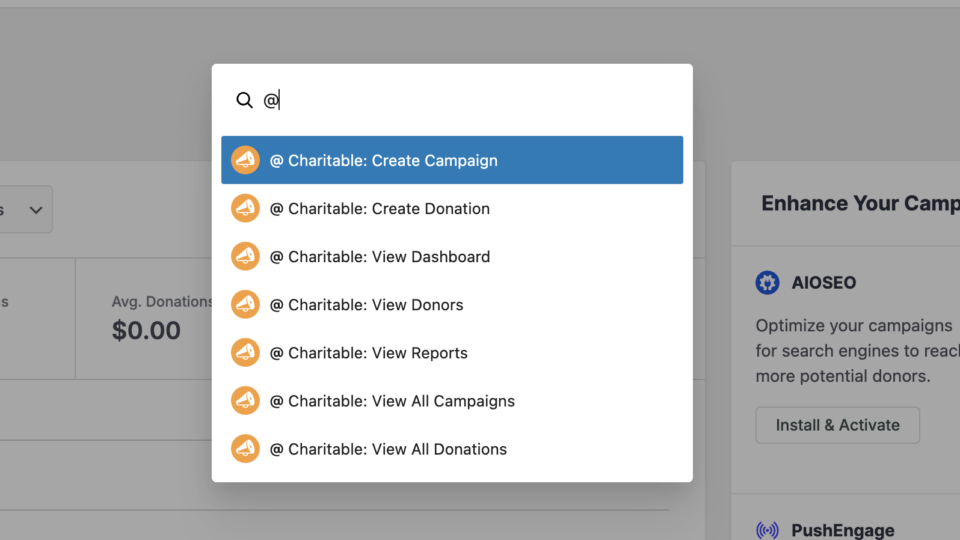
The Ultimate Keyboard Shortcut Hit Cmd + K (or Ctrl + K) to launch the Command Palette and manage your campaigns instantly.

⚡ Instant Navigation: Jump directly to your Campaigns, Donations, or Settings from anywhere in the editor.

➕ Quick Create: Start a new fundraising campaign or add a manual donation with a single command.

Efficiency Redefined
The tools you need, exactly when you need them.

⚙️ Contextual Actions: See relevant Charitable commands based on whether you’re editing a page or viewing your reports.

🚀 Seamless Integration: Built directly into the WordPress core experience for a lightweight, native feel.
Improvement New Security

📣 New Security Features

We’ve introduced a suite of new security tools to give you total control over who accesses your forms, plus a new way to tidy up your database.

Advanced Security Suite

Layered protection: Cloudflare, ReCAPTCHA, IP Controls, and Rate Limiting.

We have overhauled our security settings to stop bots without blocking real donors.

  • 🤖 Flexible Protection: Choose between Google reCAPTCHA v3 or the privacy-first Cloudflare Turnstile to block bots invisible.

  • 🚦 Rate limiting: Stop spam floods by limiting how many submissions an IP address can make in a set timeframe.

  • 🛑 Total control: Use the new IP Blacklist to block bad actors instantly, or the IP Whitelist to let your team bypass checks during testing.

The Clean Donation Tool

Go from “Testing” to “Live” in seconds.

Finished setting up your site and need to get rid of all those test transactions?

  • 🧹 Sweep it clean: Bulk delete test donations and donor records with a single click.

  • 📉 Accurate reporting: Ensure your revenue stats are 100% accurate for launch day.

  • ⚙️ Reset sequences: Automatically resets sequential invoice numbering.

donation form New

🏗️ Visual Donation Form Builder

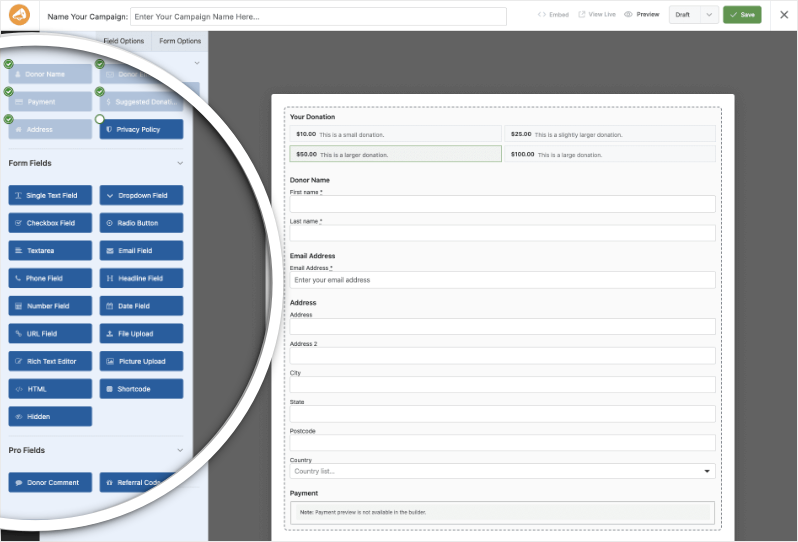
Building the perfect donation form just got easier. We have completely reimagined how you create forms with a new drag-and-drop interface.

Design Visually, in Real-Time

No coding, no guessing. Just point, click, and build.

Say goodbye to confusing settings pages. You can now edit your form and see exactly what your donors will see, instantly.

  • 🖱️ Drag & Drop: Easily add fields like names, addresses, or file uploads by dragging them exactly where you want them.

  • 🎨 Customize everything: Click any field to tweak labels, placeholders, and requirement settings on the fly.

  • 👁️ Live preview: See your changes immediately as you make them—ensure your form flows perfectly before you hit publish.

Flexible & Powerful

Works with all your existing campaigns.

  • 🧩 Deep customization: Add custom HTML, shortcodes, or CSS classes for advanced branding.

  • ⚙️ Smart fields: Collect exactly what you need with support for dropdowns, checkboxes, dates, and hidden fields.

Leaderboards New

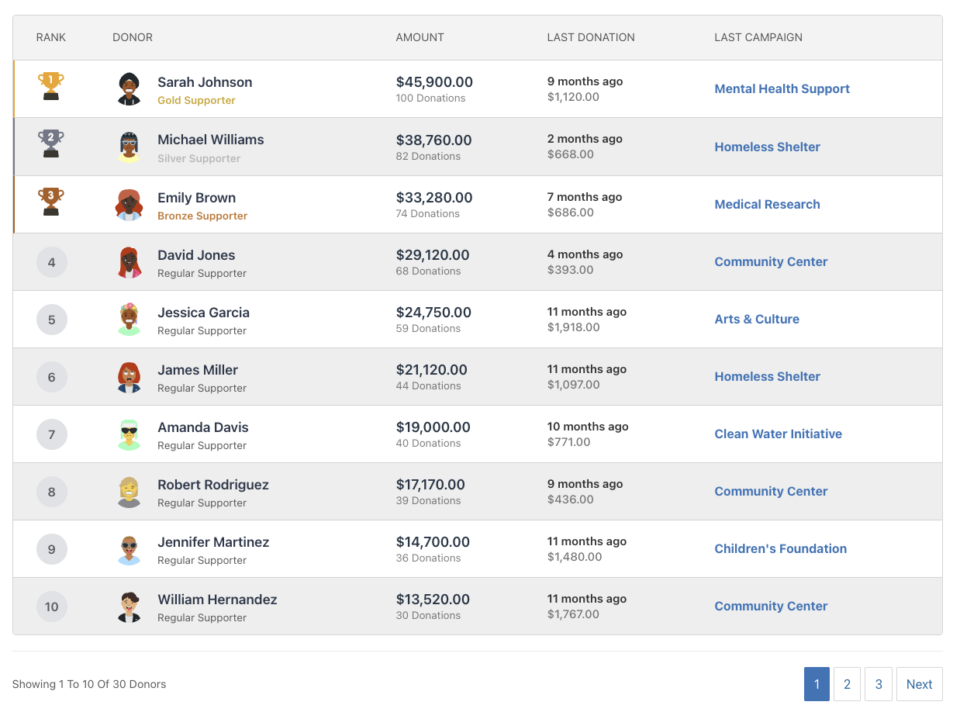
🏆 Donor Leaderboards!

Turn your fundraising into a community event. Recognize your most generous supporters and inspire friendly competition with our new leaderboard tools.

Gamify Your Fundraising

Celebrate your top donors and encourage others to climb the ranks.

Create a public “Hall of Fame” to give your donors the recognition they deserve.

  • 🎨 Two stunning layouts: Choose the List View for a clean, data-rich table or the Card View for a modern, visual grid with avatars.

  • 🥇 Automatic highlights: The top 3 supporters get special Trophy and Crown icons to make them stand out.

  • 🧩 Place it anywhere: Add it to any page using the new Gutenberg Block, or drop it directly into your campaign using the Visual Builder.

Total Customization

You decide what to show and what to hide.

  • ⚙️ Flexible data: Choose to display or hide donation amounts, donor counts, or avatars.

  • 🔄 Lifetime stats: Works seamlessly with Recurring Donations to show a donor’s all-time total impact.

Improvement New templates

🎨 New Templates & List Builder

Launch faster and design better. We’ve added three professional campaign templates and a versatile new content block to help you tell your story.

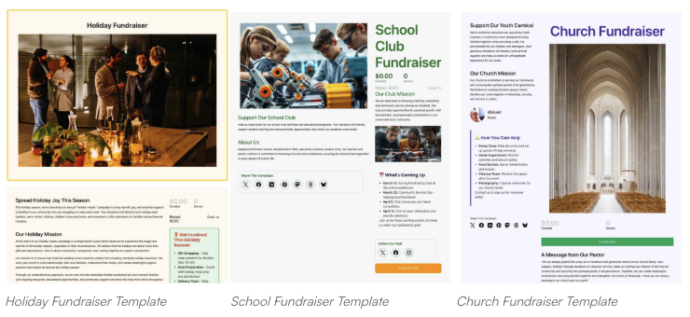
3 New Campaign Templates

Ready-to-use designs for specific fundraising needs.

Don’t start from scratch. Pick a template tailored to your cause and launch in minutes.

  • 🎄 Holiday Fundraiser: A warm, festive design perfect for year-end giving, toy drives, or food pantries.

  • 🎓 School Fundraiser: Built for PTAs and sports teams. clearly highlights goals like playground upgrades or classroom tech.

  • Church Fundraiser: A trustworthy layout designed for building funds, mission trips, and tithes.

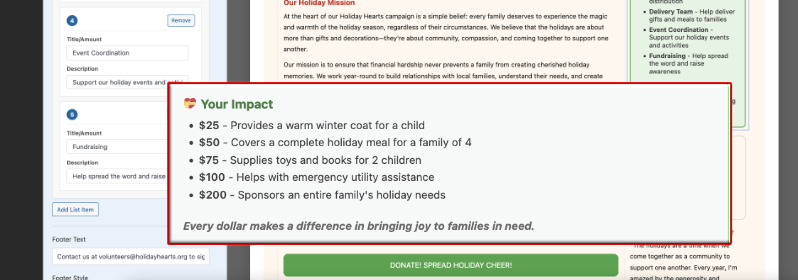
The New “List” Block

Organize your campaign details without writing code.

Make your campaign pages easier to scan and more visually engaging with our new builder block.

  • 📝 Flexible layouts: Choose from 3 distinct styles to display sponsorship levels, donation perks, or project goals.

  • 🎨 Rich customization: Add colorful headlines, support for emojis, and unlimited list items.

  • 👣 Smart footers: Include a built-in footer for extra context or a final Call to Action.