
Charitable Documentation

Learn how to make the most of Charitable with clear, step-by-step instructions.

Adding Campaigns (Legacy)

“Legacy” campaigns are the way campaigns were built by default before the introduction of the visual builder that debuted in Charitable 1.8.0. This method is no longer the default and is depreciated.

That being said: (1) Charitable will ALWAYS support campaigns created with legacy campaigns (2) Adding a legacy campaign is still possible via the campaign screen (3) Some third-party extensions rely on the legacy campaign builder (4) There are limited cases where a legacy campaign might still need to be created.

Adding (Legacy) Campaign (see above note).

Creating a New Legacy Campaign

  1. Check your Charitable settings to ensure that the “disable legacy” option is unchecked in Charitable > Settings > Advanced.
  2. In your WordPress dashboard, go to Charitable Campaigns. Click on “Add Legacy”.
  3. Enter your campaign title. Try something action-oriented or catchy; your goal is to attract people’s attention.
  4. Add a short description. Aim for something short but sweet that clearly communicates the purpose of your campaign.
  5. If you have a specific fundraising target, you can add a fundraising goal.
  6. If your campaign needs to end on a certain date, you can set an end date. Leave this blank for ongoing fundraising campaigns.
  7. Next, scroll down to the Donation Options area. Here, you can add suggested donation amounts and choose whether to allow custom donations, where the donor can donate any amount they choose.
  8. Next, click on Extended Description. Write more about your campaign or add photos.
  9. If you have a lot of campaigns, you can group them by category or tag with the Campaign Categories and Campaign Tags boxes on the right side of the screen.
  10. Finally, if you have a photo or image to go along with your campaign, you can add this using the Featured Image box.
  11. Now it’s a good idea to take a look at your campaign. Click the Preview button inside the Publish box to see how your campaign is looking.
  12. Once you are happy with your campaign, click on Publish. Your fundraising campaign is now live!
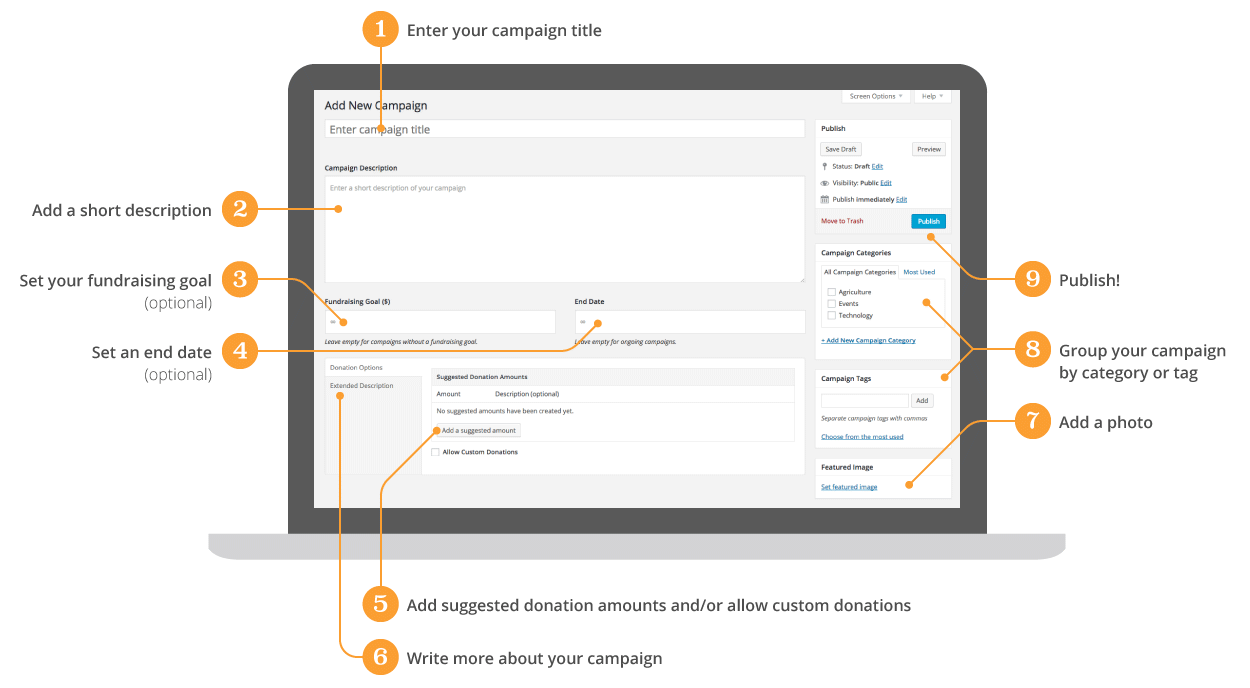
Diagram to show how to add a campaign

Still have questions? We’re here to help!

Last Modified:

What's New In Charitable

View The Latest Updates
🔔 Subscribe to get our latest updates
📧 Subscribe to Emails

Email Subscription

Join our Newsletter

We won’t spam you. We only send an email when we think it will genuinely help you. Unsubscribe at any time!

New templates

🤩 New Beacon Campaign Templates w/ “Hero” Block!

With the new Beacon Campaign Templates for Charitable Pro, you can launch a stunning, full-width fundraising page that instantly captures visitor attention above the fold.

Fundraising page header for Save Maple Grove Park with a donation widget and a small square photo of a sunlit tree thumbnail on the left.

🔦 Above-the-Fold Impact: Lead with a full-width hero image, your logo, and your goal with a donation widget locked right on top of the banner so your ask and momentum register instantly without scrolling.

📐 Two Flexible Layouts: Choose between a structured two-column layout for side-by-side storytelling and supporting details, or a clean one-column view designed for uninterrupted long-form narratives.

⚡ All-in-One Hero Field: Powered by the new Campaign Hero field, bringing background media, live progress bars, custom donation amounts, and recurring giving tabs together into a single cohesive block that can be dropped into any layout.

🎨 Automatic Theme Matching: The hero banner and donation widget automatically inherit your campaign theme’s button and accent colors, ensuring your entire presentation stays beautifully on-brand without touching a line of CSS.

Learn more here.

donation form Feature New

📝 Donation Form Block: Embed a Working Donation Form Anywhere

With the new Donation Form Block for Charitable Pro, you can drop a fully working donation form directly onto any page or post in the WordPress block editor. No redirects, no page reloads, and zero friction between reading your story and making a contribution.

📝 Drop Forms Anywhere: Place a working form directly onto your homepage, inside a story-driven blog post, on a dedicated landing page, or within a campaign announcement.

🎯 Dynamic Campaign Binding: Easily choose a specific campaign from the block sidebar or set it to automatically bind to whichever campaign is currently being viewed.

📐 Full vs. Minimal Form Views: Switch between a full layout or a compact minimal view to perfectly fit sidebars, narrow columns, or wide landing pages.

🎨 Scoped No-Code Styling: Customize typography, container spacing, border radius, amount buttons, and accent colors independently for every form instance without touching a line of CSS.

Learn more here.

ambassadors New

👤 Creator Profiles: Put a Face to Every Peer-to-Peer Campaign

Ambassadors 3.3.0 now provies Creator Profiles — giving your supporters a permanent, shareable public home that turns one-time fundraisers into ongoing relationships.

👤 Public Creator Pages: Give every fundraiser an instant, clean landing page at /creator/their-name/ to showcase their custom avatar, bio, and a browsable grid of their campaigns.

📊 Proof of Impact: Boost donor trust by displaying site-wide milestones on the profile—like total funds raised and total donor counts.

💳 Interactive Hover Cards: When donors hover over a creator’s name on a campaign page, a compact card expands with their bio and social handles right at the moment of decision.

📍 Responsible Location Sharing: Allow creators to safely show local supporters where they are based using only city, state, and country details.

🛠️ Self-Serve Customization: Fundraisers can update their own profiles and link up to six social networks directly from the My Campaigns hub, saving you admin time.

Ready to empower your advocates? Update to Ambassadors 3.3.0 and turn on “Enable Public Creator Page” today!

Improvement Payments

📱 Turn Mobile Scrollers Into Donors: Meet Charitable’s Mollie Upgrade

Losing mobile supporters because they hate typing out long card numbers on their phones? Charitable’s updated Mollie integration features:

⚡ One-Tap Wallet Checkout: Enable donors to complete their gifts instantly using Apple Pay or Google Pay with a simple face scan, fingerprint, or tap.

💰 No Extra PCI Burden: Skip complex domain verification and security compliance since all wallet transactions run safely through Mollie’s hosted checkout.

🛠️ Custom Cancel Routing: Keep the experience predictable by automatically sending donors who back out to your cancellation page, or use developer filters to route them to a custom page.

Visit this page to learn more.

ambassadors improved New

Moderation and Directory Screens In Ambassadors 3.0

Ambassadors 3.0 has new features: moderation and directory screens… now easily see those who are earning donations on your peer to peer network – including campaign creators that might need to be verified – all in one place. Generate reports, email ambassadors and campaign creators directly and more.

🚀 See when campaign creators and ambassadors have updated their campaigns, what donors/donation they have brought in and more.

🎉 Manually add ambassadors and campaign creators, and approve them in one-click!

Visit this page to learn more.


