Charitable Blog

Everything you need to know about Charitable and our team.

Announcing Charitable 1.8.3 with Enhanced WordPress Editor Blocks and In-App Notifications!

Last updated on

  • By

Charitable is delighted to announce a significant update that enhances your experience with the best donation plugin, offering two major improvements for your fundraising efforts.

Introducing New Editor Blocks

We are thrilled to introduce new blocks for the WordPress editor (which is code named Gutenberg). Starting with version 1.8.3, you can effortlessly integrate the following blocks into your posts and pages, all without needing to write any code! This update is ideal for non-profits and donors seeking an efficient way to manage fundraising campaigns.

  • Donation Button/Link: Effortlessly display a donation button for a specific campaign, encouraging seamless donor engagement.
  • Donations: Add a straightforward donation widget for any campaign to boost your fundraising efforts.
  • Campaigns: Showcase multiple Charitable campaigns in an attractive grid layout to captivate your audience.
  • Campaign Stats: Dynamically calculate and present various statistics on your page, providing insightful data for non-profits.
  • Campaign Progress Bar: Display a real-time progress bar for any campaign, motivating donors to contribute.
  • Donors Block: Feature a list of donors for one or all your campaigns, celebrating their contributions.
  • My Donations Block: Allow logged-in users to view a personalized list of their donations.

These new blocks complement our existing “Charitable Campaign” block, which lets you quickly add a single Charitable campaign. This comprehensive update further establishes Charitable as the best donation plugin for WordPress, enhancing the experience for non-profits, campaign managers, and donors alike.

In-Plugin Notifications

Notifications in a new Charitable installation

We want to make sure you’re always up-to-date with the latest developments on our platform and can continue using it with confidence. So we’ve added in-plugin notifications that will keep you informed about important updates and changes to Charitable directly from your WordPress dashboard.

With this addition you’ll know about new features, bug fixes, non-profit tips and advice, and other information we think you’ll find relevant.

PHP Version Update

This version will include a warning message for anyone using PHP versions older than PHP 7.4. If you are running an older PHP version please check our new doc page on the subject of supporting PHP versions for Charitable.

Other Updates

Outside of what I just mentioned above, here’s a list of items that are a part of the “changelog” for 1.8.3.

  • NEW: Updated charitable.pot.
  • UPDATED: Additional minification of JS and CSS to increase performance.
  • FIX: Resolved an issue regarding campaign descriptions not displaying properly with the campaign shortcode in some scenarios.
  • FIX: Fixed alt-text of a LinkedIn share icon in the visual campaign builder.
  • FIX: Code tweaks related to translations, CSS, UI, and PHP warnings.

Wrapping Up

Want to start benefiting from the latest version of Charitable? Head to your site and update Charitable to the latest version.

And if you’re not using Charitable yet, this can be the perfect time to start!

Get Charitable Pro for your site today to grow your donations with the best WordPress donation plugin on the market.

Of course, we can’t end this without thanking our awesome community for making this update possible. We’re truly grateful for your continued support and feedback.

Remember to follow us on LinkedIn and Twitter/X for the latest news and updates.

(Hint: We’ve got more updates and surprises coming up for you, so stay tuned!)

author avatar
David Bisset Project Manager
David is the project manager of Charitable since 2022. David works with several non-profits (one operated by his wife) along with managing and developing features, support, and marketing for Charitable. Has been with WordPress since 2006 and has been lead organizer of multiple conferences, events, and meetups.

Disclosure: Our content is reader-supported. This means if you click on some of our links, then we may earn a commission. We only recommend products that we believe will add value to our readers.

Leave a Reply

Your email address will not be published. Required fields are marked *

Get free tips and resources right in your inbox, along with 60,000+ others

Join our Newsletter

We won’t spam you. We only send an email when we think it will genuinely help you. Unsubscribe at any time!

Featured Video:

Watch more videos on our YouTube channel.

What's New In Charitable

View The Latest Updates
🔔 Subscribe to get our latest updates
📧 Subscribe to Emails

Email Subscription

Join our Newsletter

We won’t spam you. We only send an email when we think it will genuinely help you. Unsubscribe at any time!

automation New

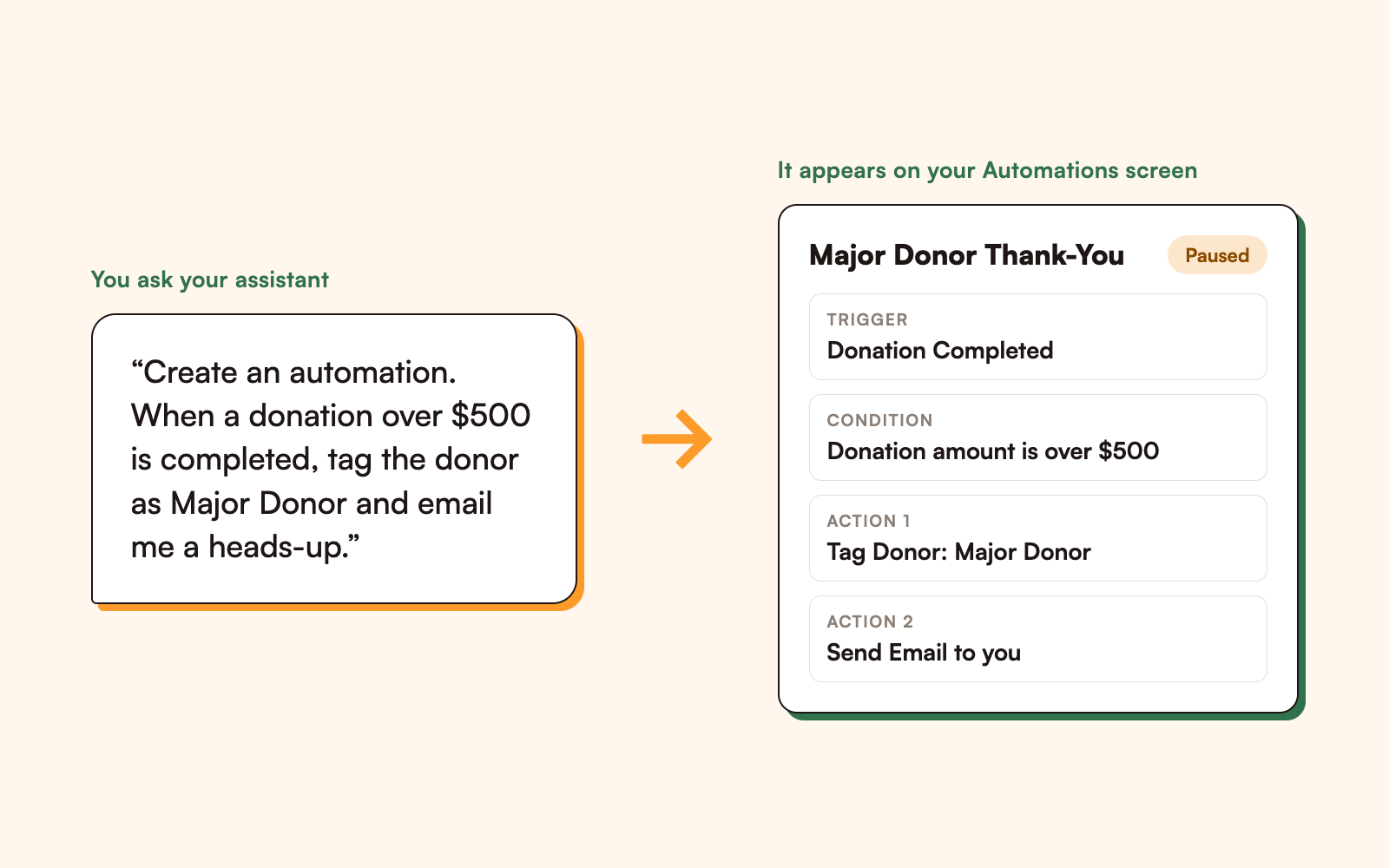
🤖 Introducing AI-Built Automations: Just Describe What You Want!

Describe the automation you want in one sentence and your AI assistant builds it, with Automation Connect 2.x on Charitable Pro 1.8.19 or later. Why this is important:

  • 🧩 Built in one sentence: Say what you want and it gets built, instead of adding it card by card.
  • 🎯 Changed by asking again: Narrow it to one campaign or reorder its actions without opening the editor.
  • 🔍 Checked before it goes live: See what it would do against a real recent gift, with nothing actually sent.
  • 🛡️ Off until you turn it on: Three separate switches, all off by default, and reading works without any of them.
  • 📜 Nothing happens unseen: Every read and every change is logged, so you always know what the AI did.

Check out our announcement here.

author avatar
David Bisset Project Manager
David is the project manager of Charitable since 2022. David works with several non-profits (one operated by his wife) along with managing and developing features, support, and marketing for Charitable. Has been with WordPress since 2006 and has been lead organizer of multiple conferences, events, and meetups.
Donations New

👥 Introducing Donor Merging: Two Records, One Supporter!

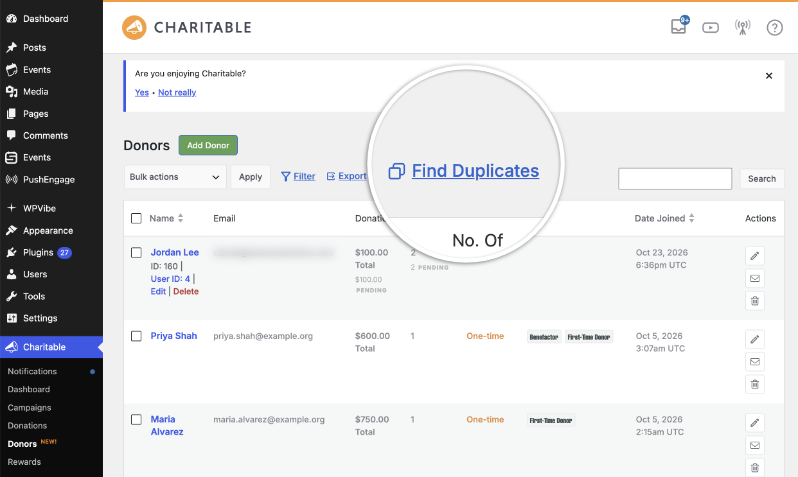
Somewhere in your donor list is a supporter who appears twice, because they gave from a work address one year and a personal one the next. Every donation is still recorded and every receipt still went out, but a loyal supporter who has given for years can look like two people who gave half as much. From the Charitable Pro plugin 1.8.19.1 you can find those records and merge them from the Donors screen. Why this is important:

  • 🔍 A Find Duplicates link where you already work: Head to Charitable » Donors and it sits next to Filter and Export, then tells you how many groups of possible duplicates it found.
  • 🧩 Grouped by name, not by email: Charitable compares the first and last name together and ignores capital letters, spacing and punctuation, which is what catches the same person under two different addresses.
  • 📊 A preview before anything changes: Each group shows every record with its email address, its donation count and its lifetime total, and the preview shows you the combined totals and the email that will be added.
  • ↩️ Every merge can be undone: Nothing is merged until you choose to merge it, and you can reverse any merge afterwards, so a wrong guess costs you nothing.
  • 📥 Built for the week after an import: Moving donors over from another plugin is where most duplicates come from, and it is also when they are hardest to spot, because every record is new to you.

Check out our announcement here.

author avatar
David Bisset Project Manager
David is the project manager of Charitable since 2022. David works with several non-profits (one operated by his wife) along with managing and developing features, support, and marketing for Charitable. Has been with WordPress since 2006 and has been lead organizer of multiple conferences, events, and meetups.
ambassadors New

🔑 Introducing Passwordless Fundraisers: Sign Up With Just an Email!

Supporters arrive wanting to help, and then the form asks them to invent a password for a website they may only visit twice. A lot of them stop right there. Passwordless Fundraiser Accounts, new in Charitable Ambassadors 3.5.0, let a supporter start a peer to peer fundraiser with nothing but an email address. Why this is important:

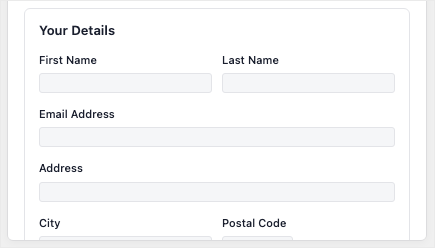
  • 🔑 No password step to lose them at: Switch it on in Charitable » Ambassadors » Templates » Submit Form and the create-fundraiser form asks only for a name, an email address and a page title.
  • 👤 Still a real WordPress account: One click in one email confirms the address, signs them in and creates the account, so they can come back later to edit their story, change their photo and see who has donated.
  • 🎚️ Your call on every campaign: Each peer to peer campaign can follow the site default or override it, which matters when a campaign pays fundraisers through Stripe Connect and those people do need a password.
  • 📋 See who has not clicked yet: The Charitable » Ambassadors » Directory » Awaiting Sign-In tab lists everyone still waiting, with the campaign they joined and a Resend button, so a typo or a spam folder is something you can spot and fix.
  • 🛡️ Links a scanner cannot use up: Opening the link only shows a page, and your fundraiser is signed in when they press the button on it, so corporate email scanners never burn the link. Each one works once, expires on its own and is stored only as a hash.

Check out our announcement here.

author avatar
David Bisset Project Manager
David is the project manager of Charitable since 2022. David works with several non-profits (one operated by his wife) along with managing and developing features, support, and marketing for Charitable. Has been with WordPress since 2006 and has been lead organizer of multiple conferences, events, and meetups.
ambassadors New

🏃 Introducing Activity: Show Progress on More Than Money!

Most peer-to-peer fundraisers are about more than the money. A read-a-thon is about minutes read, a walkathon is about miles walked, and a food drive is about meals packed. Activity for Charitable Ambassadors lets your fundraisers show that effort right beside the dollars they raise. Why this is important:

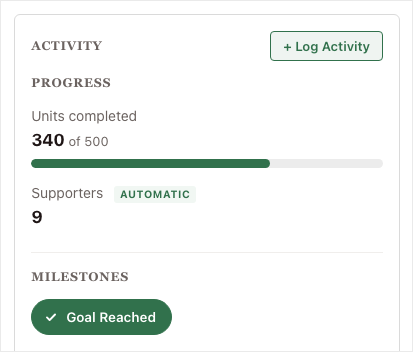
  • 🎯 Progress on what you actually count: A progress bar shows each thing you count against its own target, sitting right beside the money raised.
  • 🏅 Milestones for the yes or no things: A milestone badge marks the efforts that are simply done or not done, with no number to chase.
  • ✍️ Fundraisers log their own numbers: Your supporters enter their totals from their own pages, so the effort stops living in a spreadsheet, a comment, or nowhere at all.
  • 🤖 Some numbers count themselves: An AUTOMATIC tag appears wherever the site worked the figure out from completed donations, so you can see at a glance what nobody typed in.
  • 🧩 Set it up once, use it anywhere: You decide what gets counted one time, then choose which campaigns count it. Available now in Charitable Ambassadors 3.4.7, with no new plugin and no developer.

Check out our announcement here.

author avatar
David Bisset Project Manager
David is the project manager of Charitable since 2022. David works with several non-profits (one operated by his wife) along with managing and developing features, support, and marketing for Charitable. Has been with WordPress since 2006 and has been lead organizer of multiple conferences, events, and meetups.
ambassadors New

🖨️ Introducing Fliers and Posters: Raise Money Away From the Screen!

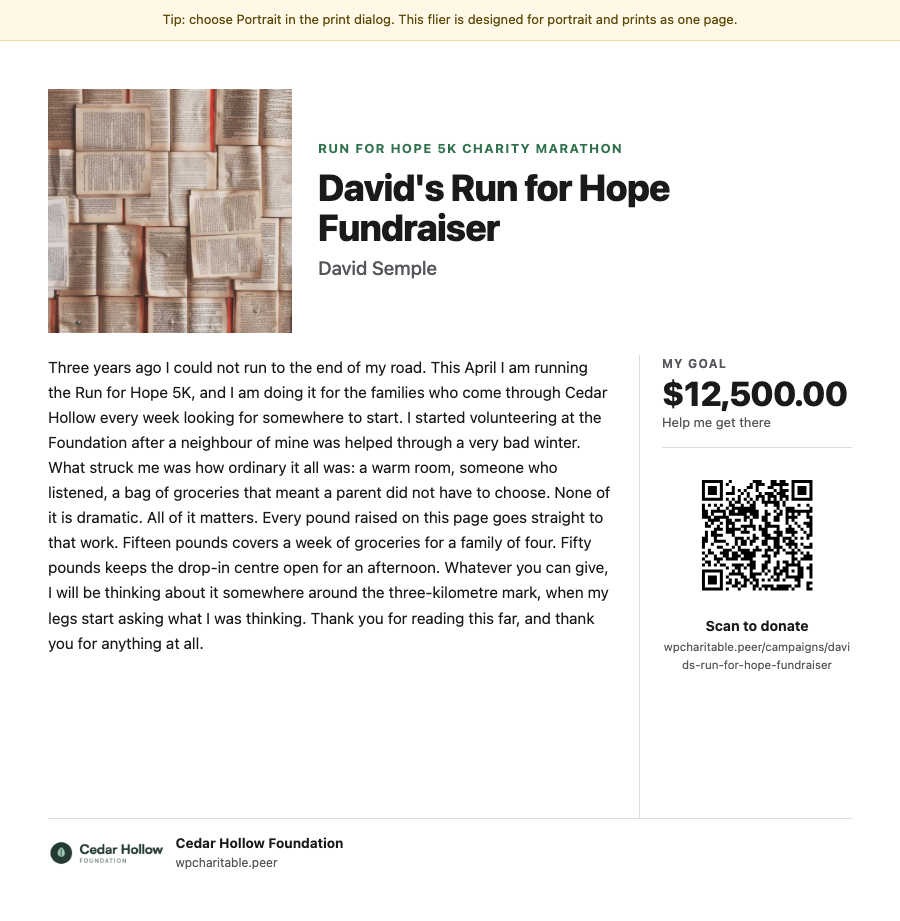
A lot of peer-to-peer fundraising happens away from a screen: at the finish line of a 5K, on a school noticeboard, in an office kitchen. Charitable Ambassadors 3.4.7 adds 2 printables, a fundraiser flier carrying each fundraiser’s own story and QR code, and a recruitment poster that signs new fundraisers up. Both open as a normal web page and print straight from the browser. Why this is important:

  • 🏁 A flier for every fundraiser: Each one carries that fundraiser’s own photo, story and goal, with a QR code that opens their page rather than your main campaign.
  • 📌 A poster that recruits: It shows “Now Recruiting” above your campaign name with a large QR code that opens your sign-up form, so someone can start fundraising without waiting on a link from you.
  • 🪄 No design tool needed: Both printables render as a normal web page and print from the browser, with no PDF plugin and no designer.
  • 📄 2 flier layouts: Hand out carries the full story for giving to friends and family, and Post up carries a short hook with 5 tear-off tabs for a noticeboard.
  • 🛡️ Off until you switch it on: Fliers stay off after the update until you enable them under Charitable » Ambassadors » Other » Fliers, and only the owner or an administrator can open one.

Check out our announcement here.

author avatar
David Bisset Project Manager
David is the project manager of Charitable since 2022. David works with several non-profits (one operated by his wife) along with managing and developing features, support, and marketing for Charitable. Has been with WordPress since 2006 and has been lead organizer of multiple conferences, events, and meetups.