Sell tickets, track attendees, and check people in at the door, all inside Charitable. Every ticket is a donation, so revenue rolls into your campaign, receipts come out tax-ready, and there is no second system to reconcile. Built into Charitable, with no code and the payment gateways you already use.
Most nonprofits run their events in one tool and their fundraising in another. Tickets sell through an events plugin or an outside platform, donations live in Charitable, and at the end of the quarter someone reconciles the two by hand. The tax side usually slips, too: when a ticket includes a dinner or an experience, only part of it is a deductible gift, and generic ticketing tools do not know the difference. Charitable Events closes that gap. Your events become part of the fundraising you already run, inside the WordPress dashboard you already use.
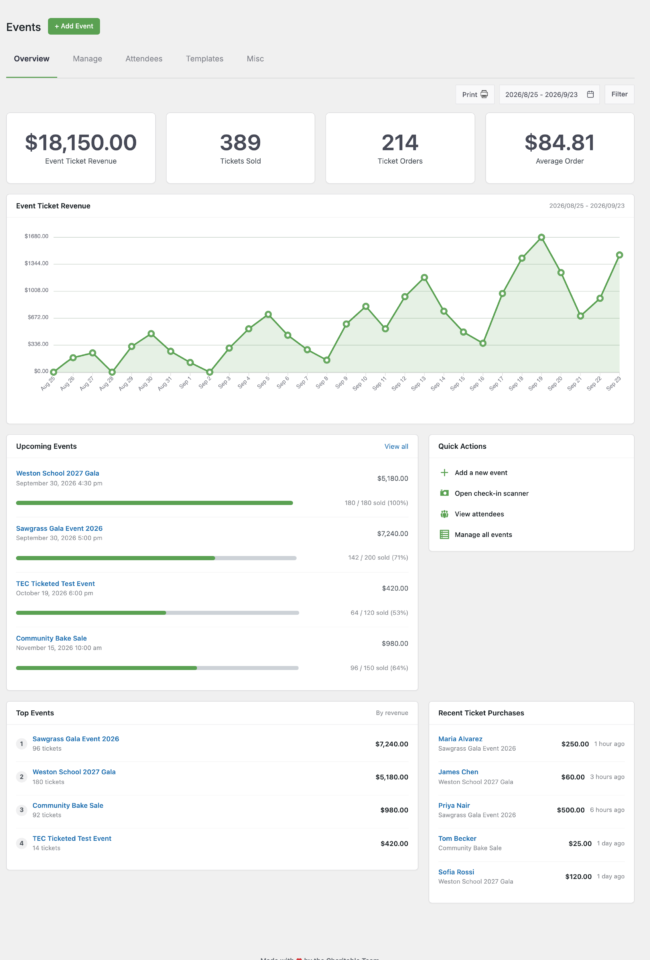
Key Features
- Sell event tickets through your existing Charitable donation forms and payment gateways
- Ticket revenue that rolls into the event’s campaign automatically
- A fair-market-value split that calculates the tax-deductible portion of every ticket
- Event tickets that flow into Charitable’s annual tax receipts
- Unlimited ticket types, each with its own price, tax treatment, and capacity
- Real capacity limits that cannot oversell the last seat
- An attendee record for every ticket, with custom questions you set for checkout
- A “My Tickets” receipt section with a scannable QR code per attendee
- A web-based check-in scanner that runs on any phone, with no app to install
- Staff sign-in for the door, or a private time-limited link for volunteers
- Virtual and hybrid events with gated stream access for ticket holders
- Three editor blocks in their own Charitable Events group, plus Sugar Calendar and The Events Calendar support
Every Ticket Is a Donation
Charitable Events is built on one idea: an event belongs to a campaign. When someone buys a ticket, that purchase is a Charitable donation like any other. It runs through the gateway you already use, it counts toward the campaign goal, and the buyer appears in your donor reports. There is no separate dashboard to reconcile and no export-import dance at year end.

- 🎟️ Every ticket is a Charitable donation, using the gateways you already run.
- 📈 Revenue counts toward the campaign goal the moment it comes in.
- 🔁 Everything you already use keeps working, from recurring to fee relief to your branding and receipts.
Tickets That Are Ready for Tax Time
When a supporter pays for a gala seat, only the amount above the fair market value of the dinner and entertainment is tax deductible. Charitable Events understands that. Set a fair market value on each ticket type and the plugin does the math on every purchase, right down to your annual tax receipts, so donors get a correct record and you do no arithmetic by hand.
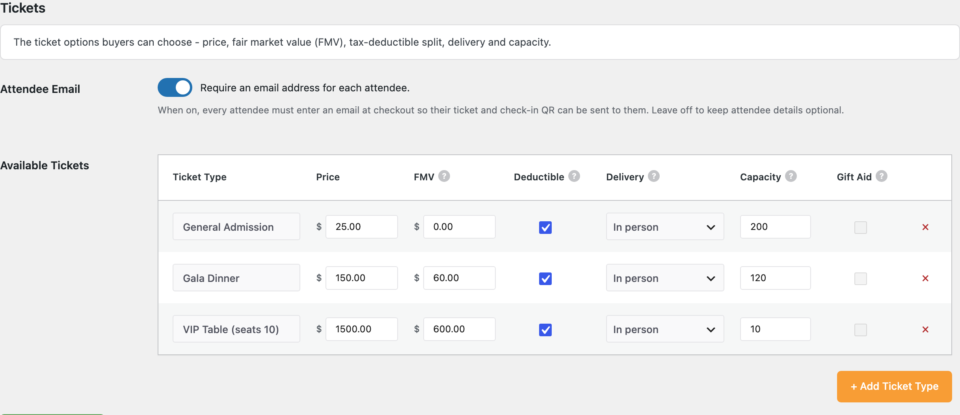
- 🧾 A fair market value per ticket type, so the deductible portion is calculated for you.
- 🧮 The deductible amount shows on the receipt and carries into your annual tax receipts.
- 🎁 Free and pure-donation tickets are handled correctly too.
Sell Exactly the Tickets You Need
Create as many ticket types as an event calls for: general admission, VIP, early bird, sponsor tables, free RSVPs. Each type has its own price, its own tax treatment, and its own capacity. When a type sells out it stops selling, and the limit holds even when two people reach checkout at the same time.
- 🎫 Unlimited ticket types for one event.
- 🚦 Real capacity limits that never oversell the last seat.
- 🏷️ In person, virtual, or hybrid delivery per ticket type.
Know Exactly Who Is Coming
Every ticket creates an attendee record. Decide what to ask at checkout with custom questions, and Charitable Events stores the answers on each attendee: meal choice, t-shirt size, accessibility needs, a guest’s name. Search and export the full list per event or across all your events, ready for the caterer, the badges, or the door.
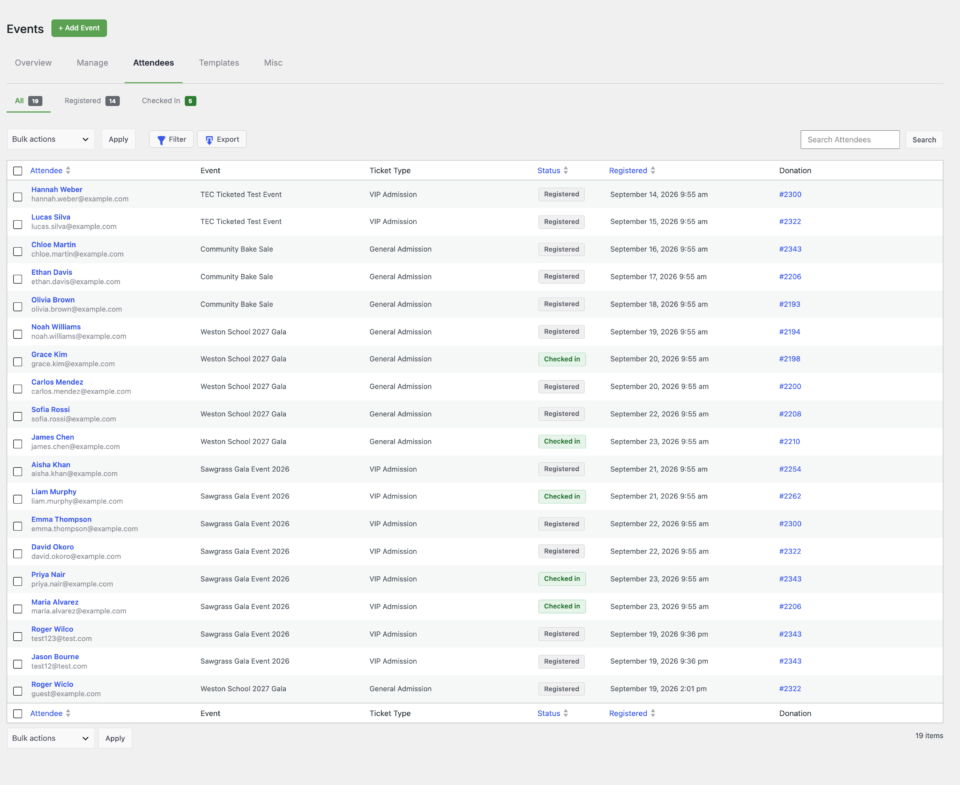
- 🧍 An attendee record for every ticket, with the custom questions you set.
- 🔎 Search across every event and export a clean CSV.
- ♻️ Refunds free the seat and update the attendee automatically.
Check People In From a Phone
When the doors open, point any phone’s camera at the attendee’s QR code, confirm their name, and tap Check In. A live roster shows who has already arrived across every scanner at the door, so no one is admitted twice. Forgot the code? Search by name and check them in by hand. There is no app to install.
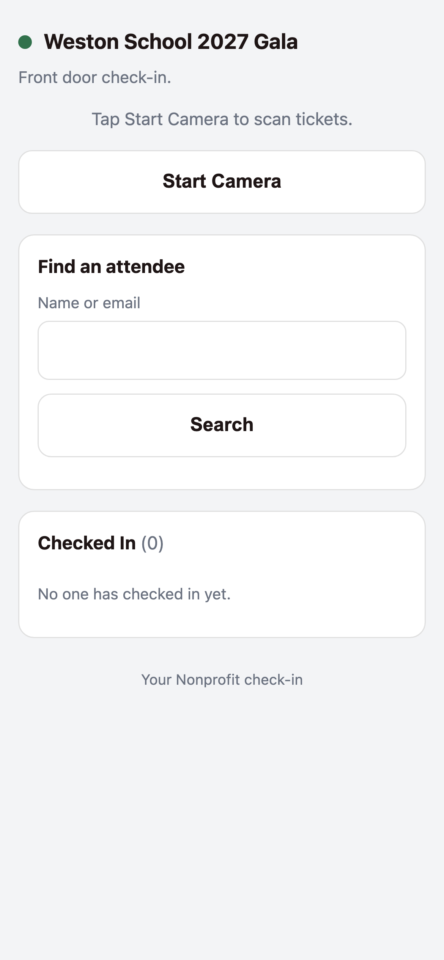
- 📷 Scan the QR from any phone browser, with nothing to download.
- 🔑 Staff sign in, or hand a volunteer a private time-limited link scoped to one event.
- 🧾 A live shared roster, undo, and manual search keep the door moving.
Their Phone Is Their Ticket
After checkout, every attendee gets a “My Tickets” section on their receipt, styled to match the rest of Charitable. Each attendee has their own card with their details and a QR code to present at the door. No printing, no separate ticketing email. The receipt is the ticket.
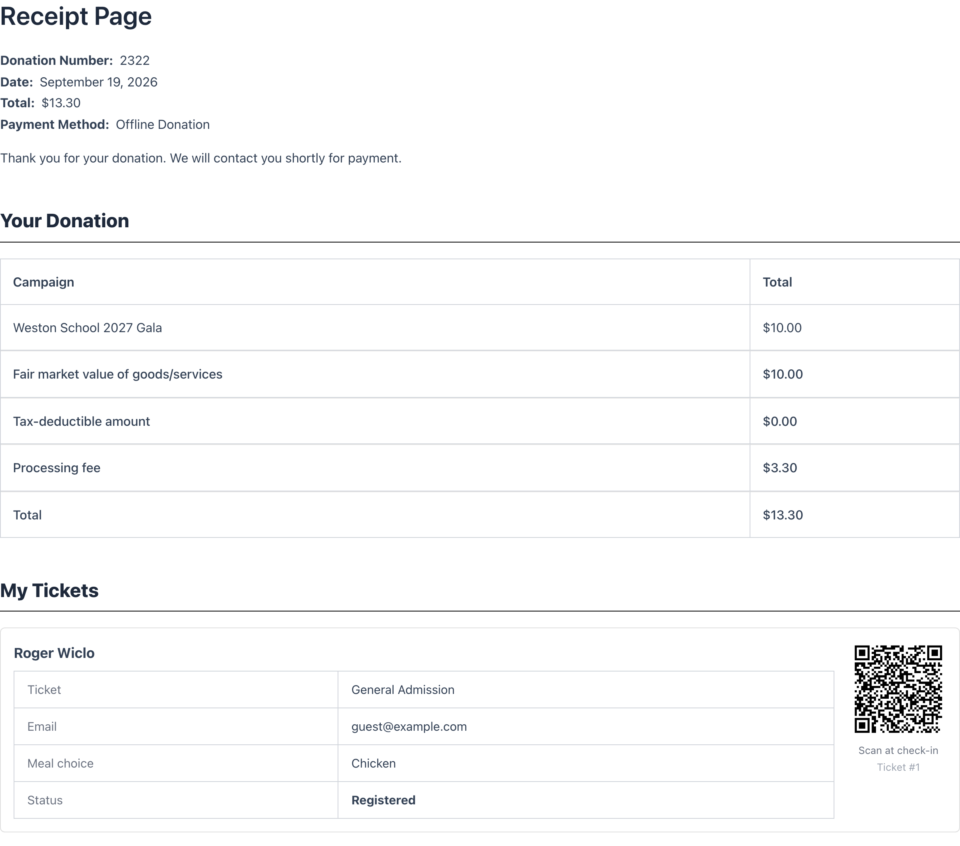
- 🎟️ A card and QR code per attendee on the receipt.
- 📱 Works on the receipt page and in the receipt email, so nothing needs printing.
- 🔐 A signed, per-attendee check-in link behind every code.
Put Your Events Anywhere
Charitable Events adds three blocks to the WordPress editor, in their own Charitable Events group: Events List for a grid of upcoming or past events, Single Event for one event’s full details, and Get Tickets for a buy button on any page. Set a featured image and it shows up in your listings. No shortcodes to memorize.
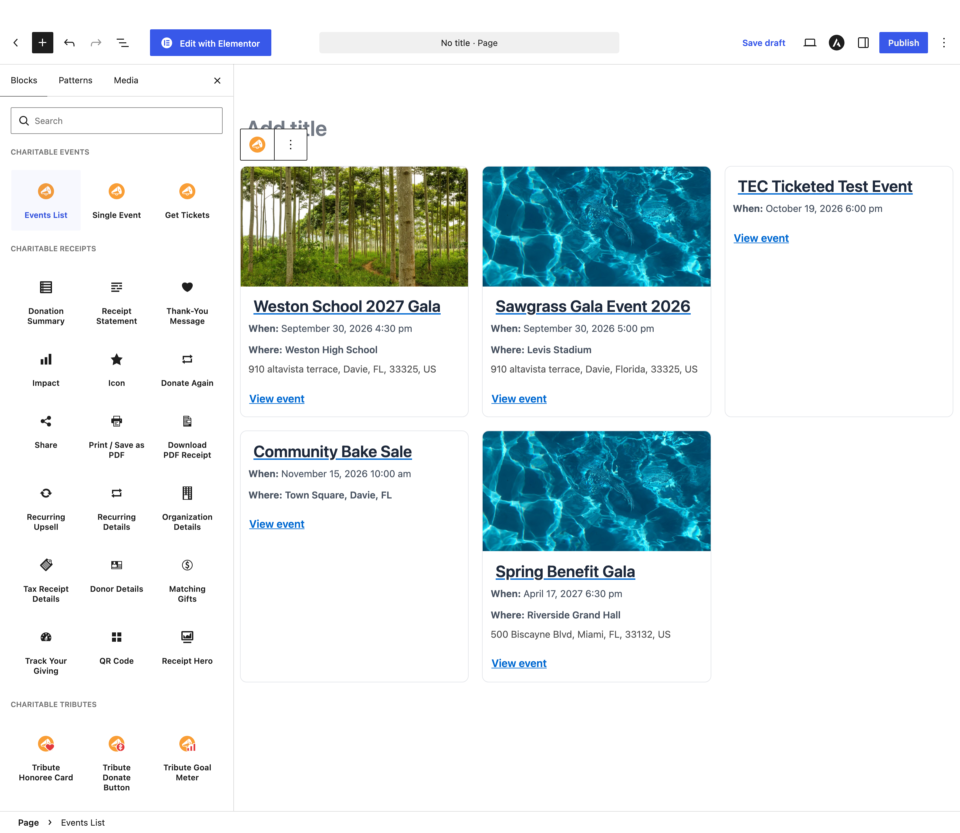
- 🧩 Three purpose-built blocks in a Charitable Events group: Events List, Single Event, and Get Tickets.
- 🖼️ Featured images across your event listings.
- 🔗 A shortcode too, for classic or page-builder layouts.
Show Events on the Calendar You Already Use
Charitable Events pairs with Sugar Calendar and also supports The Events Calendar. Create an event in Charitable and it appears on your calendar automatically, so visitors browse in the interface they already know while tickets, attendees, and money stay in Charitable.
- 📅 Works with Sugar Calendar and The Events Calendar.
- 🔒 Only display details sync, so ticketing never leaves Charitable.
- ➕ Add fundraising to an event that already lives on your calendar.
Run Virtual and Hybrid Events, Gated Properly
Not every event happens in a room. Charitable Events supports virtual and hybrid events with gated access, so the stream or join link is available to ticket holders, and only to ticket holders, inside the window before the event begins.
- 🎥 Gated stream access for ticket holders only.
- ⏱️ Access opens on a schedule, not the moment a ticket sells.
- 🔁 The same window governs virtual access and the door.
More information
Get started with the Charitable Events documentation.
Minimum requirements:
- PHP 7.4+
- Charitable Pro [CONFIRM version, e.g. 1.8.18+]