
Most nonprofits run at least one event a year. It might be a gala, a walkathon, a workshop or a community dinner. And for most of them, the tickets are sold in one tool while the donations are taken in another.
That means 2 sets of reports and 2 lists of people. At the end of the year, someone has to match them up by hand to work out what the event really raised.
You asked us to bring both into one place, so we built Charitable Events. It lets you sell event tickets through the same donation forms and payment gateways you already use in Charitable.
Every ticket counts toward a campaign goal, every attendee gets a QR code, and you can check people in at the door from a phone. 🎟️
It’s easy to set up! Takes 5 minutes!
Here’s What an Event Page Looks Like
Before we go through the setup, here’s a finished event page. This one uses the Hero layout, with the event image across the top and the ticket widget beside the description.
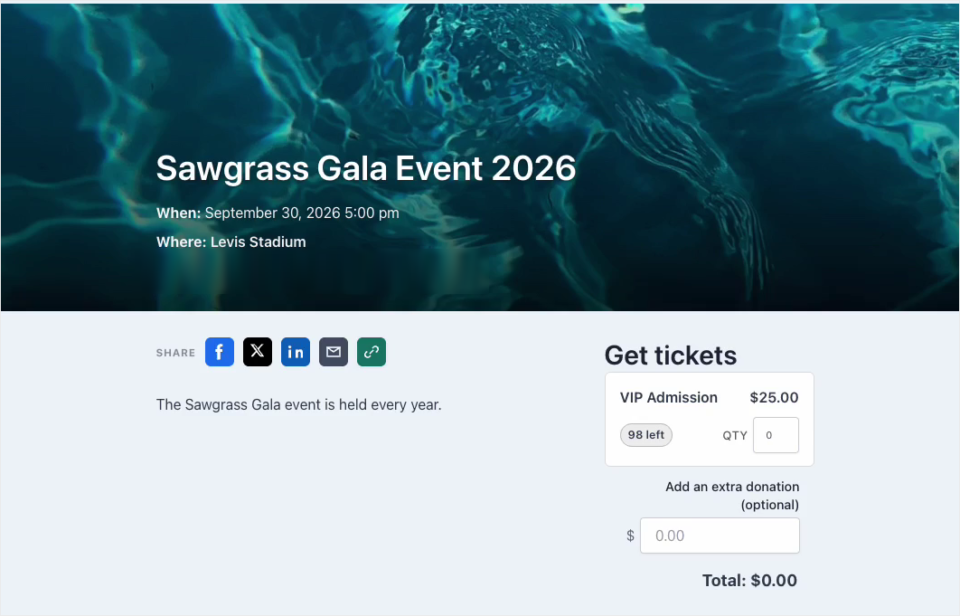
Charitable builds this page for you as soon as you save an event. Visitors pick a ticket type and a quantity, add an extra donation if they want to, and pay with the gateway you already have set up. There’s no second checkout and no separate ticketing account to manage.
Your Events Live Inside Your Campaigns
Everything about the feature sits under Charitable » Events. The Overview tab shows your ticket revenue, tickets sold, ticket orders and average order at a glance, with a revenue chart and your upcoming events underneath.
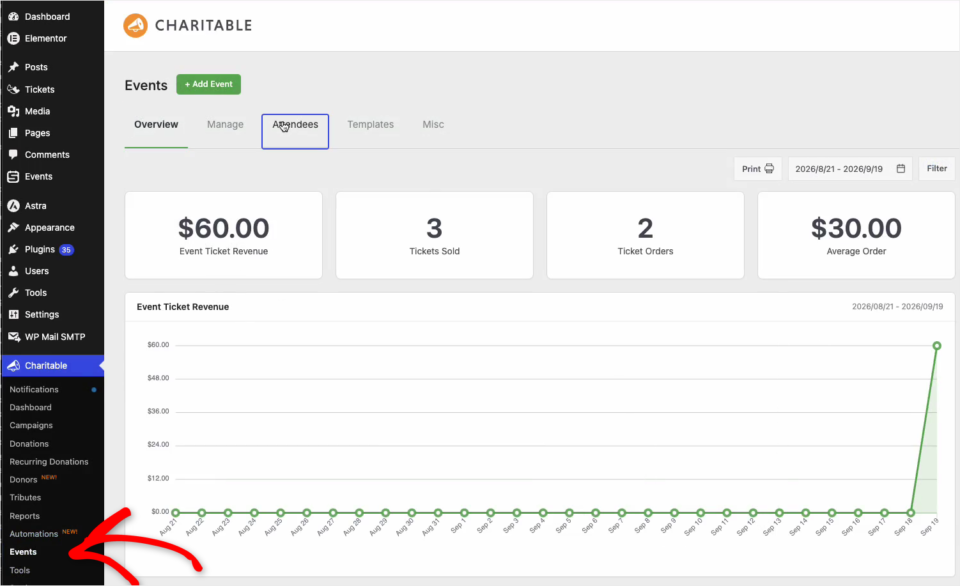
The main idea behind Charitable Events is that every event belongs to a campaign. When someone buys a ticket, that purchase is a Charitable donation like any other. It shows up in your donation reports and it counts toward the campaign goal.
You choose the campaign in the Fundraising box when you add an event. For a standalone event, leave it on Auto-create a campaign and Charitable will make one for you. If the event is part of a bigger appeal, pick that campaign instead and the ticket money will go toward its goal.
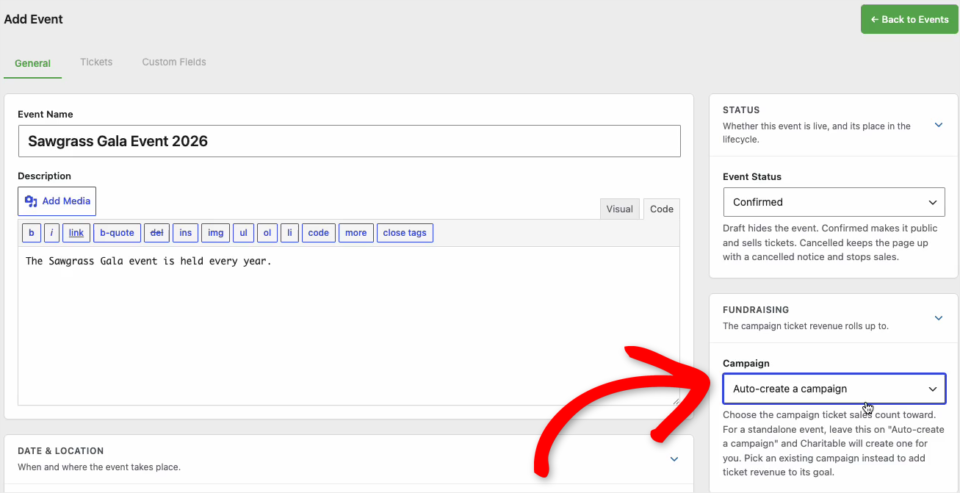
If you already know how to build a Charitable campaign, most of this screen will feel familiar. You add a name, a description, a date and a venue, then set the status. Draft keeps the event hidden, Confirmed makes it public and starts selling tickets, and Cancelled keeps the page up with a notice and stops sales.
There’s also an Event Photos gallery. It plays as a slideshow on the event page, so you can use it as a preview before the day and swap in highlights afterward.
When You’ll Feel the Difference
Any event where people pay to attend is a good fit. Here are a few we had in mind while building it.
- 🥂 Galas and dinners: sell general and VIP seats, and record the meal value on each ticket so the receipt shows the right deductible amount.
- 🏃 Walkathons and fun runs: cap the number of places and collect a t-shirt size from every runner at checkout.
- 🎓 Workshops and classes: limit each session to the size of the room and email every attendee their own ticket.
- 🎤 Conferences: offer early bird, sponsor and standard tickets side by side, each with its own price and capacity.
- 💻 Webinars and hybrid events: sell virtual tickets alongside in-person ones for the same event.
Ticket Types, Prices, and Capacity
You can create as many ticket types as an event needs on the Tickets tab. General admission, VIP, early bird and free RSVPs can all sit on the same event.
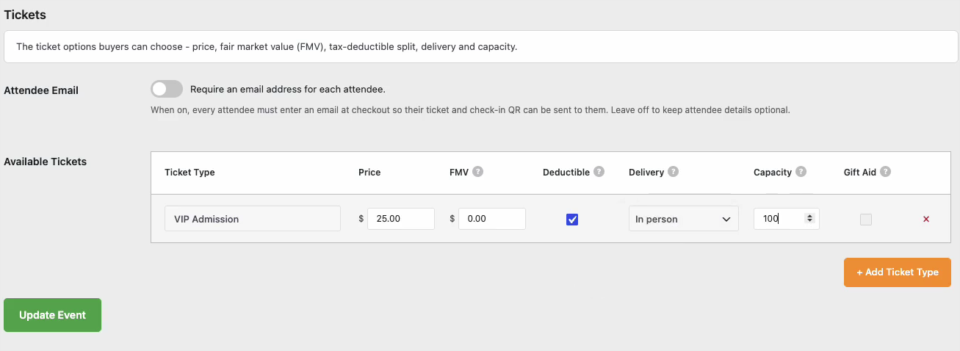
Each ticket type has its own price and its own capacity. When a type sells out, it stops selling, and the event page shows buyers how many are left.
Delivery tells Charitable how the attendee will take part. In person tickets get a QR code for check-in at the door, virtual tickets get gated access to the online stream, and hybrid tickets get both.
There’s also an Attendee Email switch at the top of the tab. Turn it on and every attendee has to enter their own email address at checkout, so each person receives their own ticket and QR code.
Tickets That Are Ready for Tax Time
When a supporter pays for a gala seat, not all of that money is a gift. Part of it pays for the dinner and the venue. That part is the fair market value of what the attendee received, and only the amount above it is tax-deductible.
Each ticket type in Charitable Events has a fair market value (FMV) field and a Deductible checkbox. Charitable does the math on every purchase and puts both numbers on the donor’s receipt.
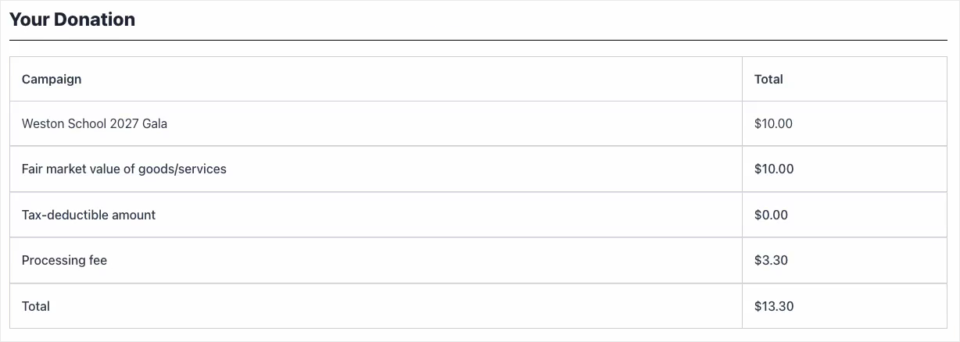
In this example, the $10 ticket covers $10 of food and entertainment, so the receipt shows a tax-deductible amount of $0. A $25 VIP ticket with no fair market value would show the full $25 as deductible. Your finance volunteer will thank you!
I’m using the US rules as the example here since that’s the system most readers know. If your organization is somewhere else, your accountant can tell you how your own country treats event tickets, and the Gift Aid column is there for UK charities.
Collect Attendee Details at Checkout
Every ticket creates its own attendee record. On the Custom Fields tab, you decide what to ask each attendee, such as a meal choice, a t-shirt size, access needs or a guest name.
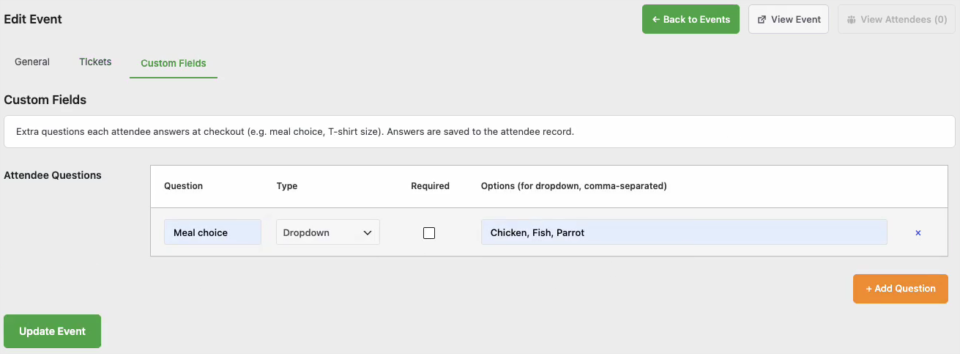
Each question can be a dropdown or a text field, and you can mark it as required. When someone buys more than 1 ticket, the form asks for each guest’s name and details separately.
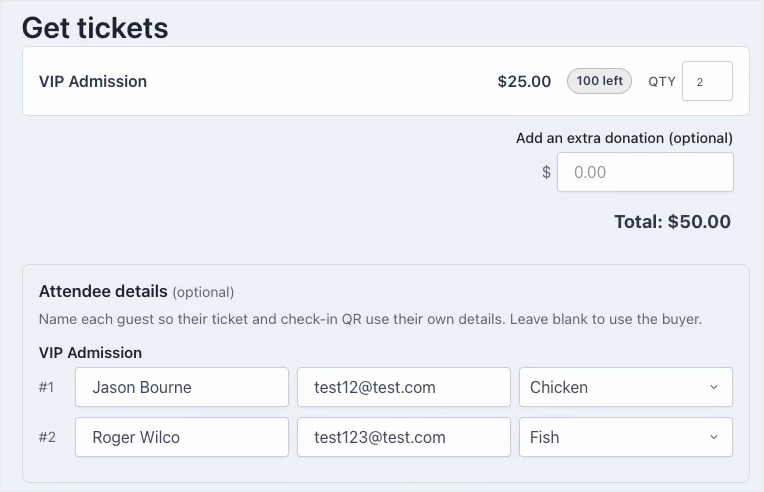
If a buyer leaves the guest details blank, the tickets use the buyer’s own details instead. That keeps checkout short for someone buying a single seat for themselves.
Choose How Your Event Pages Look
The Templates tab gives you 3 layouts for your event pages. Classic stacks everything in one column, Hero leads with a full-width image banner, and Split puts the ticket widget beside the event details.
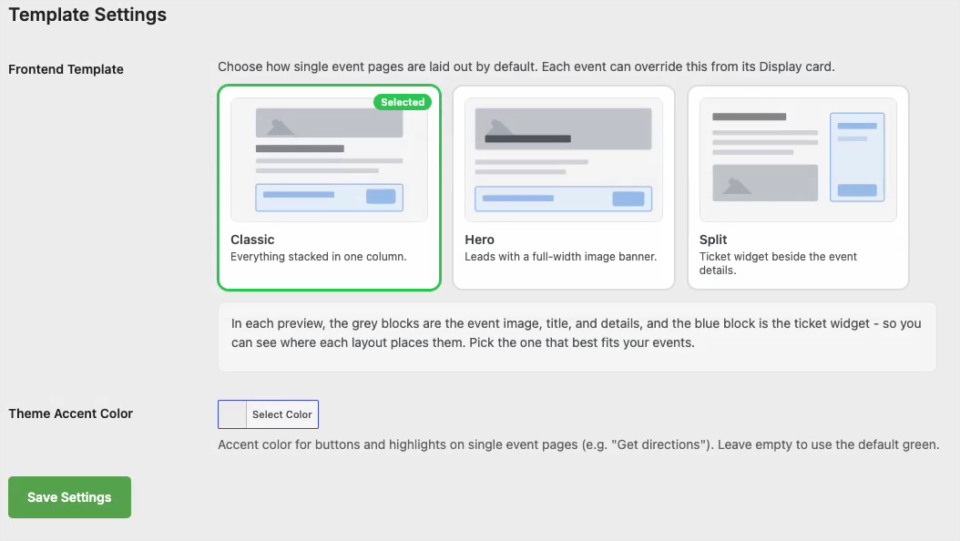
The layout you pick here becomes the default for every event. You can still change it for one event from that event’s Display box, and you can set an accent color for the buttons so the page matches your brand.
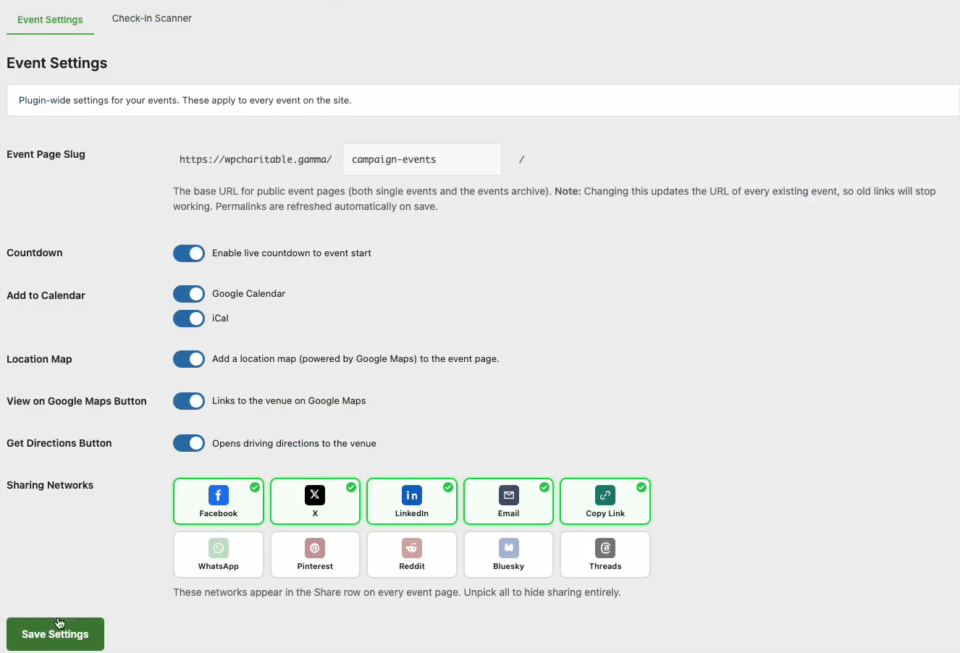
The Misc tab controls the extras. From there you can turn on a live countdown, Google Calendar and iCal buttons, a location map, links to Google Maps and driving directions, and a Share row with the networks you choose.
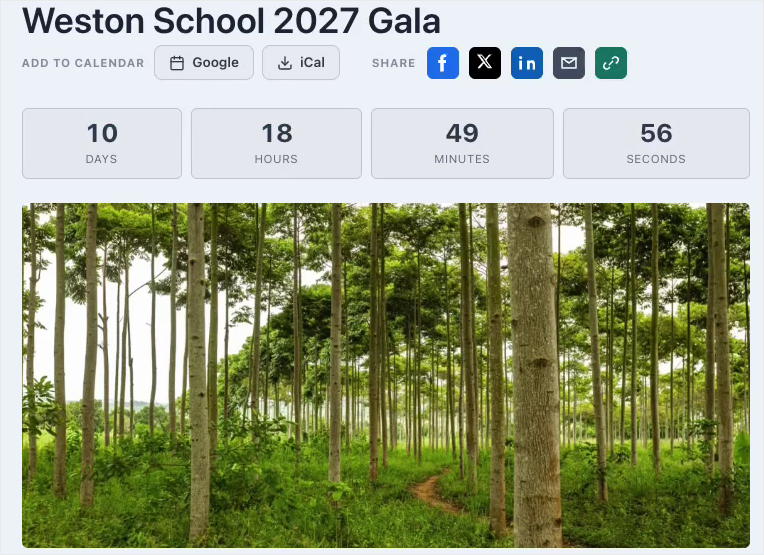
Here’s how those extras look at the top of an event page once they are switched on.
Show Your Events Anywhere With Blocks
Charitable Events adds 3 blocks to the WordPress editor, in their own Charitable Events group.
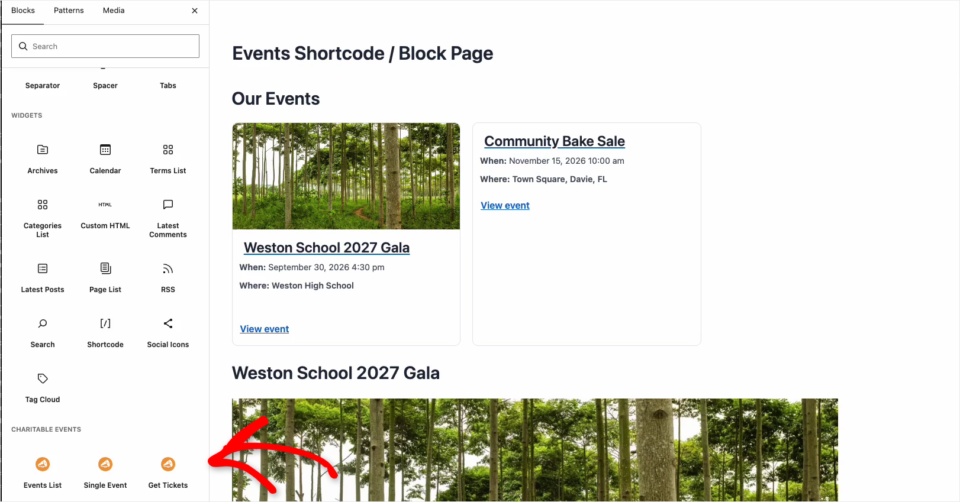
- Events List shows a grid or list of your events, with their featured images.
- Single Event shows the full details of one event.
- Get Tickets puts the ticket form for an event on any page.
So you could add an Events List to your homepage, or put the Get Tickets block at the end of a blog post about the event. There are no shortcodes to remember and no template files to edit.
Works With Sugar Calendar and The Events Calendar
If you’d like your events on a proper calendar, Charitable Events works with Sugar Calendar, another Awesome Motive plugin, and with The Events Calendar. Choose the calendar in the Show On Calendar setting in an event’s Display box.
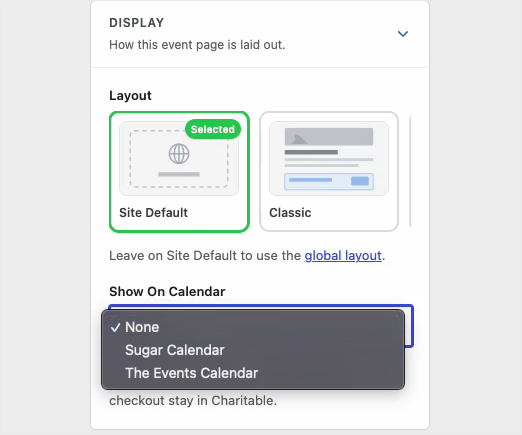
Once you do, the event shows up in that calendar with its date, description, image and location. Visitors find it on the calendar, and the tickets, attendees and receipts all stay in Charitable.
It works the other way too. If an event already lives in Sugar Calendar or The Events Calendar, you can turn it into a fundraising event in Charitable without building it again.
Digital Tickets and QR Codes on Every Receipt
Once a payment is confirmed, the donation receipt gets a My Tickets section. Each attendee has their own card with their name, ticket type, custom field answers and a QR code to show at the door.
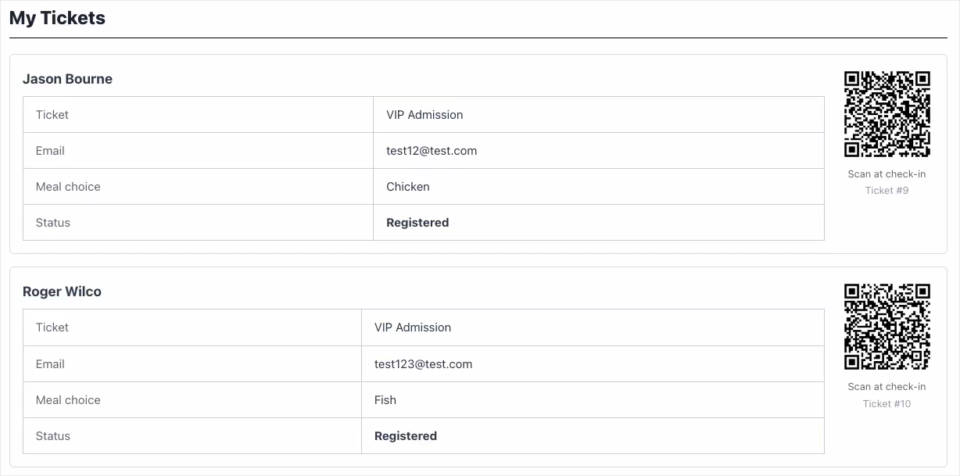
Nobody needs to print anything. The attendee’s phone is their ticket.
Tickets only appear after the payment has gone through. If someone chooses an offline payment method, their tickets show up as soon as you mark the donation as paid.
Check People In at the Door
On the night, your team can open the check-in scanner on a phone and scan each attendee’s QR code. The scanner is also listed under Quick Actions on the Overview tab.
You don’t have to give your volunteers a WordPress account for this. Every event has its own Check-In Link, which you can copy or print as a QR code and hand to the people at the door.
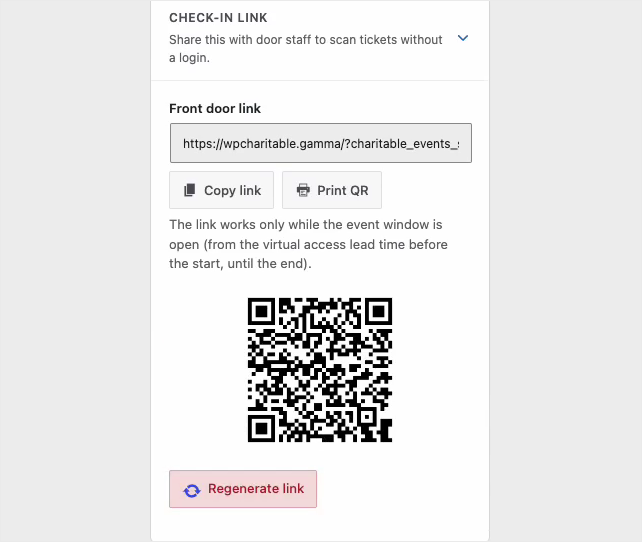
The link only works while the event is open, from shortly before the start until the end. If it gets shared too widely, click Regenerate link and the old one stops working.
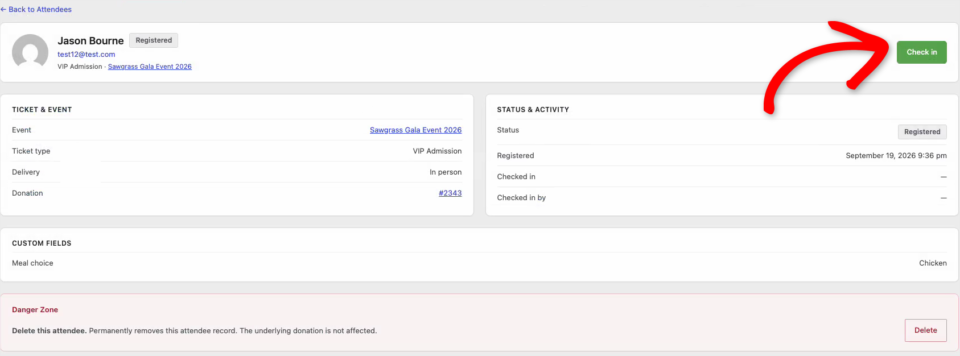
You can also check someone in by hand. Open their record on the Attendees tab and click Check In, and Charitable records who checked them in and when.
Attendees and Donations in One Place
The Attendees tab lists everyone who holds a ticket, across all your events. You can filter it, search it by name and export it before the day.
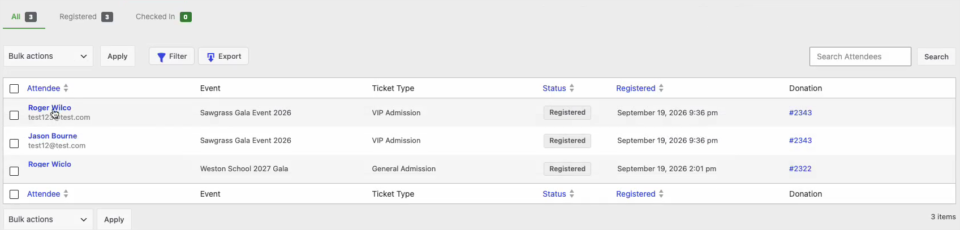
Because every ticket is a donation, you’ll also see it on the Donations screen, where a new column shows which event it belongs to. Open the donation and an Event Tickets box lists the tickets, the fair market value, the tax-deductible amount and the attendees.
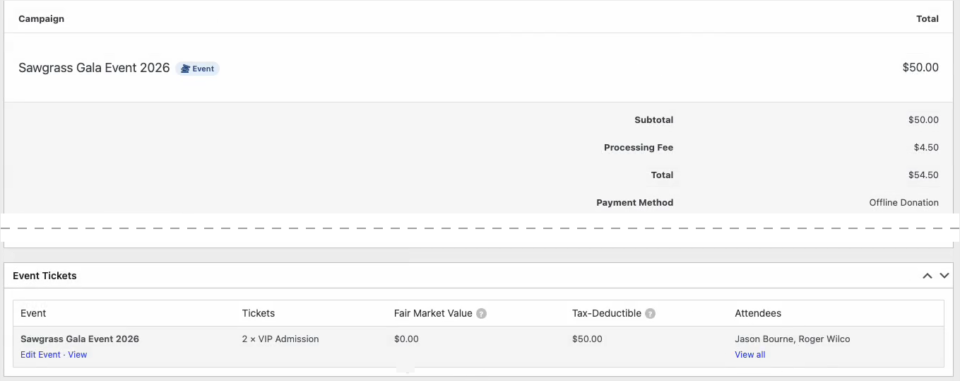
That’s the part we’re happiest with. Your event income and your donation income finally sit in the same reports.
Virtual and Hybrid Events
Not every event happens in a room. Set a ticket’s Delivery to Virtual or Hybrid, and the join link or stream is only available to people who hold a ticket.
FAQs on Charitable Events
Which plan includes Charitable Events?
Charitable Events is in the Charitable Pro plugin, Pro plan and higher.
Do I need to create a campaign first?
No. Leave the Campaign setting on Auto-create a campaign and Charitable makes one for you when you save the event.
Can supporters give more than the ticket price?
Yes. The Get Tickets form has an optional extra donation field, and that amount goes to the same campaign as the tickets.
Can I offer free tickets?
Yes. Set a ticket type’s price to $0 to take free RSVPs, and each RSVP still creates an attendee record with its own QR code.
Does it work with page builders?
Charitable Events comes with 3 blocks for the WordPress block editor. There are no page builder widgets yet.
Get Started With Charitable Events
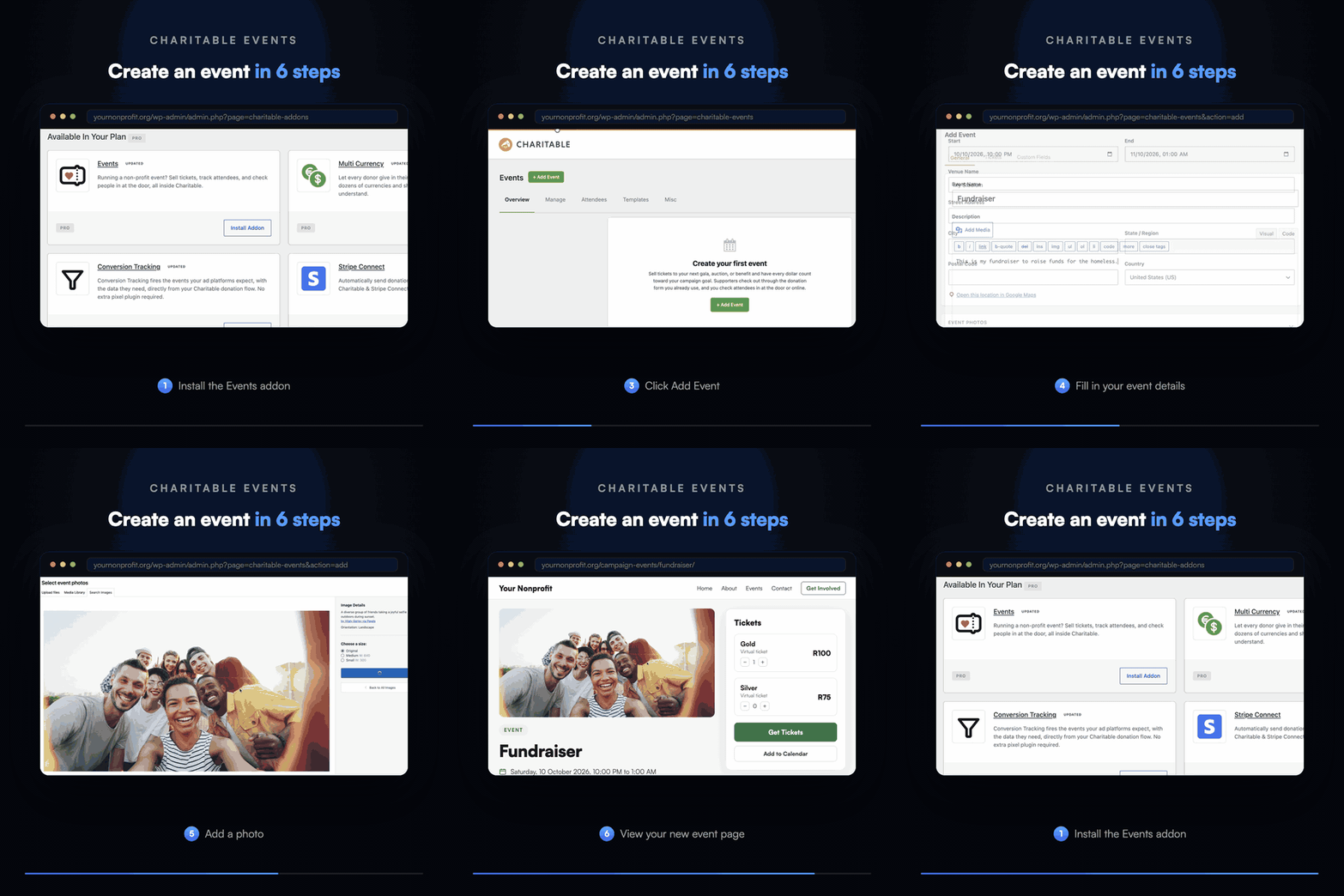
Charitable Events is available now in the Charitable Pro plugin, Pro plan and higher. To get started, install it from Charitable » Addons, then head to Charitable » Events and click Add Event.
We’d love to hear how you plan to use it. If you have a question about a specific event setup, our support team is happy to help.
Read the Charitable Events Documentation →
Not Yet on a Charitable Paid Plan?
Charitable Has 1.2+ Million Downloads!
Trusted by millions to power successful fundraising campaigns. Try Charitable risk-free today.
✅ 14-day money-back
✅ Transparent pricing
✅ Code-free setup
What’s New in Charitable
We also launched several powerful features and improvements recently:
🤖
Ask your AI assistant in plain language to draft a campaign or log an offline gift.
💰
Recurring Donations for Windcave
Windcave donors set a monthly gift up once, and Charitable bills every renewal on schedule.
⚡
A full-screen canvas that lays every automation out as a flow you can drag into place.
💳
Donors fix an expired card themselves, so a subscription keeps running instead of lapsing.
🧱
Native Elementor, WPBakery and Divi widgets for building campaign pages on the visual canvas.
We’ve been adding to Charitable constantly, features and improvements designed to help you raise more and serve your donors better. See everything we’ve shipped at the Charitable Changelog.
Not yet a Charitable Pro user? Sign up today and get up to 50% off on your plan. We’re confident you’ll love raising funds with Charitable. If, for any reason, Charitable is not the right fit for you, we’ll refund your purchase with our 14-day money-back guarantee. Get Charitable Pro Now »
Stay Connected for More Nonprofit Resources
For more tutorials and videos tailored to nonprofits, subscribe to our YouTube channel. We regularly publish expert tips, step-by-step guides on online donations, fundraising strategies, and practical resources to help your organization succeed.
🗞️ Get weekly tips and exclusive guides in your inbox
Join our newsletter →
🎥 Watch step-by-step tutorials and success stories
Subscribe to our YouTube channel →
👩🏽💻 Connect with our community and get daily nonprofit insights
Follow us on LinkedIn →
🥳 Fun reels and non-profit insights
Follow us on Instagram →
👀 Insightful & fun videos to help you grow your cause
Follow us on TikTok→
🌎 Subscribe and follow for general fundraiser tips
Get Fundraiser Tips on TikTok →
Powerful Fundraising Resources
🤖 Use Charitable with Your AI Assistant
⬇️ Download proven strategies, campaign ideas, and expert tools
Get the Fundraising Kit →
💸 Get Free Fundraising Resources
Head to the Charitable Fundraising Hub →
🤔 Got questions about Charitable?
Charitable FAQs →
🏎️ Take Charitable for a spin
Create your Charitable Demo →
Understand non-profit terms and jargon
Non-Profit Glossary →
% Looking for non-profit deals and discounts?
Best Non-Profit Deals and Discounts →








Leave a Reply