
Someone clicks a link to your campaign from an email or a social post. In the first second, before they read a word, their eyes have already decided how they feel. Is this a serious cause? Is it moving? Is anyone else giving?
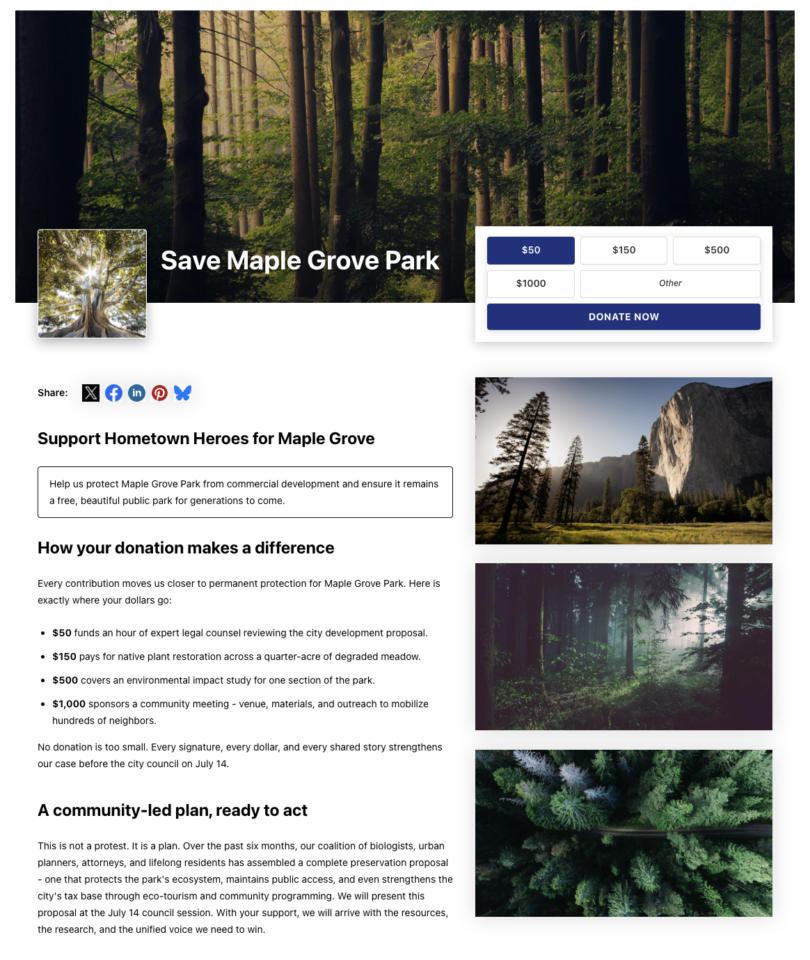
On a lot of donation pages, that first second is wasted: a small logo, a headline, and a form somewhere down the page. Beacon changes what people see in that moment. It leads with a full-width hero banner, your logo, your goal, and a donation widget sitting right on top of the image, so the ask and the momentum land instantly. 🔦
Beacon is two new Campaign Builder templates in Charitable Pro 1.8.17, both built on the all-new Campaign Hero field.
Why a Strong Hero Decides What Happens Next
The top of your campaign page does the heaviest lifting on the whole site. It sets the emotional tone, names the cause, and signals momentum, all in the space above the fold where most visitors decide whether to keep scrolling or leave.
A hero that leads with a real photo, a clear goal, and a visible progress bar does something a plain header cannot: it tells a visitor, in one glance, that this is a real effort, it is underway, and their gift matters right now. Beacon is built around that glance. The donation widget is locked into the banner by design, so the ask never drifts below the fold no matter how you edit the page.
See It in Action
When You’ll Feel the Difference
A few campaigns where Beacon’s bold hero earns its keep:
🌳 A grassroots community drive: Lead with a photo of the park, the school, or the neighborhood you are fighting for, with the goal right on the image.
🚨 An urgent, time-sensitive appeal: Put the ask and the progress bar above the fold so first-time visitors can give without scrolling.
📣 A campaign you are promoting on social: When traffic arrives from a link, the hero delivers the story and the donate button in the first screen.
🏫 A capital or building campaign: Show a rendering or site photo edge to edge, with the amount raised toward goal front and center.
💗 A memorial or tribute fund: A single, dignified banner image and a focused ask set the right tone from the first moment.
Two New Templates, One Bold Look
Both templates are marked new and highlighted in the Campaign Builder template chooser, so they’re easy to find when you start a campaign.
Beacon (2 Columns) is the more structured of the two: it pairs the locked hero banner and donation widget overlay with a two-column story area underneath, room for your narrative on one side and supporting details on the other.
Beacon (1 Column) keeps the same hero but follows it with a single full-width column, better suited to a long-form story you don’t want broken up into side-by-side chunks.
Both ship with example content and real sample photography already in place, so you can see the finished shape the moment you pick one, then swap in your own images and copy.
The Campaign Hero Field
Beacon is powered by the new Campaign Hero field, a complete header block you can drop into any template, not just Beacon. It brings ten settings together into one cohesive banner: a background image, an optional logo, your title, the raised amount with a progress bar, and a set of donation amounts, all in a single block.
You don’t need a finished photo library to use it, either.
Drop the logo slot and the hero collapses cleanly to a single full-bleed photo; skip the photography entirely and it falls back to a solid color or gradient background instead.
Turn on the raised amount and progress bar and the hero shows “$X raised toward our $Y goal” automatically, the moment a campaign goal is set.
The donation widget is built right into the hero, too. Set your one-time amounts, choose which one is selected by default, decide whether to allow an “Other” custom amount, and label the donate button however you like (it defaults to “Donate Now”).
If the Charitable Recurring Donations add-on is active, flip on monthly and one-time tabs in the same widget. And because the Campaign Hero follows your campaign theme automatically, its button and accent colors match whatever branding you’ve already set up, wherever you drop it in.
Getting Started: Launching a Beacon Campaign
You can have a Beacon campaign live in minutes.
- Go to Campaigns in wp-admin and click Add New Campaign.
- In the template chooser, find the highlighted Beacon (1 Column) or Beacon (2 Columns) template and select it. Your campaign loads with example content and photos.
- Click the pencil icon on the hero block to open the Campaign Hero panel.
- Set your background image and logo, adjust the title, donation amounts, and donate button label, and decide whether to show the raised amount and progress bar.
- Watch the builder preview update with your real campaign data, then Save.
Prefer a different template? Add the Campaign Hero field to any layout from the builder’s field palette to get the same bold header anywhere.
Why You’ll Love This
The upshot: the banner, goal, and donate button all land in the first screen, and in Beacon they stay there. The hero and donation widget are locked in place by design, so your best real estate never drifts down the page as you edit, and because it follows your campaign theme automatically, it stays on-brand without any extra styling work. The builder preview reflects your actual donation progress and goal the whole time, not a mockup, and since the Campaign Hero field works in any template, you’re never locked into using it here alone.
For Agencies and Developers
Filter the rendered hero
The hero’s front-end output passes through the charitable_campaign_builder_campaign-hero_field_display filter, so you can adjust the markup before it renders. Hero settings are stored as clean, named keys in the campaign’s field data (background image, logo, title override, amounts, CTA label, and more), and images support template-relative filenames that resolve to the template’s asset folder, with a Reset control to restore defaults.
Structured by intent
Beacon templates lock the hero row to preserve the layout while leaving all hero content fully editable, so a client can update copy and images without breaking the design you handed off.
Frequently Asked Questions
Does this require Charitable Pro? Yes. The Beacon templates and the Campaign Hero field are Charitable Pro features. Beacon is available in Charitable Pro 1.8.17.
Can I use the Campaign Hero without a Beacon template? The Campaign Hero in Charitable Pro is a standard builder field you can add to any template to give it a bold header.
Do I need the Recurring Donations add-on? Only if you want to offer monthly giving in the hero widget. Without it, the hero works fully as a one-time donation header.
Where does the “amount raised” come from? It reflects your live campaign donations and goal. The raised band and progress bar appear automatically once a goal is set.
Can I change the donate button text and colors? Yes. The button label is a setting (it defaults to “Donate Now”), and the button color follows your campaign theme’s Button color.
Do my images need to be a specific size? Not exactly. Charitable automatically crops uploaded images to the best fit for the hero space, so starting with well-composed, high-resolution photos gives you more control over the final result.
Get Started With Beacon
Beacon is available now in Charitable Pro 1.8.17. Create a new campaign, choose Beacon (1 Column) or Beacon (2 Columns), and give your cause a first impression that turns visitors into donors.
More in Charitable Pro 1.8.17
Beacon arrives alongside the new Styles tab for visual restyling, the Donation Form Gutenberg block, visual donation amounts with per-amount images, and new fundraising widgets for Elementor, WPBakery, and Divi.
Not yet a Charitable Pro user? Sign up today and get up to 50% off on your plan. We’re confident you’ll love raising funds with Charitable. If, for any reason, Charitable is not the right fit for you, we’ll refund your purchase with our 14-day money-back guarantee. Get Charitable Pro Now »
What’s New in Charitable
We also launched several powerful features and improvements recently:
📱
One-tap Apple Pay and Google Pay checkout for mobile donors giving through Mollie.
🤝
Moderation and directory screens for managing peer-to-peer ambassadors and campaign creators in one place.
💳
Native UPI, QR code, and multi-currency donations for accepting gifts from India.
🔔
Browser push notifications that reach donors with thank-yous, milestones, and urgent campaign alerts.
🛡️
Real-time bot detection that flags attacks and blocks bad actors before they hit your donation forms.
🧳
A white glove migration team moves your donors, history, and subscriptions over from GiveWP for you.
We’ve been adding to Charitable constantly, features and improvements designed to help you raise more and serve your donors better. See everything we’ve shipped at the Charitable Changelog.
If you have any questions or want help building your first Beacon campaign, our support team is ready to lend a hand.
Charitable Has 1.2+ Million Downloads!
Trusted by millions to power successful fundraising campaigns. Try Charitable risk-free today.
✅ 14-day money-back guarantee
✅ Transparent pricing
✅ Code-free setup
Stay Connected for More Nonprofit Resources
For more tutorials and videos tailored to nonprofits, subscribe to our YouTube channel. We regularly publish expert tips, step-by-step guides on online donations, fundraising strategies, and practical resources to help your organization succeed.
🗞️ Get weekly tips and exclusive guides in your inbox
Join our newsletter →
🎥 Watch step-by-step tutorials and success stories
Subscribe to our YouTube channel →
👩🏽💻 Connect with our community and get daily nonprofit insights
Follow us on LinkedIn →
🥳 Fun reels and non-profit insights
Follow us on Instagram →
👀 Insightful & fun videos to help you grow your cause
Follow us on TikTok→
🌎 Subscribe and follow for general fundraiser tips
Get Fundraiser Tips on TikTok →
Powerful Fundraising Resources
🤖 Use Charitable with Your AI Assistant
⬇️ Download proven strategies, campaign ideas, and expert tools
Get the Fundraising Kit →
💸 Get Free Fundraising Resources
Head to the Charitable Fundraising Hub →
🤔 Got questions about Charitable?
Charitable FAQs →
🏎️ Take Charitable for a spin
Create your Charitable Demo →
Understand non-profit terms and jargon
Non-Profit Glossary →
% Looking for non-profit deals and discounts?
Best Non-Profit Deals and Discounts →









Leave a Reply