
Charitable Blog

Everything you need to know about Charitable and our team.

How to See Charitable Articles First in Google

How to See Charitable Articles First in Google (In 2 Clicks)

Last updated on

  • By

If you run a nonprofit website on WordPress and rely on Charitable’s tutorials to get things done, here’s a two-click trick that makes sure you keep seeing us on Google, without having to dig for us.

Google search has a feature called “Preferred Sources.” It lets you tell Google which websites you want to see more of in your search results, so their content gets prioritized over a sea of generic results.

Instead of scrolling past AI summaries, ad-heavy roundups, and outdated forum threads to find an answer that actually applies to a WordPress donation form, you can tell Google to put Charitable’s guides front and center. In this short guide, we’ll walk you through it (it takes about 10 seconds).

How to Set Charitable as a Preferred Source in Google

Here’s how to set it up. It takes two clicks.

Step 1: Go to Google’s Source Preferences for Charitable

Click this link, and you’ll be taken directly to Charitable’s entry in Google’s Source Preferences list: google.com/preferences/source?q=wpcharitable.com

Step 2: Select Charitable

Click the checkbox next to Charitable to add it as a preferred source.
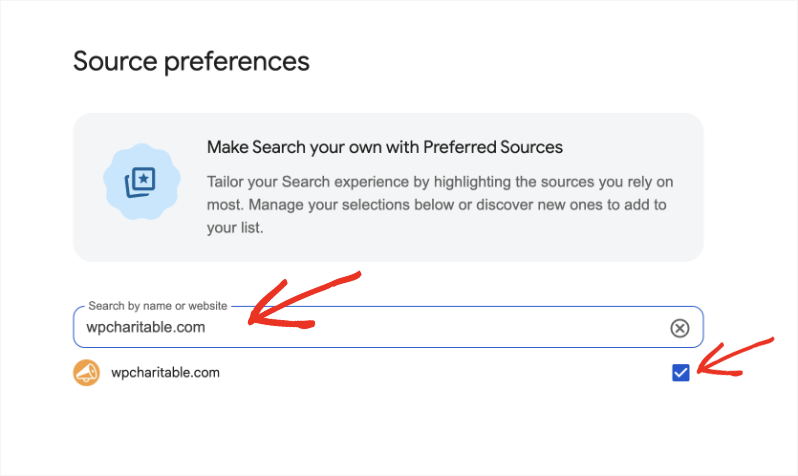
Add source preference

Step 3: Refresh Your Results

Once you’ve selected Charitable, refresh your Google search results. That’s it. You’ll start seeing Charitable content more often in the “Top Stories” and “From Your Sources” sections whenever you’re searching for WordPress donation and fundraising help.
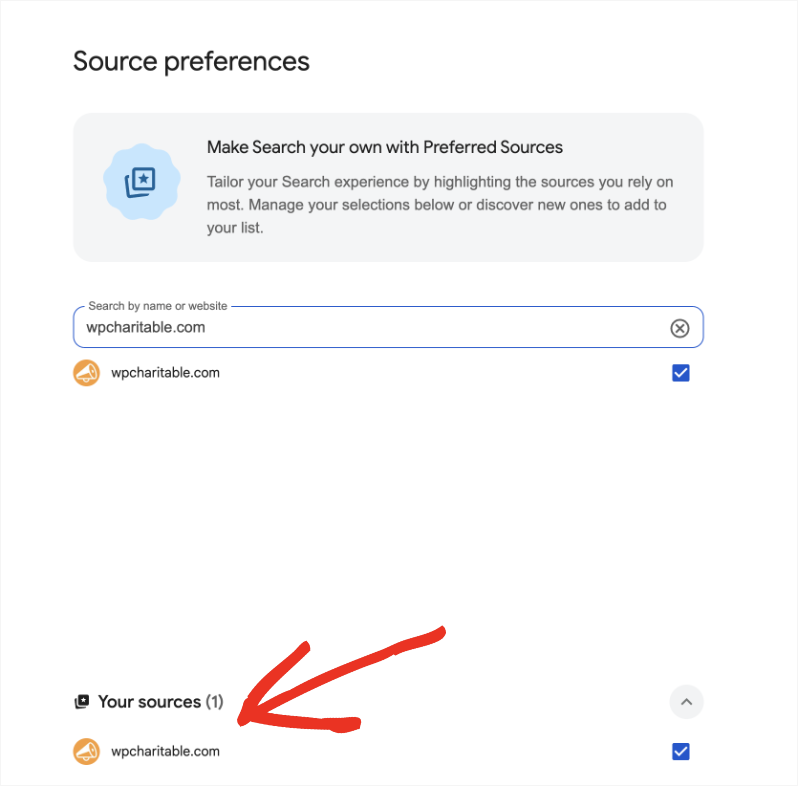
Source preferences screen with a search box for sources; wpcharitable.com listed with a checked box under Your sources (1).

Setting us as a preferred source is one way to stay current, but it’s not the only one. You may also want to stay connected with us.

We hope this helped you make sure Charitable’s tutorials are easy to find the next time you need them. If you’re new here, our documentation library and blog cover everything from setting up your first donation form to configuring recurring giving, offline donations, and donor management, all written the same way: tested first, explained plainly, and built around what nonprofits actually ask us.

Why Make Charitable a Preferred Source?

Setting Charitable as a preferred source means our tutorials and guides show up more often in Google’s “Top Stories” and “From Your Sources” sections.

Practically, that means when you’re troubleshooting a donation form, setting up recurring giving, or figuring out how to send year-end tax receipts, you see content from us first instead of hunting for it.

But we’d rather make the case for why that’s worth doing than just tell you how.

We write for the person running the nonprofit, not for the search algorithm

A lot of what ranks well for “WordPress donation plugin” is written by people who have never actually processed a donation, issued a receipt, or explained to a board member why a form isn’t converting. Our tutorials come from the other direction.

We build them around the actual questions that come into our support inbox: a form that keeps losing donors partway through, a recurring gift that failed silently, a CSV export that won’t open cleanly in Excel. If enough people ask the same question, that’s the article we write next, not whatever a keyword tool says is trending.

Every guide is tested against a real Charitable install

We don’t write from memory or from old release notes. Before a tutorial goes live, someone on our team walks through it inside an actual WordPress dashboard, with actual campaigns, and captures actual screenshots of what you’ll see.

When a feature changes, we go back and fix the guide. That sounds obvious, but it’s the difference between a tutorial that says “click Settings” when the button has moved, and one that still matches what’s on your screen when you follow it three years from now.

We build for people who don’t have a developer on staff

Most of the people reading Charitable’s documentation are wearing several hats at once.

They’re a programs manager who also updates the website, a church office administrator, a volunteer treasurer who inherited “figure out the donation form” as a side project.

We write with that reality in mind: plain language over jargon, screenshots instead of code snippets wherever possible, and a clear answer up front instead of three paragraphs of preamble before we tell you which button to click.

Search is changing, and “preferred” is how you keep a say in it

AI Overviews and AI-generated summaries are doing more of the deciding about what you see before you even click a result.

That’s convenient when it works, and frustrating when it flattens ten different nonprofits’ worth of nuance into one generic paragraph that doesn’t quite fit your situation.

Marking a source as preferred is one of the few places you still get to say, directly, “show me more from the people who actually know this plugin,” rather than leaving it entirely to an algorithm.

We’re not just documenting a plugin, we’re invested in the outcome

Charitable exists because nonprofits need to raise money without giving up a cut of every donation to a platform fee. That mission shapes what we publish. We’re not writing tutorials to hit a content quota.

We’re writing them because a fundraiser that doesn’t convert, or a donor who never gets a receipt, is a real problem for a real cause.

When you make us a preferred source, you’re not just optimizing your search results, you’re making sure the guidance that shows up first comes from people who have a stake in whether your fundraising actually works.

Explore More From Charitable

Now that Charitable is a preferred source, here’s where to find us next:

📰

Charitable Blog

Fresh tutorials, feature walkthroughs, and fundraising strategy for nonprofits running on WordPress.

Learn More →

📚

Documentation

Step-by-step setup guides for every feature, from your first donation form to advanced automations.

Learn More →

🚀

Fundraising Hub

Guides, templates, and playbooks to help your nonprofit plan and raise more, all in one place.

Learn More →

Stay Connected for More Nonprofit Resources

For more tutorials and videos tailored to nonprofits, subscribe to our YouTube channel. We regularly publish expert tips, step-by-step guides on online donations, fundraising strategies, and practical resources to help your organization succeed.

🗞️ Get weekly tips and exclusive guides in your inbox
Join our newsletter →  

🎥 Watch step-by-step tutorials and success stories
Subscribe to our YouTube channel →  

👩🏽‍💻 Connect with our community and get daily nonprofit insights
Follow us on LinkedIn →

🥳 Fun reels and non-profit insights
Follow us on Instagram → 

👀 Insightful & fun videos to help you grow your cause
Follow us on TikTok→  

🌎 Subscribe and follow for general fundraiser tips
Get Fundraiser Tips on TikTok → 

Powerful Fundraising Resources

⬇️ Download proven strategies, campaign ideas, and expert tools
Get the Fundraising Kit →  

💸 Get Free Fundraising Resources
Head to the Charitable Fundraising Hub

🤔 Got questions about Charitable?
Charitable FAQs

🏎️ Take Charitable for a spin
Create your Charitable Demo

Understand non-profit terms and jargon
Non-Profit Glossary

% Looking for non-profit deals and discounts?
Best Non-Profit Deals and Discounts →

author avatar
Melinda Bartley
I’m the senior writer at Charitable, with over 15 years of experience in content creation, digital marketing, and SEO. Beyond my professional role, I’m the co-founder and trustee of a non-profit organization committed to animal rescue and welfare. Throughout my career, I’ve helped build 17+ blogs – many from the ground up, transforming them into successful marketing platforms that drive traffic, boost brand visibility, and generate revenue.

Disclosure: Our content is reader-supported. This means if you click on some of our links, then we may earn a commission. We only recommend products that we believe will add value to our readers.

Leave a Reply

Your email address will not be published. Required fields are marked *

Get free tips and resources right in your inbox, along with 60,000+ others

Join our Newsletter

We won’t spam you. We only send an email when we think it will genuinely help you. Unsubscribe at any time!

Featured Video:

Watch more videos on our YouTube channel.

What's New In Charitable

View The Latest Updates
🔔 Subscribe to get our latest updates
📧 Subscribe to Emails

Email Subscription

Join our Newsletter

We won’t spam you. We only send an email when we think it will genuinely help you. Unsubscribe at any time!

donation form Feature New

📝 Donation Form Block: Embed a Working Donation Form Anywhere

With the new Donation Form Block for Charitable Pro, you can drop a fully working donation form directly onto any page or post in the WordPress block editor. No redirects, no page reloads, and zero friction between reading your story and making a contribution.

📝 Drop Forms Anywhere: Place a working form directly onto your homepage, inside a story-driven blog post, on a dedicated landing page, or within a campaign announcement.

🎯 Dynamic Campaign Binding: Easily choose a specific campaign from the block sidebar or set it to automatically bind to whichever campaign is currently being viewed.

📐 Full vs. Minimal Form Views: Switch between a full layout or a compact minimal view to perfectly fit sidebars, narrow columns, or wide landing pages.

🎨 Scoped No-Code Styling: Customize typography, container spacing, border radius, amount buttons, and accent colors independently for every form instance without touching a line of CSS.

Learn more here.

author avatar
Melinda Bartley
I'm the senior writer at Charitable, with over 15 years of experience in content creation, digital marketing, and SEO. Beyond my professional role, I'm the co-founder and trustee of a non-profit organization committed to animal rescue and welfare. Throughout my career, I've helped build 17+ blogs - many from the ground up, transforming them into successful marketing platforms that drive traffic, boost brand visibility, and generate revenue.
ambassadors New

👤 Creator Profiles: Put a Face to Every Peer-to-Peer Campaign

Ambassadors 3.3.0 now provies Creator Profiles — giving your supporters a permanent, shareable public home that turns one-time fundraisers into ongoing relationships.

👤 Public Creator Pages: Give every fundraiser an instant, clean landing page at /creator/their-name/ to showcase their custom avatar, bio, and a browsable grid of their campaigns.

📊 Proof of Impact: Boost donor trust by displaying site-wide milestones on the profile—like total funds raised and total donor counts.

💳 Interactive Hover Cards: When donors hover over a creator’s name on a campaign page, a compact card expands with their bio and social handles right at the moment of decision.

📍 Responsible Location Sharing: Allow creators to safely show local supporters where they are based using only city, state, and country details.

🛠️ Self-Serve Customization: Fundraisers can update their own profiles and link up to six social networks directly from the My Campaigns hub, saving you admin time.

Ready to empower your advocates? Update to Ambassadors 3.3.0 and turn on “Enable Public Creator Page” today!

author avatar
Melinda Bartley
I'm the senior writer at Charitable, with over 15 years of experience in content creation, digital marketing, and SEO. Beyond my professional role, I'm the co-founder and trustee of a non-profit organization committed to animal rescue and welfare. Throughout my career, I've helped build 17+ blogs - many from the ground up, transforming them into successful marketing platforms that drive traffic, boost brand visibility, and generate revenue.
Improvement Payments

📱 Turn Mobile Scrollers Into Donors: Meet Charitable’s Mollie Upgrade

Losing mobile supporters because they hate typing out long card numbers on their phones? Charitable’s updated Mollie integration features:

⚡ One-Tap Wallet Checkout: Enable donors to complete their gifts instantly using Apple Pay or Google Pay with a simple face scan, fingerprint, or tap.

💰 No Extra PCI Burden: Skip complex domain verification and security compliance since all wallet transactions run safely through Mollie’s hosted checkout.

🛠️ Custom Cancel Routing: Keep the experience predictable by automatically sending donors who back out to your cancellation page, or use developer filters to route them to a custom page.

Visit this page to learn more.

author avatar
Melinda Bartley
I'm the senior writer at Charitable, with over 15 years of experience in content creation, digital marketing, and SEO. Beyond my professional role, I'm the co-founder and trustee of a non-profit organization committed to animal rescue and welfare. Throughout my career, I've helped build 17+ blogs - many from the ground up, transforming them into successful marketing platforms that drive traffic, boost brand visibility, and generate revenue.
ambassadors improved New

Moderation and Directory Screens In Ambassadors 3.0

Ambassadors 3.0 has new features: moderation and directory screens… now easily see those who are earning donations on your peer to peer network – including campaign creators that might need to be verified – all in one place. Generate reports, email ambassadors and campaign creators directly and more.

🚀 See when campaign creators and ambassadors have updated their campaigns, what donors/donation they have brought in and more.

🎉 Manually add ambassadors and campaign creators, and approve them in one-click!

Visit this page to learn more.

author avatar
Melinda Bartley
I'm the senior writer at Charitable, with over 15 years of experience in content creation, digital marketing, and SEO. Beyond my professional role, I'm the co-founder and trustee of a non-profit organization committed to animal rescue and welfare. Throughout my career, I've helped build 17+ blogs - many from the ground up, transforming them into successful marketing platforms that drive traffic, boost brand visibility, and generate revenue.
New Payments

⚡ Unlock India-Based Donations: Meet Charitable’s Native Razorpay Integration

Trying to collect donations in India? Charitable’s native Razorpay integration features:

⚡ Instant UPI Integration: Accept fast, local donations directly inside your form via apps like PhonePe, Google Pay, Paytm, and BHIM without sending donors away from your site.

📲 Auto-Generated Campaign QRs: Instantly render scannable QR codes encoding a UPI deep link directly on your public campaign pages and sidebars for an effortless “scan-to-give” experience.

💰 Dual Local & Global Reach: Headline your campaigns in INR while seamlessly accepting major international currencies like USD, EUR, GBP, and CAD to maximize global support.

🔁 Seamless Recurring Giving: Fully integrates with the Charitable Recurring addon to manage automatic monthly subscriptions directly through Razorpay without extra code.

↩️ Automatic Two-Way Sync: Keep your books perfectly clean with two-way refund syncing—issue a refund inside WordPress or your Razorpay dashboard and both sides update automatically.

🔒 Webhook-Verified Security: Automatically protect your donation records using HMAC-signed webhook verification to ensure every status update represents real money cleared on the rails.

Visit this page to learn more.

author avatar
Melinda Bartley
I'm the senior writer at Charitable, with over 15 years of experience in content creation, digital marketing, and SEO. Beyond my professional role, I'm the co-founder and trustee of a non-profit organization committed to animal rescue and welfare. Throughout my career, I've helped build 17+ blogs - many from the ground up, transforming them into successful marketing platforms that drive traffic, boost brand visibility, and generate revenue.



