
Fixed-term subscriptions let you set a recurring donation to stop automatically, either after a set number of payments or on a specific end date, instead of running until someone cancels it by hand. When the term is reached, Charitable completes the subscription for you, stops billing at the payment gateway, and can email the donor a confirmation.
Available in the Charitable Recurring Donations addon 2.2.0 and later.
Key Features
- Set a recurring donation to end after a fixed number of payments.
- Or set it to end on a specific calendar date.
- Subscriptions complete automatically when the term is reached, with no manual cancellation.
- The gateway subscription is cancelled at the same time, so the donor is never charged past the term.
- The term is displayed in the admin recurring donation screen, the donor dashboard, and the donation receipt.
- A progress indicator shows how many payments have been made toward a payment limit.
- Works with the existing donor approval workflow, so a term change can be approved by the donor before it applies.
Why Use Fixed-Term Subscriptions?
Many campaigns ask supporters for a defined commitment, such as a 12-month pledge or a capital campaign that runs for a set period. Previously every recurring donation ran indefinitely, so staff had to remember to cancel each one manually when the commitment ended. Fixed-term subscriptions let you set the commitment once and let Charitable end it on schedule, which keeps your reporting clean and protects donors from unexpected charges.
See It In Action
Requirements
- Charitable Recurring Donations addon 2.2.0 or later.
- A Stripe subscription. Subscription terms are configured through the Update Subscription screen, which currently supports Stripe.
- For end-date enforcement to the exact day, Charitable Pro 1.8.16 or later (this uses Stripe’s native cancel_at). On earlier versions a built-in backstop still completes the subscription on the first renewal after the term is reached.
How to Set a Term on a Recurring Donation
Step 1: Update Subscription
In your WordPress admin, go to Charitable » Donations and open the recurring donation you want to limit. In the right panel, open the Donation Actions dropdown.
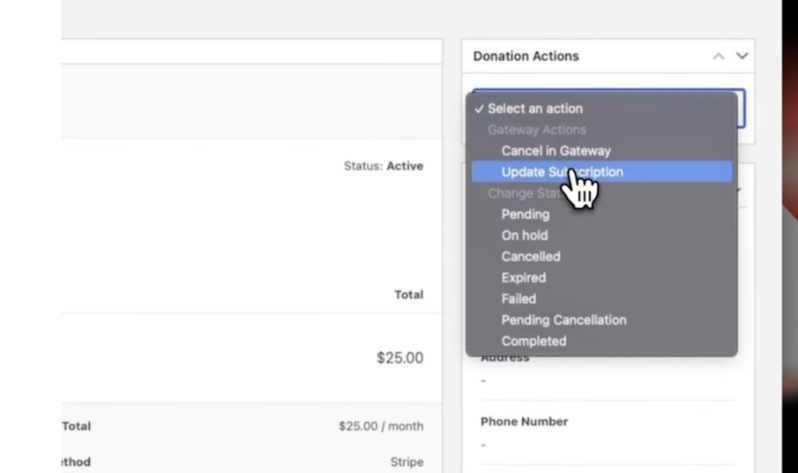
From here, click on Update Subscription.
A popup will appear that lets you change the amount, billing period, subscription term, and more.
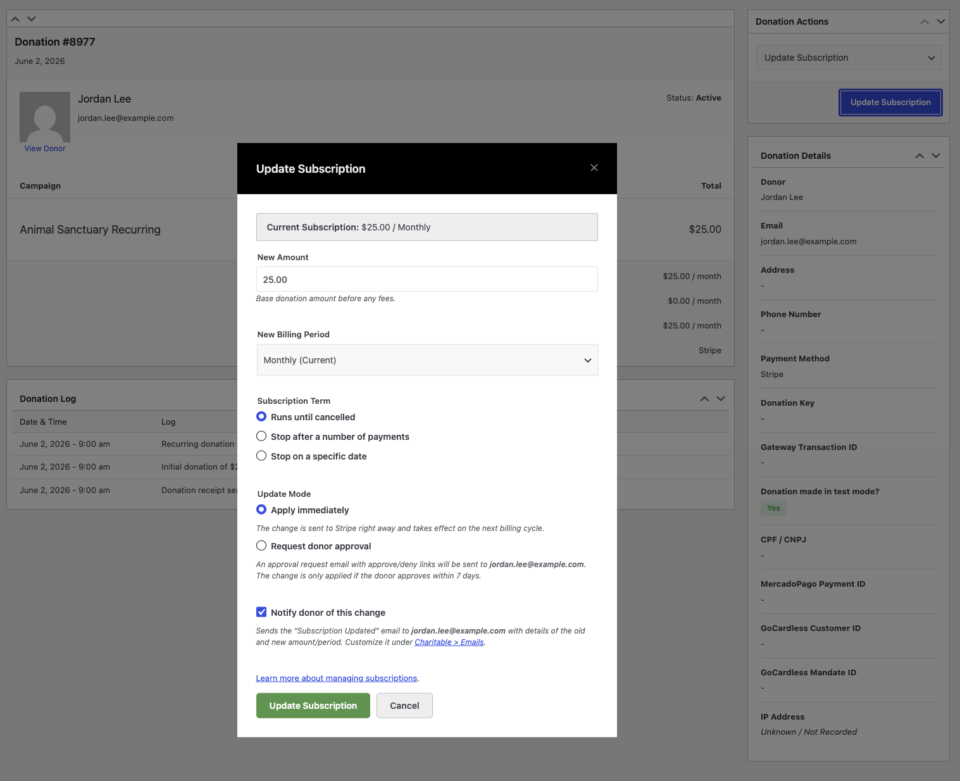
Step 2: Set a Subscription Term
You can choose one of two options for setting the term:
Stop after a Number of Payments:
Enter the total number of payments (e.g., 12). Charitable will automatically cancel the subscription once this number of charges is completed. This is ideal for pledge drives, anniversary campaigns, and installment gifts.
Stop on a Specific Date:
Select a specific calendar date (e.g., June 3, 2027). Charitable will cancel the subscription on this date. This option suits project-based campaigns with a defined end date.
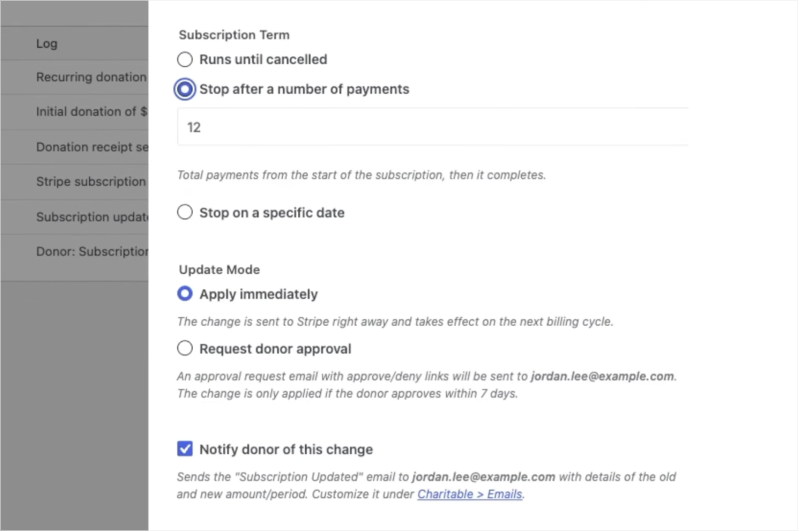
Step 3: Save and Confirm
- Click on Update Subscription to apply the changes.
- Confirm any prompts that appear.
- Charitable will communicate the new term to Stripe immediately. The donation log will update with confirmation, reflecting the new plan and term details on the subscription record.
Step 4: Optional: Request Donor Approval for Changes
If you are making changes on behalf of a donor, such as adjusting the amount or term, you can select the option to Request Donor Approval before saving.
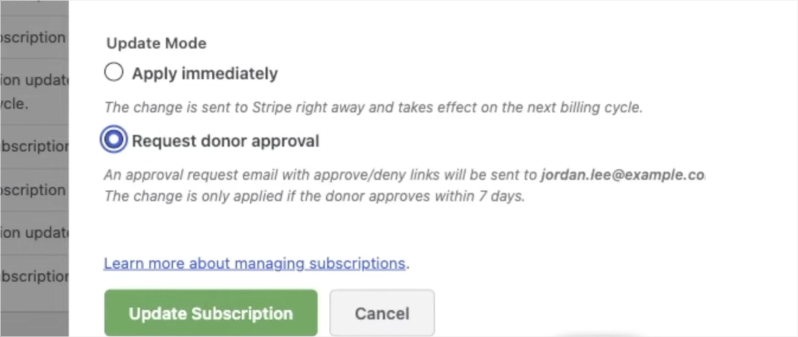
This sends an email to the donor with the proposed changes. The donor can approve or decline the changes directly from the email, ensuring a clear paper trail and maintaining the donor’s control over their giving.
When You Would Use This: Fixed Term vs. Indefinite
Not every recurring giving program needs a term. Here is a quick guide to help you decide which approach fits each campaign.
| Scenario | Best approach | Why |
|---|---|---|
| Annual pledge drive (“Give $50/month for 12 months”) | Fixed term: 12 payments | The commitment is defined up front. Charitable ends it automatically when the pledge is fulfilled. |
| Capital campaign with a funding deadline | Fixed term: specific end date | The campaign closes on a known date. No donor gets charged after the campaign ends. |
| Matching gift window (“We’ll match every dollar for 6 months”) | Fixed term: 6 payments | The match expires. The recurring gift should expire with it rather than continue unmatched. |
| Memorial or tribute fund tied to an anniversary year | Fixed term: specific end date | The campaign honors a defined period. A fixed term closes it with intention. |
| New donor challenge (“Make your first 3 gifts”) | Fixed term: 3 payments | Lowers the barrier for first-time recurring donors by making the commitment feel manageable. |
| Monthly sustaining donors with no defined end | Indefinite | The donor intends ongoing support. No term needed. |
| Ongoing operational or program support | Indefinite | The need does not expire. Let the relationship continue naturally. |
Configuration Options
Subscription Term types
| Option | What it does | Input | Notes |
|---|---|---|---|
| Run until cancelled | The historical default. The subscription continues until it is cancelled. | None | No end is applied. |
| Stop after a number of payments | The subscription completes once the total payment count is reached. | Whole number, 1 to 1000 | The admin screen shows an “X of Y payments made” progress indicator. |
| Stop on a specific date | The subscription completes on or after the chosen date. | A future date | The date must be in the future. A past date is rejected. |
What happens when the term is reached
When the final payment is made, or the end date passes, Charitable will: 1. Mark the recurring donation as Completed. 2. Cancel the subscription at the payment gateway so no further charges occur. 3. Send the Recurring Donation Completed email, if that email is enabled in your settings.
Where the term appears
- Admin recurring donation screen: a Term row, with a payment-progress indicator for count-based terms.
- Donor dashboard: a short note such as “for 12 payments” or “until June 3, 2027”.
- Donation receipt: the same term note.
Troubleshooting
The subscription did not complete on the exact end date
Exact-day cancellation relies on Stripe’s native cancel_at, which is set by Charitable Pro 1.8.16 and later. On earlier versions, the built-in backstop completes the subscription on the first renewal after the end date passes rather than on the day itself. Update Charitable Pro for to-the-day precision.
The Subscription Term options are not showing
Term controls appear in the Update Subscription screen for active Stripe subscriptions. Subscription updates are currently supported for Stripe, so the term options will not appear for other gateways.
The Recurring Donation Completed email did not send
Confirm that the Recurring Donation Completed email is enabled under Charitable email settings. The email only fires when the subscription actually completes and the email is enabled.
Developer Resources
Hooks & Filters
charitable_recurring_term_type— Filters the resolved term type (unlimited,count, orend_date) for a recurring donation.charitable_recurring_end_date— Filters the end-date timestamp (Unix seconds, UTC) for an end-date term.charitable_recurring_renewal_donation_created— Fires after a renewal donation is created. The fixed-term backstop hooks here to complete the subscription once the term is reached.charitable_recurring_donation_completed— Fires when a subscription is marked completed, which the gateway uses to cancel the subscription.
Useful Functions
charitable_recurring_validate_term( $type, $value )— Validates and normalizes a proposed term, returning an array or a WP_Error.charitable_recurring_calculate_end_timestamp( $start_ts, $period, $interval, $count )— Returns the UTC timestamp at which a count-based term should stop. Calendar-aware.charitable_recurring_get_term_label( $donation )— Returns a human-readable label for a donation’s term, such as “for 12 payments” or “until June 3, 2027”.
Additional Resources
- Changing Recurring Donation Amounts and Billing Periods
- Recurring Donations Overview
- Recurring Donation Emails
Helpful Links
🤝 Get help when you need it
Connect with Customer Support →
📑 Find the guide you need
Browse the Documentation Hub →
⬇️ Download proven strategies, campaign ideas, and expert tools
🔗 Let your AI Assistant do the fundraising work for you.
Connect Charitable to your AI assistant →
💸 Get Free Fundraising Resources
Head to the Charitable Fundraising Hub →
🤔 Got questions about Charitable?
Charitable FAQs →
Need help understanding non-profit terms and jargon?
See our Non-Profit Glossary →



