
Requires:
- Charitable Pro 1.8.16+
- Charitable Tributes 1.0.0+
Some of the most meaningful gifts your nonprofit will ever receive are made in someone’s name. A donor gives in memory of a parent, in honor of a friend’s recovery, or on behalf of a couple celebrating a milestone. Charitable Tributes captures that intention right on the donation form, then does something most donation plugins cannot: it remembers the person being honored.
Every honoree becomes a real record in your dashboard, with running totals, the donors who gave, and the family you can keep in the loop. It all runs inside WordPress, alongside the forms and reports you already use, with no separate subscription and no per-donation fees.
This guide is the starting point. It explains the core idea, gets you installed, and gives you a tour of the Tributes dashboard so you know where everything lives. From here you can follow the links to the deeper how-to pages.
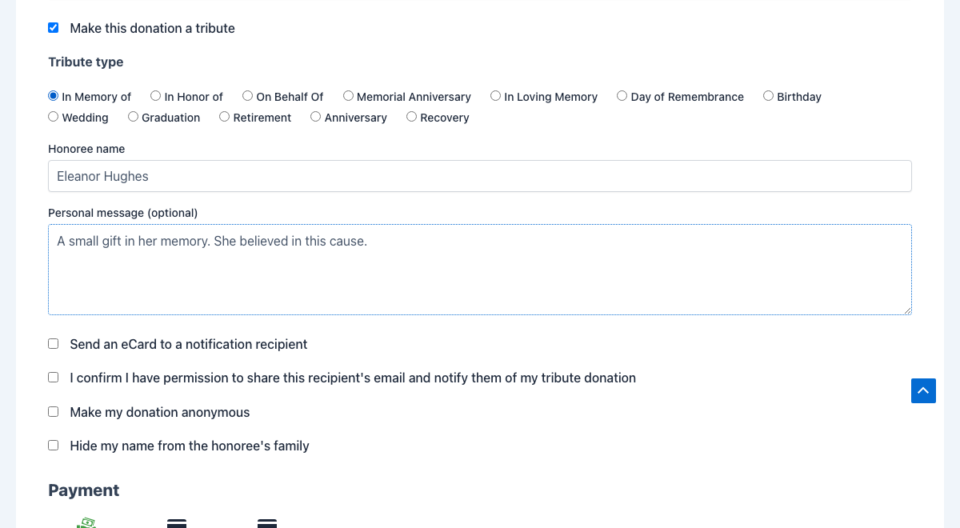
The one idea to understand first: tributes vs. honorees
Almost everything in this addon makes sense once you understand the difference between a tribute and an honoree.
- A tribute is the dedication a donor adds to a gift, such as “In Memory Of.” It belongs to a single donation.
- An honoree is the person being honored. Tributes stores each honoree as its own record.
So when ten people give in memory of the same person, you do not get ten disconnected donations. You get one honoree with the full picture: the total raised in their name, every donor who gave, the messages left for them, and the family contacts you choose to keep. This is what sets Charitable Tributes apart from a simple “is this a tribute? yes/no” checkbox.
What you can do with Tributes
- Add a tribute option to any donation form, with “In Memory Of,” “In Honor Of,” “On Behalf Of,” and your own custom tribute types.
- Keep honoree records with photos, dates, totals, donor history, and family contacts.
- Launch a dedicated tribute campaign in under two minutes with the guided setup wizard.
- Automatically notify a loved one with a tribute e-card when a gift is made.
- Build beautiful memorial and tribute pages with six dedicated blocks.
- Turn a one-time tribute into an annual gift on a date the donor chooses.
- Include a tribute section on donation receipts and PDF receipts.
- Track everything with a Tribute Donations report and an Honoree Leaderboard.
Requirements
- WordPress 6.2 or later
- PHP 8.0 or later
- Charitable with an active Charitable Pro license (latest version recommended)
- Charitable Recurring Donations, for annual tribute giving (optional)
- Charitable PDF Receipts, for the tribute section on PDF receipts (optional)
Installing and activating Tributes
Tributes installs like every other Charitable addon.
- In your WordPress admin, go to Charitable » Addons.
- Find Tributes and click Install, then Activate. If you downloaded the addon as a ZIP, you can also install it from Plugins » Add New » Upload Plugin.
- Once active, a new Tributes menu appears under Charitable in your admin sidebar.
That is all the setup required to start. The addon ships with sensible defaults, so you can create your first tribute campaign right away and adjust settings later.
A tour of the Tributes dashboard
Open WordPress Admin » Charitable » Tributes and you will land on a tabbed dashboard. Here is what each tab is for.
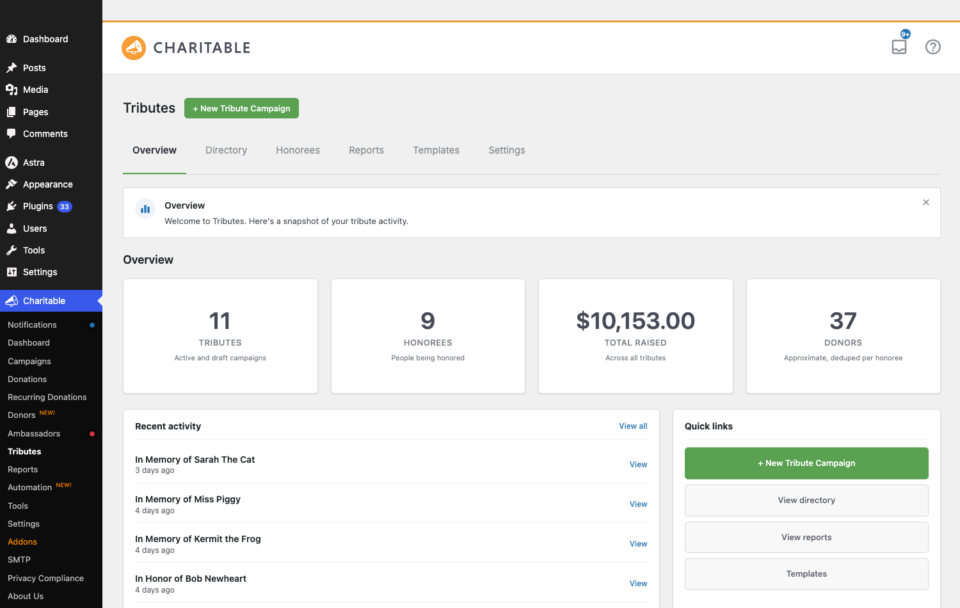
| Tab | What it is for |
|---|---|
| Overview | Your home screen. Headline numbers for amount raised, gifts, donors, and honorees, plus recent activity. |
| Directory | Every tribute campaign on your site, searchable and filterable by tribute type, template, status, and date range. |
| Honorees | The honoree directory. Browse every honoree, see totals at a glance, and drill into any record. |
| Reports | Tribute-specific analytics, including the Honoree Leaderboard ranked by amount raised or number of gifts. |
| Templates | The ready-made starting points the setup wizard uses, such as In Loving Memory and In Lieu of Flowers. |
| Settings | Everything you can configure: the donation form, integrations, emails, e-cards, and custom fields. |
To start a new tribute campaign from anywhere in this area, click the New Tribute Campaign button at the top of the page. That opens the setup wizard described in Creating Tribute Campaigns.
Where to go next
Tributes is a large addon, so the documentation is split into focused guides. Pick the one that matches what you want to do:
- Creating Tribute Campaigns – run the setup wizard, choose a template, and publish a dedicated tribute page, or add the tribute option to a campaign you already have.
- The Tribute Donation Experience – exactly what donors see and choose when they make a tribute gift.
- Honoree Records and the CRM – the honoree directory, detail pages, family contacts, privacy levels, merging, and reports.
- Tribute Emails, E-cards, and Receipts – notification e-cards, the family digest, and tribute sections on receipts.
- Tribute Pages and Blocks – the six blocks and the shortcode for building memorial and tribute pages.
- Settings, Integrations, and Developer Reference – every setting, the addon integrations, and the full hook, REST, and template reference.
A typical first run
If you would rather just dive in, here is the path most organizations take:
- Activate Tributes alongside Charitable Pro.
- Click New Tribute Campaign and follow the wizard to create your first dedicated tribute page, or turn on the tribute option for an existing campaign.
- Share the page, or let donors find your existing form. Donors choose a tribute type, name the honoree, and add a personal message.
- Tributes creates the honoree record and, if a recipient was named, notifies the family automatically.
- Track totals, donors, and messages from the Tributes dashboard.
Developer reference
The rest of this page is a quick orientation for developers. The full hook, REST, and template reference lives on the Settings, Integrations, and Developer Reference page.
Boot and version
- Text domain:
charitable-tributes(translations load fromi18n/languages/). - Version constant:
CHARITABLE_TRIBUTES_VERSION. - The addon boots on Charitable’s
charitable_startaction and firescharitable_tributes_initonce its container is ready, passing the container object. This is the safest hook to attach your own services to.
add_action( 'charitable_tributes_init', function ( $container ) {
    // The addon is fully loaded. Register your extensions here.
} );
Post types
Tributes registers two public custom post types:
| Post type | Purpose | URL base |
|---|---|---|
tribute_campaign | A dedicated tribute or memorial page. | /tribute/{slug}/ |
charitable_honoree | An honoree record (a person, pet, or cause being honored). | /tribute/{slug}/ (filterable) |
The honoree URL base is filterable:
add_filter( 'charitable_tributes_url_base', function () {
    return 'in-memory-of';
} );
Custom tables
Three custom tables back the CRM features. You rarely query these directly, but they are documented in the Developer Reference:
wp_charitable_honoree_donations– one denormalized row per gift, linked to an honoree.wp_charitable_honoree_family_contacts– family member contact records.wp_charitable_honoree_totals_cache– cached per-honoree totals.
Helpful Links
🤝 Get help when you need it
Connect with Customer Support →
📑 Find the guide you need
Browse the Documentation Hub →
⬇️ Download proven strategies, campaign ideas, and expert tools
🔗 Let your AI Assistant do the fundraising work for you.
Connect Charitable to your AI assistant →
💸 Get Free Fundraising Resources
Head to the Charitable Fundraising Hub →
🤔 Got questions about Charitable?
Charitable FAQs →
Need help understanding non-profit terms and jargon?
See our Non-Profit Glossary →




