
Your donation page is one of the most important pages on your nonprofit’s website. It’s where interest becomes action – where a visitor decides to become a donor. Yet many organizations spend enormous effort driving traffic to a donation page that’s poorly designed, confusing, or fails to inspire confidence.
The good news? You don’t need a massive budget or a design team to build a donation page that converts. You just need to understand what motivates donors and remove every barrier standing between them and their gift.
In this guide, I’ll walk you through the essential elements of a high-converting donation page, share real-world examples of what works, and show you how to implement each element using Charitable – the #1 donation plugin for WordPress.
What’s In this Guide
- What Makes a Donation Page Convert?
- 1. Start With a Strong, Emotionally Resonant Headline
- 2. Use a Hero Image or Video That Creates an Emotional Connection
- 3. Write Compelling, Donor-Centric Copy
- 4. Design Smart Donation Amount Options
- 5. Offer Recurring Donation Options
- 6. Build Trust With Social Proof and Credibility Signals
- 7. Simplify Your Donation Form
- 8. Offer Multiple Payment Methods
- 9. Address Donor Concerns Proactively
- 10. Craft a Clear, Compelling Call to Action
- 11. Optimize Your Thank You Page and Confirmation Email
- 12. Remove Distractions
- How to Build Your Donation Page With Charitable
- Test, Measure, and Improve
- FAQs on High Converting Donation Pages
If you haven’t set up your donation website yet, follow our step-by-step on How to Create a Donation Website. If you prefer video, then take a look at our YouTube tutorial here:
What Makes a Donation Page Convert?
Before we dive into specifics, it helps to understand the psychology of online giving. When someone lands on your donation page, they’re asking themselves a series of questions – often unconsciously:
- Is this cause worthy of my support?
- Can I trust this organization with my money?
- Will my donation actually make a difference?
- Is this process quick and easy?
A high-converting donation page answers all four questions with a confident “yes.” It tells a compelling story, establishes credibility, shows impact clearly, and makes the giving process as frictionless as possible.
Want an easy way to create optimized pages?
With Charitable, creating a high-converting donation page is straightforward – simply select one of our pre-made, optimized templates, customize it with your content, and publish. All the essential elements, such as progress bars and suggested donation amounts, are integrated right within the builder to enhance trust, demonstrate impact, and simplify the giving process.
Not yet a Charitable Pro user? Sign up today and get up to 50% off on your plan. We’re confident you’ll love raising funds with Charitable. If, for any reason, Charitable is not the right fit for you, we’ll refund your purchase with our 14-day money-back guarantee. Get Charitable Pro Now »
Now let’s break down exactly how to create a donation page that’s optimized to convert.
1. Start With a Strong, Emotionally Resonant Headline
Your headline is the first thing a donor reads. It sets the tone for everything that follows. A weak or generic headline like “Donate Today” wastes this prime real estate. Instead, your headline should immediately communicate the transformation their donation enables.
Weak headline: “Support Our Organization”
Strong headline: “Your Gift Gives a Child Clean Water for Life”
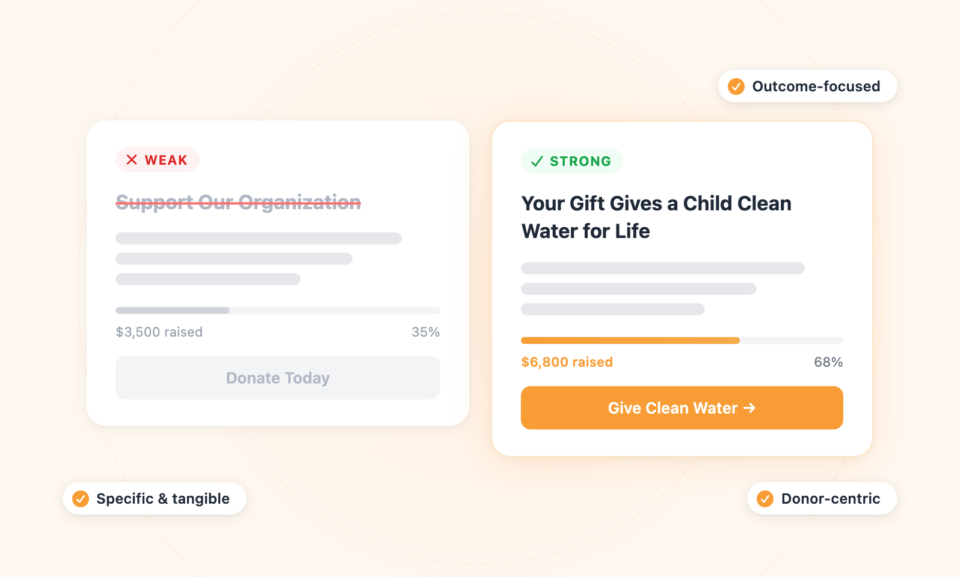
The best headlines are specific, outcome-focused, and human. They put the donor in the driver’s seat and make the impact tangible. If you can tie your headline to a concrete number or time frame, even better.
2. Use a Hero Image or Video That Creates an Emotional Connection
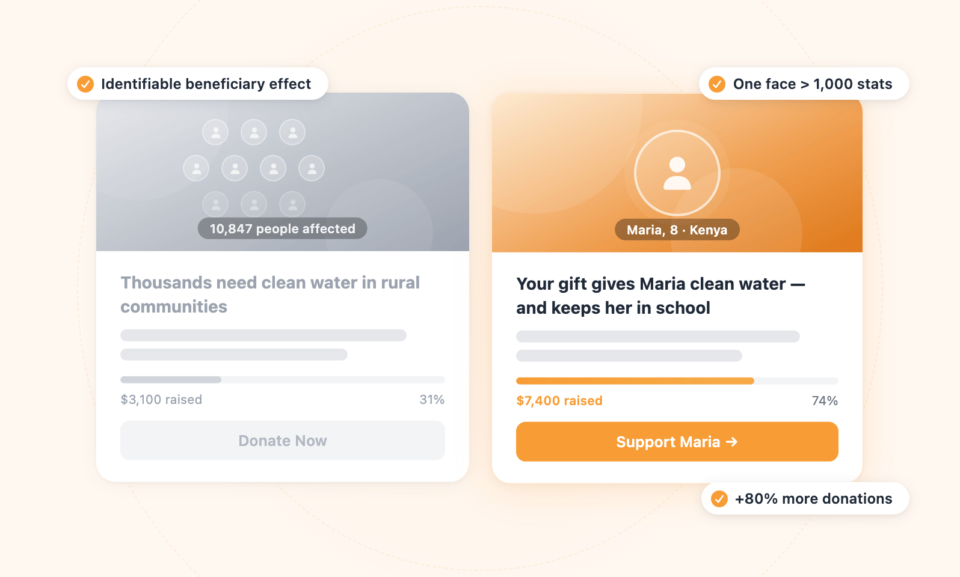
Humans are wired to respond to faces and stories. A powerful photograph or short video near the top of your donation page can do more work than paragraphs of text. The key is authenticity. Stock photos of happy volunteers don’t move people the way a real image of someone whose life your organization has touched does.
If you use a video, keep it under 90 seconds. Lead with the problem, introduce a real beneficiary, show the solution your organization provides, and close with a clear call to action. Videos have been shown to increase donation page conversions by up to 80% when done well.
For images, focus on a single individual rather than a crowd.
There’s a principle called “identifiable victim effect” – people donate more generously to a single, identifiable person than to statistics representing thousands. One face is more powerful than a hundred numbers.
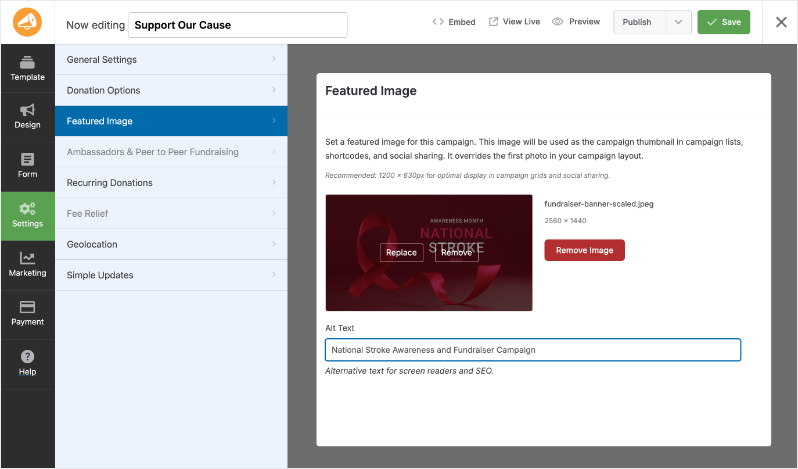
Side note: If you’re using Charitable, you can add a featured image for your campaign with just a click. This image will be used as the campaign thumbnail in campaign lists, shortcodes, and social sharing.
3. Write Compelling, Donor-Centric Copy
The copy on your donation page should do two things: inspire action and remove doubt. Here’s how to write copy that accomplishes both.
Lead With the Impact, Not the Need
Many nonprofits make the mistake of leading with how desperately they need donations. While donation urgency can be effective, leading with organizational need comes across as self-serving. Instead, lead with what the donor’s gift will accomplish.
Need-focused (weaker): “We need your help to keep our doors open and continue our critical programs.”
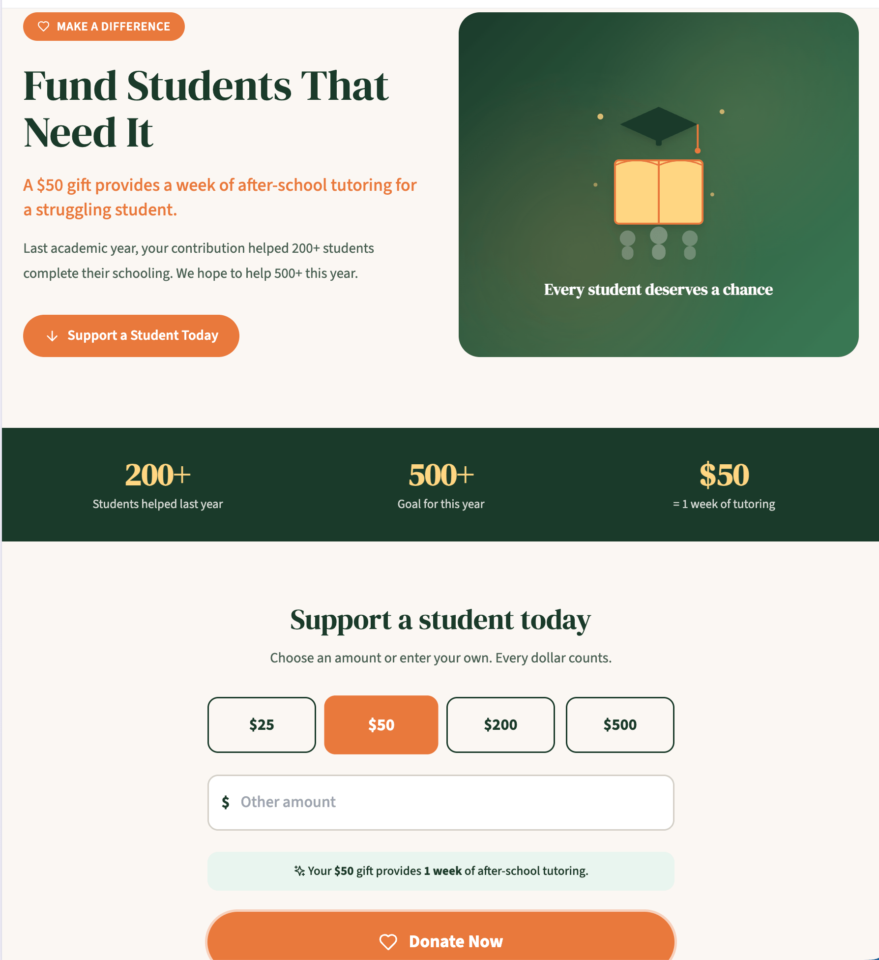
Impact-focused (stronger): “A $50 gift provides a week of after-school tutoring for a struggling student.”
Check out this sample fundraising page that has compelling copy:
Use “You” More Than “We”
If the organization-focused pronouns outnumber donor-focused ones, you have work to do. Donors want to feel like the hero of the story, not a passive supporter of your organization’s work.
Be Specific About Impact
Vague statements like “your donation helps those in need” don’t motivate giving. Specific, concrete impact statements do. Take the time to calculate exactly what different giving levels accomplish and communicate that clearly on your page.
4. Design Smart Donation Amount Options
The donation amounts you display have a significant psychological influence on how much donors give. This is one of the most powerful, and most frequently overlooked, conversion levers on any donation page.
Use Suggested Amounts Strategically
Most donors don’t have a specific amount in mind when they arrive on your page. The amounts you suggest anchor their expectations. Research consistently shows that displaying higher suggested amounts results in higher average gifts, as long as the amounts aren’t so high they feel inaccessible.
A common mistake is setting the default selected amount too low. If your lowest suggested amount is $10 and it’s pre-selected, many donors will default to that even if they would have given more. Consider pre-selecting a mid-range amount instead.
Tie Amounts to Specific Outcomes
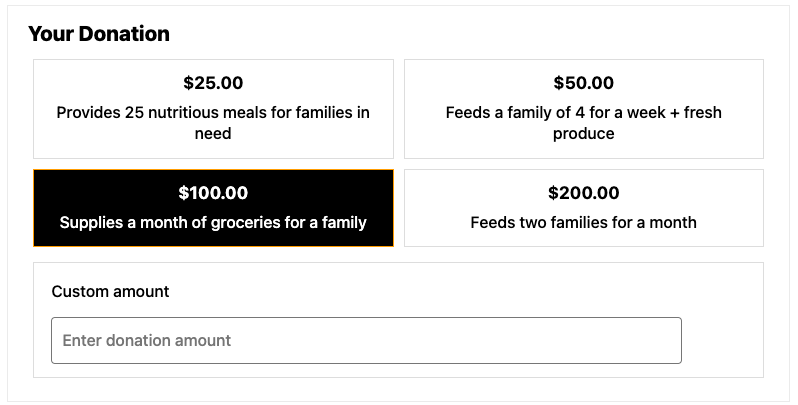
Rather than just displaying numbers, connect each giving level to a tangible outcome:
- $25 Feeds a family for one week
- $50 Provides school supplies for one child for a year
- $100 Sponsors one month of job training for an adult
- $250 Funds a full scholarship for one semester
This approach, often called “gift catalogs” or “impact ladders,” transforms a financial transaction into a meaningful act. It also helps donors self-select the level of impact they want to have, rather than feeling like they’re just picking an arbitrary number.
Always Include a Custom Amount Option
Some donors want to give a specific amount, perhaps a recurring gift they’ve budgeted for, or an amount with personal significance. Always include a field for a custom donation amount alongside your suggested tiers.
With Charitable, you can easily configure suggested donation amounts and add custom descriptions to each level, creating an engaging and personalized giving experience right out of the box.
5. Offer Recurring Donation Options
See how Charitable makes Recurring Donations a breeze »
Show the Annual Impact of Monthly Giving
Help donors understand the compounding impact of recurring gifts. A donor who gives $25 once makes a meaningful contribution. A donor who gives $25 per month contributes $300 per year. That’s a dramatically larger impact. Make this math visible on your page.
For example: “A monthly gift of $25 provides clean water to 12 families over the course of a year.” This framing makes the monthly commitment feel more significant and worthwhile.
You can also send out annual statements and reports to your recurring donors so they know their money has achieved so many milestones.
6. Build Trust With Social Proof and Credibility Signals
First-time donors are taking a leap of faith. They’re handing money to an organization they may have only just discovered, trusting that it will be used effectively. Your donation page needs to earn that trust actively, not assume it.
Display Third-Party Ratings and Accreditations
Logos from watchdog organizations like Charity Navigator, GuideStar (now Candid), or the Better Business Bureau’s Wise Giving Alliance serve as powerful trust signals. If your organization has earned ratings or certifications from any of these bodies, display them prominently on your donation page.
You can also display trust badges from your payment providers like PayPal and Stripe.
Show Donor Testimonials and Stories
Quotes from satisfied donors, especially those explaining why they give, can be surprisingly effective. They reduce anxiety and social uncertainty by showing that others like the prospective donor have already made the same decision and felt good about it.
Even more powerful are testimonials from program beneficiaries. A brief quote from someone whose life was changed by your organization’s work is worth more than almost anything else you can put on your donation page.
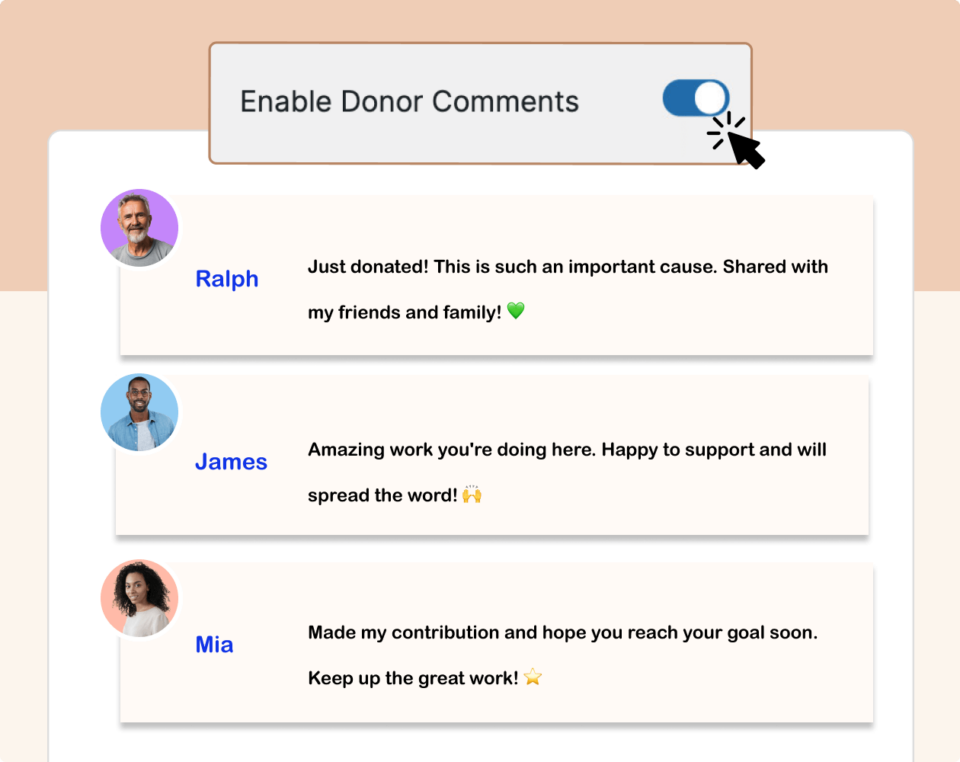
To do this effectively, you can also turn on donor comments. It’s one of the easiest ways to collect donor testimonials and messages without extra admin work.
Display a Donor Counter or Goal Progress Bar
Showing that others have already donated creates social proof and FOMO (fear of missing out). A fundraising thermometer or goal progress bar does double duty: it shows momentum and creates urgency.
Donors want to be part of something that’s already succeeding, and they don’t want to be the person who let a goal fall short.
Charitable includes built-in goal tracking and progress bar features that you can add to any campaign page with zero coding required.
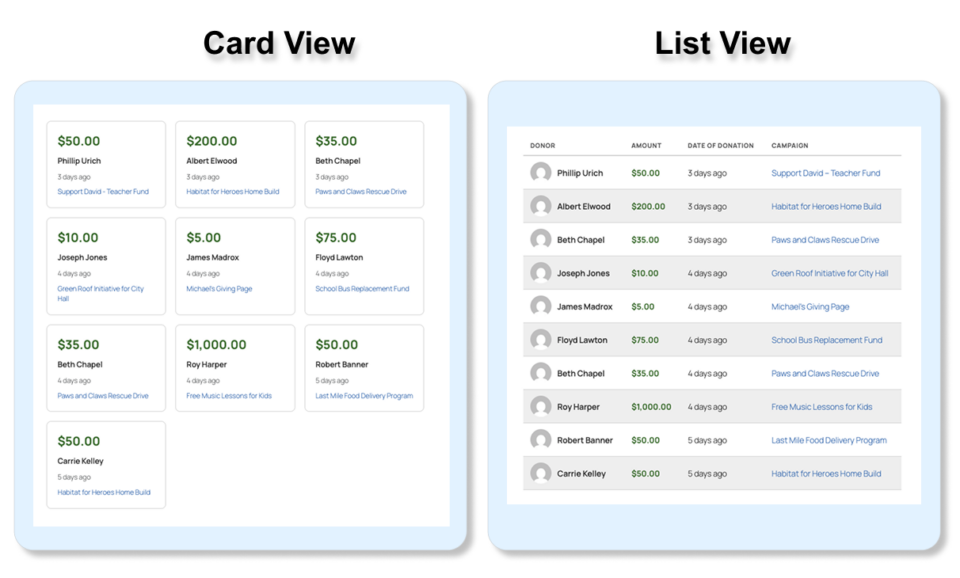
It also includes a live donation feed that shows new donations as they come in. You can choose to display it in a card view or list view. This encourages others to donate by building trust and confidence that people are supporting your cause.
Communicate Financial Transparency
A brief statement about how donations are used, for example, “90 cents of every dollar goes directly to programs” can meaningfully increase conversion rates. Donors want to know their money is being used efficiently. If you have strong financial ratios, don’t be shy about sharing them.
7. Simplify Your Donation Form
Every additional field in your donation form is a potential abandonment point. Research from the nonprofit sector consistently shows that shorter forms convert at higher rates. Here’s what you actually need:
- Donation amount
- First and last name
- Email address
- Payment information
That’s it. Everything else – phone number, mailing address, employer information, how they heard about you – can be collected later, after the gift is secured. Every field you add to your form reduces your conversion rate. Be ruthless about keeping it short.
Use a Single-Page Design
Multi-step donation processes introduce drop-off at every transition. Unless your payment processor requires multiple pages, keep everything on a single page. If a multi-step process is unavoidable, use a progress indicator to show donors how close they are to completion.
Make the Form Mobile-Friendly
More than 60% of nonprofit website traffic now comes from mobile devices, yet many donation forms are still optimized primarily for desktop. Test your donation form on multiple devices and screen sizes. Make sure buttons are large enough to tap easily, text is readable without zooming, and payment entry is as smooth as possible.
Charitable is built with mobile responsiveness in mind, ensuring a seamless giving experience across all devices.
8. Offer Multiple Payment Methods
Payment friction is one of the most common and easily fixable reasons donors abandon a giving form. If someone wants to donate but can’t use their preferred payment method, they’ll often leave rather than adapt. At a minimum, your donation page should accept:
- Major credit and debit cards (Visa, Mastercard, American Express)
- PayPal
- Apple Pay and Google Pay (increasingly expected on mobile)
- Bank transfers for larger gifts
Charitable integrates with Stripe, PayPal, and other popular payment gateways, giving donors the flexibility to pay the way they prefer.
See all payment gateway options available in Charitable »
9. Address Donor Concerns Proactively
Many potential donors hesitate not because they don’t want to give, but because they have unanswered questions. Addressing these concerns directly on your donation page can eliminate a significant source of abandonment.
Common donor concerns include:
- Is this secure? – Display SSL certificate information and payment security badges near the form.
- Will I get a receipt? – Note that a tax receipt will be sent to their email address immediately.
- Can I cancel a recurring gift? – Reassure donors that they can cancel or modify recurring donations at any time.
- How will my information be used? – Include a brief privacy statement or link to your privacy policy.
These reassurances don’t need to be long. A sentence or two near the payment form is often enough to neutralize hesitation and move donors forward.
Want to learn how to automate your receipts? Check out of step by step guide here: How to Automate Donation Receipts in Minutes »
10. Craft a Clear, Compelling Call to Action
Your donate button is the most important element on the page. Yet many organizations use generic, uninspiring text like “Submit” or “Donate.” This is a missed opportunity.
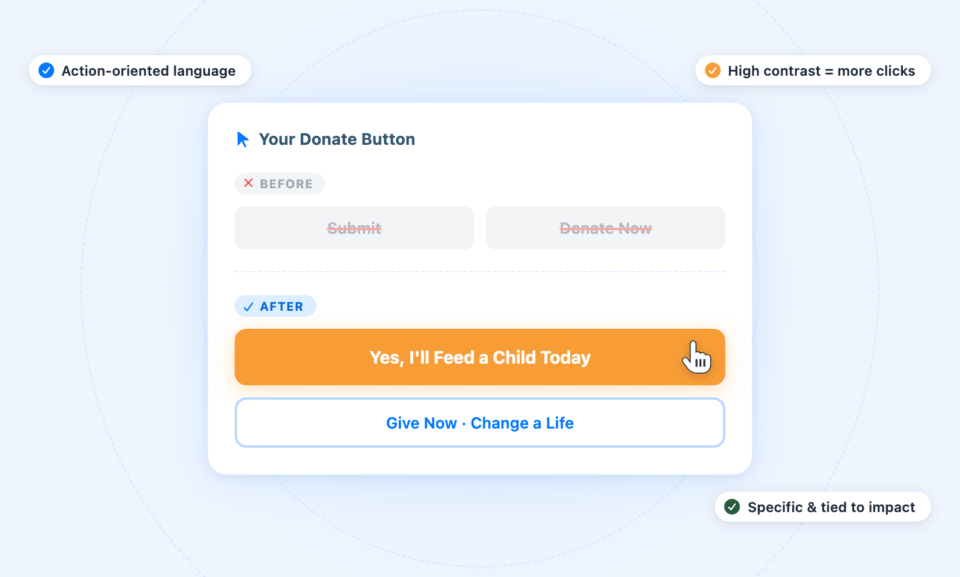
The most effective donate button text is specific, action-oriented, and tied to impact. Consider language like:
- “Yes, I’ll Feed a Child Today”
- “Give Now and Change a Life”
- “Make My Gift”
- “Support Clean Water Access”
The color of your button matters too. It should contrast strongly with the page background and stand out visually as the primary action. Orange, green, and red have all been shown to perform well, but the most important thing is contrast and visibility.
11. Optimize Your Thank You Page and Confirmation Email
Many nonprofits put enormous effort into their donation page but treat the post-donation experience as an afterthought. This is a mistake. The moment immediately after a donation is made is when donor enthusiasm is at its peak. It’s a golden opportunity to deepen the relationship.
Your thank you page should do more than confirm the transaction. It should:
- Express genuine, specific gratitude
- Reinforce the impact of the donor’s gift
- Invite further engagement (following on social media, signing up for email updates, sharing the campaign)
- Provide a tax receipt or clear instructions for obtaining one
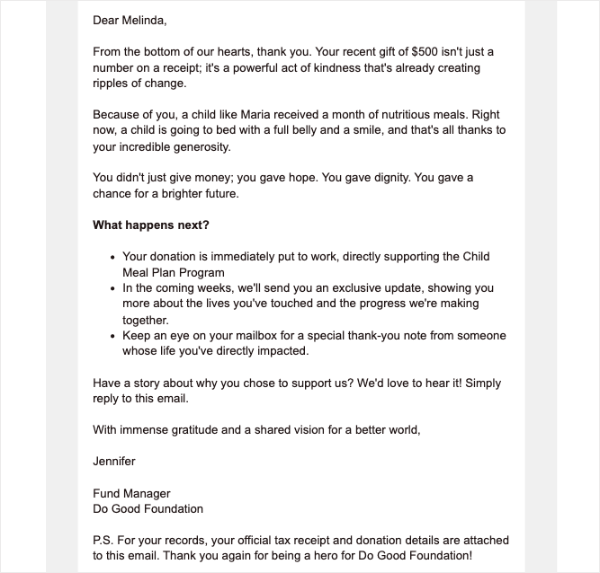
Your confirmation email should arrive within minutes and echo the warmth and specificity of your thank-you page. This email is often the first piece of communication your new donor will look for. Make it count.
Here’s a sample. Your email could be much shorter, but conveying heartfelt genuine message goes a long way:
12. Remove Distractions
One of the most impactful things you can do to improve donation page conversion rates is to remove everything that isn’t directly supporting the act of giving. This includes:
- Navigation menus: Consider using a simplified header without your full navigation on your donation page. Every link is an exit ramp.
- Sidebars: Sidebar widgets, recent posts, and category lists pull attention away from the donation form.
- Pop-ups or banners: If you don’t want them appearing during checkout, they don’t belong on your donation page.
- Excessive links: Every link you add is an opportunity for a donor to click away before completing their gift.
Think of your donation page like a landing page: focused, purposeful, and with a single conversion goal. Everything on the page should serve that goal or be removed.
How to Build Your Donation Page With Charitable
Charitable makes it straightforward to build professional, high-converting donation pages directly within WordPress – no coding, no third-party platforms, and no ongoing subscription fees for basic functionality.
Here’s what makes Charitable different:
- 1+ Million Downloads: Nonprofits worldwide trust Charitable to power their fundraising. That kind of adoption doesn’t happen by accident
- Built exclusively for nonprofits: Every template, every element, every design decision was made with one goal in mind: getting your cause funded
- Lives inside WordPress: Manage campaigns right alongside your website. No logins to juggle, no data living on someone else’s platform
- Optimized for donations, not just aesthetics: Templates and page elements are purpose-built to reduce friction and drive donors to give
- Cost-conscious by design: More of every dollar raised goes to your mission, not your software bill
The numbers don’t lie. Over a million downloads means over a million reasons other nonprofits chose Charitable over the alternatives. Your donation page is often the last thing standing between a visitor and a gift – make sure it’s working as hard as you are.
Here’s a quick overview of how to get started:
Head over to wpcharitable.com and sign up for an account. Then you can download the plugin from the Downloads tab in your account.
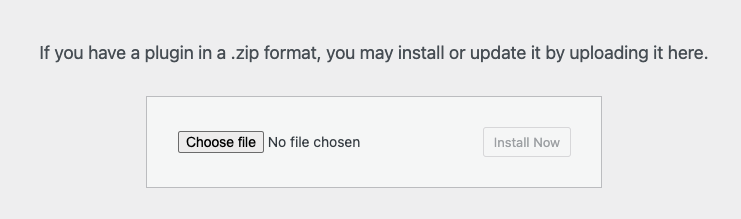
Head over to your WordPress site, and upload the plugin to WordPress by navigating to Plugins → Add New → Upload Plugin, then select the plugin ZIP file and click Install Now.
Create a new campaign by navigating to Charitable → Add New. Then you can choose a template and open up the drag-and-drop builder. If you’re getting started with Charitable, I recommend reading this guide: Getting Started and How to Create Your First Campaign »
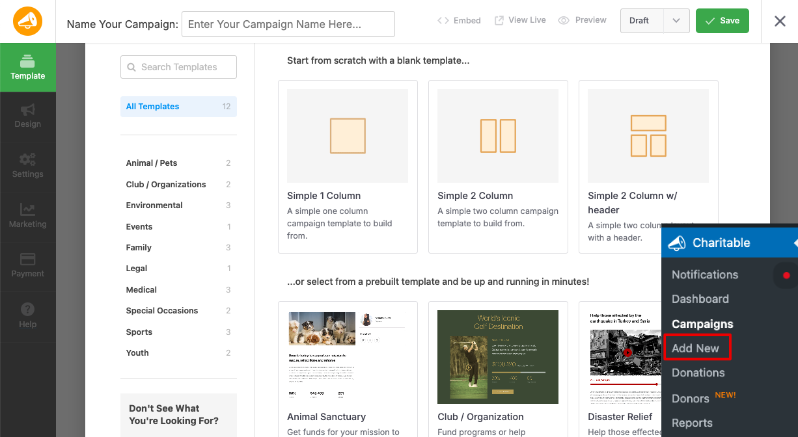
Now you can add your campaign details, including title, description, featured image, and fundraising goal. The builder is so easy to use. You can drag and drop elements where you want them to appear. You can replace the text and images and customize anything else you need.
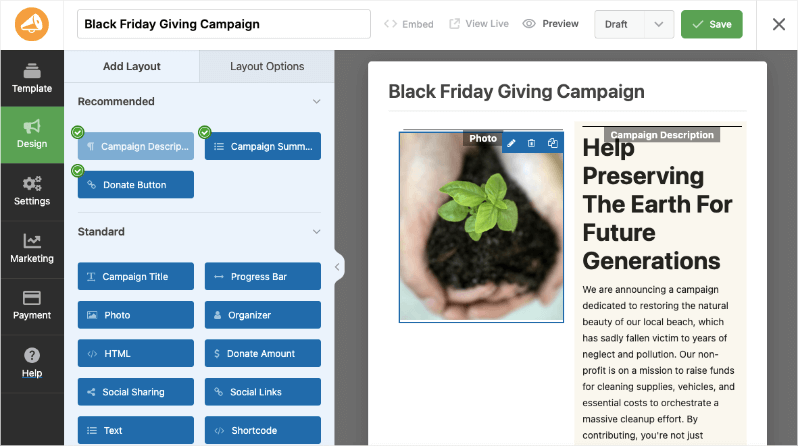
You can add or adjust sections that tell your story, showcase impact, and include social proof.
This helps engage potential donors and provide transparency about your campaign’s goals and achievements.
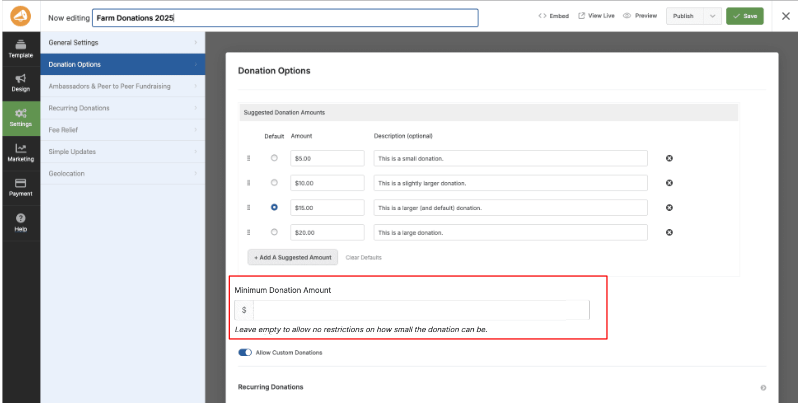
Next, under the Settings tab, you can configure your donation options, set suggested amounts, add impact descriptions, and enable recurring giving if desired. You can even set a minimum donation amount.
Now you can connect a payment gateway under the Payment tab. You can choose from Stripe, PayPal, Square, and more. See how to set up payment gateways »
Now all that’s left to do is preview and publish your campaign page.
Charitable also includes built-in tools for donor management, email notifications, fundraising reports, and integrations with popular email marketing platforms – everything you need to not just collect donations, but build lasting donor relationships.
You can try Charitable today risk-free with our 14-day money-back guarantee.
Test, Measure, and Improve
Building a great donation page isn’t a one-time task; it’s an ongoing process of testing and refinement. Once your page is live, track these key metrics to identify opportunities for improvement:
- Conversion rate: What percentage of page visitors complete a donation?
- Average gift size: Is it in line with your suggested amounts, or are donors gravitating toward the lowest tier?
- Recurring donor rate: What percentage of donors are choosing to give monthly?
- Form abandonment rate: At what point in the process are donors dropping off?
- Traffic sources: Which channels are driving the most donors, and which have the highest conversion rates?
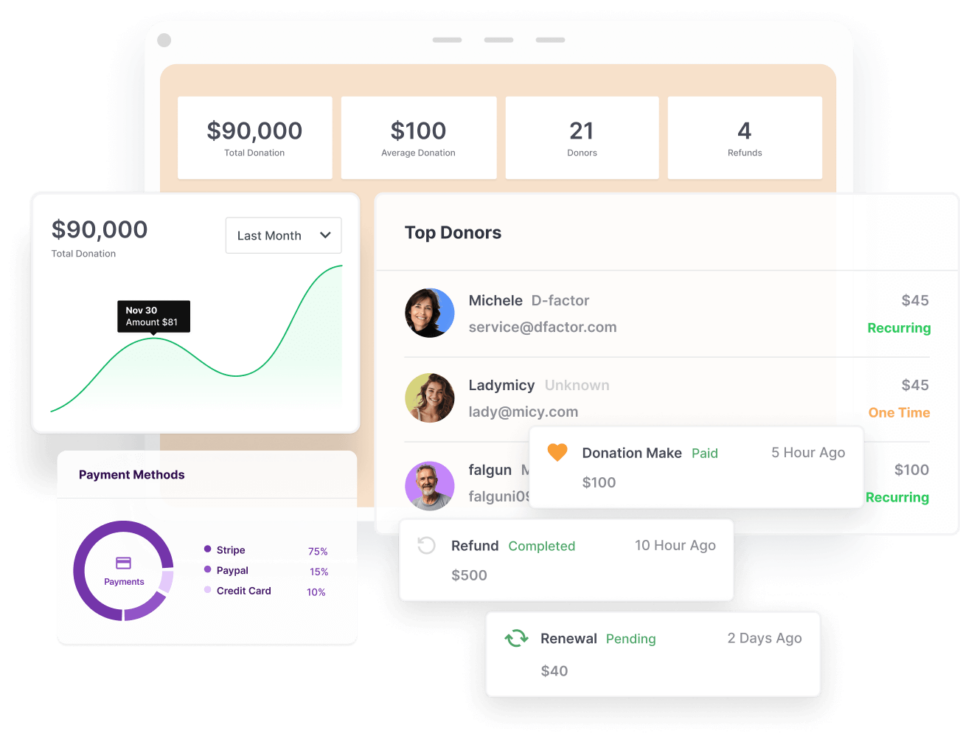
Charitable comes with built-in reports and analytics so that’s taken care of for you. All you have to do is access these reports under Charitable → Reports. You can view and export them as you need.
Tip: Use A/B testing to experiment with different headlines, images, donation amounts, button text, and page layouts. Even small changes can have a significant impact on conversion rates. The most successful nonprofit fundraisers approach their donation pages with the same analytical mindset they’d bring to any other high-stakes business challenge.
Final Thoughts
A high-converting donation page isn’t about manipulation or psychological tricks — it’s about clearly communicating the value of giving, removing unnecessary barriers, and making it as easy as possible for someone who wants to make a difference to do so.
Every element we’ve covered in this guide – the headline, the imagery, the copy, the suggested amounts, the trust signals, the form design, the payment options – is in service of that single goal: helping generous people complete the act of giving.
With the right tools and a thoughtful approach, any nonprofit, regardless of size or budget, can build a donation page that genuinely converts. Charitable gives you everything you need to build that page on WordPress, backed by a platform trusted by thousands of nonprofits around the world.
Ready to get started? Download Charitable today and build a donation page that turns visitors into donors and donors into lifelong supporters.
FAQs on High Converting Donation Pages
What elements are essential for a high-converting donation page?
Essential elements include a strong, emotionally resonant headline, compelling imagery or video, clear impact statements, smartly designed donation options, and trust signals such as third-party accreditations or testimonials.
How should I design the donation form for maximum conversion?
Keep your donation form simple and concise. Only request essential information such as the donation amount, donor’s name, email address, and payment details. Avoid unnecessary fields to minimize form abandonment.
Why is storytelling important on a donation page?
Storytelling creates an emotional connection with donors by highlighting real-life beneficiaries and the impact of their donation. It helps transform the act of donating from a financial transaction to a meaningful contribution.
How can I use suggested donation amounts effectively?
Suggested amounts should be strategically set to guide donor behavior. Connect each suggested amount with a specific, tangible outcome to help donors visualize the impact of their contribution.
What role does social proof play in increasing donations?
Social proof, such as displaying recent donations, donor testimonials, or progress bars, can enhance trust and create urgency by showing donors that others are contributing and making a difference.
How does offering multiple payment options affect conversion rates?
Offering multiple payment options reduces friction by allowing donors to choose their preferred method, which can significantly improve completion rates on donation pages.
What is the impact of a compelling call to action (CTA) on donations?
A compelling CTA guides donors toward completing their gift by using action-oriented language tied to impact, making it clear what their donation will achieve.
How often should I update my donation page content?
Regular updates to your donation page keep it fresh and relevant. Update content to reflect current campaigns, success stories, and any changes to donation impact or organizational goals.
Can I test different page elements to improve conversions?
Yes, A/B testing different elements like headlines, images, button texts, and suggested amounts can provide insights into what drives higher conversions, allowing you to continuously optimize your page.
What should I include in the thank-you message after a donation?
The thank-you message should express genuine gratitude, reinforce the impact of the donation, and invite donors to further engage with your organization through social media or newsletters.
What is Charitable, and how does it help nonprofits?
Charitable is a WordPress plugin designed specifically for nonprofits to create professional, high-converting donation pages easily. It offers pre-made templates and a user-friendly drag-and-drop builder to streamline the process without the need for coding or third-party platforms.
Do I need any technical skills to use Charitable?
No technical skills are required. Charitable is designed to be intuitive, allowing anyone to set up and customize donation pages by selecting templates and using the drag-and-drop builder.
Can Charitable handle recurring donations?
Yes, Charitable supports recurring donations. You can easily configure donation options to include recurring giving, allowing donors to provide continuous support to your cause.
What payment gateways does Charitable support?
Charitable integrates with popular payment gateways like Stripe, PayPal, and Square, giving donors flexible options for completing their transactions.
How do I ensure my donation page is mobile-friendly?
Charitable’s templates are designed to be responsive, ensuring that your donation pages look great and function well on mobile devices and tablets.
Can I add custom donation amounts?
Yes, Charitable allows you to include both suggested donation amounts and a custom amount option, providing donors with the flexibility to contribute any amount they choose.
How do Charitable’s analytics help improve fundraising?
Charitable includes built-in reports and analytics that help you track key metrics such as conversion rates, average gift sizes, and traffic sources. This data enables you to make informed decisions to optimize and improve your donation pages.
Is there a trial or refund policy for Charitable?
Charitable offers a 14-day money-back guarantee, allowing you to try the platform risk-free and ensure it meets your organization’s needs.
Can I integrate Charitable with email marketing platforms?
Yes, Charitable can be integrated with popular email marketing platforms, allowing you to manage communications and build relationships with your donors effectively.
How do I get started with Charitable?
You can start by downloading Charitable from the WordPress plugin directory or from your wpcharitable.com account. Follow the simple installation steps to set up your first campaign and start building your donation page.
Charitable Has 1+ Million Downloads!
Trusted by millions to power successful fundraising campaigns. Try Charitable risk-free today.
✅ 14-day money-back guarantee
✅ Transparent pricing
✅ Code-free setup
Stay Connected for More Nonprofit Resources
For more tutorials and videos tailored to nonprofits, subscribe to our YouTube channel. We regularly publish expert tips, step-by-step guides on online donations, fundraising strategies, and practical resources to help your organization succeed.
🗞️ Get weekly tips and exclusive guides in your inbox
Join our newsletter →
🎥 Watch step-by-step tutorials and success stories
Subscribe to our YouTube channel →
👩🏽💻 Connect with our community and get daily nonprofit insights
Follow us on LinkedIn →
🥳 Fun reels and non-profit insights
Follow us on Instagram →
👀 Insightful & fun videos to help you grow your cause
Follow us on TikTok→
🌎 Subscribe and follow for general fundraiser tips
Get Fundraiser Tips on TikTok →
Powerful Fundraising Resources
🤖 Use Charitable with Your AI Assistant
⬇️ Download proven strategies, campaign ideas, and expert tools
Get the Fundraising Kit →
💸 Get Free Fundraising Resources
Head to the Charitable Fundraising Hub →
🤔 Got questions about Charitable?
Charitable FAQs →
🏎️ Take Charitable for a spin
Create your Charitable Demo →
Understand non-profit terms and jargon
Non-Profit Glossary →
% Looking for non-profit deals and discounts?
Best Non-Profit Deals and Discounts →







Leave a Reply