

Every dollar your non-profit raises represents something meaningful – someone believed in your mission enough to open their wallet. That’s not a small thing.
But here’s the challenge most non-profits face: donation revenue is unpredictable. One month you’re celebrating a successful campaign, the next you’re watching your budget tighten during a quiet period, wondering how you’ll keep the lights on while staying focused on the work that actually matters.
Recurring donations change that equation entirely.
Monthly giving programs have become one of the most powerful revenue strategies available to non-profits of all sizes – from small community organizations to large national charities. Donors are more comfortable than ever with subscription-style giving (think how naturally people accept Netflix, Spotify, or Amazon Prime billing), and the tools available to set up and manage recurring donations have become significantly more accessible and affordable.
This guide is going to walk you through everything you need to know – honestly and practically:
- What recurring donations actually are
- Whether your non-profit genuinely needs them
- What you stand to gain
- What it costs to set them up
- And the easiest way to get started
No fluff. Just the information you need to make a smart decision for your organization.
Let’s get into it.
What Are Recurring Donations?
Recurring donations are simple in concept: a donor agrees to give a set amount on a regular schedule – weekly, monthly, quarterly, or annually – and that payment processes automatically until they decide to cancel or change it.
Think of it like a gym membership, but instead of getting access to a treadmill, your donor is continuously fueling your mission.
From the donor’s side, it looks like this:
- They visit your donation page
- They choose an amount and a frequency (monthly is by far the most popular)
- They enter their payment details once
- Everything after that happens automatically
From your side, you receive predictable, scheduled payments without having to re-engage that donor every single time. They’ve already made the decision to support you; the hard work is done.

A Quick Note on Donor Behavior in 2026
Donor expectations have shifted. People are increasingly comfortable with automated, subscription-style payments – in fact, many donors now prefer it. A recurring $15 or $25 monthly donation feels far less daunting than a single $150 ask, and research consistently shows that recurring donors give significantly more over time than one-time donors.
Network for Good has previously reported that the average recurring donor gives 42% more over the course of a year compared to one-time gift donors. That number has only become more relevant as monthly giving programs have matured.
The math is straightforward. A donor who gives $25 monthly gives you $300 a year – often with far less effort on your part to maintain that relationship.
That’s the core power of recurring donations.
Does Your Non-Profit Actually Need Recurring Donations?
Honest answer? Most non-profits do. But let’s break it down so you can make that call for your own organization.

Ask yourself these questions:
- Do you experience seasonal dips in donations? If your revenue fluctuates heavily around the holidays or specific campaigns, recurring donations can fill those quiet gaps.
- Do you struggle to forecast your budget? If planning ahead feels like guesswork because you never know what’s coming in next month, recurring revenue solves that directly.
- Are you spending significant time and money re-engaging past donors? Email campaigns, reminders, ads – these all cost time and money. Recurring donors reduce that overhead considerably.
- Are you a smaller or lesser-known non-profit? If you don’t have the brand recognition of a large national charity, recurring donations help you build a loyal, committed base that sustains you while you grow.
If you answered yes to even one of those questions, recurring donations are worth serious consideration.
When Recurring Donations Make the Most Sense
There are certain types of non-profits and campaigns where recurring donations are especially powerful:
- Ongoing mission-driven organizations – animal shelters, food banks, mental health services, and environmental organizations. These aren’t one-time causes. They need consistent funding to operate week after week.
- Smaller non-profits building their donor base – recurring donations help create stability while you’re still growing your audience and reputation.
- Non-profits with strong community connections – if your donors are emotionally invested in your mission, giving them a simple, structured way to contribute monthly deepens that relationship naturally.
When You Might Not Need It Right Away
To be fair, there are situations where recurring donations may not be your immediate priority:
- You’re running a single, time-limited campaign with a specific funding goal and end date
- You’re a brand new organization still figuring out your donor base and messaging
- You don’t yet have the infrastructure or capacity to acknowledge and steward recurring donors properly
That last point matters. Recurring donors deserve consistent communication about the impact of their giving. If you’re not in a position to deliver that yet, it’s worth building that capacity first.
But for the vast majority of established non-profits? The question isn’t really if you should implement recurring donations – it’s when and how.
What Would Your Non-Profit Gain From Recurring Donations?
Let’s get specific. Because “more money” is obvious, what’s worth understanding are the deeper, compounding benefits that recurring donations bring to your organization over time.
1. Predictable, Stable Revenue
This is the big one. When you have a base of recurring donors, you can look at your calendar and know, with reasonable confidence, what’s coming in next month, the month after, and the month after that.
That predictability changes how you operate. Instead of making reactive decisions based on whatever came in last week, you can plan proactively. You can hire staff, launch programs, and commit to longer-term initiatives with confidence.
For smaller non-profits especially, this kind of financial stability can be transformative.
2. Lower Cost Per Dollar Raised
Every time you run a campaign to attract a new one-time donor, you’re spending resources – staff time, ad spend, email marketing, design work. Those costs add up, and they repeat every single cycle.
Recurring donors, by contrast, require that investment once. After that, the relationship is maintained through impact updates and stewardship, not constant re-solicitation. Your cost per dollar raised drops significantly over time, meaning more of every dollar goes directly toward your mission.
3. Higher Lifetime Donor Value
A one-time donor who gives $100 is valuable. But a recurring donor giving $20 per month is worth $240 in year one – and if they stay for three years, that′s $720 from a single donor relationship.
The lifetime value of a recurring donor almost always exceeds that of a one-time donor, often by a significant margin. And because recurring donors tend to feel more connected to your mission, they’re also more likely to:
- Respond to special one-time campaign appeals
- Volunteer their time
- Refer friends and family to your organization
- Leave legacy gifts in their wills
4. Stronger Donor Relationships
There’s something psychologically different about a recurring donor. They haven’t just made a transaction, they’ve made a commitment. That shift in mindset creates a stronger bond between your donor and your mission.
When someone is giving to you every single month, they want to know what’s happening. They’re invested. That gives you a natural, motivated audience for your impact updates, newsletters, and milestone announcements, people who are genuinely paying attention.
5. Resilience During Tough Times
Economic downturns, global events, local crises – these things affect donation behavior. One-time donors often pull back first when times get tight. Recurring donors, because of the automated and habitual nature of their giving, tend to be far more resilient.
Having a strong recurring donor base gives your non-profit a financial cushion that helps you weather uncertainty without having to immediately cut programs or staff.
6. Freedom to Focus on Your Mission
Perhaps the most underrated benefit. When you’re not constantly scrambling to fund the next month of operations, you get something incredibly valuable back – mental and operational bandwidth.
You can focus on the work. On your community. On the people or causes you exist to serve. That’s why you started this organization in the first place.
The numbers are compelling. The operational benefits are real. But this last point, the freedom to actually do your mission might be the most meaningful gain of all.
What Does It Cost to Set Up Recurring Donations?
This is where things get really important, and where a lot of non-profits get caught off guard. Because the cost of setting up recurring donations varies enormously depending on the tools you choose.
Let’s break it down honestly.
The Two Costs You Need to Account For
When setting up recurring donations, there are two separate costs to consider:
- Platform or plugin costs: what you pay for the software that manages your donation forms and recurring payment logic
- Payment processing fees: what you pay to the payment gateway (Stripe, PayPal, etc.) that actually moves the money
These are separate, and both matter.
Payment Processing Fees
Regardless of what platform you use, you’ll pay a payment processing fee on every transaction. These are largely standard across the industry:
- Stripe: 2.2%+ $0.30 per transaction for registered non−profits (discounted from their standard $2.90 + $0.30 per transaction)
- PayPal: 1.99% + $0.49 per transaction for confirmed non-profits
- Authorize.Net: 2.9% + $0.30 per transaction
These fees are unavoidable. They’re charged by the payment processor, not your donation platform. Budget for them accordingly.
Platform Costs – Where the Real Differences Show Up
This is where your choice of platform for recurring donations makes a significant financial difference. Let’s look at how the major options compare.
GiveWP
GiveWP is one of the more widely known donation plugins for WordPress. However, recurring donations are not included in their free version. To access recurring donations, you need their Give Plus plan.
Here’s what that looks like in 2026:
- Recurring donations are locked behind a paid tier
- Their Give Plus plan starts at $349 per year
- That’s just to unlock recurring donations, and additional features cost more on top
- The setup involves managing separate add-ons, which adds complexity
For a small non-profit already operating on a tight budget, that’s a significant and ongoing expense just to access a feature that should arguably be standard.
Charitable
Here’s where Charitable stands apart, and it’s a meaningful difference.
Charitable Pro includes recurring donations in its Plus plan, starting at just $99 per year.
That’s less than half the entry cost of GiveWP for the same core functionality. And beyond the price, Charitable’s recurring donation setup is straightforward, built directly into the platform without the need to manage multiple add-ons or navigate complicated configurations.
To put it in perspective:
| Feature | Charitable | GiveWP |
|---|---|---|
| Recurring Donations Included | Plus Plan | Give Plus |
| Starting Price for Recurring | $99/year | $349/year |
| Setup Complexity | Simple, built-in | Multiple add-ons |
| Payment Processors Supported | Stripe, PayPal, Authorize.Net | Stripe, PayPal |
So What’s the Real Cost?
For a non-profit using Charitable on a single site, you’re looking at:
- $99/year for the Charitable Pro plan
- Payment processing fees on each transaction (varies by processor and donation volume)
That’s it. No surprise add-on costs. No paying separately for features that should come standard.
For many non-profits, the recurring donations feature will pay for itself with just a handful of new monthly donors. If three donors sign up for a $35 monthly donation, that’s $1,260 in annual recurring revenue, from an investment of $99.

The math is hard to argue with.
Ready to get started? Charitable Pro gives you recurring donations, a straightforward setup, and everything your non-profit needs to build a reliable monthly giving program, all for $99 per year. No complicated add-ons, no inflated pricing, just the tools you need at a price that makes sense.
How to Set Up Recurring Donations With Charitable
This is where a lot of non-profits expect things to get complicated. They don’t have to.
Setting up recurring donations with Charitable is straightforward, and you don’t need a developer or technical background to do it. Here’s exactly how it works.
If you’re already using Charitable Pro, skip to setting up Recurring Donations. (Make sure you’re subscribed to a Charitable Plus plan or higher).
Not yet a Charitable Pro User? Sign up now and get up to 50% off on your plan so you can start building a reliable monthly giving program today. Launch your recurring campaigns in under an hour! We’re confident you’ll love raising funds with Charitable. If, for any reason, Charitable is not the right fit for you, we’ll refund your purchase with our 14-day money-back guarantee.
Get Charitable Pro Now »
Step 1: Get Charitable Pro
Head to wpcharitable.com and sign up for the Plus plan at $99 per year. This gives you access to the recurring donations feature along with a solid suite of other tools your non-profit will find useful.
If you’re already running WordPress, installing Charitable works just like any other plugin. If you need more help with that, follow How to Install Charitable Pro »
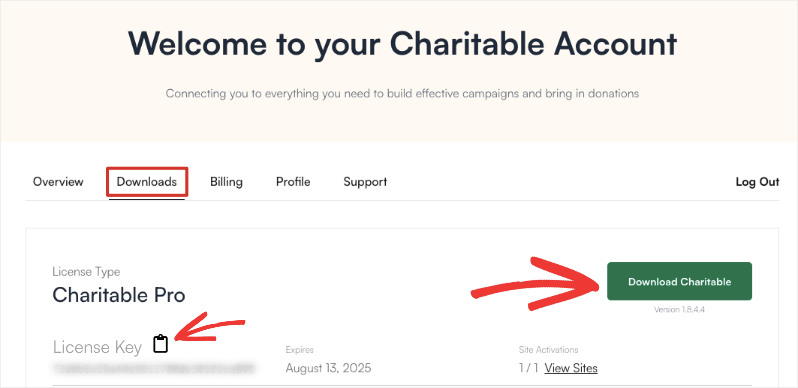
Once you purchase the Plus plan or higher, Charitable will create an account for you. Log in and head over to the Downloads tab. Here, you can download the plugin and copy your license key.
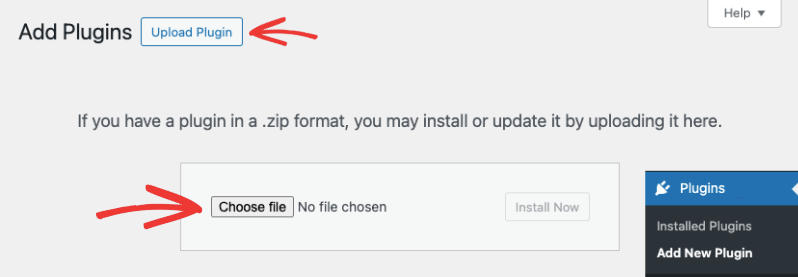
Go to your WordPress admin panel. Navigate to Plugins » Add New » Upload Plugin.
Here, you’ll see an option to choose the file you downloaded to your computer.
Upload the plugin file and activate it.
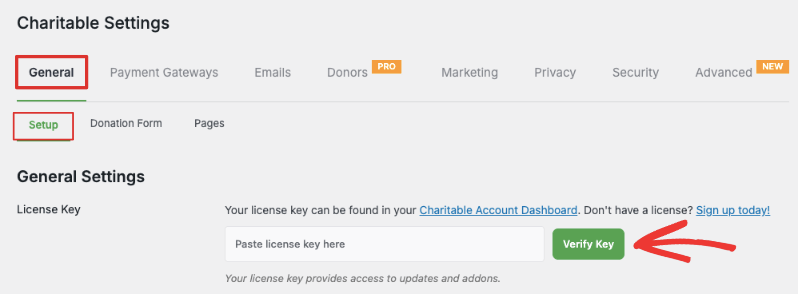
Now, from your WordPress menu, choose Charitable » Settings. This will automatically open the General » Setup tab.
Here, you can paste your license key and verify it.
That’s it. Charitable is now running on your site.
Step 2: How To Connect Your Payment Processor
Charitable integrates directly with Stripe, PayPal and Authorize.Net. Connecting your preferred payment processor takes just a few minutes:
Go to the Charitable » Settings » Payment Gateways tab in your WordPress dashboard.
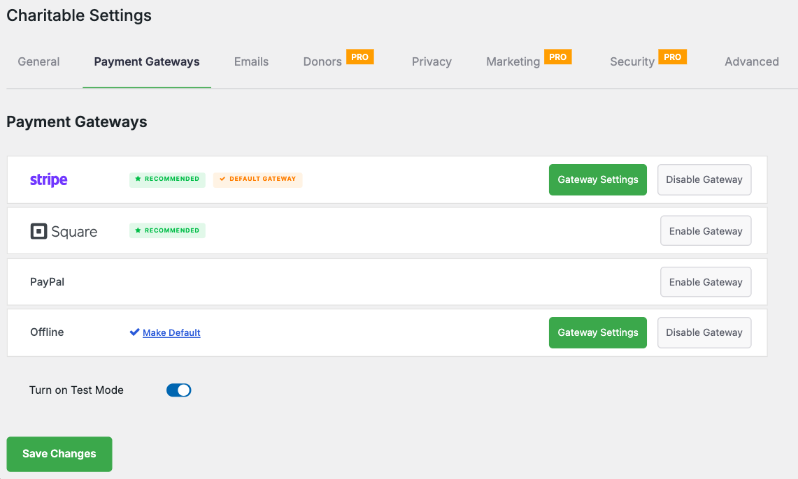
Charitable makes it so easy to set up your gateway. Simply click on the Enable Gateway button. Once enabled, you’ll see the Gateway Settings button appear.
You can click on this button to configure your gateway.
If you don’t already have a Stripe or PayPal account, you’ll need to create one first. Both are free to set up and straightforward to get approved for as a registered non-profit.
For step by step instructions for each payment gateway, see Setting Up Payment Gateways.
Now that your payment gateway is set up, let’s create your first campaign.
Step 3: How To Create Your Donation Campaign
This is where Charitable’s simplicity really shows. Creating a donation campaign with recurring options enabled takes just a few clicks:
Navigate to Charitable in your WordPress dashboard. Select Charitable » Add New.
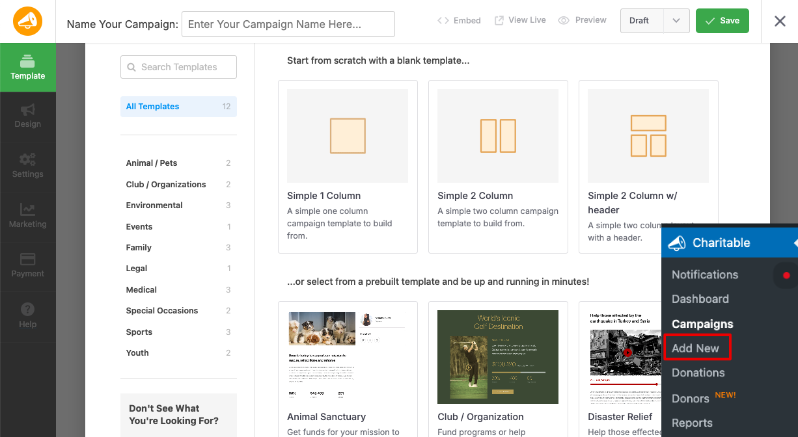
Here, you can select a template or layout. It’s all premade for you, so you don’t have to start from scratch.
Once you choose your template, the campaign builder will open. This is a visual drag and drop builder so it’s really easy for anyone to use.
To add new fields, simply select them and drop them into the visual preview on the right. You can drag to rearrange the order of your fields as well.
Click on any field and you’ll see editing options open up in the left menu. You can add donation buttons, progress bar, social icons, and more.
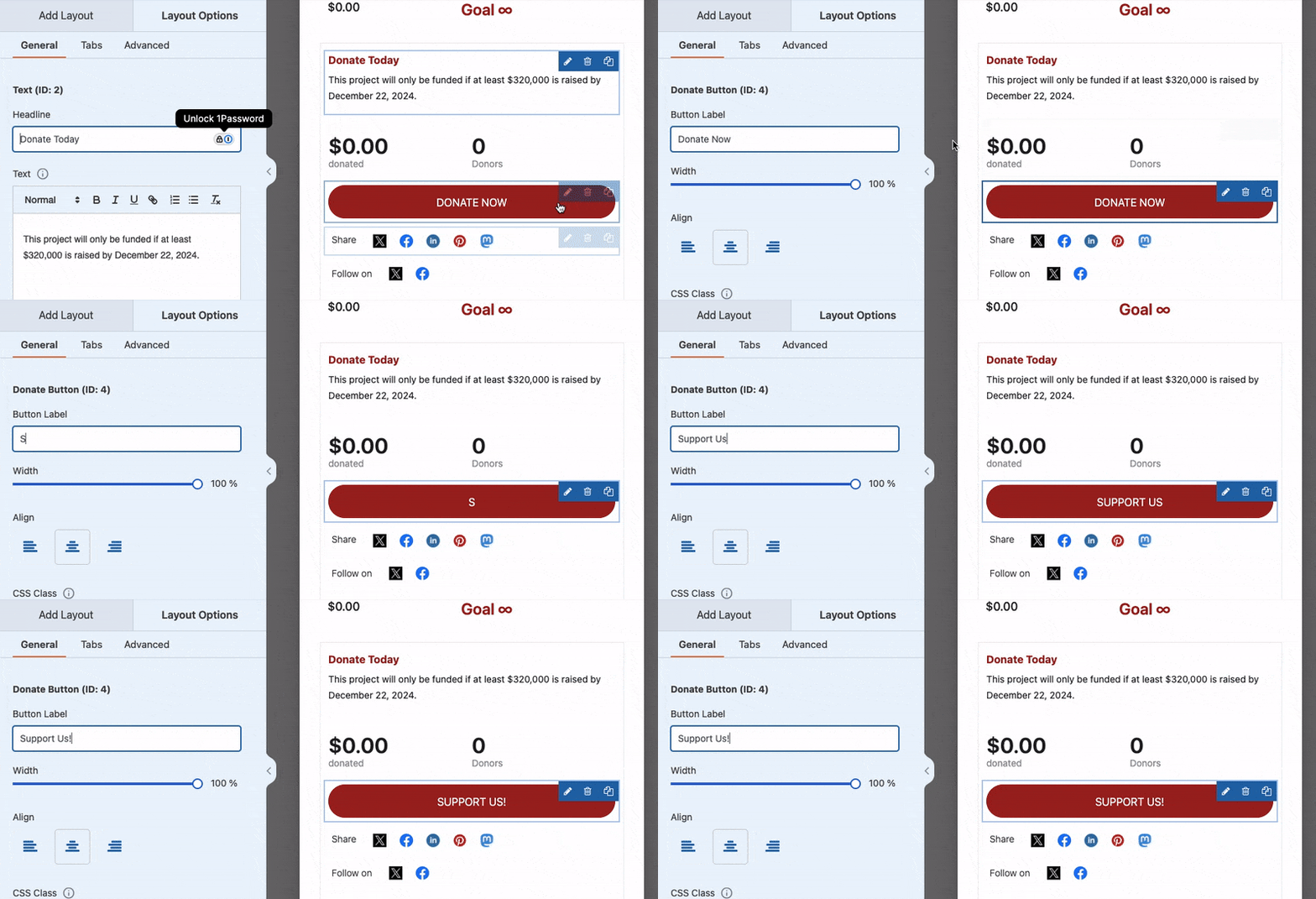
Build out your campaign details, your story, your goal.
Step 5: How To Add Recurring Donations
This is easier than you might expect. You don’t need a developer, you don’t need technical experience, and you won’t be spending hours figuring it out. Here’s exactly how it works.
Inside the Charitable campaign builder, navigate to Settings » Recurring Donations.
You’ll see a popup appear to install and activate the Recurring Donations addon. Click on this button and Charitable will handle the rest.
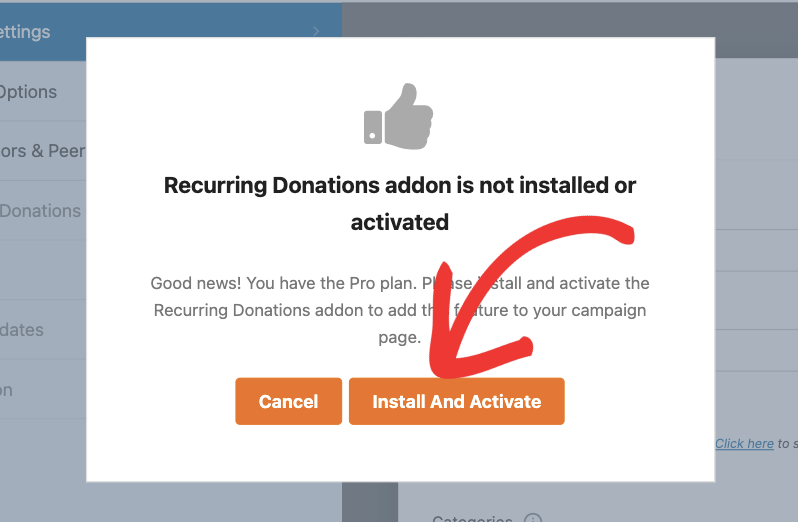
In case you face any hiccups, follow our guide here: How To Set Up Recurring Donations in Charitable.
Once activated, open the Donation Options tab and scroll down.
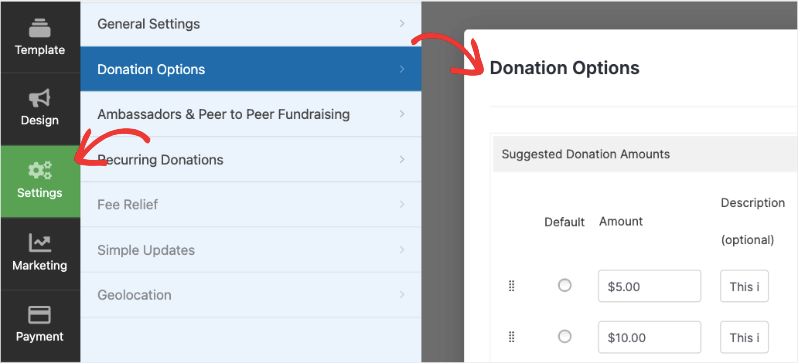
You’ll see a simple toggle button – click it to activate recurring donations on your campaign. That’s genuinely all it takes to turn the feature on.
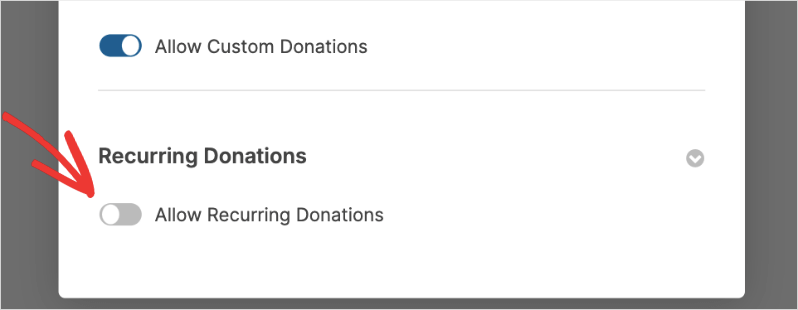
Once enabled, you’ll have two configuration options to choose from: Simple or Advanced.
Simple: The “Just Make It Work” Option
If you want the fastest, cleanest setup, Simple is your answer.
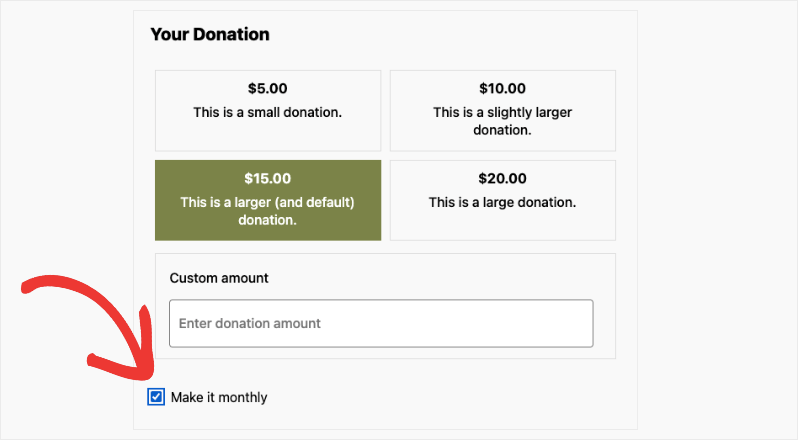
Choosing Simple adds a single checkbox to your donation form that lets donors opt in to make their contribution monthly. Charitable handles everything from there, automatically billing the donor every month on the set date.
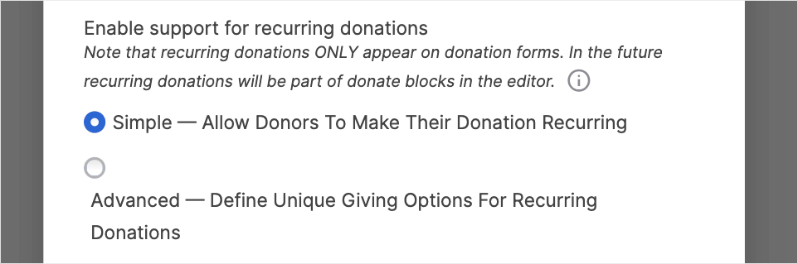
It’s minimal, it’s clean, and it gets the job done without overwhelming your donors with choices.
If you choose the Simple option, a single check box will be added to your donation form like this:
Advanced: Full Control Over Your Recurring Donations
If you want more flexibility and customization, the Advanced option gives you complete control over how recurring donations appear and function on your form.
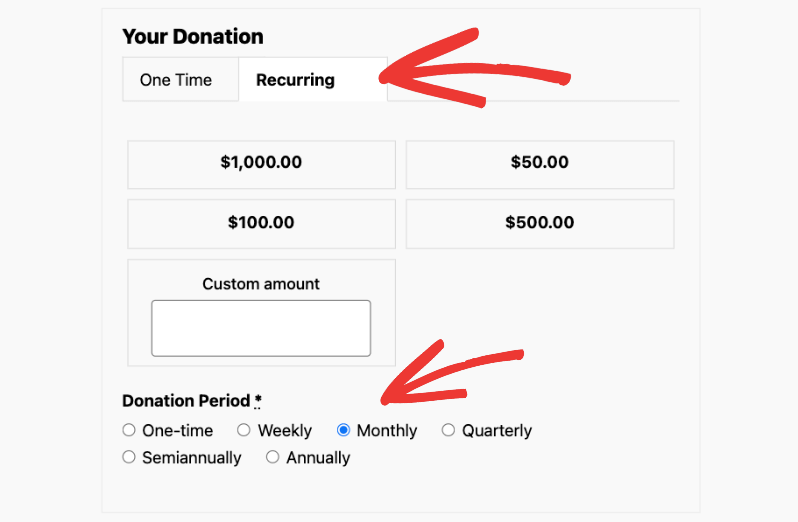
Here’s what you can configure:
- Suggested Amounts and Descriptions: Add giving amounts with short descriptions for each. Telling a donor that $25 per month feeds a family for a week is far more compelling than just showing a number. You can also allow donors to enter their own custom amount.
- Default Tab Display: Choose whether donors land on the One-Time or Recurring tab first. Setting Recurring as the default is a simple way to nudge more donors toward monthly giving.
- Donation Period: Set a fixed billing schedule yourself, or give donors the freedom to choose their own frequency from options like weekly, monthly, quarterly, semiannually, or yearly. You can also set recurring donations to run indefinitely or expire after a set period.
Once you’ve configured everything, hit Save. Publish your campaign and then you can add it to any page or post on your website.
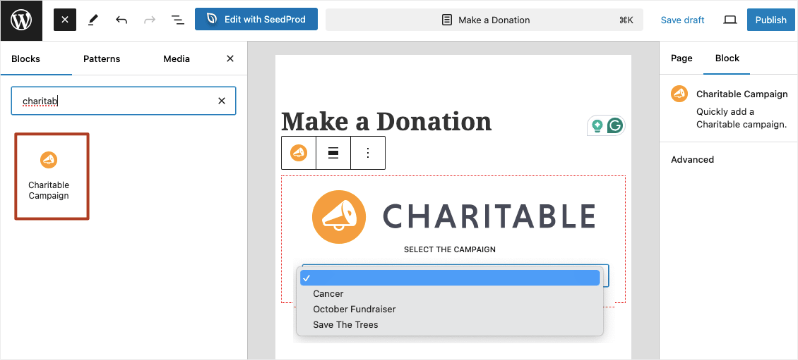
There are readymade widgets you can use inside the Gutenberg editor as well as popular landing page builders like WPBakery, Elementor and Divi.
That’s it! Your recurring donation form is live.
How To View and Manage Recurring Donations
Setting it up is just the beginning. Charitable also makes it easy to manage your donations and donors under one roof.
Your Recurring Donations Dashboard
Navigate to Charitable » Recurring Donations in your WordPress admin and you’ll find a clean, organized list of every recurring donor. For each entry you can see:
- Amount donated
- Campaign
- Date
- Related donations
- Status
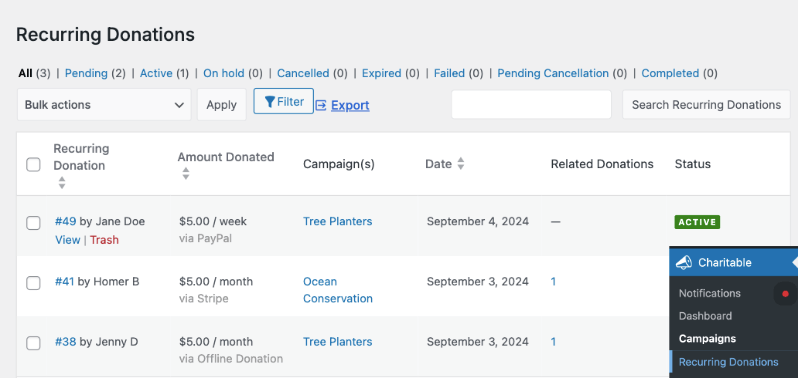
You can view and manage individual donor records directly from this page, export your full list for use with other tools, and use the search bar to quickly pull up any specific donor record you need.
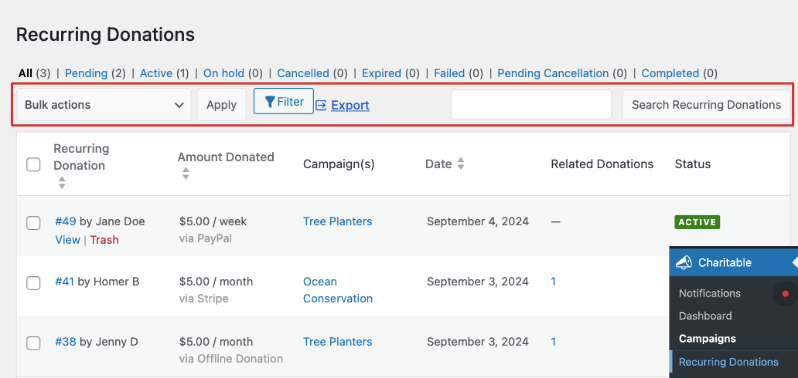
No digging through spreadsheets. No chasing down payment records. Everything is in one place.
How To View Your Recurring Donations Report
For a deeper look at performance, head to Charitable » Reports in your WordPress admin. Under the Donors tab, select Recurring Donors from the dropdown menu and hit Filter.
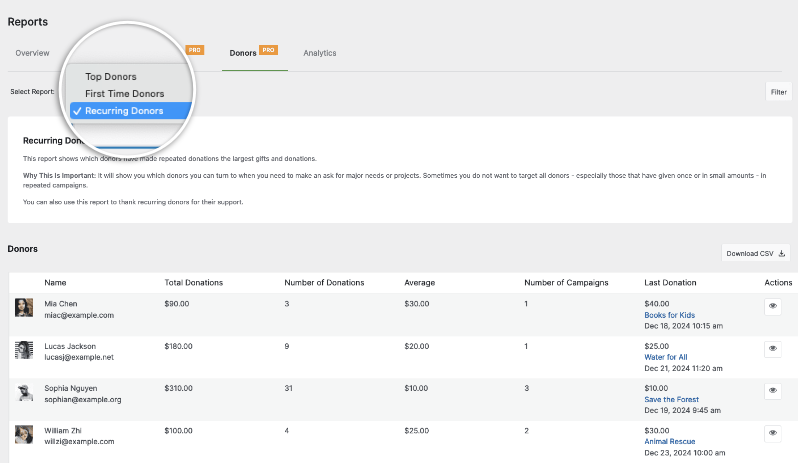
You’ll get a detailed breakdown of your recurring donor base, including:
- Total donations per donor
- Number of donations
- Average donation amount
- Number of campaigns supported
- Date of last donation
You can also download the full report as a CSV file, which is handy for board reporting, grant applications, or your own internal planning.

How To Promote Your Monthly Giving Program
Once everything is tested and working, it’s time to let your donors know. A few effective ways to promote your new recurring donation option:
- Email your existing donor base and explain the impact of monthly giving
- Update your website to prominently feature the monthly giving option
- Add a recurring giving prompt to your existing campaign pages
- Share on social media with specific monthly giving asks rather than general donation requests
The Bottom Line on Setup
From activating the plugin to having a fully configured, live recurring donation form, most non-profits can get this done in under an hour. Likely much less.
There’s no juggling multiple add-ons, no compatibility headaches, and no need to call in a developer. Charitable’s recurring donation feature is built directly into the platform, configured in a few straightforward steps, and managed from a clean, intuitive dashboard.
With Charitable, the complexity is handled for you. So you can focus on what actually matters: growing your donor base and funding your mission.
Not yet a Charitable Pro user? Sign up today and get up to 50% off on your plan. We’re confident you’ll love raising funds with Charitable. If, for any reason, Charitable is not the right fit for you, we’ll refund your purchase with our 14-day money-back guarantee. Get Charitable Pro Now »
Frequently Asked Questions on Recurring Donations
What is a recurring donation?
A recurring donation is an automatic, scheduled payment that a donor sets up once and continues on a regular basis, whether that’s weekly, monthly, quarterly, or annually. The donor enters their payment details one time and everything after that processes automatically.
Are recurring donations better than one-time donations?
They serve different purposes, but recurring donations tend to deliver significantly more value over time. A donor giving $25 per month contributes $300 over a year, compared to a single $25 gift.
Can donors cancel their recurring donation at any time?
Yes. Donors are always in control of their giving. They can cancel, pause, or adjust their recurring donation at any time.
What payment processors does Charitable support for recurring donations?
Charitable supports Stripe, PayPal, and Authorize.Net for recurring donations.
Do I need a developer to set up recurring donations with Charitable?
Not at all. Charitable’s recurring donation feature is built directly into the platform and can be configured through a simple visual campaign builder. Most non-profits have it up and running in under an hour.
How much does it cost to set up recurring donations with Charitable?
Charitable’s Plus plan starts at $99 per year and includes recurring donations. You’ll also pay standard payment processing fees on each transaction, which vary by processor and whether your organization qualifies for non-profit discounted rates.
How is Charitable different from GiveWP for recurring donations?
GiveWP requires their Give Plus plan at $349 per year just to access recurring donations, plus managing separate add-ons. Charitable includes recurring donations in its Plus plan at $99 per year with a straightforward, built-in setup. That’s a saving of $250 per year for the same core functionality.
Can I offer donors a choice of how often they give?
Yes. Charitable’s Advanced recurring donation option lets you give donors full flexibility to choose their own donation frequency, from weekly to yearly. You can also set a default frequency that appears pre-selected on your form.
Can I run a recurring donation campaign with an end date?
Yes. Charitable lets you set recurring donations to either run indefinitely or expire after a specific period, from 2 months up to 24 months. This is useful for campaign-specific fundraising with a defined timeline.
Where can I track and manage my recurring donors?
Everything is managed from your WordPress dashboard under Charitable » Recurring Donations. You can view donor records, track payment status, export your donor list, and access detailed recurring donor reports all in one place.
Stay Connected for More Nonprofit Resources
For more tutorials and videos tailored to nonprofits, subscribe to our YouTube channel. We regularly publish expert tips, step-by-step guides on online donations, fundraising strategies, and practical resources to help your organization succeed.
🗞️ Get weekly tips and exclusive guides in your inbox
Join our newsletter →
🎥 Watch step-by-step tutorials and success stories
Subscribe to our YouTube channel →
👩🏽💻 Connect with our community and get daily nonprofit insights
Follow us on LinkedIn →
🥳 Fun reels and non-profit insights
Follow us on Instagram →
👀 Insightful & fun videos to help you grow your cause
Follow us on TikTok→
🌎 Subscribe and follow for general fundraiser tips
Get Fundraiser Tips on TikTok →
Powerful Fundraising Resources
⬇️ Download proven strategies, campaign ideas, and expert tools
Get the Fundraising Kit →
💸 Get Free Fundraising Resources
Head to the Charitable Fundraising Hub →
🤔 Got questions about Charitable?
Charitable FAQs →
🏎️ Take Charitable for a spin
Create your Charitable Demo →
Understand non-profit terms and jargon
Non-Profit Glossary →
% Looking for non-profit deals and discounts?
Best Non-Profit Deals and Discounts →



