
Running a non-profit is hard enough without having to juggle spreadsheets and sticky notes to keep track of your donors. If you’ve ever lost donor information or struggled to find important details during a crucial moment, you know exactly what I’m talking about. That’s where a good donor database comes in. It serves as your organization’s memory and personal assistant rolled into one.
Today, we’re going to look at the best donor management solution that can make your life easier. We’ll skip the tech jargon and focus on what really matters: helping you build better relationships with your donors.
Let’s dive in and discover how the right donor database can transform your fundraising from stressful to successful, without breaking the bank.
Do You Need a Donor Database?
Many non-profits start with simple tools like spreadsheets or basic contact lists. And while these work when you’re just starting out, they can quickly become overwhelming as your donor base grows.
You need a donor database if you can relate to this:
- You’re spending hours manually entering donation data
- Important donor information is scattered across different files and platforms
- You can’t easily track giving patterns or donor preferences
- Thank-you letters are delayed because information is hard to find
- Your team struggles to share donor updates and notes
- Year-end tax receipts take days (or weeks) to prepare
A good donor database isn’t just about storing contact information. It’s about making your daily operations smoother and your donor relationships stronger. Here’s what it can do:
- Save Time: Automatically record donations and create donor profiles
- Reduce Errors: No more duplicate entries or missing information
- Build Better Relationships: Track every interaction and preference
- Make Smarter Decisions: See patterns in giving and engagement
- Work as a Team: Share information easily across your organization
The question isn’t really “Do you need a donor database?” but rather “Can you afford not to have one?” Even small non-profits can benefit from the right system. When you consider the time saved, donors retained, and relationships improved, a good donor database often pays for itself.
That said, let’s look at what a good donor database software should have.
What to Look for in a Good Donor Database Solution
Before diving into specific options, let’s clarify what makes a donor database worth your investment. Here’s your checklist of essential features:
✓ Easy to learn and use daily
✓ Automatic donation tracking
✓ Quick donor profile creation and updates
✓ Simple reporting and data export
✓ Email and website integration
✓ Secure data storage
✓ Reliable customer support
✓ Room to grow with your organization
✓ Fits your budget
✓ Works with your existing tools
Remember: The best solution isn’t the one with the most features – it’s the one your team will actually use every day.
Now, let’s look at the top option that checks these boxes.
The Best Donor Database Solution for WordPress Sites
If you’re already using WordPress for your non-profit’s website, here’s some good news: you can transform it into a powerful donor management hub with Charitable. It plugs right into your existing site, making it a natural choice for many organizations.
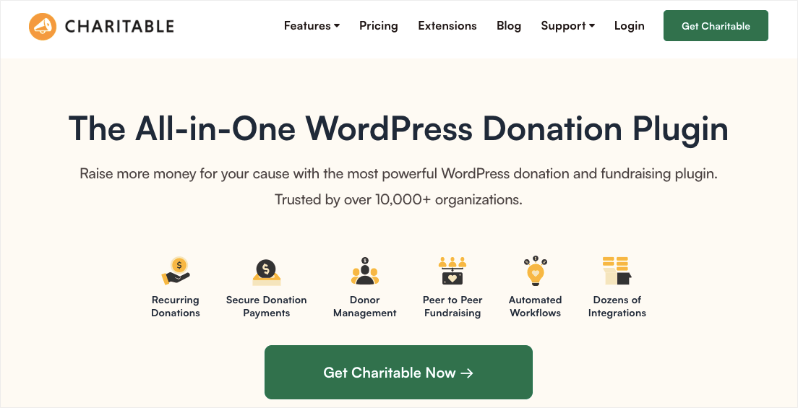
Since it’s built specifically for WordPress, it integrates seamlessly with your existing website and other tools you might be using.
Not using WordPress? You’ll want to read Reasons Why Nonprofits Should Use WordPress.
What makes Charitable special is how it handles the heavy lifting for you. Every time someone makes a donation, the system automatically creates or updates their donor profile, sends them a thank-you email, and generates a tax receipt.
No more manual data entry, no more forgotten follow-ups, and no more drowning in spreadsheets. You have an extra team member who works around the clock, so you can get a good night’s rest.
The real magic happens in the donor profiles. Each profile tells you the complete story of your donor’s journey – from their first gift to their latest interaction. You can see their giving history, preferences, and engagement patterns all in one place.
Need to find specific information? Smart filters help you sort and search your donor database in seconds, whether you’re looking for top donors, recent gifts, or specific campaigns. You can also export your data in just 2 clicks, so you can use this information for accounting, tax purposes, and with other third-party tools.
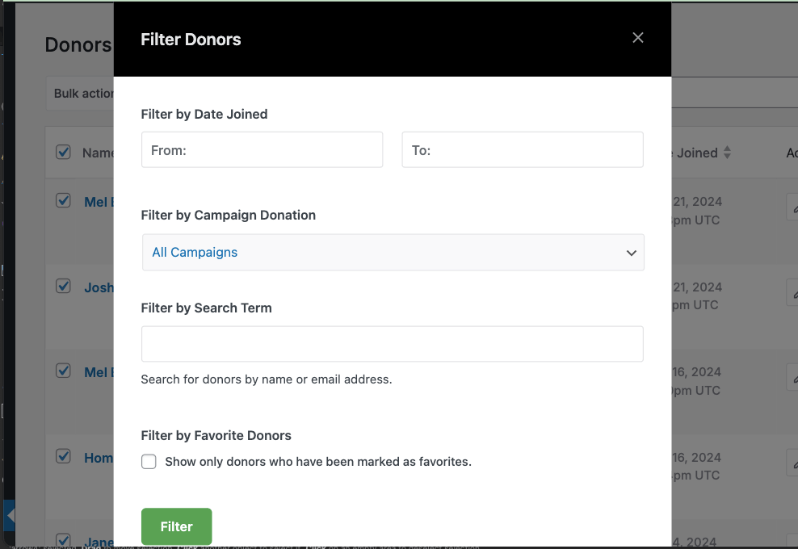
But Charitable isn’t just about collecting data – it’s about making that data work for you. The system generates clear, actionable reports that help you understand giving patterns and spot opportunities.
You can track donation trends, monitor campaign success, and identify areas for growth, all without needing a degree in data analysis. Plus, when tax season rolls around, you can generate all your required reports with just a few clicks.
Best of all, Charitable grows with your organization. Start with the basic features you need today, then add more capabilities as your non-profit expands.
Charitable’s Donor Database Features
Charitable’s donor database is quite comprehensive. I’ll be reviewing the top features here that I think benefit every non-profit organization.
Centralized Donor Database
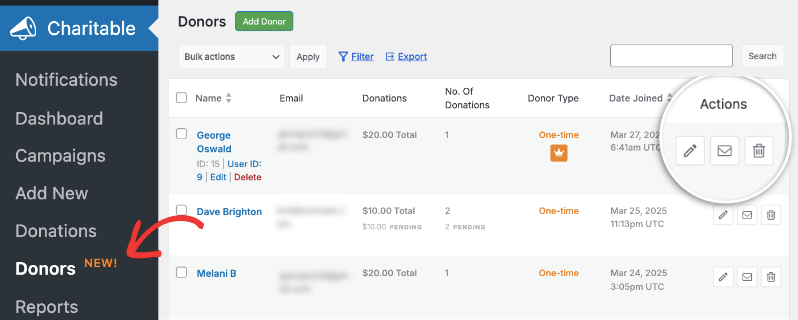
When you open Charitable’s donor database, you will see a clean, organized display of all your donors. All essential information is included in their donor profile, such as their name, email address, total donations, frequency of contributions, and the date they joined. So you have all the information you need right at your fingertips!
In the main dashboard, you not only see a list of donors, but you can also quickly spot how much they have donated, how many times, and whether they are one-time or recurring donors. You can also take actions to edit, email, or delete the donor profile. for every donor profile.
Individual Donor Profiles
Charitable creates a new donor profile every time someone contributes to your cause. If they’ve contributed before, their existing profile gets updated.
Now, accessing a donor’s profile is so simple. All you have to do is click their name or the pencil icon from the main dashboard.
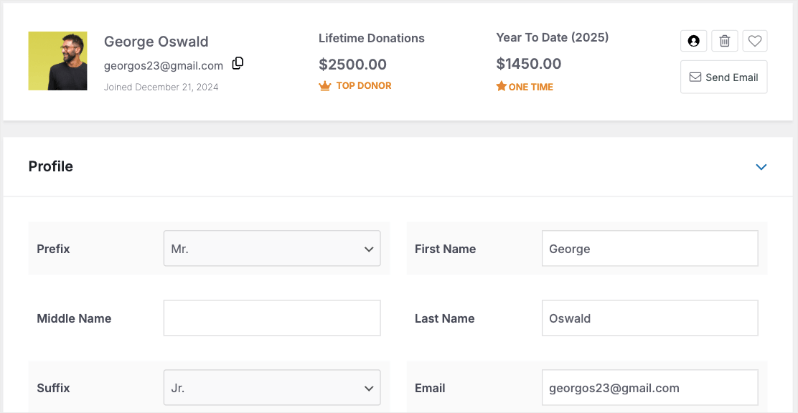
You’ll be taken to the profile where you can see an overview such as their lifetime donations, year-to-date donations, name, email, and so on.
Quick action buttons allow you to adjust user settings, mark donors as favorites, send emails, or manage their records.
You can edit their profile details and even add custom tags and fields.
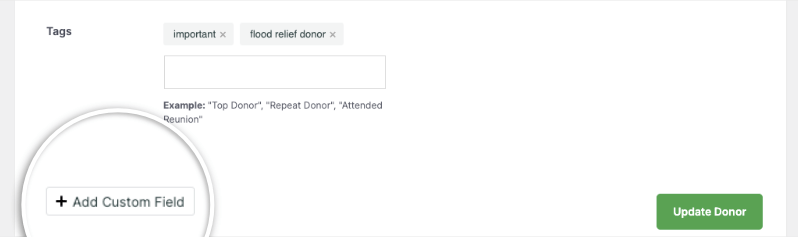
So for instance, I’ve used the tag system to categorize this donor as “important” and “flood relief”. That way, I know when we have flood relief campaigns in the future, this donor has a heart for this cause and will likely donate. So it would be a good idea to email them about it.
The custom fields feature allows you to adapt donor profiles to your specific requirements.
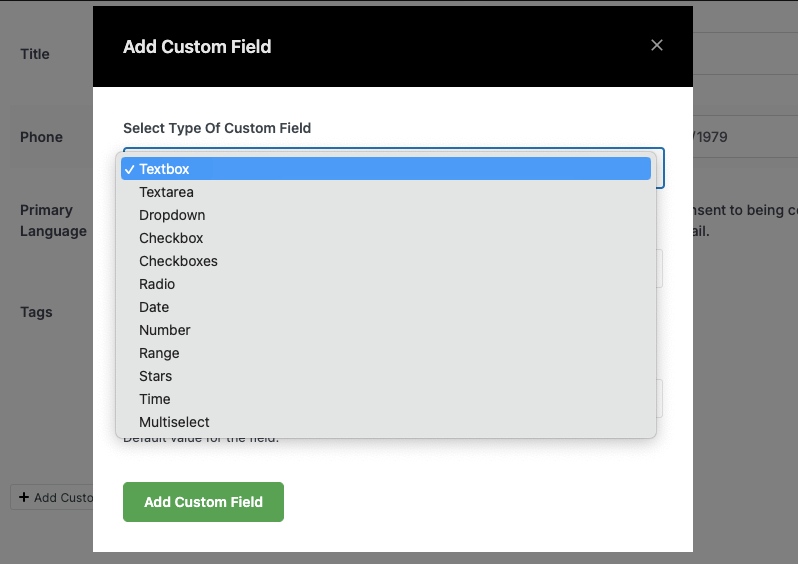
You can add various field types, including:
- Text boxes for additional notes
- Checkboxes for preferences
- Dropdown menus for categorization
- Date fields for important milestones
- Range selectors for engagement levels
- Star ratings for donor prioritization
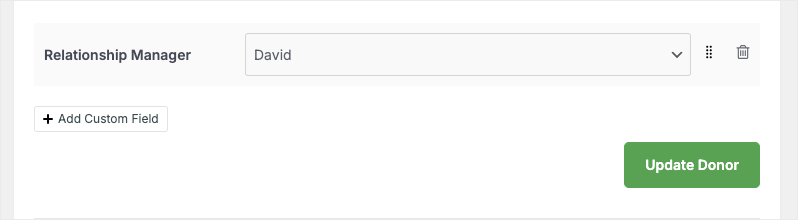
I’ve added a relationship manager field for my organization. That way, we instantly know who needs to connect with the donor or take care of any issues that arise.
Add New Donor Profile
What I love is that I can add a new donor when I need.
So when donors make offline donations or through another platform, I simply create new donation records here. That way, all my data is centralized, and I can export it for tax purposes at the end of the year.
Charitable lets you do this in two ways:
- Manually create a donor profile
- Add a donation record and the donor profile is automatically created
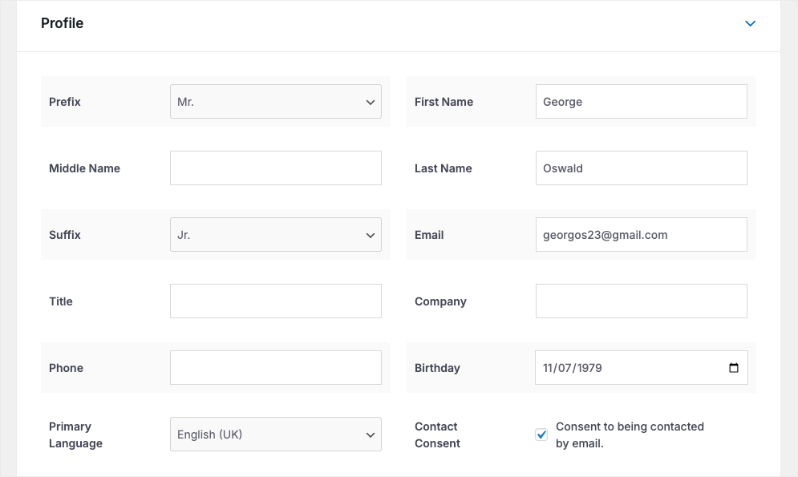
To create a donor profile, you can go to Charitable » Donors tab, then choose to Add Donor.

This will open up a blank donor profile for you to fill in. You can enter all the details you have of this donor including their name, contact information, birthday, contact consent, and more.
Alternatively, you can also create a donation record for a donation received elsewhere. I use this method more often. This is accessible under Charitable » Donations tab, like this:

Then I simply enter the amount received, for which campaign, and from whom. I can either manually fill in the new donor details. In case they already exist in the system, I can select their name from a dropdown menu.
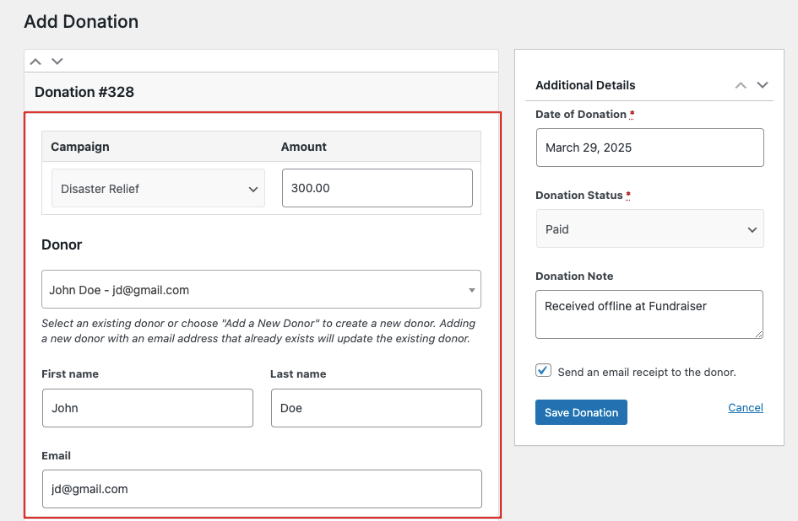
Once I save this donation record, a profile is automatically created for new donors.
Advanced Donor Details
Charitable takes it a step further and gives you a whole section dedicated to the donor’s history and activity.
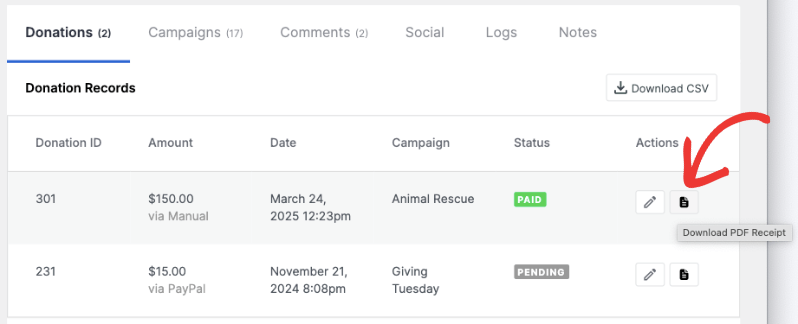
Donations: Shows the donor’s giving history. You get a chronological record of all contributions, including donation amounts, dates, associated campaigns, and payment statuses. You can edit the record or download the PDF receipt here.
Campaigns: Shows all campaigns associated with the donor, whether they’ve created or participated in them. You can see how donors have responded to different initiatives.
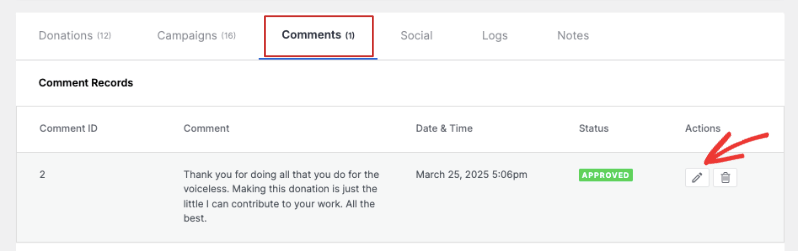
Comments: Any message left by this donor on various campaigns will show up here.
Social Media Integration: You can add various social media profiles of the donor, including Facebook, Instagram, and X (formerly Twitter), YouTube, WhatsApp, and more.
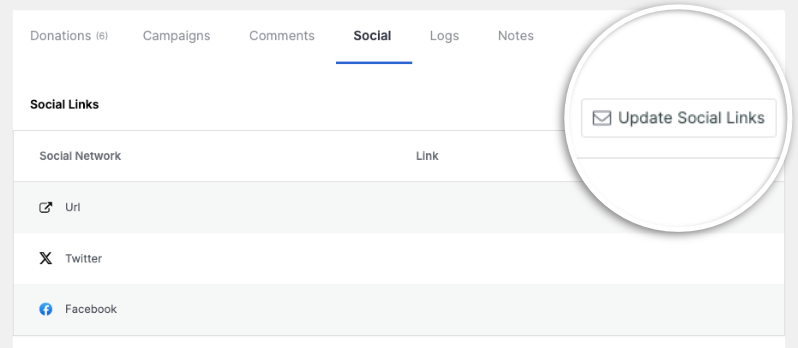
Activity Logs: Gives you a detailed record of all changes made to the donor profile.
Notes: A space for storing important information about your donor relationships.
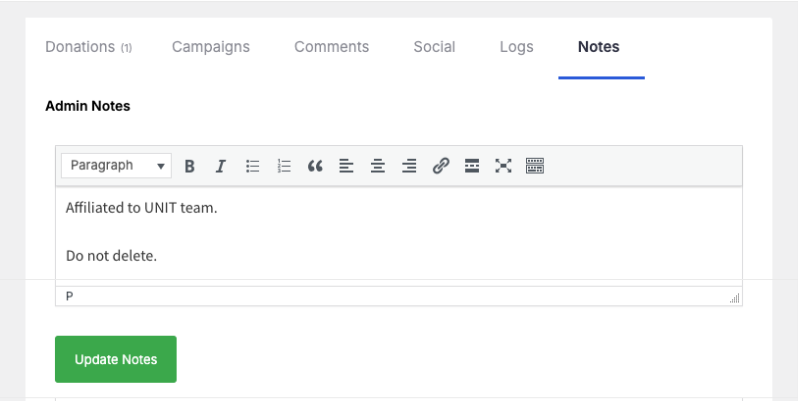
Overall, the donor profiles are so comprehensive, so you can learn everything you need to know about a donor under one roof.
Insightful Donor Reports
Charitable creates reports for you that you can view, filter, and export as needed.
You can view a dedicated Donors tab that organizes your reports into Top Donors, First-Time Donors, and Recurring Donors.
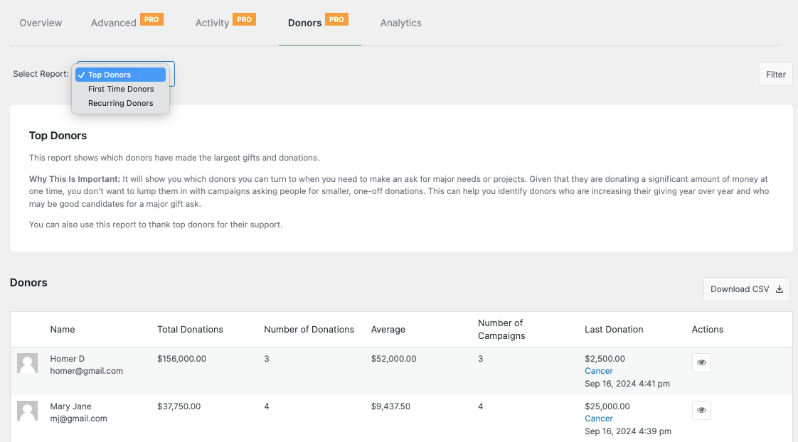
You can see their total donations, average, the last donations, the campaigns they supported, and more.
Learn more about Charitable Fundraising Reports »
What Makes Charitable Stand Out?
Out of the different donor database solutions I’ve tried, this has been not only the easiest to use, but also the most comprehensive. Not to mention, Charitable is by far the most affordable solution for non-profits. They have a lite plan for free and the premium version starts at $69 per year. So it comes to around $5 per month, which is a steal.
See the difference between Lite and Pro »
Here are a few highlights that stand out about this solution:
- Lives in Your Dashboard: No extra logins or new systems to learn. It works seamlessly with WordPress.
- Builds Itself: Creates new donation records and updates the donor profiles automatically when donations come in
- Saves Time: Handles receipt sending, data entry, and report creation
- Give Donors Payment Choices: You can accept payments through Stripe, PayPal, Square, and so many more.
- Grows With You: Add features as your organization expands
Key Features You’ll Love
Here are my favorite features that have worked wonders for my non-profit, so I’m quite confident you’ll also love them:
- Automatic donor profiles
- Easy-to-read reports
- Smart search and filtering
- Quick data export
- Donor login access
- Custom fields for your needs
- Marketing tool integration
- Receipt automation
Get a full view of Charitable Donor Database »
How To Get Charitable’s Donor Database?
The donor database and donor management system are available on all Charitable’s plans. You can head over to their website and choose a plan that fits your needs.
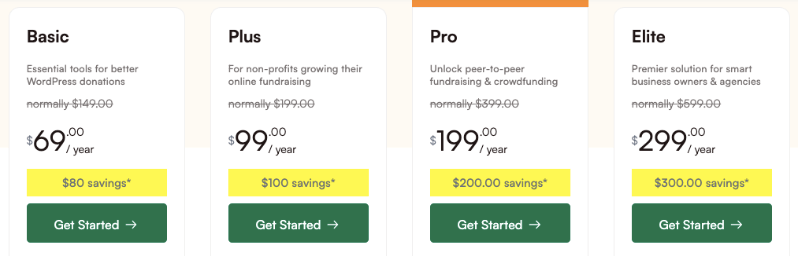
There are 4 plans available: Basic, Plus, Pro, and Elite.
The pricing starts at $69 per year, the lowest available on the market in my experience. It comes to $5.75 per month, which is a steal when compared to other solutions that charge upwards of $150 per month!
When you choose a donor database solution, the key is to pick a system that makes your daily work easier, not more complicated.
I love that Charitable is so powerful, but at the same time, simple to use and affordable for all.
For a complete step-by-step guide on how to set this up, refer to our guides:
Next, I’ll also answer some frequently asked questions.
FAQs on Donor Database for Non-Profits
What is a donor database?
A donor database is your organization’s central hub for managing donor information, tracking contributions, and maintaining relationships. Think of it as your nonprofit’s memory – storing everything from contact details to giving history in one organized place.
How does a donor database help my non-profit organization?
Instead of juggling spreadsheets and sticky notes, a donor database automates your daily tasks. It records donations, sends thank-you emails, generates reports, and helps you understand giving patterns. This means more time for what matters: building donor relationships.
What information can I store in the donor database?
Everything about your donors lives here – contact information, donation history, communication preferences, and relationship notes. You can even add custom fields to track specific details important to your organization. It’s completely adaptable to your needs.
How easy is it to use?
The interface is designed for everyday use, not technical experts. Most tasks take just a few clicks, and everything is organized intuitively. Plus, you get access to tutorials and support if you need help.
What donor reports can I generate?
From basic donation summaries to detailed campaign analysis, you can create reports that actually tell you something useful. Charitable automatically creates reports on Top Donors, Recurring Donors, and One-time Donors. You can track donor retention, campaign success, and giving trends – all without needing to be a data scientist.
Can my donors access their information?
Yes, you can enable the donor dashboard which allows donors to log into their donor portal. They can view their giving history, update contact details, manage recurring donations, and download tax receipts. This self-service feature saves your team time while empowering donors.
Does Charitable integrate with other tools?
Yes, your donor database works seamlessly with 5000+ marketing tools, email platforms, payment processors, accounting software, and website builders. This means less manual work and fewer headaches during tax season.
What are the popular alternatives to Charitable?
Yes, several options exist including Bloomerang, DonorPerfect, and Kindful. Each has its own strengths, but they typically come with higher monthly costs starting at 99−199 per month.
What kind of support is available with Charitable?
You’re never alone with Charitable. They offer customer service, online resources, and documentation whenever you need them. The goal is to help you succeed, not just provide software.
How does Charitable compare to other solutions?
While other platforms are standalone systems, Charitable integrates directly with WordPress, making it more cost-effective (69/year vs. 199+/month) and easier to manage if you’re already using WordPress. It offers similar core features without the enterprise-level complexity.
Are there free donor database solutions?
Free solutions like spreadsheets or basic CRMs exist, but they often lack automation features, donor portals, and integrated payment processing. They can work for very small organizations but become limiting as you grow.
That’s it! I hope you enjoyed this comprehensive guide on the best donor database solution. Ready to get your own powerful donor database?








Leave a Reply