
Every January, nonprofit admins face the same task: getting annual donation receipts into the hands of every donor before tax season. Until now, that meant exporting spreadsheets, writing individual emails, or directing donors to download their own receipts.
With Annual Receipts 2.0.0, Charitable Pro handles the entire process for you with a guided wizard, smart batching, and a complete audit trail.
Why Automated Annual Receipts Matter for Donor Retention
Annual receipts are more than a tax document. They’re a touchpoint that reminds donors of the impact they made. A timely, professional receipt reinforces trust and makes it easy for donors to claim their tax deduction. When receipts arrive late, or not at all, donors notice. Automating this process means every donor gets their receipt on time, every year, without manual effort on your part.
Send Receipts to Hundreds of Donors Without Leaving WordPress
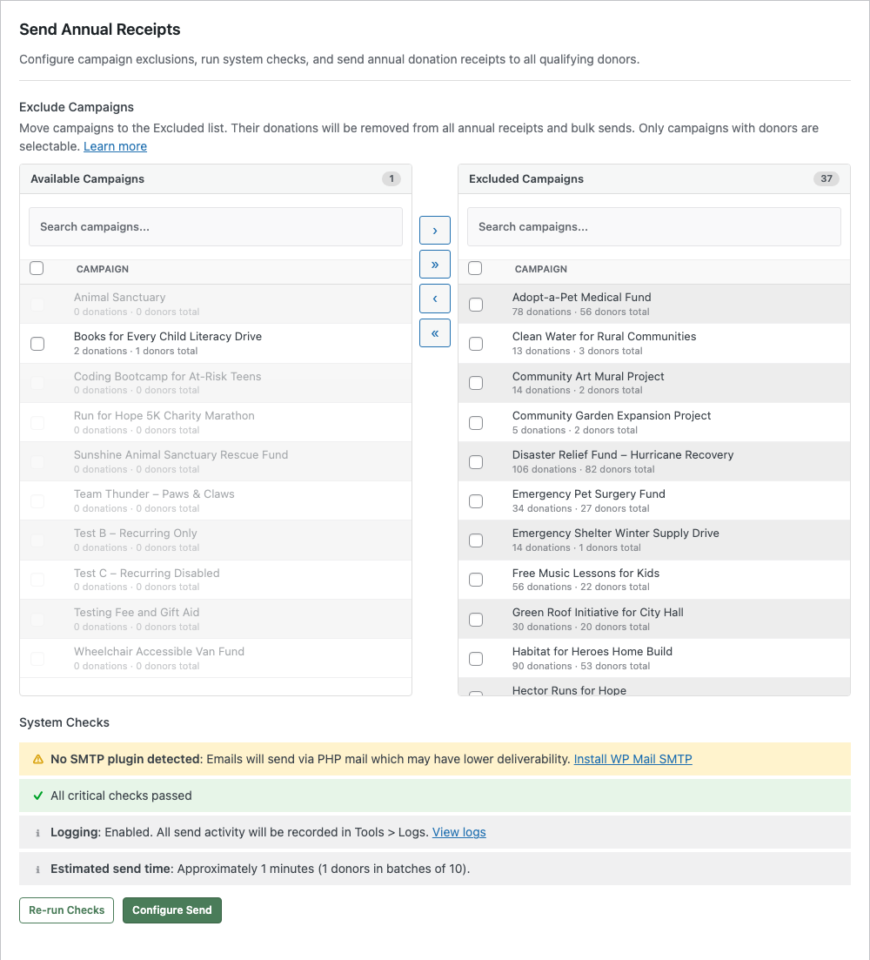
The new bulk send wizard lives right in your Annual Receipts settings. Choose a fiscal year, review your donor list, and send. The wizard walks you through three steps: configure, review, and send.
📧 One-Click Year-End Sends: Select a year, click send, and every qualifying donor receives a personalized email with a link to their annual receipt.
🎯 Campaign Exclusion: Move event registrations, merchandise, or non-deductible campaigns to the Excluded list so those donations never appear on receipts.
🔍 Dry Run Mode: Simulate the entire send without delivering a single email. See exactly who would receive a receipt, who would be skipped, and why, before you commit.
See It In Action
Built for Real-World Email Infrastructure
Not every nonprofit runs a dedicated email server. Charitable detects your SMTP setup and adapts automatically.
⚡ SMTP-Aware Batching: The system detects WP Mail SMTP, FluentSMTP, and Post SMTP, then adjusts batch sizes and delays to stay within your provider’s limits.
🛡️ Daily Limit Protection: Using Gmail or another provider with a daily cap? Charitable pauses the send automatically and resumes the next day. No emails lost, no provider suspensions.
✅ Pre-Flight System Checks: Before you send a single email, the wizard verifies your email configuration, cron availability, logging status, and donor count. Issues are flagged with direct links to fix them.
Every Send Leaves a Complete Audit Trail
Nonprofits need records. Every receipt sent, skipped, or failed is logged in two places: your system-wide log in Tools and the individual donor’s profile.
📋 System Log: Filter by “Annual Receipts” in Tools > Logs to see every send event with donor names, dates, and reasons for any skips or failures.
👤 Donor Log: Each donor’s Logs tab shows exactly when their receipt was emailed and the total donation amount. No guessing, no searching through email.
📊 Send History: A history table tracks how many receipts were sent for each year, with a one-click option to clear and resend.
Secure Receipt Links, No Login Required
Each email includes a unique, secure link that lets donors view their annual receipt without logging in. Links use HMAC authentication and expire after 30 days. Donors click the link, see their receipt, and can print or download a PDF, all without creating an account.
Donation Type Labels on Every Receipt
Receipts now show whether each donation was one-time or recurring. This small detail helps donors and their accountants understand the nature of each contribution at a glance.
For Agencies and Developers
Hooks, Filters, and Full Customization
The donation type label is filterable via charitable_annual_receipt_donation_type_label. Campaign exclusions are applied at the SQL level via the charitable_query_where filter. The receipt token expiry is filterable via charitable_annual_receipt_token_expiry.
Template Overrides
Receipt templates (annual-receipt.php and pdf.php) can be overridden in your theme at charitable/charitable-annual-receipts/.
Get Started with Annual Receipt Bulk Send
Update your Annual Receipts addon to version 2.0.0, enable the Annual Receipt email in Settings > Emails, and head to Advanced > Annual Receipts to send your first batch.
Read the Annual Receipt Bulk Send Documentation →
Learn how to set up Annual Receipts →
Features In Annual Receipts You’ll Want to Know About
Aside from the bulk send feature, our Annual Receipts feature has powerful elements that you may not know about.
→ First, you can build your Annual Receipt page in the WordPress editor in no time at all, while enjoying a live preview so you can see what an annual receipt will look like for your donors. Simply create a new page, add the Annual Receipt block, and tweak the settings to suit your needs.
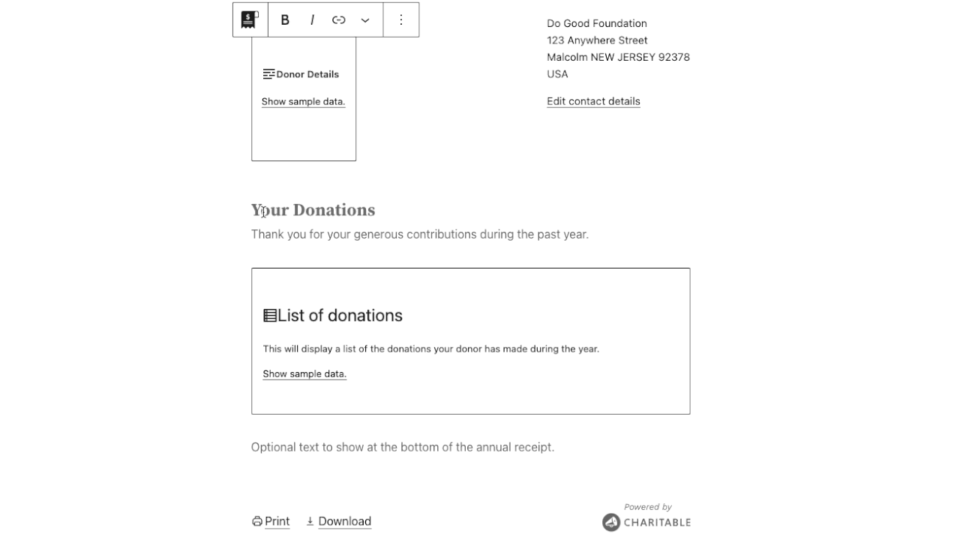
→ If you’re using a Full Site Editing-enabled block theme, you can also tweak the borders of the annual receipt.
→ One benefit of the Annual Receipt block is that you can also tailor its design to your needs by customizing the colour of the text and the background used for the annual receipt. You can even set up interesting background gradients to really make your annual receipt stand out.
→ You can change the end of financial year date. The date marking the end of the financial year changes country by country. Annual Receipts defaults to using December 31 as the final day of the financial year, but you can change this easily enough.
- In your WordPress dashboard, go to Charitable » Settings » Extensions.
- You will find the “End of financial year” setting in the “Annual Receipts” section. Set the day and month to match your country’s end of financial year date.
- Click Save Changes.
→ If you are not using the block editor, you can still create an Annual Receipt page using the [charitable_annual_receipt] shortcode. It supports most of the same settings that are supported by the block, but it does not have the same styling customization options.
→ Also, your donors can print and download their annual receipt!
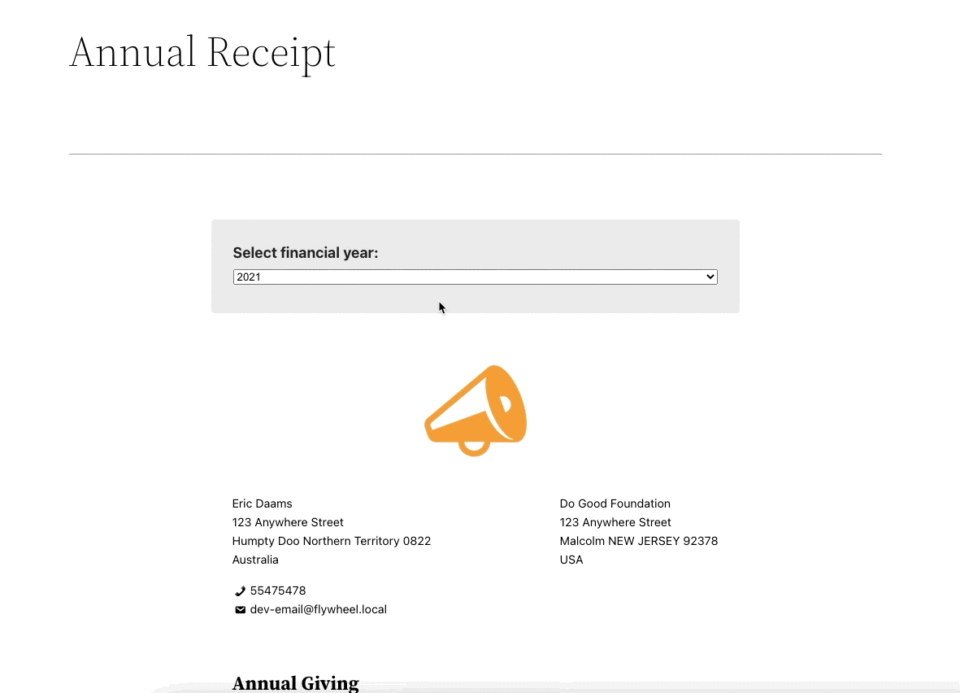
Your donors can securely access their annual receipt on your website. From there, a single click is all it takes for them to download their receipt or get a printable version.
See our guide on getting started with Annual Receipts »
Not Yet a Charitable Pro User?
Charitable powers donation forms for thousands of nonprofits on WordPress, with over 1 million downloads. Annual Receipt Bulk Send is included with every Charitable Pro license.
Stay Connected for More Nonprofit Resources
For more tutorials and videos tailored to nonprofits, subscribe to our YouTube channel. We regularly publish expert tips, step-by-step guides on online donations, fundraising strategies, and practical resources to help your organization succeed.
🗞️ Get weekly tips and exclusive guides in your inbox
Join our newsletter →
🎥 Watch step-by-step tutorials and success stories
Subscribe to our YouTube channel →
👩🏽💻 Connect with our community and get daily nonprofit insights
Follow us on LinkedIn →
🥳 Fun reels and non-profit insights
Follow us on Instagram →
👀 Insightful & fun videos to help you grow your cause
Follow us on TikTok→
🌎 Subscribe and follow for general fundraiser tips
Get Fundraiser Tips on TikTok →
Powerful Fundraising Resources
🤖 Use Charitable with Your AI Assistant
⬇️ Download proven strategies, campaign ideas, and expert tools
Get the Fundraising Kit →
💸 Get Free Fundraising Resources
Head to the Charitable Fundraising Hub →
🤔 Got questions about Charitable?
Charitable FAQs →
🏎️ Take Charitable for a spin
Create your Charitable Demo →
Understand non-profit terms and jargon
Non-Profit Glossary →
% Looking for non-profit deals and discounts?
Best Non-Profit Deals and Discounts →









Leave a Reply