
Recurring donations shouldn’t be this hard to set up. Yet time and again, new users tell us that’s exactly why they left their old platform and came to Charitable.
That positive feedback means a lot to us, but we also knew right away there was more we could do to make recurring donations easier for you.
So we asked our users directly – what would make recurring giving work better for you?
You told us what you want. We listened. And now Recurring Donations 2.0 is here!
We’ve added 4 new features built around what you asked for – a Recurring Only campaign mode, automatic failed payment recovery, donor self-service cancellation, and a real-time MRR dashboard. Check it out in our video below or keep reading for more details:
What’s In Charitable’s New Recurring Donations 2.0?
Our latest update introduces four powerful features that collectively transform how you handle recurring donations:
- Recurring Only Campaign Mode: Allows you to design campaigns specifically for sustaining support with recurring gifts as the only option.
- Automatic Failed Payment Recovery: Sends instant notifications to donors when a payment fails, helping you recover potential lost revenue.
- Donor Self-Service Cancellation: Empowers donors with a simple, clear way to manage their subscriptions directly, fostering trust and satisfaction.
- Real-Time Monthly Recurring Revenue (MRR) Dashboard: Provides at-a-glance insights into your fundraising performance, showing crucial metrics with summary cards.
Why You’ll Love Recurring Donations 2.0
These dynamic features are poised to simplify your fundraising efforts while enhancing donor relationships and increasing your revenue stream. Here’s why this matters to you:
- 💡 Maximizes Revenue: Keeps donations flowing and helps you reclaim potentially lost contributions.
- 🎯 Enhanced Donor Experience: Provides transparency and control to your supporters, boosting their trust and long-term commitment.
- 📊 Data-Driven Decisions: Real-time insights into your fundraising performance aid in strategic planning and growth.
See It In Action
See the recurring-only campaign mode – dedicated recurring campaigns with one click:
Recurring Donations 2.0 Making It Easier Than Ever!
1. Recurring Only Mode: Run Campaigns That Are Built for Subscriptions
Some campaigns aren’t designed for one-time gifts. A monthly giving club. An ongoing operational fund. An emergency response campaign where sustained support matters more than a single spike.
Previously, you could only suggest recurring donations, leaving donors free to choose one-time gifts. But now, you have the power to make recurring donations the sole choice for these crucial campaigns.
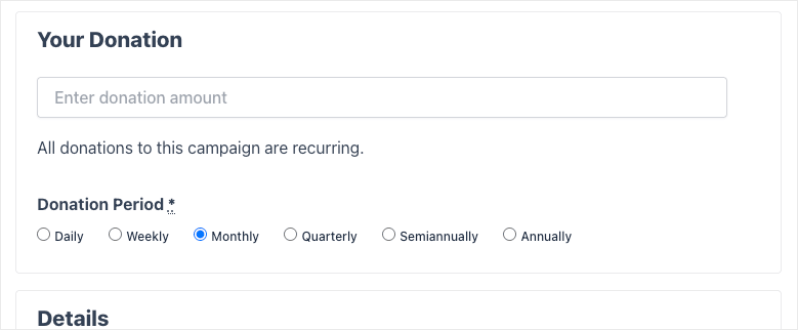
With Recurring Only mode, you can now create campaigns where recurring is the only option.
Why this works so well:
💰 Commitment by design: When you enable Recurring Only in the campaign builder, the one-time donation option disappears entirely. Donors choose their period – monthly, weekly, quarterly – and give.
🎯 Clear donor expectation: A simple notice on the form tells donors upfront that all donations to this campaign are recurring. No surprises, no confusion.
⚡ Full period flexibility: You still control whether donors choose their own period or whether the campaign has a fixed schedule. Recurring Only just removes the escape hatch.
How to Enable: Simply navigate to the Settings tab under Recurring Donations in the Campaign Builder and make your campaign “Recurring Only”.
2. Payment Failed Email: Recover Revenue Before It Walks Away
Failed payments are the silent killer of recurring revenue. A card expires. A bank flags a charge. A donor’s account goes low. The subscription fails – and if nobody informs your donor, you lose the gift quietly, with no chance to recover it.
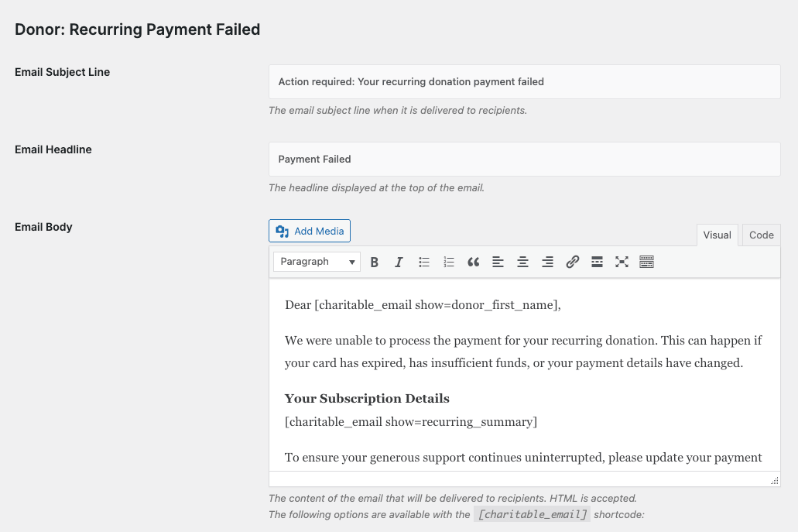
Recurring Donations 2.0 adds a Payment Failed email that fires automatically the moment a subscription payment fails. It goes straight to the donor, not the admin.
Why it works:
📣 Automatic and immediate: No manual follow-up required. The moment a payment fails and the subscription status changes, the email goes out.
✅ Fully customizable: Edit the subject line, headline, and body in Charitable » Settings » Emails. Use merge tags for the donor’s name, subscription details, and campaign. Make it feel like it came from your organization, not a system alert.
🤝 Donor-first communication: The default email is warm and practical. It explains common reasons a payment might fail – expired card, insufficient funds, updated payment details – and points the donor toward the next step.
How to Enable: Access the email under Charitable » Settings » Emails. Enable the “Payment Failed” email once in your email settings and it runs automatically from that point on.
3. Cancel Subscription Button: Give Donors the Control They Expect
Here’s an uncomfortable truth: donors who can’t easily cancel a recurring donation don’t stay donors. They call their bank instead. They dispute the charge. They leave a bad review.
The alternative is simple – and it actually builds more trust, not less: give donors a visible, straightforward way to cancel on their own terms.
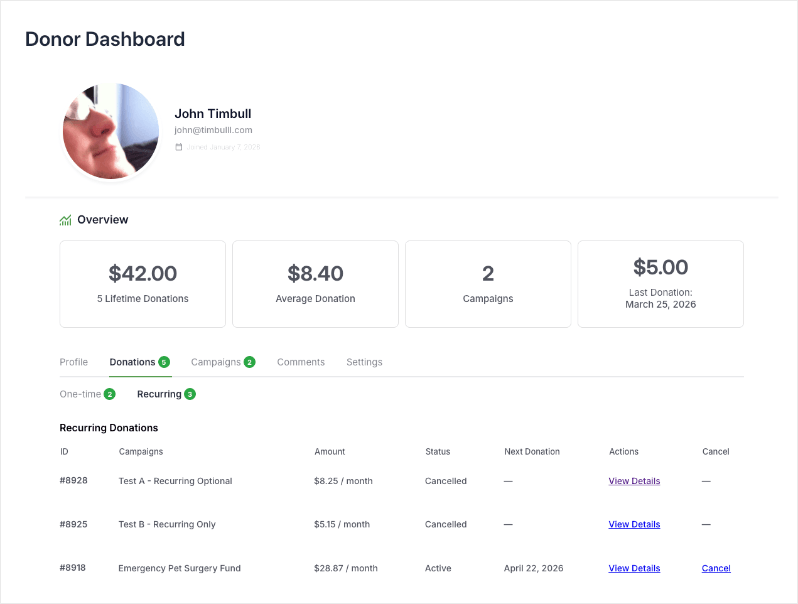
Recurring Donations 2.0 adds a Cancel Subscription button directly inside the donor dashboard.
Why it works:
🛠️ Self-service and frictionless: A Cancel link appears in the recurring donations table for any active subscription. One click, one confirmation prompt, and it’s done.
🧩 Smart status logic: The cancel button only shows when the subscription can actually be cancelled – active, pending, or on-hold. Completed, expired, and already-cancelled donations show a clean dash instead.
👁️ Transparent throughout: After cancellation, the status updates immediately and the donor sees a confirmation notice. No ambiguity about whether it worked.
How to Enable: No developer setup required. The button appears automatically when you update to 2.0.
4. MRR Summary Cards: Finally See Your Recurring Revenue at a Glance
Open your recurring donations report, and you’ll see four summary cards showcasing the metrics that matter most.
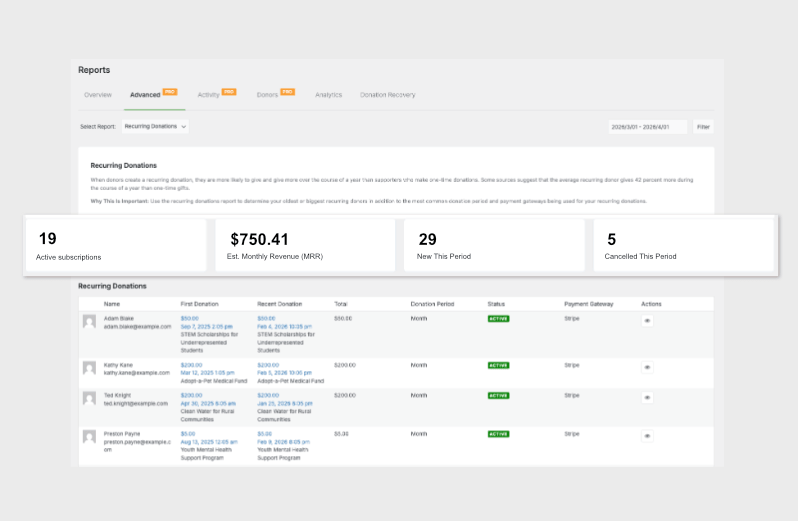
These aren’t just counts. They’re the numbers your finance team actually needs. These cards provide:
- ⚙️ Active Subscriptions: View the current count of active recurring donors, giving you a clear baseline of your recurring revenue.
- 💰 Estimated Monthly Revenue (MRR): See normalized monthly figures for each active subscription, presented with the clarity your board expects.
- 🚀 New This Period: Subscriptions initiated within your selected date range, allowing you to monitor growth in your donor base.
- 📣 Cancelled This Period: Track subscriptions canceled during a specific period, providing insight into donor retention and churn.
How to Enable: These summary cards appear automatically at the top of the Recurring Donations report, found under Charitable » Reports » Advanced » Recurring Donations. There’s no setup needed – just update to enjoy automatic insights!
With Recurring Donations 2.0, managing your sustaining donations has never been easier or more efficient.
We’re excited for these changes to supercharge your efforts. Reach out anytime. We’re here to help you succeed!
For Developers and Agencies
The cancel subscription flow includes nonce verification and user capability checks, and the full cancellation process fires through the existing charitable_process_cancellation_[gateway] filter so gateway-specific cancellation logic is respected.
The Payment Failed email extends the same Charitable_Email base class as all other Charitable emails, and the send event is filterable via charitable_send_recurring_payment_failed.
The MRR calculation and summary card HTML are available in Charitable_Report_Advanced_Recurring via get_mrr_data() and get_mrr_summary_html() if you need to extend or embed them elsewhere.
Get Started with Recurring Donations 2.0
To enable these new features, simply update your Charitable Pro plugin to the latest version. If you’re already using the Recurring Donations extension, everything activates automatically upon update.
If you’re already using the Recurring Donations extension, make sure you update to the latest version.
Not yet on Charitable Pro? You can get up to 50% off when you sign up for or upgrade to Charitable Pro. We want to ensure that you can try the advanced fundraising features like Recurring Donations 2.0 at a significantly reduced cost.
Join over a million satisfied Charitable Pro users today. Every purchase comes with a 14-day money-back guarantee, ensuring you’re supported every step of the way.
For a full walkthrough of each feature, including configuration details and shortcode documentation, see the Recurring Donations documentation.
If you have any questions or need assistance, our support team is ready to help you make the most of these new features.
Charitable Has 1.2+ Million Downloads!
Trusted by millions to power successful fundraising campaigns. Try Charitable risk-free today.
✅ 14-day money-back guarantee
✅ Transparent pricing
✅ Code-free setup
Stay Connected for More Nonprofit Resources
For more tutorials and videos tailored to nonprofits, subscribe to our YouTube channel. We regularly publish expert tips, step-by-step guides on online donations, fundraising strategies, and practical resources to help your organization succeed.
🗞️ Get weekly tips and exclusive guides in your inbox
Join our newsletter →
🎥 Watch step-by-step tutorials and success stories
Subscribe to our YouTube channel →
👩🏽💻 Connect with our community and get daily nonprofit insights
Follow us on LinkedIn →
🥳 Fun reels and non-profit insights
Follow us on Instagram →
👀 Insightful & fun videos to help you grow your cause
Follow us on TikTok→
🌎 Subscribe and follow for general fundraiser tips
Get Fundraiser Tips on TikTok →
Powerful Fundraising Resources
🤖 Use Charitable with Your AI Assistant
⬇️ Download proven strategies, campaign ideas, and expert tools
Get the Fundraising Kit →
💸 Get Free Fundraising Resources
Head to the Charitable Fundraising Hub →
🤔 Got questions about Charitable?
Charitable FAQs →
🏎️ Take Charitable for a spin
Create your Charitable Demo →
Understand non-profit terms and jargon
Non-Profit Glossary →
% Looking for non-profit deals and discounts?
Best Non-Profit Deals and Discounts →








