Charitable Blog

Everything you need to know about Charitable and our team.

Square integration announcement

Introducing Built-in Square Integration for Charitable Users

Last updated on

  • By

We’re excited to announce that Square payments are now available to everyone using Charitable – both Lite and Pro users in the latest versions (1.8.7! 🎊

We’ve completely reimagined how Square works with Charitable. Instead of requiring a separate add-on, Square is now built directly into Charitable’s core system. This means smoother performance, better reliability, and one less plugin to manage on your WordPress site.

In our mission to make fundraising accessible to all nonprofits, we’ve made Square available to both Lite and Pro users. Whether you’re just starting out or running large-scale campaigns, you can now offer your donors the convenience of Square payments.

What’s New?

First, Charitable comes with Square built-in, no addons needed. This means you’ll experience smoother performance and better reliability, while having one less plugin to manage on your WordPress site. The integration process has been streamlined to get you up and running in minutes.

We’ve completely redesigned the admin interface to make Square management effortless. All your payment settings are easily accessible from one central location.

Activating Square is now a one-click process, with clear visual indicators showing your connection status.
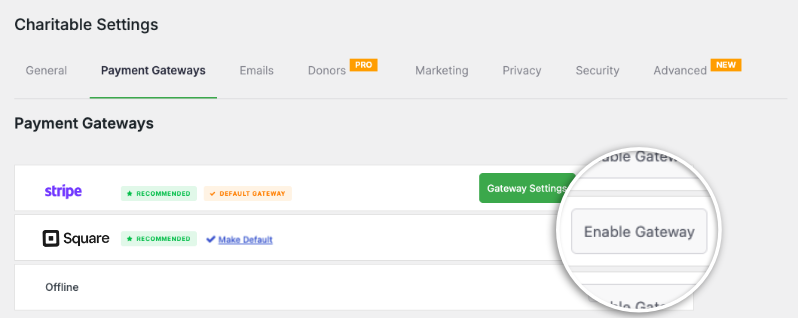
Charitable Square enable gateway

Testing your setup is simple with our test mode toggle. This lets you set up your Square account, configure settings, and make test payments safely. During this time, your users will be safe from accidentally making transactions before it’s properly set up.
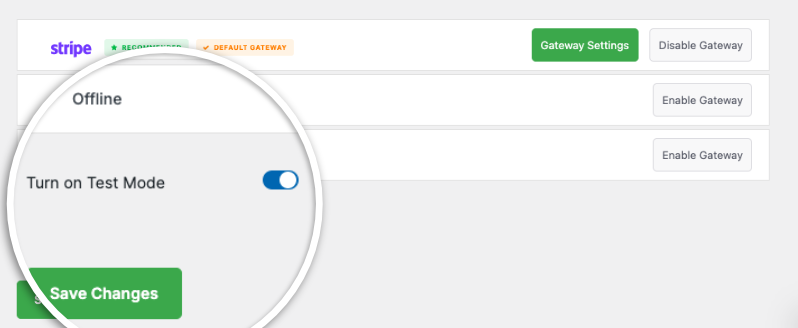
Turn on test mode

The new integration brings a comprehensive suite of payment options to your donation forms. Your donors can contribute using credit cards, debit cards, Apple Pay, Google Pay, and digital wallets. By supporting these diverse payment methods, you’re ensuring that donors can contribute using whatever method is most convenient for them, potentially increasing your donation conversion rates.

  • Built-in Integration: Square is now integrated directly into Charitable’s core – no add-ons needed!
  • Available for Everyone: Both Lite and Pro users can now accept donations through Square
  • Simple Setup: Connect your Square account in just a few clicks
  • Modern Payment Options: Support for Apple Pay and Google Pay included
  • Secure Transactions: Enterprise-level security for all donations

Learn how to connect Charitable to Square »

Simplified Pricing Structure

We’ve made Square available to both Lite and Pro users. Whether you’re just starting out or running large-scale campaigns, you can now offer your donors the convenience of Square payments.

We’ve introduced a transparent pricing structure where Charitable (Lite) / unlicensed users pay a 3% platform fee plus Square’s processing fees, while those with an active activated license from a Charitable plan (basic, plus, pro, elite) users only pay Square’s processing fees.

  • Free / Lite (no activated license):
    • Free to use
    • 3% platform fee per Square transaction
    • Standard Square processing fees
  • With activated Charitable license:
    • License required
    • No platform fee
    • Only Square processing fees apply

Advanced Campaign Integration

The new Square integration works seamlessly with all aspects of your fundraising campaigns. Whether you’re collecting one-time donations or ongoing contributions, the system handles everything automatically. For every campaign you create, you can customize your payment settings and choose which campaigns accept Square payments.

Powerful Webhook Integration

Our new webhook system ensures your donation system stays perfectly synchronized with Square’s platform. When a payment is completed, refunded, or updated, your Charitable installation receives instant notifications and automatically updates donation statuses. This means no more manual checking or delayed updates – everything happens automatically in real-time.

The best part? You can enable this in just a few clicks. There’s no coding involved. Simply copy the URL and add it to your Square dashboard. You’ll also need to subscribe to specific events by just checking a box.
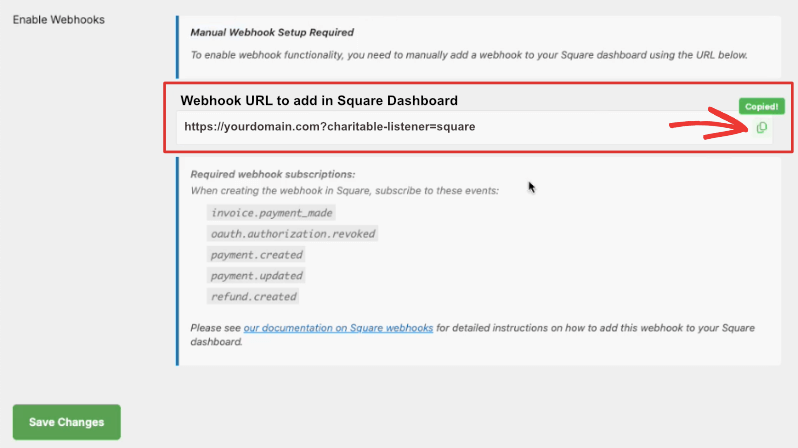
Grab the webhook url in Charitable

Once you’ve done that, you can your Square transactions will automatically be updated in your Charitable dashboard. You can even have refunds issued directly in Square.

Learn how to set up webhooks »

Comprehensive Reporting

Understanding your fundraising performance is crucial. That’s why we’ve made sure our reporting capabilities give you deeper insights into your donations.
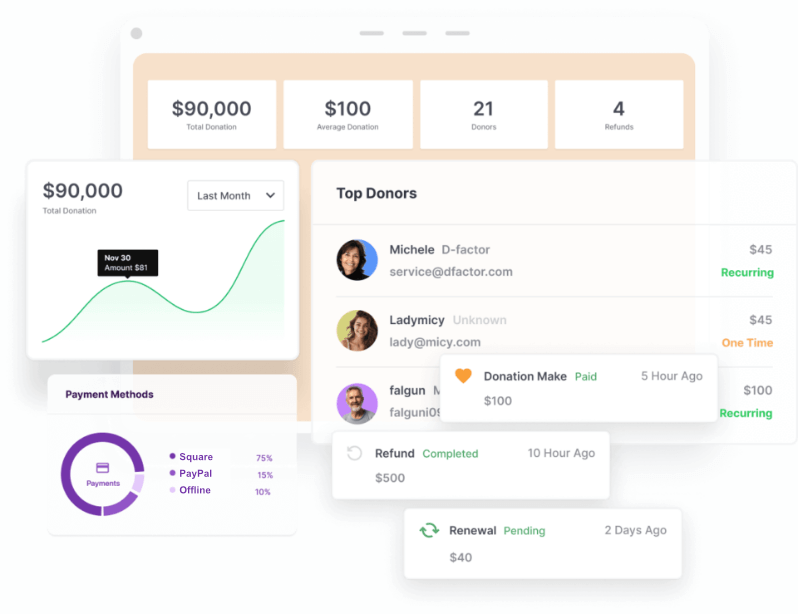
Payment reports

Track transaction details, analyze payment methods, and monitor donor contributions all from your dashboard. For accounting purposes, you’ll find customizable PDF receipts and annual statements.

Getting Started is Easy

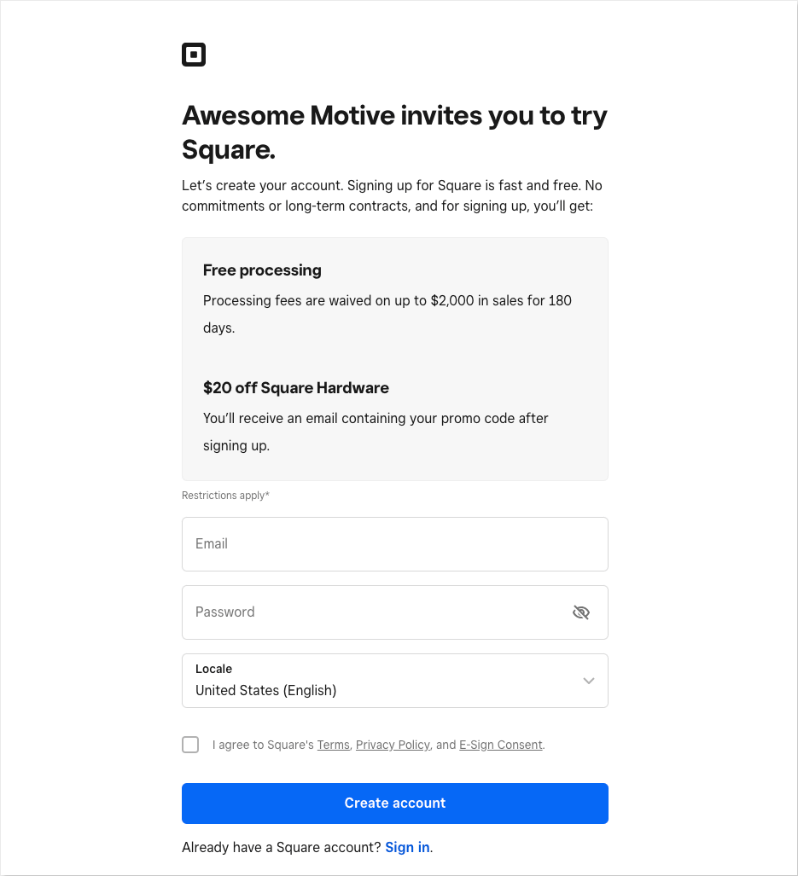
First, you will need a Square account. Don’t have one? Then it’s easy! Sign up with us. When you create your Square account through Charitable, you’ll get:

  • Processing fees are waived on up to $2,000 in sales for 180 days.
  • $20 off Square Hardware!
Sign up for Square

If you originate from one of the countries below, follow these links to get the special offers:

If you bring in more than $250K a year in donations, then you might qualify for special Square rates.

Once you have your Square account, head to the next step to connect Charitable and Square.

Enabling Square In Charitable

To enable Square, go to Charitable » Payment Settings in your WordPress dashboard. Click on the ‘Enable Gateway’ button and you’ll see a green ‘Gateway Settings’ button appear.
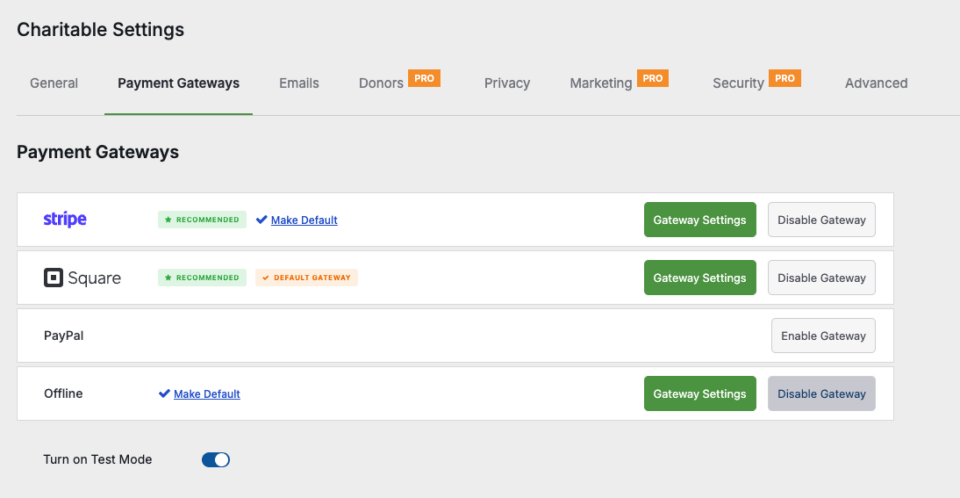
Charitable payment settings page

On the Gateway Settings page, scroll down the payment settings page to the Square section. You’ll see a field labeled Connection Status.

Click the Connect to Square Account button.
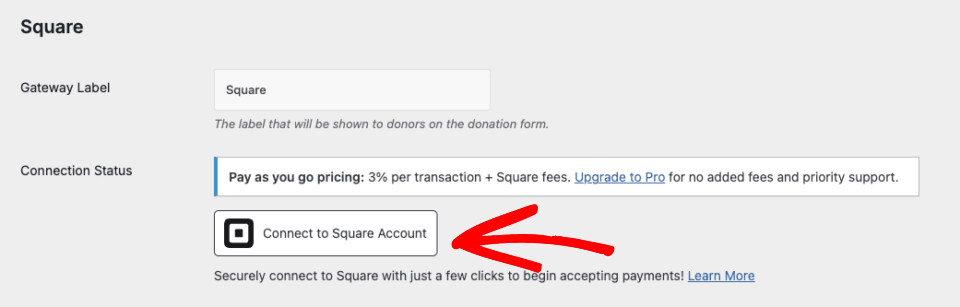
Connect to Square payment gateway

This will redirect you to the Square login page. Enter your email address and password, then click on Sign in.
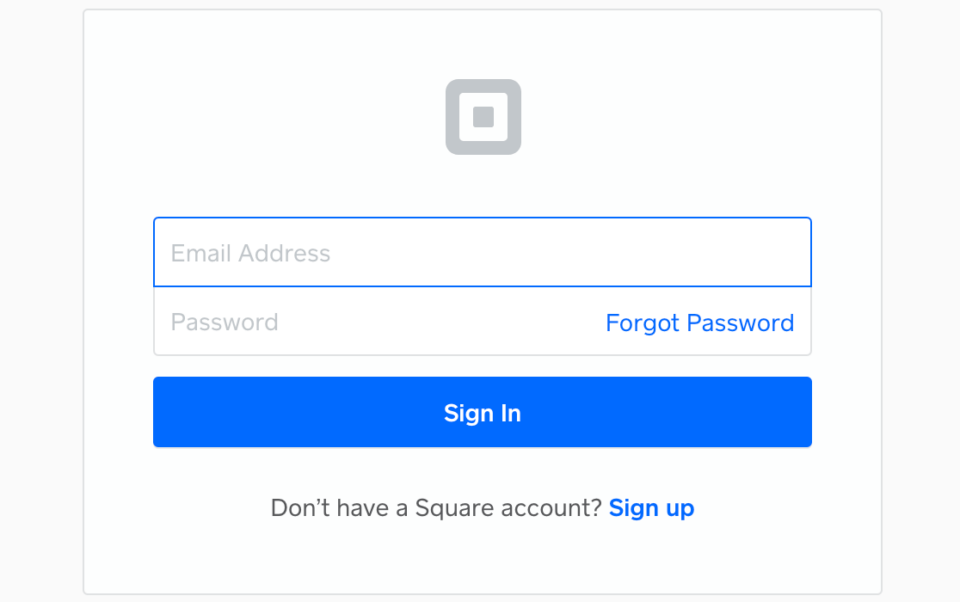
This image has an empty alt attribute; its file name is charitable-square-login-960x602.png

In order to connect Square to Charitable, you need to grant specific permissions to Charitable related to your account. Click on the Allow button to proceed.

You will now be taken back to the Charitable payments settings page. Once the connection settings are configured properly, you’ll see a green checkmark and a ‘Success’ message next to Connection Status.

Square connection status successful

For detailed setup instructions, visit our complete Square setup guide.

Frequently Asked Questions

Do I need any technical knowledge to set this up? 

No. The integration is designed to be user-friendly and can be set up in minutes.

Is this secure? 

Absolutely! We maintain the highest security standards to protect sensitive donor information.

Do I have to setup Square webhooks?

While not mandatory, we recommend setting this up so that you’ll be notified inside Charitable when Square payments are successful, failed, refunded, and more.

Ready to Get Started?

Whether you’re using Charitable Lite or Pro, you can start accepting Square payments today. Visit our Square documentation for step-by-step setup instructions.

Not yet a Charitable customer? Sign up for your account here »

author avatar
David Bisset Project Manager
David is the project manager of Charitable since 2022. David works with several non-profits (one operated by his wife) along with managing and developing features, support, and marketing for Charitable. Has been with WordPress since 2006 and has been lead organizer of multiple conferences, events, and meetups.

Disclosure: Our content is reader-supported. This means if you click on some of our links, then we may earn a commission. We only recommend products that we believe will add value to our readers.

Leave a Reply

Your email address will not be published. Required fields are marked *

Get free tips and resources right in your inbox, along with 60,000+ others

Join our Newsletter

We won’t spam you. We only send an email when we think it will genuinely help you. Unsubscribe at any time!

Featured Video:

Watch more videos on our YouTube channel.

What's New In Charitable

🔔 Subscribe to get our latest updates
📧 Subscribe to Emails

Email Subscription

Join our Newsletter

We won’t spam you. We only send an email when we think it will genuinely help you. Unsubscribe at any time!

Integration New

WordPress Command Palette Integration

Take your fundraising workflow to the next level. Speed up your site management and stay in your creative flow with our new WordPress Command Palette integration.

Supercharge Your Workflow
Navigate your fundraising dashboard faster than ever.

The Ultimate Keyboard Shortcut Hit Cmd + K (or Ctrl + K) to launch the Command Palette and manage your campaigns instantly.

⚡ Instant Navigation: Jump directly to your Campaigns, Donations, or Settings from anywhere in the editor.

➕ Quick Create: Start a new fundraising campaign or add a manual donation with a single command.

Efficiency Redefined
The tools you need, exactly when you need them.

⚙️ Contextual Actions: See relevant Charitable commands based on whether you’re editing a page or viewing your reports.

🚀 Seamless Integration: Built directly into the WordPress core experience for a lightweight, native feel.

author avatar
David Bisset Project Manager
David is the project manager of Charitable since 2022. David works with several non-profits (one operated by his wife) along with managing and developing features, support, and marketing for Charitable. Has been with WordPress since 2006 and has been lead organizer of multiple conferences, events, and meetups.
Improvement New Security

📣 New Security Features

We’ve introduced a suite of new security tools to give you total control over who accesses your forms, plus a new way to tidy up your database.

Advanced Security Suite

Layered protection: Cloudflare, ReCAPTCHA, IP Controls, and Rate Limiting.

We have overhauled our security settings to stop bots without blocking real donors.

  • 🤖 Flexible Protection: Choose between Google reCAPTCHA v3 or the privacy-first Cloudflare Turnstile to block bots invisible.

  • 🚦 Rate limiting: Stop spam floods by limiting how many submissions an IP address can make in a set timeframe.

  • 🛑 Total control: Use the new IP Blacklist to block bad actors instantly, or the IP Whitelist to let your team bypass checks during testing.

The Clean Donation Tool

Go from “Testing” to “Live” in seconds.

Finished setting up your site and need to get rid of all those test transactions?

  • 🧹 Sweep it clean: Bulk delete test donations and donor records with a single click.

  • 📉 Accurate reporting: Ensure your revenue stats are 100% accurate for launch day.

  • ⚙️ Reset sequences: Automatically resets sequential invoice numbering.

author avatar
David Bisset Project Manager
David is the project manager of Charitable since 2022. David works with several non-profits (one operated by his wife) along with managing and developing features, support, and marketing for Charitable. Has been with WordPress since 2006 and has been lead organizer of multiple conferences, events, and meetups.
donation form New

🏗️ Visual Donation Form Builder

Building the perfect donation form just got easier. We have completely reimagined how you create forms with a new drag-and-drop interface.

Design Visually, in Real-Time

No coding, no guessing. Just point, click, and build.

Say goodbye to confusing settings pages. You can now edit your form and see exactly what your donors will see, instantly.

  • 🖱️ Drag & Drop: Easily add fields like names, addresses, or file uploads by dragging them exactly where you want them.

  • 🎨 Customize everything: Click any field to tweak labels, placeholders, and requirement settings on the fly.

  • 👁️ Live preview: See your changes immediately as you make them—ensure your form flows perfectly before you hit publish.

Flexible & Powerful

Works with all your existing campaigns.

  • 🧩 Deep customization: Add custom HTML, shortcodes, or CSS classes for advanced branding.

  • ⚙️ Smart fields: Collect exactly what you need with support for dropdowns, checkboxes, dates, and hidden fields.

author avatar
David Bisset Project Manager
David is the project manager of Charitable since 2022. David works with several non-profits (one operated by his wife) along with managing and developing features, support, and marketing for Charitable. Has been with WordPress since 2006 and has been lead organizer of multiple conferences, events, and meetups.
Leaderboards New

🏆 Donor Leaderboards!

Turn your fundraising into a community event. Recognize your most generous supporters and inspire friendly competition with our new leaderboard tools.

Gamify Your Fundraising

Celebrate your top donors and encourage others to climb the ranks.

Create a public “Hall of Fame” to give your donors the recognition they deserve.

  • 🎨 Two stunning layouts: Choose the List View for a clean, data-rich table or the Card View for a modern, visual grid with avatars.

  • 🥇 Automatic highlights: The top 3 supporters get special Trophy and Crown icons to make them stand out.

  • 🧩 Place it anywhere: Add it to any page using the new Gutenberg Block, or drop it directly into your campaign using the Visual Builder.

Total Customization

You decide what to show and what to hide.

  • ⚙️ Flexible data: Choose to display or hide donation amounts, donor counts, or avatars.

  • 🔄 Lifetime stats: Works seamlessly with Recurring Donations to show a donor’s all-time total impact.

author avatar
David Bisset Project Manager
David is the project manager of Charitable since 2022. David works with several non-profits (one operated by his wife) along with managing and developing features, support, and marketing for Charitable. Has been with WordPress since 2006 and has been lead organizer of multiple conferences, events, and meetups.
Improvement New templates

🎨 New Templates & List Builder

Launch faster and design better. We’ve added three professional campaign templates and a versatile new content block to help you tell your story.

3 New Campaign Templates

Ready-to-use designs for specific fundraising needs.

Don’t start from scratch. Pick a template tailored to your cause and launch in minutes.

  • 🎄 Holiday Fundraiser: A warm, festive design perfect for year-end giving, toy drives, or food pantries.

  • 🎓 School Fundraiser: Built for PTAs and sports teams. clearly highlights goals like playground upgrades or classroom tech.

  • Church Fundraiser: A trustworthy layout designed for building funds, mission trips, and tithes.

The New “List” Block

Organize your campaign details without writing code.

Make your campaign pages easier to scan and more visually engaging with our new builder block.

  • 📝 Flexible layouts: Choose from 3 distinct styles to display sponsorship levels, donation perks, or project goals.

  • 🎨 Rich customization: Add colorful headlines, support for emojis, and unlimited list items.

  • 👣 Smart footers: Include a built-in footer for extra context or a final Call to Action.

author avatar
David Bisset Project Manager
David is the project manager of Charitable since 2022. David works with several non-profits (one operated by his wife) along with managing and developing features, support, and marketing for Charitable. Has been with WordPress since 2006 and has been lead organizer of multiple conferences, events, and meetups.