
Charitable Documentation

Learn how to make the most of Charitable with clear, step-by-step instructions.

Connect Charitable to Stripe Payments

Charitable comes with Stripe Payments built into the platform. You don’t need to use any API keys or manually configure webhooks. Simply log in to your Stripe account to complete the connection.

Note: Before we start, be sure to install Charitable on your WordPress site. Since Stripe is built into Charitable, you don’t need to install any addons or extensions for basic Stripe functionality.

Here’s a table of contents to help you navigate this easily:

  1. Enabling The Stripe Payment Gateway
  2. Connecting Your Stripe Account
  3. Stripe Settings Inside Your Campaign

Enabling The Stripe Payment Gateway

In your WordPress admin panel, navigate to the Charitable » Settings » Payment Gateways tab. You’ll see the Stripe tab along with an option to ‘Enable Gateway’.
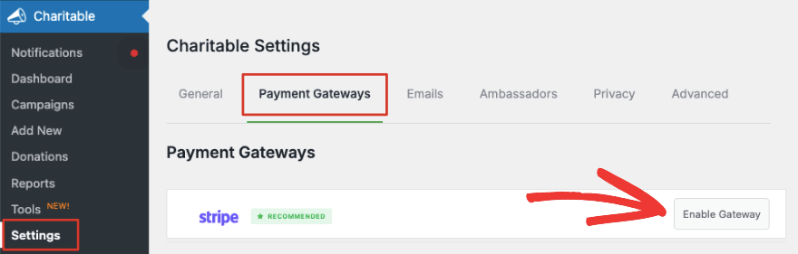
Enable Stripe payment gateway

Before you enable this, you’ll also see an option to turn on ‘Test Mode’ below the list of gateways. We recommend using Test Mode when enabling a new gateway to ensure you’ve set up everything correctly before going live on your site.
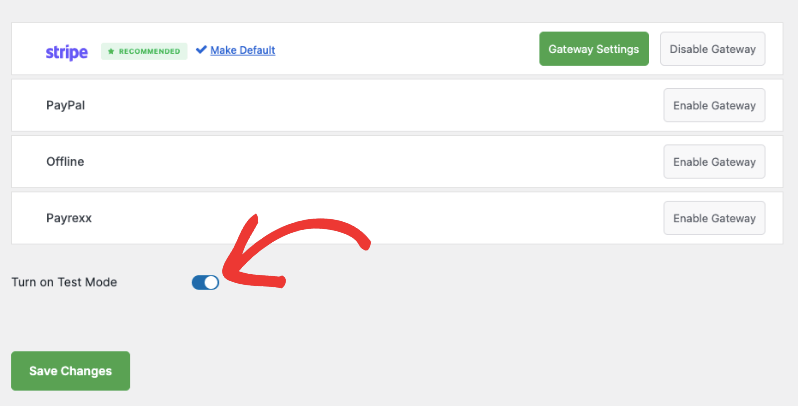
Turn on test mode for payment gateways

Make sure to hit the ‘Save Changes’ button to activate test mode.

Now you can hit the ‘Enable Gateway’ button next to Stripe and you will be automatically taken to the Stripe Settings page.

Note: When you enable a gateway, a green ‘Gateway Settings’ button will appear. You can use this to access the Settings page on your own any time you need.

Connecting Your Stripe Account

On the next page, you can add a label for this gateway. It’s prefilled with ‘Stripe’ for you but you can change that if you need.
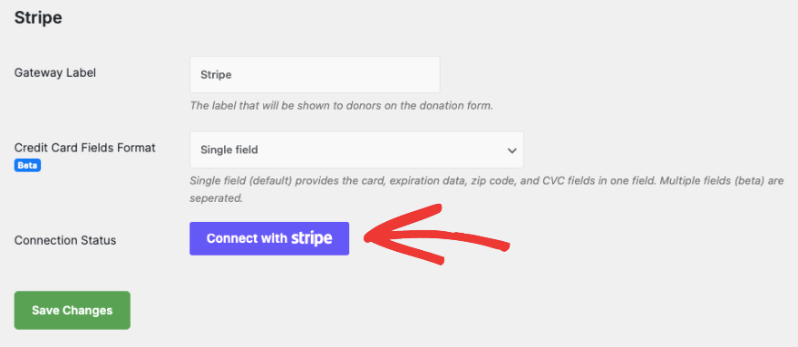
Connect with Stripe

Note: There’s a 3% fee for every transaction along with Stripe charges if you’re using Charitable Lite. To remove the additional 3% charge, you’ll need to upgrade to Charitable Pro.

Below this, you’ll see Credit Card Fields Format. This lets you decide how you want customers to enter their credit card information. There are 2 options here:

  • Single Field asks for the card number, expiration date, zip code, and CVC fields in one field.
  • Multiple Fields creates a separate field for each item.

Here’s what it will look like on the front end:
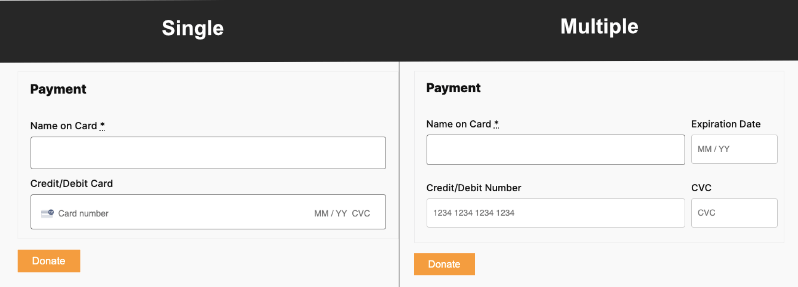
Single vs multiple payment fields

After you choose the Credit Card Fields format, click on the ‘Connect with Stripe’ button.

This will take you to the Stripe page where you can log into your account. If you don’t have an account, you can enter your email address and you’ll be able to sign up for a Stripe account.
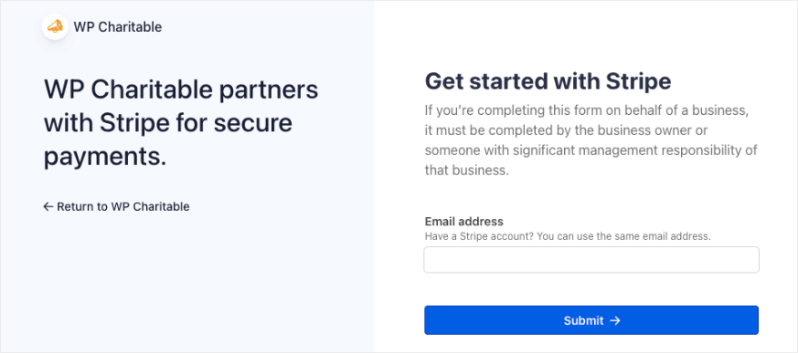
Log into Stripe

Once you’re logged into your Stripe account, use the ‘Return to WP Charitable’ link on the left. This will take you back to your WordPress dashboard and you’ll see the Connection Status should either say ‘Connected in test mode’ or ‘Connected in live mode’ depending on which mode you chose earlier.
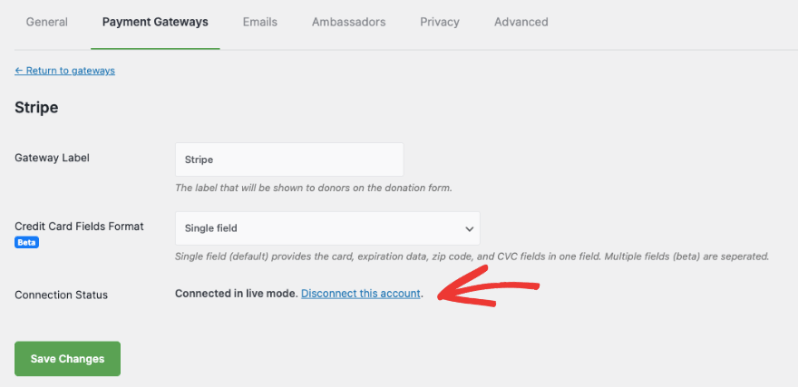
Stripe is connected

If you ever need to remove this Stripe account, you can use the ‘Disconnect this account’ link here.

Now you’re all set to start accepting donations using the Stripe payment gateway.

Stripe Settings Inside Your Campaign

When you create a fundraiser campaign with Charitable, under the Payment tab in the left menu, you’ll see that Stripe is enabled. If you need to tweak the settings, there’s an easy access button here that takes you straight to the Payment Gateway Settings page.
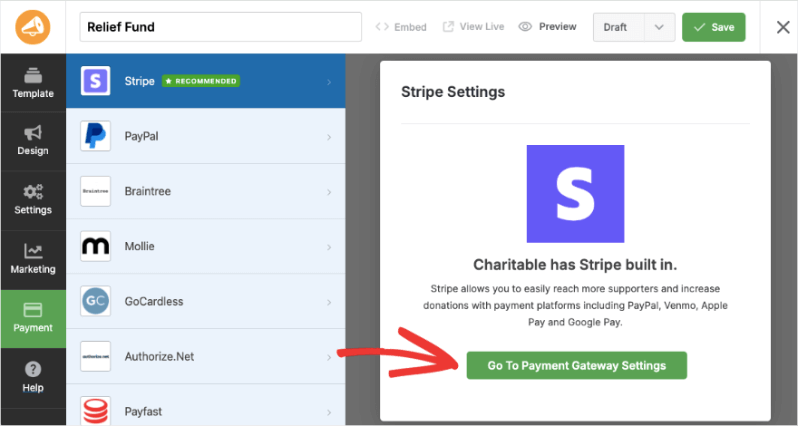
Stripe payment gateway in the campaign builder

When you publish your campaign, depending on the payment options you enabled with Stripe, they will appear in your donation form like this:
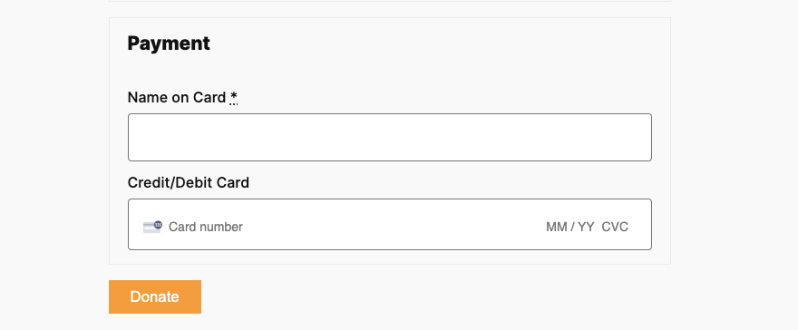
Stripe payment options in donation form

That’s it. You’re ready to create your fundraiser campaigns and accept donations through Stripe. Here’s the guide on How to Create a Fundraiser Campaign.

Looking to set up other payment options? Head over to our documentation page for Setting Up Payment Gateways.

Frequently Asked Questions

Do you have a question about using Stripe in Charitable? See the list below for our most frequently asked questions. If your question is not listed here, then please contact us.

Still have questions? We’re here to help!

Last Modified:

What's New In Charitable

View The Latest Updates
🔔 Subscribe to get our latest updates
📧 Subscribe to Emails

Email Subscription

Join our Newsletter

We won’t spam you. We only send an email when we think it will genuinely help you. Unsubscribe at any time!

Improvement Payments

🚀 Introducing PayPal Commerce: One Connection, Six Ways to Donate

Donors expect modern, flexible payment options when they support a cause. If they don’t see their preferred method on your donation form, they often disappear without a word. With PayPal Commerce, we are bringing a completely modernized checkout experience right to your campaigns.

Enjoy a single integration that upgrades your forms, makes giving seamless, and helps you capture every single donation.

What’s New:

🔌 One-Click Connection: Skip messy API keys and developer docs. Simply click “Connect with PayPal,” sign in to your business account, and your modern form is live in under five minutes.

💳 Six Ways to Give: Give your supporters instant access to PayPal balance, Venmo (US), Pay Later financing, major credit/debit cards, Apple Pay (Safari), and Google Pay (Chrome) all from the exact same form.

🔄 Flexible Recurring Giving: Fully supports monthly giving. Choose between the PayPal Subscriptions API (handled automatically on PayPal’s end) or Vault + Cron (handled securely right on your site).

💬 Friendly Error Recovery: No more confusing browser alerts. If a payment is declined, donors see plain-language, inline messages that guide them on how to fix the issue and complete their gift.

Ready for PayPal, modernized? Update to Charitable Pro 1.8.15+ (or Charitable Lite 1.8.11+) and connect your account today!

Campaigns New

⏳ Campaign Countdown: Drive Urgency and Lift Donations

Urgency is one of the most powerful tools in fundraising! Meet Campaign Countdown—a live, real-time timer built to turn procrastination into immediate generosity.

campaign_countdown_animation

What’s New:

⏱️ Live, Real-Time Urgency: Beautifully track days, hours, minutes, and seconds down to your campaign’s deadline w/ live-updating visual countdowns.

🎨 Tailored to Your Look: Choose between Boxed bordered tiles or a clean, single-line Inline display. Match your theme instantly with font and deep color controls.

🛠️ Place it Anywhere: Drop the countdown anywhere you like using the Campaign Builder field, a dedicated Gutenberg block, or a simple shortcode.

🚨 Smart Expiry Actions: Total control over the end state—choose to automatically replace the timer with a custom message, freeze it at zero, and more.

Improvement Migrations

↔️ Importing From GiveWP, Donorbox, GiveButter… even CSV!

Whether you’re migrating from another platform or consolidating your records, moving your data to Charitable is now faster and more flexible than ever. We’ve streamlined the process so you can bring over your entire fundraising history in just a few clicks.

🔄 Native GiveWP, Donorbox, & GiveButter Support: Switching from a major platform? Our dedicated migration tools handle the heavy lifting, automatically mapping your donors and donations directly into Charitable—no technical skills required.

📂 Universal CSV Import: Moving from a custom system or a specialized CRM? If you can export it to a CSV, you can import it here. Our smart mapping tool lets you align your columns to Charitable fields like names, emails, phone numbers, and addresses in seconds.

Instant Donor Profiles & Custom Tags: Automatically create rich donor profiles and bring in custom tags to keep your data organized. Segment and engage your supporters from day one with a clean, professional database structure.


Ready to make the switch?

Check out our GiveWP Migration Guide

Learn more about our Import Tools

Improvement Payments

💳 New Braintree Features For Your European Donors

With the release of Braintree addon version 1.3.0, you can now empower your European donors with the payment methods they trust and prefer, making giving seamless for international supporters.

🌍 Six New European Payment Methods: Support popular local options like iDEAL (Netherlands), Bancontact (Belgium), BLIK (Poland), and more to meet donors where they are.

⚡ Frictionless Donor Experience: These bank-based methods allow donors to authenticate directly with their own bank in a secure popup… no credit card numbers required.

⚙️ Automatic Currency Sync: No complex setup needed. The builder automatically displays the correct payment buttons based on your site’s currency (EUR or PLN), ensuring a relevant experience for every visitor.

Campaigns New

🖼️ Campaign Featured Images: Pro-Level Visuals Made Simple

With the new Campaign Featured Image setting in our visual builder, you now have a single, dedicated place to manage how your fundraisers look across your entire site and beyond.

🖼️ One Image, Everywhere: Set a primary thumbnail that automatically syncs to campaign grids, lists, and shortcodes—no more relying on layout order.

📱 Social Sharing Optimized: Easily upload images at the perfect size to ensure your campaigns look stunning and professional when shared on social media.

🔍 SEO & Accessibility Ready: Add custom alt text directly within the builder to improve search rankings and ensure your mission is accessible to every supporter.


