Charitable Blog

Everything you need to know about Charitable and our team.

Introducing the Weekly Fundraising Summary: Last Week's Numbers in Your Team's Inbox Every Monday

Introducing the Weekly Fundraising Summary: Last Week’s Numbers in Your Team’s Inbox Every Monday

Last updated on

  • By

If your treasurer asks how last week went, someone has to log in to WordPress, open the reports and copy the figures into an email. Then they do it again the next week.

We built the Weekly Fundraising Summary into the Charitable Pro plugin 1.8.19 so those numbers can reach your team without anyone logging in.

Turn on one switch, and the people you choose will get last week’s figures by email at the start of every week. The full report comes with it as a PDF, so your board can read it without a WordPress login. 📬

Here’s What the Weekly Fundraising Summary Looks Like

Before we walk through the setup, here’s where the summary lives. It’s one card on the Reports Overview.
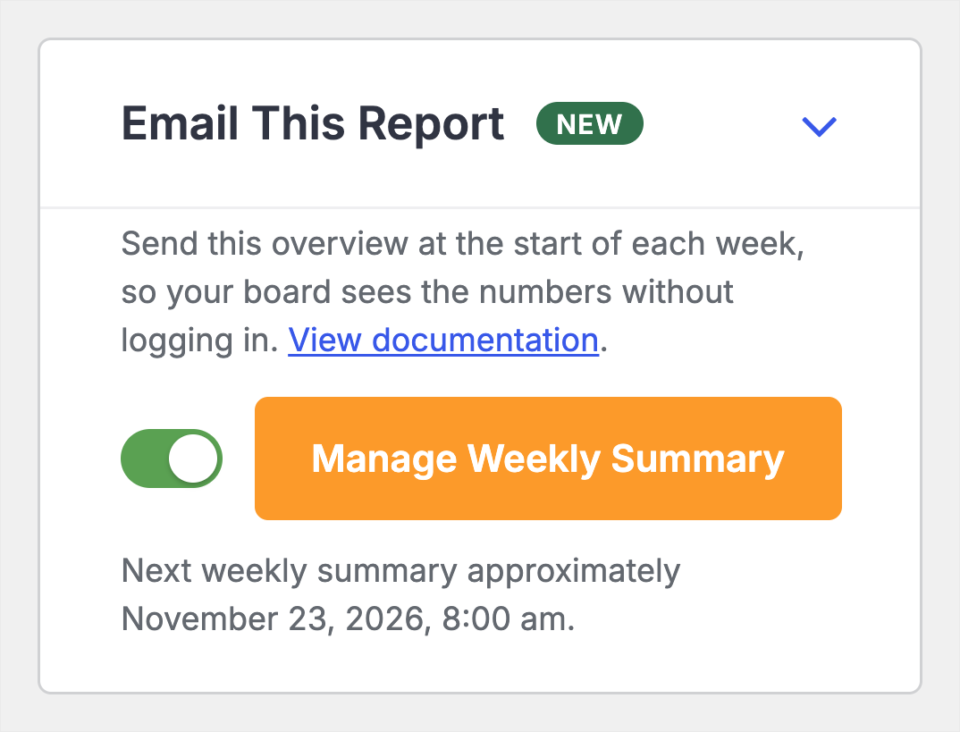
The Email This Report card in Charitable with the weekly summary switched on and the date of the next summary shown below it

Once the switch is on, the card tells you when the next summary will go out. The orange button opens the email itself, so you can choose who gets it and what it says.

What Your Team Gets Each Monday

The email opens with the week it covers, with the dates written out in full. Below that is a table of that week’s figures, placed next to the week before so you can see straight away whether giving went up or down.
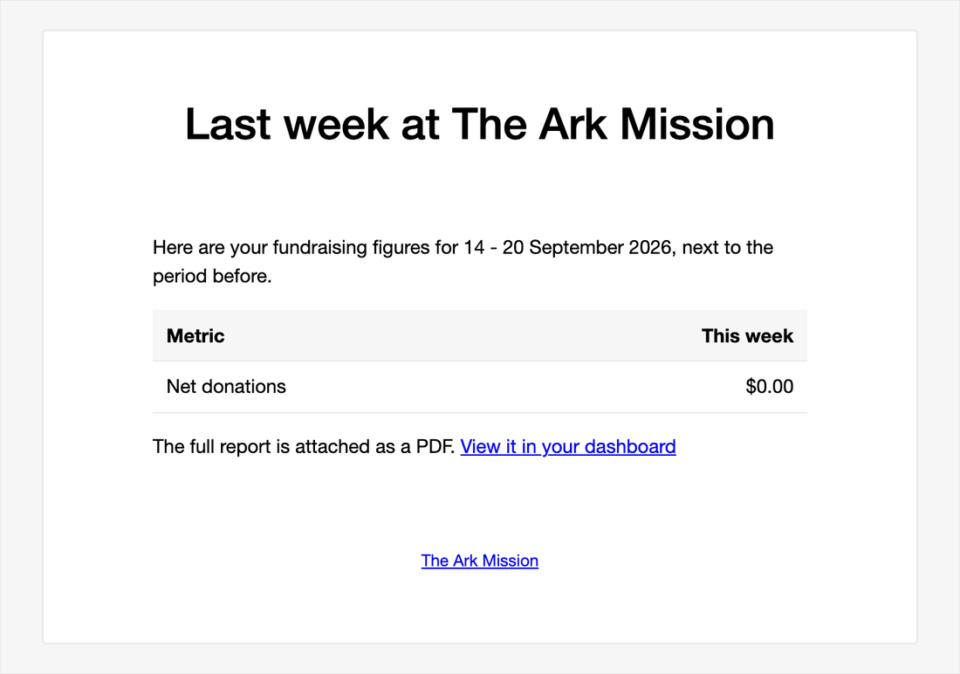
The Charitable weekly summary email as a recipient sees it, with the week's dates, a table of figures and a link to the full report

At the bottom there’s a link to view the full report in your dashboard. The same report is attached as a PDF for anyone who’d rather not log in.

Why Your Numbers Should Come to You

Most of the people who care about your fundraising numbers don’t work in WordPress. Your treasurer, your board chair and your finance committee all want the figures, but they shouldn’t need an account and a password to see them.

A summary that arrives on its own also means nobody has to remember to send it. The numbers go out every week, even in a busy week when nobody has time to check the Charitable reports by hand.

Seeing each week next to the one before helps, too. A small drop is easy to miss in a monthly fundraising report, but in a weekly email you’ll see it while there’s still time to do something about it.

When You’ll Use the Weekly Fundraising Summary

Here are a few of the people who’ll be glad to find it in their inbox.

  • 🧮 Your treasurer. They get the week’s totals every Monday and can check them against the bank without asking you first.
  • 🏛️ Your board. Board members see how fundraising is going each week, so the next board meeting starts with numbers everyone has already read.
  • ⛪ A church finance committee. The committee sees the week’s giving the day after Sunday service, with the full report attached for their records.
  • 📣 Your team during an appeal. Everyone working on a year-end or Giving Tuesday appeal sees how the last 7 days went and can plan the next email around it.
  • 🙋 A part-time or volunteer director. They only work a few hours a week, and the summary tells them where things stand before they even open WordPress.

One Switch on the Reports Overview

The summary lives on the Email This Report card on the right side of the updated Reports Overview. While it’s off, the card says Report disabled.

When you turn the switch on, your change saves straight away, with no page reload. The card then shows the date and time the next summary will go out, so you always know when your team will get it.

Each summary covers the previous Monday to Sunday. That gives everyone the same full week to compare, whatever day they open the email.

Make the Weekly Summary Email Your Own

The summary is a real Charitable email, so you can change it in the same place as your receipts and other notifications. It’s called Admin: Weekly Report Summary, and you’ll find it under Admin Notifications in the Email Manager.
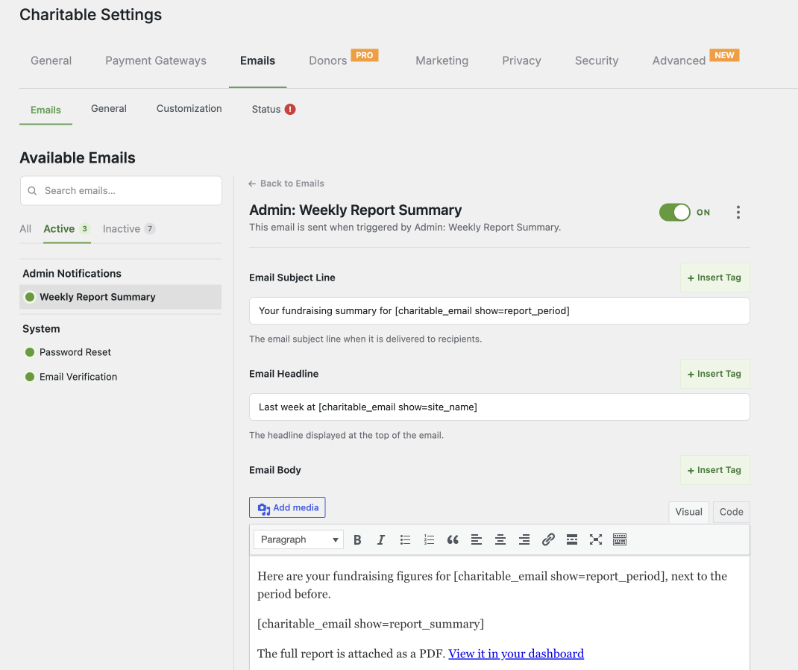
The Admin: Weekly Report Summary email settings in Charitable with the subject line, headline and body fields

You can rewrite the subject line, the headline and the message in your own words. By default, the subject reads “Your fundraising summary for” followed by the dates, and the headline reads “Last week at” followed by your site name.

The Recipients field decides who gets it. Add your treasurer, your board chair or anyone else who should see the numbers each week.
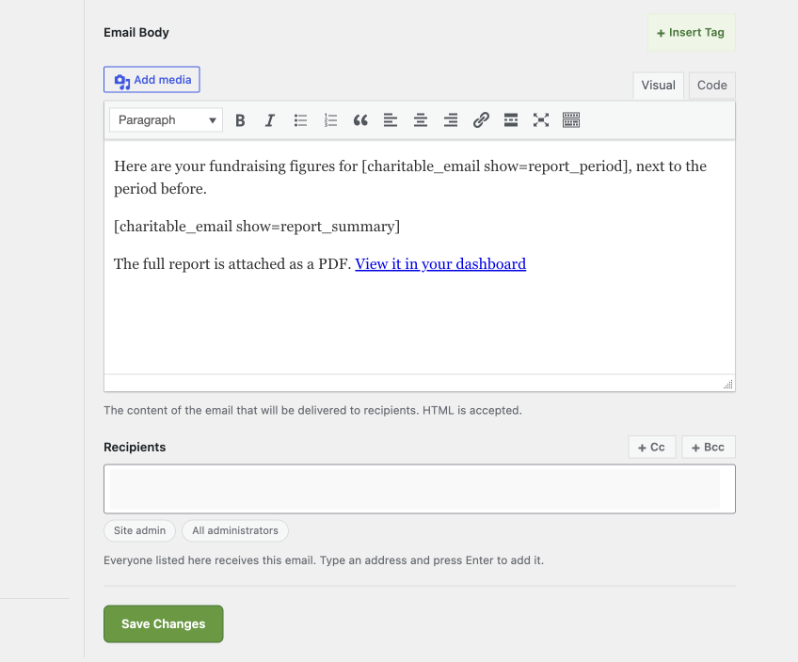
The Recipients field on the Charitable weekly summary email settings

We’d add one line to the message telling people who to contact with questions. It saves a reply-all thread when someone spots a number they don’t understand.

How to Turn On the Weekly Fundraising Summary

The setup only takes a few minutes, and most of that is choosing who gets it.

Step 1: Check Your Email Status

The summary is sent by your site’s own email, so it needs to arrive reliably. Look at the Email Status on your Charitable dashboard first, and if it shows a warning, fix the email setup before you go on.

A plugin like WP Mail SMTP helps the summary land in the inbox rather than in spam.

Step 2: Turn On Email This Report

To get started, head over to Charitable » Reports. Find the Email This Report card on the right and turn on the switch.

Step 3: Open the Email

Next, click Manage Weekly Summary on the same card. This opens the email under Charitable » Settings » Emails.

Step 4: Choose Your Recipients and Wording

In the Recipients field, add the people who should get the summary. Change the subject, headline or message if you’d like, using + Insert Tag to add the dates, your site name or the figures.

Keep the [charitable_email show=report_summary] tag in the message. That’s the tag that adds the table of figures, so without it your team gets an email with no numbers.

Step 5: Save the Email

Save your changes, and you’re done! The first summary will go out at the start of next week.

Read that first one yourself before you rely on it, so you know exactly what your team sees.

Read the Full Weekly Fundraising Summary Tutorial →

FAQs on the Weekly Fundraising Summary

Which version of Charitable do I need?

The weekly summary is in the Charitable Pro plugin 1.8.19 and higher.

When does the summary go out?

It goes out at the start of each week and covers the previous Monday to Sunday. The exact date and time of the next one shows under the switch on the Email This Report card.

Do recipients need a WordPress account?

No. The figures are in the email and the full report is attached as a PDF. They’ll only need a login if they click through to your dashboard.

Can I send the full report at other times?

Yes. You can export the same report as a PDF or CSV from the Reports Overview whenever you need it, for example before a board meeting.

How do I stop the summary?

Turn off the switch on the Email This Report card. The card will say Report disabled, and no more summaries will be sent.

Get Started With the Weekly Fundraising Summary

The Weekly Fundraising Summary is ready in the Charitable Pro plugin 1.8.19 and higher. Update the plugin, open Charitable » Reports and turn on Email This Report, and your team will get last week’s numbers next Monday!

Read the Weekly Fundraising Summary Documentation →

Not Yet on a Charitable Paid Plan?

What’s New in Charitable

Here’s what else we’ve launched in Charitable recently.

👥

Duplicate Donor Merging

Find supporters who appear twice in your donor list and merge them into one record.

Learn More →

🔑

Passwordless Fundraisers

Supporters sign up to fundraise with just an email address, no password needed.

Learn More →

🏃

Activity Tracking

Show progress on minutes read, miles walked or meals packed beside the money raised.

Learn More →

🖨️

Fliers and Posters

Fundraisers print a flier with a QR code that takes people straight to their page.

Learn More →

💸

Tiered Rates for Fee Relief

Set a different fee rate for different gift sizes, so the ask fits the gift.

Learn More →

🎟️

Charitable Events

Sell tickets to your events right inside your Charitable campaigns.

Learn More →

We add new features to Charitable all the time to help you raise more and look after your donors. See everything we’ve launched in the Charitable Changelog.

Stay Connected for More Nonprofit Resources

For more tutorials and videos tailored to nonprofits, subscribe to our YouTube channel. We regularly publish expert tips, step-by-step guides on online donations, fundraising strategies, and practical resources to help your organization succeed.

🗞️ Get weekly tips and exclusive guides in your inbox
Join our newsletter →  

🎥 Watch step-by-step tutorials and success stories
Subscribe to our YouTube channel →  

👩🏽‍💻 Connect with our community and get daily nonprofit insights
Follow us on LinkedIn →

🥳 Fun reels and non-profit insights
Follow us on Instagram → 

👀 Insightful & fun videos to help you grow your cause
Follow us on TikTok→  

🌎 Subscribe and follow for general fundraiser tips
Get Fundraiser Tips on TikTok → 

Powerful Fundraising Resources

🤖 Use Charitable with Your AI Assistant

See Charitable + AI →

⬇️ Download proven strategies, campaign ideas, and expert tools
Get the Fundraising Kit →  

💸 Get Free Fundraising Resources
Head to the Charitable Fundraising Hub →

🤔 Got questions about Charitable?
Charitable FAQs →

🏎️ Take Charitable for a spin
Create your Charitable Demo →

Understand non-profit terms and jargon
Non-Profit Glossary →

% Looking for non-profit deals and discounts?
Best Non-Profit Deals and Discounts →

author avatar
Melinda Bartley
I’m the senior writer at Charitable, with over 15 years of experience in content creation, digital marketing, and SEO. Beyond my professional role, I’m the co-founder and trustee of a non-profit organization committed to animal rescue and welfare. Throughout my career, I’ve helped build 17+ blogs – many from the ground up, transforming them into successful marketing platforms that drive traffic, boost brand visibility, and generate revenue.

Disclosure: Our content is reader-supported. This means if you click on some of our links, then we may earn a commission. We only recommend products that we believe will add value to our readers.

Leave a Reply

Your email address will not be published. Required fields are marked *

Get free tips and resources right in your inbox, along with 60,000+ others

Join our Newsletter

We won’t spam you. We only send an email when we think it will genuinely help you. Unsubscribe at any time!

Featured Video:

Watch more videos on our YouTube channel.

What's New In Charitable

View The Latest Updates
🔔 Subscribe to get our latest updates
📧 Subscribe to Emails

Email Subscription

Join our Newsletter

We won’t spam you. We only send an email when we think it will genuinely help you. Unsubscribe at any time!

Donations New

👥 Introducing Donor Merging: Two Records, One Supporter!

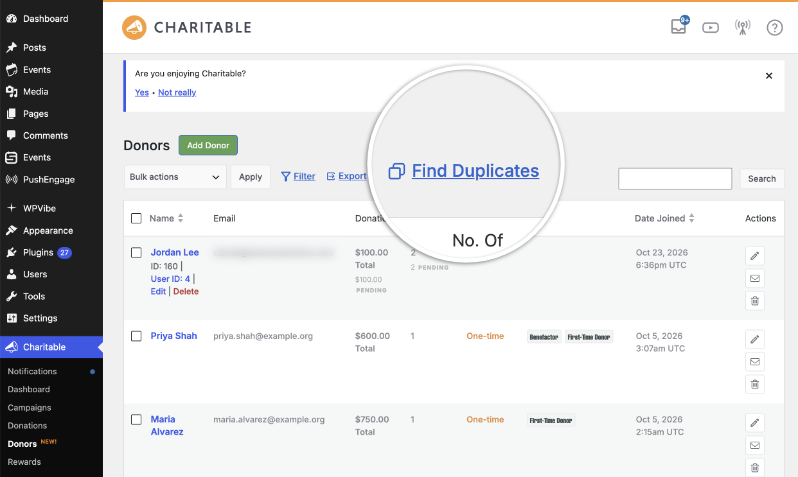
Somewhere in your donor list is a supporter who appears twice, because they gave from a work address one year and a personal one the next. Every donation is still recorded and every receipt still went out, but a loyal supporter who has given for years can look like two people who gave half as much. From the Charitable Pro plugin 1.8.19.1 you can find those records and merge them from the Donors screen. Why this is important:

  • 🔍 A Find Duplicates link where you already work: Head to Charitable » Donors and it sits next to Filter and Export, then tells you how many groups of possible duplicates it found.
  • 🧩 Grouped by name, not by email: Charitable compares the first and last name together and ignores capital letters, spacing and punctuation, which is what catches the same person under two different addresses.
  • 📊 A preview before anything changes: Each group shows every record with its email address, its donation count and its lifetime total, and the preview shows you the combined totals and the email that will be added.
  • ↩️ Every merge can be undone: Nothing is merged until you choose to merge it, and you can reverse any merge afterwards, so a wrong guess costs you nothing.
  • 📥 Built for the week after an import: Moving donors over from another plugin is where most duplicates come from, and it is also when they are hardest to spot, because every record is new to you.

Check out our announcement here.

author avatar
Melinda Bartley
I'm the senior writer at Charitable, with over 15 years of experience in content creation, digital marketing, and SEO. Beyond my professional role, I'm the co-founder and trustee of a non-profit organization committed to animal rescue and welfare. Throughout my career, I've helped build 17+ blogs - many from the ground up, transforming them into successful marketing platforms that drive traffic, boost brand visibility, and generate revenue.
ambassadors New

🔑 Introducing Passwordless Fundraisers: Sign Up With Just an Email!

Supporters arrive wanting to help, and then the form asks them to invent a password for a website they may only visit twice. A lot of them stop right there. Passwordless Fundraiser Accounts, new in Charitable Ambassadors 3.5.0, let a supporter start a peer to peer fundraiser with nothing but an email address. Why this is important:

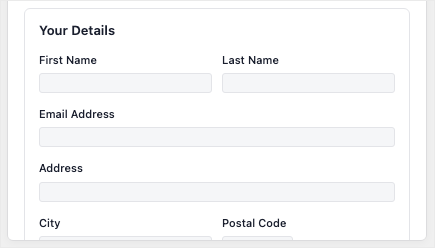
  • 🔑 No password step to lose them at: Switch it on in Charitable » Ambassadors » Templates » Submit Form and the create-fundraiser form asks only for a name, an email address and a page title.
  • 👤 Still a real WordPress account: One click in one email confirms the address, signs them in and creates the account, so they can come back later to edit their story, change their photo and see who has donated.
  • 🎚️ Your call on every campaign: Each peer to peer campaign can follow the site default or override it, which matters when a campaign pays fundraisers through Stripe Connect and those people do need a password.
  • 📋 See who has not clicked yet: The Charitable » Ambassadors » Directory » Awaiting Sign-In tab lists everyone still waiting, with the campaign they joined and a Resend button, so a typo or a spam folder is something you can spot and fix.
  • 🛡️ Links a scanner cannot use up: Opening the link only shows a page, and your fundraiser is signed in when they press the button on it, so corporate email scanners never burn the link. Each one works once, expires on its own and is stored only as a hash.

Check out our announcement here.

author avatar
Melinda Bartley
I'm the senior writer at Charitable, with over 15 years of experience in content creation, digital marketing, and SEO. Beyond my professional role, I'm the co-founder and trustee of a non-profit organization committed to animal rescue and welfare. Throughout my career, I've helped build 17+ blogs - many from the ground up, transforming them into successful marketing platforms that drive traffic, boost brand visibility, and generate revenue.
ambassadors New

🏃 Introducing Activity: Show Progress on More Than Money!

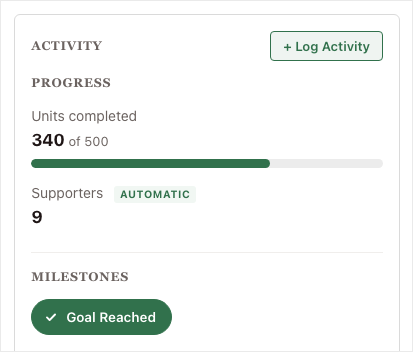
Most peer-to-peer fundraisers are about more than the money. A read-a-thon is about minutes read, a walkathon is about miles walked, and a food drive is about meals packed. Activity for Charitable Ambassadors lets your fundraisers show that effort right beside the dollars they raise. Why this is important:

  • 🎯 Progress on what you actually count: A progress bar shows each thing you count against its own target, sitting right beside the money raised.
  • 🏅 Milestones for the yes or no things: A milestone badge marks the efforts that are simply done or not done, with no number to chase.
  • ✍️ Fundraisers log their own numbers: Your supporters enter their totals from their own pages, so the effort stops living in a spreadsheet, a comment, or nowhere at all.
  • 🤖 Some numbers count themselves: An AUTOMATIC tag appears wherever the site worked the figure out from completed donations, so you can see at a glance what nobody typed in.
  • 🧩 Set it up once, use it anywhere: You decide what gets counted one time, then choose which campaigns count it. Available now in Charitable Ambassadors 3.4.7, with no new plugin and no developer.

Check out our announcement here.

author avatar
Melinda Bartley
I'm the senior writer at Charitable, with over 15 years of experience in content creation, digital marketing, and SEO. Beyond my professional role, I'm the co-founder and trustee of a non-profit organization committed to animal rescue and welfare. Throughout my career, I've helped build 17+ blogs - many from the ground up, transforming them into successful marketing platforms that drive traffic, boost brand visibility, and generate revenue.
ambassadors New

🖨️ Introducing Fliers and Posters: Raise Money Away From the Screen!

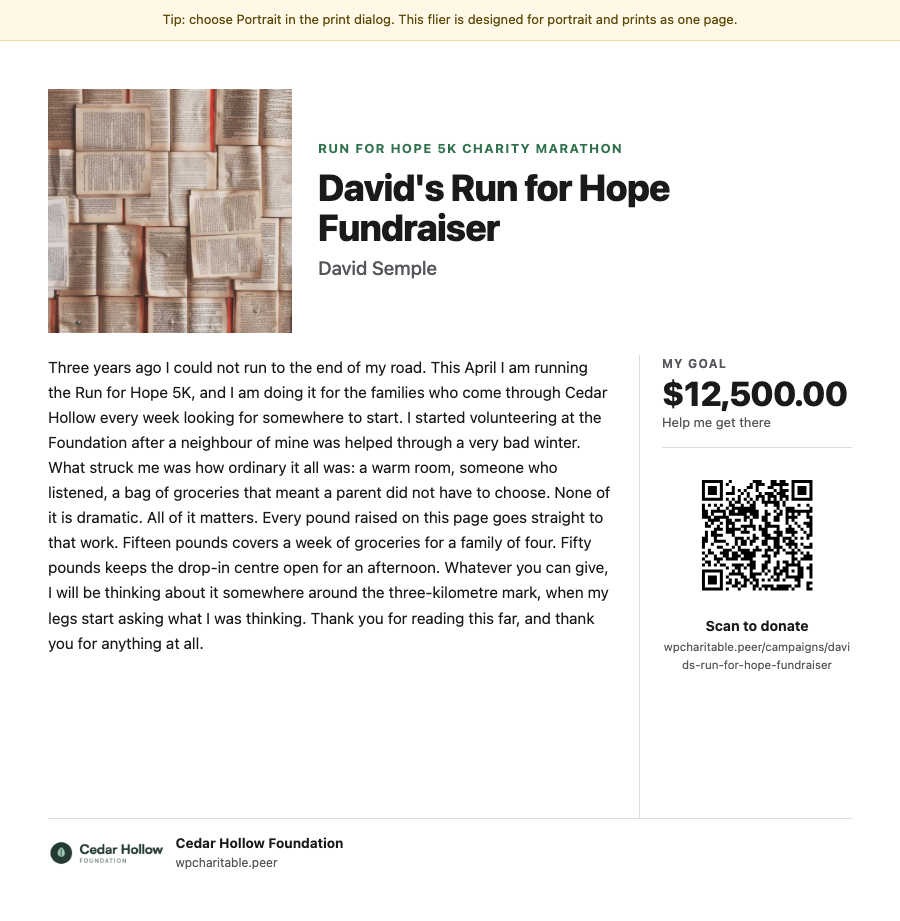
A lot of peer-to-peer fundraising happens away from a screen: at the finish line of a 5K, on a school noticeboard, in an office kitchen. Charitable Ambassadors 3.4.7 adds 2 printables, a fundraiser flier carrying each fundraiser’s own story and QR code, and a recruitment poster that signs new fundraisers up. Both open as a normal web page and print straight from the browser. Why this is important:

  • 🏁 A flier for every fundraiser: Each one carries that fundraiser’s own photo, story and goal, with a QR code that opens their page rather than your main campaign.
  • 📌 A poster that recruits: It shows “Now Recruiting” above your campaign name with a large QR code that opens your sign-up form, so someone can start fundraising without waiting on a link from you.
  • 🪄 No design tool needed: Both printables render as a normal web page and print from the browser, with no PDF plugin and no designer.
  • 📄 2 flier layouts: Hand out carries the full story for giving to friends and family, and Post up carries a short hook with 5 tear-off tabs for a noticeboard.
  • 🛡️ Off until you switch it on: Fliers stay off after the update until you enable them under Charitable » Ambassadors » Other » Fliers, and only the owner or an administrator can open one.

Check out our announcement here.

author avatar
Melinda Bartley
I'm the senior writer at Charitable, with over 15 years of experience in content creation, digital marketing, and SEO. Beyond my professional role, I'm the co-founder and trustee of a non-profit organization committed to animal rescue and welfare. Throughout my career, I've helped build 17+ blogs - many from the ground up, transforming them into successful marketing platforms that drive traffic, boost brand visibility, and generate revenue.
Improvement Payments

💸 Introducing Tiered Rates for Fee Relief: Match the Ask to the Gift!

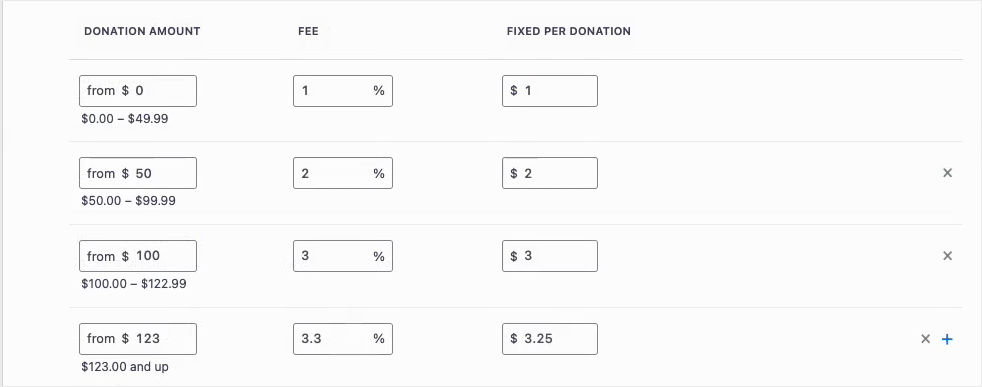
Fee Relief asks your donors one short question at checkout: would you like to cover the processing fee on this gift? Until now that question used a single rate for every donation on a gateway, so a $10 gift and a $500 gift were asked for the same percentage. Fee Relief 1.3.0 lets you set as many donation bands as you like, each carrying its own rate. Why this is important:

  • 🪙 Gentler on small gifts: A fixed transaction cost is a far bigger share of a $10 donation than a $500 one, so bands let you ask for less at the bottom.
  • 🎚️ As many bands as you need: Each band carries its own percentage and its own fixed amount, and the top band runs on with no upper limit.
  • 🛑 An optional ceiling: A Maximum fee field stops any donor being asked for more than a number you choose, however large the gift.
  • 🔌 Set per payment gateway: Stripe can run on four bands while Windcave and Payfast stay on a single rate, because bands belong to a gateway and not to your whole site.
  • 🛡️ Nothing changes until you say so: Your current rates stay exactly as they are until you switch Use Tiered Rates on under Charitable » Settings » Advanced » Fee Relief.

Check out our announcement here.

author avatar
Melinda Bartley
I'm the senior writer at Charitable, with over 15 years of experience in content creation, digital marketing, and SEO. Beyond my professional role, I'm the co-founder and trustee of a non-profit organization committed to animal rescue and welfare. Throughout my career, I've helped build 17+ blogs - many from the ground up, transforming them into successful marketing platforms that drive traffic, boost brand visibility, and generate revenue.