
Requires: Charitable Pro plugin 1.8.16+
Pro plan and higher
Do you run peer-to-peer fundraising and want every fundraiser page to offer the same rewards? With Charitable Ambassadors, rewards attached to the parent campaign appear on every fundraiser page underneath it.
This guide covers how inheritance works, how to set it up, the 2 checks that explain most problems, shared stock, and the Ambassadors rewards layout.
You set the tiers once, and 200 ambassadors all offer the same ones.
Charitable Rewards needs version 1.8.16 or higher of the Charitable Pro plugin, on the Pro plan and higher. Rewards on peer-to-peer campaigns also needs Charitable Ambassadors 3.0.0 or higher.
What’s In This Guide?
Watch the Video
If you’d rather watch than read, this short video shows rewards on a fundraiser page.
Why It Works This Way
Rewards are owned by your organization. An individual fundraiser can’t invent their own perks, change the prices, or remove the ones you set.
This is on purpose. If every fundraiser could define rewards, you’d be fulfilling 200 different promises at 200 different prices, with no way to know what you’d committed to.
Because of this, the fundraiser submission form replaces its suggested-amounts editor with a short note. The note explains that the tiers belong to the organizer, so ambassadors don’t see a setting they can’t use.
Setting It Up
- To get started, attach rewards to the parent campaign, not to individual fundraiser pages.
- On any reward with a stock limit, set the inventory scope to shared, so all fundraisers draw from 1 pool.
- Next, put the parent campaign in automatic mode. This matters more than it looks, as the next section explains.
- If you’d like a crowdfunding-style page, you can also set the Ambassadors fundraiser-page layout to the rewards variant.
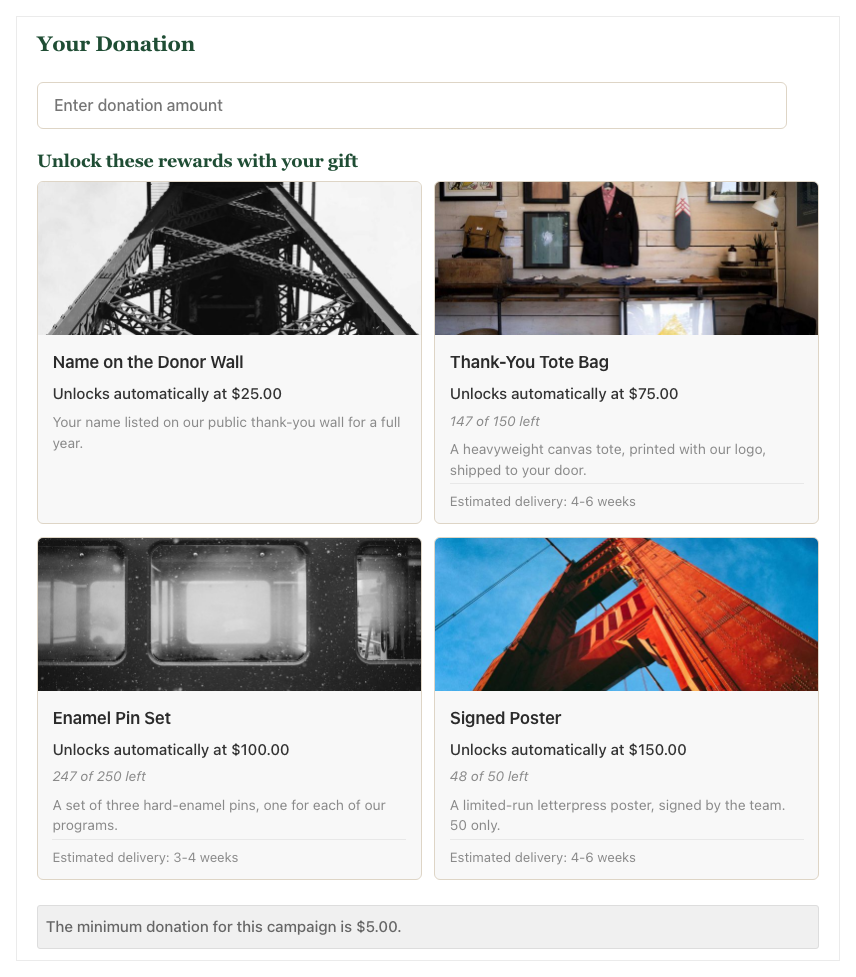
The Parent Must Be in Automatic Mode
This is the setting most likely to make you think rewards are broken on peer-to-peer.
Inherited rewards appear on a fundraiser’s donation form only when the parent campaign is in automatic mode. If the parent is in levels mode, the fundraiser’s donation form shows no rewards at all.
The reason is that a giving level sets the donation amount. On a fundraiser page, the amount has to stay the donor’s own choice for the totals to roll up to the parent correctly, so Rewards shows nothing rather than levels that can’t work.
So in levels mode, a fundraiser page shows reward cards on the page but nothing on the donation form. The page looks right and the form looks empty, which looks exactly like a bug.
If a fundraiser’s donation form shows no rewards, check the parent’s mode first.
The Other Half of the Same Check
There’s a second condition to know about. The parent campaign’s rewards must be turned on, not only attached.
Attaching rewards to a campaign doesn’t switch rewards on for it. If the parent’s rewards setting is off, fundraisers inherit nothing, even though the catalog shows the rewards as attached.
Between them, these 2 conditions explain nearly every “inheritance isn’t working” report.
Shared Inventory Is the Point
A reward with a stock limit of 50 and shared scope means 50 in total across the whole program. Per-campaign scope would mean 50 for each fundraiser, which for 200 fundraisers is 10,000 posters.
Shared is almost always what you want on peer-to-peer, so set it when you attach the reward. See Creating Rewards.
What Levels Do on Fundraiser Pages
Levels are display-only on fundraiser pages. A fundraiser page shows the parent’s rewards as threshold-style cards whatever the parent’s reward mode is.
This is because a pickable tier needs the level to set the amount, and a fundraiser’s form doesn’t do that. Donors on a fundraiser page give an amount and unlock rewards automatically, rather than picking a tier.
The Ambassadors Rewards Layout
Ambassadors comes with a fundraiser-page layout built around rewards. It’s a crowdfunding-style page with the reward cards in a sticky sidebar, tabs for story, updates and donors, and the fundraiser’s own name line.
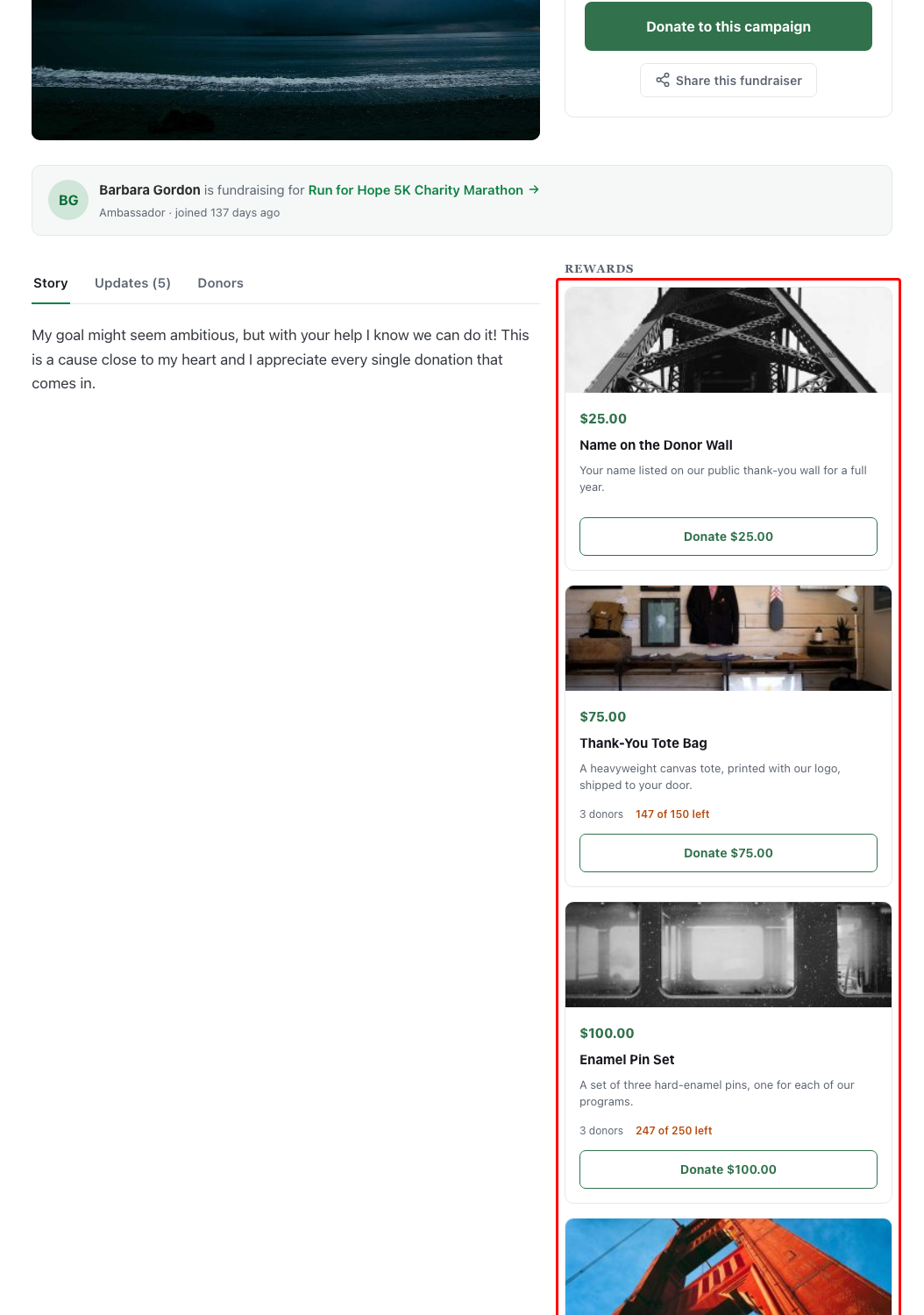
You can set it on the Ambassadors Templates tab. The layout is only selectable while Rewards is active.
If Rewards is installed but turned off, the card offers to activate it. If it isn’t installed, the card links to where you can get it.
Tips Worth Keeping in Mind
These habits keep rewards working across every fundraiser page.
- Put the parent in automatic mode and leave it there. Peer-to-peer rewards are designed around that setup.
- Use shared inventory scope on every reward with a stock limit, every time.
- When inheritance looks broken, check the parent’s rewards setting and its mode before anything else.
- Fulfillment is still yours. Claims from 200 fundraisers all land in 1 list in your admin.
FAQs on Rewards for Peer-to-Peer Campaigns
Why does a fundraiser’s donation form show no rewards?
Check that the parent campaign is in automatic mode and that its rewards setting is turned on. Those 2 conditions explain nearly every case.
Can an ambassador add their own rewards?
No. Rewards belong to your organization, so fundraisers can’t add, change or remove them.
Does each fundraiser get its own stock?
Only if you choose per-campaign scope. With shared scope, every fundraiser draws from 1 pool.
Developer Reference
Resolution
Charitable_Rewards_P2P_Source::resolve_source_campaign_id() maps a child campaign to the parent that owns its rewards.
The fundraiser page reads the resolved parent’s rewards directly. That’s why the page can show cards even in cases where the donation form does not.
The Inheritance Gate
Charitable_Rewards_Public::should_render_inherited_rewards( $campaign_id, $source_id, $source_enabled, $source_mode ) decides whether a child’s donation form renders inherited rewards. It returns false in either of these cases.
- The source campaign does not have rewards enabled.
- The request is for a child and the source campaign is in
levelsmode.
Both are intentional. The second is the condition described above.
Detection
| Filter | Purpose |
|---|---|
charitable_rewards_ambassadors_active | Override whether Rewards believes Ambassadors is present |
Attachment Scope
Charitable_Rewards_Attachment_Repository::SCOPE_SHARED is the scope that makes 1 inventory pool serve every fundraiser. SCOPE_PER_CAMPAIGN gives each its own allowance.
Customization Examples
Render inherited rewards on children even when the parent is in levels mode.
// Not recommended. Levels cannot set the amount on a child form, so the cards
// will appear without their pickable behavior.
add_filter( 'charitable_rewards_ambassadors_active', '__return_true' );
The gate itself is not filterable, and that’s deliberate. The levels restriction exists because the behavior does not work on a child form, not as a policy choice.
Wrapping Up
You now know how fundraiser pages inherit rewards, the 2 settings to check when they don’t appear, and how to share stock across your whole program.
If you get stuck on any step, our support team is happy to help.
You May Also Want to Read
These guides cover the settings peer-to-peer rewards depend on.
- Creating Rewards. Choose between shared and per-campaign inventory scope.
- Automatic Mode. Set up the mode peer-to-peer rewards need.
- Levels Mode. Learn why levels don’t carry over to fundraiser forms.
- Charitable Ambassadors. Set up peer-to-peer fundraising itself.
Helpful Links
🤝 Get help when you need it
Connect with Customer Support →
📑 Find the guide you need
Browse the Documentation Hub →
⬇️ Download proven strategies, campaign ideas, and expert tools
🔗 Let your AI Assistant do the fundraising work for you.
Connect Charitable to your AI assistant →
💸 Get Free Fundraising Resources
Head to the Charitable Fundraising Hub →
🤔 Got questions about Charitable?
Charitable FAQs →
Need help understanding non-profit terms and jargon?
See our Non-Profit Glossary →




