
Charitable Blog

Everything you need to know about Charitable and our team.

Hero banner announcing 'New Beacon Bold Hero Campaign Templates' with a circular logo on dark green left and a donation card on pale right background, indicating an announcement.

Beacon Templates Now in Charitable Lite: More Ways to Design Your Campaigns

Last updated on

  • By

Beacon, our bold campaign hero templates, launched on Charitable’s paid plans a few releases back.

As of Charitable 1.8.12, both Beacon templates are also included in Charitable Lite, our free plugin.

Beacon leads with a full-width hero banner, your logo, your goal, and a donation widget locked right on top of the image, so the ask is the first thing a visitor sees.

Read the original Beacon announcement for the full walkthrough. Here’s what’s new for Charitable Lite.

Why a Strong Hero Decides What Happens Next

The hero and donation widget are locked in place by design. It also follows your campaign theme automatically and stays on-brand without any extra styling work.

See It in Action
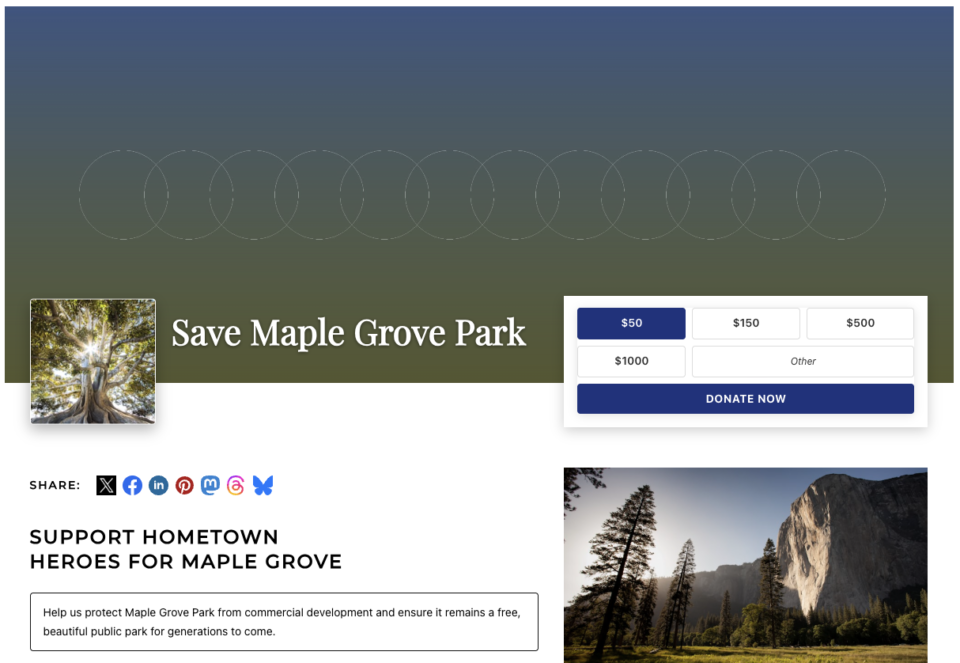
Beacon two-column campaign template showing the Campaign Hero area above a two-column story layout

Here’s Beacon (2 Columns) with example content already in place: the hero banner up top with the goal and donation widget built right in, and a 2-column story area underneath for the rest of your case.

When You’ll Feel the Difference

Beacon’s bold hero works especially well for a few kinds of campaigns.

A grassroots community drive is a natural fit. You can lead with a photo of the park, the school, or the neighborhood you’re fighting for, with the goal sitting right on the image.

If you’re running an urgent, time-sensitive appeal, putting the donation request and the progress bar at the top of the page means a first-time visitor can give without scrolling, which matters when you don’t have much time to make your case.

When you’re promoting a campaign on social, this matters even more. Beacon puts your story and your donate button in front of that visitor in the first screen.

A capital or building campaign benefits from the same treatment. Show a rendering or a site photo edge to edge, with the amount raised toward goal sitting front and center.

And for a memorial or tribute fund, a single, dignified banner image paired with a focused ask sets the right tone from the first moment.

Two New Templates, One Bold Look

Both templates are marked new and highlighted in the Campaign Builder template library, so they’re easy to find when you start a campaign.
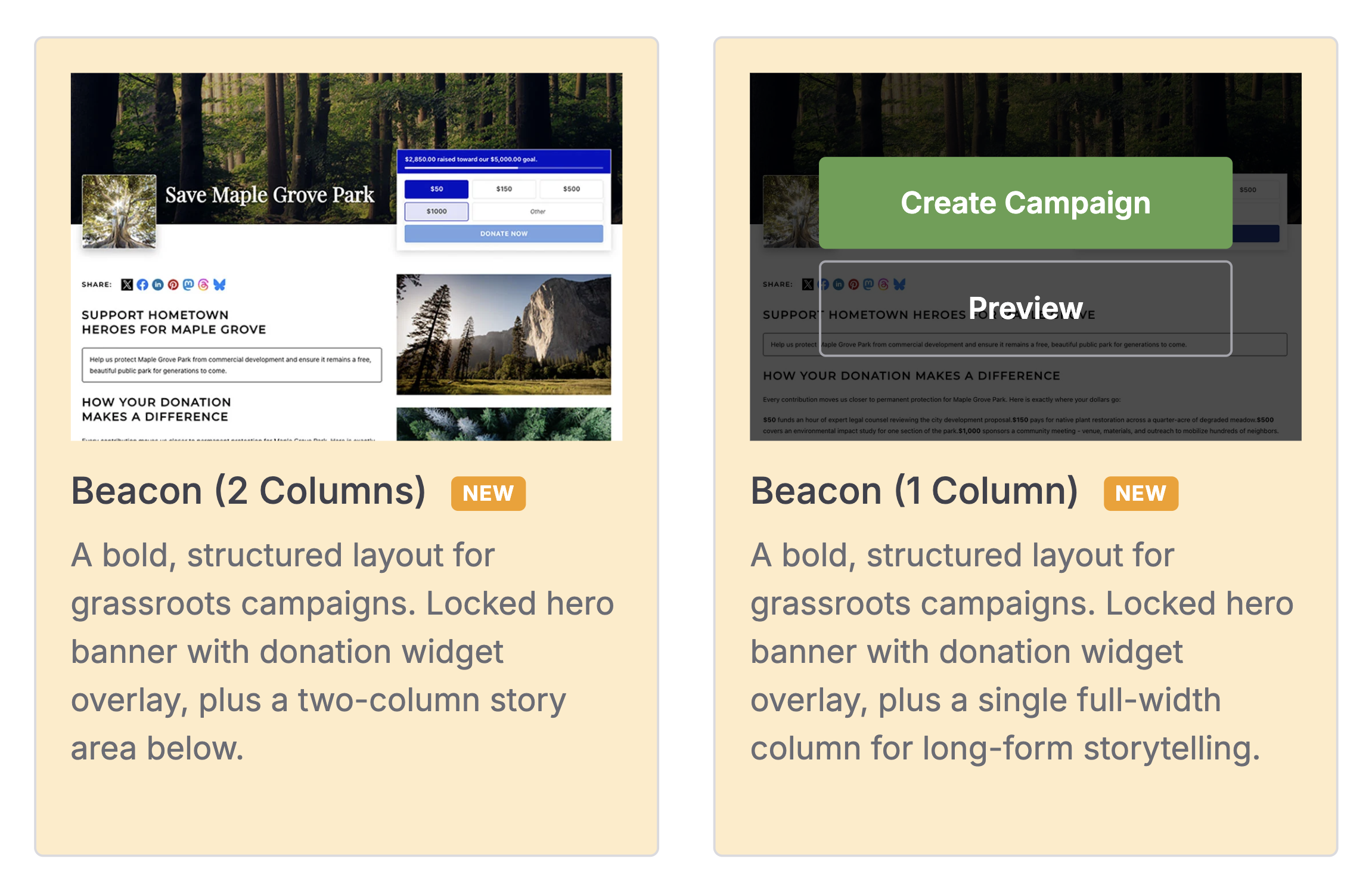
Beacon templates

Beacon (2 Columns) is the more structured of the two. It pairs the locked hero banner and donation widget overlay with a 2-column story area underneath, room for your narrative on one side and supporting details on the other.

Beacon (1 Column) keeps the same hero, but follows it with a single full-width column, better suited to a long-form story you don’t want broken up into side-by-side chunks.

Both include example content and sample photography already in place, so you can see the finished shape the moment you pick one, then swap in your own images and copy.

The Campaign Hero Field

Beacon is powered by the new Campaign Hero field, a complete header block you can drop into any template, not just Beacon.
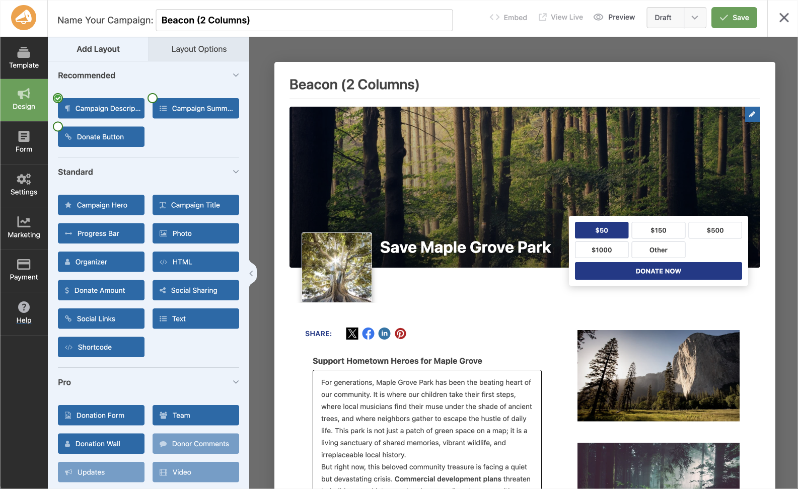
Campaign editor showing a Beacon (2 Columns) layout with a forest hero image and donation popup overlay

It brings 10 settings together into one cohesive banner, all in a single block.

  • A background image
  • An optional logo
  • Your title
  • The raised amount with a progress bar
  • A set of donation amounts

You can also remove the logo slot and let the hero image take center stage. Or if you’d rather not add an image, it falls back to a solid color or gradient background.

Turn on the raised amount and progress bar and the hero shows “$X raised toward our $Y goal” automatically, the moment a campaign goal is set.

The donation widget is built right into the hero, too.

  • Set your one-time amounts
  • Choose which amount is selected by default
  • Decide whether to allow an “Other” custom amount
  • Label the donate button however you like (it defaults to “Donate Now” if you don’t change it)

If the Charitable Recurring Donations add-on is active, flip on monthly and one-time tabs in the same widget.

Preview and Build Your Campaign

In the builder, you can preview the campaign and you’ll see your actual donation progress and goal.

Launch Your First Beacon Campaign

You can have a Beacon campaign live in minutes.

Step 1: Start a New Campaign

To start, go to Campaigns in wp-admin and click Add New Campaign.
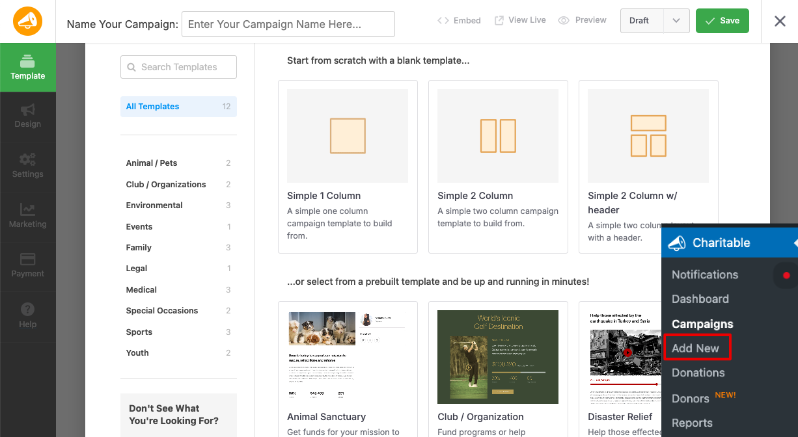
Add new campaign in Charitable

Step 2: Pick a Beacon Template

In the template chooser, find the highlighted Beacon (1 Column) or Beacon (2 Columns) template and select it. Your campaign loads with example content and photos already in place.
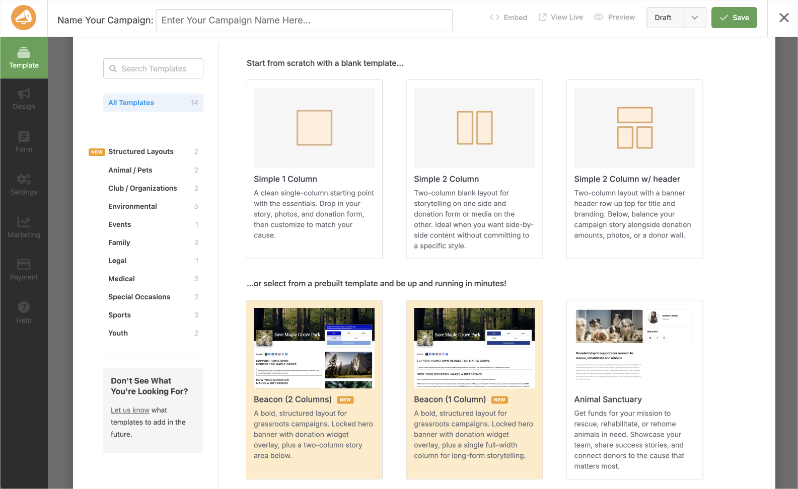
UI mockup of a campaign builder with template categories on the left and sample templates grid, and a'Name Your Campaign' field at top.

Step 3: Open the Campaign Hero Panel

To open the Campaign Hero panel, click the blue pencil icon on the hero block (top-right corner of the block)
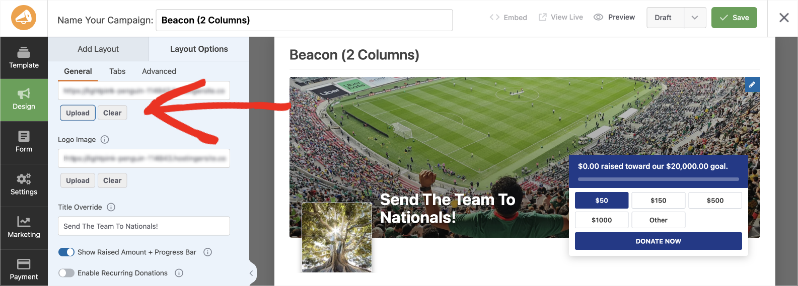
Campaign design editor: left options panel, main preview shows a soccer stadium hero image with overlay text and a donation widget.

Step 4: Set Your Details

In this panel, set your background image and logo, adjust the title, donation amounts, and donate button label, and decide whether to show the raised amount and progress bar.

Step 5: Preview and Save

As you go, watch the builder preview update with your real campaign data, then save when it looks right.

Prefer a different template? Add the Campaign Hero field to any layout from the builder’s field palette to get the same bold header anywhere.

For Agencies and Developers

Builder Row Properties

Campaign builder rows now support 2 new properties. A background_image property renders as a CSS background on the row wrapper, and a locked property prevents a row and its contents from being moved or deleted in the builder. Both are what Beacon is built on, and both are available to your own templates.

Get Started With Beacon

Beacon ships in Charitable 1.8.12. To get started, update to the latest version, whether you’re on the free Charitable Lite plugin or a paid plan. Then go to Campaigns » Add New Campaign, and pick Beacon (1 Column) or Beacon (2 Columns) from the template chooser.

Also Released: Free Site Analysis

1.8.12 also ships a new, completely free Site Analysis report that scores your fundraising setup and tells you exactly what to fix first, no upgrade required. If Beacon covers how your campaign looks, Site Analysis covers whether the fundamentals underneath it are actually working.

Read the Site Analysis Announcement →

Don’t Have Charitable Yet?

What’s New in Charitable

We also launched several powerful features and improvements recently:

🧾

Custom Receipts

Show a different thank-you page to every donor, based on their campaign, gift size, or country.

Learn More →

📝

Donation Form Block

Drop a fully working donation form directly into any page or post in the block editor.

Learn More →

👤

Creator Profiles

Give every peer-to-peer fundraiser a permanent, shareable page with their bio, avatar, and campaigns.

Learn More →

📱

Apple Pay and Google Pay in Mollie

Let mobile donors check out with a face scan or fingerprint instead of typing out a card number.

Learn More →

📋

Ambassadors 3.0

Moderate and manage your whole peer-to-peer network from new directory and reporting screens.

Learn More →

Razorpay Integration

Accept UPI, cards, and more from India-based donors with a native, no-code connection.

Learn More →

We’ve been adding to Charitable constantly, features and improvements designed to help you raise more and serve your donors better. See everything we’ve shipped at the Charitable Changelog.

Stay Connected for More Nonprofit Resources

For more tutorials and videos tailored to nonprofits, subscribe to our YouTube channel. We regularly publish expert tips, step-by-step guides on online donations, fundraising strategies, and practical resources to help your organization succeed.

🗞️ Get weekly tips and exclusive guides in your inbox
Join our newsletter →  

🎥 Watch step-by-step tutorials and success stories
Subscribe to our YouTube channel →  

👩🏽‍💻 Connect with our community and get daily nonprofit insights
Follow us on LinkedIn →

🥳 Fun reels and non-profit insights
Follow us on Instagram → 

👀 Insightful & fun videos to help you grow your cause
Follow us on TikTok→  

🌎 Subscribe and follow for general fundraiser tips
Get Fundraiser Tips on TikTok → 

Powerful Fundraising Resources

⬇️ Download proven strategies, campaign ideas, and expert tools
Get the Fundraising Kit →  

💸 Get Free Fundraising Resources
Head to the Charitable Fundraising Hub

🤔 Got questions about Charitable?
Charitable FAQs

🏎️ Take Charitable for a spin
Create your Charitable Demo

Understand non-profit terms and jargon
Non-Profit Glossary

% Looking for non-profit deals and discounts?
Best Non-Profit Deals and Discounts →

author avatar
David Bisset Project Manager
David is the project manager of Charitable since 2022. David works with several non-profits (one operated by his wife) along with managing and developing features, support, and marketing for Charitable. Has been with WordPress since 2006 and has been lead organizer of multiple conferences, events, and meetups.

Disclosure: Our content is reader-supported. This means if you click on some of our links, then we may earn a commission. We only recommend products that we believe will add value to our readers.

Leave a Reply

Your email address will not be published. Required fields are marked *

Get free tips and resources right in your inbox, along with 60,000+ others

Join our Newsletter

We won’t spam you. We only send an email when we think it will genuinely help you. Unsubscribe at any time!

Featured Video:

Watch more videos on our YouTube channel.

What's New In Charitable

View The Latest Updates
🔔 Subscribe to get our latest updates
📧 Subscribe to Emails

Email Subscription

Join our Newsletter

We won’t spam you. We only send an email when we think it will genuinely help you. Unsubscribe at any time!

recurring donations updated

💳 Introducing Card Updates: Fix Expired Cards Without Losing Subscriptions!

newExpired or updated credit cards are one of the biggest silent leaks in recurring fundraising. With Card Updates in the Recurring Donations extension, donors can now refresh their payment details directly—keeping their subscription, schedule, and giving history completely intact.

No canceled plans, no lost history, and zero administrative headache for your team.

What’s New:

⚡ 30-Second Self-Service: Donors get a dedicated “Update Card” button in their dashboard that opens Stripe’s secure, PCI-compliant Customer Portal to update card details instantly.

🔒 Scoped & Safe Access: Scoped exclusively to card updates by default, donors can’t accidentally cancel or alter their plans from inside the portal, keeping your webhooks and data in sync.

🤝 Admin-Assisted Support: Helping a donor on the phone? Open their secure Stripe portal in one click from your admin screen or generate a single-use update link to email them.

📋 Automatic Audit Trail: Every payment method update is recorded automatically with a timestamp in both system-wide logs and the individual donor’s profile.

Ready to protect your recurring revenue? Get the Plus or Pro plan and update Recurring Donations to 2.3.0+ and enable “Update Payment Method” under your Settings today!

author avatar
David Bisset Project Manager
David is the project manager of Charitable since 2022. David works with several non-profits (one operated by his wife) along with managing and developing features, support, and marketing for Charitable. Has been with WordPress since 2006 and has been lead organizer of multiple conferences, events, and meetups.
Integration page builder

Divi Fans Rejoice! Native Divi 5 Campaign Progress Bar Module!

With our new native Divi 5 module, you can anchor your microsites with real-time fundraising stats directly on the visual canvas. Here’s how it works, and why it’s worth turning on today.

Create campaign updates that are VISUAL AND LIVE. You can also:

📊 Campaign Progress Bar: Drop a live progress bar into any Divi 5 layout and show goal progress in real time.

🎨 Deep styling controls: Easily customize the bar and track color, height, and radius to match your brand perfectly.

👁️ Visual Builder ready: Configure and preview everything directly on the Divi canvas as a first-class module.

🔁 Identical rendering: The same exact engine powers this module, meaning consistent design without legacy shims.

✅ Faster launches: Never leave the Divi 5 interface to configure shortcodes or guess how your goal labels will look.

Learn more here.

author avatar
David Bisset Project Manager
David is the project manager of Charitable since 2022. David works with several non-profits (one operated by his wife) along with managing and developing features, support, and marketing for Charitable. Has been with WordPress since 2006 and has been lead organizer of multiple conferences, events, and meetups.
Integration page builder

👉🏻 New in Charitable: Native Elementor Widgets for Seamless Campaign Building

With native Elementor widgets, you design donation campaigns right alongside the rest of your page without touching code. Here’s how it works, and why it’s worth turning on today.

Create fundraising pages that are VISUAL, NATIVE, AND SHORTCODE-FREE. You can also:

⚡ Mini Donation: Add a compact, high-converting donation widget with preset amounts and full color control.

⏳ Campaign Countdown: Build urgency for a deadline-driven appeal, complete with optional confetti when the goal is hit.

📣 Donation Feed: Prove momentum by showing visitors the social proof of real people giving right now.

🏆 Donor Leaderboard: Celebrate top supporters with gold, silver, and bronze styling to spark friendly giving.

🖼️ Campaign Showcase: Feature multiple campaigns in a landing page grid or carousel, with search, filters, and badges.

Learn more here.

author avatar
David Bisset Project Manager
David is the project manager of Charitable since 2022. David works with several non-profits (one operated by his wife) along with managing and developing features, support, and marketing for Charitable. Has been with WordPress since 2006 and has been lead organizer of multiple conferences, events, and meetups.
Addon New

🗒️ Custom Receipts… New Addon!

With Custom Receipts, you decide which page your donors see, on every campaign. Here’s how it works, and why it’s worth turning on today.

Left side shows a donation receipt with donation number, date, total, and payment method for a  gift to Anywhere, titled 'One Family Gets Clean Water For A Week.'

Create receipts that are CUSTOM TO THE DONOR OR CAMPAIGN. You can also:

📅 Year-end appeal: Reinforce the goal and invite donors to share while momentum is high.

🎗️ Memorial or tribute campaign: Give a gentle, respectful thank-you that fits the moment.

💎 Major gifts: Show a special message only to donors who give above a threshold.

🔁 Recurring growth: Invite one-time donors to become monthly supporters right on the receipt.

🌍 Global campaigns: Surface a country-specific note, like a Gift Aid reminder, only where it applies.

Learn more here.

author avatar
David Bisset Project Manager
David is the project manager of Charitable since 2022. David works with several non-profits (one operated by his wife) along with managing and developing features, support, and marketing for Charitable. Has been with WordPress since 2006 and has been lead organizer of multiple conferences, events, and meetups.
New templates

🤩 New Beacon Campaign Templates w/ “Hero” Block!

With the new Beacon Campaign Templates for Charitable Pro, you can launch a stunning, full-width fundraising page that instantly captures visitor attention above the fold.

Fundraising page header for Save Maple Grove Park with a donation widget and a small square photo of a sunlit tree thumbnail on the left.

🔦 Above-the-Fold Impact: Lead with a full-width hero image, your logo, and your goal with a donation widget locked right on top of the banner so your ask and momentum register instantly without scrolling.

📐 Two Flexible Layouts: Choose between a structured two-column layout for side-by-side storytelling and supporting details, or a clean one-column view designed for uninterrupted long-form narratives.

⚡ All-in-One Hero Field: Powered by the new Campaign Hero field, bringing background media, live progress bars, custom donation amounts, and recurring giving tabs together into a single cohesive block that can be dropped into any layout.

🎨 Automatic Theme Matching: The hero banner and donation widget automatically inherit your campaign theme’s button and accent colors, ensuring your entire presentation stays beautifully on-brand without touching a line of CSS.

Learn more here.

author avatar
David Bisset Project Manager
David is the project manager of Charitable since 2022. David works with several non-profits (one operated by his wife) along with managing and developing features, support, and marketing for Charitable. Has been with WordPress since 2006 and has been lead organizer of multiple conferences, events, and meetups.





