
Plenty of the nonprofits we work with already run their email marketing through Brevo (formerly Sendinblue), and a good number of you have asked us for the same thing: a way for new donors to land on that list without anyone touching a spreadsheet.
Today we’re shipping that. Charitable now connects directly to Brevo, one of the most widely used email marketing and CRM platforms for nonprofits, so a new donor joins your Brevo list the moment their donation is completed.
No exports. No manual imports. Just donors ending up on the list they already told you they wanted to join. 📬
What Is Brevo?
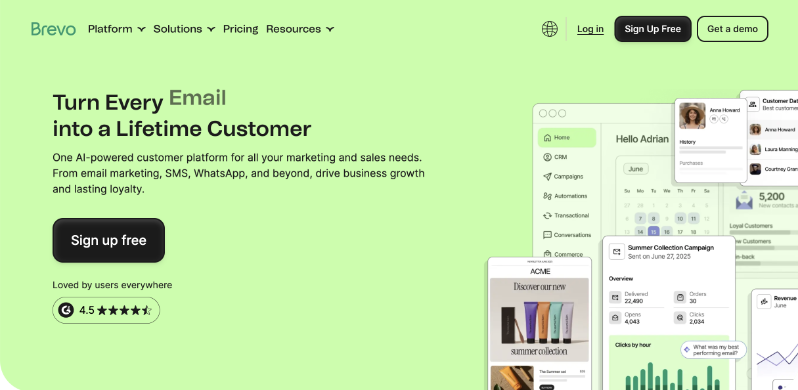
If you haven’t run into it yet, Brevo is an email marketing and CRM platform built around a generous free tier, which is a big part of why so many nonprofits end up there.
Beyond sending newsletters, Brevo also handles marketing automation, like welcome series and event-based triggers, transactional email, and basic contact segmentation. A donor’s confirmation email and next month’s appeal can come from the same place.
If you’re not on Brevo yet and want to see what the free plan covers, you can look at their plans directly at brevo.com.
Now you can use Brevo with Charitable and it’s so easy to set up!
Here’s What The Brevo Integration with Charitable Looks Like
Before we get into how the connection works, here’s what your donor actually sees. A simple opt-in checkbox sits right on your donation form.
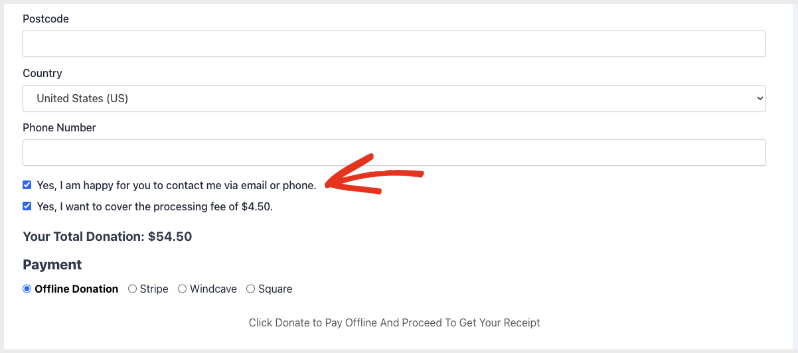
A donor checks that box while giving, and that’s the entire donor-facing part of this feature. Nothing else about your form or your checkout flow changes.
Why Automatic List Building Changes Everything
When a supporter opts in on your donation form, they’re telling you they want to hear from you. The window to welcome them, thank them, and invite them back is widest right after they give.
Connecting Brevo means that welcome sequence can start immediately. No manual exports, no spreadsheets, and no donors slipping through the cracks between your donation form and your mailing list.
Brevo joins Charitable’s Newsletter Connect lineup alongside Mailchimp, Campaign Monitor, ActiveCampaign, MailerLite, MailPoet, and Mailster. It’s available starting on the Plus plan and up.
Respect Every Donor’s Choice
Growing your list should never mean adding people who didn’t ask to be there. Charitable puts the donor in control and keeps you compliant.
You can show the opt-in checkbox unchecked, show it pre-checked, or skip the checkbox entirely and subscribe every donor automatically. The label is yours to edit, so it can match the way you’d actually ask.
Turn on Brevo’s confirmation email and a donor has to confirm before they’re added to your list. That’s the standard for consent and email deliverability, and it’s a toggle, not something you have to build.
Donor data export and permanent erasure are wired straight into WordPress’s own privacy tools, so a data request gets handled in a click instead of a support ticket.
When You’ll Feel the Difference
A few situations where this pays off right away:
⚡ Recurring campaigns: a welcome sequence fires the moment someone gives, instead of whenever you next get around to an export.
🎯 Multiple appeals running at once: point each campaign at a different Brevo list, so a giving-day appeal doesn’t land in the same list as your year-round donors.
🛡️ GDPR-conscious organizations: turn on double opt-in and get documented consent without writing a line of code.
🧑💻 Small teams without a developer on staff: no Zapier, no custom webhook, no CSV to babysit.
📊 Anyone already using Brevo’s segmentation and automation tools: donor data lands there in real time, ready to work with.
Connect Brevo in Under 5 Minutes
Connecting Brevo takes 1 key and a couple of clicks.
Step 1: Open Your Newsletter Settings
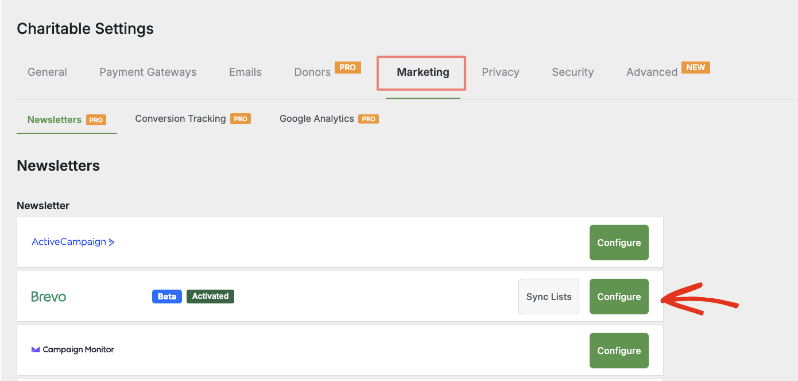
Go to Charitable » Settings » Marketing » Newsletters and click Configure next to Brevo.
Step 2: Paste Your Brevo API Key
Paste your Brevo API v3 key and save. Charitable pulls in your lists and contact attributes automatically.
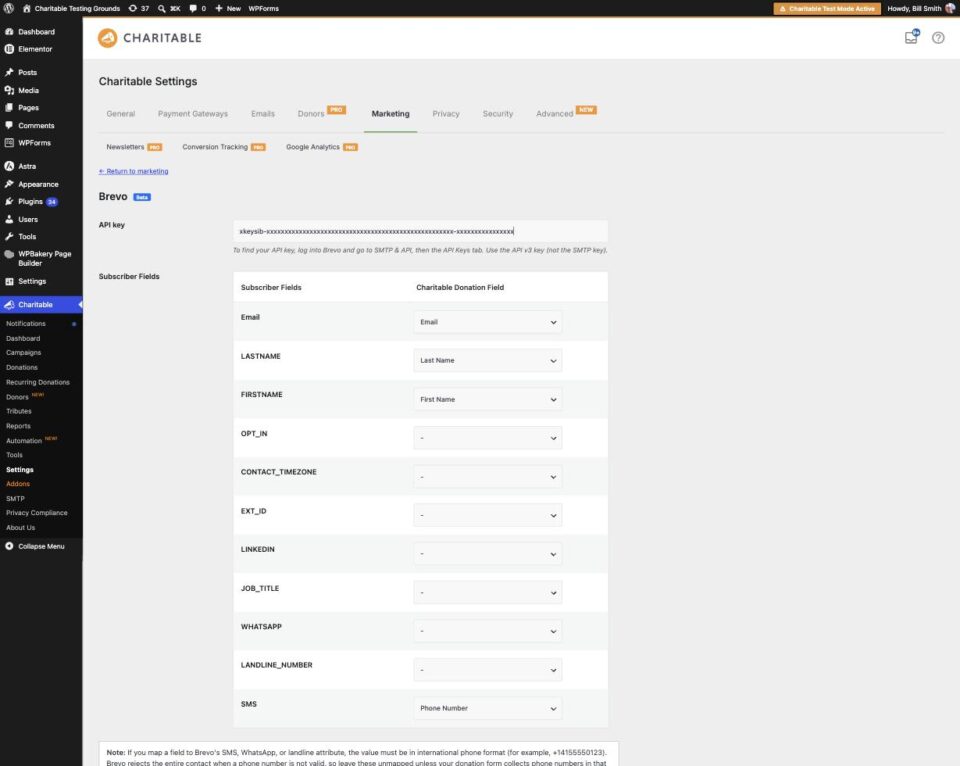
Step 3: Map Your Fields
Match donor details, like first name, last name, and any custom attributes you’ve created, to the matching Brevo attributes.
Step 4: Pick Your List
Choose a default Brevo list for every campaign, or set a different list per campaign.
That’s the whole setup. From here, every opted-in donor lands on your list on their own.
Read the Full Brevo Setup Tutorial →
Get Started with Brevo
If you already run Brevo, you can connect it to Charitable in the next 5 minutes. Head to Charitable » Settings » Marketing » Newsletters, click Configure next to Brevo, and paste your API key.
Read the Brevo Documentation →
For Agencies and Developers
Hooks and Filters
Brevo ships with 2 filters: one for the subscribe payload (charitable_newsletter_connect_brevo_subscriber_data) and one for the GDPR export (charitable_newsletter_connect_brevo_export_custom_field). Use either one to adapt what gets sent to Brevo for a specific client’s setup.
Developer’s Note on Beta: Brevo is shipping as a beta release, so we built in the visibility you’d want before trusting it with live donor data.
Every subscribe attempt, success, and error gets logged at Charitable » Tools » Logs, and you can filter that log down to just the Brevo source.
When something goes wrong, the log shows the exact message Brevo sent back. That’s the difference between guessing and knowing right away whether it’s a bad key, an IP allowlist, or a phone number format issue.
Logging degrades gracefully, and the integration never blocks a donation, even if Brevo itself is unreachable.
Read the Brevo Documentation →
Not Yet a Charitable Pro User?
Charitable Has 1.2+ Million Downloads!
Trusted by millions to power successful fundraising campaigns. Try Charitable risk-free today.
✅ 14-day money-back guarantee
✅ Transparent pricing
✅ Code-free setup
What’s New in Charitable
We also launched several powerful features and improvements recently:
🧾
Show a different thank-you page to every donor, based on their campaign, gift size, or country.
🖼️
Launch a full-width fundraising page with a hero image, logo, and donation widget locked above the fold.
📝
Drop a fully working donation form directly into any page or post in the block editor.
👤
Give every peer-to-peer fundraiser a permanent, shareable page with their bio, avatar, and campaigns.
📱
Apple Pay and Google Pay in Mollie
Let mobile donors check out with a face scan or fingerprint instead of typing out a card number.
📋
Moderate and manage your whole peer-to-peer network from new directory and reporting screens.
We’ve been adding to Charitable constantly, features and improvements designed to help you raise more and serve your donors better. See everything we’ve shipped at the Charitable Changelog.
Not yet a Charitable Pro user? Sign up today and get up to 50% off on your plan. We’re confident you’ll love raising funds with Charitable. If, for any reason, Charitable is not the right fit for you, we’ll refund your purchase with our 14-day money-back guarantee. Get Charitable Pro Now »
Stay Connected for More Nonprofit Resources
For more tutorials and videos tailored to nonprofits, subscribe to our YouTube channel. We regularly publish expert tips, step-by-step guides on online donations, fundraising strategies, and practical resources to help your organization succeed.
🗞️ Get weekly tips and exclusive guides in your inbox
Join our newsletter →
🎥 Watch step-by-step tutorials and success stories
Subscribe to our YouTube channel →
👩🏽💻 Connect with our community and get daily nonprofit insights
Follow us on LinkedIn →
🥳 Fun reels and non-profit insights
Follow us on Instagram →
👀 Insightful & fun videos to help you grow your cause
Follow us on TikTok→
🌎 Subscribe and follow for general fundraiser tips
Get Fundraiser Tips on TikTok →
Powerful Fundraising Resources
🤖 Use Charitable with Your AI Assistant
⬇️ Download proven strategies, campaign ideas, and expert tools
Get the Fundraising Kit →
💸 Get Free Fundraising Resources
Head to the Charitable Fundraising Hub →
🤔 Got questions about Charitable?
Charitable FAQs →
🏎️ Take Charitable for a spin
Create your Charitable Demo →
Understand non-profit terms and jargon
Non-Profit Glossary →
% Looking for non-profit deals and discounts?
Best Non-Profit Deals and Discounts →









Leave a Reply