
Charitable Blog

Everything you need to know about Charitable and our team.

Charitable meets Zapier

Charitable is on Zapier: Connect Your Donations to 7,000+ Apps

Last updated on

  • By

Tired of manually updating spreadsheets, triggering emails, and pinging your team every time a donation comes in?

If you’ve ever wished you could set all these tasks on auto-pilot, today’s update is for you!

🎉 Charitable is now on Zapier!

That means every donation, donor signup, recurring subscription, and campaign milestone in Charitable can trigger an automation.

You can connect your Charitable campaigns to any of Zapier’s 7,000+ connected apps. This includes Google Sheets, Gmail, Mailchimp, Notion, Airtable, HubSpot, QuickBooks, Slack, Discord, WhatsApp – to name a few! If it’s on Zapier, your Charitable site can talk to it.

We’re launching this in Beta today, which means it’s fully functional and ready to use – we just want a few weeks of real-world traffic before we declare it Public. If you’ve been waiting for a no-code way to plug Charitable into the rest of your nonprofit’s stack, the wait is over.

Zapier is available with our Automation Connect feature in the Charitable Pro plugin (Pro and Elite plan). Not yet using the Charitable Pro plugin?

Sign up today and grab up to 50% off on your plan. We want to ensure that you get access to the features you need to fundraise online! Every purchase comes with a 14-day money-back guarantee, so you can try Charitable Pro risk free today.

What The New Zapier Integration Unlocks

With Zapier, you can put many of your tasks on auto-pilot. Set it up once and then it runs on it own. We recommend that you keep an eye on it and check your workflows regularly to ensure everything is going smoothly.

To give you an idea of what you can do with this, here are a few tasks you can automate, without writing a single line of code:

  • Log every donation to a Google Sheet for accounting, board reports, or donor CRM
  • Welcome first-time donors with a personalized Gmail message that mentions their name and gift amount
  • Notify your team in Slack or Discord when a major donation lands
  • Add donors to a Mailchimp, ConvertKit, or HubSpot list automatically
  • Get an email summary when a campaign ends with totals, donor count, and goal status
  • Create a Notion or Airtable record for every recurring donor so your stewardship team can follow up
  • Pause a Mailchimp segment when a recurring donation is cancelled, so you don’t email lapsed donors

These are just the obvious ones. Once you start mapping Charitable triggers to Zapier actions, the use cases multiply quickly.

Two Zap Templates To Get You Started

To make it dead simple to try, we’ve published two pre-built Zap templates. One click and you’re up and running:

Click any “Use this Zap” button above. Zapier will walk you through connecting both apps – Charitable on one side, your Google or Gmail account on the other – and you’ll be running automations in about three minutes.

Watch It In action

Here’s the Google Sheets template running on a live Charitable site – a real donation comes in, and within a couple of seconds a new row appears in the spreadsheet:

That’s the whole loop. No webhooks, no PHP, no curl commands. Just Charitable → Zapier → wherever you need the data to go.

How To Set Up You Own Zaps Using Zapier and Charitable

If you’d rather build your own Zap from scratch instead of using a template, here’s the four-step setup:

1. Make sure you’re running Charitable Pro 1.8.13 or newer, with Automation Connect 2.1 installed and activated.

The Zapier integration runs on top of our Automation Connect addon’s webhook engine, which has been quietly powering custom webhooks since version 2.0. Charitable Pro license required.

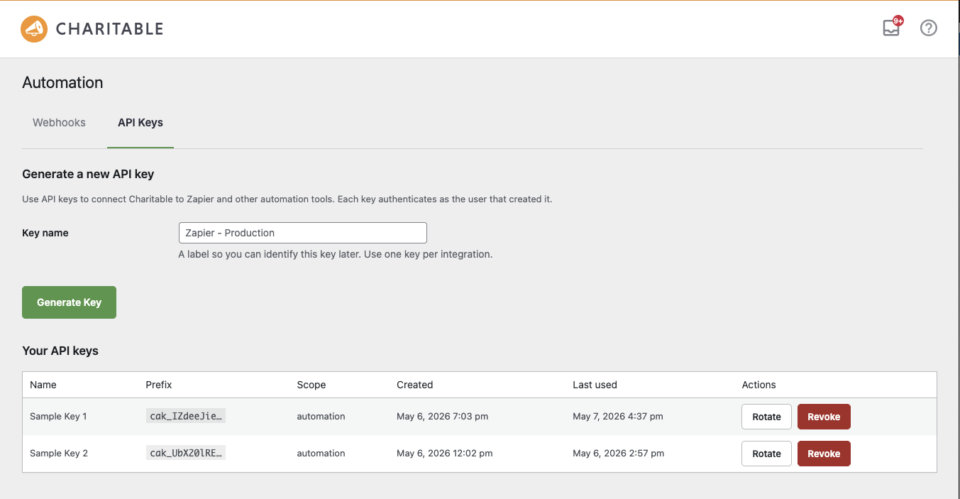
2. Generate an API key in your Charitable admin.

Navigate to Charitable » Automation » API Keys and click Generate Key. Copy the full string starting with cak_ – you’ll only see it once, so paste it somewhere safe like a password manager.
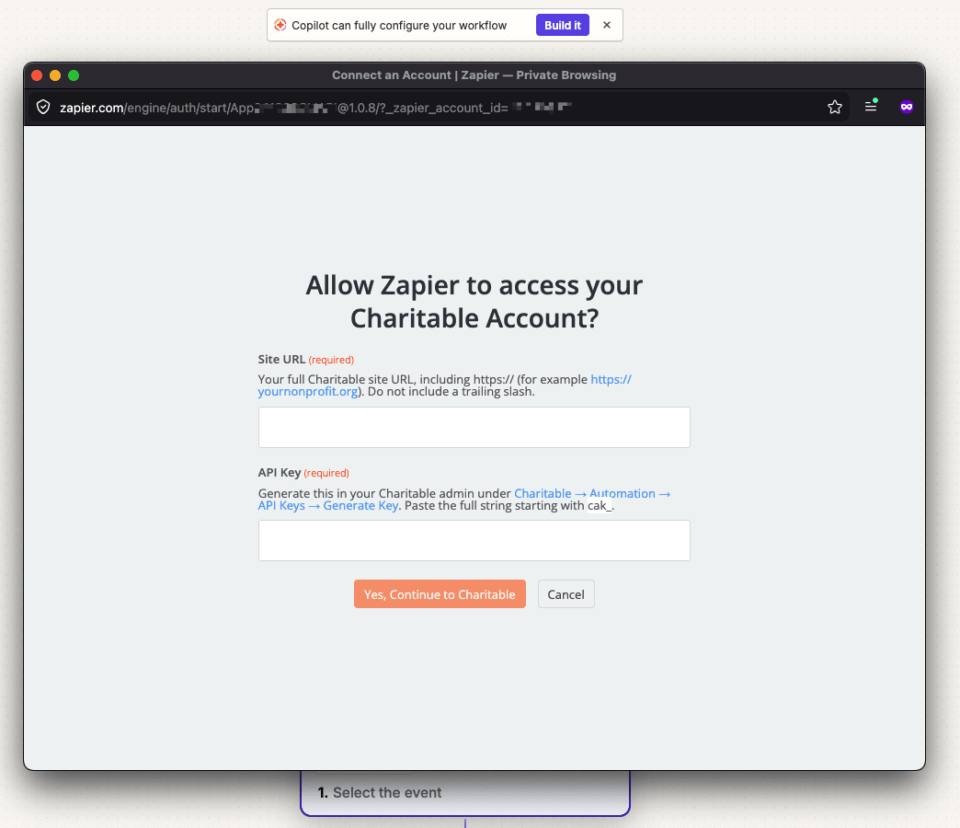
3. In Zapier, search for “Charitable” and connect your site.

Zapier will ask for two things: your site URL (the address of your Charitable WordPress site) and the API key from step 2.
4. Pick a trigger, pick an action, and turn it on.

Charitable contributes 12 triggers covering every meaningful event in the donation lifecycle:

  • New Donation
  • Donation Completed
  • Donation Refunded
  • New Donor (first-time donor)
  • New Recurring Subscription
  • Recurring Donation Renewed
  • Recurring Subscription Cancelled
  • Recurring Payment Failed
  • Campaign Created
  • Campaign Ended
  • Campaign Goal Reached
  • Plus generic donation/campaign created/updated events

Pair any of those with any Zapier action and you have an automation.

Zapier is in Beta: What This Means For You

Here’s what you need to know about our beta launch:

  • It’s fully functional. Everything works. We’ve tested every trigger end-to-end and there are no known bugs.
  • You won’t find it in Zapier’s search results yet. During Beta, the integration is invite-only via direct link. Use the templates above (or this invite link to the integration) to install it.
  • It’s free to use during Beta. Standard Zapier task pricing applies on Zapier’s side; nothing extra on the Charitable side. The integration is bundled with your Automation Connect license – no add-on charge.
  • We’re listening. If you find something rough, please email us or open a thread in our support area. Feedback during Beta directly shapes what ships in Public.

What’s Next?

A few things on the near-term roadmap:

  • Actions and Searches: Right now, Charitable contributes triggers (events that fire automations). Coming soon: actions (so a Zap can create a donor in Charitable) and searches (find a campaign by slug, find a donor by email).
  • More Zap templates: We’ll publish more starter templates as we see what people are actually building. If you build something cool, tell us. We’d love to feature it as an official template.
  • Native Workflow Element in the Charitable admin: Soon you’ll be able to browse, install, and manage Zaps directly inside your Charitable Automation Connect dashboard, without ever leaving your WordPress site.

Try It Now

If you’re already running Charitable Pro + Automation Connect, you’re three minutes away from your first automation. Click any of the templates above, or open the integration in Zapier to start from a blank Zap.

If you’re not on Pro yet, Automation Connect is included with every Pro plan, alongside payment gateways, peer-to-peer fundraising, and everything else that ships in the suite.

Questions, ideas, or just want to show off the Zap you built? Connect with our Support. We read every message.

Happy automating.

author avatar
David Bisset Project Manager
David is the project manager of Charitable since 2022. David works with several non-profits (one operated by his wife) along with managing and developing features, support, and marketing for Charitable. Has been with WordPress since 2006 and has been lead organizer of multiple conferences, events, and meetups.

Disclosure: Our content is reader-supported. This means if you click on some of our links, then we may earn a commission. We only recommend products that we believe will add value to our readers.

Leave a Reply

Your email address will not be published. Required fields are marked *

Get free tips and resources right in your inbox, along with 60,000+ others

Join our Newsletter

We won’t spam you. We only send an email when we think it will genuinely help you. Unsubscribe at any time!

Featured Video:

Watch more videos on our YouTube channel.

What's New In Charitable

View The Latest Updates
🔔 Subscribe to get our latest updates
📧 Subscribe to Emails

Email Subscription

Join our Newsletter

We won’t spam you. We only send an email when we think it will genuinely help you. Unsubscribe at any time!

Improvement Migrations

↔️ Importing From GiveWP, Donorbox, GiveButter… even CSV!

Whether you’re migrating from another platform or consolidating your records, moving your data to Charitable is now faster and more flexible than ever. We’ve streamlined the process so you can bring over your entire fundraising history in just a few clicks.

🔄 Native GiveWP, Donorbox, & GiveButter Support: Switching from a major platform? Our dedicated migration tools handle the heavy lifting, automatically mapping your donors and donations directly into Charitable—no technical skills required.

📂 Universal CSV Import: Moving from a custom system or a specialized CRM? If you can export it to a CSV, you can import it here. Our smart mapping tool lets you align your columns to Charitable fields like names, emails, phone numbers, and addresses in seconds.

Instant Donor Profiles & Custom Tags: Automatically create rich donor profiles and bring in custom tags to keep your data organized. Segment and engage your supporters from day one with a clean, professional database structure.


Ready to make the switch?

Check out our GiveWP Migration Guide

Learn more about our Import Tools

author avatar
David Bisset Project Manager
David is the project manager of Charitable since 2022. David works with several non-profits (one operated by his wife) along with managing and developing features, support, and marketing for Charitable. Has been with WordPress since 2006 and has been lead organizer of multiple conferences, events, and meetups.
Improvement Payments

💳 New Braintree Features For Your European Donors

With the release of Braintree addon version 1.3.0, you can now empower your European donors with the payment methods they trust and prefer, making giving seamless for international supporters.

🌍 Six New European Payment Methods: Support popular local options like iDEAL (Netherlands), Bancontact (Belgium), BLIK (Poland), and more to meet donors where they are.

⚡ Frictionless Donor Experience: These bank-based methods allow donors to authenticate directly with their own bank in a secure popup… no credit card numbers required.

⚙️ Automatic Currency Sync: No complex setup needed. The builder automatically displays the correct payment buttons based on your site’s currency (EUR or PLN), ensuring a relevant experience for every visitor.

author avatar
David Bisset Project Manager
David is the project manager of Charitable since 2022. David works with several non-profits (one operated by his wife) along with managing and developing features, support, and marketing for Charitable. Has been with WordPress since 2006 and has been lead organizer of multiple conferences, events, and meetups.
Campaigns New

🖼️ Campaign Featured Images: Pro-Level Visuals Made Simple

With the new Campaign Featured Image setting in our visual builder, you now have a single, dedicated place to manage how your fundraisers look across your entire site and beyond.

🖼️ One Image, Everywhere: Set a primary thumbnail that automatically syncs to campaign grids, lists, and shortcodes—no more relying on layout order.

📱 Social Sharing Optimized: Easily upload images at the perfect size to ensure your campaigns look stunning and professional when shared on social media.

🔍 SEO & Accessibility Ready: Add custom alt text directly within the builder to improve search rankings and ensure your mission is accessible to every supporter.

author avatar
David Bisset Project Manager
David is the project manager of Charitable since 2022. David works with several non-profits (one operated by his wife) along with managing and developing features, support, and marketing for Charitable. Has been with WordPress since 2006 and has been lead organizer of multiple conferences, events, and meetups.
Improvement receipts

🗓️ Annual Receipts 2.0: Send Year-End Receipts to Every Donor in Minutes

You can now send annual receipts in minutes with a few clicks to all your donors.

📧 One-Click Bulk Send Wizard that guides you to sending to hundreds of donors simultaneously directly from your WordPress dashboard.

🔍 Smart “Dry Run” Mode: See exactly who will receive a receipt and who will be skipped (and why) before a single email leaves your server.

🛡️ SMTP-Aware & Limit Protection: Charitable now detects your email setup and automatically adjusts batch sizes and pauses for daily limits to ensure your emails land in inboxes.

✅ Complete Audit Trail: Dedicated system log and on the individual donor’s profile, giving you a clear history for every fiscal year.

Stop dreading tax season and start spending that time on your mission. Update to Annual Receipts 2.0 and automate your year-end reporting today.

author avatar
David Bisset Project Manager
David is the project manager of Charitable since 2022. David works with several non-profits (one operated by his wife) along with managing and developing features, support, and marketing for Charitable. Has been with WordPress since 2006 and has been lead organizer of multiple conferences, events, and meetups.
Addon Donations Improvement

🎈Recurring Donations 2.0: Smarter Automation, Better Recovery, and More Control

We’ve completely rebuilt our Recurring Donations system to help you grow your reliable income stream while giving you (and your donors) more powerful tools than ever before.

What’s New:

🔒 Recurring-Only Campaigns: You can toggle “Recurring Only” mode in the campaign builder to hide the one-time option entirely, ensuring your supporters stay focused on long-term commitment.

📧 Automatic Payment Recovery: Our new Payment Failed Email fires automatically the moment a subscription fails.

🛠️ Self-Service Donor Control:The new Cancel Subscription Button appears directly in the donor dashboard, allowing supporters to pause or end their recurring gifts on their own terms—reducing your admin burden and payment disputes.

📊 Real-Time Revenue Insights: Track your growth, monitor active subscriptions, and see exactly how much predictable support is coming in each month at a glance.

Our new Recurring Donations addon gives you the professional-grade tools you need to grow your mission.

author avatar
David Bisset Project Manager
David is the project manager of Charitable since 2022. David works with several non-profits (one operated by his wife) along with managing and developing features, support, and marketing for Charitable. Has been with WordPress since 2006 and has been lead organizer of multiple conferences, events, and meetups.





