
When a donation comes in, tasks like updating contact records, sending Slack notifications, adding spreadsheet rows, and triggering thank-you sequences no longer require hiring a developer, writing custom code, or cobbling together fragile workarounds.
With Automation Connect 2.0, we’ve streamlined the entire process. A full webhook automation system is now built directly into Charitable – no third-party plugins or technical expertise required.
Whether your team is a single coordinator or a full staff, this upgrade makes it easier than ever for any nonprofit to put automation to work for their mission.
The new Automation Connect 2.0 is now available in Charitable Pro.
Not yet a Charitable Pro user? Sign up today and get up to 50% off on your plan. We’re confident you’ll love raising funds with Charitable. If, for any reason, Charitable is not the right fit for you, we’ll refund your purchase with our 14-day money-back guarantee. Get Charitable Pro Now »
“Wait – I’m Not a Developer. Is This for Me?”
Yes. Genuinely.
Webhooks sound technical, but the idea behind Automation Connect is beautifully simple: when a donation happens on your site, your other tools should automatically know about it. No manual exports. No copying and pasting. No waiting until someone remembers to update the spreadsheet.
Think about what happens after a donation comes in today. Someone joins your email list – did Mailchimp find out? A major donor just gave $5,000 – did your team get a Slack message? A recurring donor cancelled – does anyone know? If the answer involves a human checking a report later, that’s a gap Automation Connect closes.
Here’s how it works in practice: you connect Charitable to a tool like Zapier or Make.com (both have free plans and require zero coding). You tell Automation Connect what event to watch for – say, a new donation – and it sends all the relevant data to Zapier the moment it happens. Zapier then does whatever you’ve set up: add the donor to Mailchimp, post to Slack, log to Google Sheets, create a HubSpot contact. All of it. Automatically.
You set it up once. It runs every time.
A few things non-developers can build in under an hour:
- 📬 Auto-add donors to your email list – only those who opted in, thanks to built-in conditions
- 💬 Slack notifications for your team – “Sarah just donated $250 to the Spring Campaign!”
- 📊 Live Google Sheets donor log for board reporting, updated in real time
- 🤝 New donor records in your CRM – HubSpot, ActiveCampaign, Salesforce via Zapier
- 🔄 Alerts when a recurring donor cancels – so you can follow up personally
If you’ve ever wished Charitable could “just talk to” another tool you use, this is how.
See It In Action
What’s New?
17 Events. Infinite Possibilities.
Automation Connect fires on 17 distinct events across donations, campaigns, and recurring giving – covering the full lifecycle of a donor relationship.
⚡ Donation lifecycle:
Trigger on donation_created, donation_updated, donation_status_changed, donation_trashed, donation_restored, and donor_created (fires on a donor’s first-ever gift).
🔁 Recurring giving:
Fire webhooks on plan creation, renewal payments, updates, and trash/restore events via recurring_donation_* slugs.
📣 Campaign milestones:
Trigger on campaign_created, campaign_updated, campaign_ended, campaign_goal_reached, and trash/restore events.
Every event includes a full data payload so your connected tools always have the context they need.
Conditions: Send Webhooks When It Counts
Not every event needs to trigger every webhook. Automation Connect’s conditional logic engine lets you filter deliveries to match exactly the scenario you care about.
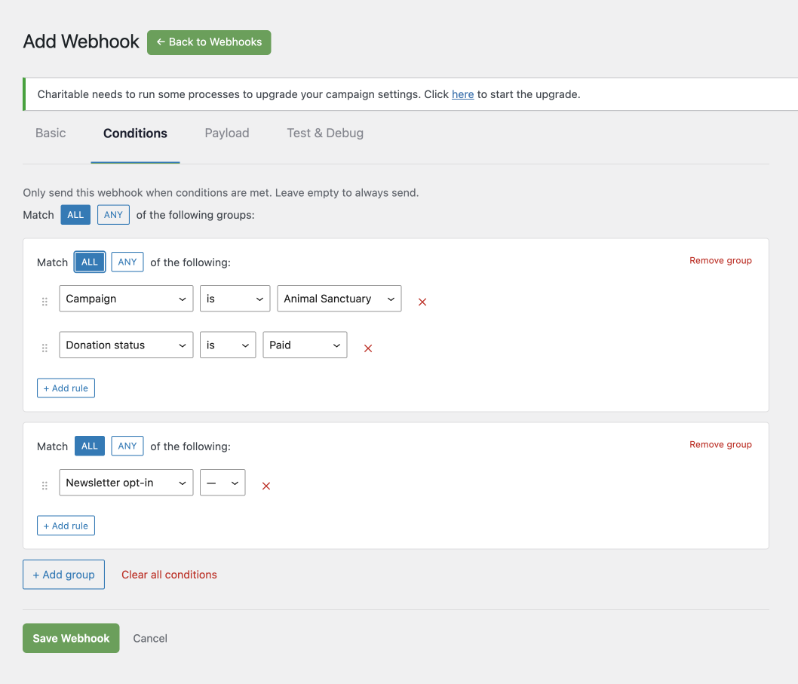
🎯 Filter by anything: Write conditions against 11 fields – donation amount, status, payment gateway, donor country, newsletter opt-in, campaign, custom fields, and more.
🧩 AND/OR logic: Combine conditions with AND logic within a group, and OR logic across groups – the same flexible structure used in marketing automation tools.
✅ One-click test: Send a test payload from the editor and see the response code, body, and delivery time before your subscription ever goes live.
Full Control Over Your Payload
Your connected apps should get the data they need, nothing more. The Payload tab lets you select from 80+ available fields across donor, donation, campaign, recurring, and site metadata – and deselect anything irrelevant to keep payloads clean and fast.
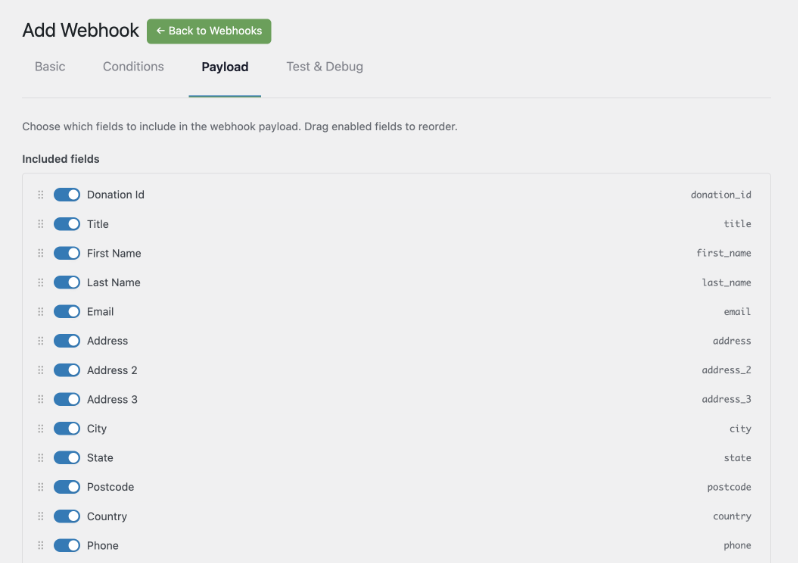
💰 Donor data: Name, email, address, lifetime giving total, donation count.
👁️ Donation data: Amount, status, gateway, transaction ID, campaign associations.
📊 Campaign data: Goal, amount raised, percentage, donor count, start and end dates.
Every outgoing request is signed with HMAC-SHA256, so your endpoint can verify the payload came from your site.
Start in Minutes with Platform Templates
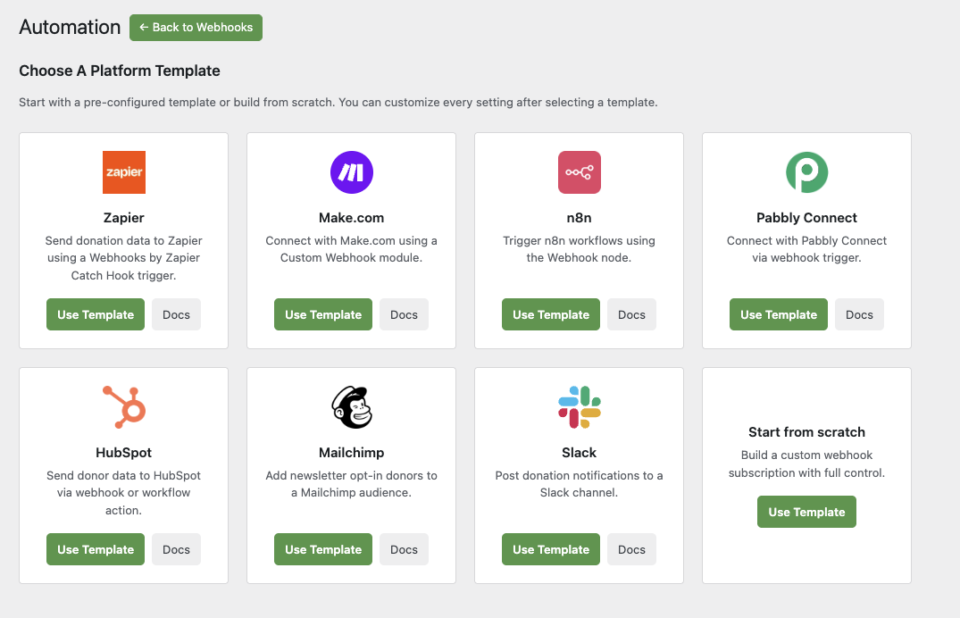
Automation Connect ships with 8 pre-built platform templates, so you don’t have to configure everything from zero.
🚀 Zapier: Pre-configured for a Webhooks by Zapier Catch Hook trigger.
🛠️ Make.com: Ready for a Custom Webhook module.
⚙️ n8n: Points to your n8n Webhook node out of the box.
🤝 HubSpot, Mailchimp, Pabbly, Slack: Each template sets sensible defaults for its platform, including a newsletter opt-in condition for the Mailchimp template.
Select a template, paste your webhook URL, and save. You can customize every setting after.
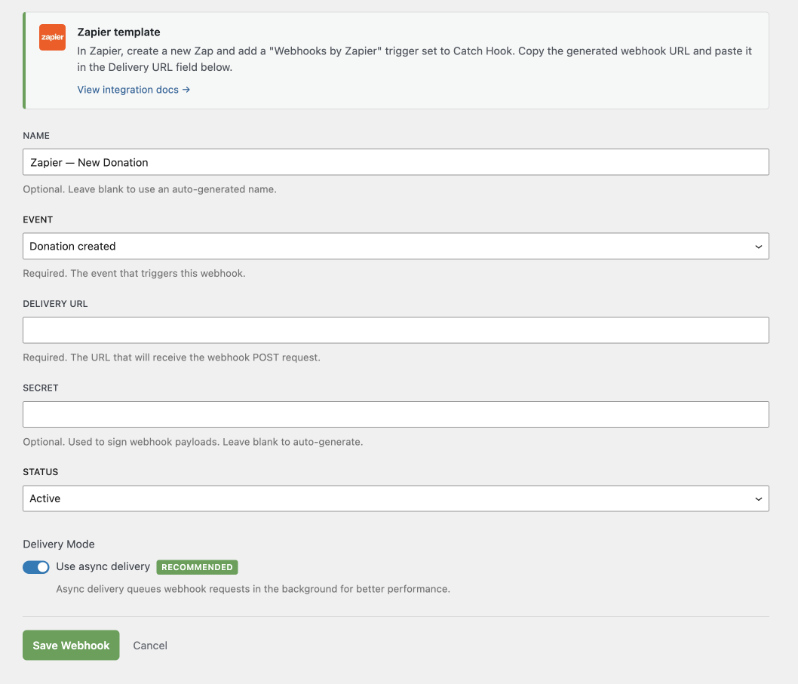
That’s it! You’re all set to automate your fundraising and admin tasks.
For Agencies and Developers
Hooks, Filters, and Full Customization
Automation Connect exposes a complete set of WordPress filters for every layer of the system. Register custom payload fields, add new trigger events, inject custom conditions, and modify payloads before delivery – all without touching core plugin files.
add_filter( 'charitable_automation_connect_payload_fields', function( $fields ) {
    $fields['my_custom_field'] = array(
        'label'   => __( 'My Custom Field', 'my-plugin' ),
        'group'   => 'donor',
        'resolve' => function( $event_data ) {
            return get_user_meta( $event_data['donor_user_id'], 'my_meta_key', true );
        },
    );
    return $fields;
} );
Reliable Delivery at Scale
Failed deliveries are retried automatically via WordPress Action Scheduler with exponential backoff, so transient endpoint errors don’t mean lost data. Every delivery attempt is logged to Charitable’s log system, accessible at Tools » Logs.
Built for Multi-Site and Client Deployments
Automation Connect works cleanly in multisite environments. Each site manages its own subscriptions independently, and the license check respects per-site Pro plan status.
Get Started with Automation Connect 2.0
Automation Connect 2.0 is available now for all Charitable Pro users on the Pro plan or higher.
Update to Charitable Pro 1.8.13, activate the extension from Charitable » Addons, and create your first subscription in minutes.
Read the Automation Connect Documentation »
Not Yet a Charitable Pro User?
Charitable has been downloaded over 1 million times and powers fundraising for nonprofits, schools, and causes around the world. Charitable Pro adds advanced features like Automation Connect, PDF donation receipts, recurring giving, and priority support.
Charitable Has 1+ Million Downloads!
Trusted by millions to power successful fundraising campaigns. Try Charitable risk-free today.
✅ 14-day money-back guarantee
✅ Transparent pricing
✅ Code-free setup
Stay Connected for More Nonprofit Resources
For more tutorials and videos tailored to nonprofits, subscribe to our YouTube channel. We regularly publish expert tips, step-by-step guides on online donations, fundraising strategies, and practical resources to help your organization succeed.
🗞️ Get weekly tips and exclusive guides in your inbox
Join our newsletter →
🎥 Watch step-by-step tutorials and success stories
Subscribe to our YouTube channel →
👩🏽💻 Connect with our community and get daily nonprofit insights
Follow us on LinkedIn →
🥳 Fun reels and non-profit insights
Follow us on Instagram →
👀 Insightful & fun videos to help you grow your cause
Follow us on TikTok→
🌎 Subscribe and follow for general fundraiser tips
Get Fundraiser Tips on TikTok →
Powerful Fundraising Resources
⬇️ Download proven strategies, campaign ideas, and expert tools
Get the Fundraising Kit →
💸 Get Free Fundraising Resources
Head to the Charitable Fundraising Hub →
🤔 Got questions about Charitable?
Charitable FAQs →
🏎️ Take Charitable for a spin
Create your Charitable Demo →
Understand non-profit terms and jargon
Non-Profit Glossary →
% Looking for non-profit deals and discounts?
Best Non-Profit Deals and Discounts →







Leave a Reply