
Charitable Blog

Everything you need to know about Charitable and our team.

Introducing DonorTrust social proof notifications

Introducing DonorTrust: Social Proof With Your Donation Campaigns

Last updated on

  • By

Want an easy way to build trust and drastically increase your donations? 

We’ve been working hard to bring you a brand new feature in Charitable Pro: DonorTrust!

This powerful new tool lets you display real-time notifications of recent donations made on your website. It leverages the psychology of social proof so you can increase donations.

We’ve designed to be easy to set up and customize, empowering you to build trust and encourage more generosity. Let’s dive in deeper to show you what it’s all about.

What Is DonorTrust?

DonorTrust displays non-intrusive popups on your site with real-time donations when someone makes a contribution. This is a great way to build trust and encourage more people to give to your cause!

Here’s an example of these popups:

You choose where and to whom it appears to. Plus, you don’t need any technical skills to get started with this. It’s as easy as clicking a few buttons.

Why did we create this tool?

Every visitor to your website is a potential donor. But too often, they hesitate, unsure if your cause is trustworthy. Now, you can transform those hesitations into donations with social proof displayed right on your website.

Real-time donations appear as proof – instantly building trust and sparking generosity with every new contribution.

Stop losing potential donors and start turning website traffic into real-world impact today!

Why You’ll Love DonorTrust

DonorTrust brings a new dimension to your fundraising efforts by turning every donation into a marketing tool. With minimal effort, you can showcase public support, reduce hesitation, and increase conversion rates.

🎯 Turn Donations Into Trust Signals Instantly build credibility with real-time notifications and showcase active support.

📊 Increase Conversions Encourage more giving with clear social proof and reduce friction for new donors.

🔄 Seamless Integration Works effortlessly with all Charitable donation forms and campaigns, with no coding required.

What You Get With DonorTrust

We’ve been listening to your feedback and also looking around the market to see what would help you raise more funds faster and more efficiently.

Social proof has been proven to be one of the best ways time and time again.

While creating DonorTrust, we kept you in mind and added in features that we hope you’ll find helpful.

Here are the top features:

  • Real-Time Notifications: Showcase recent donations as they happen, building instant credibility. Displayed in a sleek and unobtrusive popup window.
  • Display Rules: Control when and where notifications appear on your site.
  • Customizable Popups: Select which donor details are displayed, like names, amounts, and locations.
  • Campaign Selection: Choose which specific campaigns display donation notifications.
  • Link to Campaign: Make your popups clickable with links directly to campaign pages for easy giving.
  • Smart Filtering: Set minimum donation amounts to showcase meaningful contributions only.
  • Visitor Targeting: Control who sees notifications based on login status and visitor behavior.
  • Live Preview: See what the notification will look like before you show them to potential donors.
  • Fully Automated: Set it up once, and Charitable will create and display the popups automatically.

Everything You Need to Build Trust

DonorTrust is designed to be powerful, yet simple to use. Everything can be enabled/disable and tweaked with just the click of your mouse button. There’s absolutely no coding or complicated set up involved.

Here’s a sneakpeek at the DonorTrust Settings page:
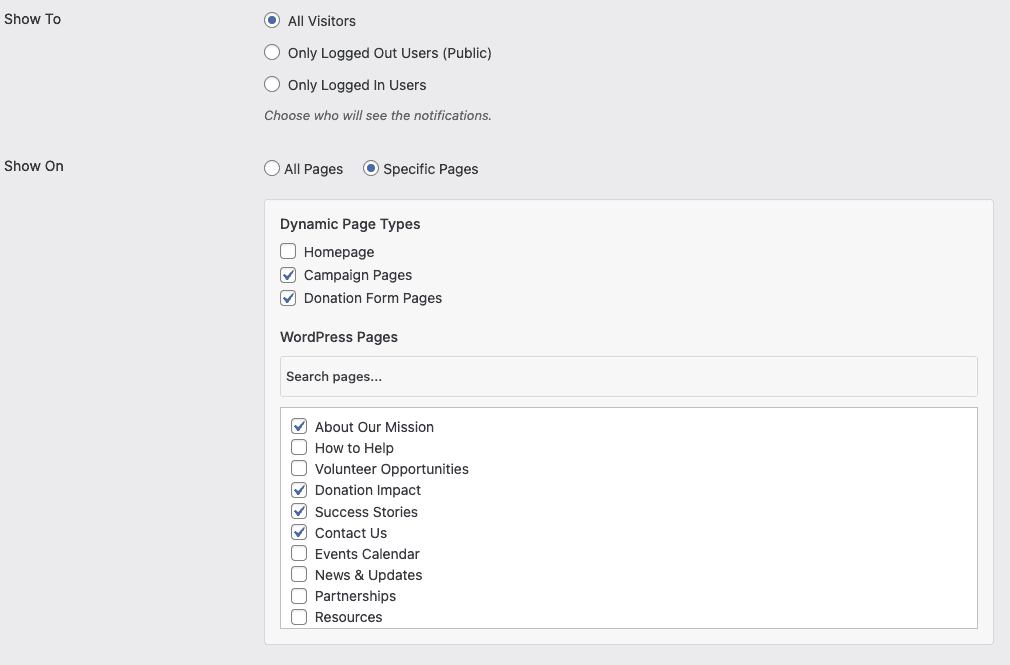
So you can see, you can control where the popups appear by checking a few boxes.

Here’s how easy it is:

  • 1-Click Setup: Enable real-time notifications with just one click. No coding needed.
  • Full Control Over the Message: You decide exactly what information appears and where notifications are displayed.
  • Targeted Display: Show notifications to new visitors while hiding them from regular donors or customizing messages based engagement.
  • Zero Maintenance: DonorTrust handles everything automatically once it’s set up.
  • Real-Time Updates: Notifications will automatically update as new donations come in.

Stop Losing Potential Donors – Let Them See That Others Support Your Cause

Your website gets visitors, but many leave without donating. DonorTrust captures their attention with neat popups that show others are giving right now, giving donors that nudge to act.

How to Get Started

DonorTrust is available on the Plus plan (or higher) of the Charitable Pro plugin. If you’re an existing customer, make sure you update your plugin to the latest version. Then enable the DonorTrust addon under the Charitable » Addons tab. The addon is also available to manually download inside your Charitable account.

Once enabled, the new tool should now be available in your Charitable settings right inside your WordPress dashboard.

Head over to Charitable » Settings » Advanced tab, and here you’ll see the option to enable DonorTrust.
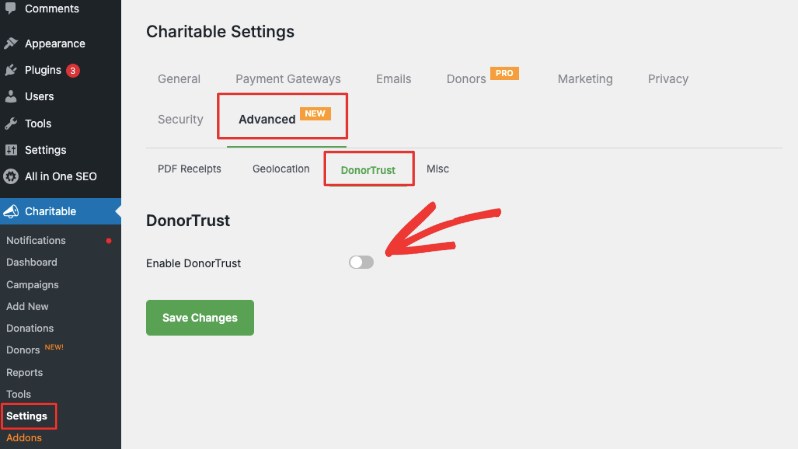
Enable DonorTrust

Within the Campaigns section, you choose which active and completed campaigns will feature notifications. Select individual campaigns from the left column and use the arrows to move them to the right column.
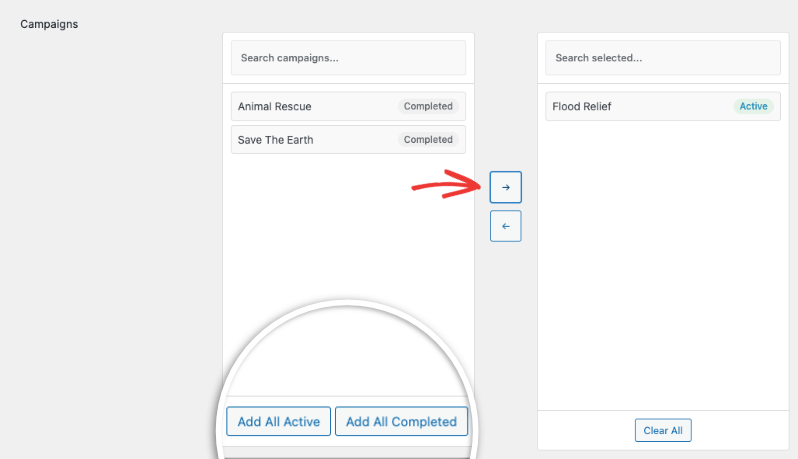
Add campaigns to DonorTrust

By default, popups link directly to the campaign page. You can change this if you like.

You’ll then be able to set display rules and start seeing positive results.

You can customize who sees the popups and where the popups appear on your site.

We’ve created a complete guide for every step of the way: How to Setup DonorTrust »

Not yet a Charitable Pro customer? Sign up below and get access to advanced fundraising features that include recurring donations, peer-to-peer fundraising, advanced reporting, DonorTrust, and so much more?

author avatar
David Bisset Project Manager
David is the project manager of Charitable since 2022. David works with several non-profits (one operated by his wife) along with managing and developing features, support, and marketing for Charitable. Has been with WordPress since 2006 and has been lead organizer of multiple conferences, events, and meetups.

Disclosure: Our content is reader-supported. This means if you click on some of our links, then we may earn a commission. We only recommend products that we believe will add value to our readers.

Leave a Reply

Your email address will not be published. Required fields are marked *

Get free tips and resources right in your inbox, along with 60,000+ others

Join our Newsletter

We won’t spam you. We only send an email when we think it will genuinely help you. Unsubscribe at any time!

Featured Video:

Watch more videos on our YouTube channel.

What's New In Charitable

View The Latest Updates
🔔 Subscribe to get our latest updates
📧 Subscribe to Emails

Email Subscription

Join our Newsletter

We won’t spam you. We only send an email when we think it will genuinely help you. Unsubscribe at any time!

💂‍♂️ New DonationGuard 🛡️ Automatically Protects Your Donations!

Worried about card testing attacks or spam bots flooding your donation forms, but don’t want to ruin the giving experience for your real supporters? Charitable’s DonationGuard features:

🛡️ Real-Time Bot Detection: Actively monitors every donation submission for five distinct attack signals without slowing down your human donors.

📊 Smart Traffic Scoring: Instantly evaluates activity against a learned baseline of your site’s normal donation rhythms to catch sneaky, slow-drip card testing.

🚨 Severity-Tiered Alerts: Immediately opens structured “Attack Records” and notifies you via email and admin alerts the moment a campaign starts taking fire.

🎯 Single-Click Defense: Deploy instant security using the “Recommended Settings” preset to turn on Honeypot, Time Trap, and Rate Limit modules all at once.

🚫 Automated Blocklists: Permanently stop repeat offenders by automatically blocking suspicious email addresses based on your customized rules.

Visit this page to learn more.

author avatar
David Bisset Project Manager
David is the project manager of Charitable since 2022. David works with several non-profits (one operated by his wife) along with managing and developing features, support, and marketing for Charitable. Has been with WordPress since 2006 and has been lead organizer of multiple conferences, events, and meetups.
GiveWP Migrations New

🧤 White Glove Migration Service for GiveWP

Thinking about switching your fundraising platform from GiveWP to Charitable, but don’t want to risk losing your data or handle a complex technical setup yourself? Charitable’s White Glove Migration Service features:

👥 Flawless Donor Mapping: Safely transfer your entire supporter database with zero data loss.

📊 Complete Financial History: Meticulously preserve every historical transaction for continuous, accurate reporting.

🔄 Seamless Recurring Giving: Safely transfer active sustaining subscriptions without disrupting your incoming revenue or requiring your donors to update their information.

💳 Zero Gateway Disruptions: Keep using Stripe, PayPal, or any other GiveWP-compatible processor you already love.

🚀 Expert Technical Setup: Relax while our team handles the heavy lifting to install and configure your forms—plus, qualifying users get a full year of Charitable Pro completely free.

Visit this page to learn more.

author avatar
David Bisset Project Manager
David is the project manager of Charitable since 2022. David works with several non-profits (one operated by his wife) along with managing and developing features, support, and marketing for Charitable. Has been with WordPress since 2006 and has been lead organizer of multiple conferences, events, and meetups.
automation Improvement

📢 New Feature Alert: Automation Connect 2.0 Is Here! 🚀

Thinking about connecting your fundraising data to tools like Mailchimp, Slack, or Google Sheets, but don’t want to hire a developer or write custom code? Charitalbe’s new automation addon has:

⚡ 17 Event Triggers: Instantly fire webhooks for a donor’s first gift, renewal payments, or reached campaign milestones.

🎯 Smart Conditional Logic: Use powerful AND/OR logic across 11 fields to only send data when it meets your exact criteria, like newsletter opt-ins.

📊 Custom Payload Control: Select from 80+ clean data fields across donor, donation, and campaign metadata so your apps get exactly what they need.

🚀 Pre-Built Platform Templates: Skip the setup from scratch with ready-to-go templates for Zapier, Make.com, n8n, HubSpot, and Slack.

🛡️ Reliable Developer Tools: Power your workflows with signed HMAC-SHA256 payloads, complete WordPress filters, and automatic retry logs.

author avatar
David Bisset Project Manager
David is the project manager of Charitable since 2022. David works with several non-profits (one operated by his wife) along with managing and developing features, support, and marketing for Charitable. Has been with WordPress since 2006 and has been lead organizer of multiple conferences, events, and meetups.
automation Improvement

🔌 Charitable Meets Zapier: Connect to 7,000+ Apps and Automate Your Fundraising

Tired of manually copying donation data into accounting sheets or tracking down new donor signups? Put your administrative tasks on autopilot. Charitable is now officially on Zapier, giving you a powerful, no-code way to plug your fundraising directly into the rest of your favorite tools.

Every donation, donor signup, and campaign milestone can now trigger an automated workflow seamlessly.

What’s New:

♾️ Connect to 7,000+ Apps: Bridge your Charitable campaigns with everyday software like Google Sheets, QuickBooks, Slack, Mailchimp, HubSpot, Notion, Airtable, and thousands more.

⚡ 12 Powerful Triggers: Build deep workflows using smart automation triggers covering the entire donation lifecycle—including New Donation, New Donor, Subscription Cancelled, and Campaign Goal Reached.

📋 Pre-Built Action Templates: Get started in three minutes or less with our pre-made template combinations, like automatically logging new donations straight into a Google Sheet or firing custom donor welcome emails through Gmail.

🚫 Zero Code Needed: No complex webhooks or custom PHP scripts required. Just pick your trigger, choose your app, map your fields, and let Zapier handle the heavy lifting.

Ready to save hours of admin time? Grab Charitable Pro with the Automation Connect addon today and launch your first Zap!

author avatar
David Bisset Project Manager
David is the project manager of Charitable since 2022. David works with several non-profits (one operated by his wife) along with managing and developing features, support, and marketing for Charitable. Has been with WordPress since 2006 and has been lead organizer of multiple conferences, events, and meetups.
Improvement Payments

🚀 Introducing PayPal Commerce: One Connection, Six Ways to Donate

Donors expect modern, flexible payment options when they support a cause. If they don’t see their preferred method on your donation form, they often disappear without a word. With PayPal Commerce, we are bringing a completely modernized checkout experience right to your campaigns.

Enjoy a single integration that upgrades your forms, makes giving seamless, and helps you capture every single donation.

What’s New:

🔌 One-Click Connection: Skip messy API keys and developer docs. Simply click “Connect with PayPal,” sign in to your business account, and your modern form is live in under five minutes.

💳 Six Ways to Give: Give your supporters instant access to PayPal balance, Venmo (US), Pay Later financing, major credit/debit cards, Apple Pay (Safari), and Google Pay (Chrome) all from the exact same form.

🔄 Flexible Recurring Giving: Fully supports monthly giving. Choose between the PayPal Subscriptions API (handled automatically on PayPal’s end) or Vault + Cron (handled securely right on your site).

💬 Friendly Error Recovery: No more confusing browser alerts. If a payment is declined, donors see plain-language, inline messages that guide them on how to fix the issue and complete their gift.

Ready for PayPal, modernized? Update to Charitable Pro 1.8.15+ (or Charitable Lite 1.8.11+) and connect your account today!

author avatar
David Bisset Project Manager
David is the project manager of Charitable since 2022. David works with several non-profits (one operated by his wife) along with managing and developing features, support, and marketing for Charitable. Has been with WordPress since 2006 and has been lead organizer of multiple conferences, events, and meetups.



