
Switching fundraising platforms sounds like a reasonable decision – right up until you think about everything you’d leave behind.
Your donor database. The names, emails, and giving histories of everyone who has ever supported your cause. Your recurring donors who signed up for monthly giving and trust that their experience won’t change. Years of donation records that shape how you understand your fundraising, run your reports, and stay in touch with your most loyal supporters.
If you’re on Donorbox specifically, you likely know the feeling well. Donorbox works fine as a starting point – but as your organization grows, the limited WordPress integration, the donor data locked away on a third-party platform, and the ongoing fees become harder to justify. The problem isn’t finding a better option. It’s the fact that you’ve built something on Donorbox. Your donor list is there. Your history is there. Moving means figuring out how to bring all of it with you safely.
That’s what makes platform migration so paralyzing. It’s not the technical setup on the other end. It’s the question of what happens to the data your organization has spent years accumulating – and whether you can ever fully recover if something goes wrong in the transfer.
Charitable Pro now includes the Donorbox Importer – a dedicated migration tool that brings your supporters, donation records, and recurring giving plans directly into your WordPress site using the CSV exports Donorbox already provides.
Your donors. Your history. Your site. Finally together.
Why this Importer Matters Now More Than Ever
There’s a BIG reason to make this move that goes beyond data portability.
Every donation page you host on Donorbox is building Donorbox’s SEO – not yours. Every visitor who lands on a third-party hosted form is a visitor your own website never saw. Every link, every search impression, every piece of trust that search engines assign to that page belongs to a platform you don’t control.
Now more than ever, owning your digital presence matters. Search is changing fast. AI is reshaping how people find causes to support. In that environment, the organizations that will hold their ground are the ones who have spent years building authority on their own domain – not renting space on someone else’s.
When your donation pages live on your WordPress site:
- Your domain earns the trust, not a third-party platform
- Your content and campaign pages build search authority that compounds over time
- Your donors find you – not a generic fundraising platform with your logo on it
The switch to Charitable isn’t just about better features or lower fees. It’s about building something that belongs to you – a fundraising presence rooted in your own website, your own SEO, and your own long-term growth.
Want to go deeper on this? We put together a complete guide: The Ultimate Guide to SEO for Nonprofits
Now here’s what makes this Donorbox-to-Charitable migration genuinely safe to run.
How the Donorbox Importer Works
Most data migrations work on faith. You export a file, run an import script, and hope the results match what you expected. When they don’t – when a record is missing, a recurring plan doesn’t carry over, or donor emails come through corrupted – the cleanup is painful and the confidence damage can take time to recover from.
The Donorbox Importer is built around a different model: verify before you commit.
When you upload a CSV file, the importer shows you a live preview – an exact count of donors, donations, or recurring plans detected in the file. You see what’s coming in before a single record touches your database. From there, you can run a full dry run: a complete test of the import that processes your data, surfaces any conflicts or errors, and generates a detailed report. None of it writes anything to your site.
Only when you’ve reviewed the results and feel confident do you run the full import. And if something still doesn’t look right after the fact, a one-click rollback undoes the entire operation and restores your previous state instantly.
Picture an animal rescue organization that’s been using Donorbox for four years. They have 600 donor records, thousands of individual gifts on file, and 150 active recurring supporters who give monthly. Their executive director – not a developer – logs into the WordPress dashboard, uploads three CSV files, previews the data counts, runs the dry test, reviews the report, and completes the migration from start to finish. No downtime. No calls to an agency. No data lost.
What the Donorbox Importer Can Do
Here’s a look at everything the importer handles – most of it running without you needing to make a single decision after the upload:
- Import your full donor database – Upload your Donorbox supporters CSV and move every donor record – names, email addresses, and contact details – directly into Charitable’s donor management system.
- Transfer your complete donation history – Every past gift comes with you. Import your donation records so your reporting, giving history, and donor communications pick up right where they left off.
- Migrate active recurring giving plans – Monthly donors keep giving monthly. Active recurring plans carry over intact, so your most committed supporters don’t experience any disruption or confusion.
- Preview data counts before importing – See an exact count of what’s in each file before anything runs. Donors, donations, recurring plans – all confirmed before a single record is written to your database.
- Run a full dry run with detailed error reports – Test the entire import process against your real data without making any changes. The dry run surfaces conflicts and errors in a clear report so you can resolve issues before they become problems.
- Roll back with a single click – If a completed import doesn’t look right, undo the entire operation instantly. No partial states, no manual cleanup, no support ticket required.
- No code, no developer – Every step runs from the WordPress dashboard. If you can upload a file and click a button, you can migrate your Donorbox data.
See it in Action
How to Get Started
Start by exporting your data from Donorbox. In your Donorbox account, download three separate CSV files: one for supporters, one for donations, and one for recurring plans. You’ll find the export options in Donorbox’s reporting or data management section.
Then, from your WordPress dashboard:
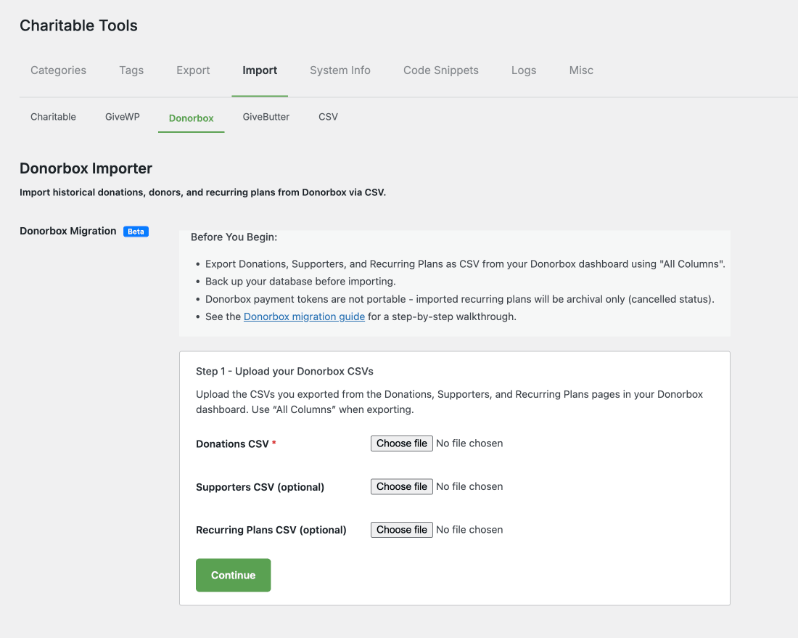
Go to Charitable » Tools and click the Import tab.
Select Donorbox from the list of available importers.
Upload your Donations CSV and review the preview count.
Upload your Supporters CSV. The importer displays a live preview showing the exact number of donor records found in the file – confirm it looks right before continuing.
Upload your Recurring Plans CSV and review the preview count.
Click Run Dry Run. The importer processes all three files, flags any errors or conflicts, and generates a report – without saving anything to your database. Review it and resolve any flagged issues before moving on.
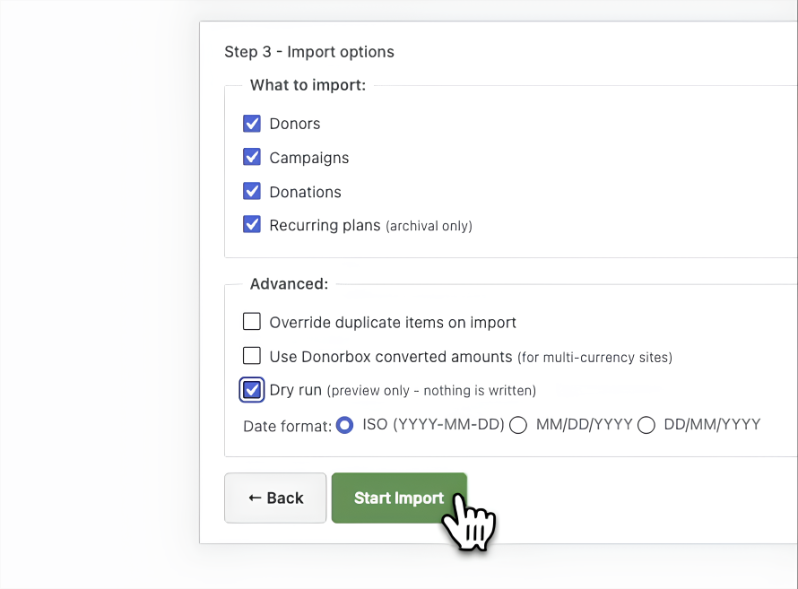
Once the dry run comes back clean, click Run Import to complete the migration.
The whole process takes well under an hour for most organizations – often closer to 15 minutes if your Donorbox exports are clean. No developer access required, and no need to take your site offline.
One recommendation: run the import before you point your public site to Charitable. Getting your historical data in place first means your reports and donor profiles are accurate from the very first day you go live.
Why You’ll Love This
The migration takes an afternoon. The donor relationships it preserves took years to build.
- 📋 Your complete giving history carries over – No blank slate. Years of donation records, donor profiles, and giving data are in Charitable from day one.
- 🔒 Three layers of safety before you commit – Preview, dry run, and rollback give you full confidence before and after the import runs.
- ⚡ No developer, no downtime – Everything runs from the WordPress dashboard. Most organizations finish in under an hour.
- 💳 Recurring donors keep giving – Monthly supporters don’t notice a thing. Their plans carry over with their history intact.
- 🏠 Your data lives on your site – Once the migration is done, your donor database is hosted on your WordPress install – not on a third-party platform you don’t control.
Ready to Make the Switch?
The Donorbox Importer is included in all Charitable Pro paid plans, starting at $69/year for a single site. Every paid plan gives you the full toolkit to receive donations, manage donors, and grow your fundraising – with no transaction fees taken by Charitable on any gift.
Not yet on Charitable Pro? Every plan is backed by a 14-day money-back guarantee. If it’s not the right fit for your organization, you get a full refund, no questions asked.
For organizations that have been putting off the switch because of what a migration might cost them in data and disruption, this removes the last real reason to wait. Your donor history belongs to you – and now you can take it with you.
Already on Charitable Pro? Check out the Donorbox Importer documentation to walk through your first import. Questions? Our support team is ready to help.
Stay Connected for More Nonprofit Resources
For more tutorials and videos tailored to nonprofits, subscribe to our YouTube channel. We regularly publish expert tips, step-by-step guides on online donations, fundraising strategies, and practical resources to help your organization succeed.
🗞️ Get weekly tips and exclusive guides in your inbox
Join our newsletter →
🎥 Watch step-by-step tutorials and success stories
Subscribe to our YouTube channel →
👩🏽💻 Connect with our community and get daily nonprofit insights
Follow us on LinkedIn →
🥳 Fun reels and non-profit insights
Follow us on Instagram →
👀 Insightful & fun videos to help you grow your cause
Follow us on TikTok→
🌎 Subscribe and follow for general fundraiser tips
Get Fundraiser Tips on TikTok →
Powerful Fundraising Resources
🤖 Use Charitable with Your AI Assistant
⬇️ Download proven strategies, campaign ideas, and expert tools
Get the Fundraising Kit →
💸 Get Free Fundraising Resources
Head to the Charitable Fundraising Hub →
🤔 Got questions about Charitable?
Charitable FAQs →
🏎️ Take Charitable for a spin
Create your Charitable Demo →
Understand non-profit terms and jargon
Non-Profit Glossary →
% Looking for non-profit deals and discounts?
Best Non-Profit Deals and Discounts →









Leave a Reply