
Your donor in another country found your campaign. They clicked through, they read your story, and they were ready to give. Then they saw the amount listed in US dollars, did a quick mental calculation, shrugged, and left.
You never knew they were there.
For nonprofits with any international reach, this happens more than most organizations realize. Donors who encounter a currency that isn’t theirs face a small but real moment of friction, and friction kills conversions. When your cause is global but your donation form only speaks one currency, you’re leaving support on the table every single day.
There’s a direct fix for that, and it doesn’t require a developer or a custom integration.
✨ Meet Charitable Multi-Currency ✨
The new Charitable Multi-Currency addon (v1.0.0) lets you accept donations in multiple currencies, right on your existing donation forms. Donors can select their preferred currency, see suggested amounts converted at live exchange rates, and give in the currency they actually use.
We’re excited about this one cause it opens up so many possibilities for you!
One form. Every currency that matters to your donors. Zero extra steps for you.
Here’s how it works in practice, and why it matters for your fundraising.
How It Works
Charitable Multi-Currency adds a currency switcher dropdown to every donation form on your site. When a donor arrives, they can select from whatever currencies you’ve enabled, and the suggested donation amounts update immediately to reflect current exchange rates.
Those rates come from a live exchange-rate API and refresh daily, so donors always see accurate numbers, not rough guesses.
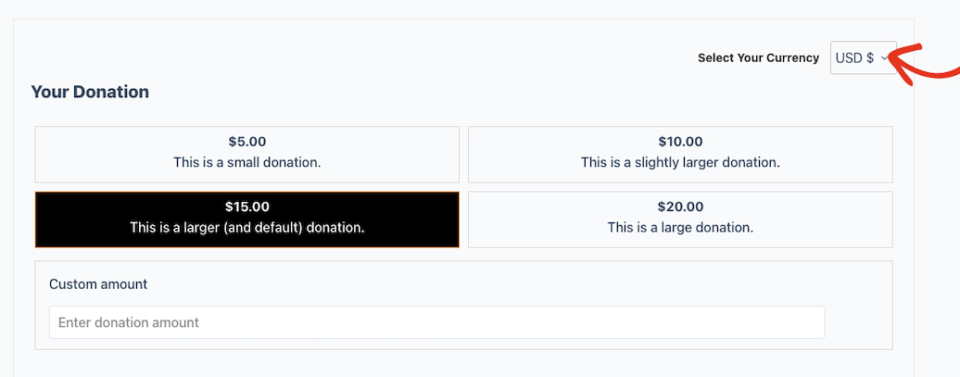
If you have the Charitable Geolocation feature active, you can take things a step further: turn on the Enable Geolocation toggle and the addon will auto-detect each donor’s currency based on their location. A supporter in the UK sees pounds. A donor in Japan sees yen. They don’t have to do anything. The form adapts to them.
Consider a nonprofit running an international disaster relief campaign. They have supporters in the US, Germany, South Korea, and Australia.
Before Multi-Currency, every one of those donors saw USD.
German supporters had to mentally convert euros.
South Korean donors dealt with a USD-suggested amount that made no practical sense when converted to KRW.
With Multi-Currency active, each donor sees suggested amounts in their own currency at current rates, and the currency selection persists via cookie, so returning visitors don’t have to switch again.
On the backend, the Currency Breakdown report in Charitable » Reports » Advanced records each donation’s original currency, the base-currency equivalent, and the exchange rate used, so your reconciliation is clean and your records are complete.
Per-gateway currency controls mean you can also route specific currencies through specific payment gateways, because not every gateway handles every currency. That’s handled under Charitable » Settings » Payment Gateways, with no code required.
What Charitable Multi-Currency Can Do
Here’s a full look at what the addon puts in your hands:
- Currency switcher dropdown on every donation form – Donors select their preferred currency directly on the form, with no page reload or redirect required.
- Live suggested-amount conversion – When a donor switches currency, the suggested donation amounts update instantly using rates fetched from a real exchange-rate API and cached daily. Donors see what their gift actually looks like in their currency.
- Automatic geolocation detection – With the Enable Geolocation toggle on, the addon detects each donor’s currency from their location and pre-selects it. Requires the Charitable Geolocation feature.
- Currency persistence via cookie – The donor’s currency selection is remembered across sessions, so returning visitors pick up right where they left off.
- Zero-decimal currency handling – JPY, KRW, and other zero-decimal currencies are handled automatically. No manual configuration needed to avoid rounding errors.
- Per-gateway currency controls – Map specific currencies to specific payment gateways under Charitable » Settings » Payment Gateways. If your Stripe account doesn’t support a given currency, route it to a gateway that does.
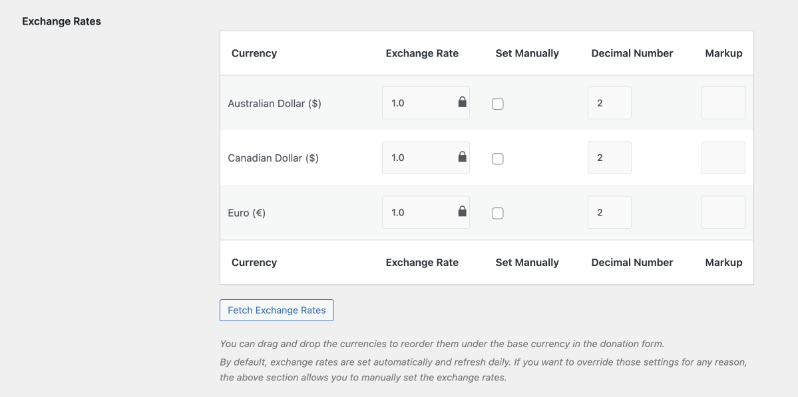
- Per-currency markup field – Add a markup amount to individual currencies in the Exchange Rates table to account for conversion costs or reporting preferences.
- Currency Breakdown report – Found under Charitable » Reports » Advanced, this report shows the original currency, the base-currency amount, and the exchange rate used for every donation. Reconciliation stays clean no matter how many currencies you accept.
- Cache-plugin compatibility – WP Rocket and LiteSpeed cookie-variation filters are built in, with a fallback for other caching plugins. The switcher works correctly even on cached pages.
- Customizable switcher label and message – Set a custom label for the currency dropdown and write a custom message using built-in placeholders to match your site’s language and tone.
Getting Started
You can have Multi-Currency live on your donation forms in just a few minutes. Here’s all it takes:
- Install and activate the addon. In your WordPress dashboard, go to Charitable > Addons, locate Multi-Currency, and click Activate. If you don’t see it listed, you can upload the addon file directly under Plugins > Add New Plugin > Upload Plugin.
- Open the Multi-Currency settings. Navigate to Charitable > Settings > Advanced > Multi-Currency. This is where all configuration lives.
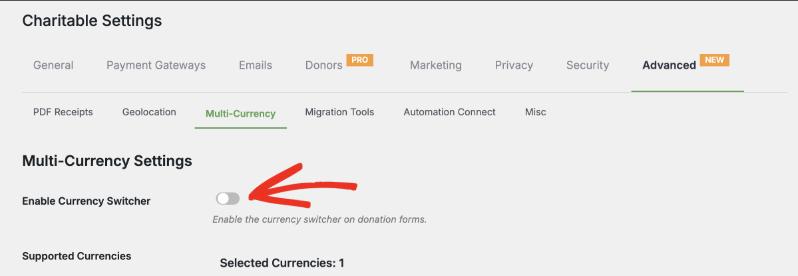
- Enable the Currency Switcher. Toggle on Enable Currency Switcher. This activates the dropdown on your donation forms. No code, no template edits.
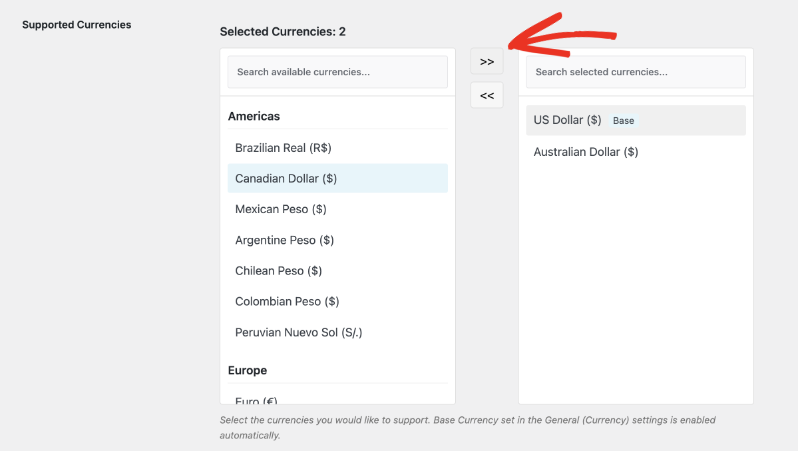
- Select your supported currencies. In the Supported Currencies panel, choose which currencies your donors can select. Currencies are grouped by region. Pick the ones that match your donor base, and they’ll appear in the dropdown on your forms.
- Review the Exchange Rates table. After you save your currency selections, the Exchange Rates table populates with live rates for each currency you’ve enabled. Click Fetch Exchange Rates at any time to refresh them manually. You can also set a per-currency markup here if needed.
- Configure per-gateway currencies (optional). If you use multiple payment gateways and need to control which currencies each one handles, go to Charitable » Settings » Payment Gateways. Each gateway has a supported currencies field where you assign currencies to it.
- Save your changes. Click Save Changes. Your donation forms now display the currency switcher.
If you want to go further: set a custom Currency Dropdown Label to match your site’s language, write a Customizable Currency Switcher Message using the available placeholders, or turn on Enable Geolocation to auto-detect donor currencies.
You can also configure Data Handling on Deactivation options under the same settings tab. If you need to troubleshoot, the Multi-Currency section in Charitable » Tools » System Info and the source filter in Charitable » Tools » Logs give you full visibility.
Why You’ll Love This
The setup takes a few minutes. The impact on international donors starts the moment they land on your form.
- 🌍 Reach donors wherever they are. Supporters in the UK, Japan, the EU, or anywhere else can give in their own currency without a second thought.
- 📊 Clean reporting, no manual conversion. The Currency Breakdown report tracks original currency, base-currency equivalent, and exchange rate per donation. Your books stay organized automatically.
- 🔁 Returning donors see their currency, every time. Cookie-based persistence means repeat supporters don’t have to re-select their currency on every visit.
- ⚙️ No developer required. Every setting lives in the WordPress dashboard. You configure everything through the Charitable UI, no code, no theme edits, no external tools.
- 💳 Gateway routing that actually works. Map currencies to the gateways that support them, so donations don’t fail because a gateway can’t process a particular currency.
Get Multi-Currency with Charitable Pro
Charitable Multi-Currency is included with every Charitable Pro paid plan, starting at $69/year (regular price $149/year) for the Basic plan. Here’s the full breakdown:
- Basic: $69/year (reg. $149) – 1 site
- Plus: $99/year (reg. $199) – 1 site
- Pro: $199/year (reg. $399) – 1 site
- Elite: $299/year (reg. $599) – 5 sites
Every plan comes with a 14-day money-back guarantee, no questions asked. If Charitable Pro isn’t the right fit, you get a full refund.
Start Accepting Donations in Every Currency
Multi-currency support is one of those additions that’s easy to overlook until you realize how many international donors you’ve been asking to work around your setup. Now you don’t have to ask them to.
Already on Charitable Pro?
Head to the Multi-Currency Documentation to get the addon configured today. Questions about setup or your plan?
The Charitable support team is ready to help.
Charitable Has 1.2+ Million Downloads!
Trusted by millions to power successful fundraising campaigns. Try Charitable risk-free today.
✅ 14-day money-back guarantee
✅ Transparent pricing
✅ Code-free setup
Stay Connected for More Nonprofit Resources
For more tutorials and videos tailored to nonprofits, subscribe to our YouTube channel. We regularly publish expert tips, step-by-step guides on online donations, fundraising strategies, and practical resources to help your organization succeed.
🗞️ Get weekly tips and exclusive guides in your inbox
Join our newsletter →
🎥 Watch step-by-step tutorials and success stories
Subscribe to our YouTube channel →
👩🏽💻 Connect with our community and get daily nonprofit insights
Follow us on LinkedIn →
🥳 Fun reels and non-profit insights
Follow us on Instagram →
👀 Insightful & fun videos to help you grow your cause
Follow us on TikTok→
🌎 Subscribe and follow for general fundraiser tips
Get Fundraiser Tips on TikTok →
Powerful Fundraising Resources
🤖 Use Charitable with Your AI Assistant
⬇️ Download proven strategies, campaign ideas, and expert tools
Get the Fundraising Kit →
💸 Get Free Fundraising Resources
Head to the Charitable Fundraising Hub →
🤔 Got questions about Charitable?
Charitable FAQs →
🏎️ Take Charitable for a spin
Create your Charitable Demo →
Understand non-profit terms and jargon
Non-Profit Glossary →
% Looking for non-profit deals and discounts?
Best Non-Profit Deals and Discounts →









Leave a Reply