Charitable Blog

Everything you need to know about Charitable and our team.

Introducing Charitable 1.8.8: Enable ACH & Cash App, Style Your Payment Fields, and More!

Last updated on

  • By

We’ve been hard at work making Charitable Pro even more powerful and user-friendly for you and your donors. This latest release is all about streamlined experiences and making fundraising simpler, more efficient, and more effective. Here’s a look at the improvements we’ve made.

New Donation UI with A Modern Look

We’re excited to introduce a fresh new look for the payment fields in your donation forms! We’ve updated the frontend user interface to give your users a new, modern look.

Here’s a peek at the modern look:
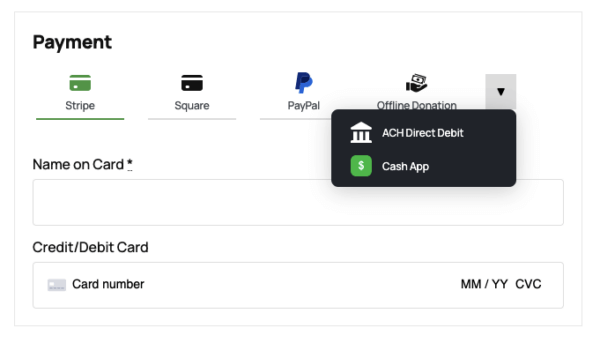
New payment ui

In your settings, you’ll find the existing default template for a simple, classic look, along with the new modern look.

You can easily switch between the two, no coding needed here.
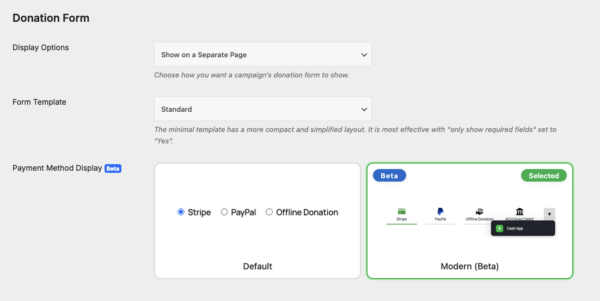
Donation form modern option

If you’ve enabled multiple payment gateways, you’ll now benefit from a streamlined payment selection process. Charitable will display your four most commonly used gateways by default. For any additional gateways, those will neatly appear in a convenient dropdown menu.

This is only available for the modern display format, helping to keep the donation form organized and easy to use.

More Payment Options With Stripe

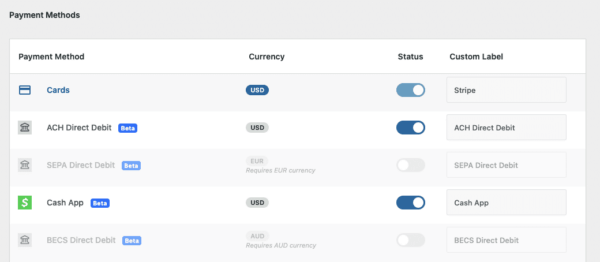
We’ve expanded payment options to make donating even easier for your supporters! With Stripe, you can now offer these additional payment options:

  • ACH Direct Debit
  • SEPA Direct Debit
  • Cash App Direct Debit
  • BECS Direct Debit
Stripe payment methods available

We’ve made it easy to manage which payment options are available to your donors.

ACH Direct Debit (USD)

You can now enable or disable ACH Direct Debit payments with just a click – making it easier for donors to give directly from their bank accounts.

ACH Direct Debit is perfect for donors in the United States who prefer to pay directly from their bank accounts. It offers a secure, convenient, and reliable way to contribute directly—and often with lower transaction fees.
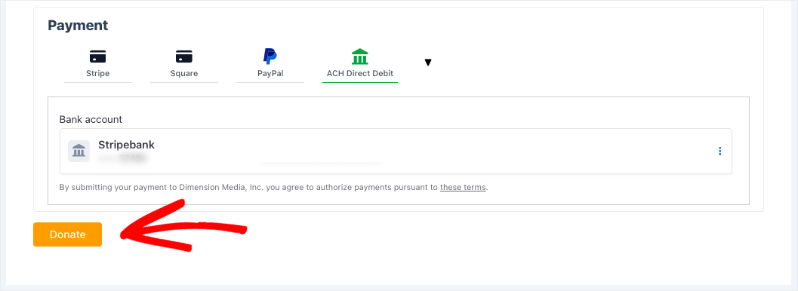
ACH bank donate now button

With ACH Direct Debit integration, US donors can contribute securely and seamlessly.

Cash App Pay (EUR)

Allow your supporters to donate quickly and easily using Cash App! Cash App integration offers a fast and convenient payment option for donors on the go.

Your users can now scan a QR code that appears onscreen and make the donation on their smartphones.
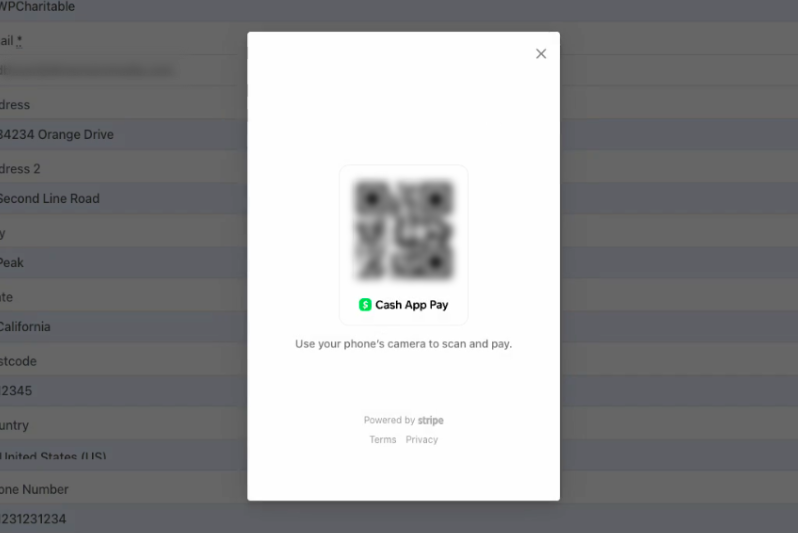
Scan Cash App page

Cash App Pay caters to the European market, especially younger mobile-first donors. It provides an instant, simple, and secure way to donate from smartphones.

SEPA Direct Debit (EUR)

SEPA Direct Debit is the preferred payment method for European donors, streamlining direct payments from European bank accounts. With SEPA, you can receive higher volumes of donations from Europe.

Offering this localized payment option increases trust and makes donating easier for major markets in Europe.

BECS Direct Debit (AUD)

Activate BECS Direct Debit within your Charitable settings to enable direct payments from Australian donors. A streamlined process for higher donation volumes and increased trust.

Australian donors can now easily contribute with a payment method they already trust and use.

With this, you can appeal to a larger audience, by expanding donation options globally and locally, and help them support your cause easily!

Clear Instructions for PayPal & Offline Donations

We understand that sometimes donors prefer alternative payment methods. To make the process clearer, donors using PayPal or Offline Donations will now see helpful instructions detailing the next steps they need to take.
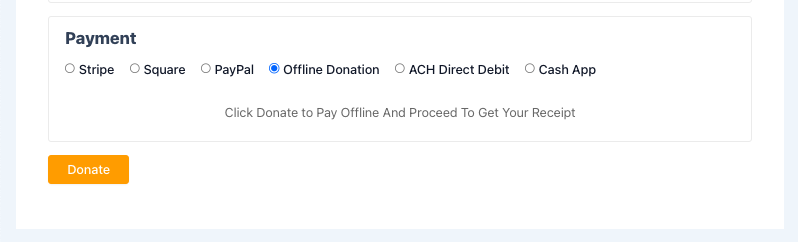
Offline donations instructions

This includes messages like:

  • “Click Donate to complete your payment with PayPal”
  • “Click Donate to pay offline and proceed to get your receipt”

This ensures that your donors know exactly what to do to complete their contribution, even when using these methods.

Easier Navigation with the Refreshing Addons View

Finally, we’ve updated the Addons View to make it simpler than ever to find the tools you need. The page now has a cleaner design and more intuitive layout, and the same improvements are available directly in the Charitable dashboard too! 
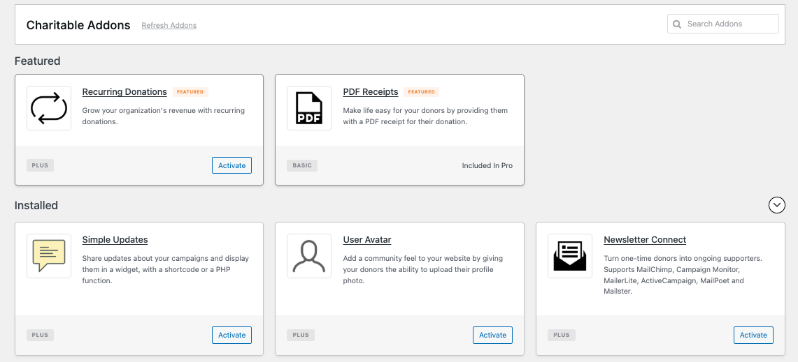
New Charitable addon view

That’s our latest update! If you don’t have Charitable Pro yet, consider upgrading to get features like recurring donations, peer-to-peer fundraising, donor portal, complete donor management, and so much more.

Learn more about Charitable Pro here »

If you’d like to receive updates on new features along with non-profit advice and tips delivered straight to your inbox, join our newsletter.

You may also want to subscribe to our Charitable YouTube Channel. We regularly post tips, tricks, and tutorials to help you make the most of the Charitable plugin.


author avatar
David Bisset

Disclosure: Our content is reader-supported. This means if you click on some of our links, then we may earn a commission. We only recommend products that we believe will add value to our readers.

Leave a Reply

Your email address will not be published. Required fields are marked *

Get free tips and resources right in your inbox, along with 60,000+ others

Join our Newsletter

We won’t spam you. We only send an email when we think it will genuinely help you. Unsubscribe at any time!

Featured Video:

Watch more videos on our YouTube channel.

What's New In Charitable

View The Latest Updates
🔔 Subscribe to get our latest updates
📧 Subscribe to Emails

Email Subscription

Join our Newsletter

We won’t spam you. We only send an email when we think it will genuinely help you. Unsubscribe at any time!

Donations Improvement

📊 Your Pro Dashboard Can Now Compare, Export, and Score!

Most fundraising dashboards only tell you how much you have raised. Charitable Pro 1.8.19 rebuilds the dashboard and the Reports Overview around the harder questions: whether anything is broken, whether this period beat the last one, and which single change would make the most difference today. Why this is important:

  • 📈 Every figure has a trend: Pick a period and the tiles and the chart move together, with each total shown against the previous period.
  • 🗓️ Charts that stay readable: Short ranges group donations day by day, while longer ranges group by week or month, so a full year reads as a curve instead of a flat line.
  • 🔀 Compare any 2 periods: Not just consecutive ones, so you can ask how this December did against last December. That matters because fundraising is seasonal.
  • 📤 Export the whole summary: Send the full overview out as CSV or PDF, ready for a board pack or a funder report.
  • 🎯 Score your setup for free: Have your fundraising setup scored, so the one change worth making next is the one you can see.

Check out our announcement here.

author avatar
David Bisset
Feature New

🎟️ Introducing Charitable Events: Sell Tickets Inside Your Campaigns!

Most nonprofits sell event tickets in one tool and collect donations in another, which leaves two sets of reports and a manual match at the end of the year. Charitable Events brings both together, selling tickets through the same donation forms and payment gateways you already run in Charitable. Why this is important:

  • 🎟️ Every ticket is a donation: Ticket sales run through the gateway you already use and count toward the campaign goal, with everything managed under Charitable » Events.
  • 📱 QR check-in from any phone: Each attendee gets their own QR code on the receipt, and volunteers scan at the door through a check-in link that needs no WordPress account.
  • 🧾 Receipts ready for tax time: Give each ticket type a fair market value, and Charitable puts the correct tax-deductible amount on every donor receipt.
  • 📋 Attendee details at checkout: Ask every guest for a meal choice, shirt size, or access needs, with a separate attendee record created for each ticket.
  • 🗓️ Blocks and calendars included: Three editor blocks plus Sugar Calendar and The Events Calendar support put your events where supporters already look.

Check out our announcement here.

author avatar
David Bisset
ai New

🚀 Unleash AI Power in Charitable!

Your AI assistant can now build, edit, and manage your Charitable fundraising campaigns directly — just by asking. With Charitable Pro adding write support for the WordPress Abilities API, tools like ChatGPT, Claude, and Cursor can handle full administrative actions safely through MCP. Why this is important:

  • 🤖 Campaign creation in plain language: Prompt your assistant with a goal like “Set up a fundraiser for the shelter with a $5,000 goal”, and it builds a real draft campaign complete with suggested donation tiers.
  • 🎨 Instant donation form tweaks: Add custom fields, change button colors, or reorder elements without diving into form settings.
  • 📝 Offline gift logging: Tell your assistant about cash or check gifts, and it will match donor emails and record transactions into your history.
  • 🛡️ Safety and control by default: Write access stays strictly off until turned on in Charitable » Tools » AI MCP, keeping read-only reporting safe by default.
  • 📜 Full audit logging: Every change made by an AI assistant is tracked under Charitable » Tools » Logs, so you always know who (or what) updated your site.

Check out our announcement here.

author avatar
David Bisset
Improvement Payments

💰 Accept Recurring Donations with Windcave and Charitable

A donor sets their gift up once on Windcave’s secure payment page, and Charitable bills every renewal after that on schedule. Why this is important:

🏦 Organizations banked in New Zealand or Australia: monthly giving on the gateway your bank already set you up with, with no second processor to onboard.
⛪ Churches taking regular tithes and offerings: congregants set their own schedule once, which is the simplest way to launch recurring church giving without a separate platform.
🌏 Groups with donors in several currencies: Windcave handles more than 20, so a supporter can give in the currency they actually hold.
📅 Operating funds rather than one-time campaigns: switch on Recurring Only mode and the one-off option disappears, so every gift to that campaign is a subscription.
🧾 Teams with no developer on staff: 3 sets of credentials pasted into a settings page, and no code anywhere.

Check out our announcement here.

author avatar
David Bisset
automation update

⚡ Visual Automation Builder: Drag and Drop With No Code!

Charitable Automation Connect 2.3.0 introduces the Visual Automation Builder, a full-screen canvas that lays each automation out as a flow of connected cards: a trigger, optional conditions, and a list of actions that run in order.

🧩 Many actions, one trigger: Tag a donor, send an email, add a note, and fire a webhook from a single event, dragged into any order.

✉️ Act inside Charitable: New Send Email, Tag Donor, and Add Donor Note actions run with no external service required.

🔤 Merge tags: Personalize emails and notes with live fields like {first_name}, {total}, and {campaign_name}.

🔁 Apply to existing donors: Run Tag Donor and Add Donor Note against the donors you already have.

🖥️ Canvas or Simple: Switch views anytime, and automations built before 2.3.0 keep working unchanged.

Read more here.

author avatar
David Bisset