
Peer-to-peer fundraising has been one of our most popular features, with a number of feature requests from you – our users.
You asked, we’ve delivered!
We’re so excited to introduce Charitable Ambassadors 3.0!
We worked really hard on this! Why?
Well, peer-to-peer fundraising is one of the most powerful ways to reach your fundraising goals and do it faster – but it has never been easy to run.
Most peer-to-peer platforms cost thousands of dollars per year – plus a per-transaction cut. Or you could try to assemble a workflow on your own and hope it held together when the donations started coming in.
It’s why we built our Ambassadors add-on years ago to solve this problem and make peer-to-peer fundraising as easy as it can be. Over time, we’ve listened to your feedback and feature requests. And now, we’ve made it even easier for you to manage and run peer-to-peer campaigns without any technical jargon or coding in the way.
Now Ambassadors 3.0 gives you more of a peer-to-peer fundraising platform than a plugin!
You now get a guided onboarding wizard that makes it easy for anyone to set up. There’s also a real-time fundraising dashboard, fundraiser moderation, supporter recruitment, and five beautiful fundraiser page layouts to choose from.
Why 3.0 Is A Big Deal
Here’s what the data says about nonprofit fundraising right now: donor bases have shrunk every year since 2021. The Q4 2025 Fundraising Effectiveness Project report just confirmed it. Active donors declined another 3.6% last year.
Revenue was actually up 5%, but almost all of that growth came from major and supersize donors, who make up just 3.4% of all donors.
Nonprofits are more dependent on a handful of big supporters than ever before, and that’s a fragile position to be in.
Retention for first-time donors is still hovering near 19%. Nearly 4 in 5 new donors never give again.
We’ve been watching these trends. And we believe peer-to-peer fundraising is one of the most powerful responses to all of it at once.
When a donor becomes a fundraiser, they stop being passive. They recruit new supporters from their own network, people who give because of a personal connection, not a cold email. They build community around your cause. And that community is exactly the kind of broad, engaged donor base the data says nonprofits desperately need more of.
The problem has always been execution. Running peer-to-peer well means managing dozens or hundreds of individual fundraisers, reviewing them, supporting them, tracking their performance in real time, recruiting more of them. The platforms built to handle that cost thousands of dollars a year, plus a cut of every donation.
Ambassadors 3.0 changes that.
🚀 See everything live, in one place. Total raised, top fundraisers, donor counts, and trend lines on a single screen, refreshed continuously, without ever leaving WordPress.
✅ Review every fundraiser before it goes public. Approve, reject, or send back for changes with a full audit trail and an automatic email to the ambassador.
🤝 Turn any supporter into a fundraiser. Personalized invite links track who recruited whom, who signed up, and how much each recruit raised.
🎯 Onboard a new organization in minutes. A guided wizard plus scenario templates for marathons, memorials, galas, schools, and birthdays get a brand-new admin to a publishable campaign without a support ticket.
🎨 Ship a beautiful fundraiser on day one. Pick from five built-in layouts, or design one template campaign and have every ambassador’s fundraiser inherit it automatically.
This is what platforms charging thousands of dollars per year are built around. With Ambassadors 3.0, it is a Charitable Pro addon running on the WordPress site you already own.
What’s New in Ambassadors 3.0?
A New Admin Home
Ambassadors no longer lives as a sub-tab inside Charitable Settings. It is now a top-level page under Charitable, with seven dedicated tabs that group your work by what you are actually doing:
- Monitoring performance (Overview)
- Reviewing fundraisers (Moderation)
- Managing people (Directory)
- Configuring how things look (Templates)
- Recruiting more supporters (Invitations)
- Tuning settings (General and Other)

Each of the next sections walks through one of those tabs.
Overview: Your Command Center
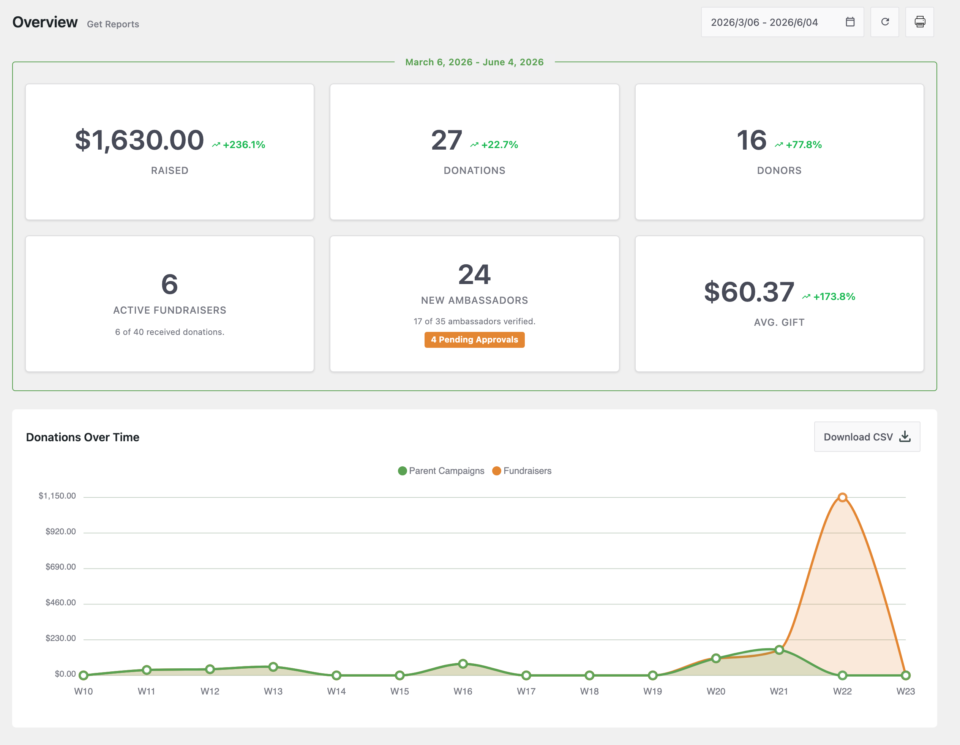
The Overview tab is the first thing you see when you open Ambassadors. It is where you keep a live pulse on how every campaign and every fundraiser is performing.
📊 Key numbers at a glance: Total raised, total donations, active fundraisers, donor counts, and goal progress in six scannable tiles.
📈 Trend chart: A stacked-area chart of donation totals over time, by parent campaign, with a date range picker that matches the rest of Charitable Pro.
🏆 Leaderboards: Top parents, top fundraisers, and top ambassadors, each ranked by amount raised.
📤 CSV export and Print: Every section exports cleanly so you can drop the numbers into a board report or a year-end review.
Moderation: Approve, Reject, Or Request Changes
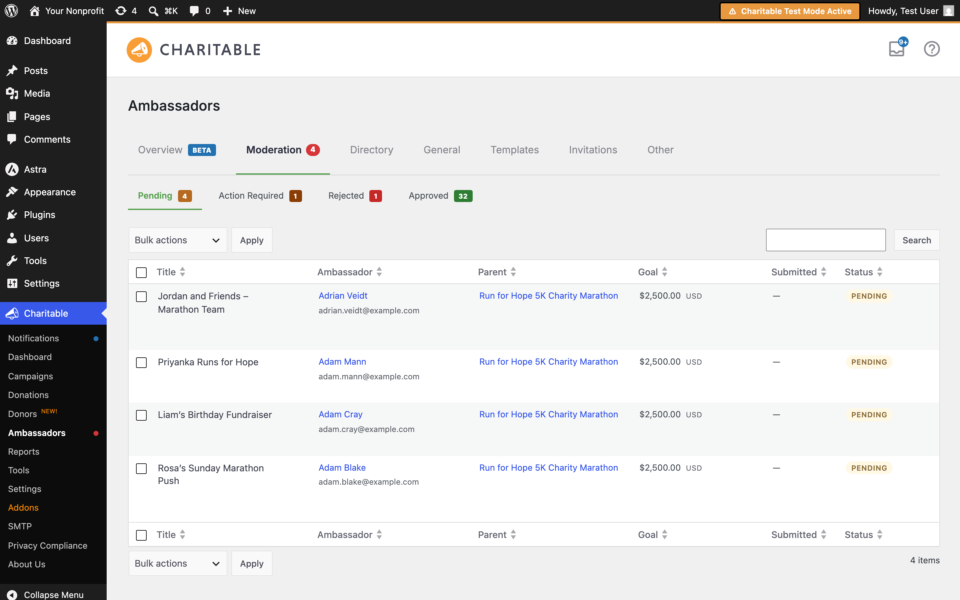
Every fundraiser created under your roof carries your nonprofit’s name. The Moderation tab gives you a queue to review each one before it goes public.
⚖️ Three-state queue: Pending, Approved, and Rejected, with clear row actions on every fundraiser.
↩️ Bulk actions with undo: Approve or reject in bulk, then undo the last action for 30 seconds if you change your mind.
🔍 Full audit log: Every decision and the reviewer who made it is recorded, append-only, on the fundraiser itself.
📧 Two new transactional emails: Rejections and change-request notes go to the ambassador automatically so they know what happened and what to do next.
Directory: One Place To Manage Every Ambassador
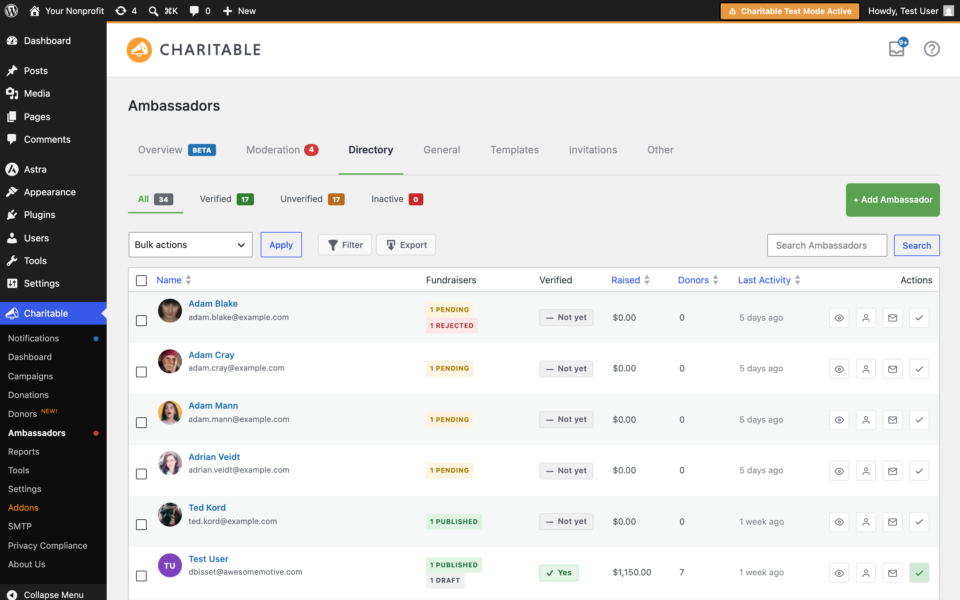
The Directory tab gives you a searchable list of every ambassador on your site, with profile drill-downs, the ability to add new ambassadors manually, CSV export, and bulk email and delete actions.
👥 Searchable roster: Filter and sort by activity, verification, and other key fields.
📇 Profile drill-down: See every fundraiser an ambassador owns and every donation that has come in through them.
📨 Bulk email: Reach out to your entire ambassador list, or a filtered slice, without exporting and pasting into your email tool.
Templates: A Beautiful Fundraiser, Out Of The Box
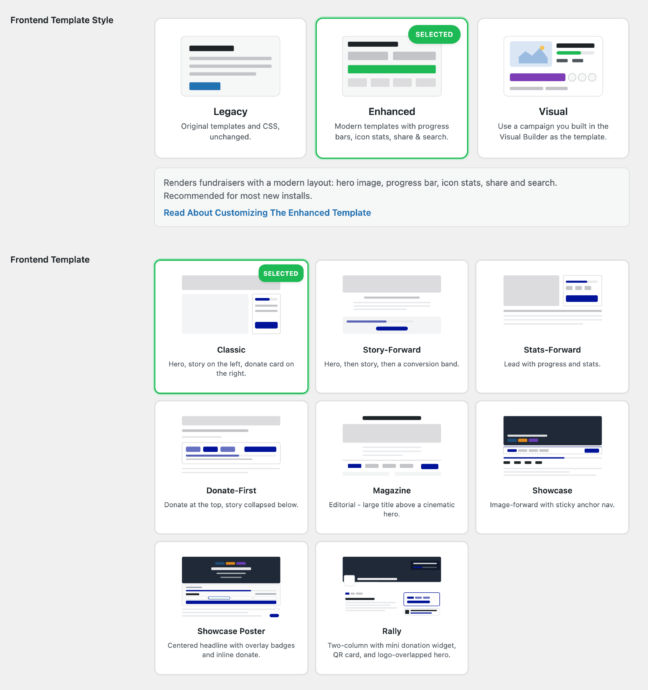
This is where Ambassadors 3.0 really earns the “most complete” claim. The Templates tab is where you decide what every fundraiser page looks like, and you have more options than ever.
🎨 Five layout variants: Classic, Story-forward, Stats-forward, Donate-first, and Magazine. Pick one in a click and every fundraiser adopts it.
🧩 Template campaign mode: Design one campaign in Charitable Pro’s visual builder, set it as the P2P template, and every fundraiser inherits the design. Smart tokens swap in each ambassador’s name, photo, goal, and raised amount automatically.
✍️ Modernized submit form: A card-grid recipient picker and a rich campaign picker replace the old long-form submission, and deep-link parameters let you skip steps when you already know where a fundraiser belongs.
👁️ Live previews: The My Campaigns and Fundraiser Page settings render a live preview of your design choices, accent color and all, before you save.
Here’s a sample of a template that a campaigner can set up:

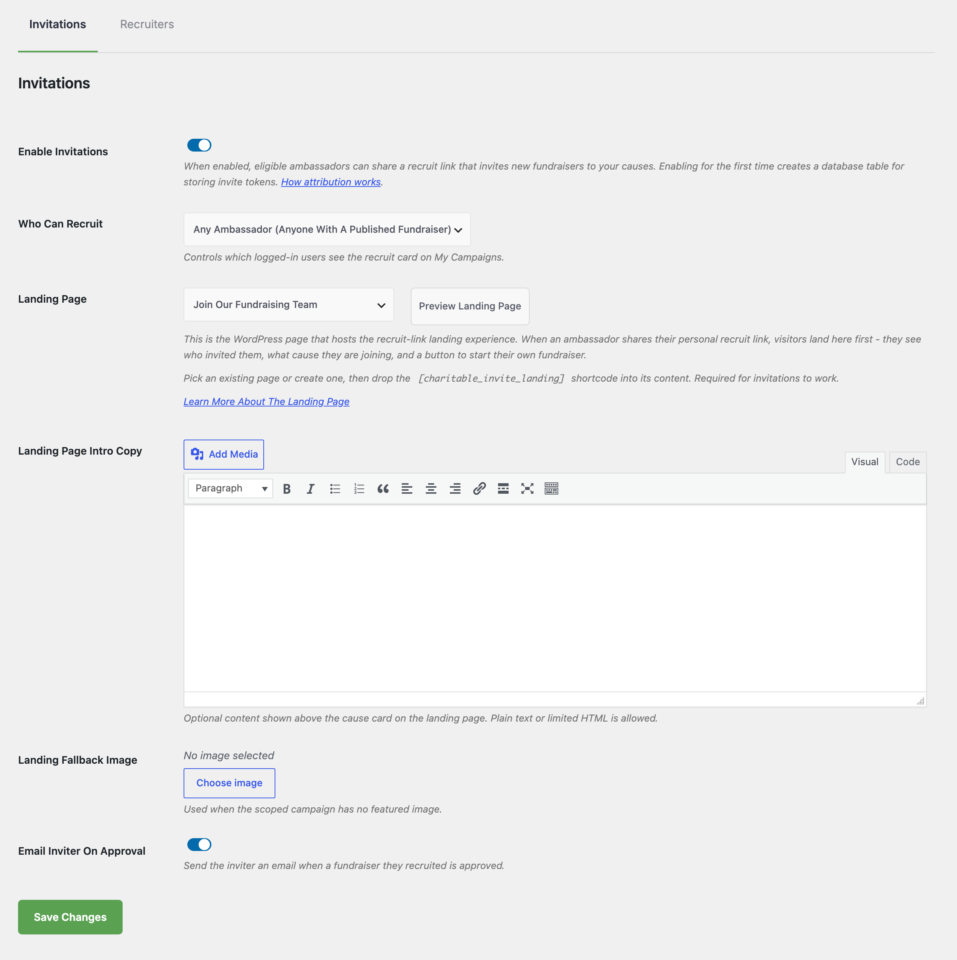
Invitations: Turn Supporters Into Fundraisers
This is the single biggest growth lever in peer-to-peer fundraising, and it is brand new in 3.0.
✉️ Personalized invite links: Every ambassador can generate share links that uniquely identify them and the campaign they are recruiting for.
🍪 Attribution that actually works: A 30-day cookie tracks who clicked which link and who eventually signed up to fundraise, so you know which ambassadors are bringing the most new ambassadors in.
📣 Built into My Campaigns: A recruit card and a per-campaign popover make sharing invites a one-click action from the ambassador’s own dashboard.
📊 Recruitment KPIs on Overview: Invitations sent, accepted, conversion rate, and recruit-driven revenue roll up to your main dashboard.
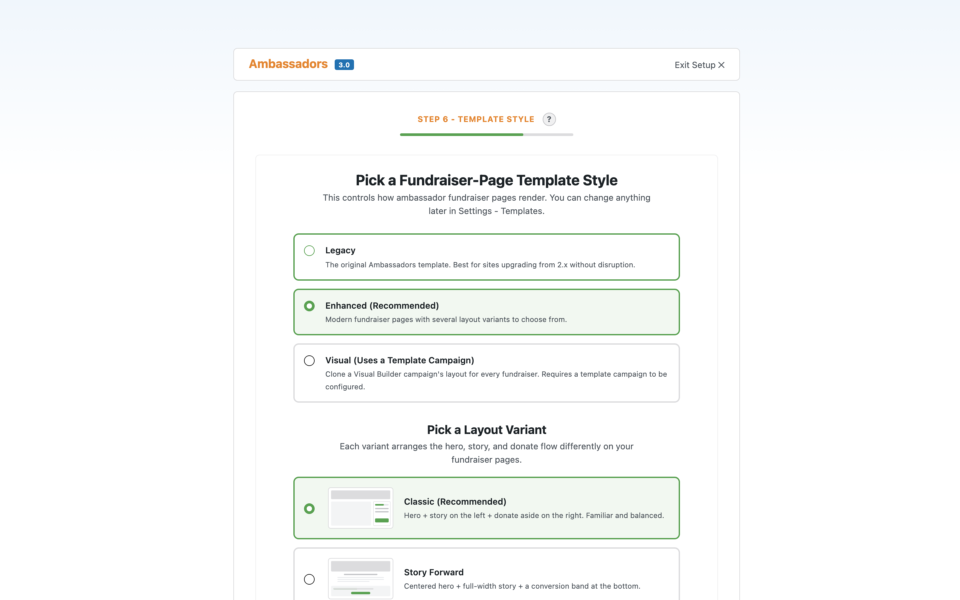
Onboarding: From Activation To First Campaign In Minutes
A brand-new admin used to need a tutorial and probably a support ticket. In 3.0, the plugin onboards them.
🪄 Three paths to first campaign: A step-by-step Setup Wizard for first-timers, six scenario templates for organizations that already know what kind of campaign they want, and a Quick Start for experienced admins.
🎽 Six scenarios out of the box: Marathon, Memorial, Gala, School, Birthday, and Custom. Each one preconfigures a starter campaign that matches how that kind of fundraising actually runs.
🏗️ Pages and starter campaign created for you: The wizard creates the draft Submit Campaign page, the draft My Campaigns page, and a starter peer-to-peer campaign, all in draft so you can review before publishing.
Notifications: Stay In The Loop Without The Inbox Spam
Ambassadors 3.0 hooks into Charitable Pro’s notification bell so the moments that matter surface inside WordPress, not in a flood of email.
🔔 Moderation queue health: Know when fundraisers are waiting on your review.
🎉 First-fundraiser lifecycle: Celebrate when a new ambassador’s first campaign goes live and when it lands its first donation.
🎯 Goal-reached: A notification when any fundraiser crosses 100% of goal.
💰 Total-raised milestones: Quiet celebrations as your organization crosses $1K, $5K, $10K, all the way to $1M.
A master switch and per-event toggles mean you can dial in exactly which moments deserve to surface.
For Agencies And Fundraising Pros
Ambassadors 3.0 is not just for nonprofits running their own campaigns in-house. If you build, theme, or run campaigns for clients, here is what becomes possible.
- Run a year-end match with 50 identical fundraisers. Design one template campaign in the visual builder, let every ambassador fundraise against the same design, with their photo and story swapped in automatically.
- Build a school fundraising platform. Every classroom or team gets its own sub-campaign. Teachers and parents become ambassadors. Invite links bring in families, with attribution back to whoever recruited them.
- Launch a memorial campaign program. Give grieving families a guided onboarding flow and a dignified fundraiser page without asking them to learn WordPress.
- Roll out a multi-chapter rally. Each chapter gets its own parent campaign and its own roster of fundraisers, all reporting up to a single dashboard for the home office.
- Track which ambassadors are actually moving the needle. Recruitment attribution shows you who is sharing for show and who is bringing in real money, so you can double down on the people doing the work.
- Theme each client’s fundraiser pages differently. Layout variants and template overrides mean every nonprofit you serve gets a distinct look, without forking the plugin or maintaining custom builds.
For developers who want to extend the plugin further, hooks, filters, and template override paths are documented in the Ambassadors 3.0 documentation.
Get Started With Ambassadors 3.0
Ambassadors 3.0 is rolling out now to all Charitable Pro customers whose license includes the Ambassadors addon.
If you already have the the Ambassadors add on installed on your site, simply update to the latest version from your WordPress dashboard, then visit Charitable » Ambassadors to meet the new Overview tab.
If you haven’t installed Ambassadors yet, you’ll need an active Charitable Pro license (Pro plan or higher).
Then, you can head to the Downloads tab in your Charitable Pro account. Here, scroll to the Addons section to see all the addons available to you. Download the Amabassadors addon.
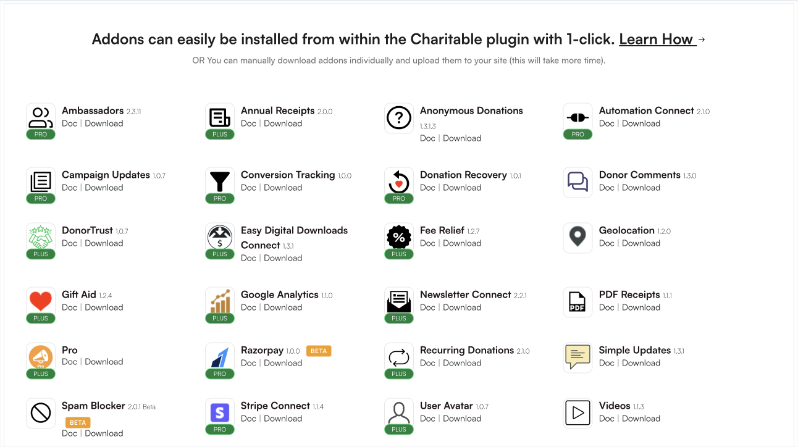
Upload it to your WordPress website under Plugins » Add New » Upload.
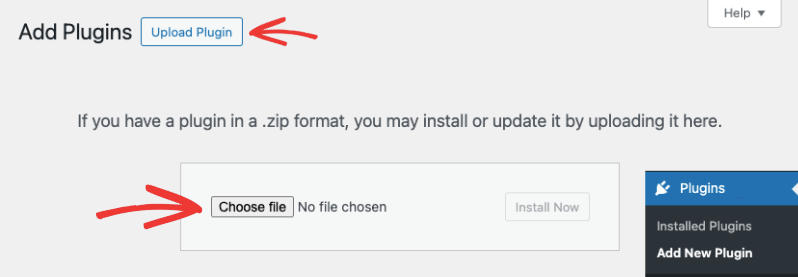
Once activated, you can access it under Charitable » Ambassadors inside your WordPress admin.
For more details: Read the Ambassadors 3.0 Documentation →
Not Yet A Charitable Pro User?
Charitable Pro powers peer-to-peer fundraising for nonprofits of every size, from one-person family memorials to multi-chapter national rallies.
If you have been holding out for a complete peer-to-peer fundraising solution that does not require switching to a hosted platform or paying SaaS fees, this is it.
You can try Charitable Pro for 14-days risk-free and if it’s not a match for your non-profit, you can request for a refund. No matter waht, we want to make sure that you have the right solution to raise funds effectively for you cause.
Charitable Has 1.2+ Million Downloads!
Trusted by millions to power successful fundraising campaigns. Try Charitable risk-free today.
✅ 14-day money-back guarantee
✅ Transparent pricing
✅ Code-free setup
Stay Connected for More Nonprofit Resources
For more tutorials and videos tailored to nonprofits, subscribe to our YouTube channel. We regularly publish expert tips, step-by-step guides on online donations, fundraising strategies, and practical resources to help your organization succeed.
🗞️ Get weekly tips and exclusive guides in your inbox
Join our newsletter →
🎥 Watch step-by-step tutorials and success stories
Subscribe to our YouTube channel →
👩🏽💻 Connect with our community and get daily nonprofit insights
Follow us on LinkedIn →
🥳 Fun reels and non-profit insights
Follow us on Instagram →
👀 Insightful & fun videos to help you grow your cause
Follow us on TikTok→
🌎 Subscribe and follow for general fundraiser tips
Get Fundraiser Tips on TikTok →
Powerful Fundraising Resources
🤖 Use Charitable with Your AI Assistant
⬇️ Download proven strategies, campaign ideas, and expert tools
Get the Fundraising Kit →
💸 Get Free Fundraising Resources
Head to the Charitable Fundraising Hub →
🤔 Got questions about Charitable?
Charitable FAQs →
🏎️ Take Charitable for a spin
Create your Charitable Demo →
Understand non-profit terms and jargon
Non-Profit Glossary →
% Looking for non-profit deals and discounts?
Best Non-Profit Deals and Discounts →










Leave a Reply