
Charitable Lite est la version gratuite qui vous offre les outils essentiels dont vous avez besoin pour collecter des fonds efficacement sur votre site WordPress. Cela inclut des formulaires de don, le traitement des paiements Stripe et PayPal, et des outils de gestion des dons. Pour de nombreuses organisations à but non lucratif qui débutent avec les dons en ligne, elle offre une base solide.
Étant un plugin gratuit, il répond aux besoins de base en matière de collecte de fonds. Cependant, si vous cherchez à développer davantage vos efforts de collecte de fonds, vous pourriez être curieux de découvrir Charitable Pro.
Charitable Pro vous offre des outils puissants pour augmenter considérablement vos dons en ligne. Cela inclut une base de données centralisée des donateurs, un système complet de gestion des dons, des comptes donateurs en libre-service, ainsi que des dons récurrents et des campagnes de pair à pair.
Il y a tant à explorer dans Charitable Pro, mais avez-vous besoin de toutes ces fonctionnalités, ou Charitable Lite sera-t-il suffisant pour votre organisation ?
Cet article fournira une comparaison claire entre Charitable Lite et les différentes formules Charitable Pro. Mon objectif est de vous aider à déterminer si la mise à niveau vers une licence payante est la bonne décision pour répondre aux besoins de collecte de fonds de votre organisation.
Examinons en détail ce que vous obtenez avec chaque version de Charitable. Cette comparaison vous aidera à repérer rapidement les différences entre Lite et Pro.
Charitable Lite vs Pro en un coup d'œil
Tout d'abord, voici les fonctionnalités de base que vous obtiendrez avec les versions Lite et Pro.
Lorsque vous installez le plugin, vous serez accueilli par un assistant de configuration qui vous aidera à démarrer rapidement. Ce guide est conçu pour vous aider à configurer les bons paramètres et à lancer votre première campagne rapidement afin que vous puissiez commencer à collecter des fonds immédiatement.
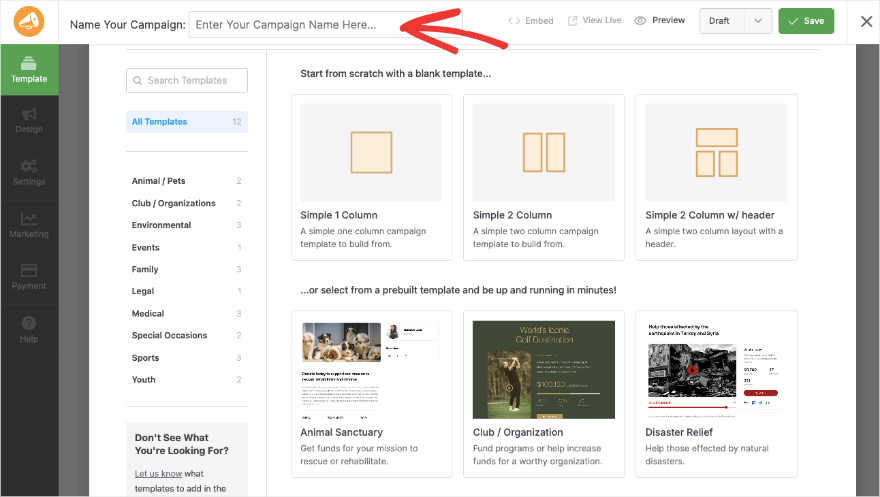
Tout d'abord, vous obtiendrez des modèles de campagne préconçus ou vous pourrez commencer à concevoir à partir de zéro.
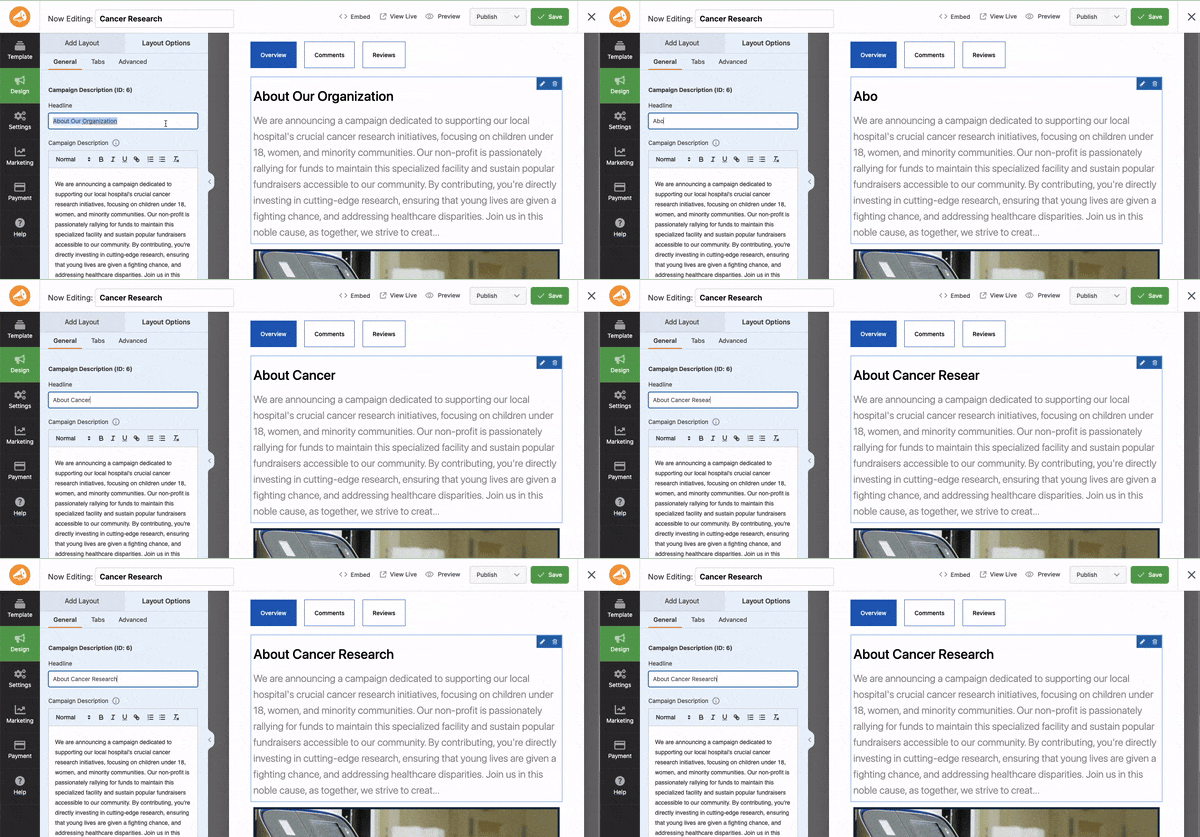
Ensuite, il existe un constructeur intuitif par glisser-déposer pour personnaliser votre collecte de fonds. Cela vous permet d'ajouter de nouveaux champs tels que des barres de progression, le montant du don, des liens sociaux, des photos, et plus encore. Il y a un aperçu en direct de votre campagne afin que vous puissiez voir à quoi elle ressemblera sur le front-end pendant que vous la concevez. Vous cliquez simplement sur n'importe quel champ pour le modifier.
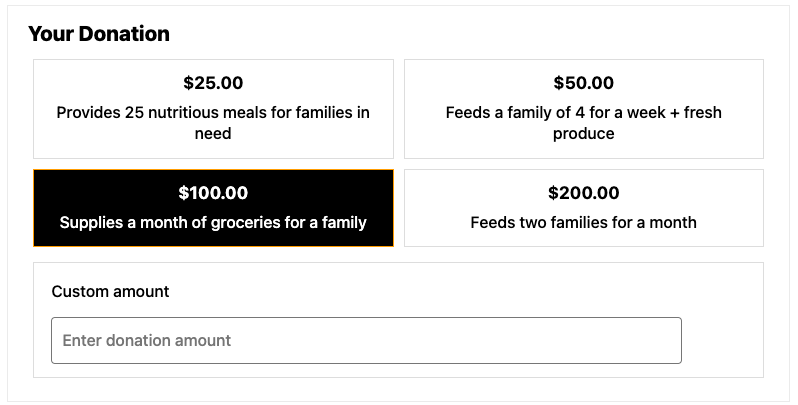
Ensuite, vous pouvez personnaliser les montants des dons qui apparaissent à vos donateurs et leur permettre également d'entrer un montant personnalisé de leur choix.
Vous pouvez accepter les paiements en ligne via Stripe et PayPal. Tout est intégré, il vous suffit donc d'activer la passerelle et de lier votre compte.
Pour les e-mails, vous pouvez vous connecter à Mailchimp et commencer à envoyer vos e-mails marketing immédiatement.
Avec toutes les versions du plugin, vous obtiendrez :
- Formulaires de dons illimités
- Gestion de base des dons
- Intégration PayPal et Stripe
- Création de campagnes
- Rapports de dons
- Notifications par e-mail de base
- Outils de conformité RGPD
- Conception réactive pour mobile
Plongeons maintenant dans les détails de ce que propose Charitable Lite et à qui il est destiné. Vous voulez connaître le coût de Pro tout de suite ? Passez à la suite »
Le plugin Charitable Lite

Au cœur de Charitable Lite, vous trouverez les outils essentiels pour commencer à accepter des dons sur votre site WordPress. Vous pouvez créer des campagnes de collecte de fonds illimitées, avec des objectifs, des échéances et des barres de progression qui maintiennent l'engagement et la motivation de vos donateurs. Les fonctionnalités de reporting de base vous aident à suivre le succès de vos campagnes et l'activité des donateurs.
Comme je l'ai mentionné, en matière de traitement des dons, Charitable Lite s'intègre avec PayPal et Stripe. Cela signifie que vous pouvez commencer à accepter des dons ponctuels en toute sécurité immédiatement. Les formulaires de don sont simples mais efficaces, conçus pour être réactifs sur mobile et conformes au RGPD.
Pour chaque don effectué, un nouvel enregistrement de don est automatiquement créé pour vous. Cela vous permet de suivre les contributions. Vous pouvez envoyer des notifications par e-mail standard et exporter les données de dons si nécessaire. Bien que basiques, ces fonctionnalités offrent suffisamment de possibilités pour gérer un programme de dons simple.
Ce qu'il y a dans Charitable Lite
Voici ce que vous obtenez avec Charitable Lite :
- Créez des campagnes de collecte de fonds illimitées avec des objectifs, des échéances et un suivi de progression
- Acceptez des dons ponctuels via PayPal et Stripe avec un traitement sécurisé
- Formulaires de don de base avec des fonctionnalités de reporting de campagne
- Enregistrements de dons simples avec des outils de communication de base
- Notifications par e-mail standard et exportation de données
- Reporting de base et suivi des donateurs
- Conception réactive sur mobile avec intégration WordPress
- Conformité RGPD et support du forum communautaire
- Outils essentiels pour la gestion de campagne de base
Limitations de Charitable Lite
Bien que Charitable Lite offre une base solide, il présente des limitations par rapport à la version pro. Vous ne trouverez pas de fonctionnalités telles que les dons récurrents ou des options de passerelles de paiement supplémentaires. Le système de gestion des donateurs est basique, manquant de profils avancés ou de tableaux de bord donateurs en libre-service. Si vous êtes intéressé par la collecte de fonds pair-à-pair ou si vous avez besoin d'outils sophistiqués d'engagement des donateurs, vous constaterez qu'ils manquent dans la version gratuite.
Voici les inconvénients en un coup d'œil :
- Aucune option de don récurrent
- Options de passerelles de paiement limitées
- Gestion des donateurs basique uniquement
- Pas de collecte de fonds pair-à-pair
- Support standard uniquement
Qui devrait utiliser Charitable Lite ?
Charitable Lite est parfait pour les organisations qui débutent dans la collecte de fonds en ligne. Si vous êtes une nouvelle organisation à but non lucratif qui teste les eaux des dons en ligne, ou une petite association aux besoins de collecte de fonds simples, cette version gratuite pourrait être tout ce dont vous avez besoin. C'est aussi un excellent moyen de tester la plateforme avant de s'engager dans une licence Pro.
Combien coûte Charitable Lite ?
Charitable Lite est gratuit. Vous pouvez simplement l'installer sur votre site web et commencer.
Lorsque vous utilisez une passerelle de paiement, celle-ci prélève des frais de transaction pour son service. Par exemple, Stripe facture généralement 2,9 % + 0,30 $ par transaction. Ces frais s'appliqueront que vous utilisiez Charitable Lite ou Pro. Les frais sont appliqués par la passerelle de paiement et vont directement à celle-ci.
Si vous utilisez Stripe avec Charitable Lite, vous paierez ces frais de passerelle de paiement + 3 % supplémentaires sur chaque transaction. Les frais supplémentaires de 3 % disparaissent lorsque vous passez à la version Charitable Pro.
Comment obtenir Charitable Lite ?
Vous pouvez télécharger la version gratuite de Charitable depuis le répertoire des plugins WordPress.org. Dans votre tableau de bord WordPress, allez à la page Plugins » Ajouter. Recherchez Charitable, puis installez et activez le plugin sur votre site.
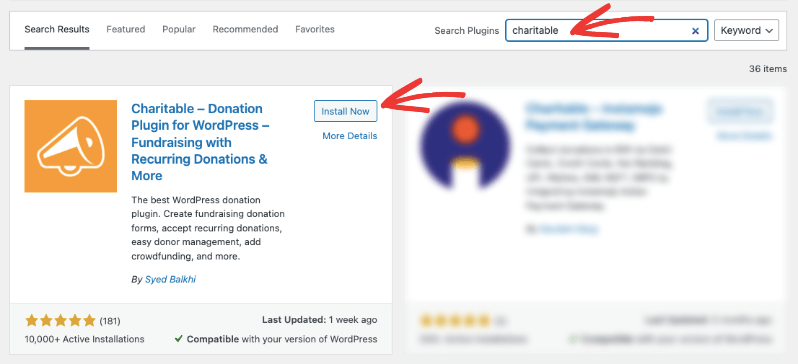
C'est tout, vous êtes prêt à utiliser Charitable Lite. Aucune licence requise.
Maintenant, jetons un coup d'œil à ce que Charitable Pro a à offrir.
Le plugin Charitable Pro (Premium)
Avec Charitable Pro, vous débloquerez des options de dons avancées et un puissant système de gestion des donateurs. Il est conçu pour être une solution tout-en-un pour les sites Web de collecte de fonds et de dons, il contient donc à peu près tout ce dont vous aurez besoin pour accepter les paiements en ligne, gérer les donateurs, émettre des reçus, envoyer des e-mails, et plus encore.
Premièrement, lorsque vous créez des campagnes, vous pouvez dupliquer des campagnes existantes. J'adore cette fonctionnalité car elle fait gagner beaucoup de temps. Je n'ai qu'à configurer ma campagne une fois avec tous les bons paramètres, puis je peux simplement la dupliquer et modifier le contenu au besoin.
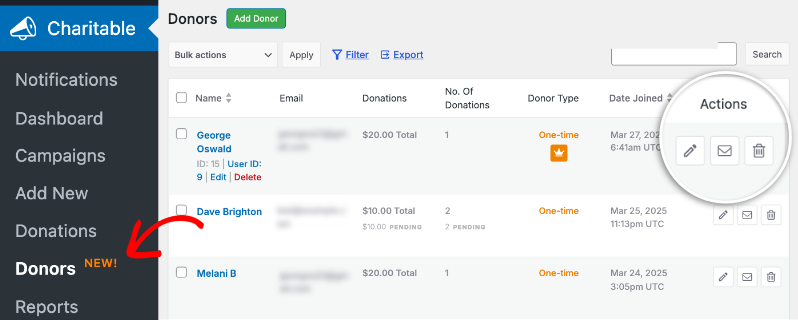
Ensuite, lorsqu'une personne fait un don, un enregistrement de don est créé avec un nouveau profil de donateur, qui est ensuite ajouté à votre base de données de donateurs.
De plus, vous obtiendrez des fonctionnalités d'optimisation des dons comme les dons récurrents, les montants de dons personnalisés et plusieurs passerelles de paiement. Par exemple, vous pouvez proposer des options de dons ponctuels et récurrents comme ceci :
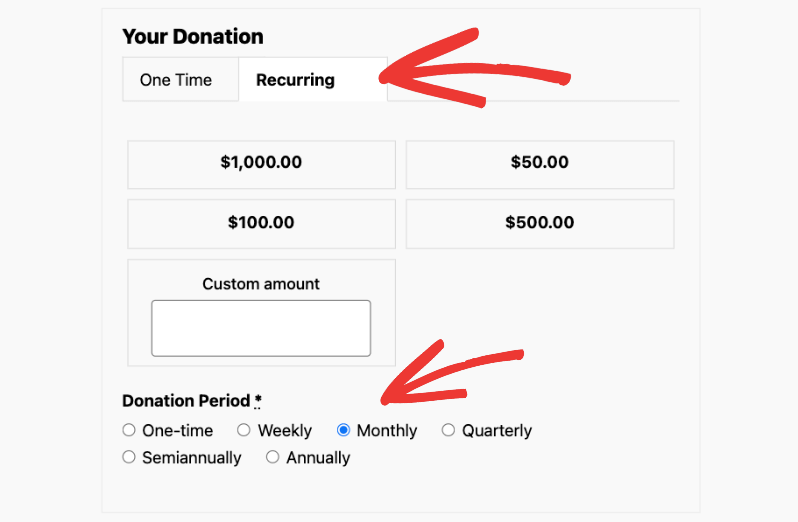
Vous pouvez ajouter des montants suggérés et des périodes de dons récurrents.
Il existe également la fonctionnalité de récupération des frais qui permet de compenser les coûts de traitement et le Gift Aid qui profite aux organisations au Royaume-Uni.
Le plugin Pro transforme la façon dont vous gérez les relations avec les donateurs grâce à une base de données centralisée et des profils améliorés. Les donateurs obtiennent des comptes en libre-service pour gérer leur historique de dons, modifier leurs contributions récurrentes et télécharger leurs reçus de dons quand ils le souhaitent.
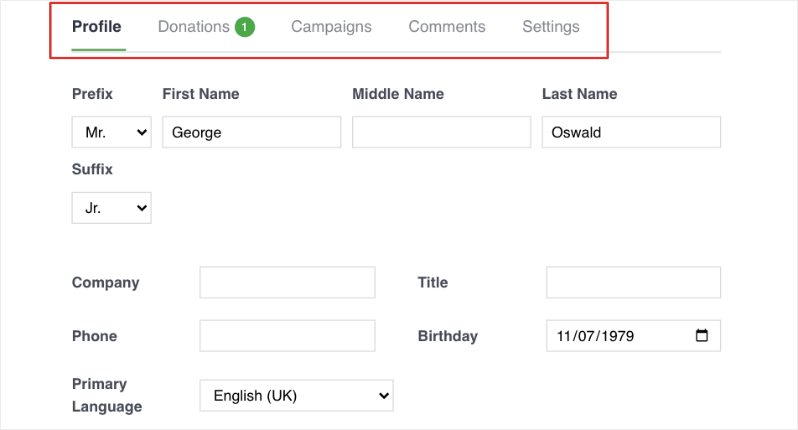
Cela crée une expérience plus professionnelle et rationalisée pour toutes les personnes impliquées.
Il y a plus !
Charitable vous permet également de lancer des campagnes de financement peer-to-peer et de vous intégrer à vos outils de marketing par e-mail. Ces fonctionnalités vous aident à engager votre communauté plus efficacement et à élargir considérablement votre portée de collecte de fonds.
Vous bénéficierez également d'un accès prioritaire à une assistance experte lorsque vous en aurez besoin, garantissant ainsi le bon déroulement de vos opérations de collecte de fonds.
Pour utiliser Charitable Pro, vous avez besoin d'une licence payante, que vous pouvez obtenir sur le site Web de Charitable.
Qu'y a-t-il dans Charitable Pro ?
Voici un aperçu de ce que vous pouvez obtenir avec le plugin Charitable Pro :
- Dons récurrents et intervalles de dons personnalisables
- Plusieurs options de passerelles de paiement avec récupération des frais
- Profils de donateurs améliorés et comptes en libre-service
- Collecte de fonds pair-à-pair
- Intégrations de marketing par e-mail
- Formulaires de dons personnalisés avec champs avancés
- Reçus PDF automatisés
- Support prioritaire et mises à jour régulières
- Intégration Gift Aid pour les organisations britanniques
- Options de don anonyme
- Modèles d'e-mails personnalisables
- Rapports et analyses avancés
- Plusieurs types de campagnes
- Collecte de fonds en équipe
- Programme d'ambassadeurs
- Automatisation intelligente des flux de travail avec intégrations Zapier et webhook
- Widgets d'objectifs de dons
- Fonctionnalités de sécurité avancées
C'est une longue liste, mais elle n'est pas exhaustive. Voyons à qui s'adresse Charitable Pro.
À qui s'adresse Charitable Pro ?
Charitable Pro est le bon choix si vous :
- Développez votre organisation à but non lucratif et avez besoin d'outils de dons avancés au-delà des fonctionnalités de base
- Souhaitez lancer des campagnes de collecte de fonds peer-to-peer et permettre à vos supporters de collecter des fonds
- Avez besoin d'un suivi détaillé des donateurs et de capacités de reporting améliorées
- Nécessitez des options de dons récurrents et plusieurs passerelles de paiement
- Souhaitez offrir une expérience de don professionnelle avec des comptes donateurs en libre-service
- Êtes une organisation britannique ayant besoin d'une assistance Gift Aid
- Prévoyez de vous intégrer avec des plateformes de marketing par e-mail et des outils d'automatisation
- Avez besoin d'un support prioritaire et de mises à jour régulières de la plateforme
Si vous reconnaissez votre organisation dans l'un de ces scénarios, passer à Pro pourrait être une décision qui changera la donne pour vos efforts de collecte de fonds.
Passons maintenant au coût de Charitable Pro pour voir s'il correspond à votre budget.
Combien coûte Charitable Pro ?
Le plugin Charitable Pro nécessite une licence payante. Vous devrez donc vous rendre sur la page des tarifs de Charitable et consulter les niveaux disponibles.
Il y a 4 plans parmi lesquels choisir :
- Basique
- Plus
- Pro
- Élite
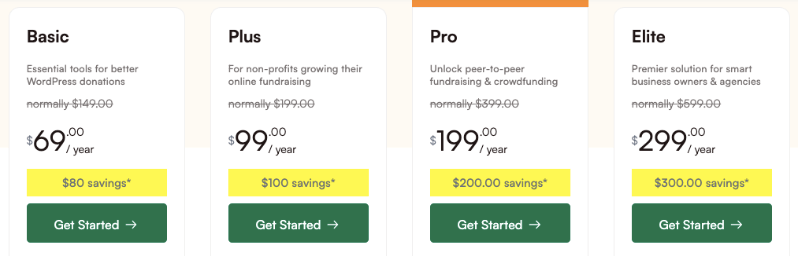
Examinons ces plans en détail.
Basique (69 $/an)
Le plan Basique est parfait pour les petites organisations à but non lucratif qui sont prêtes à aller au-delà de la version gratuite mais n'ont pas besoin de fonctionnalités complexes comme les dons récurrents. Ce plan offre des outils premium essentiels comme des formulaires personnalisés et des reçus PDF, ce qui le rend idéal pour les organisations caritatives locales, les organisations religieuses ou les groupes communautaires ayant des besoins de dons simples.
Vous obtiendrez :
- Licence pour un seul site
- Fonctionnalités essentielles de don :
- Formulaires de don personnalisés
- Gestion complète des dons
- Reçus et rapports PDF
- Plusieurs passerelles de paiement, y compris Stripe, PayPal et Authorize.net
- Support standard
Plus (99 $/an)
Le forfait Plus est conçu pour les organisations à but non lucratif en pleine croissance qui souhaitent établir un financement durable grâce à des dons récurrents. Ce niveau est particulièrement précieux pour les organisations utilisant activement des plateformes de marketing par e-mail et celles qui ont besoin de réduire les coûts de traitement grâce à des allègements de frais. Si vous êtes une organisation basée au Royaume-Uni nécessitant une assistance Gift Aid, ce forfait offre les fonctionnalités dont vous avez besoin pour gérer efficacement ces exigences.
Vous bénéficiez de toutes les fonctionnalités du forfait de base, plus :
- Outils de collecte de fonds avancés :
- Dons récurrents
- Réduction des frais
- Support Gift Aid
- Reçus annuels
- Dons anonymes
- Intégrations de marketing par e-mail (MailChimp, Active Campaign, et plus)
Pro (199 $/an)
Le forfait Pro est spécialement conçu pour les organisations à but non lucratif établies et en pleine croissance qui souhaitent tirer parti de leur communauté pour réussir leur collecte de fonds. Ce forfait est le bon choix si vous prévoyez de lancer des campagnes de pair à pair, de développer des programmes d'ambassadeurs ou de mener des initiatives de financement participatif.
Les organisations prêtes à automatiser leurs flux de travail et à élargir leurs stratégies de collecte de fonds trouveront les fonctionnalités avancées du forfait Pro inestimables.
En plus de toutes les fonctionnalités des autres forfaits, vous bénéficierez également de fonctionnalités et d'outils premium qui incluent :
- Collecte de fonds pair-à-pair
- Capacités de financement participatif
- Programmes d'ambassadeurs
- Équipes de dons
- Outils d'automatisation (Zapier, Webhooks, Workflows intelligents)
- Support prioritaire
Elite (299 $/an)
Ceci est conçu pour les agences ou les grandes organisations gérant plusieurs sites WordPress. Si vous gérez des dons sur plusieurs sites Web ou si vous avez besoin de gérer des sites clients, ce forfait offre la flexibilité dont vous avez besoin avec 5 licences de site.
Les développeurs Web, les agences et les organisations ayant plusieurs sections ou sites trouveront le support multisite et les fonctionnalités premium du forfait Elite essentiels pour gérer des systèmes de dons complexes.
Vous bénéficiez de tout ce que le forfait Pro offre, ainsi que :
- 5 licences de site
- Support multisite
- Gestion des clients
- Support premium
Prêt à obtenir Charitable Pro ? Découvrez comment faire ci-dessous.
Comment obtenir le plugin Charitable Pro ?
Commencez par explorer notre page Forfaits Charitable Pro. Vous y trouverez des informations détaillées sur les fonctionnalités de chaque forfait, vous aidant à choisir celui qui correspond le mieux à vos besoins de collecte de fonds. Lorsque vous êtes prêt, cliquez simplement sur « Commencer » pour acheter le forfait choisi.
Après avoir finalisé votre achat, vous aurez automatiquement accès à votre nouveau compte Charitable Pro. Celui-ci sert de centre de contrôle pour :
- Télécharger des extensions
- Gérer les clés de licence
- Accéder aux reçus
- Obtenir le support client
Accédez à l'onglet Téléchargements de votre compte. Cliquez sur le bouton Télécharger Charitable pour télécharger le fichier de l'extension. Vous y trouverez également votre clé de licence – il suffit de cliquer sur l'icône du presse-papiers pour la copier. Gardez cette clé à portée de main pour l'étape finale d'activation.
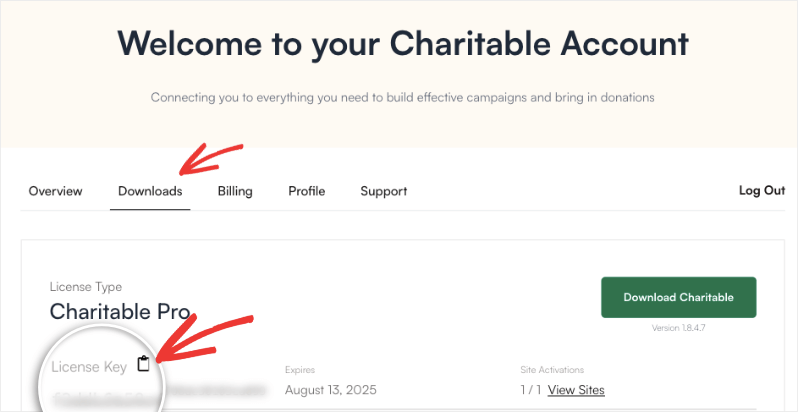
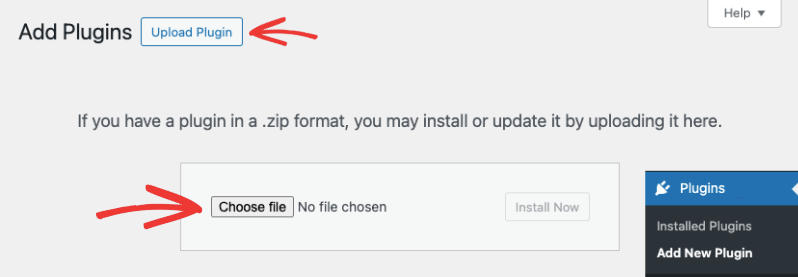
Connectez-vous ensuite à votre site WordPress et allez dans Extensions » Ajouter » Téléverser une extension. Choisissez le fichier que vous avez téléchargé, puis téléversez-le, installez-le et activez-le ici.
Ensuite, allez dans Charitable Pro » Réglages, collez votre clé de licence et cliquez sur le bouton Vérifier la clé.
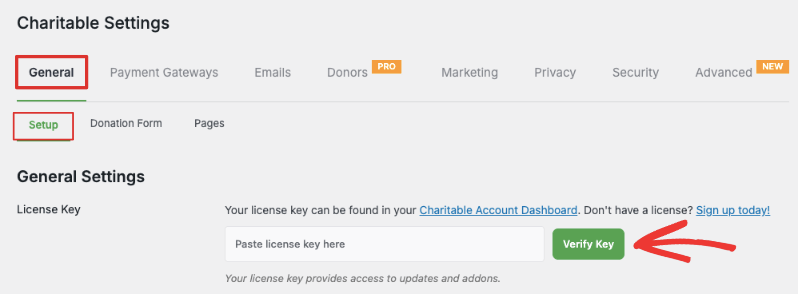
La version payante est maintenant installée et prête à l'emploi. Pour des instructions plus détaillées, suivez notre guide : Comment passer à Charitable Pro
Comparaison rapide de Charitable Lite et Pro
Voici un tableau comparatif pour vous aider à visualiser facilement les différences entre Lite et Pro.
| Fonctionnalité | Lite | Pro |
|---|---|---|
| Fonctionnalités de base | ||
| Campagnes illimitées | ✓ | ✓ |
| Formulaires de dons basiques | ✓ | ✓ |
| Intégration PayPal | ✓ | ✓ |
| Intégration Stripe | ✓ | ✓ |
| Rapports basiques | ✓ | ✓ |
| Traitement des paiements | ||
| Passerelles de paiement supplémentaires | ✖ | ✓ |
| Recouvrement des frais | ✖ | ✓ |
| Gift Aid (Royaume-Uni) | ✖ | ✓ |
| Dons récurrents | ✖ | ✓ |
| Fonctionnalités des formulaires | ||
| Champs personnalisés | ✖ | ✓ |
| Suggestions de dons | ✖ | ✓ |
| Formulaires modaux | ✖ | ✓ |
| Gestion des donateurs | ||
| Enregistrements de donateurs basiques | ✓ | ✓ |
| Profils de donateurs améliorés | ✖ | ✓ |
| Tableau de bord du donateur | ✖ | ✓ |
| Reçus PDF et annuels | ✖ | ✓ |
| Fonctionnalités avancées | ||
| Collecte de fonds pair-à-pair | ✖ | ✓ |
| Intégration Email Marketing | ✓ | ✓ |
| Financement participatif | ✖ | ✓ |
| Support | ||
| Support par forum | ✓ | ✓ |
| Support prioritaire | ✖ | ✓ |
Pour faire votre choix : Charitable Lite ou Pro ?
Le choix entre Charitable Lite et Pro dépend en fin de compte des besoins spécifiques et du stade de croissance de votre organisation.
Restez avec Charitable Lite si :
- Vous débutez dans la collecte de fonds en ligne
- Vos besoins en matière de dons sont basiques et directs
- Vous n'avez besoin que de PayPal et Stripe pour les paiements
- Vous êtes à l'aise avec une gestion simple des donateurs
- Vous avez un budget limité pour les outils de collecte de fonds
Passez à Charitable Pro si :
- Vous souhaitez établir des dons récurrents
- Votre organisation est en pleine croissance
- Vous avez besoin de capacités de collecte de fonds pair-à-pair
- Une gestion améliorée des donateurs est une priorité
- Vous avez besoin de plusieurs options de passerelles de paiement
- L'intégration du marketing par e-mail est importante
- Vous avez besoin de la prise en charge du UK Gift Aid
- Le support professionnel est essentiel
Considérez vos plans de croissance
Pensez à l'évolution de votre organisation dans l'année à venir. Si vous prévoyez d'étendre vos efforts de collecte de fonds, commencer dès maintenant avec Pro pourrait vous aider à construire une base plus solide pour votre croissance. N'oubliez pas que vous pouvez toujours commencer avec le plan Basic et passer à une version supérieure à mesure que vos besoins évoluent.
L'investissement dans Pro pourrait rapidement se rentabiliser grâce à une augmentation des dons, une meilleure rétention des donateurs et des opérations de collecte de fonds plus efficaces.
Prêt à commencer avec Charitable Pro ?





Laisser un commentaire