Sell Event Tickets That Count Toward Your Fundraising Goal
Sell event tickets right on your WordPress site for fundraisers, galas, dinners, and more! Set up tiered pricing, get QR codes, and deliver tickets physically or virtually.

Sell tickets, collect attendee details and check people in at the door, all from the Charitable dashboard you already use.
Every Ticket Is a Donation
Ticket sales go to a campaign, count toward its goal and show up in your donation reports.
As Many Ticket Types as You Need
General admission, VIP, early bird and free RSVPs can sit on one event, each with its own price and capacity.
Fair Market Value on Receipts
Set the fair market value of each ticket, and Charitable puts the tax-deductible amount on the donor’s receipt.
Attendee Questions at Checkout
Ask each guest for a meal choice, a t-shirt size or access needs, with dropdown or text fields.
QR Code Tickets
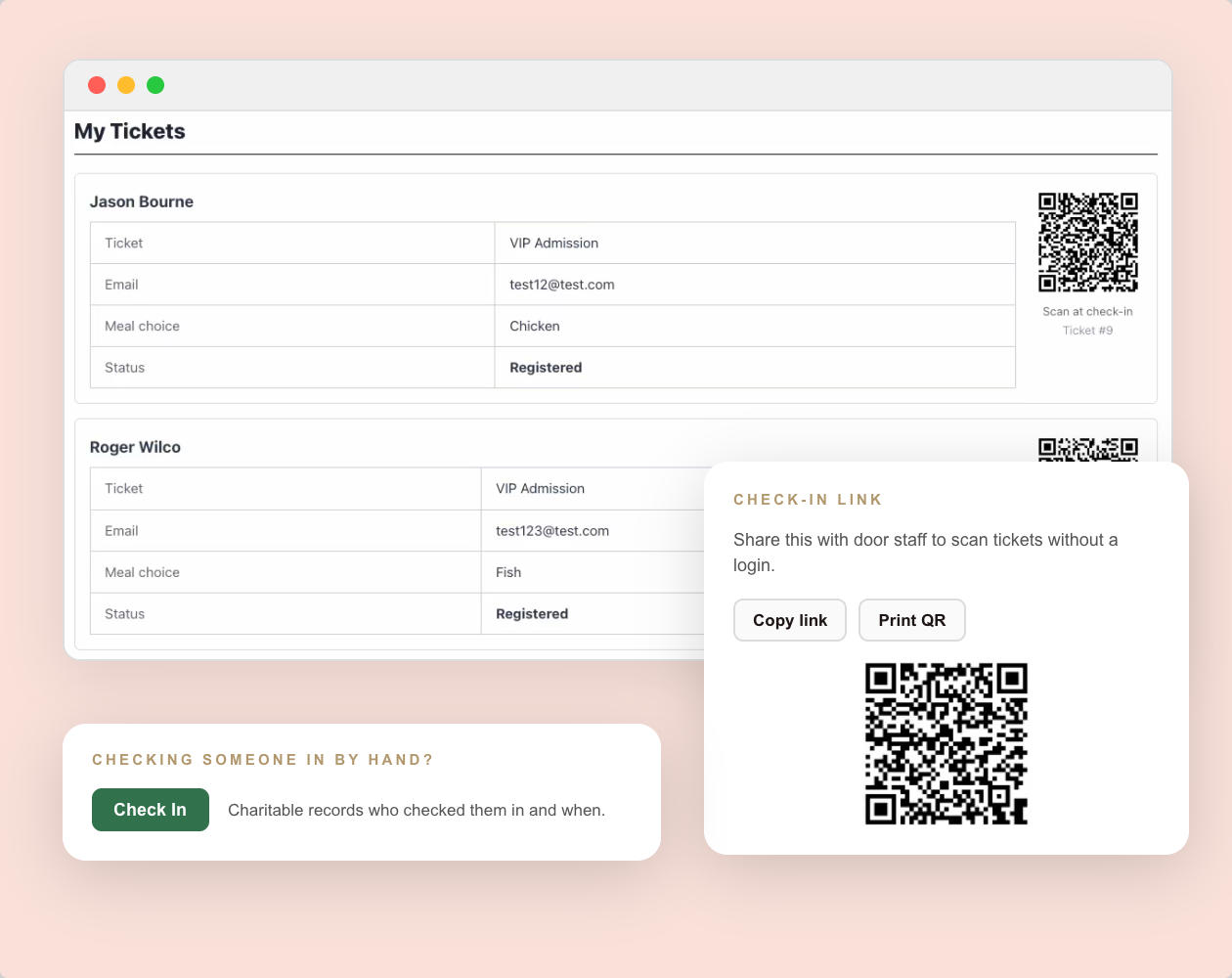
Each attendee gets their own ticket card and QR code on the donation receipt, so their phone is their ticket.
Check In From a Phone
Share a Check-In Link with your door volunteers, so they can scan tickets without a WordPress account.
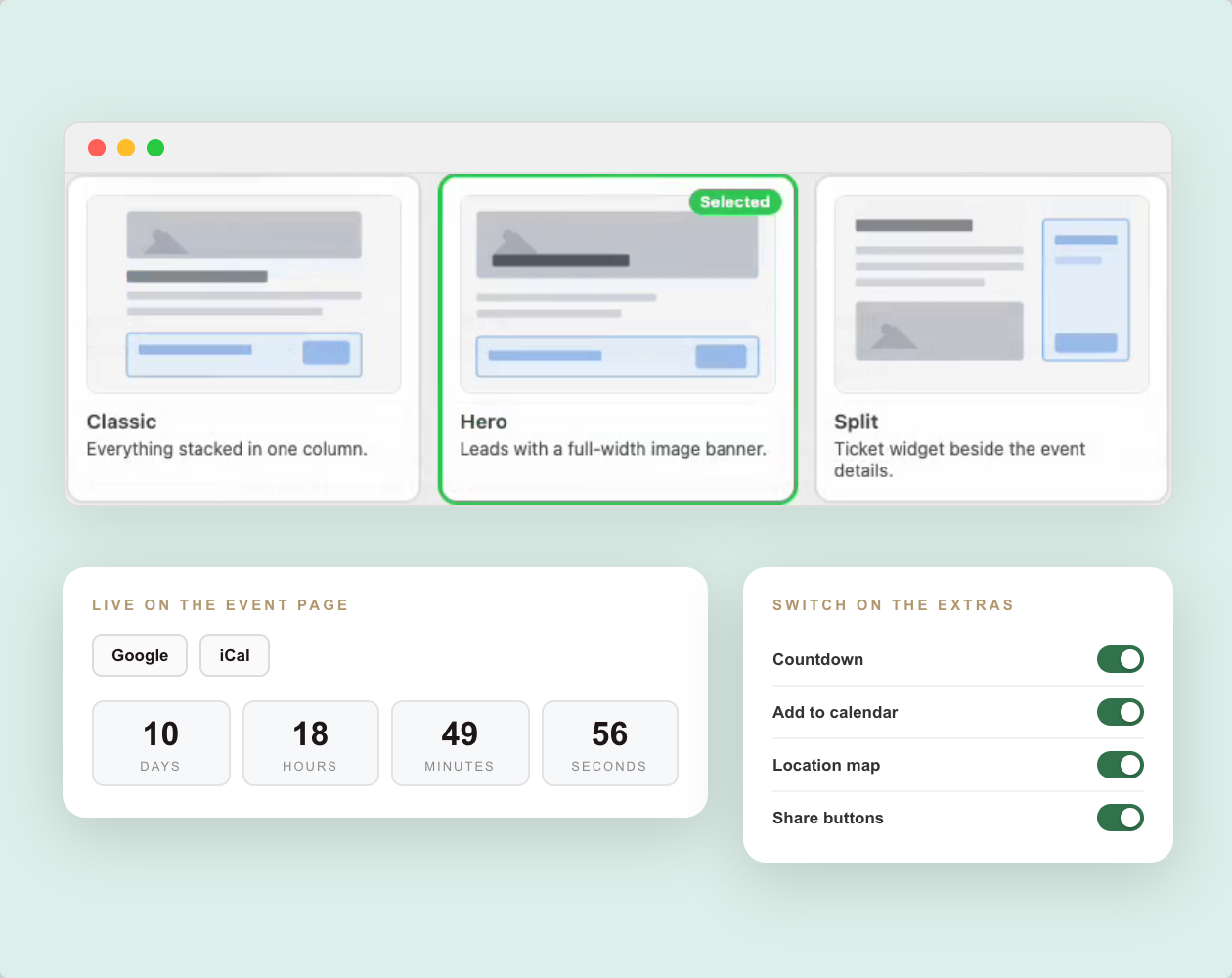
3 Event Page Layouts
Choose Classic, Hero or Split, and add a countdown, a map, calendar buttons and share buttons.
3 Blocks for the Editor
Add an Events List, a Single Event or a Get Tickets form to any page or post.
Works With Your Calendar
Show events in Sugar Calendar or The Events Calendar, while the tickets and attendees stay in Charitable.
Why You’ll Love Charitable Events
Your tickets, attendees and donations live in one place, so you never have to match up 2 sets of reports after the event.
Events Inside Your Campaigns
One Place for Event and Donation Income
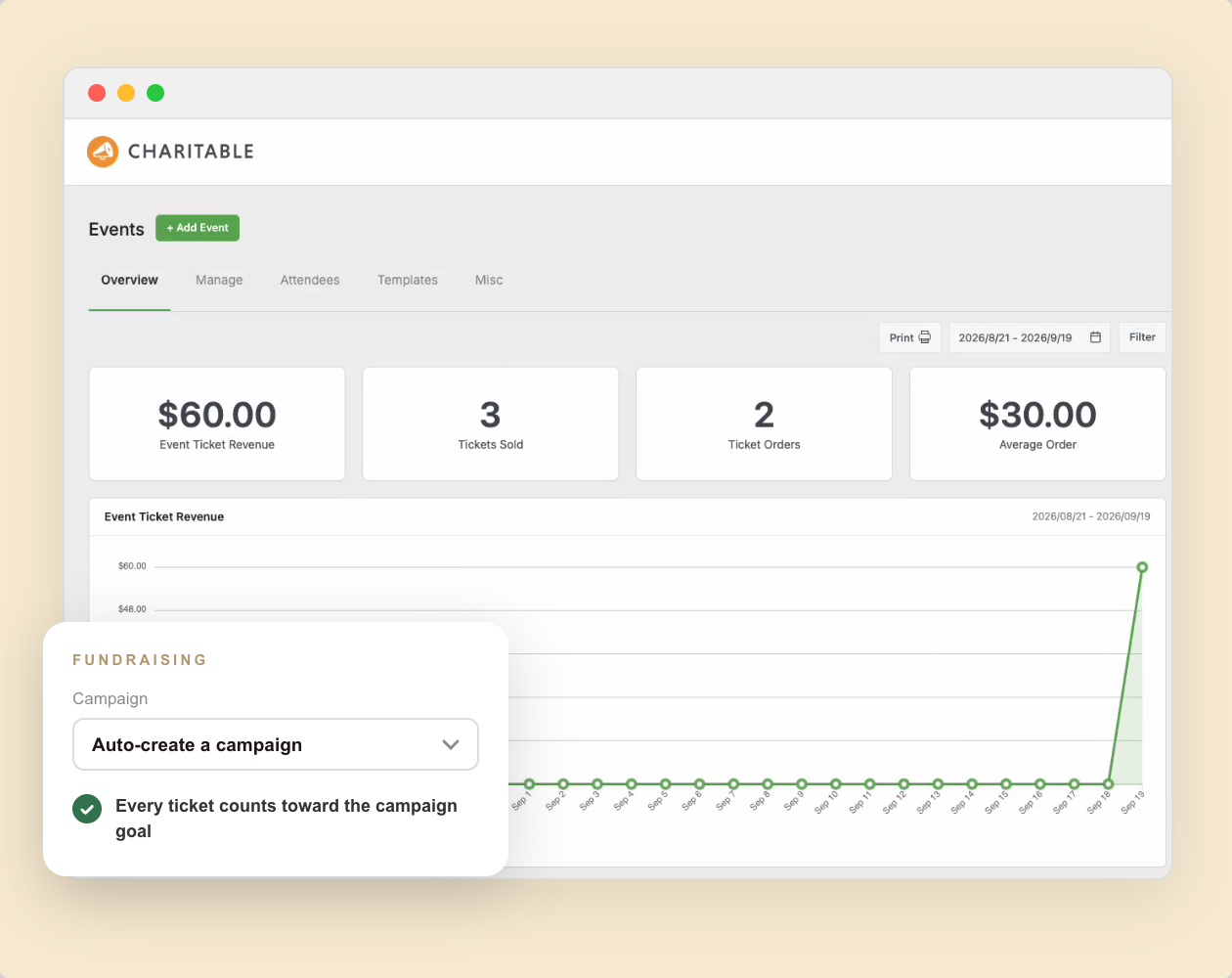
Every event in Charitable belongs to a campaign. When someone buys a ticket, that purchase is a Charitable donation like any other, and it counts toward the campaign goal.
For a standalone event, leave the Campaign setting on Auto-create a campaign and Charitable makes one for you. If the event is part of a bigger appeal, pick that campaign and the ticket money goes toward its goal.
The Overview tab under Charitable » Events shows your ticket revenue, tickets sold and upcoming events at a glance.
Tickets Count Toward Goals
Auto-Created Campaigns
Ticket Revenue at a Glance
Ticket Types and Receipts
Tickets That Are Ready for Tax Time
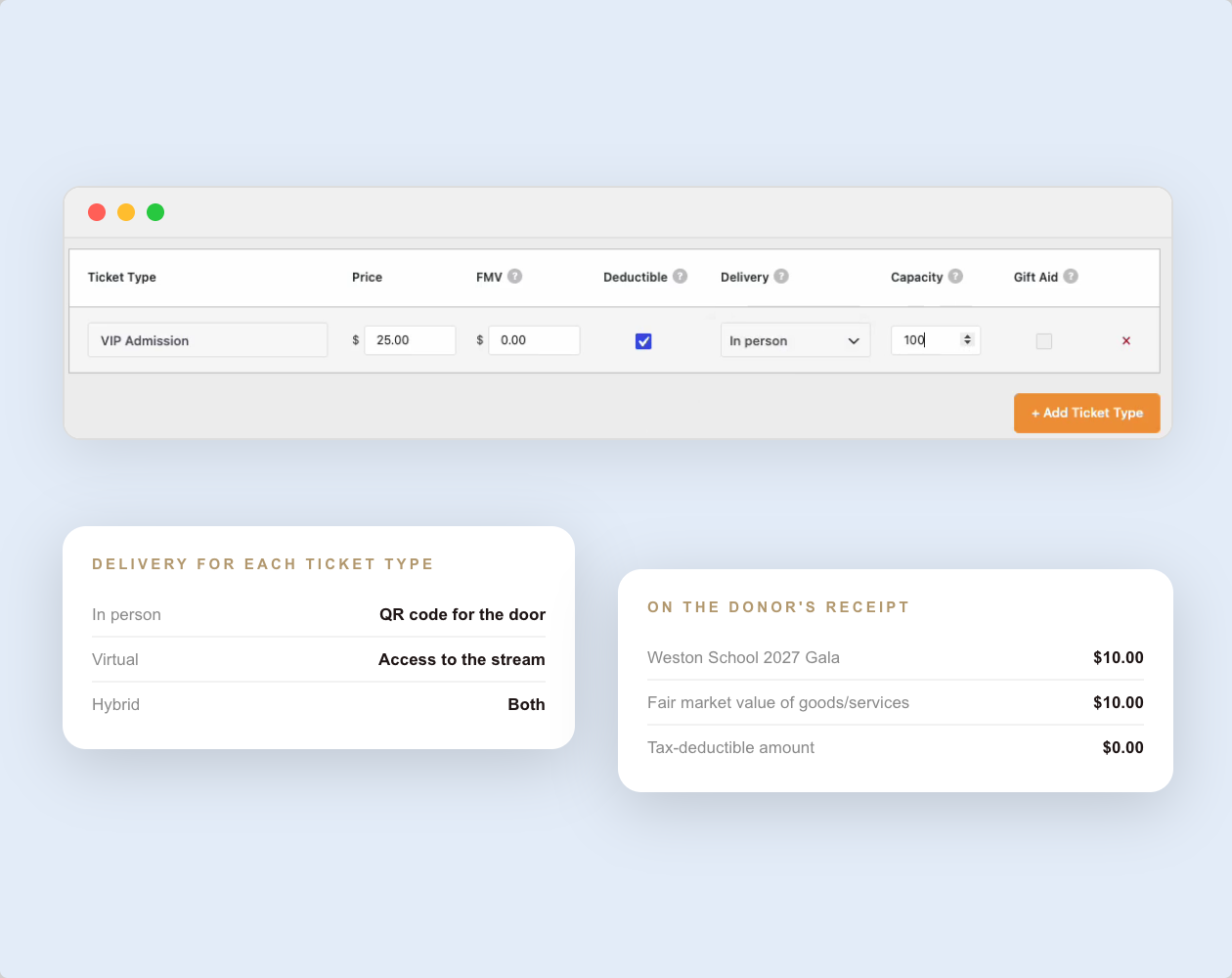
On the Tickets tab, you can create as many ticket types as an event needs. Each type has its own price and capacity, and it stops selling when it sells out.
When a supporter pays for a gala seat, part of that money pays for the dinner. Each ticket type has a fair market value field, and Charitable puts the tax-deductible amount on the donor’s receipt.
UK charities also get a Gift Aid column on every ticket type.
Price and Capacity per Ticket
Fair Market Value Built In
Free RSVPs Supported
Attendee Details
Know Who Is Coming Before the Day
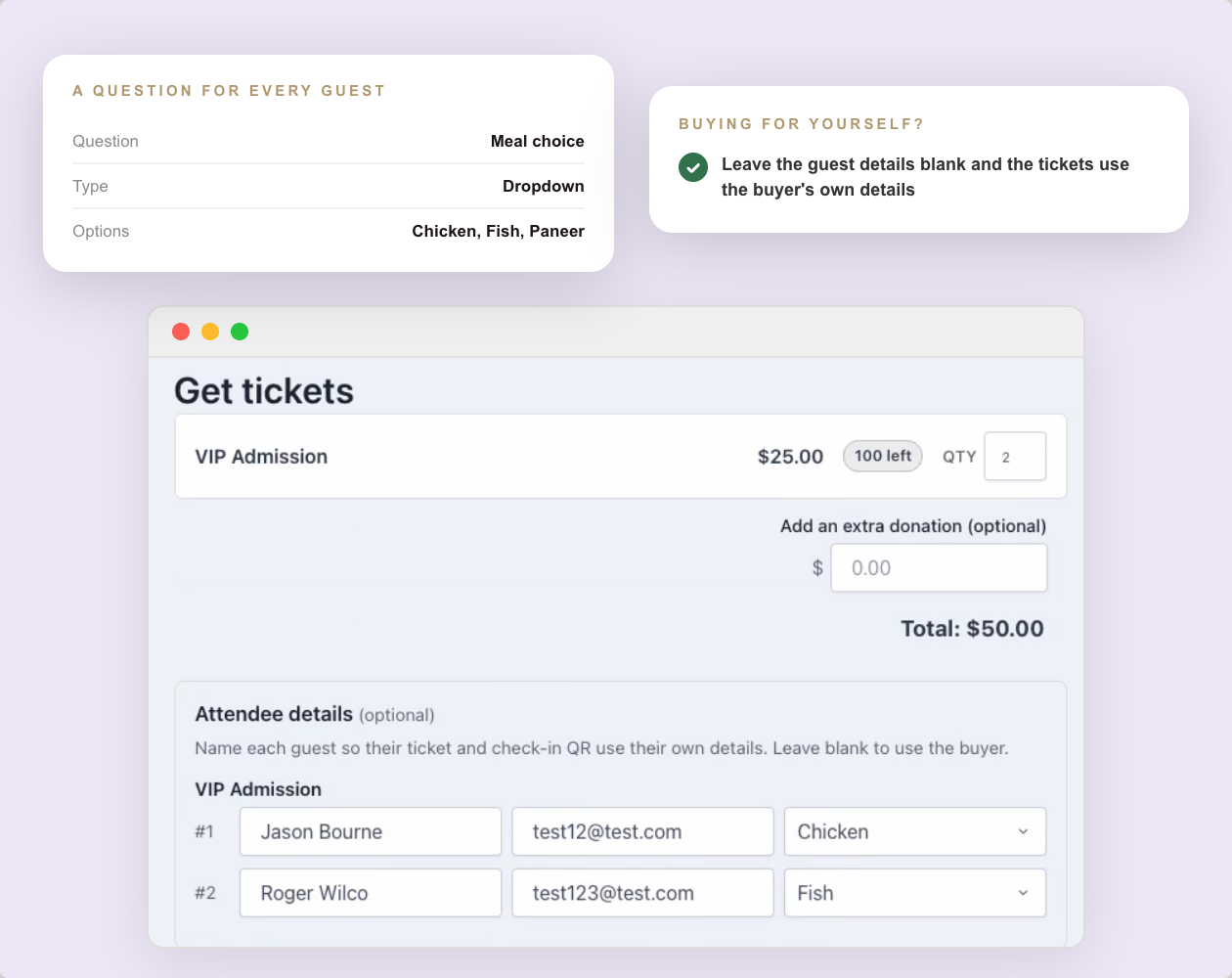
Every ticket creates its own attendee record. On the Custom Fields tab, you decide what to ask each guest, such as a meal choice, a t-shirt size or access needs.
When someone buys more than 1 ticket, the form asks for each guest’s name and details separately. Supporters can also add an extra donation on the same form.
The Attendees tab lists everyone who holds a ticket, and you can search, filter and export it.
Custom Questions per Event
Separate Details for Each Guest
Optional Extra Donation
Event Page Templates
Event Pages That Match Your Brand
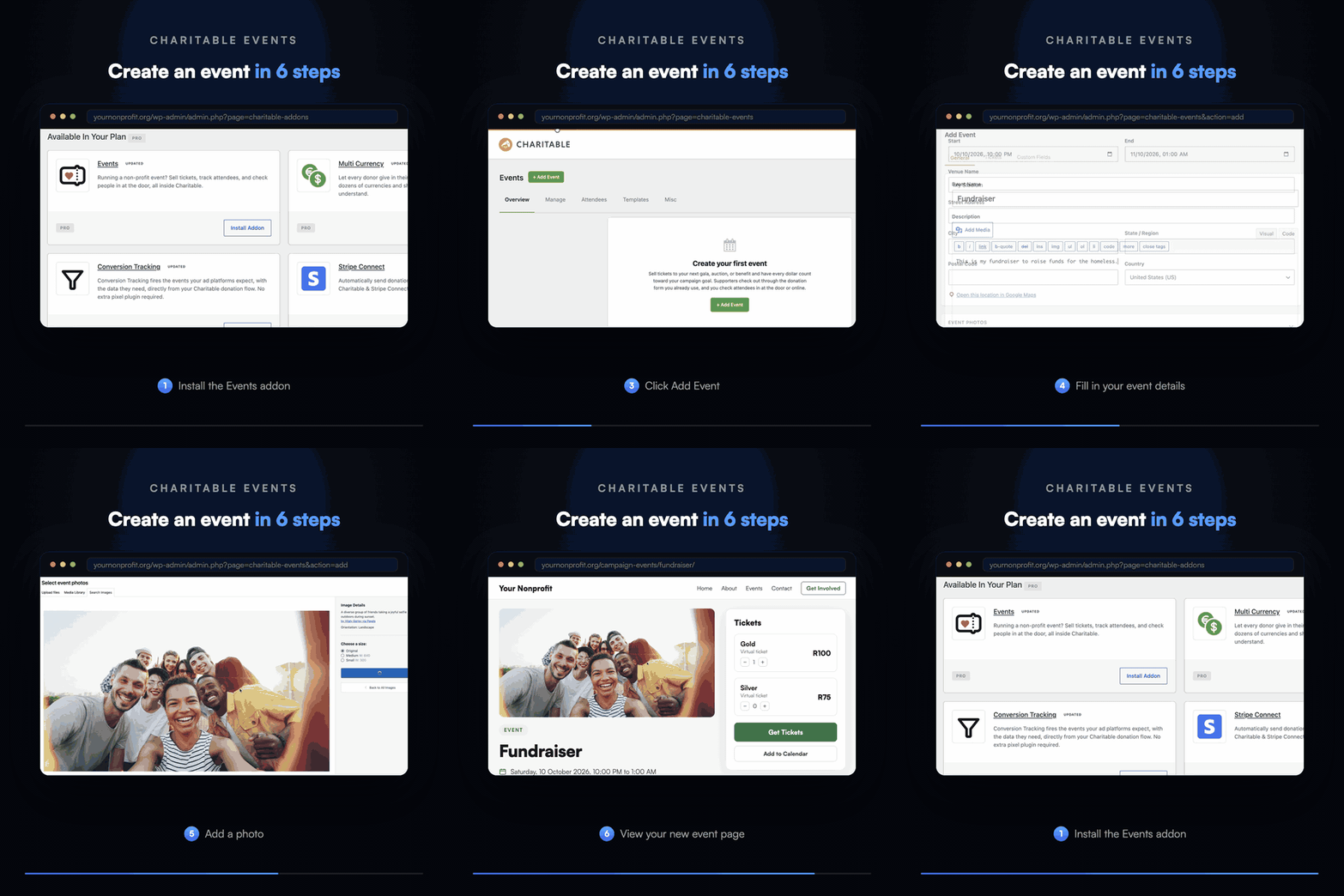
Charitable builds an event page for you as soon as you save an event. The Templates tab gives you 3 layouts, called Classic, Hero and Split.
You can set an accent color for the buttons so the page matches your brand. From the Misc tab, you can switch on a live countdown, calendar buttons, a location map and a Share row.
Want your events somewhere else on the site? Add the Events List, Single Event or Get Tickets block to any page.
Classic, Hero and Split Layouts
Countdown and Calendar Buttons
3 Editor Blocks
Digital Tickets and Check-In
Check People In at the Door
Once a payment is confirmed, the donation receipt gets a My Tickets section. Each attendee has their own card with a QR code to show at the door.
On the night, your team can scan each QR code from a phone. Every event has its own Check-In Link, so your volunteers don’t need a WordPress account.
You can also check someone in by hand from their attendee record, and Charitable records who checked them in and when.
“…others were charging 5% and more for every donation, but with Charitable there are no fees for donations, so we were able to run a number of fundraising campaigns with all the money going to the charity.”

Stuart Robinson
“Really useful plugin. I wanted to extend the functionality of it a wee bit and the code was very easy to work with and adapt. Really great response from the developer and it looks like fantastic updates are being added all the time.”

Paul Lawley-Jones
“I’d like to thank you both for making such a great tool at such a great cost. It’s literally 24 times cheaper than the platform we were using before I came on board.”

Stephen Weinberg
“This plugin is exactly what our small, parent-run organization needed… Easy to set up. Easy to customize (as long as you can handle just a tiny bit of code). And superior support! Thanks so much for this full-featured software.”
Charitable Events – Frequently Asked Questions
Do you have a question about Charitable Events? See the list below for our most frequently asked questions. If your question is not listed here, please contact us.
Which plan includes Charitable Events?
Charitable Events is in the Charitable Pro plugin, Pro plan and higher.
Do I need to create a campaign first?
No. Leave the Campaign setting on Auto-create a campaign, and Charitable makes one for you when you save the event.
Can I offer free tickets?
Yes. Set a ticket type’s price to $0 to take free RSVPs, and each RSVP still creates an attendee record with its own QR code.
Can I sell tickets for virtual or hybrid events?
Yes. Set a ticket’s Delivery to Virtual or Hybrid, and the join link or stream is only available to people who hold a ticket.
How much does Charitable cost?
You can start with Charitable Lite at no cost. Charitable paid plans are billed as a yearly license, and Charitable takes no percentage of your donations on any paid plan. You can choose the plan that fits your organization’s needs and budget.
Does Charitable offer a money-back guarantee?
Sure. We are confident you’ll be delighted with Charitable. But, if you’re unhappy for any reason or have a rare issue we can’t resolve, you’ll get a full refund within 14 days of the purchase date.
How long is my Charitable license valid for?
All Charitable purchases are for a one-year license. It gives you access to support and our frequent product updates. Annual renewals are automatic and you’re free to cancel any time.
Get the best WordPress fundraising plugin today
Join over 10,000+ smart website owners who trust Charitable for their donation websites.
For more tutorials and videos tailored to nonprofits, subscribe to our YouTube channel. We regularly publish expert tips, step-by-step guides on online donations, fundraising strategies, and practical resources to help your organization succeed.
💸 Introducing Tiered Rates for Fee Relief: Match the Ask to the Gift!
Fee Relief asks your donors one short question at checkout: would you like to cover the processing fee on this gift? Until now that question used a single rate for every donation on a gateway, so a $10 gift and a $500 gift were asked for the same percentage. Fee Relief 1.3.0 lets you set as many donation bands as you like, each carrying its own rate. Why this is important:
🪙 Gentler on small gifts: A fixed transaction cost is a far bigger share of a $10 donation than a $500 one, so bands let you ask for less at the bottom.
🎚️ As many bands as you need: Each band carries its own percentage and its own fixed amount, and the top band runs on with no upper limit.
🛑 An optional ceiling: A Maximum fee field stops any donor being asked for more than a number you choose, however large the gift.
🔌 Set per payment gateway: Stripe can run on four bands while Windcave and Payfast stay on a single rate, because bands belong to a gateway and not to your whole site.
🛡️ Nothing changes until you say so: Your current rates stay exactly as they are until you switch Use Tiered Rates on under Charitable » Settings » Advanced » Fee Relief.
📊 Your Pro Dashboard Can Now Compare, Export, and Score!
Most fundraising dashboards only tell you how much you have raised. Charitable Pro 1.8.19 rebuilds the dashboard and the Reports Overview around the harder questions: whether anything is broken, whether this period beat the last one, and which single change would make the most difference today. Why this is important:
📈 Every figure has a trend: Pick a period and the tiles and the chart move together, with each total shown against the previous period.
🗓️ Charts that stay readable: Short ranges group donations day by day, while longer ranges group by week or month, so a full year reads as a curve instead of a flat line.
🔀 Compare any 2 periods: Not just consecutive ones, so you can ask how this December did against last December. That matters because fundraising is seasonal.
📤 Export the whole summary: Send the full overview out as CSV or PDF, ready for a board pack or a funder report.
🎯 Score your setup for free: Have your fundraising setup scored, so the one change worth making next is the one you can see.
🎟️ Introducing Charitable Events: Sell Tickets Inside Your Campaigns!
Most nonprofits sell event tickets in one tool and collect donations in another, which leaves two sets of reports and a manual match at the end of the year. Charitable Events brings both together, selling tickets through the same donation forms and payment gateways you already run in Charitable. Why this is important:
🎟️ Every ticket is a donation: Ticket sales run through the gateway you already use and count toward the campaign goal, with everything managed under Charitable » Events.
📱 QR check-in from any phone: Each attendee gets their own QR code on the receipt, and volunteers scan at the door through a check-in link that needs no WordPress account.
🧾 Receipts ready for tax time: Give each ticket type a fair market value, and Charitable puts the correct tax-deductible amount on every donor receipt.
📋 Attendee details at checkout: Ask every guest for a meal choice, shirt size, or access needs, with a separate attendee record created for each ticket.
🗓️ Blocks and calendars included: Three editor blocks plus Sugar Calendar and The Events Calendar support put your events where supporters already look.
Your AI assistant can now build, edit, and manage your Charitable fundraising campaigns directly — just by asking. With Charitable Pro adding write support for the WordPress Abilities API, tools like ChatGPT, Claude, and Cursor can handle full administrative actions safely through MCP. Why this is important:
🤖 Campaign creation in plain language: Prompt your assistant with a goal like “Set up a fundraiser for the shelter with a $5,000 goal”, and it builds a real draft campaign complete with suggested donation tiers.
🎨 Instant donation form tweaks: Add custom fields, change button colors, or reorder elements without diving into form settings.
📝 Offline gift logging: Tell your assistant about cash or check gifts, and it will match donor emails and record transactions into your history.
🛡️ Safety and control by default: Write access stays strictly off until turned on in Charitable » Tools » AI MCP, keeping read-only reporting safe by default.
📜 Full audit logging: Every change made by an AI assistant is tracked under Charitable » Tools » Logs, so you always know who (or what) updated your site.
💰 Accept Recurring Donations with Windcave and Charitable
A donor sets their gift up once on Windcave’s secure payment page, and Charitable bills every renewal after that on schedule. Why this is important:
🏦 Organizations banked in New Zealand or Australia: monthly giving on the gateway your bank already set you up with, with no second processor to onboard.
⛪ Churches taking regular tithes and offerings: congregants set their own schedule once, which is the simplest way to launch recurring church giving without a separate platform.
🌏 Groups with donors in several currencies: Windcave handles more than 20, so a supporter can give in the currency they actually hold.
📅 Operating funds rather than one-time campaigns: switch on Recurring Only mode and the one-off option disappears, so every gift to that campaign is a subscription.
🧾 Teams with no developer on staff: 3 sets of credentials pasted into a settings page, and no code anywhere.
Cloudflare's bot products identify and mitigate automated traffic to protect your site from bad bots. Cloudflare places the __cf_bm cookie on End User devices that access Customer sites that are protected by Bot Management or Bot Fight Mode. The __cf_bm cookie is necessary for the proper functioning of these bot solutions.
session
__cflb
When enabling session affinity with Cloudflare Load Balancer, Cloudflare sets a __cflb cookie with a unique value on the first response to the requesting client. Cloudflare routes future requests to the same origin, optimizing network resource usage. In the event of a failover, Cloudflare sets a new __cflb cookie to direct future requests to the failover pool.
session
_cfuvid
The _cfuvid cookie is only set when a site uses this option in a Rate Limiting Rule, and is only used to allow the Cloudflare WAF to distinguish individual users who share the same IP address.
session
cf_clearance
Whether a CAPTCHA or Javascript challenge has been solved.
session
__cfseq
Sequence rules uses cookies to track the order of requests a user has made and the time between requests and makes them available via Cloudflare Rules. This allows you to write rules that match valid or invalid sequences. The specific cookies used to validate sequences are called sequence cookies.
session
cf_ob_info
The cf_ob_info cookie provides information on: The HTTP Status Code returned by the origin web server. The Ray ID of the original failed request. The data center serving the traffic
session
cf_use_ob
The cf_use_ob cookie informs Cloudflare to fetch the requested resource from the Always Online cache on the designated port. Applicable values are: 0, 80, and 443. The cf_ob_info and cf_use_ob cookies are persistent cookies that expire after 30 seconds.
session
__cfwaitingroom
The __cfwaitingroom cookie is only used to track visitors that access a waiting room enabled host and path combination for a zone. Visitors using a browser that does not accept cookies cannot visit the host and path combination while the waiting room is active.
session
cf_chl_rc_i
These cookies are for internal use which allows Cloudflare to identify production issues on clients.
session
cf_chl_rc_ni
These cookies are for internal use which allows Cloudflare to identify production issues on clients.
session
cf_chl_rc_m
These cookies are for internal use which allows Cloudflare to identify production issues on clients.
session
__cfruid
Used by the content network, Cloudflare, to identify trusted web traffic.
session
These cookies are needed for adding comments on this website.
Name
Description
Duration
comment_author_email
Used to track the user across multiple sessions.
Session
comment_author_url
Used to track the user across multiple sessions.
Session
comment_author
Used to track the user across multiple sessions.
Session
Easy Digital Downloads is a WordPress plugin for selling digital products effortlessly and managing transactions.
Name
Description
Duration
edd_session_
Stores information about the current user session.
Session
edd_items_in_cart
Stores information about the cart contents.
Session
These cookies are used for managing login functionality on this website.
Name
Description
Duration
wordpress_logged_in
Used to store logged-in users.
Persistent
wordpress_sec
Used to track the user across multiple sessions.
15 days
wordpress_test_cookie
Used to determine if cookies are enabled.
Session
WPForms is a user-friendly WordPress plugin for creating custom forms with drag-and-drop functionality.
Name
Description
Duration
wpfuuid
Used to track user interactions with forms.
11 years
Statistics cookies collect information anonymously. This information helps us understand how visitors use our website.
Clarity is a web analytics service that tracks and reports website traffic.