
Requires:
- Charitable Pro (Plus, Pro, or Elite) 1.8.17+
- Charitable Custom Receipts 1.0.0+
- Recurring Donations 2.2.1+ (optional)
Custom Receipts lets you decide what a donor sees on screen right after they give. That page (the thank-you page a donor lands on once their donation goes through) is one of the highest-attention moments in the whole donation flow, and out of the box every campaign shares the same site-wide receipt.
This addon changes that. Every campaign can:
- Keep the default receipt (no change, exactly like today).
- Redirect donors to a page you already built, or to any URL.
- Show a custom receipt you design in the WordPress block editor, using receipt-aware blocks that fill in the real donor name, amount, campaign, and gift details at display time.
You start from a built-in design, adjust it to fit your organization, preview it with sample data, and save your own designs to reuse across campaigns.
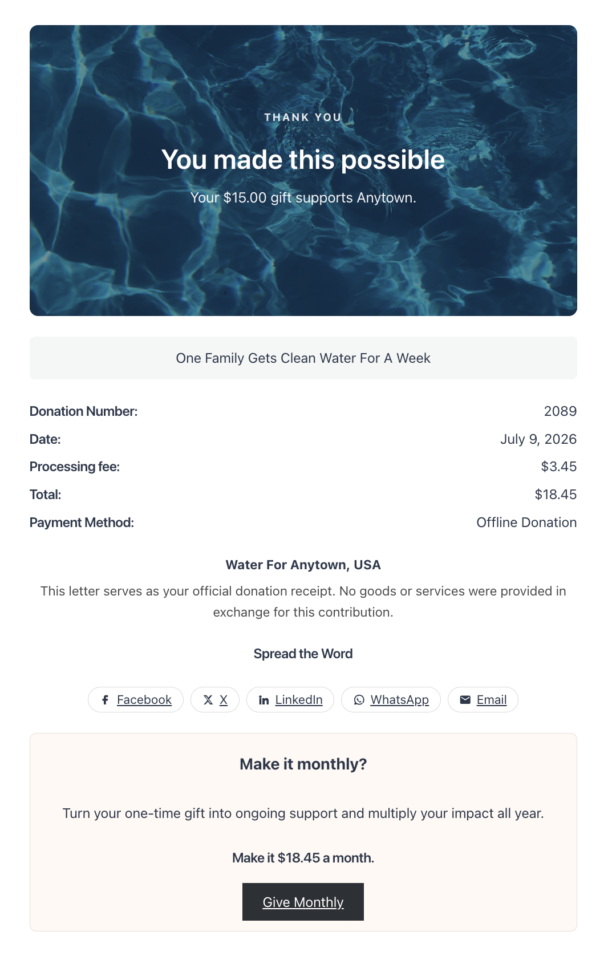
What a custom receipt is (and is not)
It helps to be precise about what this addon touches:
- It customizes the on-screen receipt page only – the page a donor sees immediately after giving.
- It does not change your donation receipt emails. Those are still controlled in Charitable’s email settings.
- It does not replace the PDF Receipts addon. If you use PDF receipts, they keep working, and there is even a block that links donors straight to their PDF.
Think of it as the thank-you page, not the paperwork.
When you would use it
A few common reasons organizations reach for custom receipts:
- Make the thank-you moment feel personal. Swap the plain confirmation for a warm message, your logo, and a line about the impact of the gift.
- Send bigger donors somewhere special. Use a condition so a “$500+” thank-you note only appears for major gifts.
- Point donors to a next step. A “Donate Again,” “Share,” or “Track Your Giving” button turns a one-time gift into ongoing engagement.
- Turn a one-time gift into monthly support. Add the Recurring Upsell block to invite one-time donors to convert their gift to a recurring donation (requires the Recurring Donations addon).
- Match the receipt to the campaign. A memorial campaign and a year-end appeal can each have their own thank-you page.
- Reuse a redirect page you already built. If you have a custom “thank you” page in your theme, just point the campaign at it.
Before you start
Custom Receipts needs a few things in place:
- Charitable Pro with an active license (Plus, Pro, or Elite).
- Charitable core 1.8.17 or later. The addon renders through a core filter that was added in 1.8.17, so on older versions the custom receipt will not display. If your core is out of date, you will see an admin notice asking you to update.
- WordPress 6.2+ and PHP 7.4+.
- Recurring Donations 2.2.1 or later (optional). Only needed if you want the Recurring Upsell and Recurring Details blocks or the Gift Type condition.
Once the addon is active, there is no separate settings page to configure. Everything happens per campaign.
Choosing a receipt mode
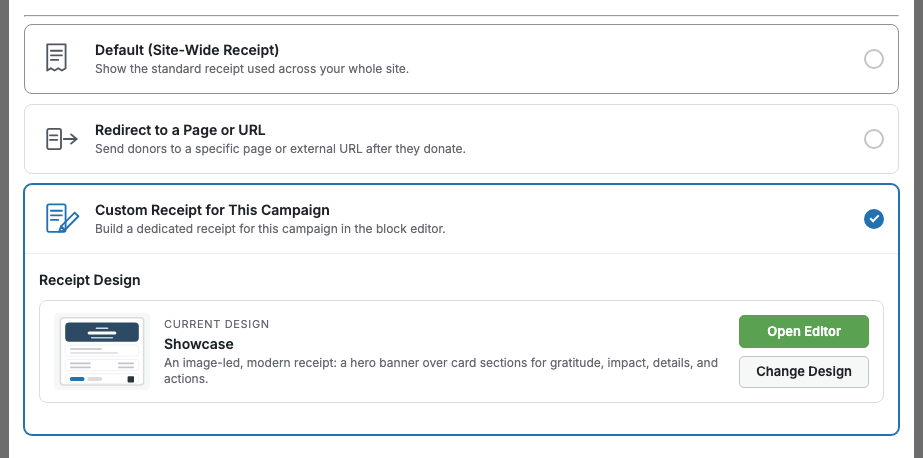
Each campaign has its own receipt mode. You will find the setting in whichever campaign editor you use.
In the visual Campaign Builder
Open a campaign in the Campaign Builder and go to:
Settings > Receipt
In the legacy Campaign Settings editor
If you use the classic campaign editor, the same options live in the Receipt metabox under the campaign’s advanced settings tabs, alongside Donation Options and Updates. The mode picker looks and behaves exactly like the Campaign Builder panel shown above.
The three modes
Default leaves everything as-is. The donor sees your normal site-wide receipt. Pick this for any campaign you do not want to touch.
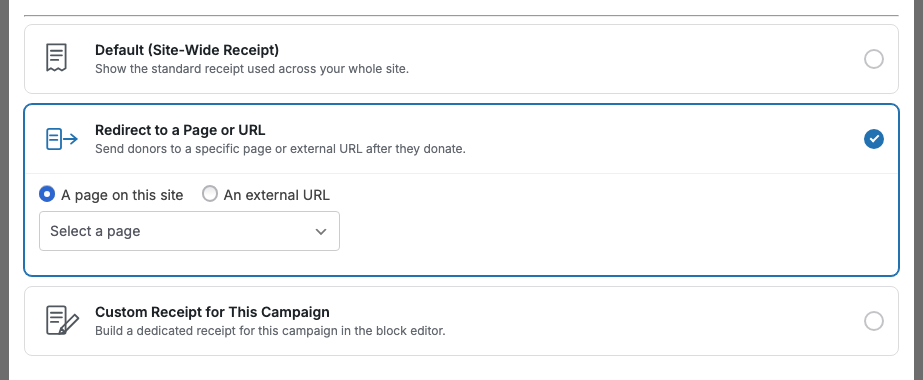
Redirect sends the donor somewhere else the moment their donation completes. You choose one of two targets:
- A page on this site, picked from a dropdown of your published pages.
- An external URL, typed in directly. It must start with
https://.
Custom renders a receipt you design in the block editor. When you choose Custom, the addon creates a receipt document linked to that campaign and gives you a button to open it in the editor.
Designing a custom receipt
Choosing Custom mode opens the receipt in a focused version of the WordPress block editor. It looks like editing a page, with one important difference: the blocks you place are receipt-aware. A Donation Summary block does not ask you to type an amount, it shows the real amount from each donation when the donor views their receipt.
The welcome walkthrough
The first time you open a receipt, a short guided walkthrough introduces the editor, the design chooser, and the preview button.
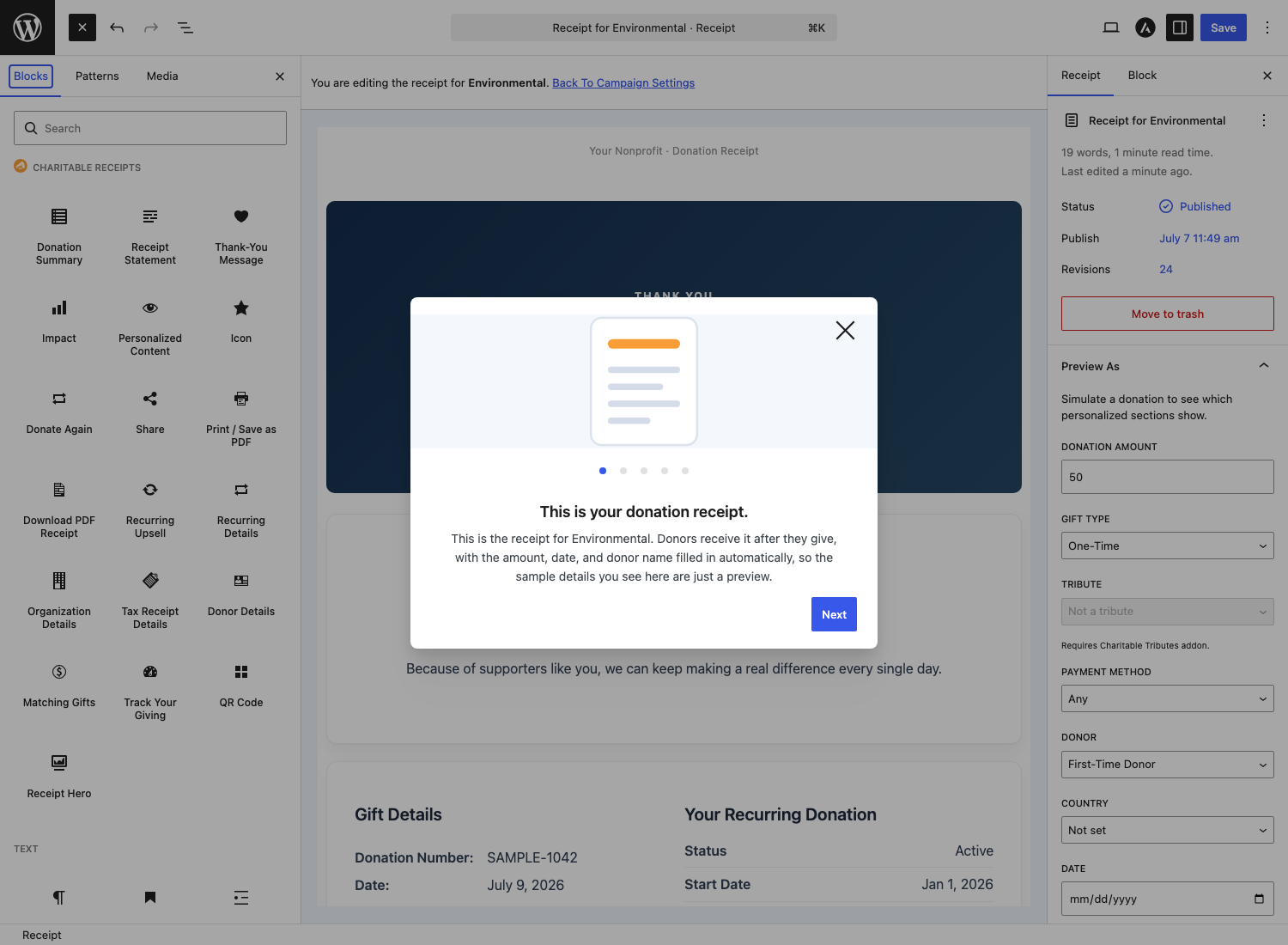
Tip: Want to see the walkthrough again later? Add
&charitable_cr_guide=1to the end of the receipt editor URL and the welcome guide and first-run tips will replay, no matter how many times you have dismissed them before.
Start from a built-in design
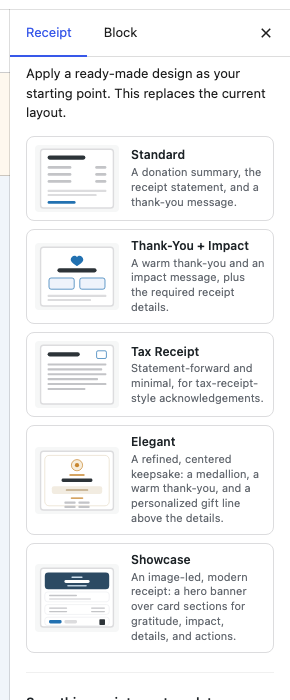
You rarely start from a blank page. Open the Designs panel in the editor sidebar and pick a starting point. Each design shows a small wireframe so you can see the layout at a glance.
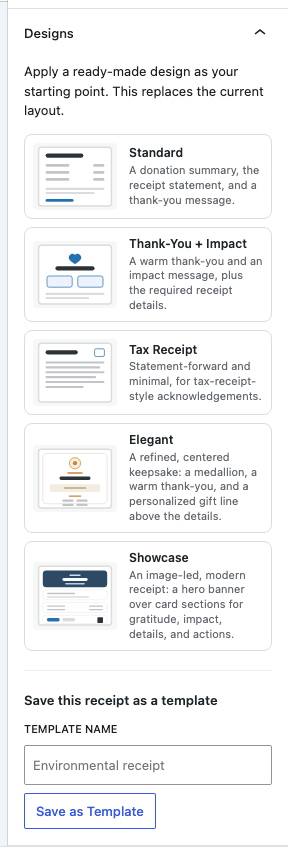
Clicking a design fills the editor with that design’s blocks, ready for you to edit. Nothing changes for donors until you save. You can always switch to a different starting point later with Change Design.
Good to know: Applying a design copies it into your receipt. If you edit a built-in design’s underlying definition later (for example through a filter), receipts you already created do not change. To pull in the newest version of a design, re-apply it with Change Design.
The five built-in designs
| Design | Best for |
|---|---|
| Standard | A clean, everyday receipt: donation summary, the official receipt statement, and a thank-you message. |
| Thank-You and Impact | A warm thank-you and an impact message on top of the required receipt details. |
| Tax Receipt | Statement-forward and minimal, for formal, tax-receipt-style acknowledgements. |
| Elegant | A refined, centered keepsake with a medallion, a warm thank-you, and a personalized gift line above the details. |
| Showcase | An image-led, modern receipt with a hero banner over card sections for gratitude, impact, details, and actions. |
The receipt blocks
Custom Receipts adds a dedicated set of blocks that read live donation data. Open the block inserter inside a receipt and you will find them grouped together.
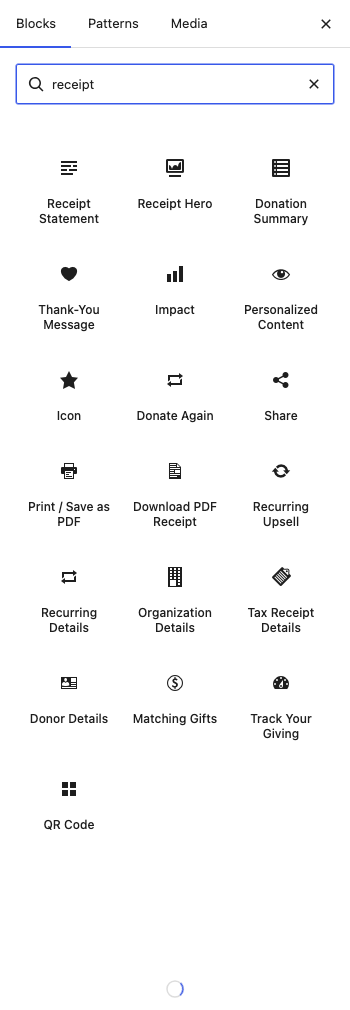
Two blocks are the backbone of every valid receipt:
- Donation Summary – the amount, date, receipt number, campaign, and payment method for the gift.
- Receipt Statement – your organization name, tax ID / EIN, and the official donation-receipt statement donors need for their records.
The rest are optional, mix-and-match pieces:
| Block | What it shows |
|---|---|
| Thank-You Message | A custom heading, message, and icon, with styles from simple to certificate and medallion. |
| Impact | A short message about what the gift makes possible, optionally different by donation amount. |
| Personalized Content | A container whose contents appear only when the donation matches your rules (see below). |
| Icon | A single icon: an emoji, a built-in SVG, or an image you upload. |
| Receipt Hero | A hero banner with a background image, overlay, optional icon, eyebrow, heading, and a dynamic gift line. |
| Organization Details | Your logo, name, address, phone, email, and website. |
| Donor Details | The donor’s name, email, and billing address from the donation. |
| Tax Receipt Details | The tax-deductible amount and the goods-and-services compliance statement. |
| Matching Gifts | A prompt for donors to check whether their employer matches donations. |
| Donate Again | A button that sends the donor back to the campaign to give again. |
| Share | Social share buttons (Facebook, X, LinkedIn, WhatsApp, email) and a referral link. |
| Print or Save as PDF | A button that opens the browser print dialog so the donor can print or save the page. |
| Download PDF Receipt | A button linking to the donor’s PDF receipt (uses Charitable Pro’s built-in PDF receipts). |
| Track Your Giving | A link into the donor dashboard, with a secure email sign-in link for guest donors. |
| QR Code | A scannable code generated on your own server (see below). |
| Recurring Upsell | An invitation for one-time donors to switch to monthly giving. |
| Recurring Details | The status, dates, and amount of a recurring plan (needs the Recurring addon; hides itself for one-time gifts). |
Personalized Content
The Personalized Content block is a container: anything you place inside it appears only when the donation matches the rules you set. Select the block, open its settings, and add one or more conditions.
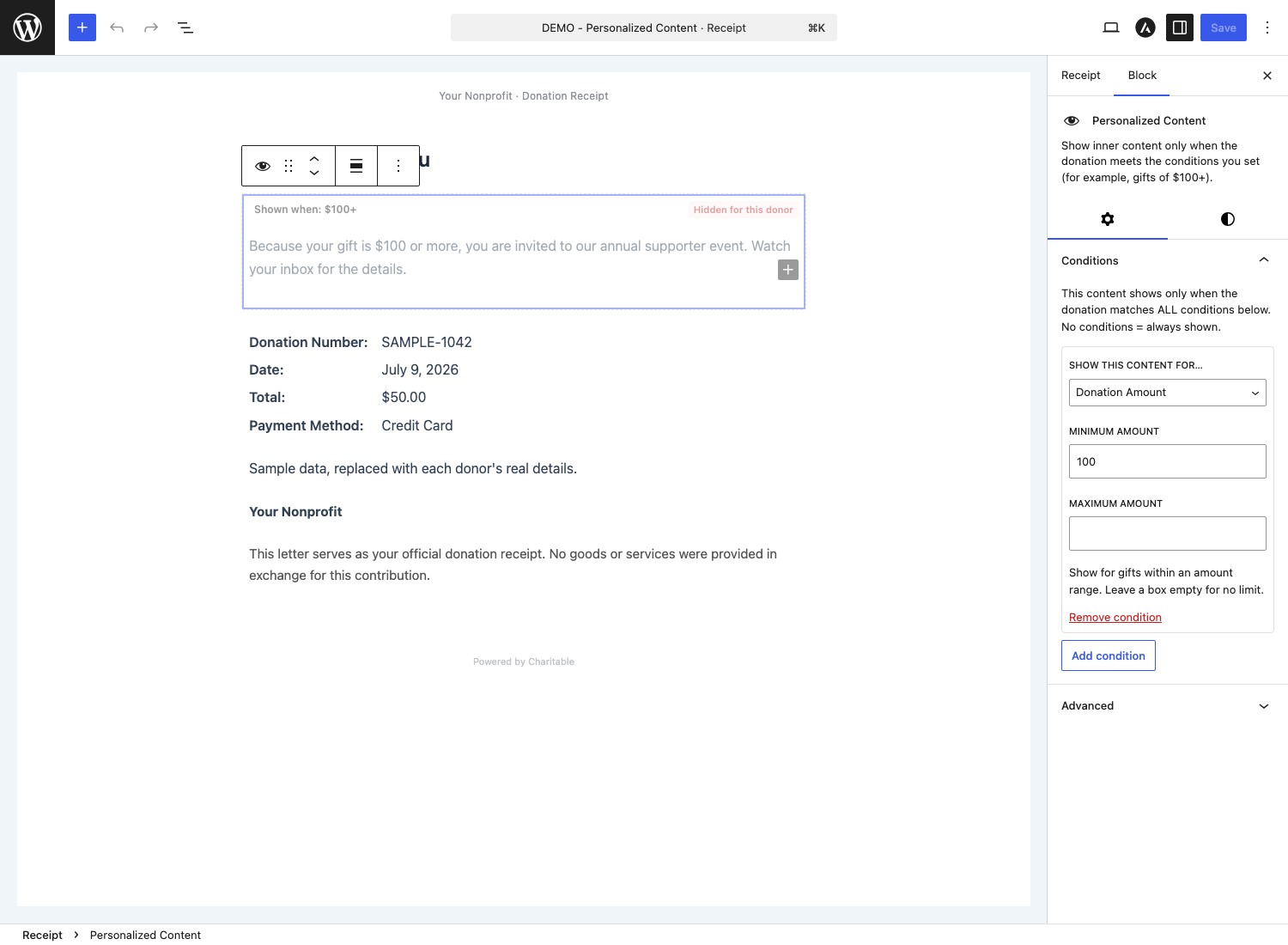
You can build rules from any of these:
| Condition | Matches on |
|---|---|
| Amount | A donation amount range (a minimum, a maximum, or both). |
| Gift Type | One-time versus recurring gifts (needs the Recurring addon). |
| Tribute | Whether the gift is a tribute (needs the Tributes addon). |
| Payment Method | The gateway the donor used (Stripe, PayPal, and so on). |
| Donor | Donor-based rules, such as first-time versus returning. |
| Campaign | A specific campaign. |
| Country | The donor’s billing country. |
| Date | A date range for when the donation was made. |
A few examples
- Thank major donors. Wrap an event invitation in a Personalized Content block with an Amount condition of $250 or more, so only larger gifts see it.
- Welcome monthly supporters. Use a Gift Type condition set to recurring to show a “thank you for becoming a monthly donor” note (requires the Recurring Donations addon).
- Show a country-specific message. Add a Country condition set to the United Kingdom to display a Gift Aid reminder only for UK donors.
- Guide offline donors. Use a Payment Method condition for offline or check payments to show your mailing address and who to make the check payable to.
You can combine conditions in one block. All of them must match for the content to show (for example, Amount $250+ and Country United States).
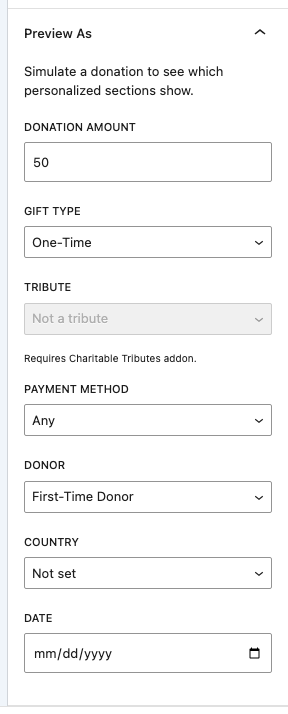
Preview as
Because personalized content is hidden until a donation matches, it can be hard to design. The Preview as switcher in the editor sidebar lets you pretend to be different donors (a large gift, a recurring donor, a specific country) and watch blocks appear and disappear live, without leaving the editor.
The QR Code block
The QR Code block adds a scannable code to your receipt. It is a nice touch on a printed receipt: a donor can scan it with their phone to jump straight to a link you choose.
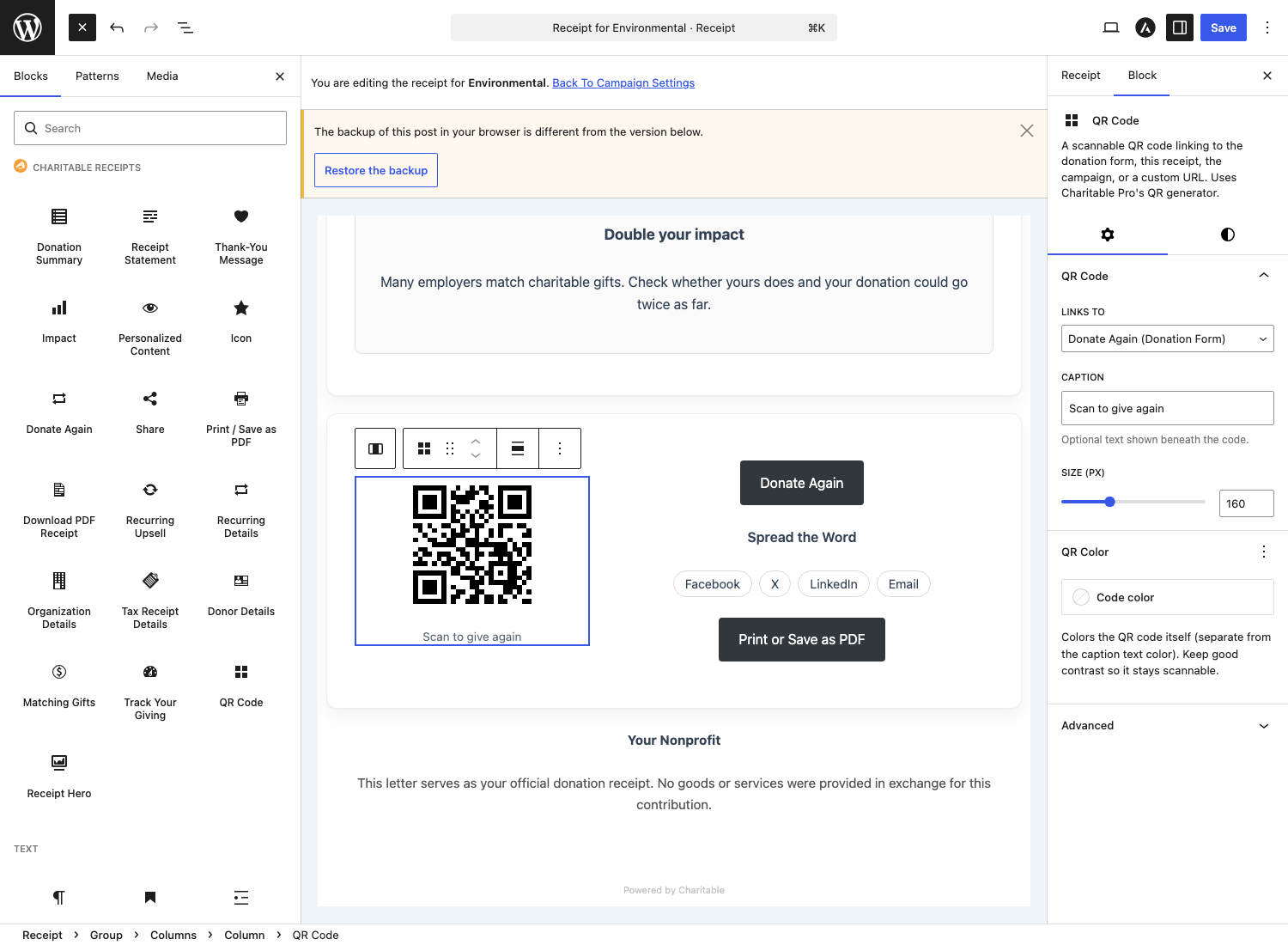
You choose where the code points:
- Donate again (the campaign’s donation form), the default.
- This receipt.
- The campaign page.
- A custom URL you enter.
You can also set the code’s color and size. The code is generated on your own server with no external calls, so nothing about the donation is sent to a third-party QR service.
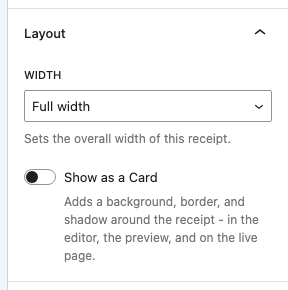
Layout: width and card framing
Two controls in the receipt’s sidebar shape the overall look:
- Width – how wide the receipt content is: Narrow, Standard, Wide, or Full. The editor canvas resizes to match, so what you see while editing matches the front end.
- Card – an optional white “card” frame (padding, border, and a soft shadow) around the whole receipt, so it stands out on a busy page.
Previewing on your site
Editing shows you the layout, but to see the receipt exactly as a donor would, open the Preview panel in the editor sidebar and click Preview On Site. It opens your live theme in a new tab and renders the receipt with realistic sample donation data. (Save the receipt once to enable the button.)
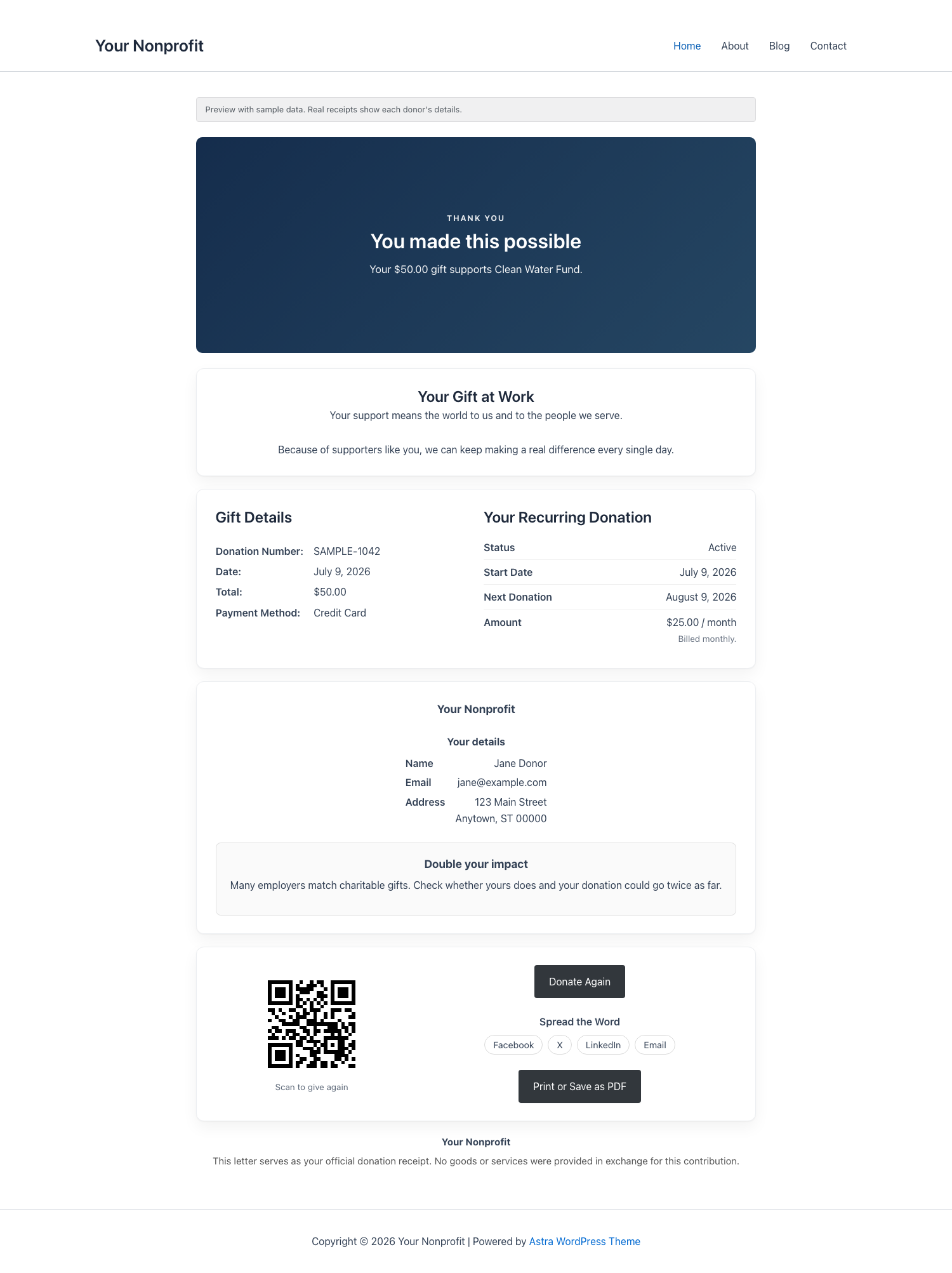
Because it uses sample data, you can preview safely without making a test donation.
Save and reuse your own designs
Once you have a receipt you like, you can save it as a reusable template. In the editor sidebar, open the Receipt Template panel, click Save as Template, and give it a name. Your saved template then appears alongside the built-in designs in the Designs panel for every campaign.
To rename or remove saved templates later, use the template management screen linked from the editor’s help menu.
How it works with other Charitable addons
Custom Receipts is designed to cooperate with the rest of the Charitable family:
- Recurring Donations. The Recurring Details and Recurring Upsell blocks light up, and the Gift Type condition becomes available. If your receipt already includes a Recurring Details block, the addon suppresses the duplicate recurring section that Recurring would otherwise append, so donors do not see it twice.
- Tributes. Tribute donations keep their dedicated Tributes receipt. Custom Receipts steps aside for those gifts so the tribute experience (honoree, message, and details) is preserved. Non-tribute gifts on the same campaign still use your custom receipt.
- PDF Receipts / Charitable Pro. The Download PDF Receipt block links donors to the PDF produced by Charitable Pro’s built-in PDF receipts. QR code generation also uses a Charitable Pro helper.
- Fee Relief. Donation figures shown by the receipt blocks reflect the amounts Charitable core records, so fee-relief details flow through the standard donation data.
Frequently asked questions
Does this require Charitable Pro? Yes. Custom Receipts requires an active Charitable Pro license (Plus, Pro, or Elite) and Charitable core 1.8.17 or later.
Does it change my donation receipt emails or PDF receipts? No. This addon customizes only the on-screen receipt page. Your receipt emails and the PDF Receipts addon are not affected.
What happens to a tribute donation? Tribute gifts keep their dedicated Charitable Tributes receipt. The custom receipt opts out for those donations so the tribute experience is preserved.
If I change a built-in design later, do my existing receipts update? No. Applying a design copies it into that campaign’s receipt, so each receipt stays independent and editable. To pull the latest version of a design, re-apply it with Change Design.
Does the QR code call an external service? No. QR codes are generated on your own server. No external HTTP requests are made.
Developer reference
Everything below is for developers who want to extend or theme custom receipts. If you are just setting up receipts in the admin, you can stop here.
How rendering works
Custom Receipts hooks the core filter charitable_donation_receipt_custom_body, added in Charitable 1.8.17. When a donation’s campaign is in Custom mode, the addon returns the rendered receipt block markup through that filter; otherwise it returns null and the default receipt is used. This is why 1.8.17 is a hard requirement: on older core the filter does not exist and nothing renders.
Receipts are stored as a non-public custom post type, charitable_receipt, one post per campaign that uses Custom mode. Saved designs are also charitable_receipt posts, flagged as templates and not linked to a campaign.
Meta keys
Set on the campaign:
| Meta key | Purpose |
|---|---|
_charitable_receipt_mode | default, redirect, or custom. |
_charitable_receipt_redirect_type | page or url (Redirect mode). |
_charitable_receipt_redirect_target | Page ID or full https:// URL (Redirect mode). |
_charitable_receipt_id | ID of the linked charitable_receipt post (Custom mode). |
Set on the receipt post:
| Meta key | Purpose |
|---|---|
_charitable_cr_design | ID of the applied design (builtin:standard, a template post ID, and so on). |
_charitable_receipt_width | narrow, standard, wide, or full. |
_charitable_receipt_card | Whether the card frame is enabled. |
Filters
| Filter | Purpose |
|---|---|
charitable_custom_receipts_render_for_donation | Return false to opt a specific donation out of custom rendering (this is how Tributes steps aside). |
charitable_custom_receipts_render | Filter the final rendered receipt HTML. |
charitable_custom_receipts_built_in_themes | Add, remove, or modify the built-in designs. |
charitable_custom_receipts_template_options | Modify the full design list (built-in plus saved) shown in pickers. |
charitable_custom_receipts_condition_types | Register or modify Personalized Content condition types. |
charitable_custom_receipts_widths | Define or modify the width options and their pixel constraints. |
charitable_custom_receipts_layout_classes | Modify the CSS classes on the receipt wrapper. |
charitable_custom_receipts_seed_content | Provide the initial block markup for a newly created receipt. |
charitable_custom_receipts_preview_context | Modify the sample donation data used in previews. |
charitable_custom_receipts_docs_url | Override the “Read the docs” link in the editor onboarding. |
charitable_custom_receipts_qr_alt | Customize the QR code image alt text. |
charitable_custom_receipts_dashboard_url | Customize the Track Your Giving link. |
charitable_custom_receipts_pdf_download_url | Customize the Download PDF Receipt link. |
charitable_custom_receipts_recurring_upsell_url | Customize the Recurring Upsell conversion link. |
Actions
| Action | Fires when |
|---|---|
charitable_custom_receipts_init | The addon has booted and confirmed Charitable Pro is active. Passes the service container. Use it to register integrations or custom conditions. |
charitable_custom_receipts_template_applied | A design or saved template is applied to a campaign’s receipt. Passes the campaign ID, receipt ID, and template ID. |
Examples
Drop any of these into a site-specific plugin or your theme’s functions.php.
Point the in-editor docs link at your own onboarding page:
add_filter( 'charitable_custom_receipts_docs_url', function () {
	return home_url( '/staff/receipt-guide/' );
} );
Add an extra receipt width option:
add_filter( 'charitable_custom_receipts_widths', function ( $widths ) {
	// slug => [ content width px, wide width px ].
	$widths['xwide'] = array( 960, 1200 );
	return $widths;
} );
Never render a custom receipt for a specific campaign, regardless of its mode:
add_filter( 'charitable_custom_receipts_render_for_donation', function ( $render, $donation ) {
	return ( 123 === (int) $donation->get_campaign_id() ) ? false : $render;
}, 10, 2 );
Do something after a design is applied (for example, clear a page cache):
add_action( 'charitable_custom_receipts_template_applied', function ( $campaign_id, $receipt_id, $template_id ) {
	// Your cache invalidation here.
}, 10, 3 );
Related
- Charitable PDF Receipts – downloadable PDF receipts for donors and admins.
- Charitable Recurring Donations – unlocks the recurring blocks and the Gift Type condition.
- Charitable Tributes – in-memory and in-honor gifts with their own receipt.
- Using the Campaign Builder – where the per-campaign Receipt panel lives.





