
Requires: Charitable Pro 1.8.16+
Charitable Ambassadors 3.0.0+
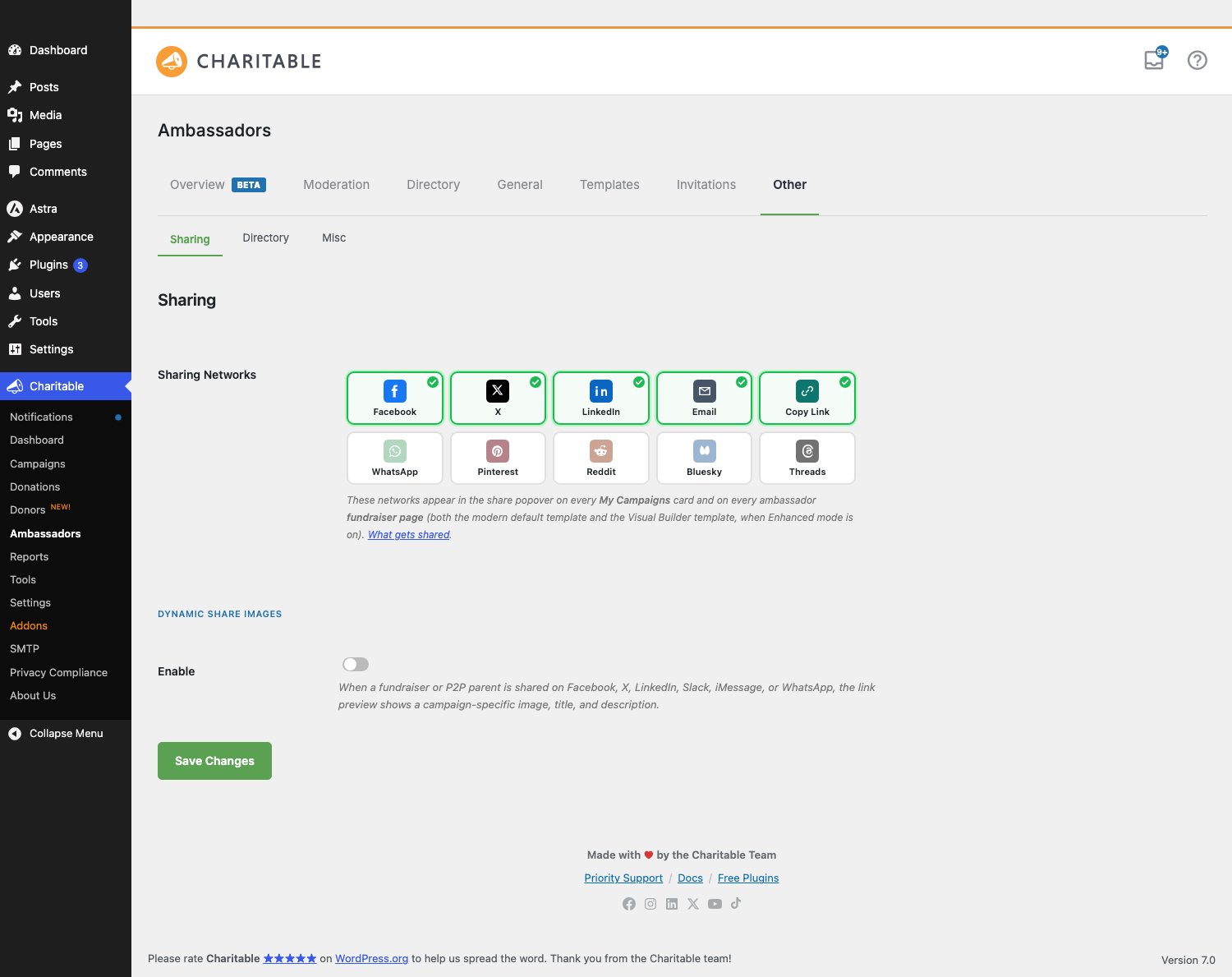
Every ambassador fundraiser page has a share popover – a row of social icons your supporters tap to share the fundraiser with their network. Sharing Networks is where you pick which networks show up in that popover, and in what order. Ten networks ship with Ambassadors, and you can enable any combination of them with a single click.
It’s a small setting that punches above its weight. The right network mix – the ones your audience actually uses – means more shares, which means more eyeballs on the fundraiser, which means more donations.
When You’d Use It
- Initial setup – turn on the four or five networks you care about; turn off the rest.
- Adapting to your audience – international audience? Turn on WhatsApp (huge globally) and Threads. K-12 / parents? Keep Email and Facebook front and center.
- Aligning with brand guidelines – some orgs don’t want their fundraisers shared on Reddit or X. Turn them off.
Where to Find It
Go to your WordPress admin, open Charitable » Ambassadors » Sharing
It’s the only setting on the Sharing sub-tab. (The sub-tab used to share space with other social settings; it was split out in 3.0 for clarity.)
The Ten Networks
| Network | Best for |
|---|---|
| The classic – still the highest-volume share network in most US-based programs. | |
| X (formerly Twitter) | Reaches a journalist + activist audience. Good for cause-driven campaigns. |
| Professional, corporate, alumni networks. Best for gala-style and corporate fundraising. | |
| Always-on universal. Opens the user’s mail client pre-filled. | |
| Copy Link | “Just give me the URL.” The most-clicked tile in mobile-first programs. |
| Massive in EMEA, LATAM, India, Southeast Asia. Often the best mobile share globally. | |
| Best when fundraisers have strong hero imagery (gala, school art auctions). | |
| Useful for cause-driven campaigns with community-specific subs. | |
| Bluesky | Growing alternative to X; good to include for tech / progressive audiences. |
| Threads | Meta’s text-first network; growing audience. |
Each network gets a clickable chip in the settings grid. Click to toggle; the grid updates immediately. The order you click them in is the order they appear in the popover.
How The Popover Uses the Picks
On every fundraiser page (and the My Campaigns recruit card, if enabled), the share popover renders one icon per enabled network.
Each icon either opens a native share intent (Facebook’s share-link URL, X’s tweet intent, WhatsApp’s send-text deep link) or, for Copy Link, copies the fundraiser URL to the clipboard with a confirmation tooltip.
If you enable QR codes for the fundraiser page (under Fundraiser Page settings), a QR tile appears alongside the social icons – it opens a modal with a downloadable PNG.
Per-Fundraiser Overrides
The Sharing Networks picks are site-wide by default – every fundraiser uses the same set. To override on a per-campaign basis (e.g. a corporate gala that should only show LinkedIn + Email), use the charitable_ambassadors_share_networks_for_campaign filter:
add_filter( 'charitable_ambassadors_share_networks_for_campaign', function ( $networks, $campaign_id ) {
    if ( has_term( 'corporate', 'campaign_category', $campaign_id ) ) {
        return [ 'linkedin', 'email' ];
    }
    return $networks;
}, 10, 2 );
Recommended Starting Mixes
| Audience | Suggested networks |
|---|---|
| General US / EU consumer | Facebook, X, WhatsApp, Email, Copy Link |
| International / mobile-first | WhatsApp, Facebook, Threads, Email, Copy Link |
| Corporate / B2B / alumni | LinkedIn, X, Email, Copy Link |
| Cause-driven / activist | X, Bluesky, Reddit, Email, Copy Link |
| Visual-led / events | Facebook, Pinterest, Instagram (via Threads), Email, Copy Link |
When in doubt, start with Facebook, X, WhatsApp, Email, Copy Link – the five that work for the broadest audience.
Tips
- Less is more. Five enabled networks feels well-curated. Ten feels overwhelming and reduces clicks.
- Always keep Copy Link on. It’s the lowest-friction option – the user picks where to paste it themselves.
- Add WhatsApp if you have any international audience. It dwarfs Facebook and Twitter in many countries.
- Check your share button on mobile. Mobile native-share is a different flow on iOS than Android; the popover handles both, but verify the tiles look right at narrow widths.
Developer Reference
The rest of this page is for developers customizing share networks.
Settings Storage
charitable_settings > ambassadors_share_networks # array of enabled slugs, e.g. ['facebook','x','whatsapp','email','copy']
This option lives at the top level of charitable_settings, not under the ambassadors sub-array. Watch out for this when reading via filters.
Read with:
$enabled = charitable_get_option( 'ambassadors_share_networks', [ 'facebook', 'x', 'email', 'copy' ] );
Network Catalog
The 10-network catalog is in Charitable_Ambassadors_Settings::get_share_networks_catalog(). Each entry has:
'<slug>' => [
    'label' => 'Display name',
    'color' => 'Brand hex',
    'icon'  => 'inline SVG markup',
],
Filter via charitable_ambassadors_share_networks_catalog to add custom networks or replace icons:
add_filter( 'charitable_ambassadors_share_networks_catalog', function ( $catalog ) {
    $catalog['mastodon'] = [
        'label' => 'Mastodon',
        'color' => '#6364ff',
        'icon'  => '<svg ...>...</svg>',
    ];
    return $catalog;
} );
You’ll also need to teach the popover renderer how to build the share URL for a custom network – hook charitable_ambassadors_share_url_for_network:
add_filter( 'charitable_ambassadors_share_url_for_network', function ( $url, $slug, $fundraiser_id ) {
    if ( 'mastodon' === $slug ) {
        $title = wp_strip_all_tags( get_the_title( $fundraiser_id ) );
        return 'https://mastodon.social/share?text=' . rawurlencode( $title . ' ' . get_permalink( $fundraiser_id ) );
    }
    return $url;
}, 10, 3 );
Filters
| Filter | Default | Purpose |
|---|---|---|
charitable_ambassadors_share_networks_catalog | array of 10 | Add/remove/modify networks in the catalog. |
charitable_ambassadors_share_networks_for_campaign | site setting | Override the enabled list per campaign. Receives ($networks, $campaign_id). |
charitable_ambassadors_share_url_for_network | computed | Build the share URL for a specific network + fundraiser. Receives ($url, $slug, $fundraiser_id). |
charitable_ambassadors_share_popover_position | 'bottom' | Position of the share popover relative to the trigger button. |
charitable_ambassadors_sharing_networks_docs_url | this page | Override the docs URL the “What gets shared” inline link points at. |
Actions
| Action | Args | Fires when |
|---|---|---|
charitable_ambassadors_share_popover_before | $campaign_id | Just before the share popover renders. |
charitable_ambassadors_share_popover_after | $campaign_id | Just after the share popover. |
Capabilities
Settings access: manage_charitable_settings. Front-end rendering has no capability gate.
Customization Examples
Restrict to LinkedIn + Email for a specific category of campaign:
add_filter( 'charitable_ambassadors_share_networks_for_campaign', function ( $networks, $campaign_id ) {
    if ( has_term( 'corporate', 'campaign_category', $campaign_id ) ) {
        return [ 'linkedin', 'email' ];
    }
    return $networks;
}, 10, 2 );
Add a Telegram network:
add_filter( 'charitable_ambassadors_share_networks_catalog', function ( $catalog ) {
    $catalog['telegram'] = [
        'label' => 'Telegram',
        'color' => '#0088cc',
        'icon'  => file_get_contents( __DIR__ . '/telegram.svg' ),
    ];
    return $catalog;
} );

add_filter( 'charitable_ambassadors_share_url_for_network', function ( $url, $slug, $fundraiser_id ) {
    if ( 'telegram' === $slug ) {
        return 'https://t.me/share/url?url=' . rawurlencode( get_permalink( $fundraiser_id ) );
    }
    return $url;
}, 10, 3 );
Hide the share popover entirely on a single fundraiser:
add_filter( 'charitable_ambassadors_fundraiser_show_share', function ( $show ) {
    if ( is_singular( 'campaign' ) && (int) get_the_ID() === 123 ) {
        return false;
    }
    return $show;
} );
Use a custom UTM-tagged share URL for analytics:
add_filter( 'charitable_ambassadors_share_url_for_network', function ( $url, $slug, $fundraiser_id ) {
    $base = add_query_arg( [ 'utm_source' => $slug, 'utm_medium' => 'share', 'utm_campaign' => 'p2p' ], get_permalink( $fundraiser_id ) );
    return str_replace( get_permalink( $fundraiser_id ), $base, $url );
}, 20, 3 );
Related
- Fundraiser Page – the master switch for whether the popover shows at all.
- QR Codes – the QR tile in the share popover.
- Hooks & filters in Ambassadors – full reference.
Helpful Links
🤝 Get help when you need it
Connect with Customer Support →
📑 Find the guide you need
Browse the Documentation Hub →
⬇️ Download proven strategies, campaign ideas, and expert tools
🔗 Let your AI Assistant do the fundraising work for you.
Connect Charitable to your AI assistant →
💸 Get Free Fundraising Resources
Head to the Charitable Fundraising Hub →
🤔 Got questions about Charitable?
Charitable FAQs →
Need help understanding non-profit terms and jargon?
See our Non-Profit Glossary →





